dsh-acp-enhanced
Health Uyari
- License — License: MIT
- Description — Repository has a description
- Active repo — Last push 0 days ago
- Low visibility — Only 5 GitHub stars
Code Basarisiz
- process.env — Environment variable access in cordis.patch.yml
- exec() — Shell command execution in lib/codec.js
- exec() — Shell command execution in lib/terminal-codec.js
- process.env — Environment variable access in packages/dsh-web-search-openrouter/lib/index.js
- network request — Outbound network request in packages/dsh-web-search-openrouter/lib/index.js
- process.env — Environment variable access in profile/cordis.yml
Permissions Gecti
- Permissions — No dangerous permissions requested
Bu listing icin henuz AI raporu yok.
Enhanced ACP (Agent Client Protocol) server for DeepSeek Harness (dsh) — drop-in bridge for the Zed editor: block-level streaming, usage/stat telemetry, model & reasoning-effort switching, permission presets, session resume & archive. Install: dsh plugin add
中文 | English
dsh-acp-enhanced
An enhanced Agent Client Protocol (ACP) server for
DeepSeek Harness (dsh), built for ACP
editors like Zed. It is a drop-in replacement for the official @deepseek-ai/dsh-acp
bridge: the official bridge only streams plain text, this one exposes the Web GUI's
capabilities — streaming, telemetry, model/permission control, session management, MCP —
over the ACP wire.
Features
Output & telemetry
- Block + reasoning streaming: text blocks and the model's thinking arrive live
(agent_message_chunk/agent_thought_chunk); cancelled/retried attempts never leak
torn output - Full telemetry: context usage ring plus cache hit rate / TPS / input-output-reasoning
tokens / tool timing / turn counts (usage_update._metacarries the full breakdown) - Image support (multimodal): when the dsh composition mounts an attachment store
(dsh 0.1.1-rc.2+ withdsh-attachment-local, the default in dsh-base),promptCapabilities.image
is advertised and pasted/uploaded images are ingested into the harness's durable attachment
store — a vision-capable model (e.g.deepseek-v4-flash-vision-exp) reads them natively,
in wire order with surrounding text. Older stacks (no attachment store) automatically
downgrade: image is not advertised and an image prompt is refused with a clear error.
Model & permissions
- Model switching: live
provider/modelcatalog dropdown (ACP grouped-select wire shape) - Reasoning effort:
reasoning_effortdropdown — only when the routed model exposes
selectable efforts; each model remembers the effort it last used (persisted per profile),
so switching back restores it, and a first-time model falls back to its own default — or
its first offered effort — instead of an empty "unknown" selection - Permission presets: read-only / workspace-write / full-access session modes
- Approval: native allow-once / reject-once prompts per tool call
- Agent presets: per-session model-facing composition (tools + prompt sections)
from the dsh agent-presets roster.standardis the full coding agent (default),minimal(极简模式) is a bare shell + files editor with no subagent/web/todo/plan
tools — nothing from the host layer leaks into a minimal agent;codeandcordis
ship alongside, and your own presets under~/.dsh/.agent-presetsappear too.
Choose via theagent_presetconfig option, the/presetcommand, or theDSH_ACP_PRESETenv var (per-session default); switching is only allowed while the
session is still blank (no turn has run), so history never straddles two tool sets.
Zed deep integration
- Tool cards: one-line summary in the collapsed header —
Read <path>, the
model's own intent line for shell commands (description, Codex-style — the
exact command stays one click away),Search: <pattern>,Fetch: <url>, etc.
The card body follows the ACP best practice: file edits render as a real
diff, bash/pwsh commands as a real terminal card (codex-acp wire
shape: command line + output + exit pill inside a terminal panel — no more
raw-JSON cards), other executors as a syntax-highlighted code block, and
touched files as clickable locations that open the file — withrawInput
/rawOutputkept one click away for transparency, plus per-kind icons and a
proper in-progress → completed/failed status lifecycle - Zed files & terminal:
zed_read_text_file/zed_write_text_file/zed_terminal
put file edits into Zed's "edited files" area (diff + accept/reject) and commands into a
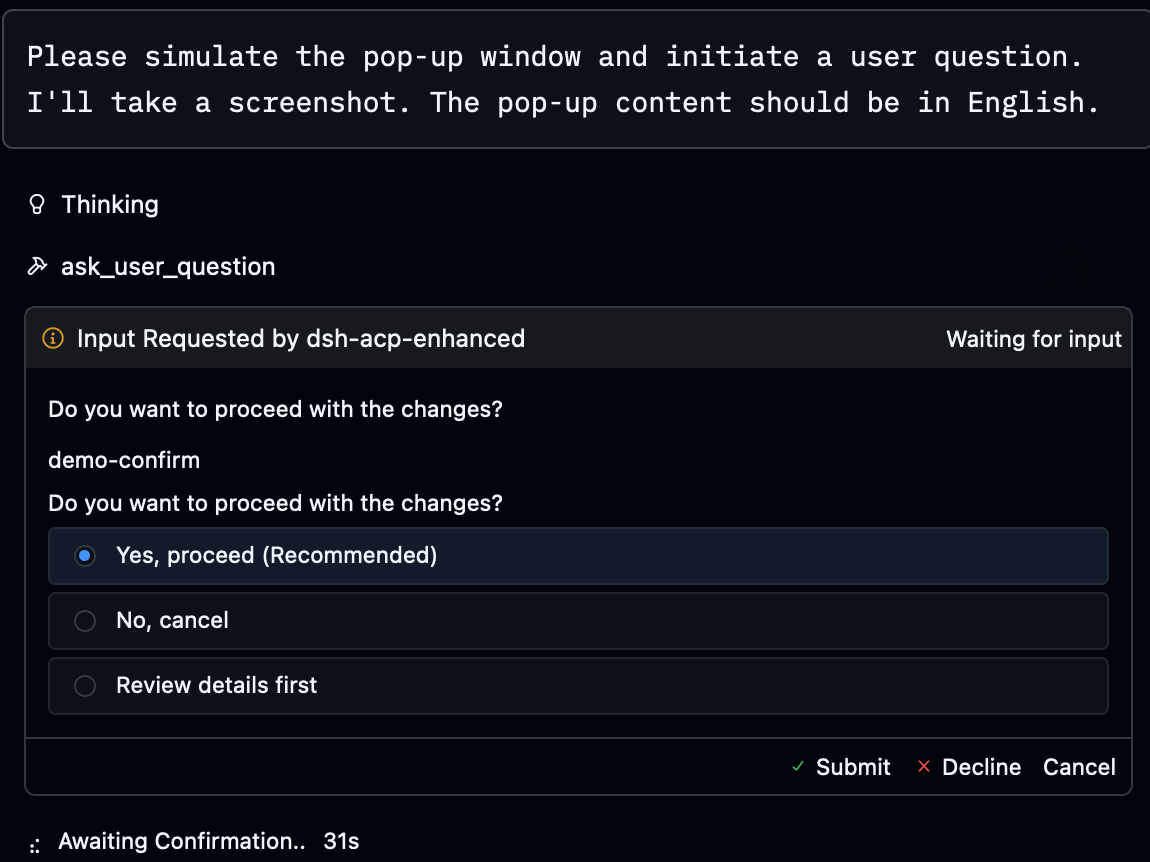
real Zed terminal - Native form questions:
ask_user_question→elicitation/createform, click an
option — or type a custom answer when none of them fit: options render with their
descriptions, each option-backed question gets a free-text "Custom answer" field, and a
custom answer replaces the single selection / accompanies a multi-select (same semantics
as dsh's native question card) - Plan panel: plan mode toggle → "planning" status bar in Zed
Sessions
- Resume & archive:
session/loadrestores past threads (full replay);session/list/session/deletemanage the thread archive (titled, sorted by last
activity); live title updates - Multi-root workspaces:
sessionCapabilities.additionalDirectoriesis advertised,
so Zed no longer shows "this agent doesn't currently support multi-root workspaces"
and instead passes every workspace root onsession/new/session/load. All roots
are described to the model in the system prompt and reported onsession/list; the
sandbox keeps the primarycwdas its single writable root (see Known limitations)
Commands
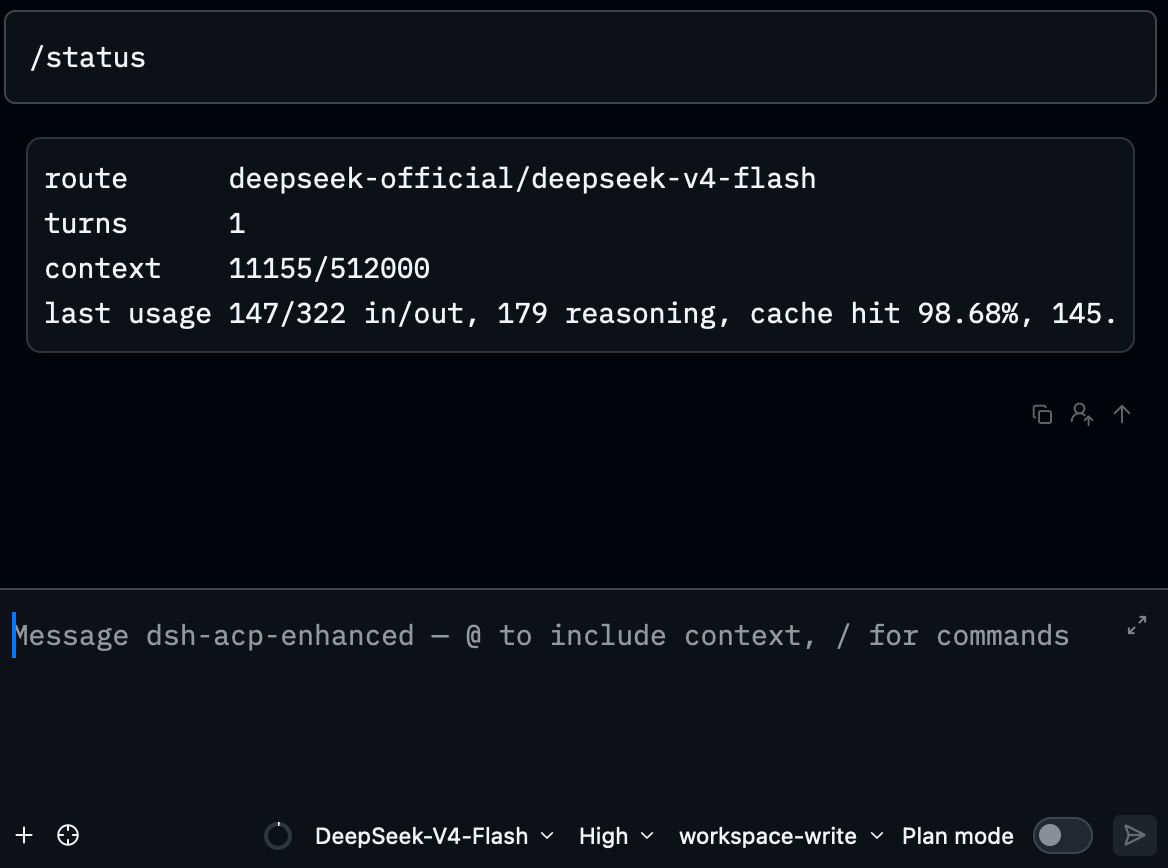
- Slash commands: typing
/reveals the command list (available_commands_update):/statusshows the route and telemetry,/modellists or switches the model,/preset
lists or switches the agent preset (listings render as monospace code blocks — readable
at a glance), everything else (/compact/goal/permission/plan…) runs straight
through the harness command registry — all executed without a model turn. Every
user-invocable skill is advertised as a command too, so/ask-matt,/code-review,/tdd, … reach the bridge instead of being rejected by the editor, and the skill's
instructions are injected into the message (dsh-tool-skill-style user invocation)
MCP
- MCP servers:
session/newmcpServersmount any MCP server (stdio + streamable
HTTP); tools join asmcp__<server>__<tool>; a failing server never takes the session
down
Preview
After picking dsh-acp-enhanced in Zed's AI Agent panel:
Quick start
This package follows the official dsh plugin conventions (it declares dsh.bundle), so
installation matches any official bundle: one command — auto-initializes the profile,
installs the package, appends the bundle layer; no profile YAML to write.
Install (2 steps)
Step 1 — install (from the npm registry; no source checkout needed):
dsh plugin --profile acp-enhanced add dsh-acp-enhanced
When hacking on the code, use
link:to a local checkout instead (live edits):dsh plugin --profile acp-enhanced add "link:/absolute/path/to/dsh-acp-enhanced"
Step 2 — register in Zed (under agent_servers in ~/.config/zed/settings.json;
Zed spawns agents with a minimal PATH, so use the shipped launcherscripts/dsh-acp-zed.sh, which locates node/dsh itself)
The launcher ships with the package. Its absolute path depends on how you
installed in Step 1:
- npm install (default):
$HOME/.dsh/profiles/acp-enhanced/node_modules/dsh-acp-enhanced/scripts/dsh-acp-zed.sh— replace$HOMEwith your home directory (e.g./Users/you); Zed does not expand~or env vars, so write the full literal path.link:dev install:<your checkout>/scripts/dsh-acp-zed.sh.
Most common: DeepSeek official API (the default route)
{
  // ...your existing settings...
  "agent_servers": {
    "dsh-acp-enhanced": {
      "type": "custom",
      "command": "/bin/bash",
      "args": ["/absolute/path/to/dsh-acp-enhanced/scripts/dsh-acp-zed.sh"],
      "env": {
        "DSH_ACP_PROVIDER": "deepseek-official",  // the official provider id
        "DSH_ACP_MODEL": "deepseek-v4-flash",     // the official model id
        "DSH_ACP_PRESET": "standard"              // optional: agent preset id (minimal / standard / code / cordis / yours)
      }
    }
  }
}
Both env vars match the shipped patch's defaults, so they can be omitted entirely —
writing them out just makes the route explicit.DSH_ACP_PRESETdefaults tostandard
on the roster side; set it when you want every new session to start in a specific mode.
The API key does not have to live in Zed:
store it in~/.dsh/.credentials.yaml(DEEPSEEK_API_KEY) and the dsh credentials
service resolves it; the launcher also falls back to a runningdsh webprocess's key.
Optional: pin the panel's default config options (all still changeable in the panel):
"dsh-acp-enhanced": {
  // ...the type/command/args/env above...
  "default_config_options": {
    "model": "deepseek-official/deepseek-v4-flash",
    "agent_preset": "standard",
    "plan_mode": false,
    "reasoning_effort": "high"
  },
  "favorite_config_option_values": {
    "model": ["deepseek-official/deepseek-v4-flash", "deepseek-official/deepseek-v4-pro"]
  }
}
Extended: route through an OpenAI-Responses gateway (e.g. a company model gateway)
Same install path; only the env values change to the provider/model the gateway exposes
plus the key env var it requires:
"dsh-acp-enhanced": {
  "type": "custom",
  "command": "/bin/bash",
  "args": ["/absolute/path/to/dsh-acp-enhanced/scripts/dsh-acp-zed.sh"],
  "env": {
    "DSH_ACP_PROVIDER": "<gateway-provider-id>",  // provider id exposed by the gateway
    "DSH_ACP_MODEL": "<gateway-model-id>",         // model id exposed by the gateway
    "<KEY_ENV_NAME>": "<key>"                      // the key env var the gateway reads
  }
}
<KEY_ENV_NAME>can also be omitted and the key stored in~/.dsh/.credentials.yamlinstead.
Zed hot-reloads settings. Open the AI Agent panel (Cmd+Shift+A) → pick
dsh-acp-enhanced in the agent selector → send your first message: replies stream in
real time, the status bar shows context usage, the panel exposes Model / Permission preset
/ Plan mode options plus three modes, and the thread archive lists and resumes past
sessions.
Verify locally (no Zed needed):
node scripts/acp-client.mjs                    # official default route, no env; expect ALL CHECKS PASSED
DSH_ACP_PROVIDER=... DSH_ACP_MODEL=... node scripts/acp-client.mjs   # only for a custom route
Optional: route web_search through the same gateway
If the gateway implements the OpenAI Responses web_search server tool, you can route
search through it too (reusing the same credential). Install the sub-package and append
two blocks to the profile's cordis.patch.yml:
dsh plugin --profile acp-enhanced add dsh-web-search-openrouter
- id: web
  config:
    searchProvider: openai-responses   # the search provider id this sub-package registers on ctx.web (fixed value)

- insert:
    - id: web-search-openrouter
      name: 'dsh-web-search-openrouter'
      config:
        enabled: true
        baseURL: http://<gateway-host>:<port>/v1
        model: <your-model-id>
        apiKeyEnv: <KEY_ENV_NAME>
⚠️
searchProvidermust be exactlyopenai-responses— the search provider iddsh-web-search-openrouterregisters onctx.web. It is not your gateway's LLM
provider id (the one you put inDSH_ACP_PROVIDERabove). Thewebplugin matches it
exactly, so a wrong value produces no error at config time and only fails at the first
search withWEB_PROVIDER_CONFIGURED_MISSING.
Managing the profile's plugins
dsh-acp-enhanced runs in its own profile — acp-enhanced, created at~/.dsh/profiles/acp-enhanced/ by the install command above — fully separate from theweb profile behind dsh web, so plugin changes here never affect your web setup.
The profile composes its plugin tree from three sources, each layer patching the ones
before it:
- Bundle layers —
dsh.profile.bundlesin the profile'spackage.json: the
template's@deepseek-ai/dsh-basefirst, then every installed package that declaresdsh.bundle(likedsh-acp-enhanced), in array order. - Your user layer —
~/.dsh/profiles/acp-enhanced/cordis.patch.yml: id-targeted
row config overrides,disabled: truerow disables, andinsertlists (how a
package withoutdsh.bundle— likedsh-web-search-openrouterabove — gets
mounted). - Per-run overlays —
dsh --profile acp-enhanced --patch extra.yml.
Adjust the set with:
dsh plugin --profile acp-enhanced add <package>     # install; a dsh.bundle package auto-joins the layer stack
dsh plugin --profile acp-enhanced remove <package>  # uninstall; auto-leaves the stack
dsh plugin --profile acp-enhanced update [package]  # update one/all, then reconcile
dsh --profile acp-enhanced --dump-config             # inspect the composed tree (per-layer provenance)
dsh plugin is a thin pnpm forwarder (run inside the profile directory) that
reconciles dsh.profile.bundles against the installed state after every run. Two
consequences worth knowing:
Disabling a bundle by deleting it from
bundlesdoes not stick — the package is
still an installed dependency, and the nextdsh pluginrun appends it right back.
To disable a single row without uninstalling, target it in the user layer by its
row id (not the package name — find ids in the--dump-configoutput):- id: mnemon disabled: trueA package without
dsh.bundleloads nothing by itself — it installs as a plain
dependency (with a one-time warning) and needs your owninsertentry in the user
layer, like theweb-search-openrouterrow above. To change an existing row's
config, override it with- id: <row>+config:— patch entries replace the
whole row config, they do not merge.
Changes take effect in the next process: Zed spawns a freshdsh --profile acp-enhanced for every agent thread, so open a new agent thread (or
restart Zed) after editing the profile.
Troubleshooting
| Symptom | Fix |
|---|---|
exec: dsh: not found (status 127) |
Use the shipped dsh-acp-zed.sh launcher (locates node/dsh itself) |
no API key for provider route "xxx" |
Write ~/.dsh/.credentials.yaml, or set env.DEEPSEEK_API_KEY on the agent_servers entry |
| Cannot switch models | The saved reasoning_effort default (or the session's current effort) is carried onto the new model. Since 0.3.6 the bridge remembers the last effort per model (per-profile JSON): an unsupported carried effort is replaced by that model's remembered effort, else its own default, else its first offered effort — never an "unknown" dropdown, never a failed switch. Also check: a "phantom provider" route was picked — this bridge filters them by default (only config.provider's models are advertised), so point the profile's provider at a real route |
| Context usage missing | A "phantom provider" route was picked; this bridge filters them by default (only config.provider's models are advertised) — point the profile's provider at a real route |
| Need detailed diagnostics | ACP_DEBUG=1 dsh --profile acp-enhanced (stderr lifecycle trace) |
Development
node scripts/acp-client.mjs           # end-to-end smoke (needs an API key)
node scripts/acp-client-tools.mjs     # client-tool tests (mocks Zed fs/terminal/elicitation/plan)
node scripts/acp-mcp-test.mjs         # MCP mount test (no model calls)
node scripts/acp-smoke-keyless.mjs    # keyless boot smoke (CI)
node scripts/acp-resume-test.mjs      # session resume test
node scripts/codec-image-test.mjs     # image-codec unit tests (no network, fake store)
node scripts/terminal-codec-test.mjs  # terminal-card codec unit tests (no network)
node scripts/acp-image-e2e.mjs        # image capability e2e (vision-model leg needs an API key)
Known limitations
Audio attachments are not supported (audio capability is not advertised), text streams at
block granularity, one in-flight prompt per session. MCP supports stdio and streamable HTTP
(legacy SSE / acp transports are not advertised).session/close / session/fork / session/resume are not implemented (capabilities
undeclared, compliant clients will not call them); session/delete removes the
persisted directory directly because dsh persistence has no official delete API.
Multi-root workspaces are advertised and all roots are visible to the model, but dsh's
sandbox policy resolves one writable root per session (the primary cwd, i.e.session.header.cwd) and the local sandboxes bind exactly that root for writes. Reads
work in every root; under workspace-write a write under an additional root is denied
first and needs escalation/approval, while danger-full-access writes everywhere.
True multi-root write enforcement belongs in dsh core (dsh-sandbox-policy /dsh-sandbox-local would need a root list instead of a single root).
Agent presets take over the model-facing rows: the shipped cordis.patch.yml disables
the dsh-base rows a preset owns (tool-bash/fs/subagent/todo/web/… — exactly the official
dsh-web-app/tui list minus hmr) and mounts the agent-presets roster (standard
default; code/minimal/cordis ship with the dsh CLI, your own preset dirs under~/.dsh/.agent-presets are picked up automatically). The bundle's own patch applies
automatically (package.json dsh.bundle.patch) — do not copy it into the profile's
user-layer cordis.patch.yml, or the loader rejects the duplicate entry ids at boot.
When upgrading a profile that already carries a customized user-layer patch, keep
only your custom row configs there (e.g. includeAllProviders: true on the
acp-enhanced row, restating provider/model/preset since patch entries replace whole
rows, they do not merge). A session created before the upgrade resumes under the
roster's default preset.
Yorumlar (0)
Yorum birakmak icin giris yap.
Yorum birakSonuc bulunamadi