atrium
Health Warn
- License — License: MIT
- Description — Repository has a description
- Active repo — Last push 0 days ago
- Low visibility — Only 5 GitHub stars
Code Fail
- fs.rmSync — Destructive file system operation in app/scripts/build.mjs
- process.env — Environment variable access in app/scripts/build.mjs
- exec() — Shell command execution in app/scripts/check-css.mjs
- spawnSync — Synchronous process spawning in app/scripts/check-css.mjs
- spawnSync — Synchronous process spawning in app/scripts/launch.mjs
- process.env — Environment variable access in app/scripts/real.mjs
Permissions Pass
- Permissions — No dangerous permissions requested
No AI report is available for this listing yet.
One infinite canvas for all your CLI coding agents: Claude Code, Codex and shells side by side, with live terminals, your-turn alerts and links between agents. Windows.

An infinite canvas for your CLI coding agents.
Run Claude Code, Codex, Antigravity, opencode, pi, and shells on one spatial board — see who is working, who needs you, and coordinate them without switching windows.




English · 한국어
Why Atrium
Running five or twenty coding agents in parallel breaks down fast in tabs and scrolling sidebars: every list reorders on activity, background sessions disappear, and you miss the one prompt waiting for approval.
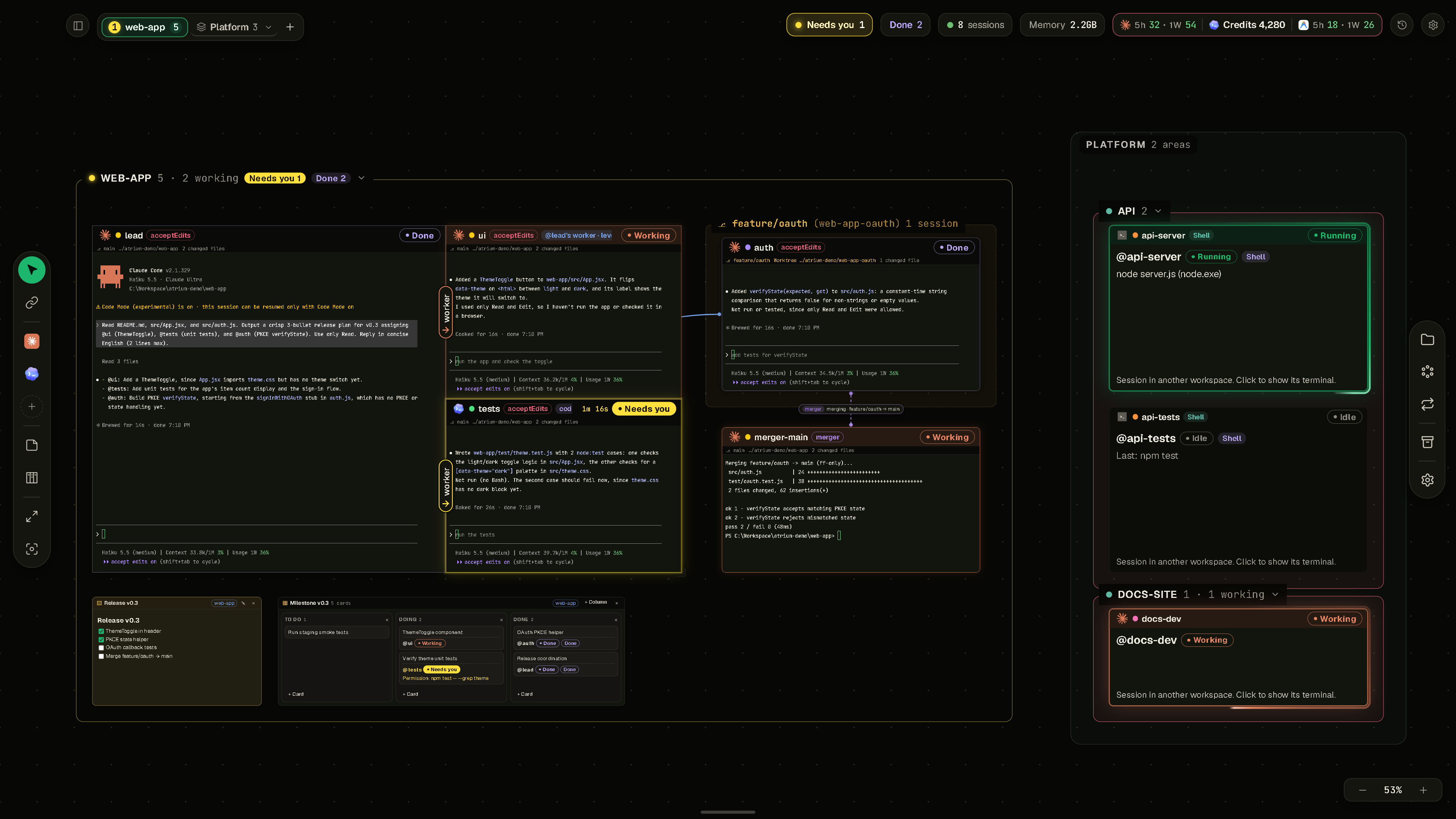
Atrium gives every repository and live terminal a fixed place on one infinite canvas. Working agents glow orange, sessions waiting for you glow yellow, and every terminal runs outside the app inside herdr-core. Close the window, restart the backend, or update Atrium — your sessions keep running and reattach when you come back.
A quick tour
One canvas for every repo
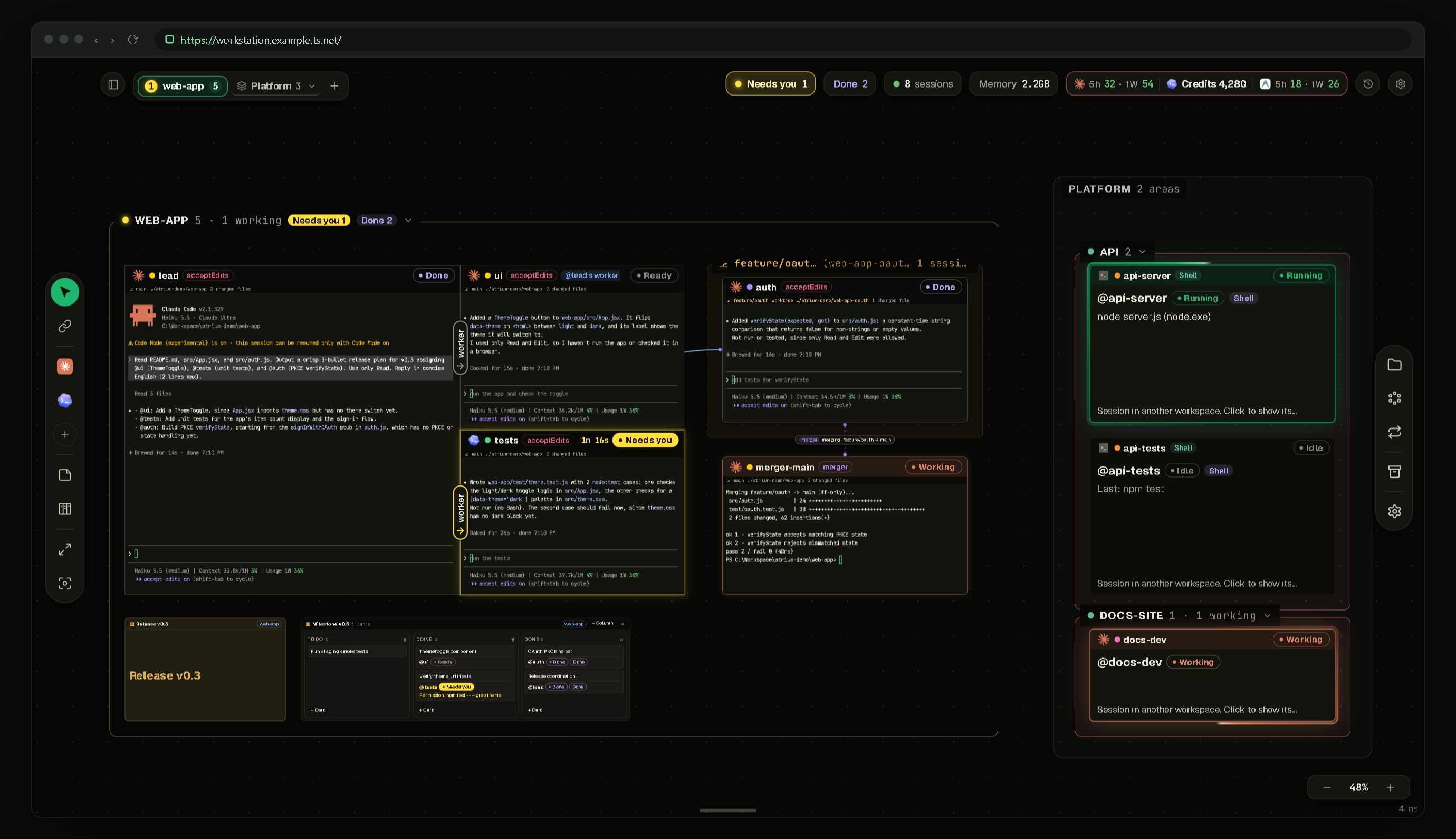
Each repository gets its own region, and active git worktrees appear as yellow boxes inside it. Up close, every node is a live xterm.js terminal you can type in directly. Zoom out and nodes simplify into status cards with their latest prompt and reply.
The top bar stays consistent across all repositories:
- Needs you (
N) jumps straight to the oldest waiting prompt. - Done collects finished top-level turns you have not viewed yet, with Mark all read.
- Usage tracks local Claude, Codex (including remaining credits), and Antigravity quota windows.
- Memory & CPU shows per-session and system usage; idle repos and idle sessions automatically sleep to free RAM and wake on click or message with the same conversation, model, and effort level.
Markdown memos and session-linked kanban boards sit right next to your terminals.
Session Map (Tab)
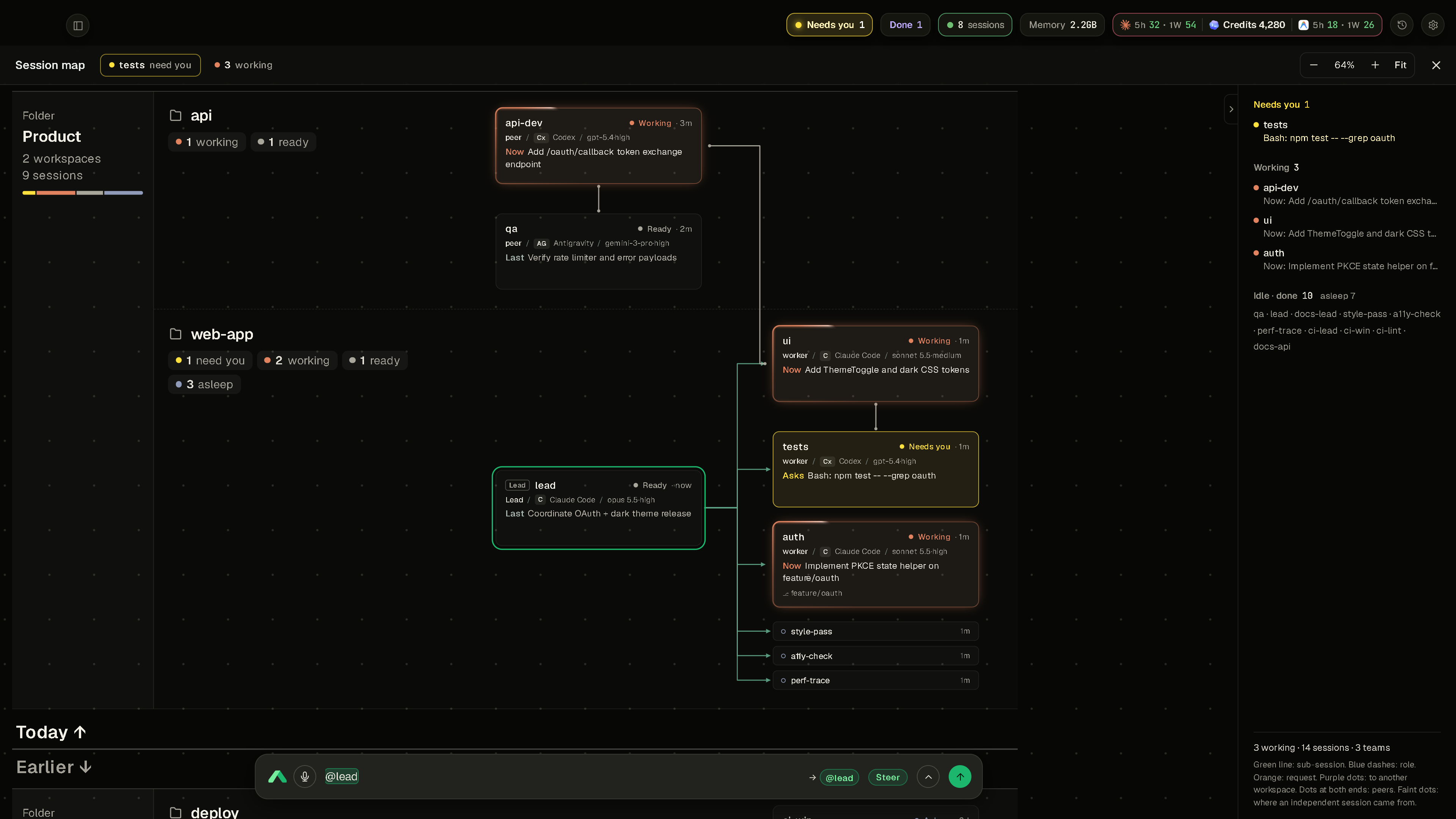
Press Tab to switch from the canvas to the Session Map — an infinite lineage view organized by folder and repository, with today's folders first; when it grows, folder bands flow into columns so it stays a readable 2D sheet, and the arrangement stays put while you zoom (it only changes when a new workspace appears).
- Follow parent–worker trees and peer chains across Claude Code, Codex, Antigravity, and pi without crossing lines.
- Spot running sessions from afar by their animated border light; every depth stays visible, and long-idle workers shrink to thin rows that still show their name and state.
- Click any card to
@tagit directly in the bottom command bar and send a prompt without leaving the map, or double-click to jump to its terminal.
Docks, delivery queues, and mid-turn steering
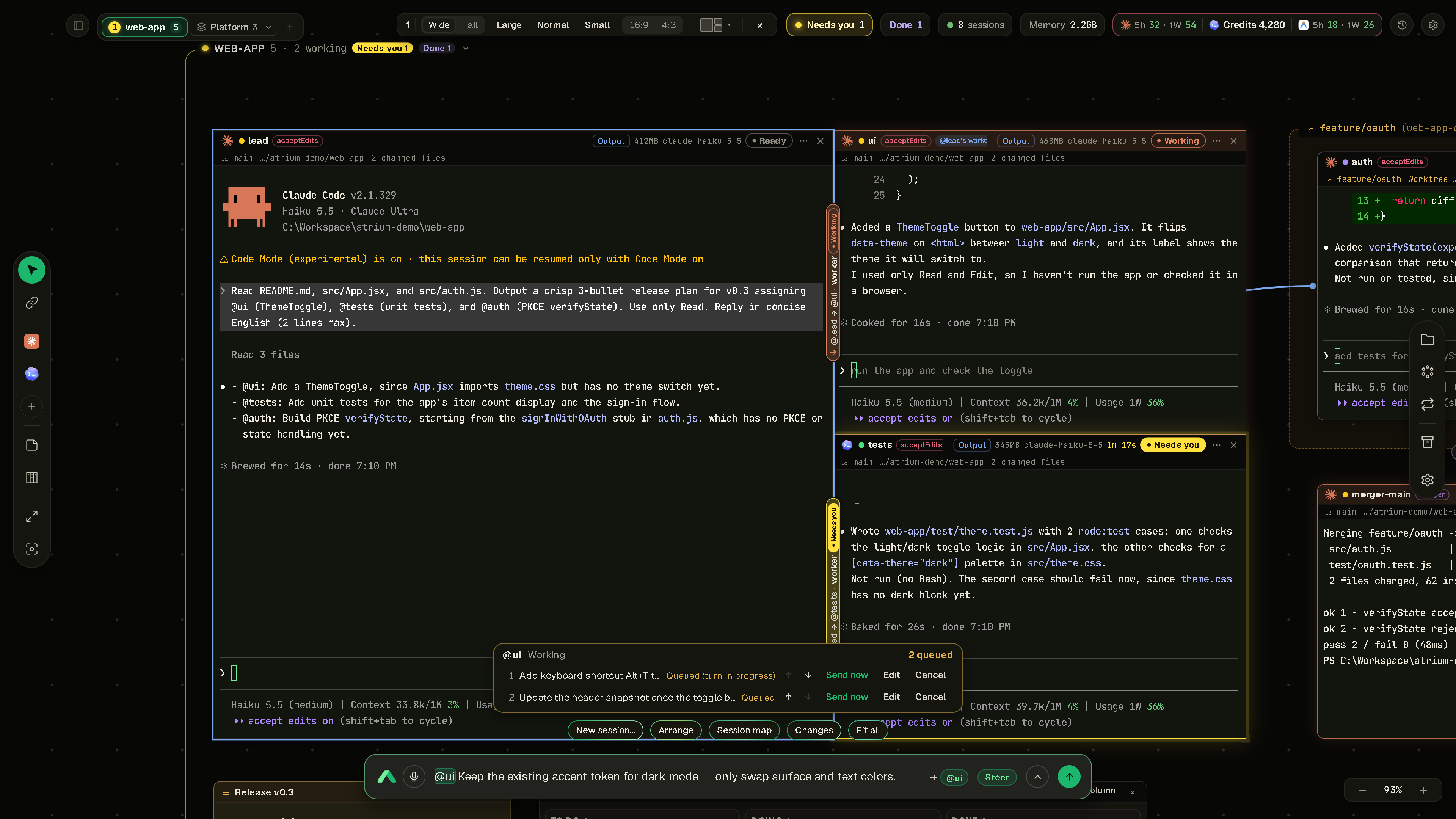
- Docks.
Ctrl+drag any terminal onto another node's edge to split it tmux-style, switch presets for 2–6+ panes, and keep links as clean divider bridges instead of lines across your screen. - Per-session delivery queue. Send messages to
@nameor@allfrom the command bar (Ctrl+Kor↓). Prompts queue while an agent is busy and submit cleanly once its turn ends. Reorder, edit, or cancel queued messages at any time. - Steer mid-turn. Toggle Steer (or press
Ctrl+Enter) to inject guidance into a running Claude Code turn immediately instead of waiting in the queue. - Answer in the terminal. Atrium does not wrap prompts in brittle modal cards — click a yellow session (or press
N) and reply directly in the real terminal.
Sidebar & Quick Find for large boards
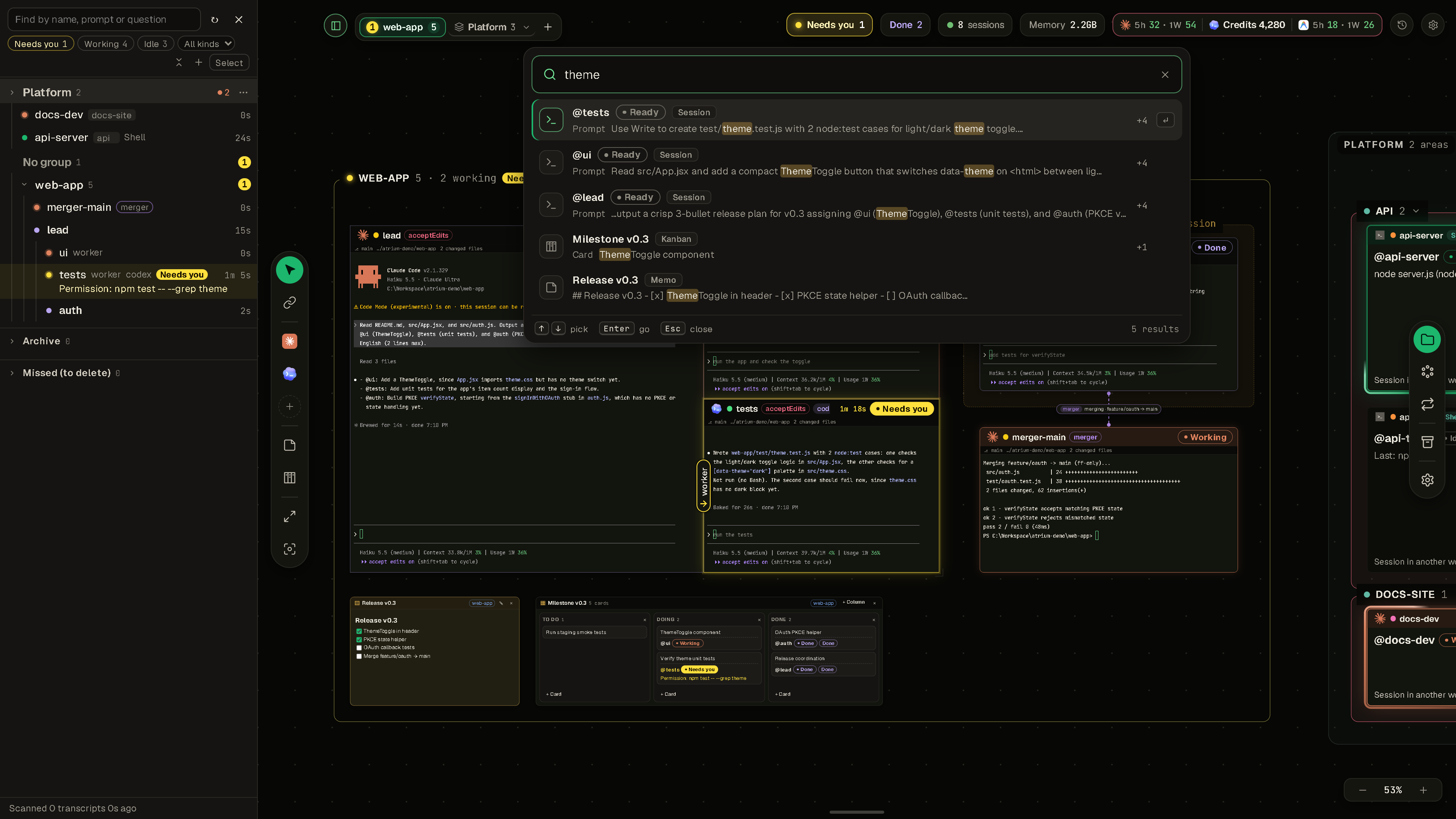
- Collapsed folders keep active work visible. Toggle the sidebar (
Ctrl+Shift+E) to navigate virtual repo groups and hundreds of sessions. Even when a folder or repo is collapsed, working and needs-you sessions stay pinned underneath so nothing running slips out of view. - Quick Find (
Ctrl+F). Search sessions by name, prompt, question, or reply — plus memos and kanban cards. - Resume past work. Unattached Claude Code and Codex CLI conversations appear per repo so you can bring them onto the board in one click.
Multi-agent handoffs & Auto-Merger
Every agent Atrium starts — Claude Code, Codex, Antigravity (AGY), opencode, or pi — gets the same atrium command on PATH, regardless of harness:
atrium child ui --worktree ui --prompt "Build the ThemeToggle component"
atrium child api-dev --peer --prompt "Add /oauth/callback endpoint"
atrium prompt ui "Keep the existing accent color" --steer
atrium done ok "Added ThemeToggle and unit tests (all passing)"
- Structured delegation. Workers close their task with
atrium done ok|failed "<report>", delivering the result back to their parent once — no polling loops. Peers stay independent and share updates viaatrium newsandatrium log. - Auto-Merger (
Settings › Bots › Merge bot). When a worktree worker finishes withatrium done ok, Atrium can sleep the worker and hand its branch to a dedicated, low-context merger session that merges cleanly into your target branch and reports back only if a failure or decision needs the parent. Configure per project (On,Ask, orOff, plus.atrium/merge.json). - Board doc checks (
atrium docs). Optional, non-blocking checks that keep project docs within size and structure budgets on each turn.
Remote & mobile over Tailscale
 |
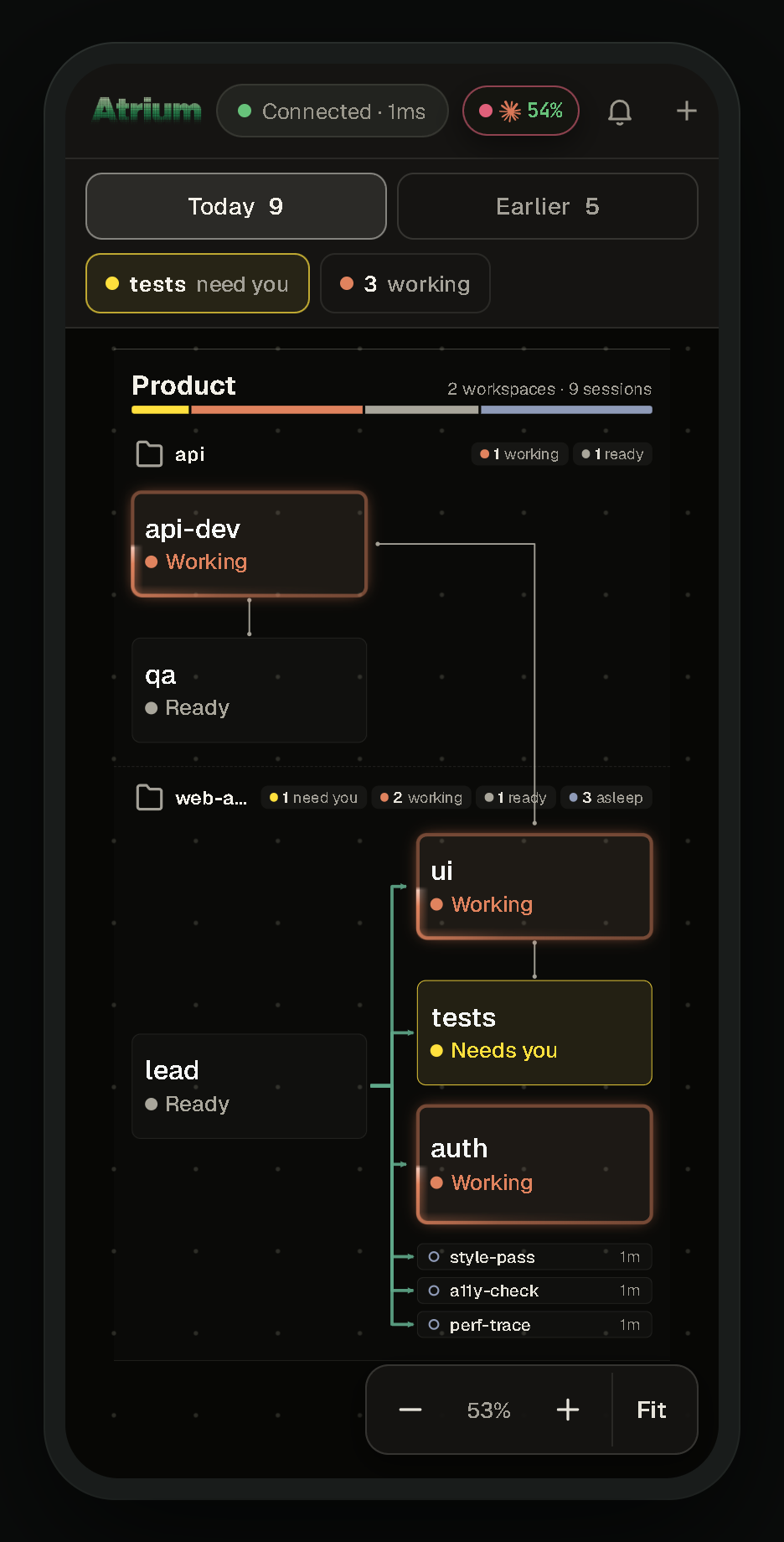 |
| Same board in a laptop browser over Tailscale. | Phone PWA opens straight to the Session Map. |
Open the exact same board from a laptop or phone over Tailscale. The backend stays bound to 127.0.0.1; tailscale serve forwards tailnet HTTPS traffic to it.
- Pair with a 6-digit code in Settings › Connected devices (or approve a request from the browser). Sessions are bound to the paired Tailscale device via
tailscale whois, with an optional passkey check (Windows Hello or phone). - On a phone (PWA), Atrium opens straight into the Session Map with Today | Earlier tabs, a representative usage pill, a touch keypad (arrows, Enter, Esc, Tab, Space, 1–4) for answering prompts in any harness, and Web Push alerts when a lead's work cycle ends or a session needs you.
Install Tailscale on both devices, sign in to the same tailnet, and enable MagicDNS and HTTPS Certificates in your Tailscale admin console.
Enable
tailscale serveon the PC:node backend\bin\atrium.mjs remote status node backend\bin\atrium.mjs remote enable --yesOpen the
https://<machine>.<tailnet>.ts.net/URL printed byremote statuson your laptop or phone, then pair with a code from Settings › Connected devices.
Security notes:
- A paired browser has the same local privileges as your Windows user. Pair only your own devices.
- Sessions use
HttpOnly; SameSite=Strictcookies (Secureon HTTPS); no permanent token is stored in the browser. - Requests are verified against
tailscale whoisand restricted to your Tailscale login by default. Do not usetailscale funnel. - Manage or revoke devices anytime in Settings › Connected devices, the tray menu, or
node backend\bin\atrium.mjs remote block | devices rm <id> | remote disable --yes.
Quick start
Requirements
Atrium currently runs on Windows 10 / 11 (x64).
| Dependency | Details |
|---|---|
| Node.js | 22.15 or later on Node 22, or 24.14 or later (tested on 22.15, 22.16, 22.23, 24.14, 24.19 and 25.9). Other versions stop with a message: 22.14 and earlier cannot read compressed Codex history, 22.13 crashes in folders with non-ASCII names, and 24.10 to 24.13 crash there too. |
| herdr-core | Auto-downloaded on first run (pinned 0.1.20, ~4 MB, SHA-256 verified) into Atrium's data folder. Does not touch PATH or startup items. |
| Git | Used for repository and worktree detection. |
| Agent CLIs | Any supported CLI on PATH: Claude Code, Codex, Antigravity (agy), opencode, or pi. |
| Optional | Tailscale for remote laptop & phone access. |
Run from source
git clone https://github.com/Gudals0320/atrium.git
cd atrium\backend
npm install
cd ..\app
npm install
npm run real
npm run real builds the window and opens the board (starting the backend on port 47800 and downloading herdr-core on first run). Click + at the top left to open a repository, then pick a launcher on the left rail to start a session.
Create a desktop shortcut:
powershell -ExecutionPolicy Bypass -File app\scripts\make-shortcut.ps1
Install releases & in-app updates
Install the latest GitHub release into %LOCALAPPDATA%\atrium\versions (after npm install in backend):
node backend\bin\atrium.mjs install
# Or track pre-release builds from the dev branch:
node backend\bin\atrium.mjs install --channel dev
When a new release is available, update from Settings › General › Update or the tray menu. Only the backend and window restart — running terminals stay alive in herdr-core, and failed starts roll back automatically.
Keyboard shortcuts
| Key | Action |
|---|---|
Tab |
Toggle Session Map |
N |
Jump to next session that needs you |
Ctrl+K / ↓ |
Focus command bar |
Ctrl+Enter |
Send as Steer (mid-turn) from command bar |
Ctrl+F / ↑ |
Open Quick Find |
Ctrl+Shift+E |
Toggle sidebar |
← / → |
Previous / next workspace |
Hold Space |
Fit entire board (when nothing is selected) |
Delete |
Close selected sessions |
- Model connections removed. The Settings › Connections feature was removed; any stored connection entries are ignored. Launchers keep their own
envand arguments (for example,ANTHROPIC_BASE_URLin a Claude launcher's env still works), so put custom endpoints or auth variables directly in the launcher's env or your user environment. - Boards from Atrium 0.1.7 or earlier (
herdr). Boards that previously ran on herdr migrate automatically toherdr-coreon first start. Idle sessions move right away with their conversation, layout, and links intact; busy sessions wait until idle. Progress is shown in Settings › Terminal.
CLI & architecture
Run node backend\bin\atrium.mjs <command> to drive the board from any terminal (--help lists every verb):
| Command | Purpose |
|---|---|
spawn <folder> [--launcher l] [--name n] [--model m] [--kind shell] |
Start a session |
ls, inbox, get <name> |
List sessions, waiting prompts, or full session detail |
send @name [@name…] <text> [--wait] |
Queue a prompt (@all targets every agent) |
link <a> <b> --role worker |
Link two sessions with a role |
dock <a> <b>, dock layout <preset> <a> <b> … |
Dock panes and apply split layouts |
arrange --all --apply |
Auto-arrange the board along links |
usage, res, docs |
Check subscription usage, memory/CPU, and board doc checks |
remote status, remote log, devices |
Manage Tailscale remote access |
kill <name> --yes |
Close a session |
Inside any board-started agent session, atrium is automatically on PATH with prompt, wait, read, child, children, relate, done, item, items, me, news, log, models, usage, docs, and help --json.
flowchart LR
  UI["Atrium Window<br/>Electron, React Flow, xterm.js"]
  WEB["Laptop & Phone<br/>Browser / PWA"]
  TS["tailscale serve<br/>HTTPS, tailnet only"]
  CLI["atrium CLI"]
  B["Backend<br/>Node 22+, 127.0.0.1"]
  DB[("SQLite")]
  H["herdr-core<br/>session: atrium"]
  A["Claude Code, Codex,<br/>AGY, opencode, pi, shells"]
  UI <-->|WebSocket| B
  WEB --> TS -->|WebSocket & HTTP| B
  CLI -->|WebSocket| B
  B <-->|JSON-RPC, named pipe| H
  H --> A
  A -->|HTTP hooks & atrium CLI| B
  B --- DB
- herdr-core owns all terminals and child processes outside Atrium, so sessions survive restarts and updates.
- Backend (
backend/) tracks session state, per-session delivery queues, links, work units, usage, remote web serving, and SQLite (node:sqlite) with only one npm dependency (ws). - Window (
app/) renders the canvas and Session Map with React Flow and attachesxterm.jsto visible terminals.
Development
cd app
npm start            # dev profile: herdr-core session atrium-dev, port 47811, data in backend\.dev\
cd ..\backend
npm test             # backend unit tests
cd ..\app
npm test             # window unit tests
The dev profile is isolated from your real board (atrium, port 47800). Screenshots in this README are generated against an isolated demo board by app/test/e2e/p273-readme-shots.mjs (seed, shoot, publish, clean).
See CHANGELOG.md for full stage-by-stage history. Atrium is an active early project — bug reports and issues are welcome.
Acknowledgments
- herdr-core (Apache-2.0, downloaded at runtime and not bundled in this repository) and herdr.
- React Flow, xterm.js, and Electron.
- Korean UI translation by Qualop, adapted from Qualop/atrium-macos.
- Bundled fonts: Geist, JetBrains Mono, Pretendard, and Nanum Gothic Coding (SIL Open Font License 1.1).
- Claude, Codex, Antigravity, DeepSeek, Grok, Pi, Hermes, and OmO names and logos are trademarks of their respective owners, used solely to label session kinds with no affiliation or endorsement.
See app/THIRD_PARTY_NOTICES.txt for full third-party notices.
License
MIT © 2026 Gudals0320. Third-party logos and fonts remain under their respective licenses; see app/THIRD_PARTY_NOTICES.txt.
Reviews (0)
Sign in to leave a review.
Leave a reviewNo results found