mycodex
Health Warn
- No license — Repository has no license file
- Description — Repository has a description
- Active repo — Last push 0 days ago
- Low visibility — Only 5 GitHub stars
Code Pass
- Code scan — Scanned 7 files during light audit, no dangerous patterns found
Permissions Pass
- Permissions — No dangerous permissions requested
No AI report is available for this listing yet.
MyCodex: desktop Codex + Hermes agent workspace with WeChat control, local runtime, file artifacts, and token-light workflows.
MyCodex
English | 简体中文 | 日本語 | 한국어 | Deutsch | Français



Free Codex + Hermes for everyone: fewer tokens, fewer fragile setups, a steadier workflow.
MyCodex wraps Codex + Hermes into a desktop workspace that normal users can actually open and use.
You do not need to start with tokens, command lines, model routing, or environment variables. Open MyCodex, describe the result you want, and let the Agent run the task, show the process, and save the output files. When you need to step away from the computer, connect WeChat and let tasks and files come back through your phone.
Download MyCodex · Desktop tour · Roadmap · Community
v0.9.6 Highlights
- Desktop window lifecycle handling is steadier: closing the main window no longer leaves stale login callback, update status, or focus dispatch paths behind.
- Opening MyCodex from an external link, login callback, or second app launch now restores and focuses a live window when one exists.
- Minimized windows are restored before focus, reducing the “app is running but invisible” failure mode.
- macOS Apple Silicon and macOS Intel packages are refreshed for 0.9.6.
- Windows x64 remains available as the older 0.9.0 package until the Windows runtime build is refreshed.
- WeChat and Hermes remain the main workflow: send tasks, continue conversations, and receive result files without staying at your desk.
- Results are more than chat replies: process, conclusions, tables, files, and next steps stay in the same conversation.
What It Solves
Many people want Codex + Hermes, but they drop off before the first useful task because setup gets in the way.
MyCodex reduces the entry path to three steps: download, log in, describe the task. The result, process, and generated files stay in the desktop app. After WeChat is connected, the phone can also send tasks and receive files.
Who It Is For
- Founders and managers: send one message and get progress summaries, competitor notes, customer context, and action items.
- Operators: collect topics, draft campaign reviews, prepare community messages, and build content calendars.
- Sales teams: gather leads, enrich customer context, generate follow-up suggestions, and export tables.
- Assistants and support teams: turn scattered messages, webpages, and files into usable deliverables.
- Non-technical users: download, log in, scan, send tasks, and avoid tokens, shell commands, and environment setup.
Desktop Tour
The screenshots below use example data. They show what users can see and click in the desktop app.
1. Login
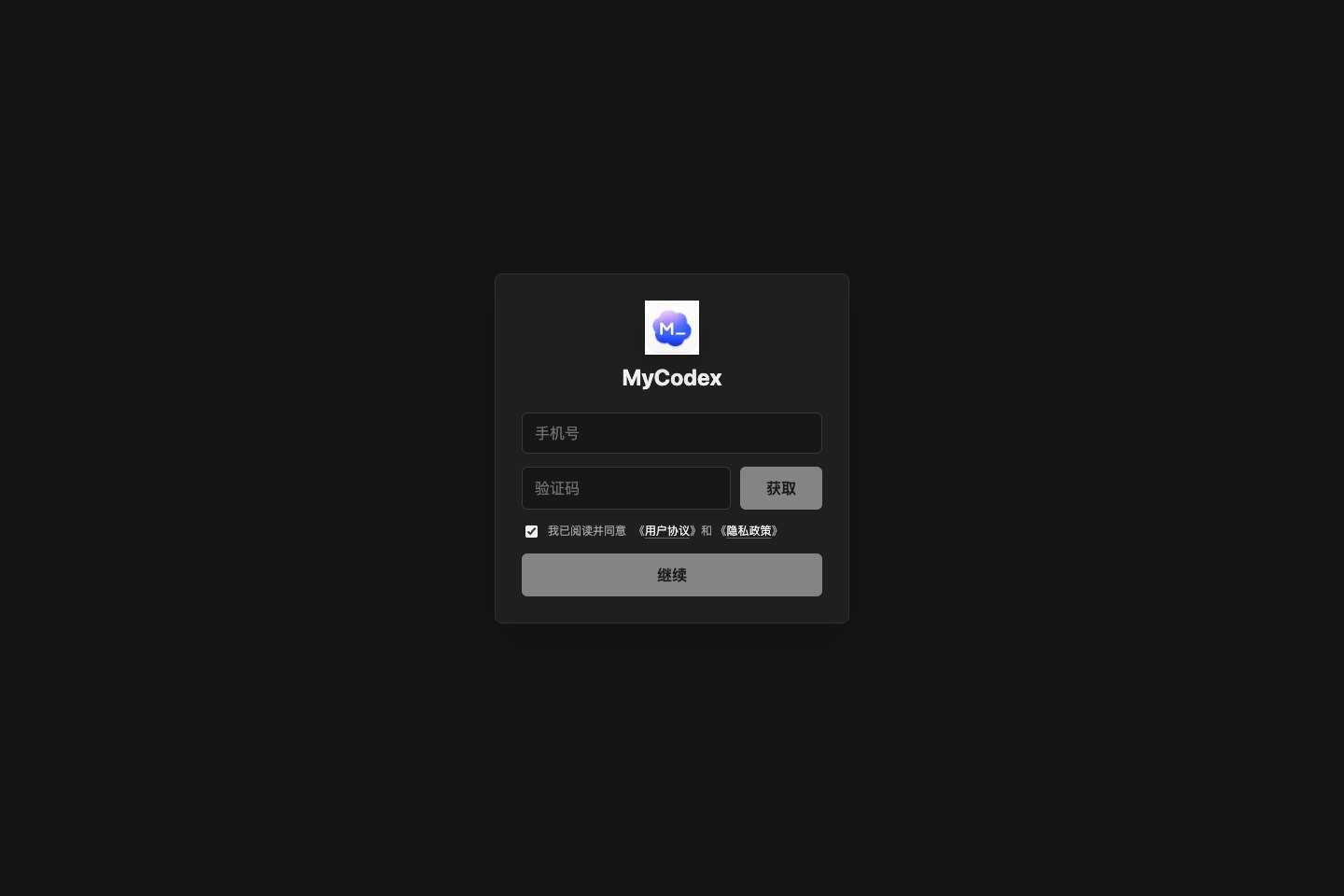
MyCodex starts with login before it asks users to think about models or runtime details.
- Phone verification-code login.
- User agreement and privacy policy checkbox.
- Session restore on already logged-in devices.
- Retry state when the login service is unavailable.
The order matters: get users into the workspace first, then handle models and tasks.
2. First Model Setup
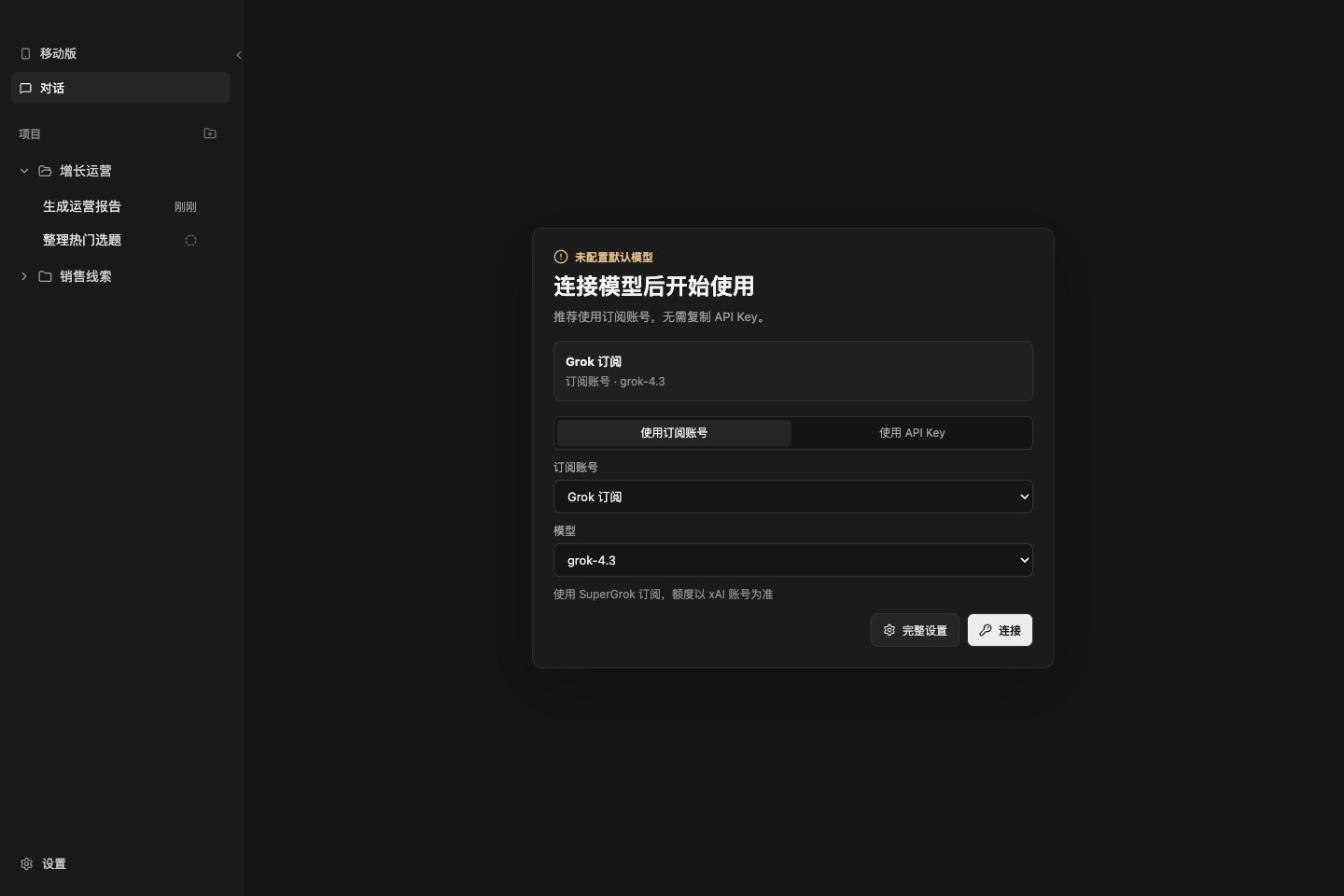
When no usable model exists, MyCodex shows the setup entry directly inside the conversation area.
- Subscription-account setup is recommended.
- API Key setup is still available.
- Users can open the full settings page if they need more control.
- After setup, the app returns to the conversation flow.
This removes a common first-run failure: the app is installed, but the user has no idea why tasks cannot be sent.
3. Conversation Home
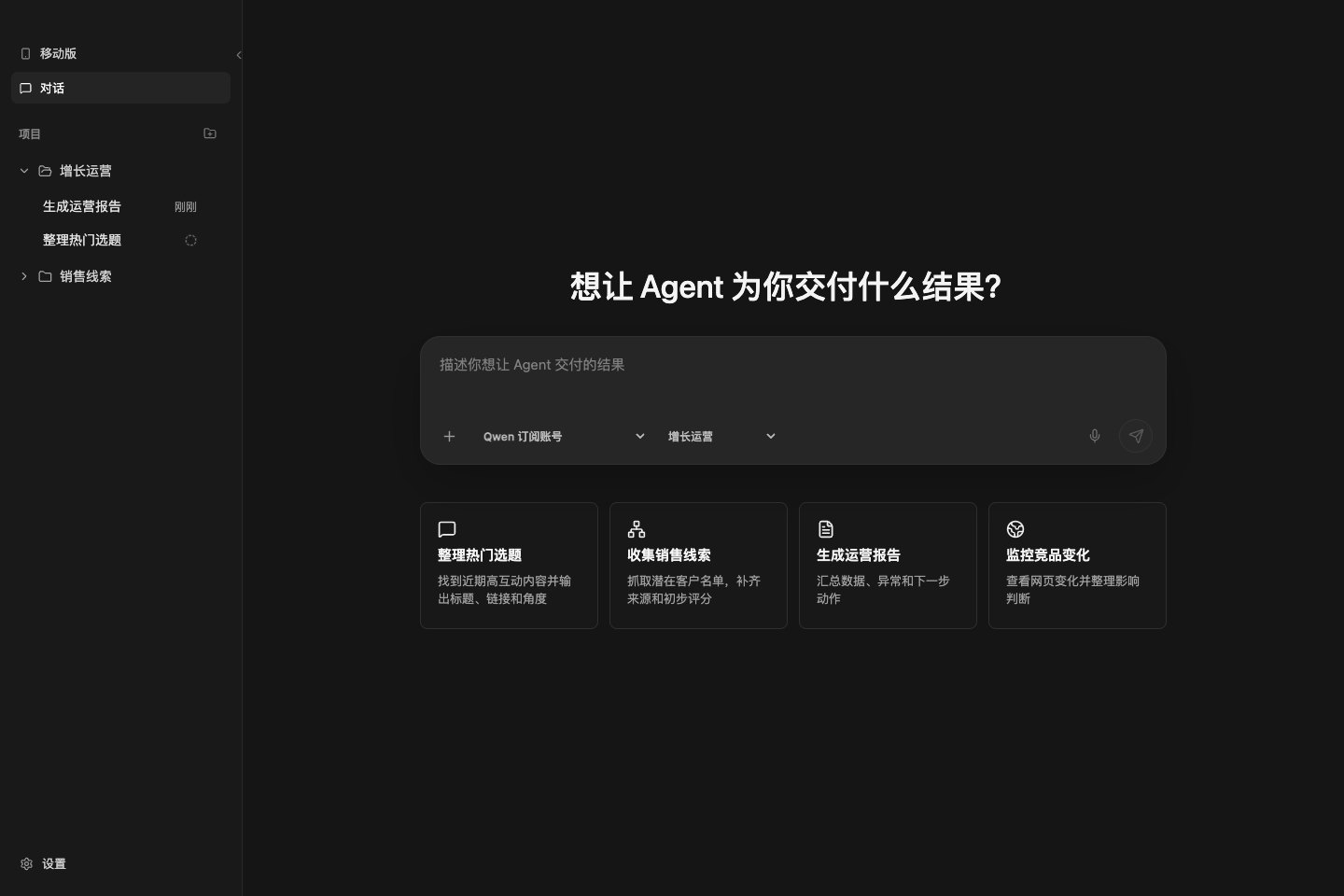
Conversation is the main workspace. Users only need to say what they want the Agent to deliver.
- Type the task goal.
- Choose a model.
- Choose a project.
- Attach images or files.
- Start from built-in task scenarios.
- Send the task; stop it if the direction is wrong.
Built-in scenarios:
- Collect trending topics.
- Gather sales leads.
- Generate an operations report.
- Monitor competitor changes.
These are not demo buttons. They are starting points for users who do not want to write a task from scratch.
4. Projects and History
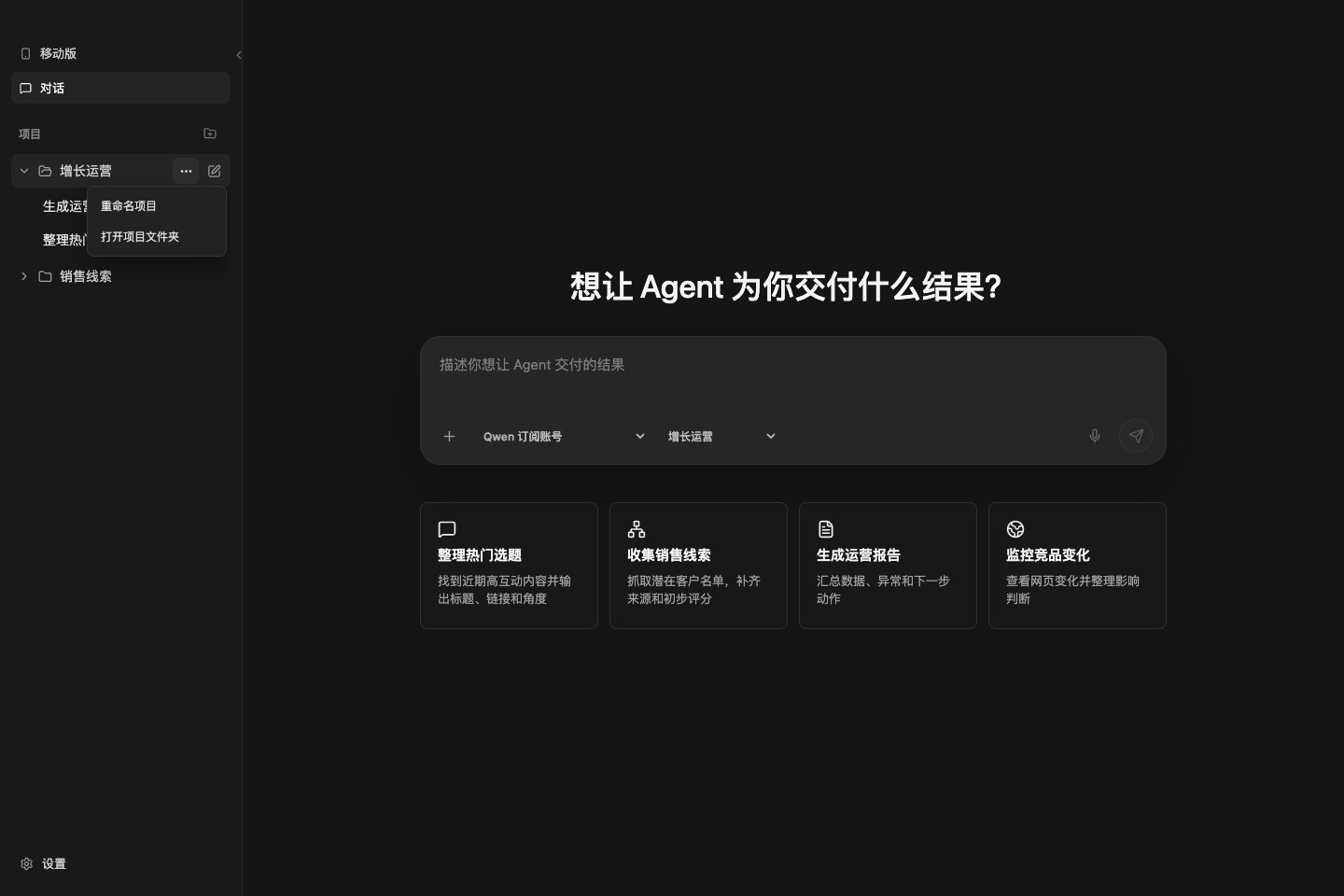
The sidebar keeps tasks organized. After a few days of use, users need to get back to a project or past task quickly instead of digging through chat history.
- Main navigation: Mobile, Conversation, Settings.
- Create projects.
- Rename projects.
- Open project folders.
- Set the default project.
- Delete non-default projects.
- Open conversation history.
- Delete conversations.
- See running-state markers in the conversation list.
Projects, conversations, and folders stay tied together, so results are easier to find later.
5. Running Tasks
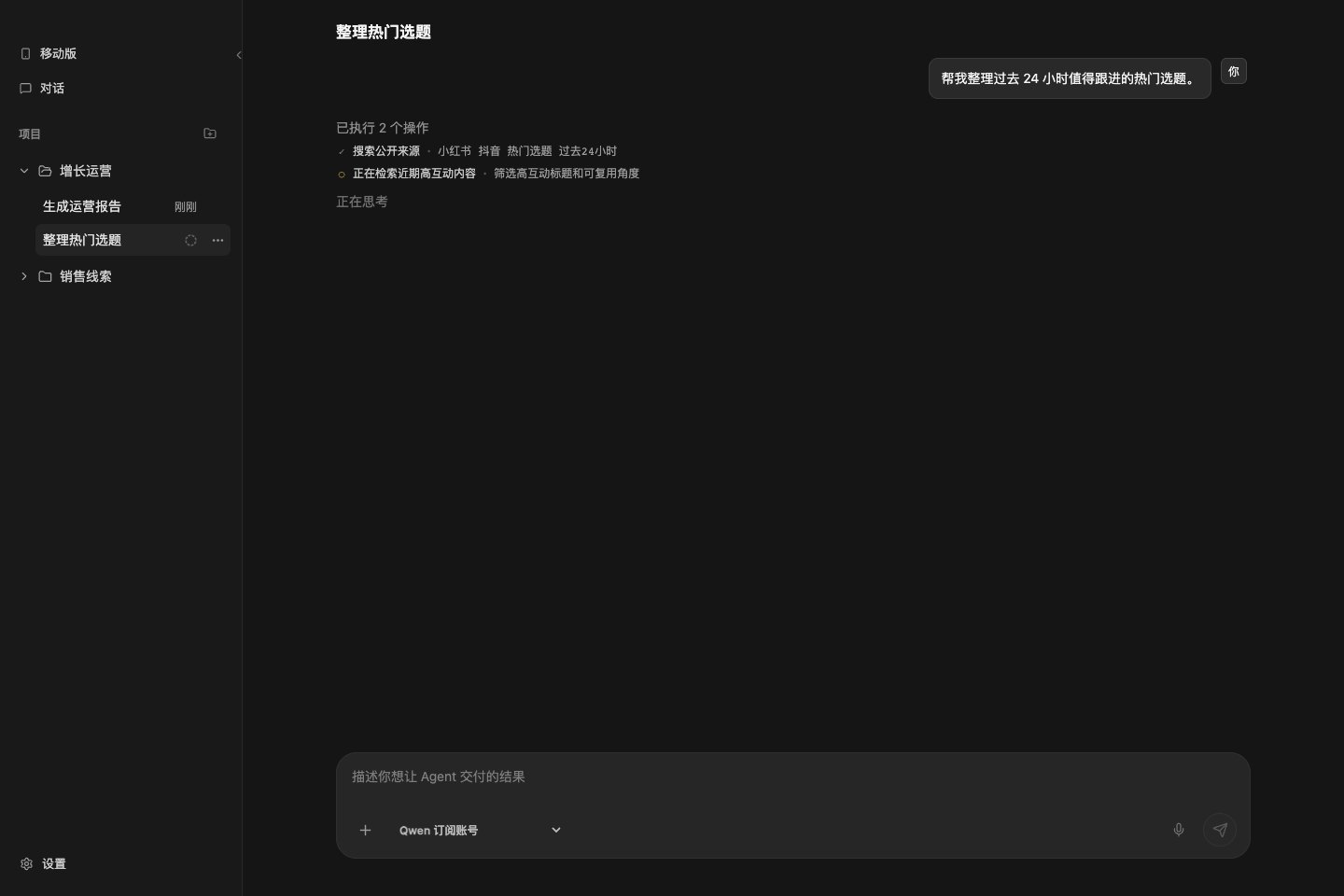
When the Agent starts working, the page shows what is happening.
- User task remains visible.
- Current Agent step is shown.
- Tool actions are displayed.
- Running conversations show a status marker in the sidebar.
- Process state can be restored after refresh or reopening the window.
Users need to see that the app is moving, not stare at an input box with no feedback.
6. Results and Artifacts
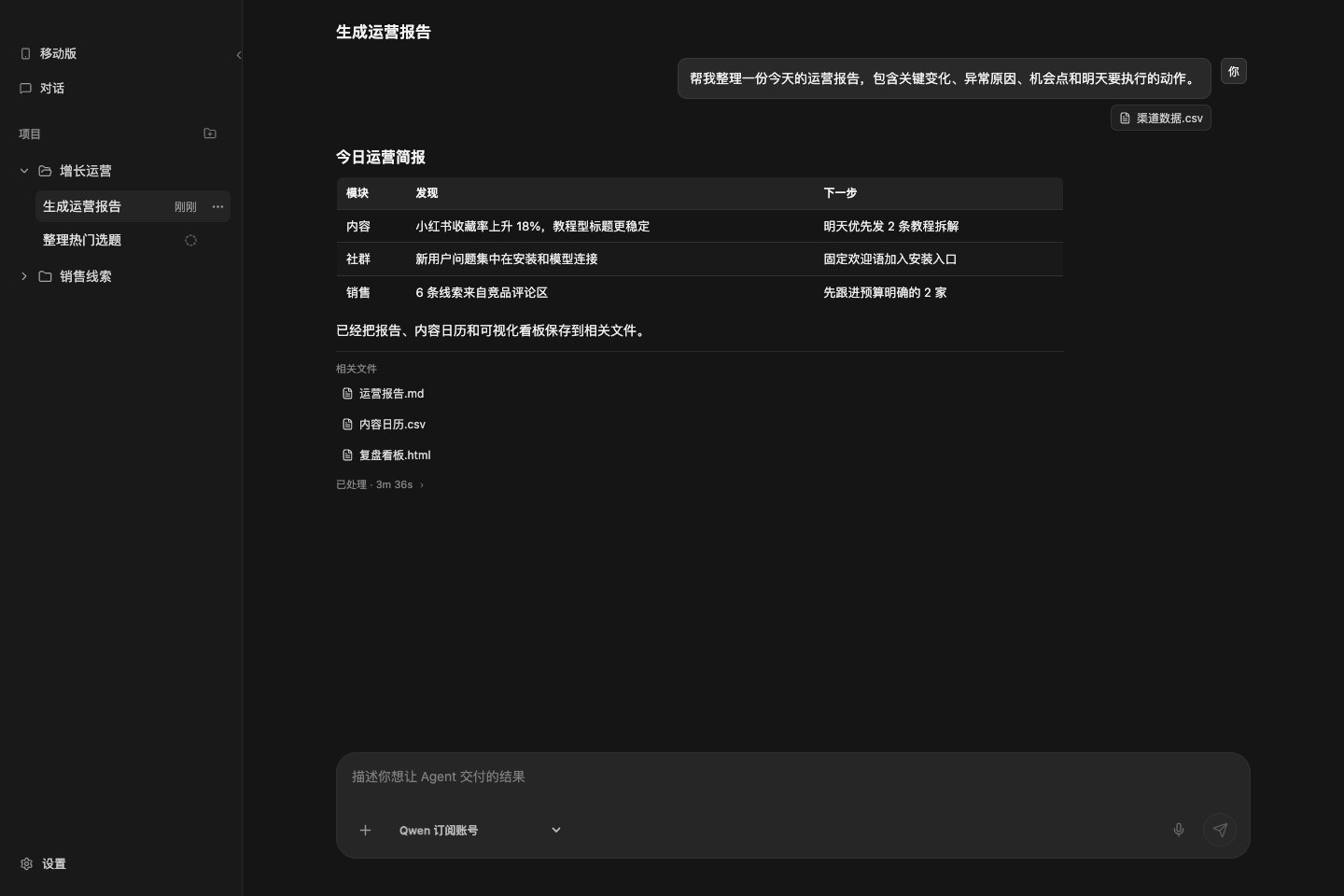
Completed tasks stay in the same conversation. Users can read the answer and see which files the Agent created.
- Final text result.
- Markdown, tables, and links.
- Uploaded attachments.
- Generated result files.
- Follow-up questions without restating the full context.
This makes a conversation closer to a work record than a throwaway chat.
7. Execution Details
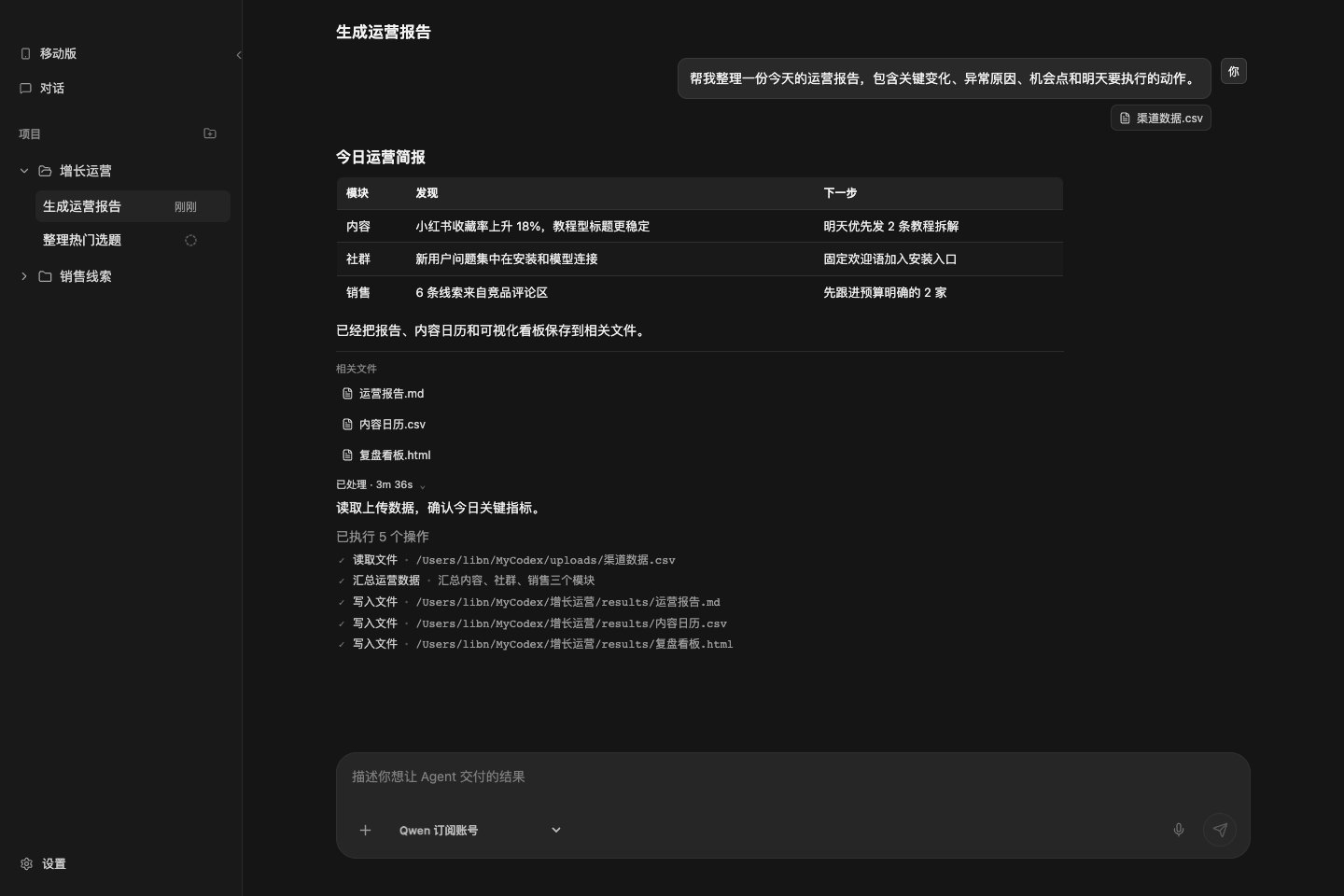
If the user wants to check the work, the execution process can be expanded.
- See what the Agent did.
- Review read, search, summarize, and write-file steps.
- See touched file paths.
- Failed, stopped, and waiting states are shown separately.
This answers a practical question: what did the Agent actually do?
8. Real Browser Control
MyCodex can now connect the Agent to a real browser session through the desktop-managed browser extension.
- Install and open the MyCodex browser extension from the desktop app.
- Check browser bridge connection status, active session, extension version, and recent actions.
- Use the browser tool entry from the conversation composer for tasks that need page interaction.
- Keep browser session context available to the Agent while preserving the conversation record.
- Store extension resources inside the desktop package and use a stable Documents-based install path.
9. File Preview
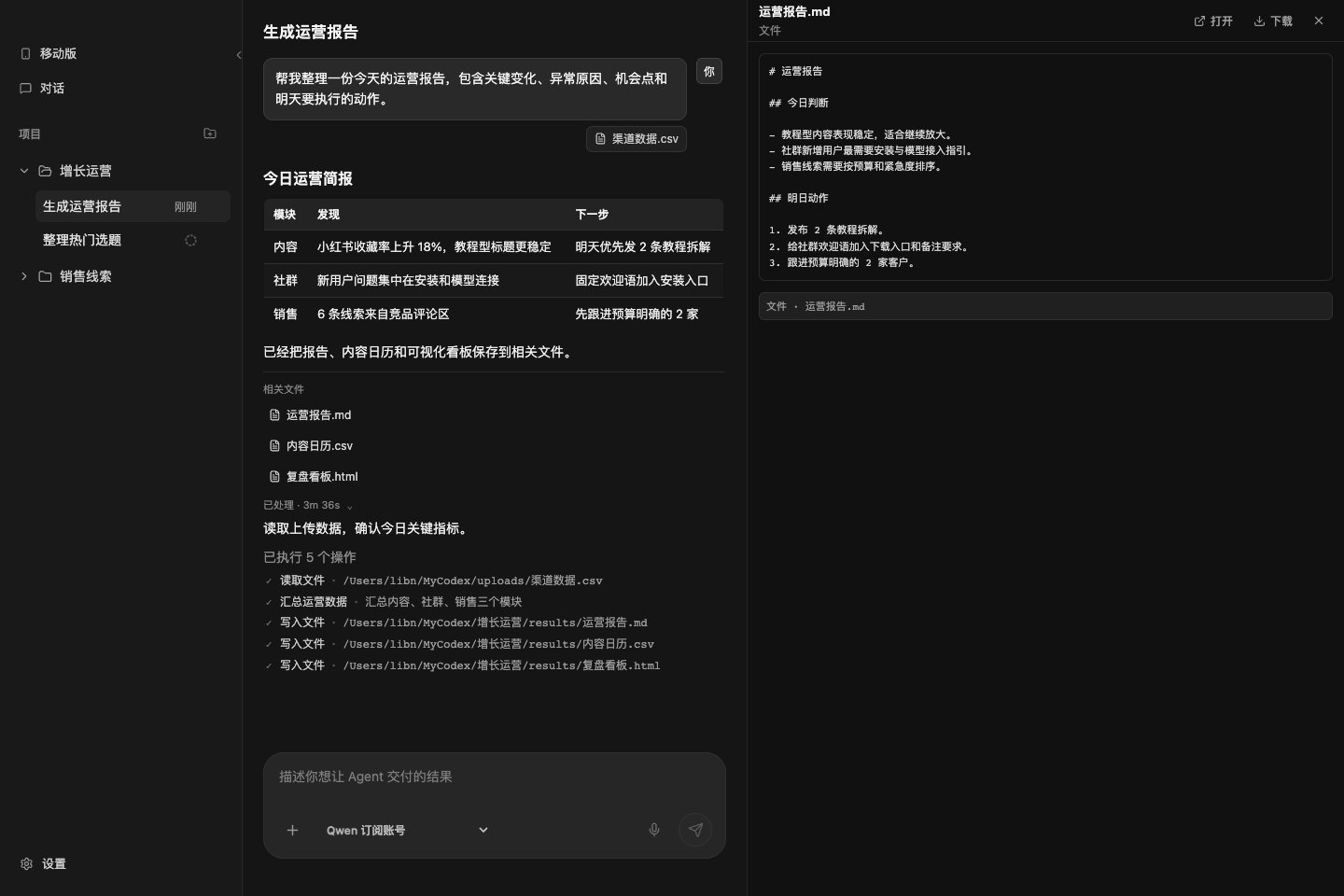
Many tasks end with a file, not just a paragraph. MyCodex puts file preview on the right side so users can open results immediately.
- Click related files to preview them.
- Preview text, Markdown, CSV, HTML, JSON, logs, XML, and other text artifacts.
- Preview images.
- Preview PDFs inline.
- Download files.
- Open files with the system app.
- Close the preview panel and return to conversation-only mode.
Users can inspect the output before downloading it or opening it elsewhere.
10. Mobile
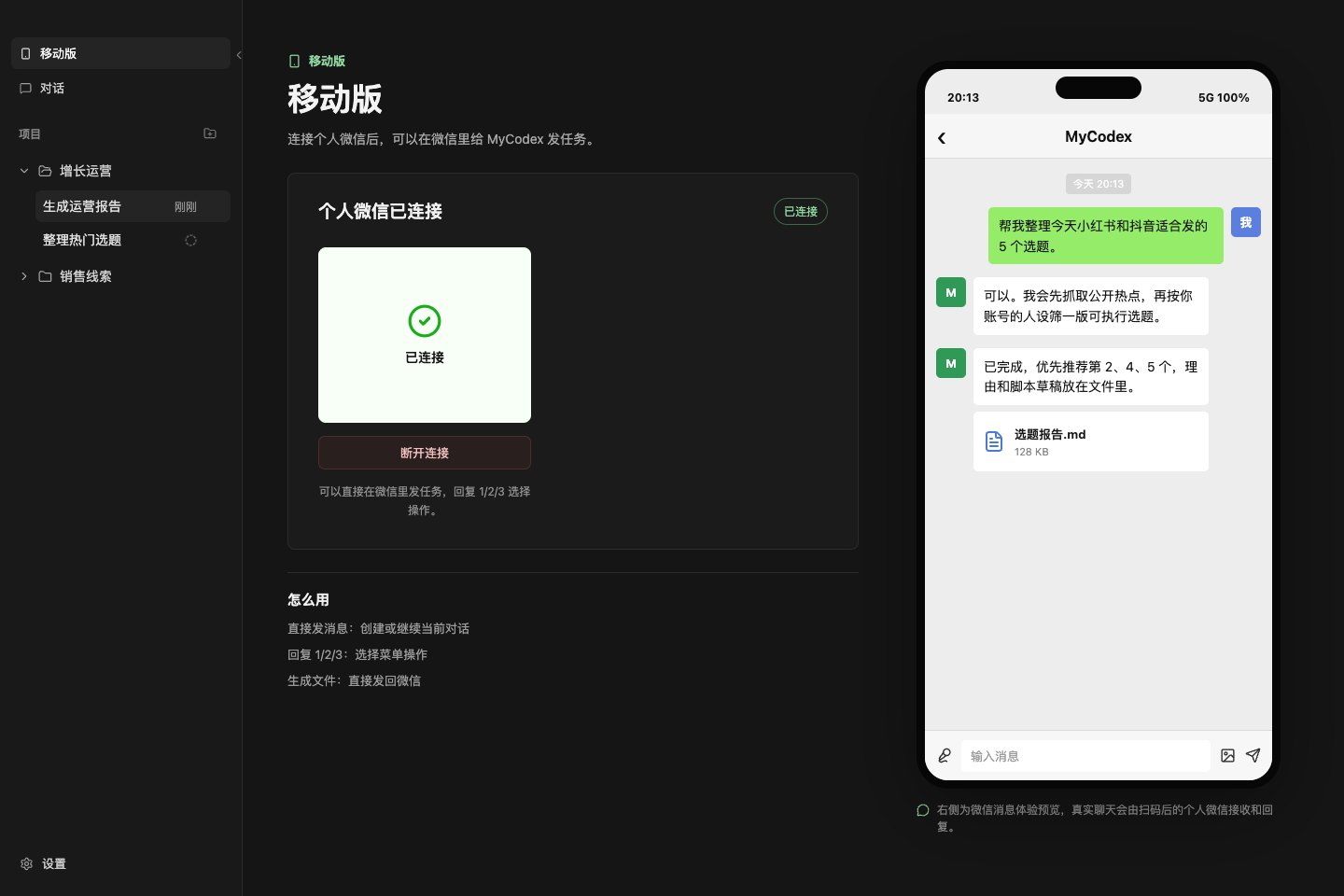
Mobile is the WeChat entry point, not just another settings screen.
- Check personal WeChat connection status.
- Generate a login QR code.
- Show waiting-for-scan, waiting-for-confirmation, connected, and error states.
- Disconnect or reconnect.
- Send tasks to MyCodex from WeChat.
- Reply with
1/2/3to choose menu actions. - Receive generated files back in WeChat.
- Preview the WeChat chat experience on the right.
This is useful when a user is away from the computer but wants to send a task now.
11. Settings
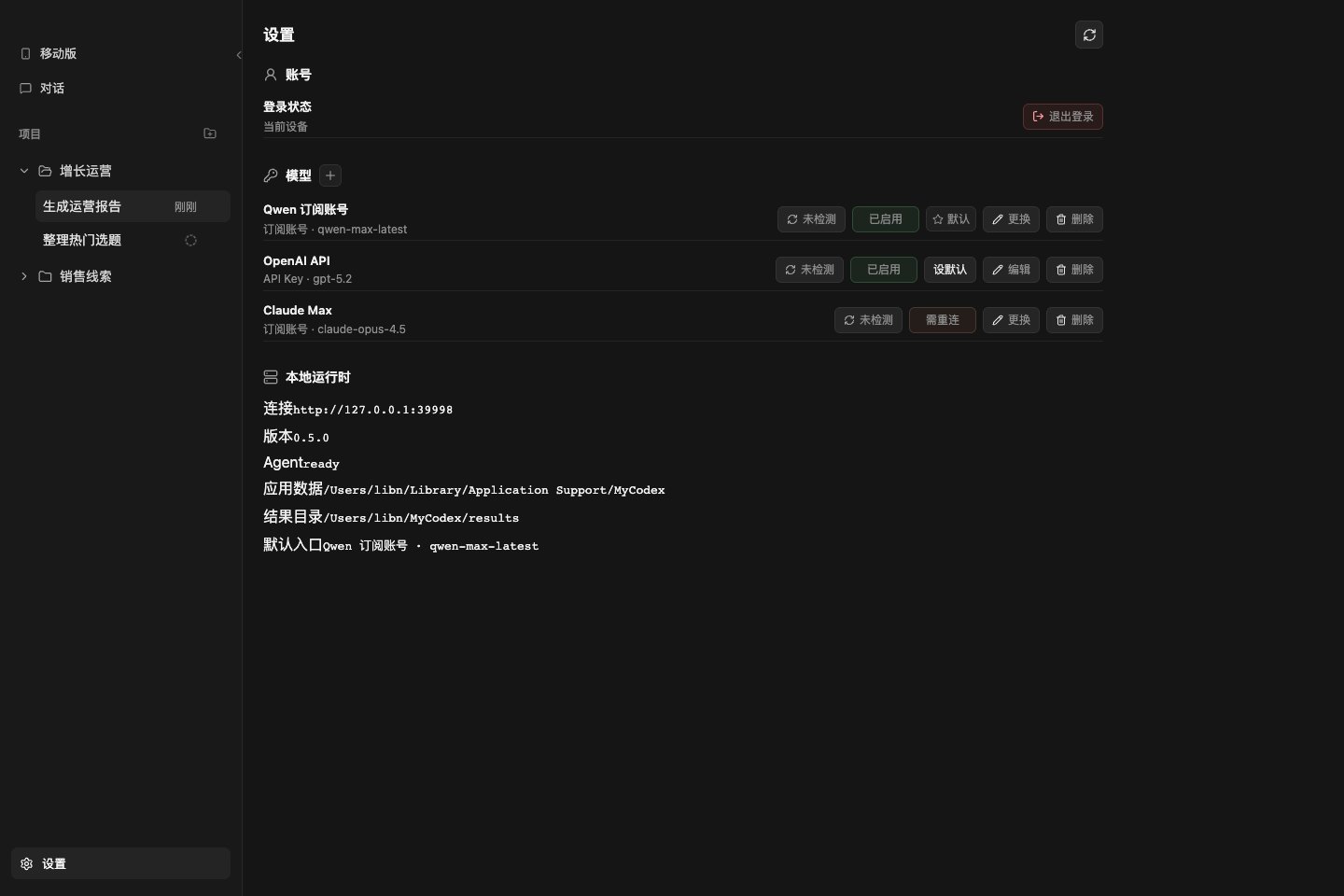
Settings only contains things that should not interrupt the main workflow: account, models, and local runtime.
- View login state.
- Log out.
- View model list.
- Check whether a model works.
- Enable or disable models.
- Set the default model.
- Edit API Key models.
- Replace subscription-account models.
- Delete models.
- View local runtime URL, version, Agent status, app data directory, and results directory.
Most users only come here when changing models, checking runtime state, or logging out.
12. Subscription Account Setup
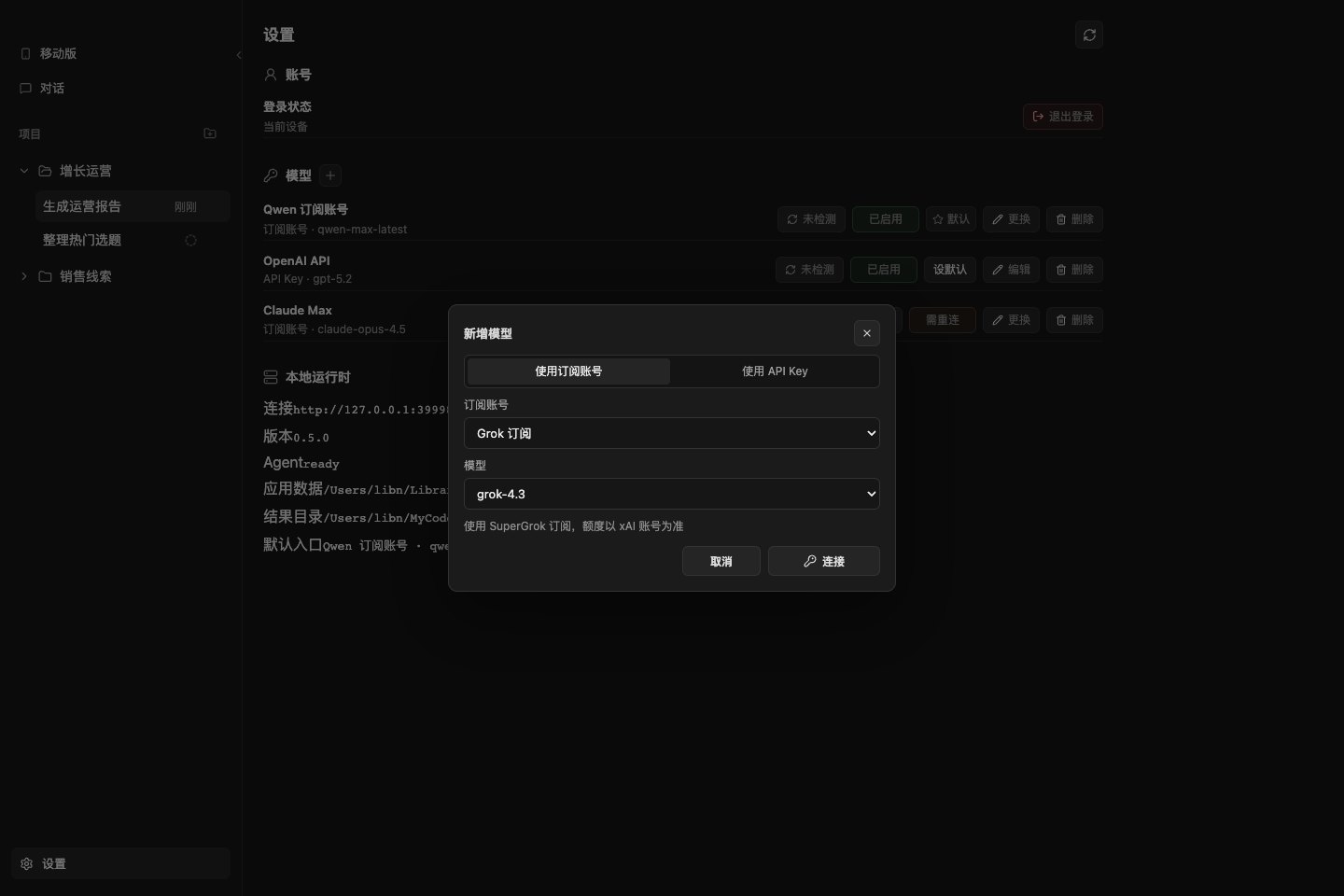
New model setup starts with the subscription-account path.
- Choose a subscription account.
- Choose a model.
- Start the connection.
- If web authorization is required, MyCodex provides the authorization link.
First subscription entries include:
- Grok subscription.
- Nous Portal.
- ChatGPT / Codex.
- Gemini OAuth.
- MiniMax OAuth.
- Qwen Portal.
- GitHub Copilot.
- GitHub Copilot ACP.
- Claude Max.
The goal is simple: users who already pay for a subscription should not have to copy keys and tune parameters before running a task.
13. API Key Setup
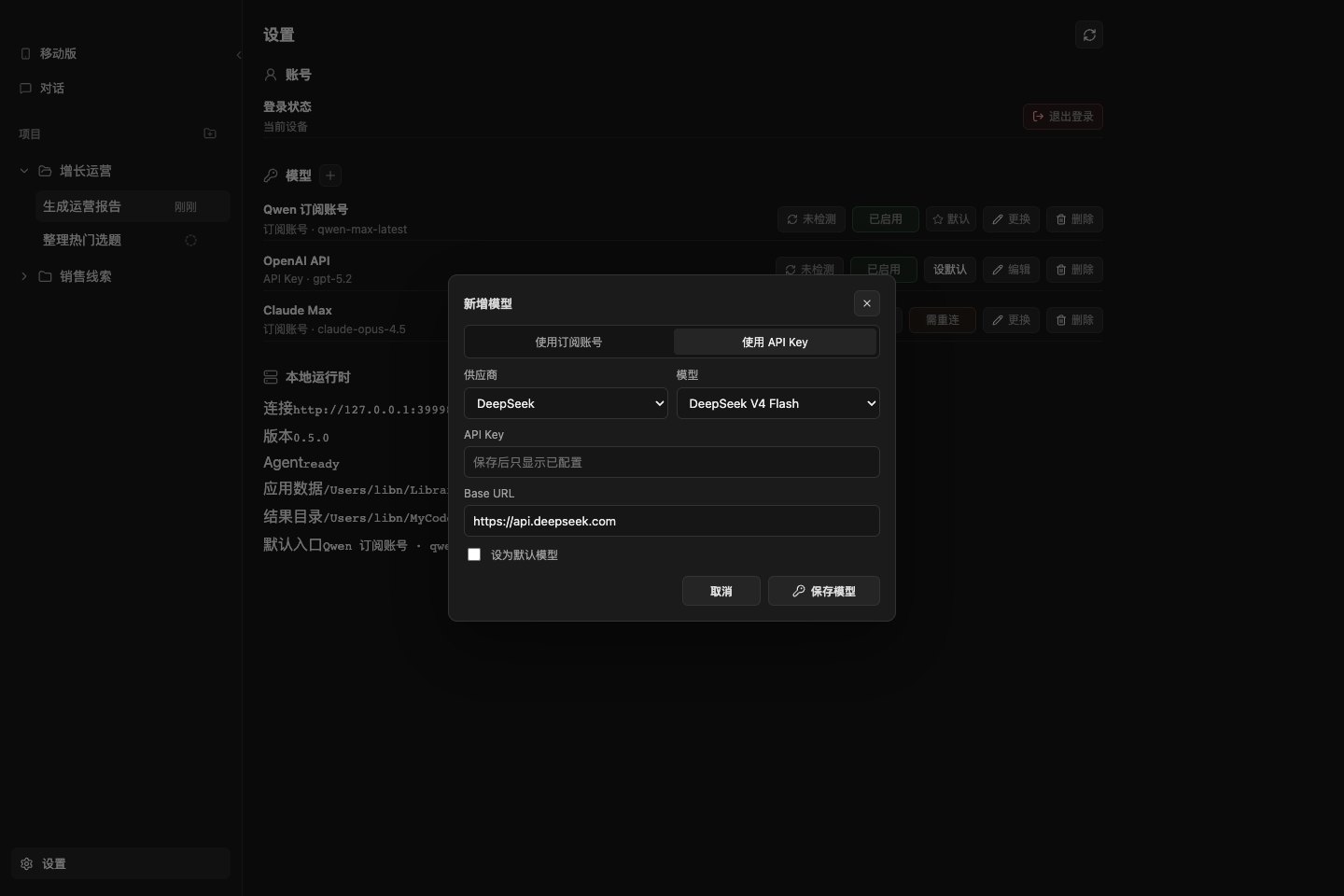
If you already have your own API Key, the traditional setup path is still available.
- Choose a provider.
- Choose a model.
- Enter the API Key.
- Enter Base URL.
- Decide whether it should be the default model.
Teams and power users often need this control, so the API Key path remains available.
Download
Source code is not published yet. This repository currently provides packaged installers first.
Current release:
- macOS Apple Silicon:
MyCodex-0.9.6-mac-arm64.dmgorMyCodex-0.9.6-mac-arm64.zip. - macOS Intel:
MyCodex-0.9.6-mac-x64.dmgorMyCodex-0.9.6-mac-x64.zip. - Windows x64:
MyCodex-0.9.0-win-x64.zipremains available from the v0.9.0 release archive.
Release notes: v0.9.6.
Download from GitHub Releases.
Roadmap and Feedback
MyCodex is still moving quickly. Public issues are used for roadmap signals, install problems, model-provider requests, and translation fixes.
- Roadmap issues
- Installation help
- Feature request
- Model provider request
- Translation feedback
- Discussions
Install
macOS:
- Apple Silicon users download
MyCodex-0.9.6-mac-arm64.dmg; Intel users downloadMyCodex-0.9.6-mac-x64.dmg. - Open the dmg.
- Drag
MyCodex.appinto Applications. - Launch, log in, connect a model, and start sending tasks.
Windows:
- Download the archived
MyCodex-0.9.0-win-x64.zipfrom Releases until the Windows 0.9.6 package is refreshed. - Extract the whole folder.
- Run
MyCodex.exe.
Community
Join the community and help make MyCodex more accessible.
When adding the community contact, please write: MyCodex

Status
MyCodex is still an early preview. Try it in a test folder or non-critical workflow first, then move it into more important work once it fits your process.
The goal is clear: let more people use Codex + Hermes without fighting tokens, environments, and command lines.
Reviews (0)
Sign in to leave a review.
Leave a reviewNo results found