aiconnect-figma-mcp
Health Uyari
- License — License: AGPL-3.0
- Description — Repository has a description
- Active repo — Last push 0 days ago
- Low visibility — Only 5 GitHub stars
Code Uyari
- process.env — Environment variable access in scripts/relay.mjs
- network request — Outbound network request in src/aiconnect_mcp/design_intel.ts
- network request — Outbound network request in src/socket.ts
Permissions Gecti
- Permissions — No dangerous permissions requested
Bu listing icin henuz AI raporu yok.
Open-source, local MCP server + Figma plugin: drive Figma from any AI agent. Build whole pages in one call with batch_ops.

AIConnect for Figma
Your AI agent, designing in your real Figma file — 100% local, whole pages in one call.
Open-source · fully local · no cloud, no telemetry · works with Claude Code, Cursor, or any MCP client.







AIConnect is an MCP server + Figma plugin that hands your AI agent a real pen in your real Figma file. It creates frames, text, auto‑layout, fills, gradients, effects, SVGs, imports images, clones nodes, builds a full design‑token system, and assembles entire pages in one round‑trip with batch_ops. Everything runs on your machine and talks only to a relay on localhost — no cloud, no telemetry, nothing leaves your laptop.
⭐ If this saves you time, a star helps other people find it.
✨ See it in action
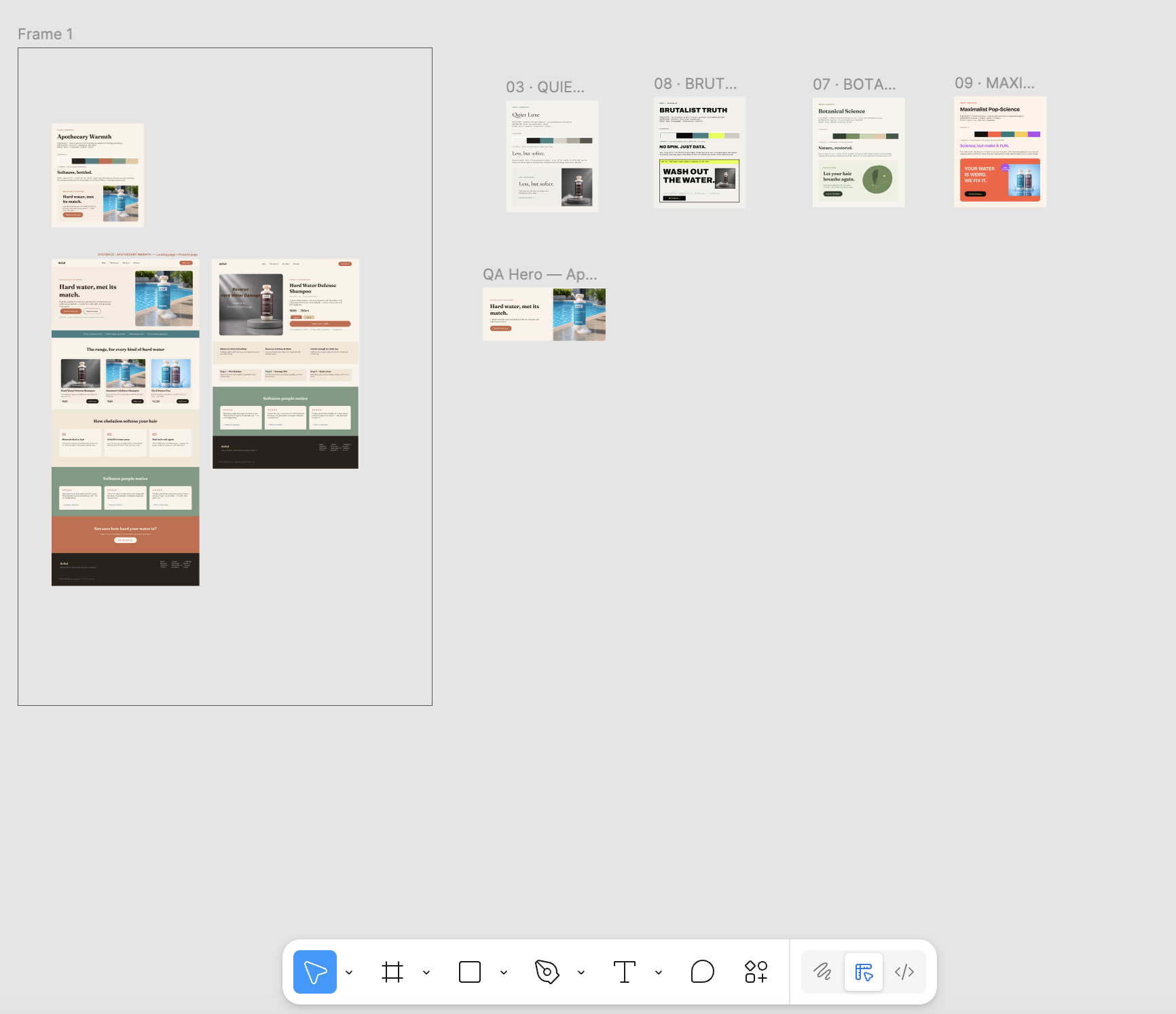
No hand‑placed layers. An agent was asked to design a hard‑water hair‑care brand and built it all directly in Figma through AIConnect — a landing page, a product page, and four full design‑direction boards, each assembled with
batch_ops.
🔓 What AIConnect unlocks for free
Most of these are behind a paid Figma seat or a paid plugin. With AIConnect they're just MCP tools your agent can call — keyless and local.
| You'd normally pay for… | AIConnect gives you | Tool(s) |
|---|---|---|
| Dev Mode inspect / CSS handoff (paid Dev seat) | Dev Mode‑equivalent CSS for any node — no Dev seat | get_css |
| Variables / design tokens workflow (Dev Mode, Enterprise) | First‑class variables you can create, bind, and export to DTCG / CSS / Tailwind | create_variable, bind_variable, export_tokens |
| Palette / brand generator plugins | Full token system (OKLCH ramps, semantic roles, type scale) from a preset, brand name, or one color | apply_brand, generate_palette, generate_theme |
| Stock photo & icon plugins | 200k+ Iconify icons and openly‑licensed Openverse imagery, inserted in place | insert_icon, search_icons, search_images |
| Font‑pairing plugins | Typeface pairing recommendations | suggest_fonts |
| Accessibility / contrast plugins | WCAG contrast checks with auto‑fix suggestions | check_contrast |
Why AIConnect
| 🔒 Local & private | Talks only to a relay on localhost. No telemetry, no third‑party servers — nothing leaves your machine. |
| 🤝 Client‑agnostic | Use it with Claude Code, Cursor, or any MCP client — not tied to one editor. |
⚡ batch_ops |
Build a whole page/section in one round‑trip instead of 100+ individual calls. |
| 🎨 Rich commands | Images, fonts, gradients, effects, SVG, auto‑layout, clone, reorder — 67 tools. |
| 🎯 Design intelligence | Keyless & local: apply_brand (full token systems from a preset/brand/color), OKLCH generate_palette/generate_theme, WCAG check_contrast (+auto‑fix), suggest_fonts, 200k+ insert_icon (Iconify), search_images (Openverse). |
| 🎟️ Design tokens & Dev Mode | First‑class Figma variables (create_variable, bind_variable, export_tokens), plus get_css — Dev Mode‑equivalent inspect without a paid Dev seat. |
| 🔍 Debuggable | get_status, get_console_logs, and get_page_snapshot — the agent literally sees its work and self-corrects. |
| 🛠️ Open & hackable | AGPL‑3.0, ~one file to extend. Wire it into your own agent skills. |
⚡ 2‑minute quickstart
Prerequisites: Node ≥ 18 (or Bun) and the Figma desktop app (free). The browser version of Figma cannot import development plugins, so the desktop app is required.
1 · Point your agent at the MCP server
No clone, no build — npx fetches and runs the published server. Add this to your MCP client config (.mcp.json for Claude Code, mcp.json for Cursor):
{
  "mcpServers": {
    "AIConnect": {
      "command": "npx",
      "args": ["-y", "aiconnect-figma-mcp"]
    }
  }
}
2 · Start the local relay — leave it running
npx -y aiconnect-figma-relay # → relay running on ws://localhost:3055
The relay runs on plain Node — no Bun required.
3 · Import the plugin into Figma
The plugin ships inside the npm package. After step 1, print its path with:
node -e "console.log(require.resolve('aiconnect-figma-mcp/src/figma_plugin/manifest.json'))"
Then in the Figma desktop app (not the browser): actions menu (or right‑click → Plugins) → Development → Import plugin from manifest… and choose that manifest.json.
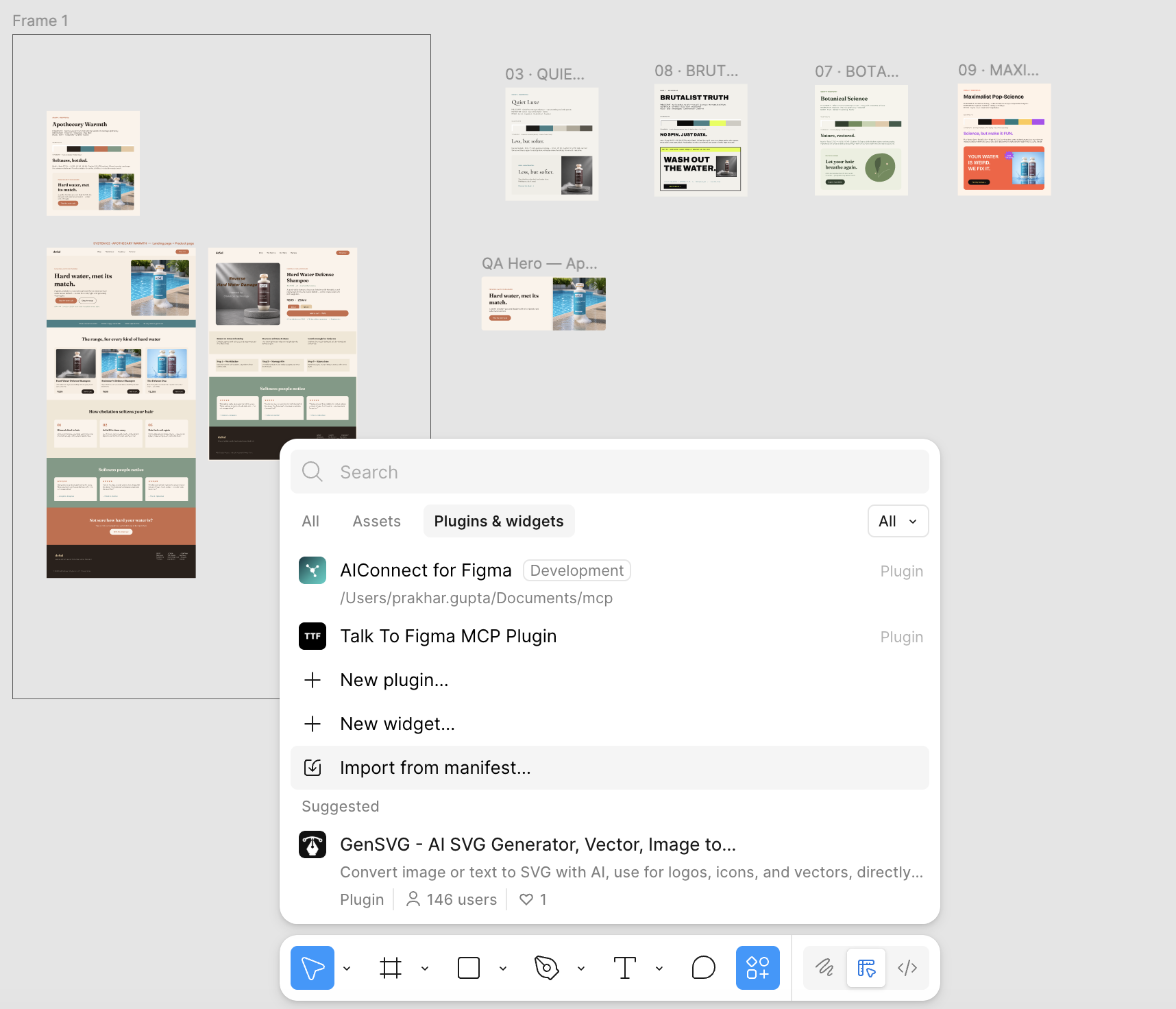
4 · Run the plugin & copy the channel
Run Plugins → Development → AIConnect for Figma. The panel connects to the relay and shows a channel id — copy it.
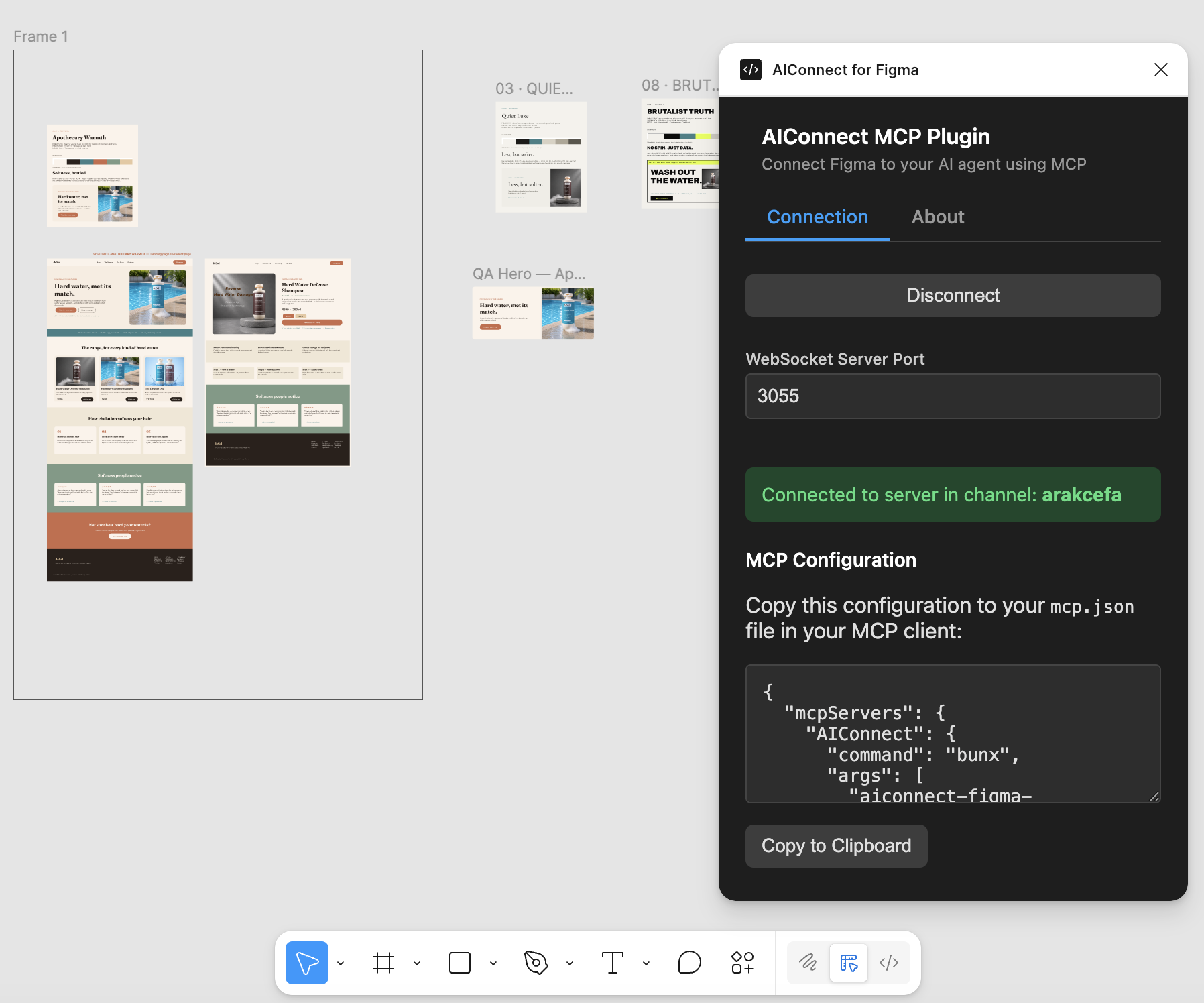
5 · Connect and build
In your agent, call join_channel with the id from the plugin, then ask it to design. That's it. 🎉
Prefer to run from source? (Bun dev path)💡 Keep the Figma window focused while the agent works — Figma pauses background plugins, which surfaces as command timeouts.
git clone https://github.com/guptaprakhariitr/aiconnect-figma-mcp
cd aiconnect-figma-mcp
bun run setup        # installs, builds, writes a correctly-pathed .mcp.json,
                     # and prints the plugin-import + channel steps
bun run relay        # in a second terminal — or: bun socket (Bun-native)
Then point your agent at the absolute dist/server.js path that setup printed, import src/figma_plugin/manifest.json, and join the channel.
💬 Try these prompts
Once your agent has joined the channel, paste any of these:
Apply the "fintech-trust" brand, then build a pricing page with 3 tiers
(Starter / Pro / Enterprise), a feature list per tier, and a highlighted
"most popular" middle card. Use batch_ops so it's one round-trip.
Generate an OKLCH theme from the seed color #5B8DEF, create Figma variables
for it, bind them to a hero section you build, then export the tokens as
Tailwind config.
Inspect my selected card with get_css and tell me the exact CSS. Then check
the text contrast against its background and auto-fix anything that fails WCAG AA.
Build a 4-feature "Why us" section: each feature is an Iconify icon
(insert_icon), a heading, and a line of body text, in a responsive
auto-layout row. Suggest a font pairing first and apply it.
⚡ batch_ops — build pages in one call
The headline feature. Children reference parents created earlier in the same batch via @ref placeholders, so a whole layout goes over the wire once:
batch_ops({
  ops: [
    { "ref": "page", "command": "create_frame",
      "params": { "x": 0, "y": 0, "width": 1440, "height": 800, "name": "Landing",
                  "layoutMode": "VERTICAL", "fillColor": { "r": 0.98, "g": 0.96, "b": 0.92 } } },
    { "command": "set_layout_sizing", "params": { "nodeId": "@page", "layoutSizingVertical": "HUG" } },
    { "ref": "title", "command": "create_text",
      "params": { "text": "Hello", "fontSize": 56, "parentId": "@page" } },
    { "command": "set_font_name", "params": { "nodeId": "@title", "family": "Inter", "style": "Bold" } }
  ]
})
// → { ok: true, ids: { page: "12:3", title: "12:4" }, errors: [] }
@refresolves anywhere a node id is expected (including nested objects/arrays).- Ops run sequentially in the plugin — no parallel‑crash risk.
- Returns a compact
ids+errorsmap, not a verbose node dump. set_image_fillworks in a batch too — the server pre‑encodesimagePath/imageUrl.
🧰 Tools
67 tools across reads, create/edit, style, layout, batch, tokens, debug & design intelligenceReads — get_document_info, get_selection, get_node_info, get_nodes_info, read_my_design, scan_text_nodes, scan_nodes_by_types, get_styles, get_local_components, get_annotations, get_reactions, export_node_as_image
Create / edit — create_frame, create_text, create_rectangle, create_ellipse, create_svg, create_component_instance, clone_node, insert_child, move_node, resize_node, delete_node, delete_multiple_nodes
Style — set_fill_color, set_stroke_color, set_gradient_fill, set_effect, set_corner_radius, set_image_fill, set_font_name, set_text_content, set_multiple_text_contents
Layout — set_layout_mode, set_layout_sizing, set_padding, set_item_spacing, set_axis_align
Design tokens / variables — get_variables, create_variable_collection, create_variable, set_variable_value, bind_variable, export_tokens (DTCG/CSS/Tailwind)
Dev & debug — get_css (Dev Mode‑equivalent, no paid seat), get_status, get_console_logs, get_page_snapshot
Design intelligence (keyless, local) — apply_brand, list_brand_presets, generate_palette, generate_theme, check_contrast, suggest_fonts, search_icons, insert_icon, search_images
Batch & misc — batch_ops, join_channel, annotations, connectors, focus/selection helpers
🏗️ How it works
AI agent (MCP client)
        │  MCP (stdio)
        ▼
  MCP server  ──┐
                │  WebSocket  ws://localhost:3055
  Figma plugin ─┘   (the relay / socket server)
        │  Plugin API
        ▼
   Your Figma file
The MCP server (src/aiconnect_mcp/server.ts) exposes the tools and runs under plain Node; the relay brokers messages on port 3055 — run it under Node via scripts/relay.mjs (aiconnect-figma-relay) or under Bun via src/socket.ts (bun socket); the plugin (src/figma_plugin/) runs inside Figma. The agent and the plugin join the same channel.
🧪 Testing
bun run test               # connection-free: every MCP command has a matching plugin handler
bun run test:smoke <chan>  # live: drives the plugin through batch_ops + ~18 commands
ℹ️ Use
bun run test(notbun test) — barebun testinvokes Bun's built‑in test runner, which finds no spec files here.
❓ FAQ
What makes AIConnect special?
It's open‑source, runs fully locally, works with any MCP client, and centers on batch_ops for fast multi‑node builds — plus a keyless design‑intelligence layer (brand kits, palettes, contrast, fonts, icons, images) so your agent designs with taste, not guesses.
Is my data safe?
Yes. The plugin's only network use is ws://localhost:3055 on your own machine. No telemetry, no external calls.
Which agents work?
Anything that speaks MCP — Claude Code, Cursor, and others.
Why do commands sometimes time out?
Figma pauses plugins whose window isn't focused. Keep Figma in front while the agent works.
🤝 Contributing
PRs welcome. Run bun run test before opening a PR.
📄 License
Free for everyone — individuals and teams alike. No seat limits, no usage caps, no paywalls, no restrictions. Use it at work or at home, on as many machines and projects as you like, forever.
AIConnect is open source under the GNU AGPL‑3.0 (see LICENSE) — you're free to use, modify, and self‑host it. The only ask: if you distribute a modified version or run one as a public network service, share your changes under the same license. That's it.
Builds on prior MIT‑licensed work — see NOTICE.
Yorumlar (0)
Yorum birakmak icin giris yap.
Yorum birakSonuc bulunamadi