sneaky-whopper-recomp
Health Uyari
- License — License: NOASSERTION
- Description — Repository has a description
- Active repo — Last push 0 days ago
- Low visibility — Only 9 GitHub stars
Code Gecti
- Code scan — Scanned 12 files during light audit, no dangerous patterns found
Permissions Gecti
- Permissions — No dangerous permissions requested
Bu listing icin henuz AI raporu yok.
Burger King: Sneak King (original Xbox) statically recompiled into a native Windows PC port, plus an experimental WebAssembly browser build. No emulator. Bring your own disc. For the memes.
A native PC port of Burger King: Sneak King
Burger King: Sneak King (2006, Blitz Games) for the original Xbox, statically recompiled into a native Windows game and an experimental WebAssembly browser build. No emulator: every function of the game's default.xbe is lifted from x86 to C, then compiled for the host with a small model of the Xbox around it.
Yes, this is a serious amount of engineering spent on a Burger King advergame. It's for the memes. :)
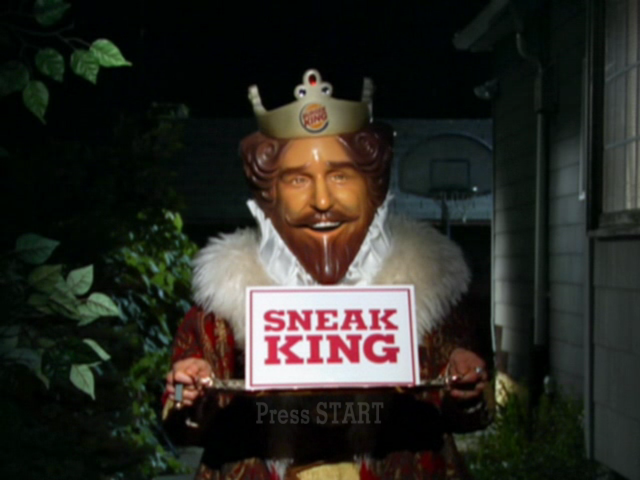
One checkout builds two versions of the game:
- Windows (Direct3D 11, Vulkan or OpenGL, through ANGLE). This is the main version. It plays the whole game with keyboard and mouse or a pad. It adds widescreen, 360 HD textures, a debug overlay with cheats, and two joke modes.
- Web (WebAssembly, in Chrome). This one is experimental. It boots, plays the movies and menus, and runs the levels with the same controls, widescreen and cheats.
This repo contains no game data. You need a dump of your own disc. The ISO, the extracted files, the analysis and the lifted code all stay on your machine, and .gitignore covers them.
Contents
- How it works
- Setup
- Controls
- Builds
- Cheats and joke modes
- Troubleshooting
- Docs
- AI tools
- Contributing
- License
How it works
- Lift. The xboxrecomp toolkit, vendored in
xboxrecomp/with our patches, unpacks the disc, finds the game's roughly 13,650 functions and turns each one into C insrc/recomp/gen/. Guest registers become globals and guest memory accesses become macros into one block of host memory. - Runtime. The toolkit's libraries stand in for the Xbox hardware the game talks to:
- the kernel (threads, files, memory)
- the audio processor
- USB pads
- just enough of the GPU for the game's graphics library to keep going
- Graphics. The game's Direct3D 8 calls are intercepted and replayed on OpenGL ES 3 (
src/gl_hle.c), with D3D8's fixed function and the NV2A vertex programs turned into GLSL. In the browser that is WebGL2. On Windows it runs on ANGLE, which translates it to Direct3D 11 (the default), Vulkan or desktop OpenGL: setRECOMP_GFX=d3d11,vulkanorgl. - Host.
- Windows:
src/main.c, with a Win32 window, raw input and the bindings inmkb.ini. - Web:
src/main_web.candsrc/web_host.c, with a canvas and DOM input. Game files are fetched over HTTP as the game reads them.
- Windows:
Fixes go in src/recomp_manual.c or the toolkit, never in the generated code. docs/BUILDING.md explains each part in depth.
Setup
Setup takes four stages. You install the tools, dump your disc, and lift the game once. Then you build either version, as often as you like.
1. Install the tools
| Tool | Needed for | Notes |
|---|---|---|
| Windows 10 or 11 | both | |
| Visual Studio 2022 (Community is fine) | both | Install the Desktop development with C++ workload. It brings MSVC, CMake and Ninja. |
| Python 3.11 or newer | both | For the lifting pipeline and the web server. |
| Git | both | |
| Emscripten SDK | web only | Installed in step 5b. |
| Google Chrome | web only | The web build is tested in Chrome. |
| About 16 GB of RAM | both | The generated C files are large. |
| About 10 GB of disk | both |
The build commands need MSVC on the PATH. Use one of these:
- x64 Native Tools Command Prompt for VS 2022 from the Start menu.
- Or wrap each command:
cmd /c '"C:\Program Files\Microsoft Visual Studio\2022\Community\VC\Auxiliary\Build\vcvars64.bat" >nul && <command>'
2. Get the code
git clone https://github.com/Guuzzeji/sneaky-whopper-recomp
cd sneaky-whopper-recomp
python -m venv .venv
.venv\Scripts\python.exe -m pip install capstone pytest pefile numpy
The toolkit is already in xboxrecomp/, so there's nothing else to clone.
3. Dump the disc
Make an ISO of your own Sneak King disc. A Redump-style dump of the US release is what this project was built against. Put the .iso in the repo root.
The disc is a hybrid: it holds both the original Xbox game and the Xbox 360 version. Only the original Xbox default.xbe is recompiled. The 360 files are optional extras; see Optional extras.
4. Lift the game
You do this once, and again only after changing src/recomp_manual.c overrides or the toolkit's lifter. Run it from PowerShell in the toolkit folder:
cd xboxrecomp
$env:PYTHONIOENCODING = "utf-8"
$py = "..\.venv\Scripts\python.exe"
$x  = "..\game\default.xbe"
$a  = "..\analysis"
4.1. Unpack the disc into game/ (about 1.6 GB):
& $py -m tools.xiso unpack ..\<your-dump>.iso -o ..\game
& $py -m tools.xbe_parser $x --json ..\game\default_analysis.json
4.2. Find every function. This takes about 13 minutes:
& $py -m tools.disasm $x -o $a\disasm --force `
    --seed-functions ..\seeds\p1_static.json `
    --seed-functions ..\seeds\p3_runtime.json `
    --seed-functions ..\seeds\p5_xpp.json
4.3. Identify library functions and calling conventions:
& $py -m tools.func_id $x --functions $a\disasm\functions.json --strings $a\disasm\strings.json --xrefs $a\disasm\xrefs.json -o $a\func_id
& $py -m tools.abi_analysis $x --disasm-dir $a\disasm --func-id-dir $a\func_id --output-dir $a\abi
4.4. Lift to C in src/recomp/gen/:
& $py -m tools.recomp $x --all --split 250 `
    --disasm-dir $a\disasm --func-id-dir $a\func_id --abi-dir $a\abi `
    --gen-dir ..\src\recomp\gen --game-name "Sneak King" `
    --exclude-manual ..\src\recomp_manual.c `
    --exclude-manual ..\src\gl_hle.c `
    --exclude-manual ..\src\d3d_hle_shared.h `
    --mmio-range 1EC5C0-20FB40 --mmio-range 23CB60-262FEC --mmio-range 2A65C0-2AFB10
cd ..
Keep every argument:
- The three
--exclude-manualfiles tell the lifter which functions our code overrides or wraps. Without them, the link fails with unresolvedsub_X_gensymbols. - The three
--mmio-rangesections reach hardware registers through explicit calls. The web build needs them, and the Windows build works with them too, so one lift serves both.
You now have game/, analysis/ and src/recomp/gen/, all gitignored.
5a. Build and run on Windows
From the repo root, in a VS developer prompt. First build ANGLE, once (it needs git, about 3 GB and half an hour; the source goes to ..\angle and the result to third_party\angle\):
tools\build_angle.cmd
Then the game:
cmake --preset release
cmake --build --preset release
build\sneakking_recomp.exe
The first build compiles about 70 large generated files and takes a while. Later builds only compile what changed.
The exe needs no settings. It finds game\ by walking up from its own folder, opens a window, and plays the intro movies. Press Escape or P (START) to skip them.
From an IDE instead:
- Visual Studio 2022: File > Open > Folder on the repo root, pick
releasein the preset dropdown, then press F5. - VS Code: install the CMake Tools and C/C++ extensions, pick a preset in the status bar, and run the "Sneak King" launch configuration.
5b. Build and run in the browser
1. Install the Emscripten SDK next to the repo, in ..\emsdk (where the web preset looks). From the repo root:
git clone https://github.com/emscripten-core/emsdk ..\emsdk
..\emsdk\emsdk install latest
..\emsdk\emsdk activate latest
If you install it somewhere else, add a CMakeUserPresets.json that inherits the web preset and sets EMSDK.
2. Build from the repo root (normal prompt; the script sets up MSVC's Ninja itself):
tools\web_build.cmd
This writes build-web\sneakking_recomp.js and build-web\sneakking_recomp.wasm, about 30 MB.
3. Serve and play:
.venv\Scripts\python.exe tools\serve.py
Open http://localhost:8080/ in Chrome. The server:
- sends the COOP/COEP headers the page's threads need
- serves
game/with range requests, so nothing is downloaded up front - lists the game files for the page (
game/manifest.txt, generated on request) - listens on localhost only
The log under the picture shows boot progress, and the Hide log button folds it away. Click the picture once the King is in play to give it the mouse.
Page options go in the query string, for example http://localhost:8080/?RECOMP_WIDESCREEN=0:
| Option | Effect |
|---|---|
RECOMP_WIDESCREEN=0 |
4:3 instead of 16:9 |
RECOMP_HD_TEX=0 |
the original Xbox textures instead of the 360 HD ones |
RECOMP_SCALE=1 |
render at 640x480 (the default is 2x) |
RECOMP_D3D9_STATS=1 |
log frames per second (the name is historical) |
Optional extras
- 360 HD textures.
tools/xen_tex.py <pkg.xbp> <pkg.xen> -o game/hdconverts the 360 version's textures. Both builds usegame/hdwhen it exists. - Joke modes (Windows only). Shooter mode needs your own Call of Duty 4 PC install, and skate mode needs your own Skate 3 dump.
docs/MODS.mdhas the extraction steps. - Debugging the web path natively.
cmake --preset gl && cmake --build --preset glbuildsbuild-gl\sneakking_recomp.exe: the web memory layout as a Windows exe, so you can use the Visual Studio debugger.
Controls
Both versions use the same layout.
| Input | Action |
|---|---|
| WASD | Move |
| Mouse | Camera (points at options in menus) |
| Shift | Run |
| Left click, Space | A (surprise, accept) |
| Right click, Q | B (back) |
| E | Y (hide, action) |
| F | First person |
| Wheel, Z | Zoom |
| Escape, P | Pause (START) |
| Arrows, Enter | Menus |
Windows:
- F1 opens the overlay (stats and cheats).
- F2 shows the frame rate.
- F9 frees the mouse.
- Edit the bindings in
mkb.ini. - A plugged-in Xbox controller works too.
Web:
- The cheats are buttons under the picture.
- Escape frees the mouse and a click takes it back.
Builds
| Preset | Output | What it's for |
|---|---|---|
release |
build\sneakking_recomp.exe |
The Windows game |
relwithdebinfo |
out\build\relwithdebinfo\ |
The same, with a PDB for debugging |
web |
build-web\sneakking_recomp.{js,wasm} |
The browser build |
gl |
build-gl\sneakking_recomp.exe |
The web build's memory layout on Windows |
Cheats and joke modes
| Windows | Web | |
|---|---|---|
| Unlock levels, unlock missions, warp to a level | yes | yes |
| Shooter mode (CoD4 guns, third person) | yes | no |
| Skate mode (Skate 3 board) | yes | no |
Troubleshooting
| Problem | Fix |
|---|---|
cl, cmake or ninja not found |
Use the VS developer prompt or the vcvars64.bat wrapper (step 1). |
ANGLE not found when configuring |
Run tools\build_angle.cmd first. |
Link fails with unresolved sub_X_gen |
The lift missed an --exclude-manual file. Run step 4.4 again with all three. |
| The web page says "Not cross-origin isolated" | Open it through tools\serve.py, not as a file or from another server. |
| The web build hangs on boot | The lift ran without the --mmio-range arguments. Run step 4.4 again and rebuild. |
| Black screen in the browser after a warp | A warp only works while you control the King, not during a load. |
| No sound and the game quits (Windows) | RECOMP_AC97_READY was set to 0. Leave it unset. |
docs/BUILDING.md has more.
Docs
| File | Contents |
|---|---|
docs/BUILDING.md |
How everything works, in depth |
docs/ROADMAP.md |
Phases and progress |
docs/RESEARCH.md, docs/P1_FINDINGS.md |
Background and findings about the game |
docs/WEB_PORT_RESEARCH.md |
The web port's design and results |
docs/MODS.md, docs/MW1_NOTES.md, docs/SKATE3_NOTES.md |
The joke modes |
docs/FUNNY_CHEATS.md |
Remaining work on the joke modes |
CLAUDE.md |
Working notes: every command, the RECOMP_* switches, debugging |
AI tools
This project was built with Claude Code, and CLAUDE.md holds its working notes. These add-ons help a lot:
| Tool | What it does here | Install |
|---|---|---|
| REA (Reverse Engineer Anything) | MCP server for decompiling, xrefs and callers. CLAUDE.md tells the agent to use it for every reverse-engineering question, on analysis/rea/default_flat.exe and the reference games. Needs Node.js and Ghidra 12 (GHIDRA_INSTALL_DIR). |
npx rea-agents setup |
| Caveman | Makes Claude answer tersely, so long debugging sessions use fewer tokens. | claude plugin marketplace add JuliusBrussee/cavemanclaude plugin install caveman@caveman |
| Ponytail | Pushes Claude to the smallest fix that works, which keeps the overrides and the toolkit patches small. | claude plugin marketplace add DietrichGebert/ponytailclaude plugin install ponytail@ponytail |
Turn the plugins on in a session with /caveman and /ponytail.
Contributing
Pull requests are welcome. Read CONTRIBUTING.md first. The short version: never commit game data, and never edit src/recomp/gen/ by hand.
License
The project's own code and docs are under the MIT License. The vendored toolkit (xboxrecomp/) and Dear ImGui (third_party/imgui/) keep their own licenses. The game is not covered: you must own it.
Burger King, Sneak King and the King are trademarks of their owners. This is an unofficial preservation and research project; it ships no game code or data.
Yorumlar (0)
Yorum birakmak icin giris yap.
Yorum birakSonuc bulunamadi