multi-gmail-mcp
Health Uyari
- License — License: MIT
- No description — Repository has no description
- Active repo — Last push 0 days ago
- Low visibility — Only 5 GitHub stars
Code Basarisiz
- network request — Outbound network request in package-lock.json
- process.env — Environment variable access in src/auth.js
- execSync — Synchronous shell command execution in src/cli.js
- exec() — Shell command execution in src/db.js
- process.env — Environment variable access in src/db.js
Permissions Gecti
- Permissions — No dangerous permissions requested
This tool is a Model Context Protocol (MCP) server that allows AI clients, such as Claude Desktop, to search, read, and send emails across multiple Gmail accounts simultaneously.
Security Assessment
Overall Risk: High. The server handles highly sensitive data by requiring full OAuth access to your Gmail accounts. The automated rule scan raises significant security concerns, specifically highlighting the use of dynamic shell command execution (`execSync` and `exec()`) within the CLI and database scripts. While these functions might be intended for managing local authentication or opening a browser, executing shell commands introduces a severe risk of arbitrary command injection. Additionally, the tool makes outbound network requests and accesses system environment variables to fetch Google credentials. If coupled with an autonomous AI, any vulnerability or unexpected prompt could be exploited to run malicious commands or leak your private emails and OAuth secrets.
Quality Assessment
The project utilizes the standard MIT license and is relatively new, with recent repository activity. However, it suffers from low community visibility and trust, boasting only 5 GitHub stars and lacking a basic repository description. Because of this limited community adoption, the codebase has not undergone widespread peer review or security auditing. Users must rely entirely on the original author's code quality and security practices.
Verdict
Not recommended due to the presence of dynamic shell command execution combined with access to highly sensitive email data, unless you thoroughly review and understand the local codebase before installation.
multi-gmail-mcp
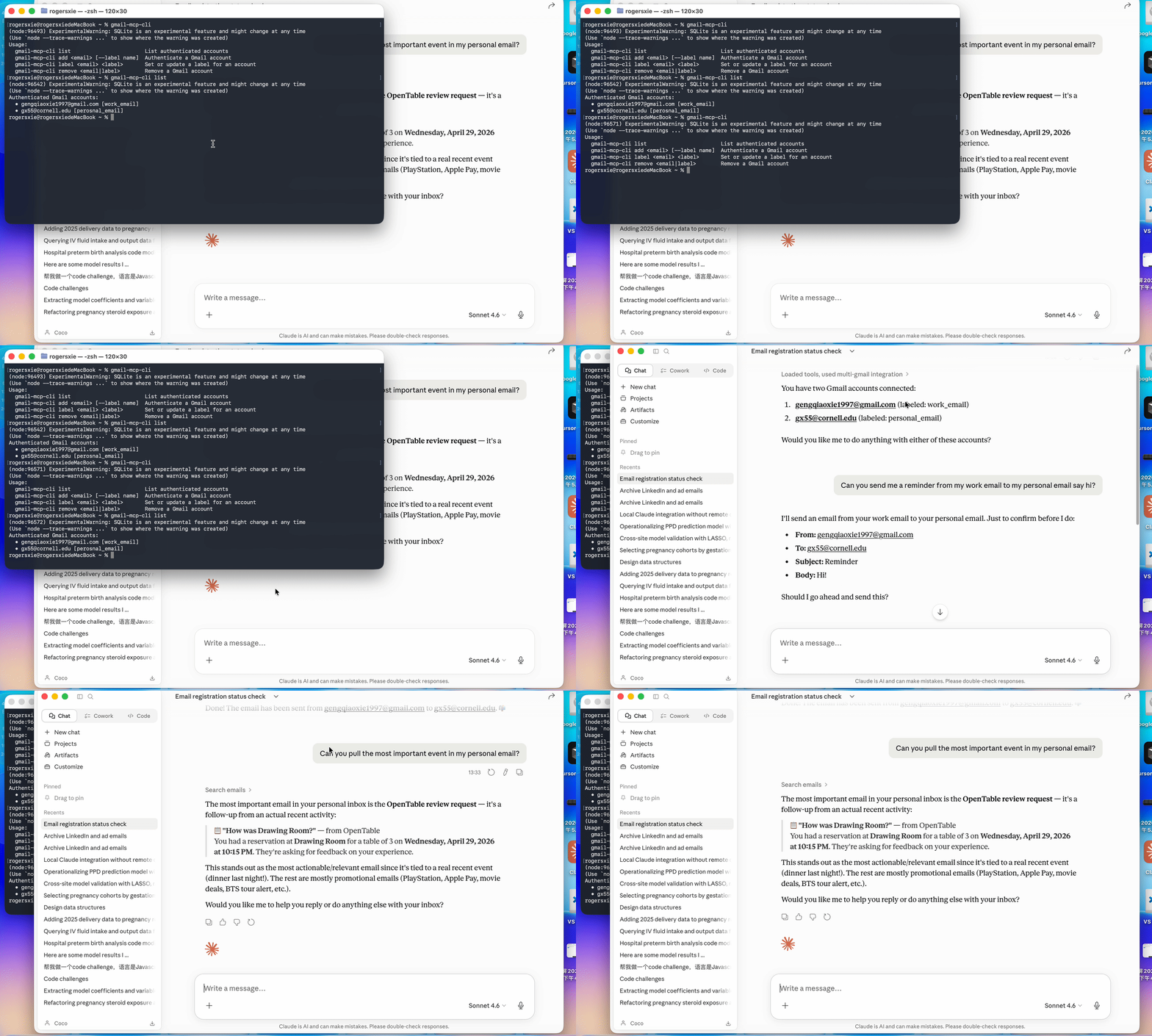
A Model Context Protocol (MCP) server that lets Claude Desktop manage multiple Gmail accounts simultaneously. Listed on the official Anthropic MCP registry and published on npm.
Features
- Connect unlimited Gmail accounts — personal, work, side projects
- Search any inbox using full Gmail search syntax
- Read complete emails with MIME parsing
- Send, reply in thread, and create drafts
- Organize with labels: add, remove, list, archive
- Mark as read / unread
- Tokens stored locally in
~/.gmail-mcp-tokens.db— never committed to git - Auto-refreshes OAuth tokens silently
Requirements
- Node.js >= 22.5.0
- A Google Cloud project with the Gmail API enabled
- Claude Desktop
Installation
npm install -g multi-gmail-mcp
This registers two global commands: gmail-mcp (the MCP server) and gmail-mcp-cli (account manager).
Google Cloud Setup
You only need to do this once.
- Go to console.cloud.google.com → create a project
- Enable the Gmail API (APIs & Services → Library)
- Configure the OAuth consent screen — External, add your Gmail addresses as test users
- Add scopes:
gmail.readonly,gmail.send,gmail.modify,gmail.labels - Create a Desktop app OAuth credential → download the JSON
- Save it to
~/.gmail-mcp-oauth.json
Alternatively, set environment variables in the Claude Desktop config (see below).
Authenticating Gmail Accounts
# Add accounts (opens browser for Google sign-in)
gmail-mcp-cli add [email protected]
gmail-mcp-cli add [email protected]

# List authenticated accounts
gmail-mcp-cli list

# Remove an account
gmail-mcp-cli remove [email protected]
Tokens are saved to ~/.gmail-mcp-tokens.db and refreshed automatically.
Claude Desktop Configuration
Edit ~/Library/Application Support/Claude/claude_desktop_config.json:
{
  "mcpServers": {
    "multi-gmail": {
      "command": "gmail-mcp"
    }
  }
}
If you prefer environment variables over ~/.gmail-mcp-oauth.json:
{
  "mcpServers": {
    "multi-gmail": {
      "command": "gmail-mcp",
      "env": {
        "GOOGLE_CLIENT_ID": "your-client-id.apps.googleusercontent.com",
        "GOOGLE_CLIENT_SECRET": "your-client-secret"
      }
    }
  }
}
Restart Claude Desktop after saving. Click the hammer icon to confirm 19 tools are loaded.
Available Tools
Account Management
| Tool | Description |
|---|---|
list_accounts |
List all authenticated Gmail accounts |
initiate_auth |
Start OAuth flow — returns a URL to open in browser |
complete_auth |
Finalize auth after completing Google sign-in |
remove_account |
Remove an account and its stored credentials |
Reading Email
| Tool | Description |
|---|---|
search_emails |
Search with Gmail syntax (is:unread, from:, after:, etc.) |
get_email |
Fetch full email content by message ID |
Writing Email
| Tool | Description |
|---|---|
send_email |
Send an email (supports To, CC, BCC) |
reply_to_email |
Reply in thread, preserving References headers |
create_draft |
Save an email as a draft |
Organization
| Tool | Description |
|---|---|
list_labels |
List all Gmail labels for an account |
add_label |
Add one or more labels to a message |
remove_label |
Remove one or more labels from a message |
archive_email |
Remove from Inbox |
mark_as_read |
Remove the UNREAD label |
mark_as_unread |
Add the UNREAD label |
Example Prompts
List all my authenticated Gmail accounts.
Search my [email protected] inbox for unread emails from this week.
Reply to that email from my personal account saying I'll be there Saturday.
Send an email from [email protected] to [email protected]
with subject "Dinner plans" and body "Are you free Saturday?"
Archive everything older than a week in my side-project inbox that's already read.
Check both my accounts for emails from GitHub and summarize them.
Security
~/.gmail-mcp-oauth.jsonand~/.gmail-mcp-tokens.dblive in your home directory — outside the project, never committed.gitignoreexcludes*.db,.gmail-mcp-oauth.json, and.env- The server runs over stdio only — no network port is opened
- OAuth scopes are limited to the minimum required
See SECURITY.md for full details: token storage, network behavior, scope rationale, revocation steps, and how to report a vulnerability.
Registry
Listed on the official Anthropic MCP registry:
io.github.gx-55/multi-gmail-mcp
curl "https://registry.modelcontextprotocol.io/v0.1/servers?search=io.github.gx-55"
Project Structure
multi-gmail-mcp/
├── bin/
│   ├── gmail-mcp.js        # Entry point for the MCP server command
│   └── gmail-mcp-cli.js    # Entry point for the CLI command
├── src/
│   ├── server.js           # MCP server — all 19 tools
│   ├── gmail-client.js     # Gmail API wrapper
│   ├── auth.js             # OAuth2 flow with auto-refresh
│   ├── db.js               # SQLite token storage (node:sqlite)
│   └── cli.js              # Account management CLI
└── package.json
Troubleshooting
"No OAuth credentials found"
Make sure ~/.gmail-mcp-oauth.json exists or set GOOGLE_CLIENT_ID / GOOGLE_CLIENT_SECRET in the Claude Desktop config.
"Account not found. Authenticate it first"
Run gmail-mcp-cli add [email protected] before using that account in Claude.
Tools not appearing in Claude Desktop
Confirm gmail-mcp is in your PATH (which gmail-mcp) and restart Claude Desktop.
Token expired errors
Tokens auto-refresh if a valid refresh token is stored. If refresh fails, remove the account and re-authenticate: gmail-mcp-cli remove [email protected] && gmail-mcp-cli add [email protected].
Yorumlar (0)
Yorum birakmak icin giris yap.
Yorum birakSonuc bulunamadi