Blitz
Health Uyari
- No license — Repository has no license file
- Description — Repository has a description
- Active repo — Last push 0 days ago
- Low visibility — Only 8 GitHub stars
Code Basarisiz
- rm -rf — Recursive force deletion command in install.sh
Permissions Gecti
- Permissions — No dangerous permissions requested
Bu listing icin henuz AI raporu yok.
⚡ Ultra-fast, lightweight, offline-first API client & Postman alternative built in Rust. Native MCP server for AI coding agents (Cursor, Claude, Antigravity). Multi-protocol: REST, gRPC, WebSocket, MQTT, SSE.
⚡ Blitz

Lightweight, native Postman alternative built with Rust & Dioxus.
Offline-first, multi-protocol (REST, gRPC, WebSocket, MQTT, SSE, MCP), ~10MB RAM runner, zero cloud lock-in.




Downloads • Interface • Comparison • Features • CLI Runner • Git Sync • License
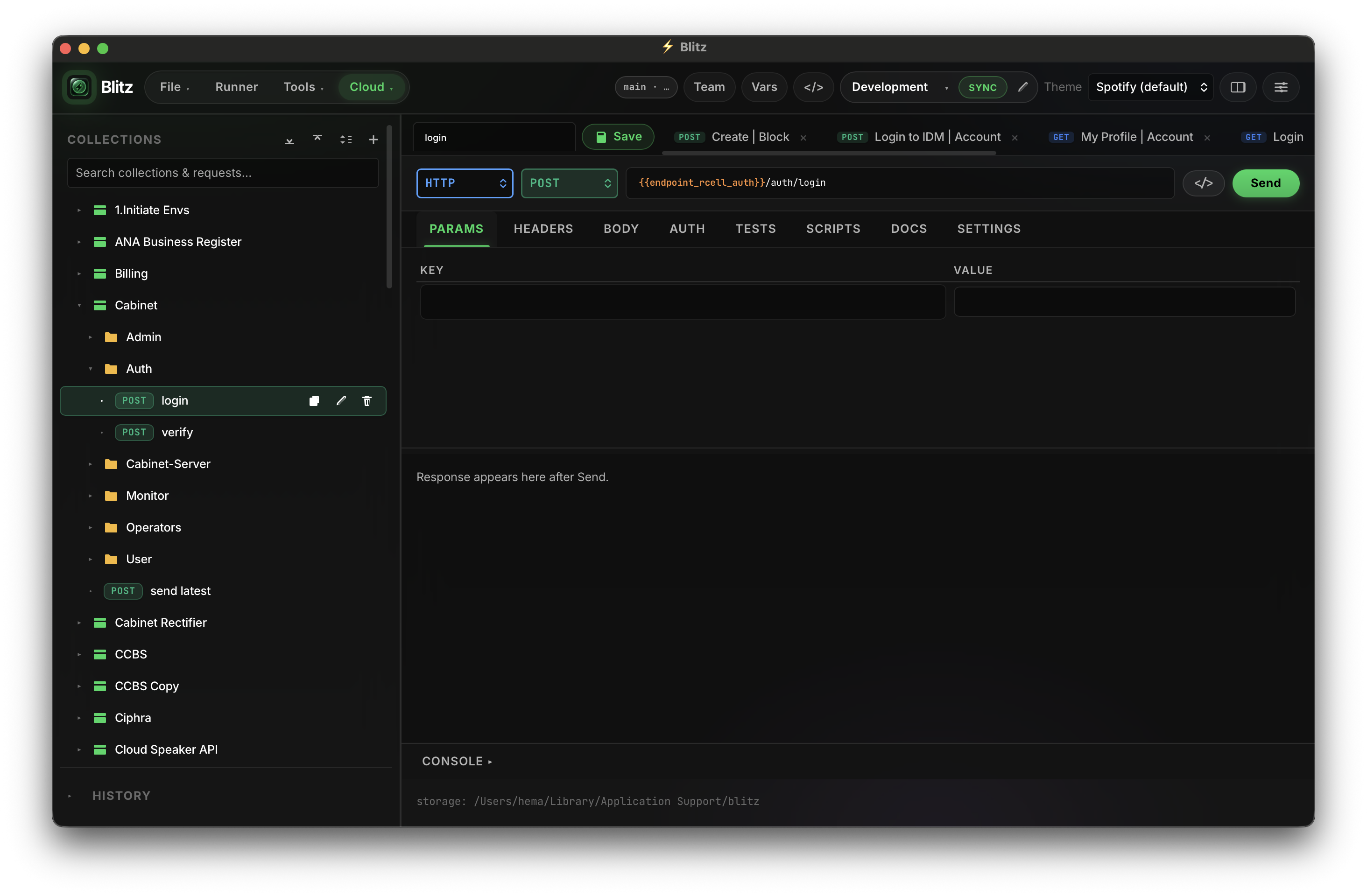
📸 Interface Preview
📦 Downloads & Installation
⚡ 1-Line Quick Install
macOS
curl -fsSL https://raw.githubusercontent.com/h3ma209/Blitz/master/install.sh | bash
Downloads latest DMG, installs to /Applications/Blitz.app, and automatically clears Gatekeeper quarantine.
Linux
curl -fsSL https://raw.githubusercontent.com/h3ma209/Blitz/master/install.sh | bash
Downloads latest binary and installs executable to ~/.local/bin/blitz.
Windows
PowerShell:
irm https://raw.githubusercontent.com/h3ma209/Blitz/master/install.ps1 | iex
Command Prompt (curl):
curl.exe -fsSL https://raw.githubusercontent.com/h3ma209/Blitz/master/install.ps1 -o install.ps1 && powershell -ExecutionPolicy Bypass -File install.ps1
Git Bash / WSL:
curl -fsSL https://raw.githubusercontent.com/h3ma209/Blitz/master/install.sh | bash
Installs to %LOCALAPPDATA%\Blitz\blitz.exe, adds to User PATH, and creates Start Menu shortcut.
Homebrew Tap
brew tap h3ma209/blitz https://github.com/h3ma209/homebrew-blitz
brew install --cask blitz
Direct Downloads
Pre-built binaries for macOS, Linux, and Windows are available directly from the Releases Page.
| Platform | Download | Package / Command |
|---|---|---|
| macOS (Apple Silicon) | Blitz-macos-arm64.dmg | Drag to Applications |
| macOS (Tarball) | blitz-macos-arm64.tar.gz | tar -xzf blitz-macos-arm64.tar.gz |
| Linux (x86_64) | blitz-linux-x86_64.tar.gz | tar -xzf blitz-linux-x86_64.tar.gz |
| Windows (x86_64) | blitz-windows-x86_64.zip | Unzip & run blitz.exe |
| Cargo (Any OS) | Source crate | cargo install --git https://github.com/h3ma209/Blitz.git |
🛡️ First-Launch Security Notice (macOS & Windows)
Because Blitz is an open-source project distributed without paid Apple Developer ($99/yr) or Windows EV enterprise certificates, your operating system may display a security verification warning on first manual launch.
🍎 macOS Fix: "Apple cannot verify that this app is free of malware" or "Blitz is damaged"
Apple Gatekeeper attaches a quarantine attribute to files downloaded via web browsers.
Method 1 — 1-Line Terminal Command (Recommended):
xattr -cr /Applications/Blitz.app
(If installed to user folder ~/Applications/Blitz.app, run xattr -cr ~/Applications/Blitz.app)
Method 2 — GUI Right-Click:
- Open Finder → navigate to Applications.
- Right-click (or
Control-click) on Blitz and select Open. - Click Open in the confirmation prompt (macOS will remember this permanently).
Method 3 — System Settings:
Open System Settings → Privacy & Security, scroll down to the Security section, and click Open Anyway.
🪟 Windows Fix: "Windows protected your PC (SmartScreen)"
Microsoft Defender SmartScreen flags newly downloaded open-source executables.
Method 1 — GUI:
- On the "Windows protected your PC" popup, click More info.
- Click Run anyway.
Method 2 — PowerShell (Instant Unblock):
Unblock-File "$env:LOCALAPPDATA\Blitz\blitz.exe"
(Or if downloaded zip: Unblock-File .\blitz-windows-x86_64.zip before unzipping)
🐧 Linux: "Permission denied"
Ensure the binary has executable permissions:
chmod +x ~/.local/bin/blitz
⚡ Comparison
| Feature | Postman | Bruno | Yaak | ⚡ Blitz |
|---|---|---|---|---|
| Language / Architecture | Electron + Node | Electron + Node | Tauri + React | Pure Rust + Dioxus |
| Cold Start Latency | ~3,500 ms | ~1,200 ms | ~450 ms | < 150 ms |
| CLI Runner Footprint | ~800 MB RSS | ~120 MB RSS | N/A | ~10.2 MB RSS |
| Account Mandatory | Yes (forced cloud) | No | No | No (100% offline) |
| Team Collaboration | Cloud servers ($19+/user) | Git (.bru format) | Git / Sync | Git-native (any remote) |
| Secret Storage | Cloud / Local | Plaintext env | SQLite | OS Keychain (Encrypted) |
| Built-in Mock Server | Cloud hosted only | No | No | Localhost 127.0.0.1 |
| Traffic Proxy Capture | Cloud proxy | No | No | Local HTTP/HTTPS Proxy |
| License | Proprietary | MIT | Fair-Core / Commercial | MIT / Apache-2.0 |
Why Blitz?
Most modern API clients have become bloated, memory-heavy cloud platforms that gate basic workflows behind subscriptions and force private endpoints onto remote servers.
Blitz is built from the ground up to be fast, private, and developer-friendly:
- Ultra-lightweight: Cold starts in ~120ms with a headless CLI runner that sits at ~10 MB RAM and a desktop GUI that uses native OS WebViews (no bundled Chromium or multi-process Electron bloat).
- Offline-First & Local: Collections, environments, and mocks live as transparent JSON files directly in your repository.
- Zero Cloud Lock-in: No forced logins, accounts, or telemetry. Your endpoints and tokens never leave your machine.
- Git-Native Team Sync: Collaborate with your team using standard Git workflows (
git pull/git push) instead of per-seat cloud subscriptions.
Key Features
🔌 Multi-Protocol Support
Interact with any modern API standard in one place:
- REST / HTTP: Query parameters, headers, GraphQL, form-data, multipart uploads.
- WebSockets: Interactive bidirectional streaming and frame inspection.
- gRPC: Unary calls and streaming with Protobuf schema reflection and decoding.
- MQTT: Real-time publish and subscribe to IoT brokers.
- SSE (Server-Sent Events): Live streaming event reader.
- Socket.IO: Native engine handshake and event listener.
- MCP (Model Context Protocol): Direct connection to AI agent tooling and context servers.
📑 Comprehensive Collection Workspace
Manage complex API suites with dedicated tabs:
- Overview: Collection documentation, structure preview, and real-time statistics.
- Authorization: Inherited authentication (Bearer, Basic, API Key, OAuth2) applied across child requests.
- Pre-request & Test Scripts: Collection-wide scripting for setup, teardown, and validation.
- Variables: Environment and collection variable scope resolution.
- Runner: Batch test execution with iteration controls, delays, and pass/fail diagnostics.
🧪 Postman-Compatible JavaScript Testing
Write familiar assertions and workflows locally without remote runtime limits:
blitz.test()andblitz.expect()assertion suites.blitz.sendRequest()for chained requests and token pre-fetching.- Built-in
CryptoJSlibrary (SHA256,HmacSHA256,MD5, Base64, Hex). - Dynamic variables (
{{$guid}},{{$timestamp}},{{var}}).
🔐 Secure Credential Storage
Protect sensitive environment secrets and tokens:
- Native OS Keychain integration (macOS Keychain, Linux Secret Service, Windows Credential Manager).
- Secrets stay encrypted locally and are automatically stripped before committing to Git remotes.
🔄 Seamless Migration & Local Mocks
- Postman: Import and export Postman v2.1 collections with full script fidelity.
- OpenAPI: Import and export OpenAPI 3.0 specifications.
- cURL & HAR: Paste raw terminal cURL commands or drop browser HAR files directly into the workbench.
- Local Mock Server: Instant zero-config HTTP mocks on
127.0.0.1served from your saved examples.
Quick Start
Prerequisites
- Rust Toolchain (1.83+)
- macOS, Linux, or Windows
Build and Run from Source
# Clone repository
git clone https://github.com/h3ma209/Blitz.git
cd Blitz

# Run debug build
cargo run

# Or run optimized release build
cargo run --release
Install as Native Desktop App
make install
| Operating System | Default Install Destination | Uninstall |
|---|---|---|
| macOS | ~/Applications/Blitz.app |
make uninstall |
| Linux | ~/.local/share/blitz/ + ~/.local/bin/blitz |
make uninstall |
| Windows | %LOCALAPPDATA%\Blitz\ |
powershell -File scripts/install.ps1 -Uninstall |
CI/CD Automation & AI Agent Integration
Headless CLI Runner
Run test collections headless in your CI/CD pipelines without cloud subscriptions or proprietary API keys:
# Execute collection headless (returns exit code 0 on pass, 1 on failure)
blitz run collection.json --env staging.json
🤖 AI Agent Integration via MCP (Cursor, Claude, Antigravity, Windsurf, VS Code, Zed)
Blitz includes a built-in Model Context Protocol (MCP) server (blitz mcp), allowing AI coding assistants and autonomous agents to list collections, inspect request schemas, execute endpoints, and run API test suites directly through Blitz.
Automatic IDE & Agent Setup:
Blitz can automatically scan your machine for installed IDEs and AI coding agents, and configure the MCP server for you:
# Scan and interactively select which IDEs/agents to configure:
blitz mcp setup

# Or configure all detected IDEs automatically without prompting:
blitz mcp setup --all

# Or target a specific IDE:
blitz mcp setup --target cursor
blitz mcp setup --target claude_desktop
blitz mcp setup --target vscode
blitz mcp setup --target zed

# Scan only (preview detected tools without modifying configs):
blitz mcp setup --scan
Supported IDEs and coding agents detected out of the box:
- Cursor (
~/.cursor/mcp.json) - Claude Desktop (
claude_desktop_config.json) - Antigravity / Gemini CLI (
~/.gemini/antigravity/mcp_config.json) - Windsurf (
~/.codeium/windsurf/mcp_config.json) - VS Code (
~/Library/Application Support/Code/User/mcp.json) - Cline extension for VS Code (
cline_mcp_settings.json) - Roo Code extension for VS Code (
cline_mcp_settings.json) - Zed (
settings.jsoncontext_servers) - Claude Code CLI (
~/.claude.json)
Manual Configuration:
If you prefer manual setup, add Blitz to your IDE's mcpServers configuration:
{
  "mcpServers": {
    "blitz": {
      "command": "/Applications/Blitz.app/Contents/MacOS/Blitz",
      "args": ["mcp"]
    }
  }
}
Exposed MCP Tools:
blitz_list_collections: Discover all collections, folders, and requests with folder breadcrumb paths (path,folder).blitz_get_request: Retrieve full request details (URL, headers, query params, body, auth).blitz_send_request: Execute a saved request through Blitz pipeline (returns parsedjson, supportssave_to_envauto-extraction, records history).blitz_execute_http: Run an ad-hoc HTTP request through Blitz engine (returns parsedjson, supportssave_to_envauto-extraction, records history).blitz_list_environments: List available environments, active state, and variable keys/values.blitz_set_env_var: Update or create an environment variable (e.g. auth token or baseUrl) directly from agent output.blitz_set_active_environment: Switch or clear the active environment.blitz_upsert_request: Create or edit request drafts in collections and folders.blitz_import_curl: Import raw cURL commands directly into collections.blitz_generate_code: Generate client code snippets (cURL,Python,TypeScript,Rust,Go,Java,C#) with variable interpolation.blitz_list_history: Query past request executions with status, latency, and timestamps.blitz_run_collection: Run a complete collection test suite (supportsfolderscoping) and return assertion results.blitz_suggest_assertions: Automatically generate test scripts & assertions (status, JSON path, headers, latency ceiling) from an HTTP response or request, with optional auto-attachment.blitz_perf_test: Run concurrent load/benchmark testing against any request or collection (concurrency VUs, duration) and get RPS throughput, error rate, and p50/min/max latencies.
Exposed MCP Resources:
blitz://collections: Hierarchy of all collections, folders, and requests.blitz://environments: Configured environments and variables.blitz://active-env: Currently active environment with resolved key-value pairs.blitz://history: Recent execution history.
Team Collaboration via Git
Sync team workspaces directly through Git without cloud intermediaries:
- Link Git Remote: In the top toolbar, select Team → Link Git Remote…
- Work Locally: Add endpoints, edit environments, and write tests.
- Sync: Click Sync — Blitz pulls changes, handles merges, and pushes through standard Git (SSH or
ghCLI). - Leak Prevention: Passwords, tokens, and local secret variables are kept local and excluded from commits.
License
Distributed under the MIT / Apache 2.0 open-source licenses. Not affiliated with or endorsed by Postman Inc.
Yorumlar (0)
Yorum birakmak icin giris yap.
Yorum birakSonuc bulunamadi