bageo-call
Health Pass
- License — License: NOASSERTION
- Description — Repository has a description
- Active repo — Last push 0 days ago
- Community trust — 10 GitHub stars
Code Fail
- rm -rf — Recursive force deletion command in android/magisk/pixelcallai_uplink/apply_mode.sh
- rm -rf — Recursive force deletion command in android/magisk/pixelcallai_uplink/mode_daemon.sh
- rm -rf — Recursive force deletion command in android/magisk/pixelcallai_uplink/service.sh
- rm -rf — Recursive force deletion command in android/scripts/package-uplink-module.sh
Permissions Pass
- Permissions — No dangerous permissions requested
No AI report is available for this listing yet.
AI phone assistant for your real phone number: Gemini Live answers and makes calls through a spare rooted Android phone (Pixel) with your own SIM. Call screening, spam/scam call stalling, transcripts, summaries. Self-hosted, open source. 八哥 AI 接電話/代打電話
AI phone assistant for your real phone number: Gemini Live answers and makes your calls.
Self-hosted and open source. A spare rooted Android phone with your SIM, one program on your computer, your own Gemini key.



 Answers your calls Picks up after one ring, talks like a person and waits for the caller to say goodbye. |
 Stalls scammers Spots sales and scam calls, then plays a slow, curious customer for up to 30 minutes. |
 Runs your errands Write one line and it makes the call for you. When unsure, it asks you first. |
 Speaks nine languages English, Chinese, Japanese, Korean, Spanish, French, German and Portuguese. It switches when the caller does. |
The name comes from bāgē (八哥), the crested myna, a bird that learns to talk like the people it lives with.
Try it: guess what Bageo says
Open a call, then click through it line by line. Scripted examples, not real call recordings.
Package delivery — A package arrives while you’re busy.What does Bageo say?Caller: Your package is here.
And then?Bageo: Hi, I’m an AI assistant answering this phone. Does it need a signature in person?
Caller: Yes. We can deliver again before five this afternoon.
Bageo: I’ll pass that on and ask the recipient to confirm a time.
What you get: Signature needed; another delivery is possible before 5 pm. You confirm the time.
Sales pitch — A “special offer” is calling.Does Bageo hang up?Caller: You’re approved for a low-interest loan today!
Does Bageo hand them over?Bageo: Is that a monthly interest rate or an annual one?
Caller: First, give me your personal details.
Bageo: How do you calculate the fees? How much is the monthly payment?
What you get: No personal details shared, and the questions keep coming. Bageo can keep a caller like this busy for up to 30 minutes.
Book a table — One instruction. One less call.How does Bageo open?You: Book four seats tomorrow at 7 pm. 7:30 is fine too.
Does Bageo accept?Bageo: Hello, I’m an AI assistant calling to book a table for four tomorrow at seven.
Restaurant: Seven is full. We have a table at seven thirty.
Bageo: Seven thirty works. Please book it for four, thank you.
Restaurant: Confirmed: tomorrow at seven thirty, four people.
What you get: Tomorrow, 7:30 pm, four people, within what you allowed. Anything outside your instructions, Bageo asks you first.
A scammer calls. Bageo keeps them talking.
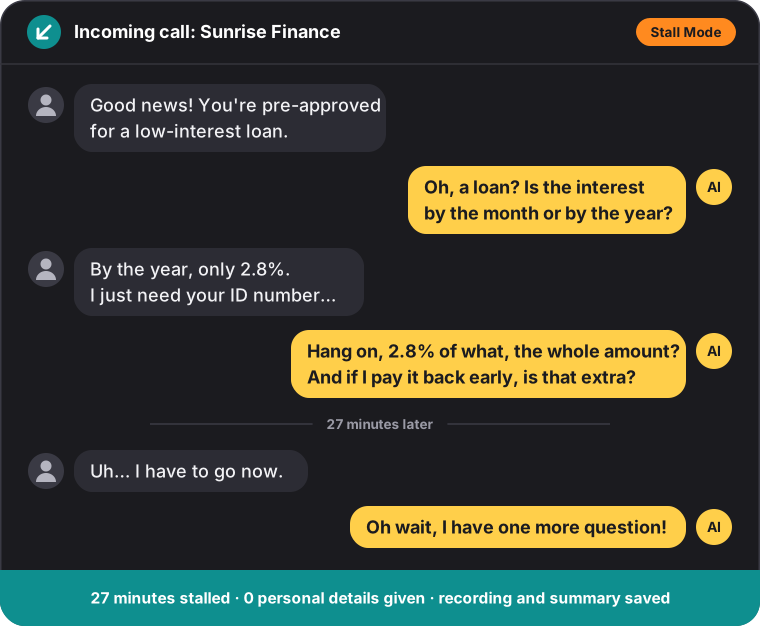
Once a call is clearly sales or a scam, the AI turns into an interested, slow, easily distracted customer. It asks about every detail, mishears the numbers and never gives out a real one, for up to 30 minutes, and you get the recording, the transcript and a short summary. Honest calls are left alone: a bank checking a card charge, a clinic, a courier, family. Stall Mode is on by default and one switch turns it off. How the screening works
Don't feel like calling? Write one line.
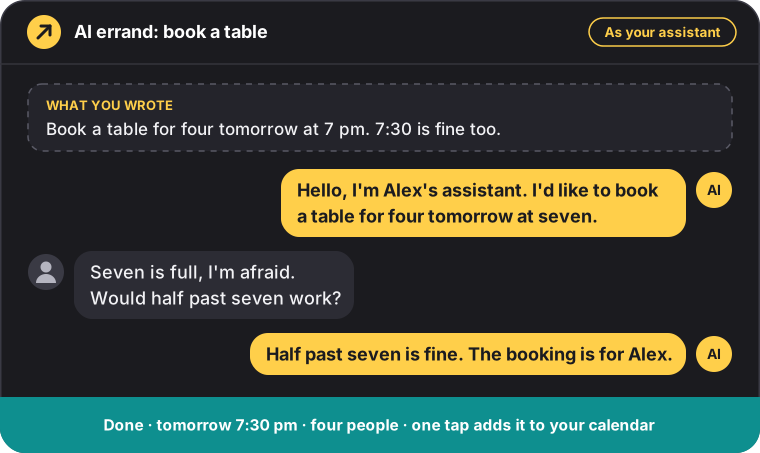
Book a table, move an appointment, ask a shop about stock or opening hours. When the other side raises something you did not cover, the AI asks you on screen before it answers. It never agrees to anything on its own: if you do not reply in time, it says you will confirm and ends the call politely. More about AI errands
A caller from abroad? Bageo speaks nine languages.
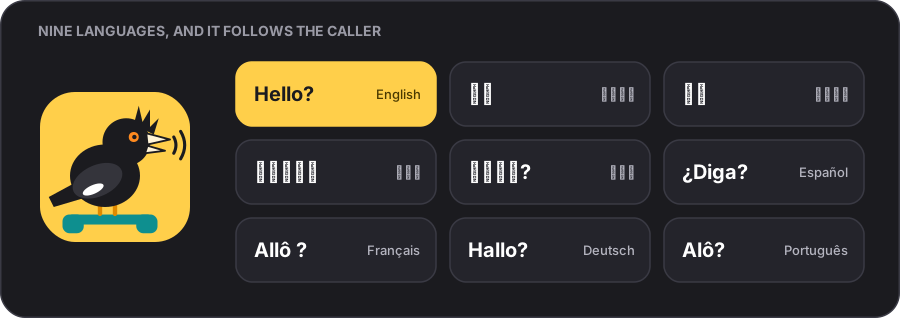
The AI's voice, the built-in prompts, the web console, the phone app and the notifications all come in nine languages. On a dual-SIM phone each SIM opens calls in its own language, a caller from abroad hears their country's language, and when a caller switches language mid-call, the AI follows. Transcripts keep the original words, each line with a translation into your notification language. More about languages and dual SIM
How it works
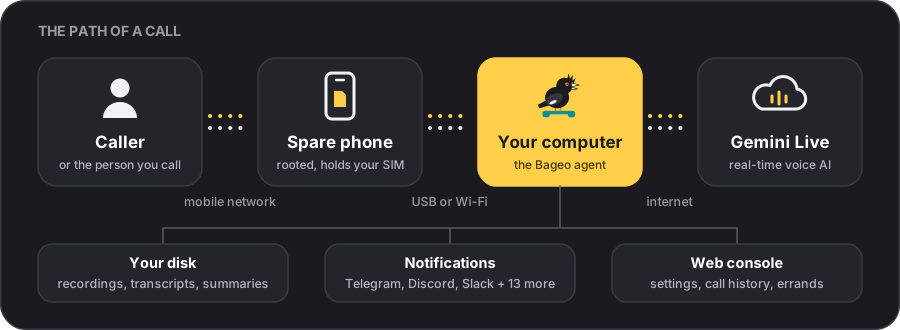
The phone only carries the call; everything else runs on your own computer. The AI connects while the phone is still ringing, so its first word comes about 0.43 s after pick-up (measured median). One call, step by step: Architecture.
Why Bageo
| AI phone services on SIP trunks or virtual numbers | Bageo | |
|---|---|---|
| Number | A number from the service, or your calls forwarded to it | The number you already have. Outgoing calls show it too. |
| Cost | A subscription or a per-minute rate | No platform fee. You pay Google for Gemini usage and your carrier for the SIM. |
| Your data | On the service's servers | Plain files in a data/ folder on your own disk |
| The catch | Sign up and go | You need a spare rooted Android phone and a computer that stays on |
And there is more
 Appointments wait for you With Appointments on, a caller who wants to set a time lands on your to-do list. You accept or decline; the AI texts or calls them back. |
 Knows who is calling Import contacts from vCard, CSV, Excel, Word, PDF or a photo of a business card. |
 One switch back to a normal phone Turn the spare phone into an ordinary phone and back again, from the console or the app. |
 Sounds like a real call Optional background sound: home, office, street, night market and eight more. |
 32 notification channels A summary after every call, on Telegram, Discord, Slack, LINE, ntfy, Gmail and more. |
 Your data stays yours Recordings and transcripts are plain files on your own disk. No account with us. |
Every feature in detail: Features.
What you need
- A spare Android phone with your SIM, rooted with Magisk or KernelSU, Android 10 or newer. Tested: Google Pixel 7, 7a, 8 and 9.
- A computer that is on while calls should be answered: Windows 10/11, macOS, Linux or Docker.
- A USB cable (Wi-Fi works too).
- A Gemini API key from Google AI Studio. Google bills per use.
Quick start
- Download the package for your system from Releases and unpack it.
- Start it. Windows: double-click
start.cmd. macOS: double-clickstart.command. Linux:./start.sh. The console opens at http://localhost:8787/. - Fill in the basics under Settings: your Gemini API key, your name and the language. Press ▶ to hear the voices and pick one.
- Prepare the phone once: install
pixelcallai_uplink-<version>.zipas a module in Magisk or KernelSU, reboot, open the Bageo app, work through its checklist and plug the phone in. - Call it from another phone: one ring, and the AI answers.
Stuck? Every step in detail: Getting started · Phone setup.
Documentation
Test status: more than 520 automated tests in CI, 234 simulated calls in 28 languages, and real calls on Pixel 7, 7a and 9. Details. Reports from other phones and languages help the most: CONTRIBUTING.md.
FAQ
Can an AI answer calls on my existing phone number?Yes, that is what Bageo is for. Put your SIM in a spare rooted Android phone
and the AI answers calls to your number and places calls from it. To keep
your SIM in your main phone, forward unanswered calls to the spare phone's
number instead: your phone rings first and missed calls go to the AI (errands
and call-backs then show the spare phone's number).
No. Android lets only privileged system apps record a call and play sound into
it, so the phone needs Magisk or KernelSU to install the Bageo module. iOS does
not allow it at all.
Google Pixel 7, 7a, 8 and 9 are tested, on Android 10 or newer. Other rooted
phones work only if their audio hardware layer lets an app record the call and
play into it; otherwise the call is answered but one side hears nothing. See
Which phones.
Bageo is free for personal and open-source use under AGPL-3.0-only (closed-source or commercial hosted operators need a Commercial License). Google bills the Gemini Live audio per use for
every call the AI handles, incoming or outgoing; summaries are small text
requests to Gemini's lowest-cost model. Voice previews and the blocked-number
announcement are prerecorded and cost nothing. Add your phone plan and the
electricity for the computer, and set a budget in your Google account if you
want a ceiling.
It depends on where you and the other side are. Call recording, AI disclosure
and automated outgoing calls all have their own rules. The AI assistant
style says it is an AI in its first sentence; As me says so when sincerely
asked. Read Privacy, safety and the law before
you switch it on.
No. The live voice is Gemini Live, which needs an internet connection and a
Gemini key. Summaries can run on a local model through Ollama (see
Summary & calendar); a fully local
voice stack is not part of the supported setup (Roadmap).
Use it responsibly
- Laws differ. Recording calls, and letting an AI talk to people without
telling them, is restricted in many places. The AI assistant answer style
says it is an AI up front; errands made as Your assistant introduce the
AI as your assistant; every call admits to being an AI when sincerely asked. Find
out what applies where you and the other side are. - The AI makes no commitments. It never agrees to payments, deposits,
contracts, passwords or codes, and appointments wait for your decision. It
is still an AI: read the summaries and results. - Do not rely on it for emergencies. Errands never dial emergency numbers.
- Rooting voids warranties and can go wrong. Use a spare phone.
License & Legal Disclaimer
Dual-licensed by h4lo-void:
- Open-Source Community License: GNU Affero General Public License v3.0 only (
AGPL-3.0-only) — free for personal, academic, and open-source use. Modifying Bageo and letting others interact with it over a network or phone line requires releasing the complete corresponding source code underAGPL-3.0-only. - Obtain a Commercial License: Operators, enterprises, SaaS/call-center providers, or hardware vendors who wish to deploy, embed, or host Bageo without
AGPL-3.0-onlysource-code disclosure can purchase a separate written proprietary license — see Commercial License Terms.
Legal responsibility: Bageo is self-hosted software provided strictly "AS IS" without warranty. You alone are the operator and data controller of your installation and bear full legal responsibility for call recording, AI disclosure, dialing, hardware rooting, and carrier/API charges. Read LEGAL.md, Privacy, safety and the law, and the gemini-4-carbon Project Audit Report before use. Third-party notices are in NOTICE.md. Not affiliated with Google LLC; Pixel, Android, and Gemini are trademarks of Google LLC.
Reviews (0)
Sign in to leave a review.
Leave a reviewNo results found