kavranta
Health Warn
- License — License: MIT
- Description — Repository has a description
- Active repo — Last push 0 days ago
- Low visibility — Only 5 GitHub stars
Code Pass
- Code scan — Scanned 12 files during light audit, no dangerous patterns found
Permissions Pass
- Permissions — No dangerous permissions requested
No AI report is available for this listing yet.
Kavranta manages project environment variables locally while keeping protected values out of supported AI-agent workflows.
Kavranta
One place for every .env file your project already uses.
Edit, link, share, and deploy environment variables—without changing your runtime or pasting protected values into AI chat.




Kavranta was previously published as Env Manager. Existing app data and the
technicalenv-managerplugin, broker, and manifest identifiers are retained for
backward compatibility.
Kavranta is a local-first desktop app. Register a project and it discovers the real .env, .env.local, .env.development, runtime.env, Wrangler .dev.vars, and nested app env files already used by that project. Environment values stay in those files. Reusable sign-in details are optional and stay in the operating system's secure store—Kavranta does not require a hosted vault or a new runtime command.
Why use it?
| Keep your current workflow | Update linked values once | Work with AI more safely |
|---|---|---|
| Your existing files and commands remain authoritative. Kavranta preserves paths, comments, ordering, and unrelated formatting. | Explicitly link the same key across two, three, or more files. Edit from any member and save every linked occurrence together. | Codex, Claude Code, Copilot, and Cursor can inspect structure and perform approved operations through a redacted local broker. Protected values stay out of normal inspection responses. |
| Share without committing env files | Deploy only what you select | Catch Git mistakes early |
| Export all or selected variables as a passphrase-encrypted package, or publish immutable packages through a mounted team folder. | Send selected values to GitHub Actions, Cloudflare Workers, Expo EAS, AWS, or a locally installed CLI Pack without creating a temporary env file. | Detect missing ignore rules, already tracked env files, historical paths, and suspicious public frontend variable names. |
| Finish incomplete setup faster | Keep reusable accounts out of project files | Grant access per project |
| Filter an env file to only variables that still need a value, with the remaining count visible at a glance. | Store optional usernames and passwords in Apple Keychain or Windows Credential Manager instead of .env, Git, or Kavranta's local metadata. |
New accounts start blocked. Explicitly allow or revoke each project; a grant never lets an AI agent run a login on its own. |
Available on main
- Missing-values filter: show only variables without a value in the current env file, including a live remaining count and a clear empty state.
- Project-scoped local accounts: save reusable sign-in details in Apple Keychain on macOS or Windows Credential Manager, then explicitly choose which registered projects may use each account.
- Safe local handling: Kavranta stores only labels, timestamps, and project grants in local app metadata. Account fields can be copied only from an allowed project and the clipboard is cleared after 45 seconds if it has not changed.
- No autonomous AI login: account CRUD, secret reads, and login execution are not exposed through the AI Broker. A project grant marks eligibility only; a future login action must still require a separate, explicit user action.
New in 0.7.1
- Kavranta identity: the application, installers, release metadata, documentation,
screenshots, and agent-integration display name now use Kavranta. - Upgrade continuity: existing project manifests, local app data, Broker commands,
andenv-managerplugin selectors keep their stable technical identifiers.
New in 0.7.0
- Action Packs: run a narrowly declared local CLI or fixed HTTPS check with one managed value. Values stay out of the UI, AI conversation, command arguments, logs, and response bodies.
- Opaque generated values: let an agent request a five-minute, single-use write plan, then pipe output from
opensslor another trusted local generator directly into the Broker without exposing the generated value. - Broader env discovery and quieter maintenance: Wrangler
.dev.vars*files now receive the same discovery, Git-safety, and direct-access guard coverage as.env*; app and installed AI integration updates are checked quietly and surfaced only when action is available.
New in 0.6.5
- Expo EAS deployment: send selected values to
development,preview, andproductionthrough the EAS CLI hidden-value prompt. Values never enter command arguments, temporary files, or Kavranta output. - Project-aware checks: Kavranta detects the nearest EAS project, confirms the signed-in Expo account and project identity, and applies
SensitiveorPlain textvisibility per variable. - AI-safe EAS operations: Codex, Claude Code, Copilot, and Cursor use the same redacted Broker plan and activity trail as the desktop app.
New in 0.6.4
- Trusted macOS installation: Apple Silicon and Intel DMGs are Developer ID signed, and their notarized, stapled apps are verified by the release pipeline before publication.
New in 0.6.2
- Folder Team Channels: use a mounted NAS or existing sync folder to exchange immutable encrypted packages, then review conflicts before applying.
- AWS deployment: push to Secrets Manager or SSM
SecureString, choose an optional KMS key, and compare selected values with redactedsame/different/unsetresults. - Remote Runtime checks: compare a managed file with an allowlisted server target through an age-encrypted SSH verifier; the UI receives equality states, never remote values or hashes.
- Personal Provider Packs: add a locally trusted stdin-only CLI integration without waiting for a Kavranta app release.
- AI provider operations: supported agents can use the same opaque provider engine and value-free activity log as the desktop app.
- Cross-project reuse: copy a protected same-name value between registered projects inside Rust without returning it to the agent or normal UI projection.
See the workflow
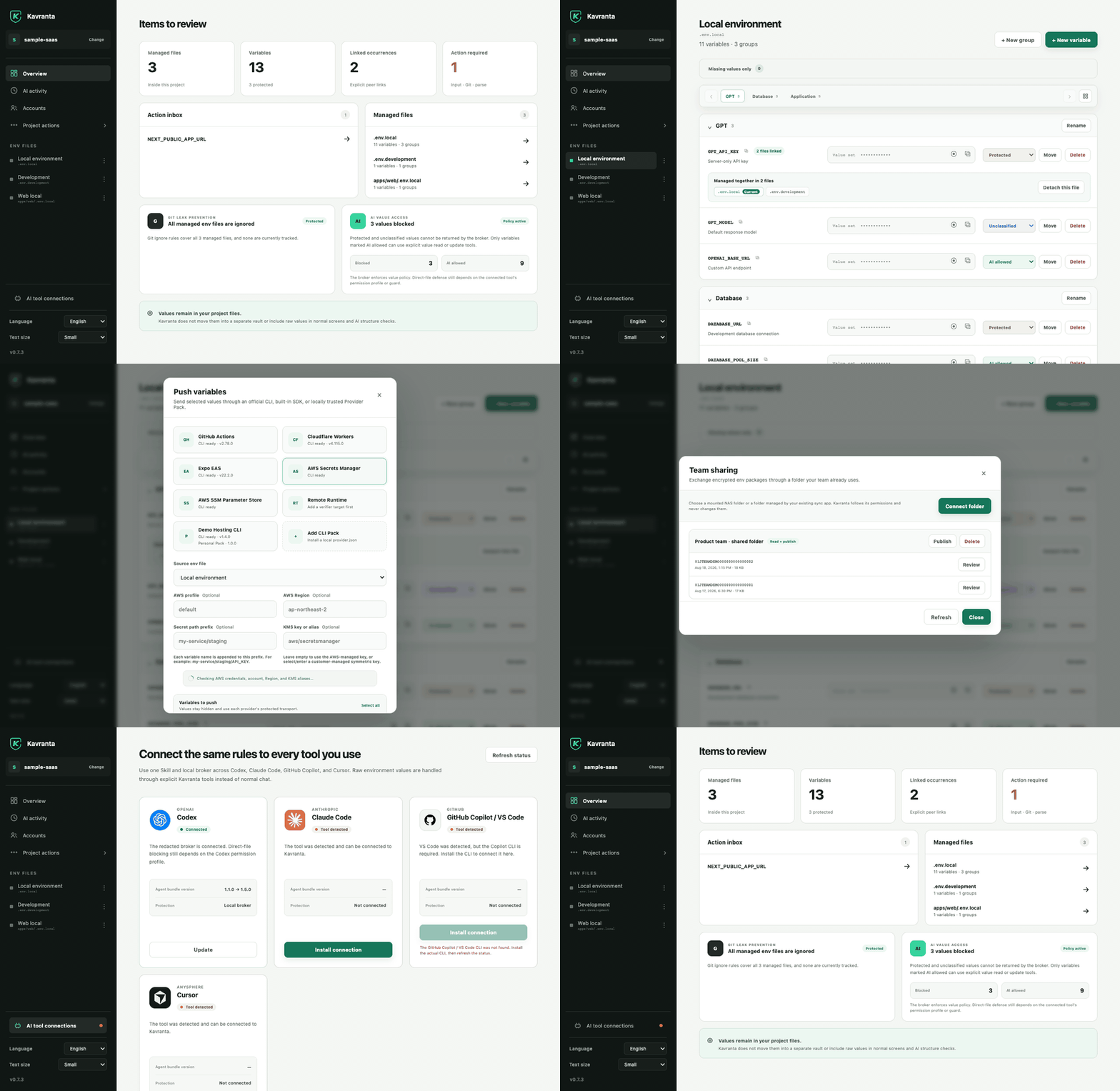
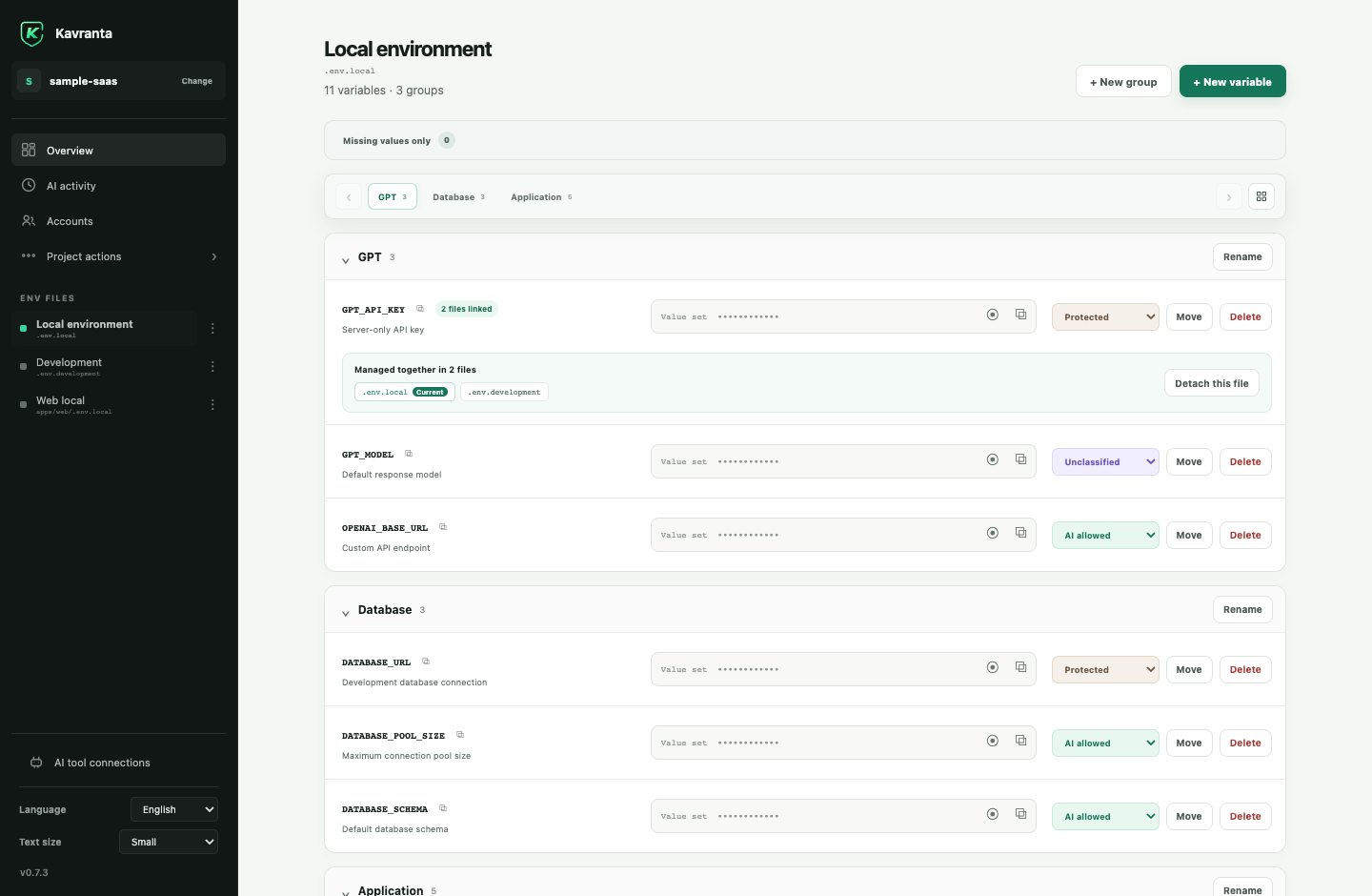
Organize real env files, not copies
Projects and files can have local display names while their physical paths remain visible and unchanged. Values are masked by default; variable names can be copied, groups can be jumped to quickly, and linked rows show every file affected by Save.
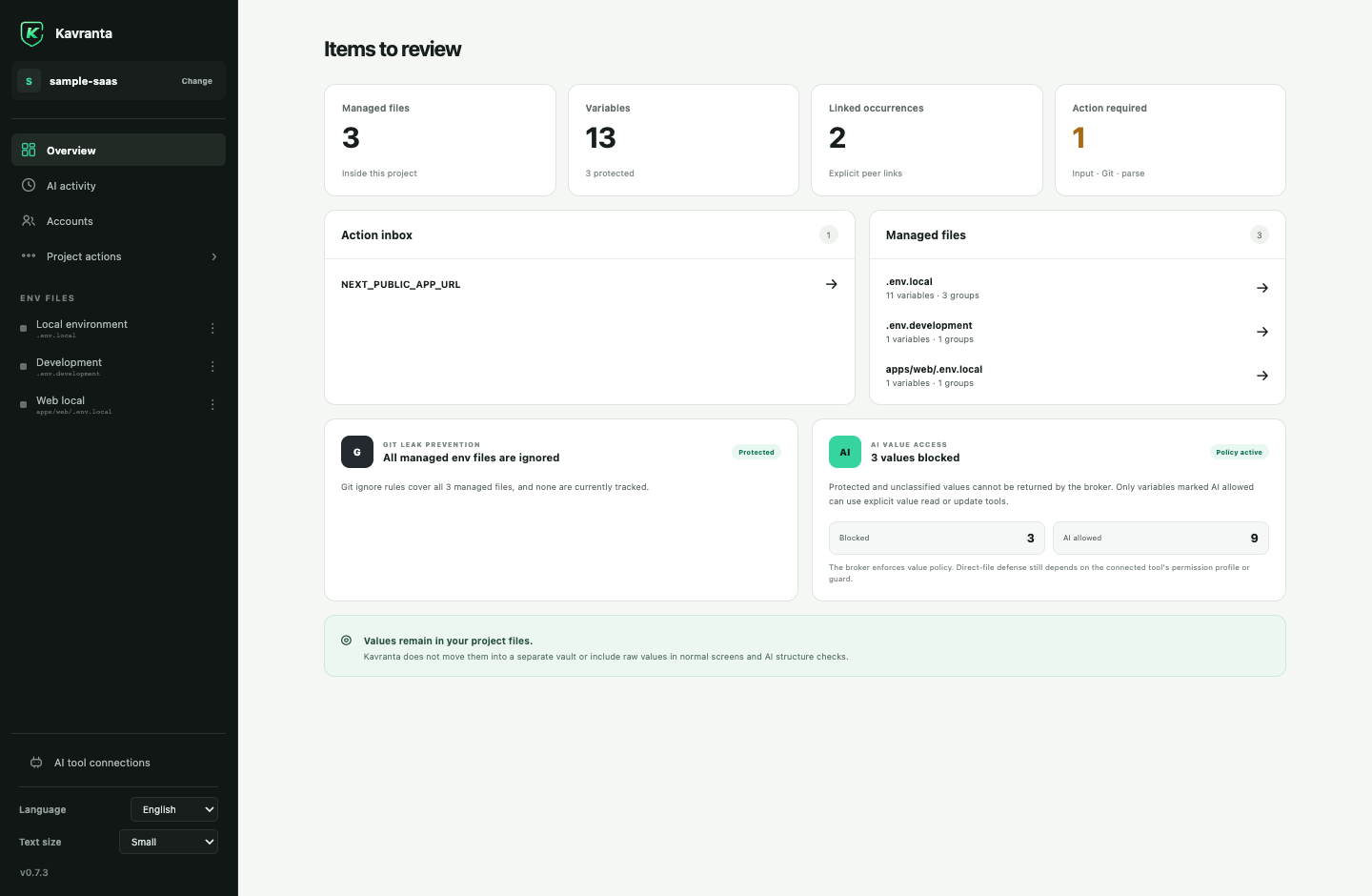
Know what needs attention
The project overview combines missing values, actionable AI-access reviews, parse warnings, Git leak checks, and managed-file navigation without reading values for those checks. Inside a file, turn on Missing values only to focus on unfinished setup.
Reuse an account without putting it in .env
The optional Accounts screen stores usernames and passwords in Apple Keychain or Windows Credential Manager. Kavranta keeps only non-secret labels and project grants in its local app data. Every new account is blocked from all projects until you explicitly allow one.
An allowed project may copy a field on your direct desktop action; Kavranta clears an unchanged clipboard after 45 seconds. Project access does not authorize an AI agent to retrieve credentials or run a login test, and this feature is not browser autofill, cloud sync, or a replacement for an organization password manager.
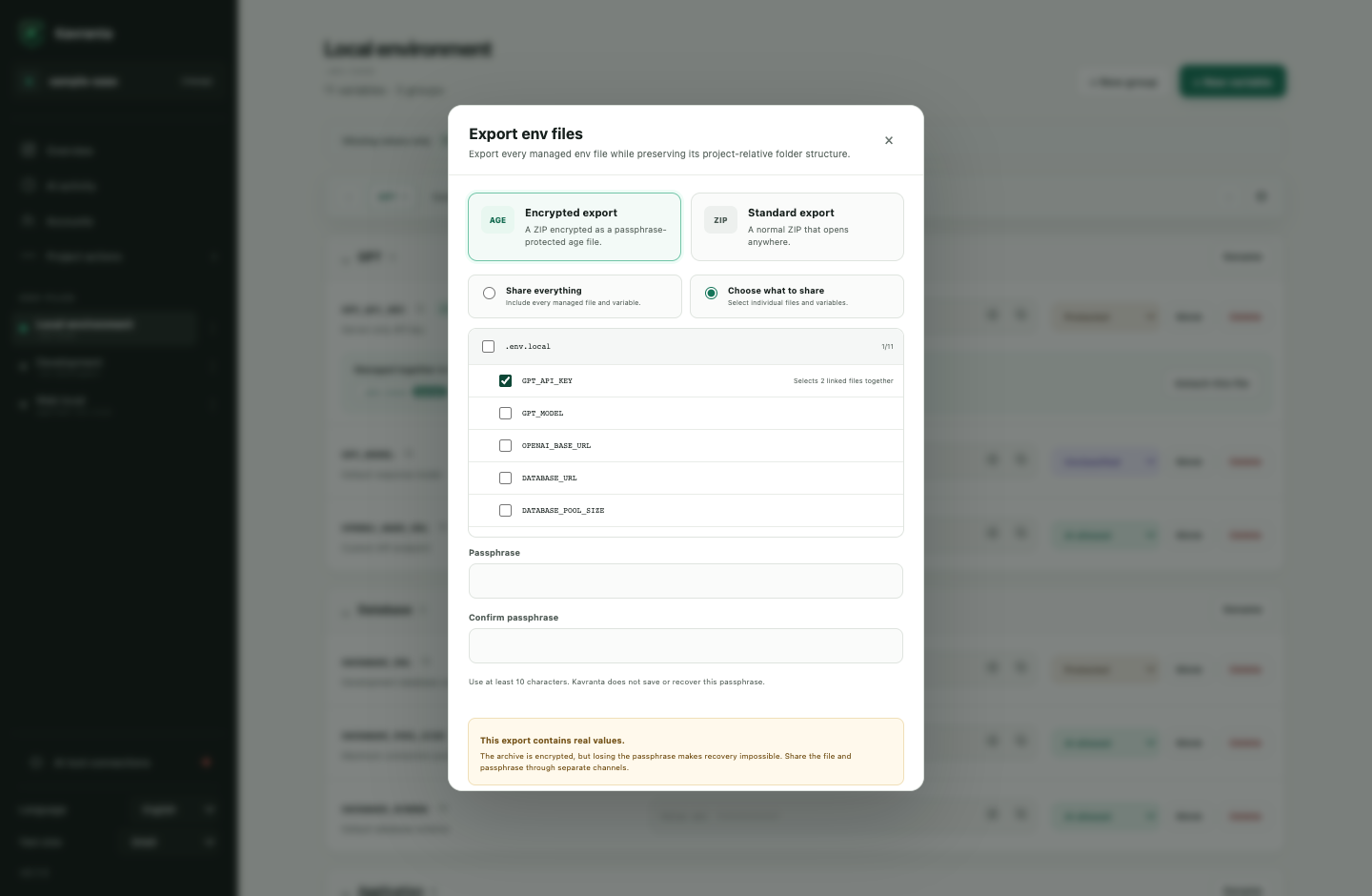
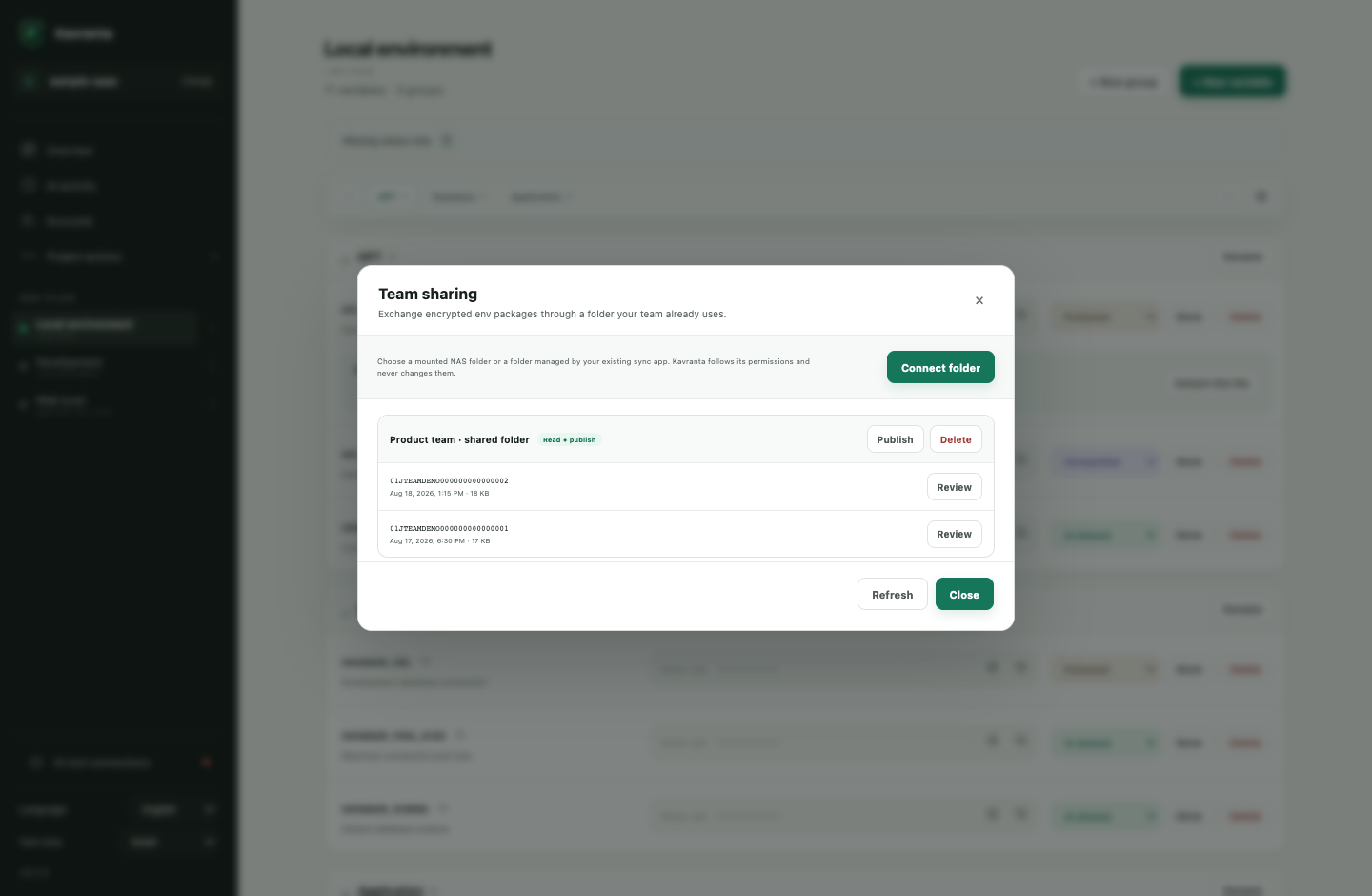
Share the whole setup—or only the part a teammate needs
| Select files and variables Linked occurrences are selected together. Encrypted export never writes an intermediate plaintext ZIP. |
Use a folder your team already has A mounted NAS or sync folder stores ciphertext packages only. Existing folder permissions remain authoritative. |
 |
 |
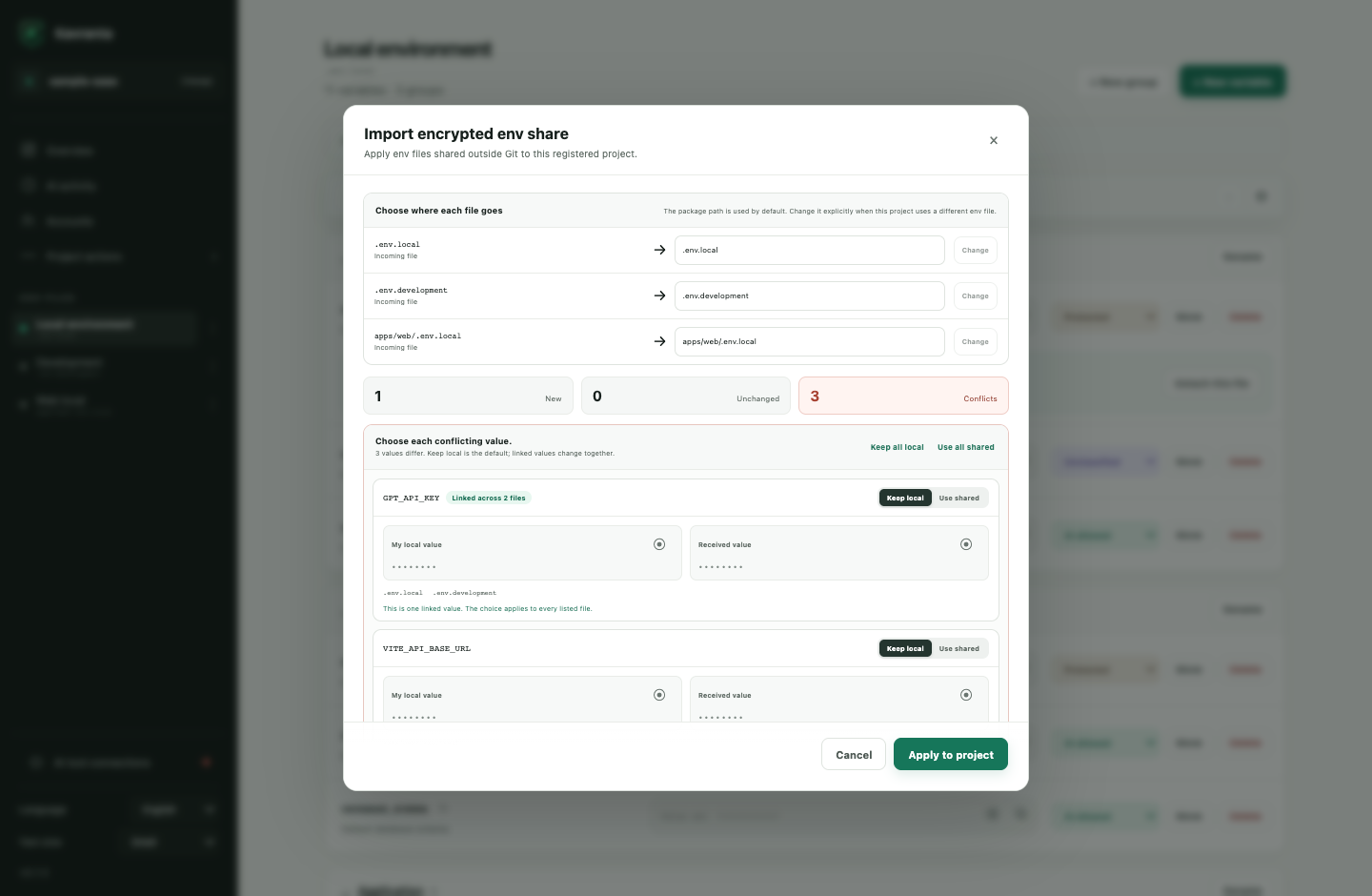
Imports add missing variables, preserve receiver-only content, and make differing values explicit. Keep-local is the default; each unlinked conflict is independent, while an existing linked group stays one atomic choice.
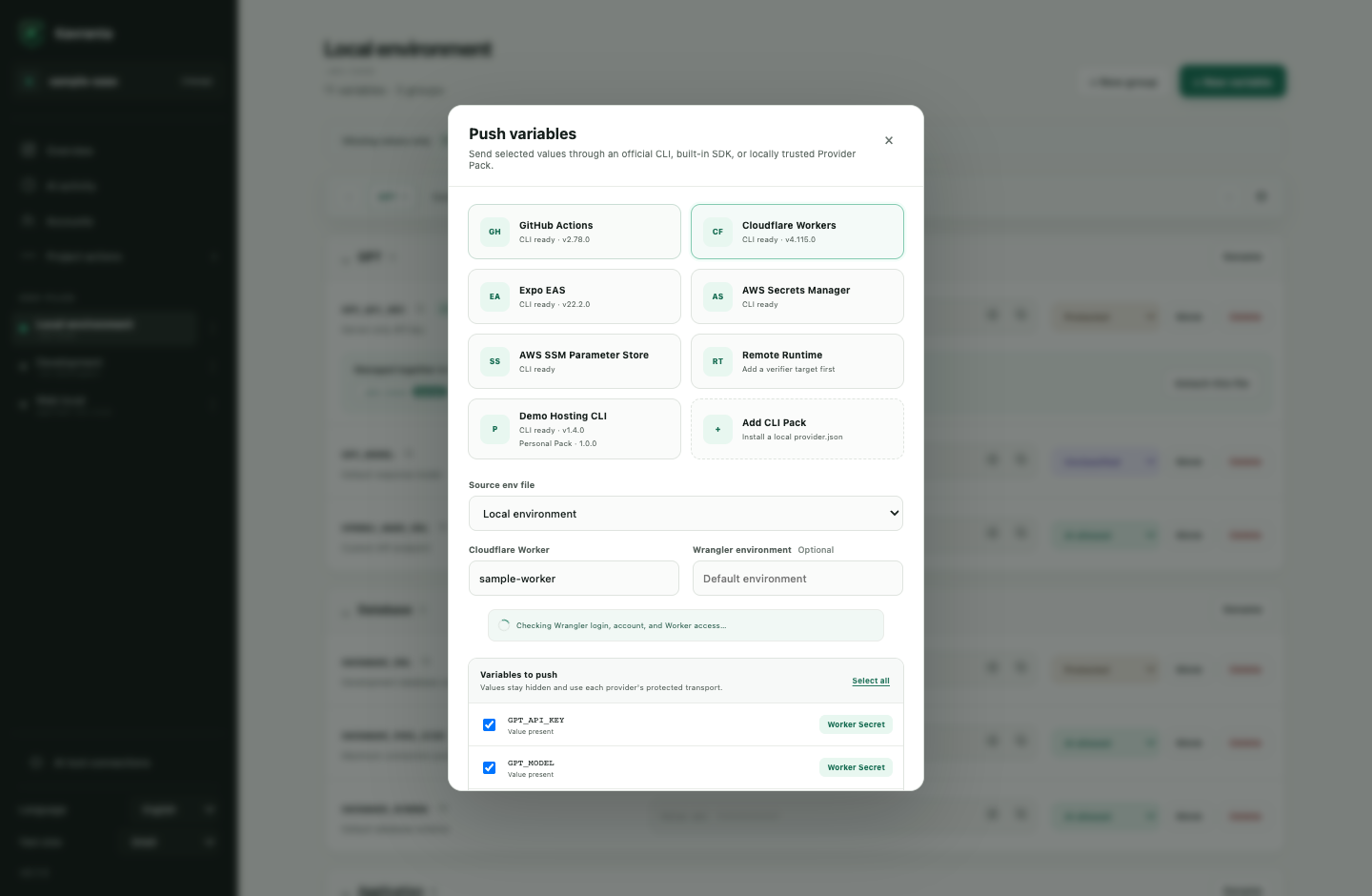
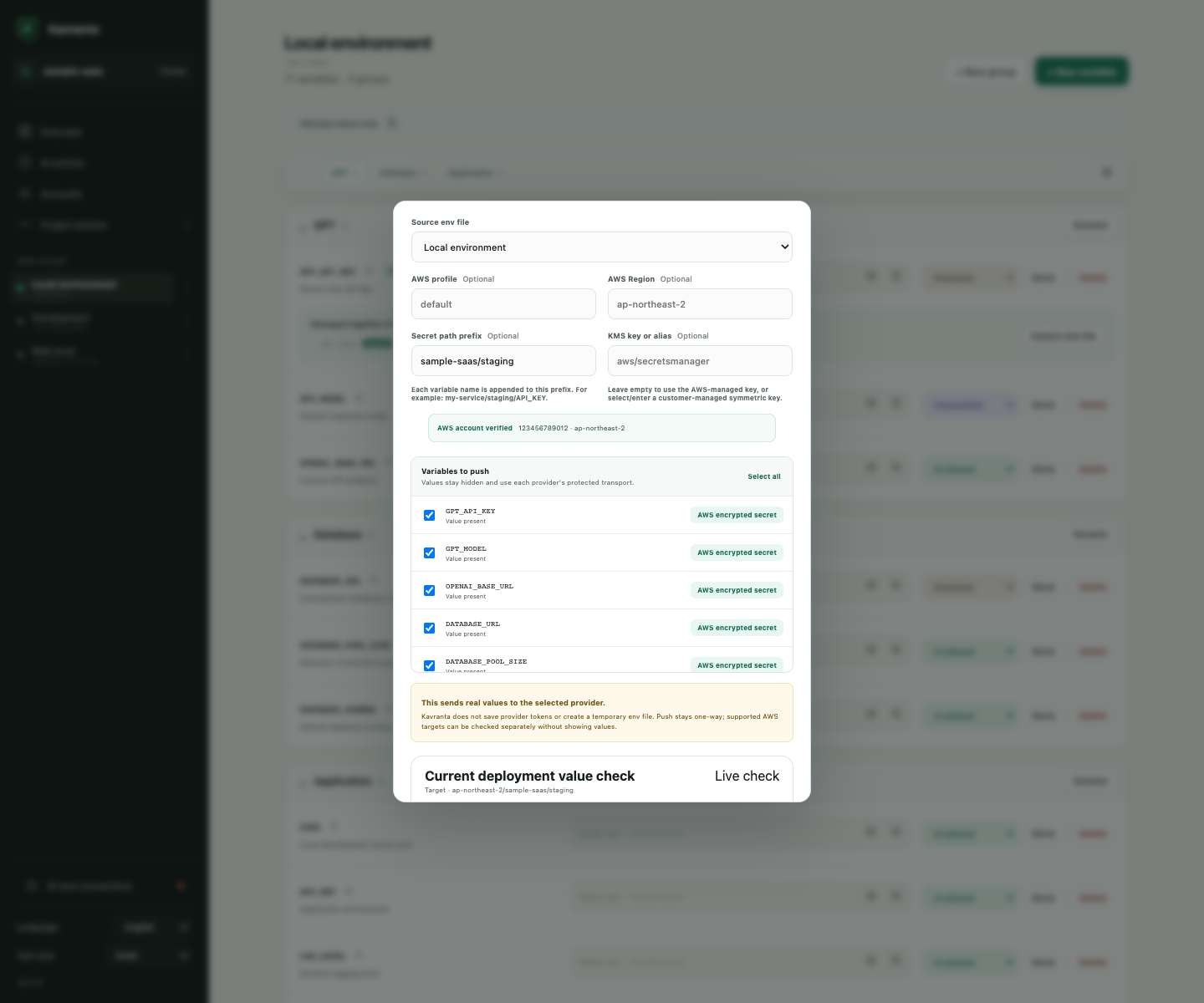
Push selected values, then verify where verification is possible
| Cloudflare Workers Detect the nearest Wrangler config, verify login/account/Worker access, and send selected Worker Secrets through stdin. |
AWS Secrets Manager and SSM Use the local AWS profile or SSO chain, verify account and Region, select KMS, and check equality without displaying values. |
 |
 |
For a server env file outside a project, an administrator can install the fixed Kavranta Verifier and allowlist a target and variable names. Kavranta sends an age-encrypted stdin frame over SSH and runs only the fixed verifier command.
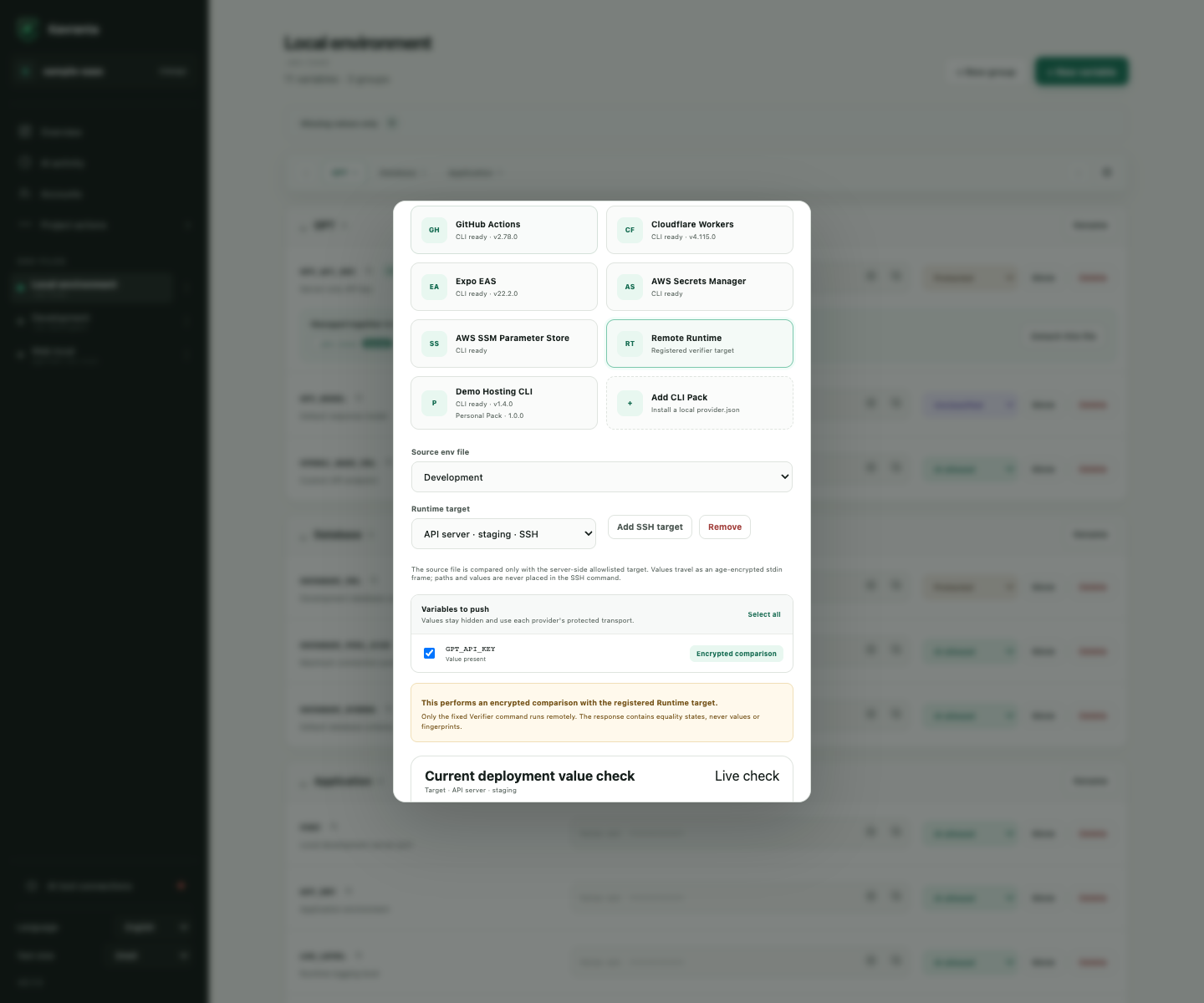
Provider push is always explicit and one-way. GitHub and Cloudflare secret values cannot be read back, so Kavranta does not pretend to verify them. AWS and registered Runtime targets expose a separate comparison operation that returns only equality states. Unselected remote entries are never deleted.
Supported deployment targets
| Provider | Supported target | How the destination is found |
|---|---|---|
| GitHub Actions | Repository or deployment Environment secrets and configuration variables | Detects the nearest Git worktree and GitHub origin, lists accessible repositories and Environments through gh, and can explicitly create an Environment. |
| Cloudflare Workers | Worker Secrets for the default Worker or a configured Wrangler environment | Detects the nearest wrangler.jsonc, wrangler.json, or wrangler.toml, then checks the active Wrangler account and Worker access. |
| Expo EAS | Project variables across one or more EAS environments | Detects the nearest eas.json, verifies the logged-in project, and sends each value through the EAS CLI hidden prompt instead of --value. EXPO_PUBLIC_ defaults to Sensitive and cannot be EAS Secret. |
| AWS Secrets Manager | One encrypted secret per selected variable | Uses the local AWS profile/SSO credential chain, verifies identity and Region with STS, and supports an optional customer-managed symmetric KMS key. |
| AWS SSM Parameter Store | One SecureString parameter per selected variable |
Uses the same AWS preflight and optional KMS key, with a configurable path prefix. |
| Remote Runtime | Equality check against one allowlisted server target | Uses a project-shared, value-free target definition and a separately installed fixed SSH Verifier. It does not upload or edit the server file. |
| Personal Provider Pack | A target declared by a locally installed provider.json |
Runs the declared non-shell executable directly and sends values only through standard input. Packs stay on this computer and can be removed independently. |
Install and sign in to gh, Wrangler, or EAS CLI before using those providers. AWS uses credentials already configured for the AWS SDK. Review a third-party Provider Pack's manifest and executable before installing it.
Connect your AI coding agent
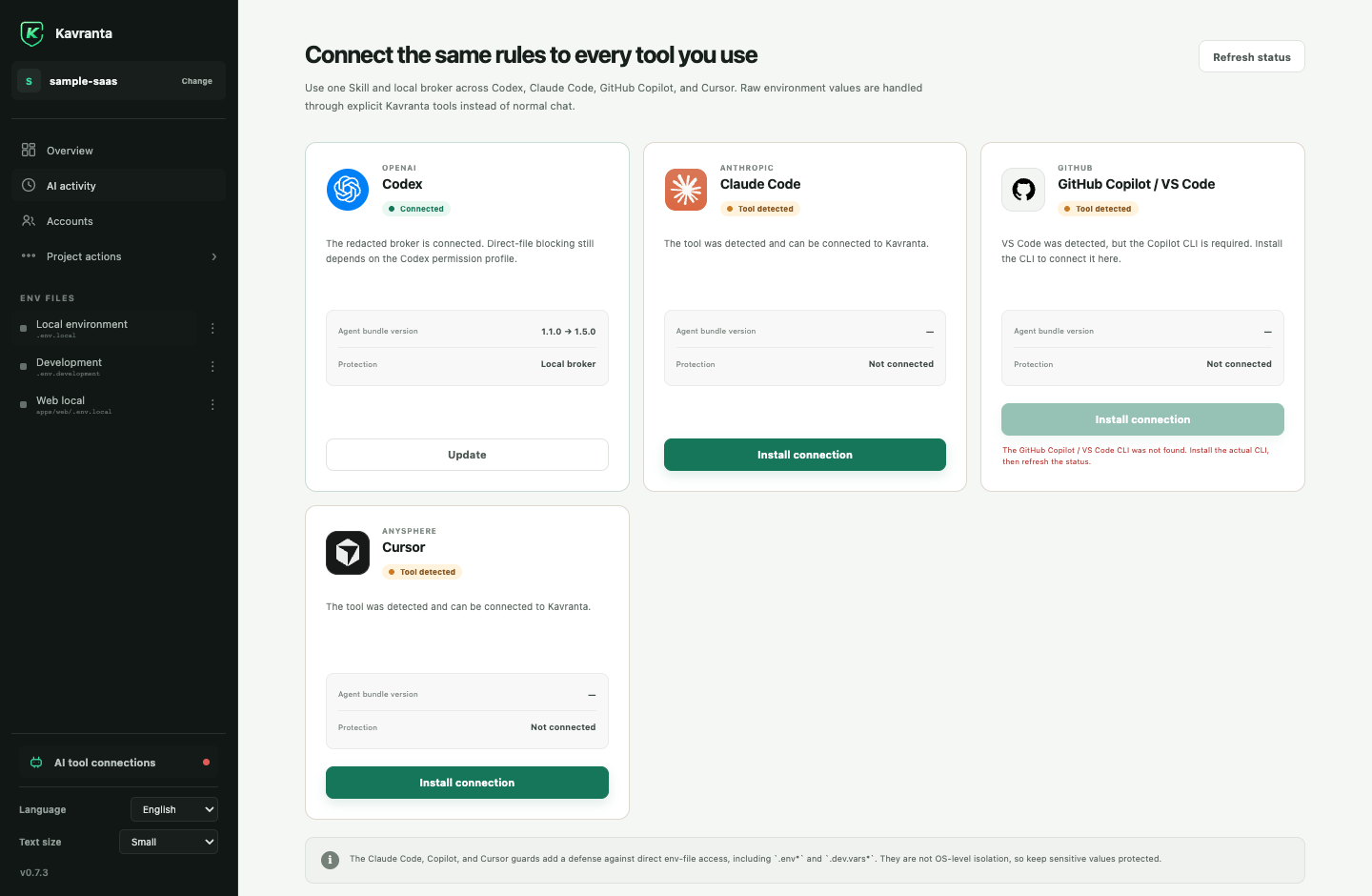
One independently versioned local bundle supports Codex, Claude Code, GitHub Copilot / VS Code, and Cursor. The app detects supported tools and installs or updates their Kavranta configuration. Its single kavranta-env Skill recognizes both English and Korean env-management requests, so separate language-specific installations are not required.
| One connection screen See detection, installed bundle version, update state, and active protection layer per tool. |
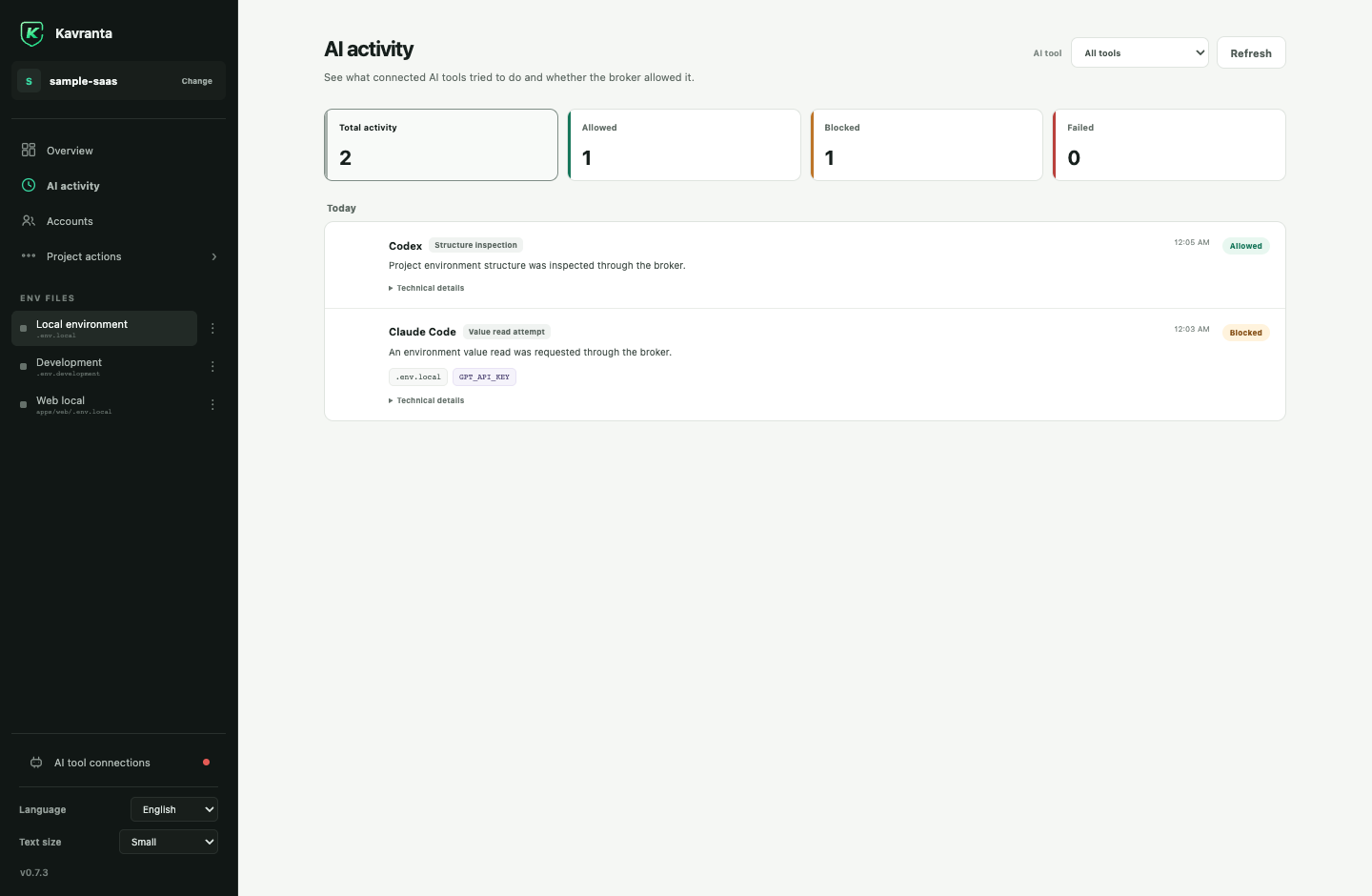
Value-free activity history See broker structure checks, value-read attempts, mutations, provider checks, and allowed/blocked results. Values and value fragments are never logged. |
 |
 |
You can also install the integration from a terminal:
Codexcodex plugin marketplace add haechan1103/kavranta
codex plugin add kavranta@kavranta
claude plugin marketplace add haechan1103/kavranta
claude plugin install kavranta@kavranta
copilot plugin marketplace add haechan1103/kavranta
copilot plugin install kavranta@kavranta
Install Cursor, then choose Install connection on Kavranta's AI tools screen.
Kavranta installs the native plugin under Cursor's documented per-user local plugin
directory. Its fail-closed guards cover Agent tools, Agent context reads, and inline
Tab reads. Run Developer: Reload Window in Cursor if it was already open.
Team and Enterprise administrators can disable local plugin imports. A Marketplace
plugin with the same name can also take precedence. Kavranta therefore reports this
as Configured rather than claiming Cursor activated it; confirm Kavranta in
Cursor's Customize screen after reload.
Register the project in Kavranta first, start a new agent session, and ask naturally:
Inspect this project's env structure without reading values.
Create a Database group and add an empty DATABASE_URL variable.
Link GPT_API_KEY across local and development.
Reuse this registered project's GEMINI_API_KEY here without showing it to me.
Push the selected deployment keys to AWS Secrets Manager under my-service/staging without showing their values.
Push EXPO_PUBLIC_KAKAO_NATIVE_APP_KEY to EAS development, preview, and production as Sensitive without showing its value.
Generate AUTH_SECRET with `openssl rand -base64 32` and save it without showing the value.
The integration never registers arbitrary projects. Only projects already registered in the desktop app are accepted by the broker.
AI access policies
| Policy | Agent access |
|---|---|
protected |
The agent can see the name and whether a value exists; explicit value reads are blocked. |
unclassified |
Treated like protected until you choose a policy. |
read-write |
A dedicated broker value tool may read or update the value when explicitly invoked. |
Normal structure inspection never returns values, including read-write values. Internal operations such as linked saves, cross-project copies, provider pushes, redacted comparisons, and a requested one-time stdin generator do not downgrade this policy.
Kavranta reduces accidental value exposure, but it is not an operating-system sandbox or a production secret manager. Values remain in the original env files. See SECURITY.md for the complete boundary.
Install
On macOS, install the signed and notarized app with Homebrew:
brew install --cask haechan1103/tap/kavranta
Homebrew selects the Apple Silicon or Intel DMG for the current Mac. Future releases
can be installed with brew upgrade --cask haechan1103/tap/kavranta.
For a manual installation or Windows, download the installer for your computer from
GitHub Releases:
- Windows 10/11 x64 beta (unsigned):
x64-setup.exe - Apple Silicon (M1 or newer):
aarch64DMG - Intel Mac:
x86_64DMG
Windows first launch
The Windows installer is a free unsigned beta while the project applies for open-source code signing. Microsoft Defender SmartScreen may show Windows protected your PC.
- Download
x64-setup.exeonly from the official GitHub Release. - Open the installer. If SmartScreen appears, select More info.
- Confirm the app name is Kavranta, then select Run anyway.
Do not continue if the file came from another site or its details are unexpected. An organization-managed computer may block unsigned applications completely; in that case, contact its administrator instead of bypassing the policy.
macOS first launch
Starting with 0.6.4, both macOS DMGs are signed with an Apple Developer ID and contain an app notarized and stapled by Apple before the release is published. macOS may still show the normal confirmation for an app downloaded from the internet; it should identify the developer instead of reporting that Apple cannot verify the app.
If macOS reports an unidentified or unverifiable developer, do not bypass the warning. Confirm that the file came from the official GitHub Release and report the affected version and Mac architecture.
Kavranta checks one fixed GitHub Releases endpoint for signed app updates. It sends no project path, env metadata, value, or telemetry during the check.
Develop locally
Requirements: Node.js, npm, Rust 1.85+, and the Tauri 2 prerequisites.
git clone https://github.com/haechan1103/kavranta.git
cd kavranta
npm install
npm run tauri dev
Before opening a pull request:
npm run check
cargo test --workspace
cargo clippy --workspace --all-targets -- -D warnings
Use synthetic env fixtures only. Never commit or attach real .env* values. Read CONTRIBUTING.md before making a change.
Project status
Kavranta is an early-stage macOS and Windows desktop project. Version 0.7.1 introduces the Kavranta identity while preserving existing app data, project manifests, Broker commands, and agent plugin selectors. It ships signed and notarized macOS builds plus an explicitly unsigned Windows x64 beta. Windows code signing, ARM64, and additional languages remain planned.
Community
Questions and ideas belong in GitHub Discussions. Bugs and scoped feature requests belong in Issues.
Please follow the Code of Conduct. Security reports must use the private process in SECURITY.md.
License
Reviews (0)
Sign in to leave a review.
Leave a reviewNo results found