idea-de-espend-ml-llm
Health Uyari
- License — License: MIT
- Description — Repository has a description
- Active repo — Last push 0 days ago
- Low visibility — Only 5 GitHub stars
Code Gecti
- Code scan — Scanned 12 files during light audit, no dangerous patterns found
Permissions Gecti
- Permissions — No dangerous permissions requested
Bu listing icin henuz AI raporu yok.
Configure and use multiple AI providers (Claude CLI, Gemini, OpenCode, OpenRouter, and more) as chat Agent in IntelliJ IDEA's AI Assistant chat.
AI Assistant Providers / Sessions for IntelliJ IDEA

Browse and search chat sessions from external AI tools, expose conversations through MCP, monitor AI provider quotas from the toolbar and status bar, and view Tokscale usage statistics and RTK token savings.
| Key | Value |
|---|---|
| ID | de.espend.ml.llm |
| Releases | GitHub Releases |
Install the plugin manually using the ZIP from GitHub Releases. See Installation for the steps.
Features
Provider Usage Toolbar & Status Bar
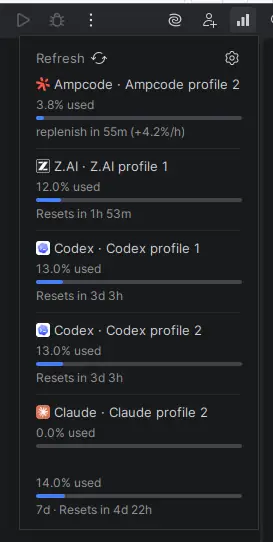
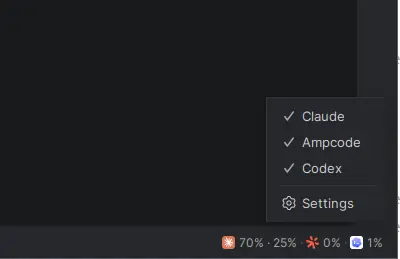
Monitor your AI provider quota usage across multiple accounts directly from the toolbar or status bar. Click the usage icon to see current usage percentages and reset times.
Locations (when configured):
- Main toolbar (right side) → Usage icon
- Status bar (bottom of IDE) → Usage widget
Configure accounts in Settings → Tools → Account Usage Toolbar.
| Provider | Quota Type | Credential Modes |
|---|---|---|
| Claude | 5-hour window + 7-day window | Auto (~/.claude/.credentials.json), Manual (access token), Web API (sessionKey) |
| Codex | Rate limit quota | Auto (~/.codex/auth.json), Manual (refresh token) |
| Ollama | Session window + Weekly window | __Secure-session cookie from ollama.com/settings |
| Z.AI | Token quota | API key |
| Ampcode | Free credits balance | Auto (~/.local/share/amp/secrets.json), Manual (API key) |
| Junie | Request quota | Auto (~/.junie/token.json), Manual (API key) |
Session Browser
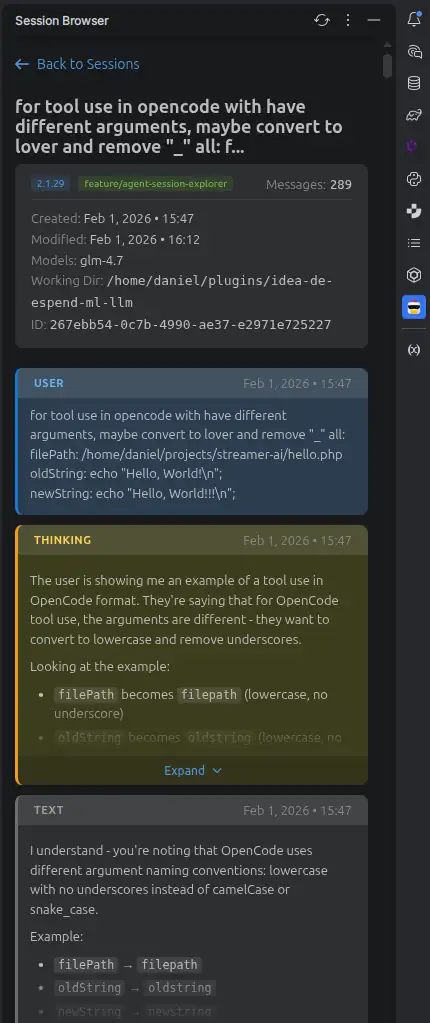
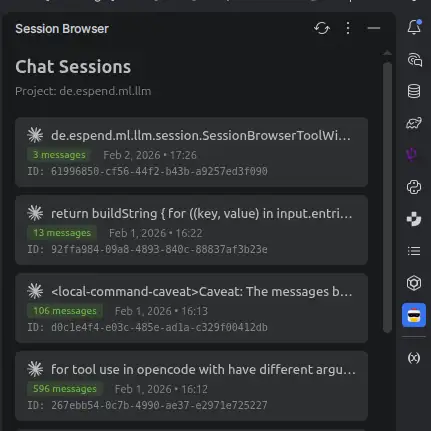
Browse and view chat sessions from external AI tools directly in the IDE.
Open the Session Browser from Tools → AI Session Browser or View → Tool Windows → Session Browser.
| Source | Description |
|---|---|
| Claude Code | Chat sessions from Claude Code CLI |
| Codex CLI | Chat sessions from Codex CLI, including sessions created through JetBrains AI Assistant |
| OpenCode | Chat sessions from OpenCode CLI |
| Amp | Chat sessions from ampcode.com |
| Junie | Chat sessions from Junie CLI (JetBrains) |
| Droid | Chat sessions from Factory.ai CLI |
| Kilo Code | Chat sessions from Kilo Code CLI |
MCP Integration (IntelliJ Built-in MCP Server)
The plugin exposes AI session data via IntelliJ's built-in MCP server, allowing any MCP client (e.g. AI agents, CLI tools) to search and retrieve past coding sessions.
Requirement: The com.intellij.mcpServer plugin must be enabled in your IDE.
| Tool | Description |
|---|---|
search_ai_sessions |
Search across all AI sessions for a query string. Returns matching sessions with text snippets. |
get_ai_session |
Fetch the full conversation of a session by its ID. |
Tools
Additional tools integrated into the plugin:
| Tool | Description |
|---|---|
| RTK Savings | Token savings statistics from RTK (Rust Token Killer) CLI. Shows yesterday, today, and 7-day totals in the Usage popup. |
| Tokscale | Token usage and cost statistics from Tokscale CLI. Shows weekly and monthly totals in the Usage popup. |
Installation
- Download the plugin ZIP from GitHub Releases. Keep the ZIP file intact.
- In IntelliJ IDEA, open Settings → Plugins.
- Click the gear icon and select Install Plugin from Disk….
- Select the downloaded ZIP and restart the IDE if prompted.
To update the plugin, download the ZIP from a newer release and repeat these steps.
Images
Yorumlar (0)
Yorum birakmak icin giris yap.
Yorum birakSonuc bulunamadi