khan-explainer
Health Pass
- License — License: MIT
- Description — Repository has a description
- Active repo — Last push 0 days ago
- Community trust — 59 GitHub stars
Code Fail
- child_process — Shell command execution capability in scripts/render.js
- spawnSync — Synchronous process spawning in scripts/render.js
- process.env — Environment variable access in scripts/render.js
- fs module — File system access in scripts/render.js
- network request — Outbound network request in scripts/render.js
Permissions Pass
- Permissions — No dangerous permissions requested
No AI report is available for this listing yet.
Claude Code skill: Khan Academy style explainer videos. A pen draws while a voice explains. Free, local, no API keys.
khan-explainer
A Claude Code skill that makes Khan Academy style explainer videos: a pen draws while a voice explains. You describe the video, Claude writes a scene file, and one command renders the MP4.
Write-up: Claude Code skills for content: how I make Khan Academy style videos for free
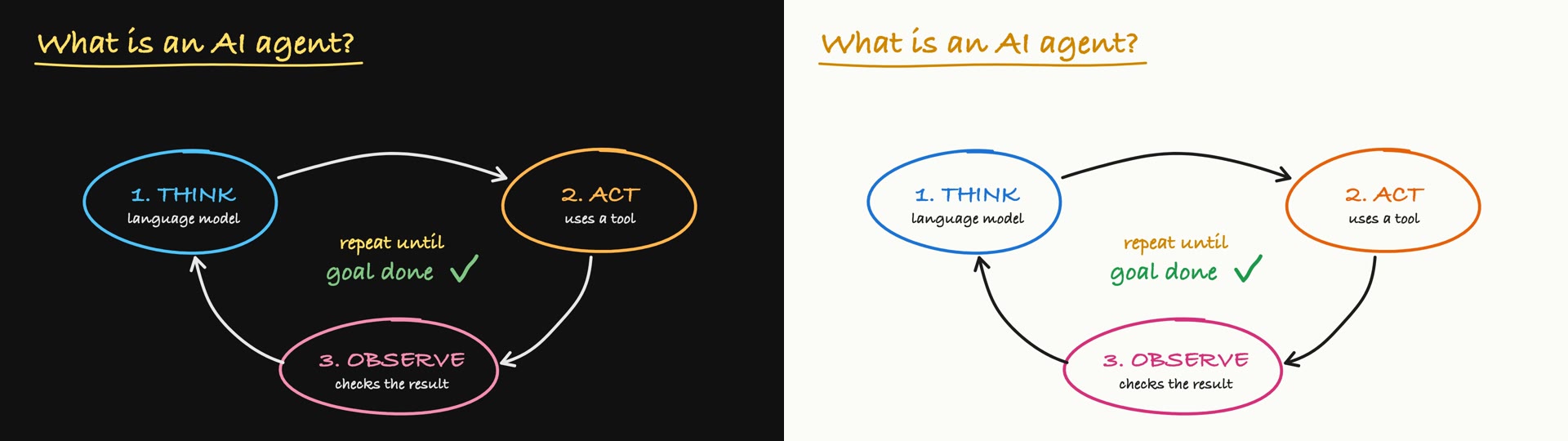
It runs on your Mac with an HTML canvas, Playwright, ffmpeg and the built-in say voice. No API keys, no accounts, no editor.
What it makes
| Mode | What you get |
|---|---|
| Blackboard lesson | A diagram drawn stroke by stroke while the voice explains it. |
| Draw-over-UI tutorial | Arrows, circles and numbered steps drawn over your product screenshots. |
| Real-audio clip | A YouTube video or podcast in, vertical shorts out. The speaker's own voice plays while the board is drawn to their words. It can also cut the speaker out and stand them in front of the board. |
Every mode renders as chalk on a blackboard or marker on a whiteboard, landscape or vertical. One flag switches between them, and a single beat can flip the board mid-video.
Why the pen stays in sync
The voice drives the clock. A scene is a list of beats, and a beat is one spoken clause plus the drawing that happens while it is said. The renderer speaks each beat first, measures it, and fits that beat's drawing to its length. Nobody types a timestamp, so the pen cannot run ahead of the words.
scene({
  beats: [
    { say: 'What is an AI agent?', draw: p => {
        write('What is an AI agent?', 60, 85, p, { size: 56, color: C.yellow });
    } },
    { say: "It's software that uses a language model to think,", draw: p => {
        stroke(oval(300, 330, 155, 82), seg(p, 0, .4), { color: C.blue });
        write('1. THINK', 300, 328, seg(p, .4, 1), { size: 40, color: C.blue, center: true });
    } },
  ],
})
Install
You need macOS, Node 20 or newer, and ffmpeg (brew install ffmpeg).
git clone https://github.com/haiderfarooq3/khan-explainer ~/.claude/skills/khan-explainer
cd ~/.claude/skills/khan-explainer/scripts && npm install && npx playwright install chromium
Use
Ask Claude Code for the video you want:
Make a 30-second Khan-style explainer on how DNS works.
Draw over these screenshots and show a new user how to send their first invoice.
Khanify this YouTube video: find the best moments and clip them, light and dark.
Or render one of the examples yourself:
cd ~/.claude/skills/khan-explainer
node scripts/render.js examples/ai-agents.js agents.mp4                    # blackboard
KHAN_THEME=light node scripts/render.js examples/ai-agents.js light.mp4    # whiteboard
node scripts/render.js examples/ui-tutorial.js tutorial.mp4                # drawn over screenshots
node scripts/render.js examples/arabic.js arabic.mp4                      # right-to-left writing
node scripts/render.js examples/languages.js languages.mp4                # one word in eight languages
Each render also prints the path of a contact sheet: the board at the end of every beat, in one image. That sheet is how Claude checks its own layout before it shows you anything.
SKILL.md is the full reference: the scene API, layout rules, the capture recipe for tutorials and the clip pipeline.
Optional extras
- A human voice. Export
ELEVENLABS_API_KEYand addeleven: '<voice id>'to a scene. The script is read in one take and cut back into beats, and takes are cached, so re-rendering the same words is free. - Kokoro, a free local human voice.
pip install kokoro soundfile, thenkokoro: trueon a scene orKHAN_TTS=kokorofor any scene. English, Spanish, French, Hindi, Italian, Japanese, Portuguese and Chinese. - Any language on the board. Arabic, Urdu and Hebrew are written right to left, Hindi, Thai, Chinese, Japanese, Korean, Russian and more left to right, each in a face that writes it properly.
lang: 'ar'on a scene picks the matching voice.node tests/run.jsrenders them all. - Real-audio clips need uv.
scripts/clip_audio.pytranscribes locally with faster-whisper. - The talking-head cutout uses macOS Vision. It builds itself with
swiftcthe first time, which needs the Xcode command line tools.
Credits
Made by Haider Farooq. MIT licensed: use it, change it, ship videos with it.
Not affiliated with or endorsed by Khan Academy. "Khan Academy style" describes the look: handwriting on a board, drawn as it is explained.
Reviews (0)
Sign in to leave a review.
Leave a reviewNo results found