open-carrusel
Health Gecti
- License — License: MIT
- Description — Repository has a description
- Active repo — Last push 0 days ago
- Community trust — 30 GitHub stars
Code Basarisiz
- execSync — Synchronous shell command execution in scripts/doctor.mjs
- process.env — Environment variable access in scripts/doctor.mjs
- os.homedir — User home directory access in scripts/setup.mjs
- process.env — Environment variable access in scripts/setup.mjs
Permissions Gecti
- Permissions — No dangerous permissions requested
This is an AI-powered tool that integrates with Claude to design and generate Instagram carousel slides. It renders designs as HTML/CSS, which are then exported as pixel-perfect PNG images.
Security Assessment
The overall risk is rated as Low to Medium. The tool runs locally and does not request explicitly dangerous permissions. However, there are a few security flags to be aware of. The setup and diagnostic scripts (`setup.mjs` and `doctor.mjs`) access the user's home directory and read environment variables. This is standard for a local Node.js project setting up its environment and downloading dependencies. Additionally, the diagnostic script uses synchronous shell execution (`execSync`). While this is typically used to check system requirements (like Node or NPM versions), developers should still quickly verify what specific commands are being executed. There are no hardcoded secrets detected, and no data is sent to external clouds, as it is a local-first application.
Quality Assessment
The project demonstrates solid quality and active maintenance. It was updated very recently (last push was today) and has garnered 30 GitHub stars, indicating a decent level of early community trust. It is well-documented and fully licensed under the permissive MIT license. The codebase leverages a modern, robust tech stack (Next.js, React, TypeScript, Tailwind), making it easy for other developers to read, audit, and contribute to.
Verdict
Use with caution — the tool is generally safe and well-built, but you should review the setup scripts before running them to ensure the shell commands align with your expectations.
AI-powered Instagram carousel builder. Chat with Claude to design slides; export as PNGs at exact Instagram dimensions. Type /start in Claude Code to bootstrap.
Open Carrusel
Chat with Claude. Design Instagram carousels. Export pixel-perfect PNGs.
Local-first. Open source. One command to start.





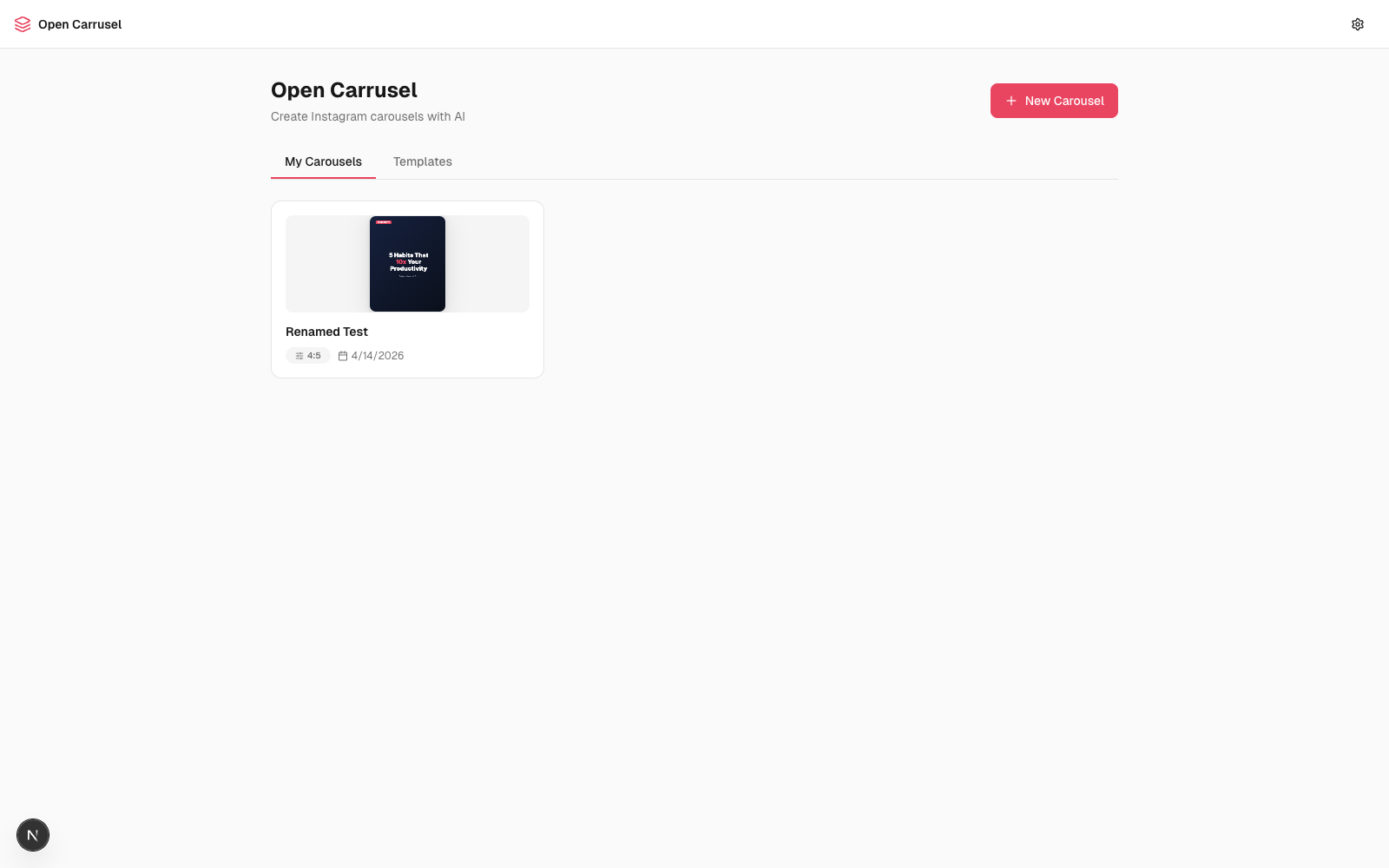
Table of contents
- Why Open Carrusel
- See it in action
- Quickstart (60 seconds)
- What you can do
- How the AI agent works
- Slash commands
- Architecture
- Tech stack
- Project structure
- Configuration
- Troubleshooting
- Roadmap
- Contributing
- Acknowledgments
- About the maker
- License
✨ Why Open Carrusel
Designing Instagram carousels eats hours. You either:
- Pay $20–60/month for a closed-source tool that limits how creative you can get
- Wrestle Canva templates that everyone else also uses
- Hand-craft slides in Figma and lose your weekend
Open Carrusel takes a different bet. You chat with Claude — the same model many designers already trust — and it generates real HTML/CSS slides that get screenshotted to PNGs at exact Instagram dimensions. Slides are unique, on-brand, and pixel-perfect. Everything runs on your laptop. Nothing is sent to a cloud you don't control.
It's open source under MIT. Fork it, tweak the system prompt, ship your own variant. No accounts. No subscriptions. No vendor lock-in.
🎬 See it in action
Dashboard — your carousels, templates, and one-click export.
Editor — chat panel (left), live preview (center), drag-reorderable filmstrip (bottom).
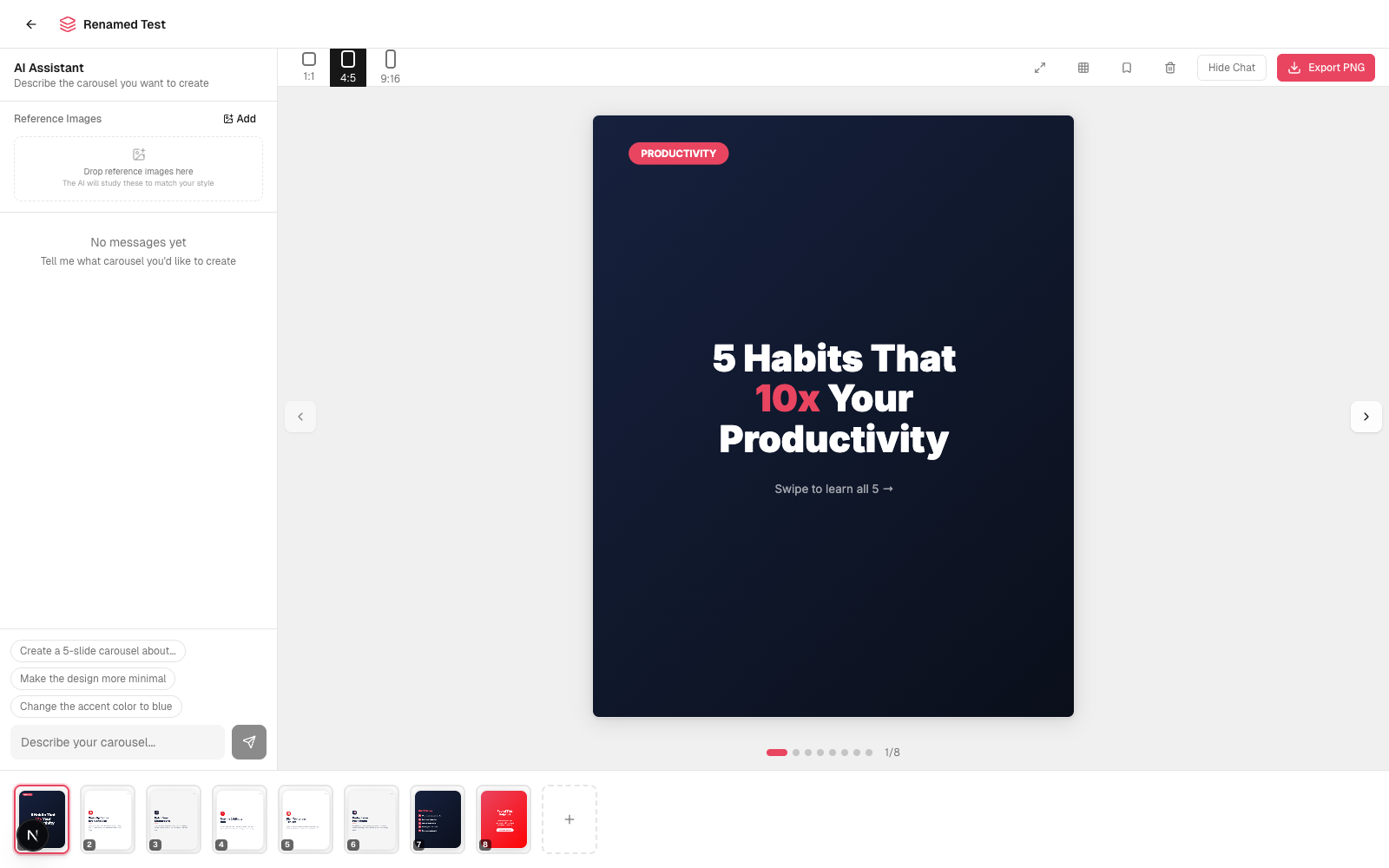
The slides shown above were generated by chatting with Claude. No templates, no copy-paste — every layout, color, and font choice came from a conversation.
🚀 Quickstart (60 seconds)
First run takes 1–2 minutes (Puppeteer downloads ~300 MB of Chromium for PNG export). After that, every launch is seconds.
One-command path (recommended)
- Install Claude Code and authenticate.
- Clone and open the repo in Claude Code:
git clone https://github.com/Hainrixz/open-carrusel.git cd open-carrusel claude - In the Claude Code prompt, type:
/start
That's it. Dependencies install, the dev server starts, your browser opens. Now design carousels by chatting.
Manual path (if you don't use Claude Code)
git clone https://github.com/Hainrixz/open-carrusel.git
cd open-carrusel
npm run setup        # installs deps + seeds /data/
npm run dev          # starts http://localhost:3000
You won't get the AI chat without Claude Code installed (the in-app agent shells out to the claude CLI), but the editor and export still work for static slides.
🧰 What you can do
- Three-panel editor designed for flow: chat (left), live preview (center), drag-reorderable slide filmstrip (bottom).
- Generate slides by chatting: "Make me a 5-slide carousel about productivity habits — bold sans-serif, dark mode, accent red." Watch them stream in.
- Iterate per slide: "Make slide 3 more minimal", "Change the accent to teal", "Swap the hook for something punchier."
- Three Instagram aspect ratios ready to go: 1:1 (1080×1080), 4:5 (1080×1350), 9:16 (1080×1920).
- Brand config — name, color palette, fonts, logo, style keywords. Claude reads it before every generation so output stays on-brand.
- Templates — save any carousel as a template, reuse it for the next one.
- Reference images — drop in screenshots of carousels you love. Claude studies them to match style.
- Drag to reorder slides via dnd-kit. Undo per-slide if a tweak goes sideways (version history per slide).
- Safe-zone overlay to verify nothing important crops behind Instagram's UI.
- Fullscreen preview for the final review.
- One-click export — Puppeteer screenshots each slide HTML at the exact pixel dimensions Instagram expects, zips them, downloads.
- Captions + hashtags generator built into the editor.
- All local — slides, brand, uploads, exports all live in
/data/and/public/uploads/. Nothing is sent to a cloud you don't control. The only network call is when Claude Code talks to Anthropic.
💬 How the AI agent works
The in-app agent is the Claude CLI spawned as a subprocess from /api/chat with --allowedTools Bash WebFetch. Messages stream back to the browser via Server-Sent Events.
When you ask for a slide, Claude:
- Reads your brand config + active carousel state from the system prompt
- Writes the slide as a complete HTML/CSS string
- POSTs it to
/api/carousels/[id]/slidesviacurl(using itsBashtool) - The new slide appears in your filmstrip seconds later
Example chat
You    > Create a 5-slide carousel about “3 morning habits that
         actually move the needle.” Punchy, dark mode, accent red,
         portrait 4:5.

Claude > Coming up. I'll build a hook slide, three habit slides,
         and a CTA. Working...
         [streams 5 HTML slides into the filmstrip]

You    > Slide 3 — the headline is too long. Cut it in half and
         move the icon to the top.

Claude > Done.
         [updates that slide; you can /undo if you preferred the old one]
How the slides become PNGs
Slides are stored as body-level HTML (no <html>/<head>/<!DOCTYPE>). The shared function wrapSlideHtml() in src/lib/slide-html.ts wraps that body into a full document — adding font loading, dimension constraints, and box-sizing reset — and serves it both:
- to a sandboxed
<iframe>for live preview in the editor - to Puppeteer (headless Chromium) for export, screenshot at exact Instagram pixel dimensions, zipped, downloaded
Because the same wrap function feeds both paths, what you see is exactly what you export. No surprises.
🛠 Slash commands
Type these inside Claude Code:
| Command | What it does |
|---|---|
/start [port] |
Install + seed + run + open browser. Idempotent — re-running on a healthy install is seconds. |
/stop [port] |
Kill the dev server. Defaults to :3000, accepts a port arg matching /start. |
/reset |
Wipe local carousels, templates, brand config, uploads, exports — and re-seed defaults. Asks first. |
/doctor |
Run setup diagnostics: Node version, Claude CLI on PATH, deps installed, data files seeded, port free. |
You can also run them outside Claude Code:
npm run setup     # equivalent to /start (skips the browser-open + background server bits)
npm run dev       # start the dev server
npm run build     # production build
npm run doctor    # run scripts/doctor.mjs (works pre-`npm install`)
🏗 Architecture
flowchart LR
  U(["Browser :3000"])
  C["Chat Panel"]
  P["Slide Preview<br/>(sandboxed iframe)"]
  F["Filmstrip<br/>(dnd-kit)"]
  API["/api/chat<br/>SSE streaming/"]
  CCLI["Claude CLI<br/>subprocess"]
  SLIDES["/api/carousels/.../slides/"]
  DATA[("/data/*.json<br/>async-mutex<br/>atomic writes")]
  EXP["/api/.../export/"]
  PUP["Puppeteer<br/>(headless Chromium)"]
  ZIP{{"ZIP of PNGs"}}

  U --> C & P & F
  C -- "POST chat" --> API
  API -- "spawn" --> CCLI
  CCLI -. "SSE" .-> API
  API -. "SSE" .-> C
  CCLI -- "curl POST slide HTML" --> SLIDES
  SLIDES <--> DATA
  P <--> SLIDES
  F <--> SLIDES
  U -- "Export" --> EXP
  EXP --> PUP
  PUP --> ZIP
  ZIP --> U
Why these choices:
- Local-first, single-user. The whole app is a localhost web app talking to local files. No cloud, no auth, no database.
- Claude CLI as the agent. Lets us reuse the user's existing Claude Code authentication, capabilities, and context. The subprocess gets
Bash(tocurlthe slide-write endpoints) andWebFetch(for research while designing). - Slides as HTML. Claude already writes great HTML/CSS — way more flexible than canvas, way easier to debug than a JSON DSL. The same HTML powers preview and export, so what you see is what you ship.
- Sandboxed iframes. No
<script>tags allowed (enforced by the iframesandbox=""attribute). Slides can't run code or escape their box. - JSON file storage with async-mutex + atomic writes. No SQLite, no Postgres. Reads and writes go through
src/lib/data.tswith proper locking, and writes are tmp-file + rename to avoid torn JSON.
For more, see CLAUDE.md — the architecture doc tuned for AI assistants working on this codebase.
📦 Tech stack
| Layer | Tool |
|---|---|
| Framework | Next.js 16 (Turbopack), React 19 |
| Language | TypeScript 5 |
| Styling | Tailwind CSS v4 (CSS-first config in globals.css) |
| UI primitives | Radix UI, lucide-react |
| Drag/drop | @dnd-kit |
| AI agent | Claude CLI subprocess |
| Image export | Puppeteer, Sharp |
| Zipping | Archiver |
| Storage | JSON files + async-mutex |
| Animation | CSS-first (Emil Kowalski's design philosophy) |
📁 Project structure
open-carrusel/
├── .claude/
│   └── commands/             ← /start, /stop, /reset, /doctor (Claude Code slash commands)
├── data/                     ← user state (gitignored): brand, carousels, templates, exports
├── docs/screenshots/         ← README assets
├── public/uploads/           ← user uploads (gitignored): logos, reference images
├── scripts/
│   ├── setup.mjs             ← npm install + seed data dirs + Claude CLI detection (cross-platform)
│   └── doctor.mjs            ← env diagnostic (zero deps, runs pre-install)
├── src/
│   ├── app/
│   │   ├── api/              ← every backend route (chat, carousels, slides, export, brand, ...)
│   │   ├── carousel/[id]/    ← editor page
│   │   ├── globals.css       ← Tailwind v4 theme + Emil-style motion tokens
│   │   ├── layout.tsx
│   │   └── page.tsx          ← dashboard page
│   ├── components/
│   │   ├── brand/            ← BrandSetup, ColorPicker, FontSelector, LogoUpload
│   │   ├── chat/             ← ChatPanel, ChatMessage, ChatInput, ReferenceImages
│   │   ├── editor/           ← CarouselPreview, SlideFilmstrip, SlideRenderer, ExportButton, ...
│   │   ├── layout/           ← TopBar
│   │   ├── templates/        ← TemplateGallery, TemplateCard
│   │   └── ui/               ← Button, Input, Badge, ConfirmDialog, CreateCarouselDialog
│   ├── lib/
│   │   ├── chat-system-prompt.ts   ← dynamic system prompt (brand + carousel context)
│   │   ├── slide-html.ts            ← wrapSlideHtml() — the rendering contract
│   │   ├── carousels.ts             ← carousel + slide CRUD with version history
│   │   ├── data.ts                  ← JSON storage with async-mutex + atomic writes
│   │   ├── claude-path.ts           ← portable Claude CLI discovery
│   │   └── ...
│   └── types/                ← shared TypeScript types
├── CLAUDE.md                 ← architecture doc for AI assistants working on this code
├── LICENSE                   ← MIT
├── README.md                 ← you are here
├── next.config.ts
├── package.json
└── tsconfig.json
⚙️ Configuration
Environment variables (.env.local)
Created automatically by scripts/setup.mjs if it can find your Claude CLI. You can override:
CLAUDE_CLI_PATH=/path/to/claude # set if `which claude` doesn't find it
On Windows, run where claude in PowerShell to find the path (typically C:\Users\<you>\AppData\Roaming\npm\claude.cmd), then set CLAUDE_CLI_PATH in .env.local.
Brand config
Set on first run (or via the gear icon in the top bar). Stored at /data/brand.json. Fields:
- Name — your handle / company / project
- Colors — primary, secondary, accent, background, surface
- Fonts — heading + body (Google Fonts; the
/api/fontsendpoint serves a curated list) - Logo — optional; used by Claude when you ask for branded slides
- Style keywords — free-text style hints ("editorial, minimalist, warm tones") that get injected into Claude's system prompt
Templates
Save any carousel as a template via the bookmark icon in the editor toolbar. Templates appear in the dashboard's Templates tab. Stored at /data/templates.json.
Reference images
Drop screenshots into the chat panel's "Reference Images" section. Stored under /public/uploads/. Claude Code can read them via WebFetch of the local URL when designing.
🩺 Troubleshooting
/start says "Node v18 detected, need ≥20."
Next.js 16 requires Node 20+. Install via nodejs.org or nvm.
/start says "Claude CLI not found."
Install Claude Code and authenticate. The setup script searches ~/.local/bin/claude, /usr/local/bin/claude, /opt/homebrew/bin/claude, ~/.npm-global/bin/claude, and $CLAUDE_CLI_PATH. If yours lives elsewhere, set CLAUDE_CLI_PATH in .env.local.
Port 3000 is in use.
Run /stop to kill whatever's there, or run /start 3001 to use a different port.
Export fails or hangs.
Likely a Puppeteer/Chromium issue. Try rm -rf node_modules && npm install to re-trigger the Chromium download. On Linux you may need apt install of common Chromium dependencies (libnss3, libatk1.0-0, libxss1, etc.).
Slides look fine in preview but export looks different.
That shouldn't happen — both go through wrapSlideHtml(). If it does, file an issue with the slide HTML attached.
The AI keeps generating slides that ignore my brand colors.
Open the brand setup (gear icon) and confirm your colors and style keywords are saved. They're injected into Claude's system prompt on every chat request via chat-system-prompt.ts.
Run /doctor for a full env audit — it'll tell you which of the above applies.
🗺️ Roadmap
Open ideas — PRs welcome. Tick what you ship, add your own.
- Multi-language slide generation — Spanish-LATAM voice presets so creators don't fight the AI's English defaults
- Reels storyboard mode — vertical 9:16 with optional text-on-clip annotations
- Twitter/X thread export — same brand voice, different surface
- Notion / Linear export — push the carousel as a doc with each slide as a section
- Theme presets gallery — community-curated
style-presets.jsonyou can one-click apply - Per-slide AI chat — a smaller chat thread scoped to a single slide
- Hosted demo — for people who want to try before installing Claude Code
🤝 Contributing
PRs welcome. The bar:
- Run
npm run doctorandnpm run buildbefore opening a PR — both should pass clean. - Follow the file conventions in
CLAUDE.md— components ≤ 300 lines, types insrc/types/, libs insrc/lib/,cn()fromsrc/lib/utils.tsfor class merging, all data writes throughsrc/lib/data.ts. - Don't touch the slide rendering contract.
wrapSlideHtml()insrc/lib/slide-html.tsis the seam between preview and export. Change it carefully and test the export round-trip. - Animations follow Emil Kowalski's philosophy — CSS-first, custom easings (already defined as CSS variables in
globals.css), respectprefers-reduced-motion. See theoc-*utility classes already inglobals.cssbefore authoring new ones.
Good first contributions: roadmap items above, more brand templates, accessibility audits, real screenshots/demos for the README, translations.
🙏 Acknowledgments
- Emil Kowalski — animation philosophy that shaped the whole motion system. The
oc-*CSS classes encode his design-engineering principles (custom easings, restraint over excess,@starting-styleover JS for entries). - Anthropic — Claude (the model) and Claude Code (the CLI) are the brain of the in-app agent.
- Vercel — Next.js + Turbopack make local-first React apps feel snappy.
- Radix UI + shadcn/ui — the patterns underneath the dialog/button/input primitives.
- dnd-kit — the only sane drag-and-drop story in React.
- Puppeteer + Sharp — the export pipeline.
👋 About the maker
Open Carrusel is built and maintained by tododeia — a content + AI lab building tools for creators who want leverage without lock-in.
Founder: Enrique Rocha (@soyenriquerocha) — Tijuanense, content creator, builds AI tools so creators don't fall behind. Also behind @tododeia and @metara.ai.
If Open Carrusel saves you time, the best support is:
- ⭐ Star this repo to help others find it
- 🐛 Open an issue when something breaks (or send a PR)
- 📲 Tag @soyenriquerocha or @tododeia when you ship a carousel made with it — we love seeing it
- 🌐 Visit tododeia.com for more AI-for-creators content
📄 License
MIT — do anything you want with it. Attribution appreciated, never required.
Built with ❤️ in Tijuana by tododeia.
Hecho para creadores que construyen el futuro.
Yorumlar (0)
Yorum birakmak icin giris yap.
Yorum birakSonuc bulunamadi