mobius
Health Uyari
- License — License: MIT
- Description — Repository has a description
- Active repo — Last push 0 days ago
- Low visibility — Only 8 GitHub stars
Code Gecti
- Code scan — Scanned 12 files during light audit, no dangerous patterns found
Permissions Gecti
- Permissions — No dangerous permissions requested
Bu listing icin henuz AI raporu yok.
Self-hosted AI agent that builds apps. Chat with a coding agent (Claude Code or Codex) that builds mini-apps, modifies its own UI, and gets sharper the more you use it. Your personal AI operating system, on your own server.

Möbius
A personal AI agent you self-host, with one job, to be as helpful to you as possible. It answers your questions, builds the apps you need, learns what matters to you, and works overnight to be ready for tomorrow. All on a machine you own.



What is it? · Batteries included · You grow it · Apps that work together · It improves itself for you · How the agent gets better · Get started
An agent that adapts to you · The self-improvement harness · The agent is the kernel
What is Möbius?
Möbius is a personal AI agent you self-host. Its one job is to be as helpful to you as it can. It answers your questions, builds the apps you reach for, picks up on what matters to you, and works in the background to anticipate what you'll need next. Most assistants get more generic the longer you use them. Möbius gets more yours.
A chat sits on one side, a full-screen canvas on the other. You describe what you want, and the coding agent inside builds it, a small piece of software that lands next to the chat, runs in your browser, and is yours to keep. The agent isn't limited to apps either. It can reshape the interface it runs inside, the theme, the layout, the features in the shell, by editing the source and rebuilding live.
It runs on Codex (free or paid ChatGPT plan) or Claude Code (any paid plan), both via OAuth, no API key needed. It installs on your phone like a native app on Android and iOS. And because it runs on your server, your data stays yours.
Get Started has one-click setup.
Batteries included
Möbius comes with a curated app store, so you have a suite of genuinely useful personal apps from the first day, no prompt required. Tap to install, and each one is yours to use, edit, or rebuild.
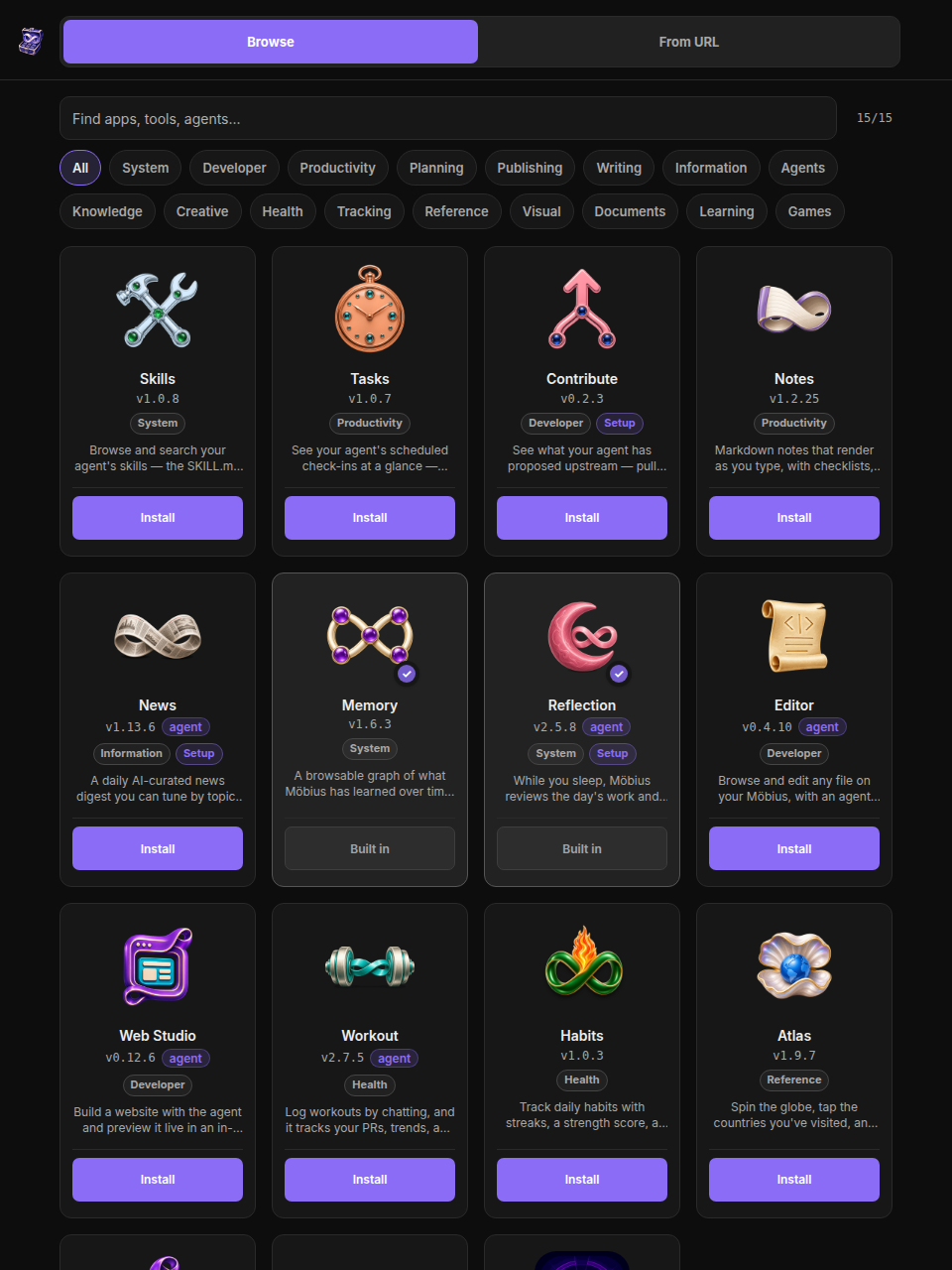
A few of the starter-pack apps. News writes you a morning digest on a schedule. Workout logs training in plain language, on-device. Visited is a 3D globe of where you have been. Mind is a browsable graph of everything the agent has learned, every interaction and every lesson. LaTeX is an Overleaf-style editor with a real engine. Dreaming is the agent improving itself overnight.
Every app is just a public repo with a mobius.json and an index.jsx, open under github.com/mobius-os. Installing one means pasting a URL; updating one means pasting the same URL again, which patches the code and keeps your data. There is no submission queue and nothing to be blessed by.
You grow it
Möbius starts deliberately small: a chat and a canvas, and not much else. So you grow it. Ask for a feature and the agent writes it, end to end, in the same conversation. I asked for file upload in one ordinary message, "I'd like to send files and images along with my messages," and got the endpoint, the schema, the drag-and-drop overlay, the paste handler, and the thumbnails, all in one chat.
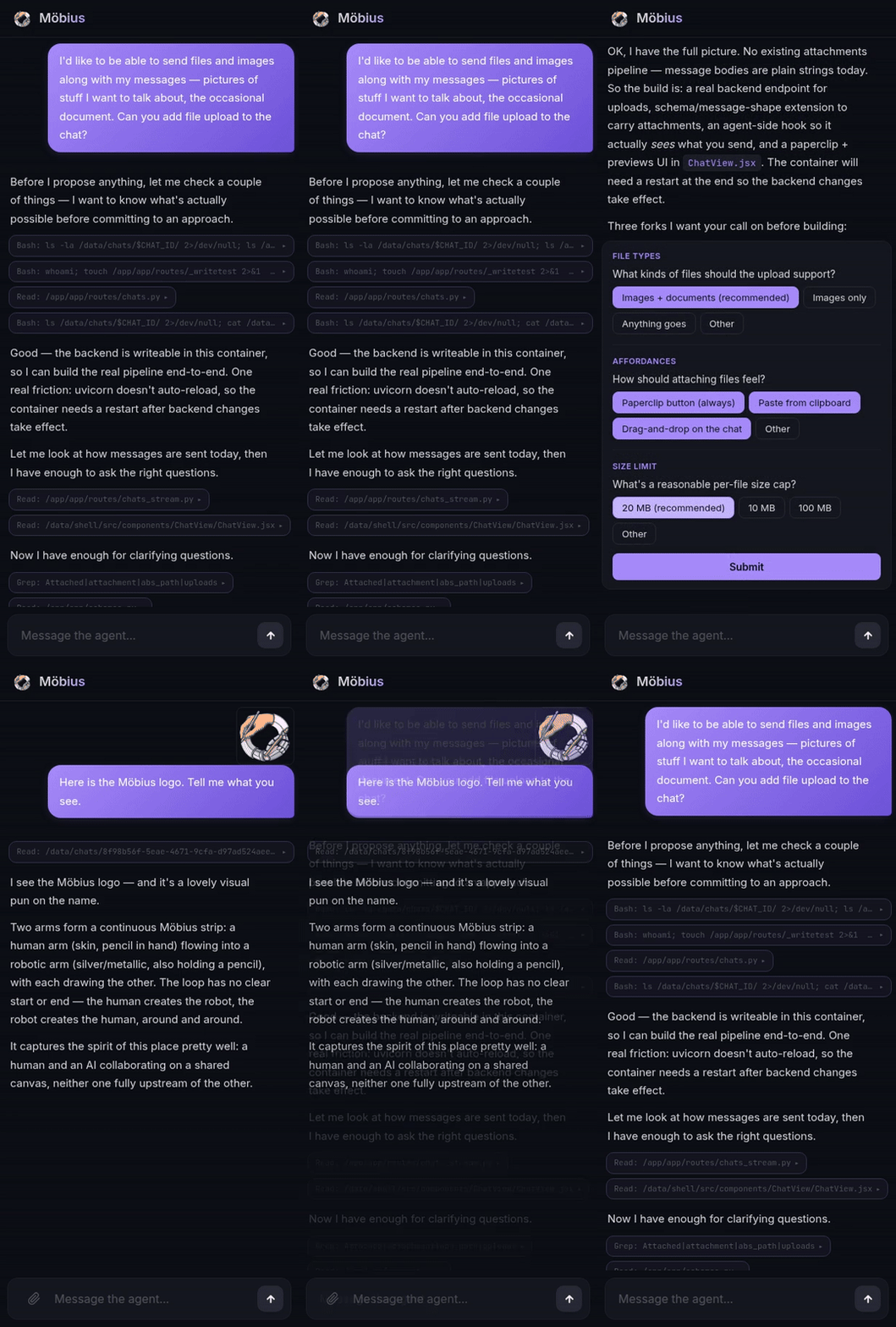
One chat, from empty composer to working feature. Ask, answer a couple of questions, and it is in use.
The same loop builds whole apps. Some of what it has built me:
- News aggregator that runs on a schedule, searches the web, and filters stories around preferences that evolve over time
- Stock dashboard for a local exchange with no public API, which the agent figured out how to scrape
- Finance tool to upload statements, categorize spending, and compute taxes from your phone
- Learning companion that builds a curriculum around any topic with spaced repetition that adjusts as you improve
- Period tracker, a habit log, a drum machine that turns voice samples into beats
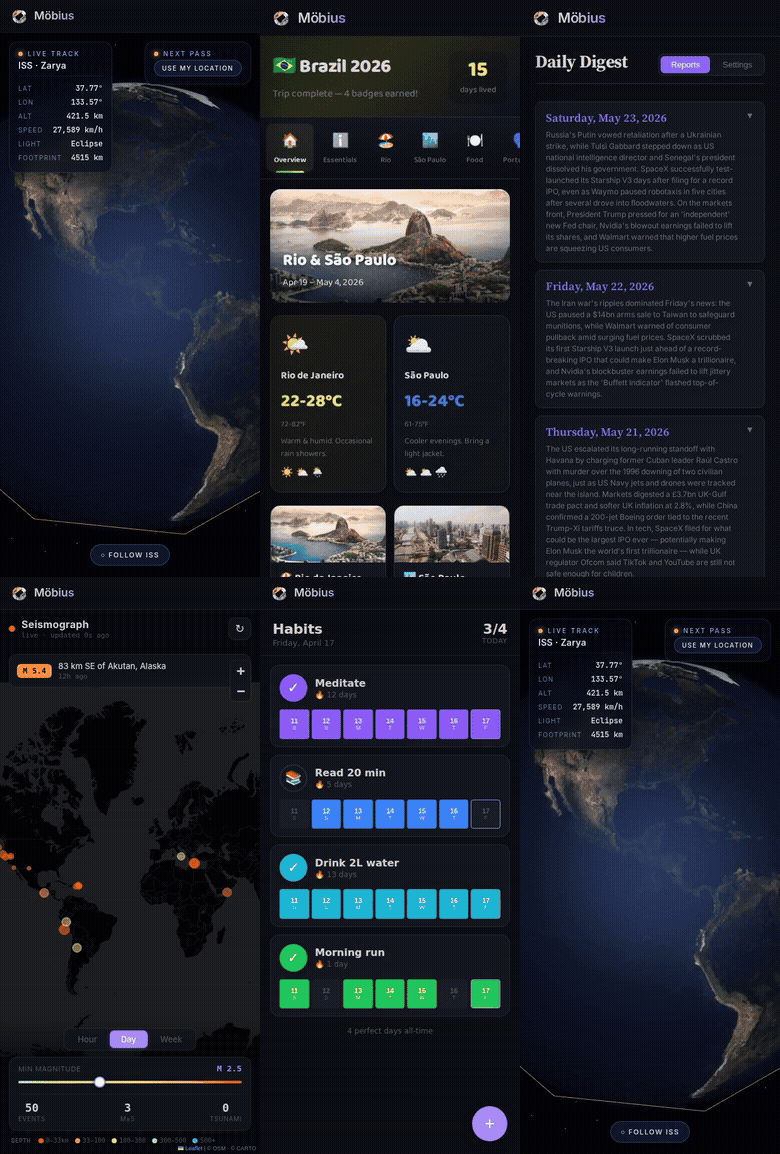
Each was a single prompt. The agent wrote the JSX, compiled it, mounted it, and the app lives in the same shell the chat does. Your health data, your finances, your habits, all private by default.
You can reshape the platform the same way. "Make it warmer." "Restyle the whole shell as a 1970s synth panel." The agent edits the CSS and the new look is live in seconds.
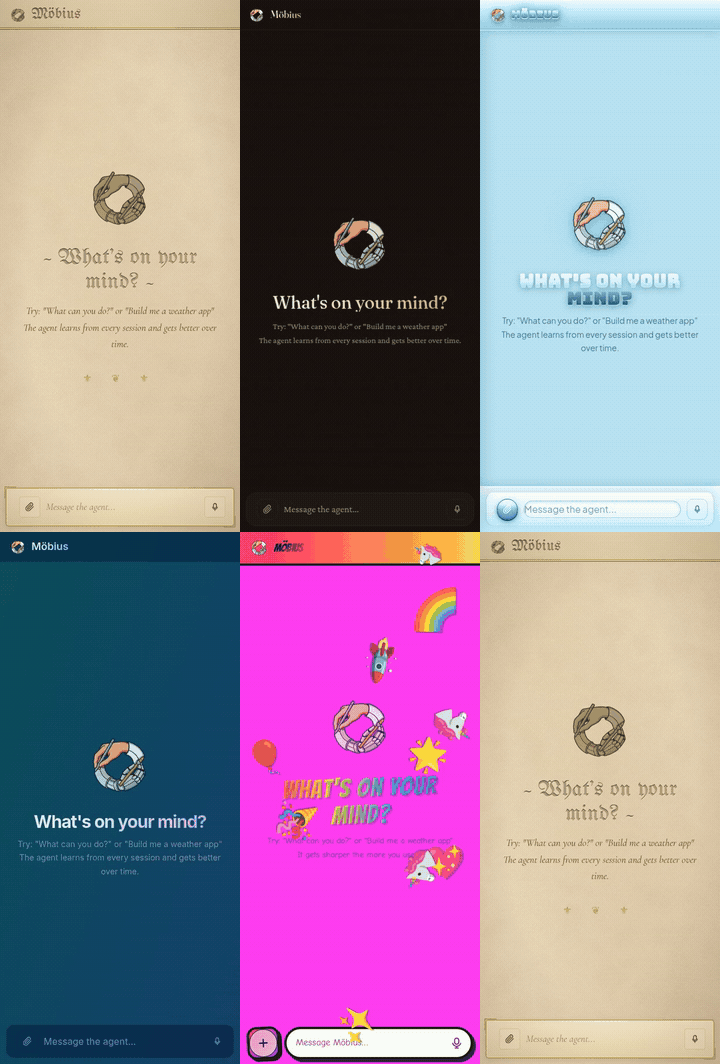
The same new-chat screen across a range of looks, from a medieval manuscript to a deep-blue ambient theme to fully meme-worthy. Themes and layout changes go live immediately, no rebuild.
Apps that work together
Möbius apps are not sealed boxes. They share a common storage layer and a permission model, so with your say-so one app can read another's data. That turns the app store into something closer to a personal data platform. Ask for a dashboard that pulls your Workout log and your habit tracker into one view, and the agent can build an app that reads across both. Apps adapt and grow together, recombining the data you already own into whatever shape is useful next.
Read the full design in The agent is the kernel.
It improves itself for you
Möbius does not just keep your chat history. It builds a lasting memory of everything it learns, the Mind, a knowledge graph of every interaction and every lesson the agent picks up along the way, kept separate from any transcript so it can reason from accumulated experience instead of re-reading conversations. The Mind is browsable; it is one of the starter apps.
And every night, while you sleep, it dreams. The Dreaming agent reviews the day and looks for ways to be more useful to you tomorrow. It tidies and reorganizes the Mind, anticipates what you are likely to need next, suggests new apps and features worth building, and audits your instance for improvements and weak spots. You wake up to an agent that is a little sharper and a little more yours than the day before.
This nightly loop is not a gimmick. It is the self-improvement research below, productized. The same techniques we use to develop Möbius now run inside your own instance, on your behalf.
How the agent itself gets better
Möbius the product improves through a self-improvement harness we run during development. An outer agent watches the inner one build, asks it why it did what it did, and rewrites its instructions between sessions. The pairing is unusual; the moves are simple. A few findings from running that loop on ourselves:
- Reading transcripts and patching the prompt stalls fast, because every rule you add surfaces a regression somewhere else. Asking the inner agent why it acted, with the transcript still in its context, produced more durable fixes in fewer iterations than third-party theory-of-mind ever did. An agent reflecting on its own experience beats a bigger agent reasoning from the outside.
- The worry that asking the model directly just yields sycophancy turned out to be too simple. Confrontational prompts get binary compliance or defiance; warm, curious framings get the model to push back on bad premises and cooperate on good ones.
- Once the loop works, the limit stops being the model and becomes the meta-goals you optimize for, which come from real users hitting real friction on real apps.
All of it is backed by a run of controlled experiments, not anecdotes. The full write-up, including the coaching and ensemble methods that let two agents solve more together than either does alone, is in the harness post. Those are the lessons the Dreaming agent above now runs on your behalf.
It's yours
Möbius runs in a single Docker container you control. Your chats, apps, data, theme, and the agent's memory all live on your server. The whole instance is a git repo, so a bad change can be read back and undone, and every install behaves like the Möbius strip it is named after. The agent builds the surface it runs on, then uses it to build the next thing, with no clean inside or outside.
If the UI ever breaks, every instance ships with /recover. It resets the shell and leaves your chats, apps, and data untouched. Installs are atomic, so a failed one cannot half-land.
Get started

Click Deploy Now, log in to Railway, and deploy. New accounts get a free month, then around $5/month for hosting. Once the deploy finishes, go to Settings → Networking → Generate Domain. You'll get a URL like xxx.up.railway.app. Open it, and the setup wizard walks you through creating your account and connecting Codex or Claude.
Bookmark https://xxx.up.railway.app/recover. If the UI ever breaks, that's where you fix it. On your phone, save to home screen for the best experience.
To update, go to the same deployment's Settings → Source → Check for updates. Railway pulls the latest image and redeploys, and chats, apps, credentials, and the agent's memory all survive.
Deploy self-hosted
Requirements: a Linux server with Docker, a domain name pointing to it, and a coding provider, either Codex (free or paid plan) or Claude Code (paid plan).
git clone https://github.com/hamzamerzic/mobius.git
cd mobius
cp .env.example .env
sed -i 's/^DOMAIN=.*/DOMAIN=your-domain.com/' .env
docker compose up -d
Caddy handles HTTPS automatically. Visit https://your-domain.com and the setup wizard takes it from there. On a headless server, copy the auth URL to a local browser to complete sign-in.
Bookmark https://your-domain.com/recover. If the UI ever breaks, that's where you fix it.
To update: git pull && docker compose up -d --build. Everything in /data survives rebuilds.
License
Yorumlar (0)
Yorum birakmak icin giris yap.
Yorum birakSonuc bulunamadi