tokcat
Health Uyari
- No license — Repository has no license file
- Description — Repository has a description
- Active repo — Last push 0 days ago
- Low visibility — Only 5 GitHub stars
Code Basarisiz
- rm -rf — Recursive force deletion command in package.json
Permissions Gecti
- Permissions — No dangerous permissions requested
Bu listing icin henuz AI raporu yok.
AI token usage monitor for macOS menu bar — track Claude Code, Codex, Cursor, Copilot and other AI coding agent usage with a cute 2D/3D contribution graph.
Tokcat
AI token usage monitor for the macOS menu bar.




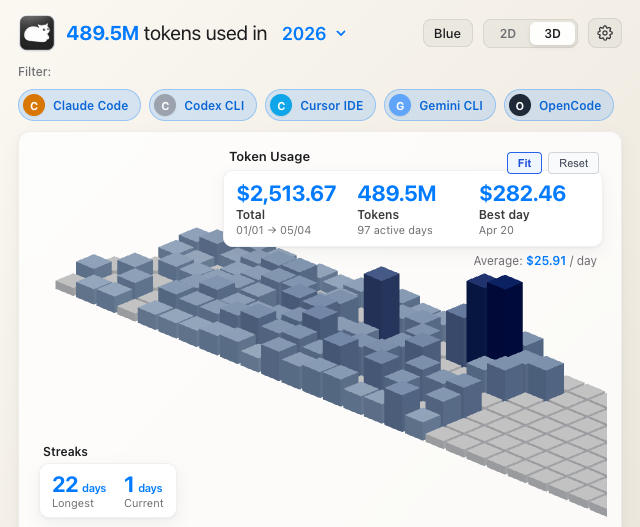
You spent $2,513.67 on AI coding tools in the last four months. You don't know that, because you can't see it.
Tokcat is an AI token usage monitor for the macOS menu bar — a local-first Claude Code usage, Codex usage, Cursor usage, and LLM cost tracker for AI coding agent usage. Built with Tauri 2 (Rust shell + React/Vite frontend), Tokcat sits in the macOS menu bar — no Dock icon, no telemetry, no account — and surfaces 8+ AI coding clients (Claude Code, Codex, Cursor, OpenCode, Gemini, Copilot, Amp, Droid, Hermes) in a single 2D or 3D contribution graph. The menu-bar title can show today's tokens, today's cost, totals, live tokens/min, or icon-only mode; clicking opens a frosted-glass popover with per-client filters, Live trace, streak summaries, and a settings panel. Tokcat refreshes local usage data in-process, checks for signed updates every 30 minutes, and ships as a signed DMG for Apple Silicon, macOS 11+. Install: brew install --cask handlecusion/tokcat/tokcat.
Quick Start
brew install --cask handlecusion/tokcat/tokcat
That's it. The fully-qualified user/tap/cask form auto-taps handlecusion/homebrew-tokcat. Open Tokcat from /Applications — the cat shows up in the menu bar, the Dock stays clean, and clicking the icon opens the dashboard.
The in-app updater checks for new releases on launch and again every 30 minutes; signed .tar.gz artifacts are verified against the embedded public key before install.
Prefer a one-off DMG? Grab
Tokcat_<version>_aarch64.dmgfrom
Releases. No separate
token-usage CLI is required.
Find Tokcat by use case
Tokcat is built for the category searches people actually type when AI coding bills get fuzzy:
- AI token usage monitor for the macOS menu bar
- Claude Code usage tracker for local session logs
- OpenAI Codex usage and Codex cost tracker
- Cursor usage and Cursor AI token dashboard
- LLM cost tracker for AI coding agent usage across Claude Code, Codex, Cursor, Copilot, Gemini, OpenCode, Amp, Droid, Hermes, and compatible local logs
- GitHub-style contribution graph for AI coding spend, tokens, streaks, and daily totals
Why Tokcat
| Glanceable | The menu bar title is configurable: today's tokens, today's cost, total tokens, total cost, live tokens/min, or icon-only. |
| Native | Tauri 2 shell with macOS NSVisualEffectView vibrancy, system fonts, and prefers-color-scheme light/dark adaptation. |
| Quiet | Lives in the menu bar — no Dock icon, no spurious notifications, auto-hides when you click another app. |
| Honest | Numbers come from local session logs read on-device. No telemetry, no cloud sync, no account required. |
| Multi-client | Tokcat reads Claude Code, Codex, Cursor, OpenCode, Gemini, Copilot, Amp, Droid, Hermes, and compatible local logs. |
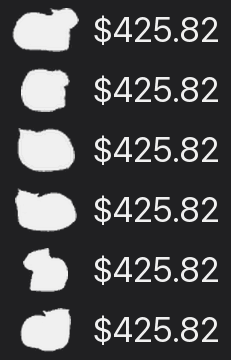
| Cat | The menubar cat eats your tokens and spins faster the more it digests — your token throughput as a single, glanceable critter. |
How It Works
Tokcat reads local usage logs directly from the Rust backend. On demand from the tray menu, and on a steady background refresh for the popover chart, it scans supported client stores, deduplicates streaming retries, normalizes token fields, estimates cost from a bundled model-price table when the source log does not include cost, and caches the graph payload in memory.
For live activity, a JSONL tailer tracks recent growth in supported session logs and turns it into a 10-minute tokens/min signal. The same signal can drive the menu-bar title, the Live trace card, and the adaptive tray animation.
The React frontend renders that payload as a 2D heatmap or a 3D tile graph powered by react-three-fiber. Per-client filters, summary cards, and the menu bar title all update from the same local payload.
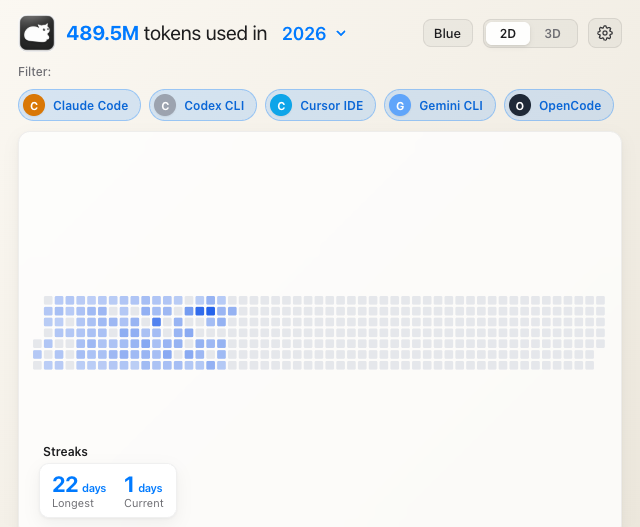
2D heatmap
GitHub-style contribution grid. Click and hold for a date / cost / token tooltip.
3D tile graph
Orthographic isometric projection with orbit controls and persistent camera state. The default framing auto-fits to the active tile cluster so populated days stay readable instead of getting lost in the empty future.
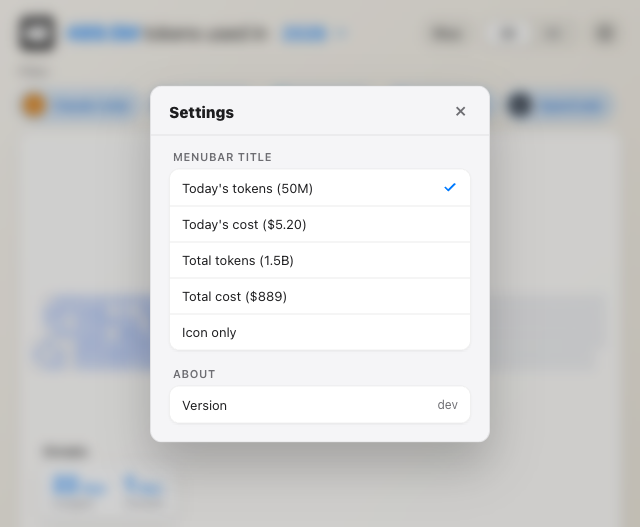
Menubar settings
A native System Settings-styled panel for the menu-bar title, animated tray icon, launch-at-login, and one-click update check.
A cat that eats tokens and spins
The mascot isn't decoration — it's the gauge. Tokcat's menubar cat eats whatever tokens your AI tools chew through and spins faster as it digests more. The hungrier your editor, the louder the cat. When you're idle, it dozes. When Claude Code is hammering through a refactor, it whirls. A glance at the menu bar and you know how fast your tokens are burning, without opening anything.
Pick between two styles in Settings: the spinning cat or a party parrot. During a manual refresh, the tray icon hops while Tokcat rebuilds the graph.

Features
| Feature | Details |
|---|---|
| 2D / 3D contribution graph | GitHub-style heatmap or interactive 3D tile graph with orbit controls, persistent camera, and auto-fit-to-active-tiles framing. |
| Per-client filters | Toggle Claude Code, Codex, Cursor, OpenCode, Gemini, Copilot, Amp, Droid, Hermes, and compatible local logs. |
| Live menu-bar title | Today's tokens, today's cost, total tokens, total cost, live tokens/min, or icon-only. Token-rate updates are emitted every 3 minutes. |
| Animated tray icon | Optional spinning cat or party parrot animation whose FPS scales with your real-time token velocity. Native CALayer frame swaps keep the animation smooth in the macOS menu bar. |
| Native vibrancy + glassmorphism | Transparent window with macOS sidebar NSVisualEffectView; light/dark auto via prefers-color-scheme. |
| Menubar popover behavior | Chromeless window, drag region on the header, auto-hides when focus leaves the app. |
| Settings panel | macOS System Settings-styled preferences with switch toggles, sectioned groups, version info, and one-click update check. |
| In-app updater | Signed releases via Tauri updater. Silent check on launch and every 30 minutes; manual check from Settings or the tray menu. |
| Launch at login | Tauri autostart plugin — opt-in via Settings. |
| Live trace | 10-minute tokens/min breakdown by client, with an optional split by agent and model. |
| Streaks & summaries | Longest / current streak, total tokens, total cost, daily average, best day. |
| No telemetry | Tokcat never makes a network request except the updater manifest. All data stays local. |
Usage
After installation, launch Tokcat from /Applications. Click the cat in the menu bar to open the dashboard. Right-click for the tray menu (Open, Settings…, Refresh Now, About, Check for Updates, Quit).
| Action | Shortcut |
|---|---|
| Open Settings | ⌘, (from tray menu) |
| Refresh now (bypass cache) | ⌘R (from tray menu) |
| Quit Tokcat | ⌘Q (from tray menu) |
| Setting | Effect |
|---|---|
| Menubar title | What the menu-bar text shows next to the icon, including the live tokens/min option. |
| Launch at login | Starts Tokcat automatically when you log in (Tauri autostart). |
| Animate tray icon | Spinning cat or party parrot animation that reflects token velocity. |
| Live trace → Split by agent / model | Expands the Live trace card from one row per client into per-agent and per-model rows. |
| About → Version | Currently installed Tokcat version. |
| About → Check Now | Same as the tray menu's "Check for Updates…", but in-pane. |
| Quit Tokcat | Exits the app. |
Dashboard is empty or a client is missing
Tokcat only reads local usage logs that already exist on disk. Open the AI client, complete at least one request, then choose Refresh Now from the tray menu. If you upgraded from an older Tokcat release that showed a missing-CLI setup dialog, update via Settings → About → Check Now, or brew upgrade --cask tokcat.
The menu-bar window vanishes when I click anywhere
That's intentional — Tokcat behaves like a native menubar popover. To keep it visible while interacting with another app, drag the window away from the menu bar by its header (anywhere outside the controls is a drag region).
brew install --cask tokcat says no formula found
Use the fully-qualified name so brew knows which tap to look in: brew install --cask handlecusion/tokcat/tokcat. If the tap itself is stale, refresh it with brew update.
Error: Cask tokcat exists in multiple taps
Earlier versions of the tap lived at handlecusion/tokscale; that repo was renamed to handlecusion/homebrew-tokcat. If you tapped the old name once, your local Homebrew still treats it as a separate tap and collides with the new one. Drop the stale tap and reinstall:
brew untap handlecusion/tokscale
brew install --cask handlecusion/tokcat/tokcat
Downloaded DMG won't launch / "Tokcat is damaged" / immediate crash
Tokcat ships ad-hoc-signed (no paid Apple Developer ID), so a DMG-installed copy hits the Gatekeeper quarantine. The Homebrew cask runs the strip + re-sign step automatically; for the manual DMG path do it yourself:
xattr -dr com.apple.quarantine /Applications/Tokcat.app
codesign --force --deep --sign - /Applications/Tokcat.app
open -na /Applications/Tokcat.app
FAQ
What is Tokcat?
Tokcat is a free, open-source native macOS menu-bar app that visualizes your AI coding token usage as a 2D or 3D GitHub-style contribution graph. Its Tauri 2 backend reads local sessions from Claude Code, Codex, Cursor, OpenCode, Gemini, Copilot, Amp, Droid, and Hermes in one glanceable place. Tokcat runs entirely on-device, makes zero analytics requests, requires no account, and reads token data from local session logs. The app is MIT-licensed, distributed via Homebrew (brew install --cask handlecusion/tokcat/tokcat) and as a signed DMG from GitHub Releases, and targets Apple Silicon Macs running macOS 11 or newer.
How much does Tokcat cost?
Tokcat is free and open-source under the MIT licence. There is no subscription, no paid tier, and no telemetry. Install with brew install --cask handlecusion/tokcat/tokcat.
Which AI coding tools does Tokcat track?
Tokcat tracks Claude Code, OpenAI Codex, Cursor, OpenCode, Google Gemini, GitHub Copilot, Amp, Droid, and Hermes from local logs. New client formats are added in Tokcat's Rust usage reader.
Does Tokcat send my data anywhere?
No. Tokcat's only network request is a check against https://github.com/handlecusion/tokcat/releases/latest/download/latest.json for new releases. There is no telemetry, no analytics, no cloud sync, no account, and no third-party server. All token-usage data is read locally from session logs.
How is Tokcat different from CLI token-usage tools?
Tokcat is a native macOS GUI and background reader: an animated menu-bar icon that shows cost, token count, or live tokens/min, a click-to-open frosted-glass dashboard with a GitHub-style heatmap, an interactive 3D tile graph, Live trace, per-client filters, streaks, and a System Settings-styled preferences panel. It does not require a separate token-usage CLI at runtime.
Does Tokcat run on Intel Macs or Windows?
Tokcat ships only for Apple Silicon (arm64) on macOS 11 or later. There is no Intel x86_64 build and no Windows or Linux build.
How do I uninstall Tokcat?
If installed via Homebrew: brew uninstall --cask tokcat. If installed via DMG: drag Tokcat.app from /Applications to the Trash. Tokcat writes preferences to ~/Library/Preferences/com.handlecusion.tokcat.plist and a small settings file under ~/Library/Application Support/com.handlecusion.tokcat; delete those manually if you want a clean removal.
Build From Source
git clone https://github.com/handlecusion/tokcat.git
cd tokcat
pnpm install            # or: npm install
pnpm tauri:dev          # opens the menubar app with Vite HMR on :4061
pnpm tauri:build        # production .app + .dmg in src-tauri/target/release/bundle
The dev script runs the web frontend in a browser at http://localhost:4061 against a small Express + Vite server (server.js) with a mock graph payload. Use pnpm tauri:dev when you need the native backend to read real local usage logs.
# 1. bump version in package.json, src-tauri/tauri.conf.json, src-tauri/Cargo.toml
# 2. cargo check (refreshes Cargo.lock)
# 3. commit, push to origin/main
scripts/release.sh <version> "<release notes>"
scripts/release.sh builds the production app and DMG, strips the embedded .VolumeIcon.icns (which would otherwise show up in Finder when hidden files are visible), generates the updater signature, writes latest.json, tags the release, and uploads everything via gh release create.
After the release lands, bump Casks/tokcat.rb in handlecusion/homebrew-tokcat so brew users see the new version.
Repos involved
| Repo | Role |
|---|---|
handlecusion/tokcat |
App source, GitHub Releases, in-app updater manifest |
handlecusion/homebrew-tokcat |
Homebrew tap (Casks/tokcat.rb) — what brew install --cask handlecusion/tokcat/tokcat resolves |
junhoyeo/tokscale |
Upstream CLI used as a reference for supported local log formats |
Acknowledgements
Tokcat's local usage reader was informed by the open-source tokscale project. Special thanks to @junhoyeo for documenting and maintaining that ecosystem knowledge.
Licence
MIT. See LICENSE.
brew install --cask handlecusion/tokcat/tokcat
macOS 11+ · Apple Silicon · Tauri 2 · React / Vite · MIT
Yorumlar (0)
Yorum birakmak icin giris yap.
Yorum birakSonuc bulunamadi