aperture
Health Warn
- License — License: NOASSERTION
- Description — Repository has a description
- Active repo — Last push 0 days ago
- Low visibility — Only 8 GitHub stars
Code Pass
- Code scan — Scanned 12 files during light audit, no dangerous patterns found
Permissions Pass
- Permissions — No dangerous permissions requested
No AI report is available for this listing yet.
Catches AI agents' mistakes with deterministic checks: parse, imports, types, tests, secrets. An open-source AI code editor and GitHub Action.
Aperture
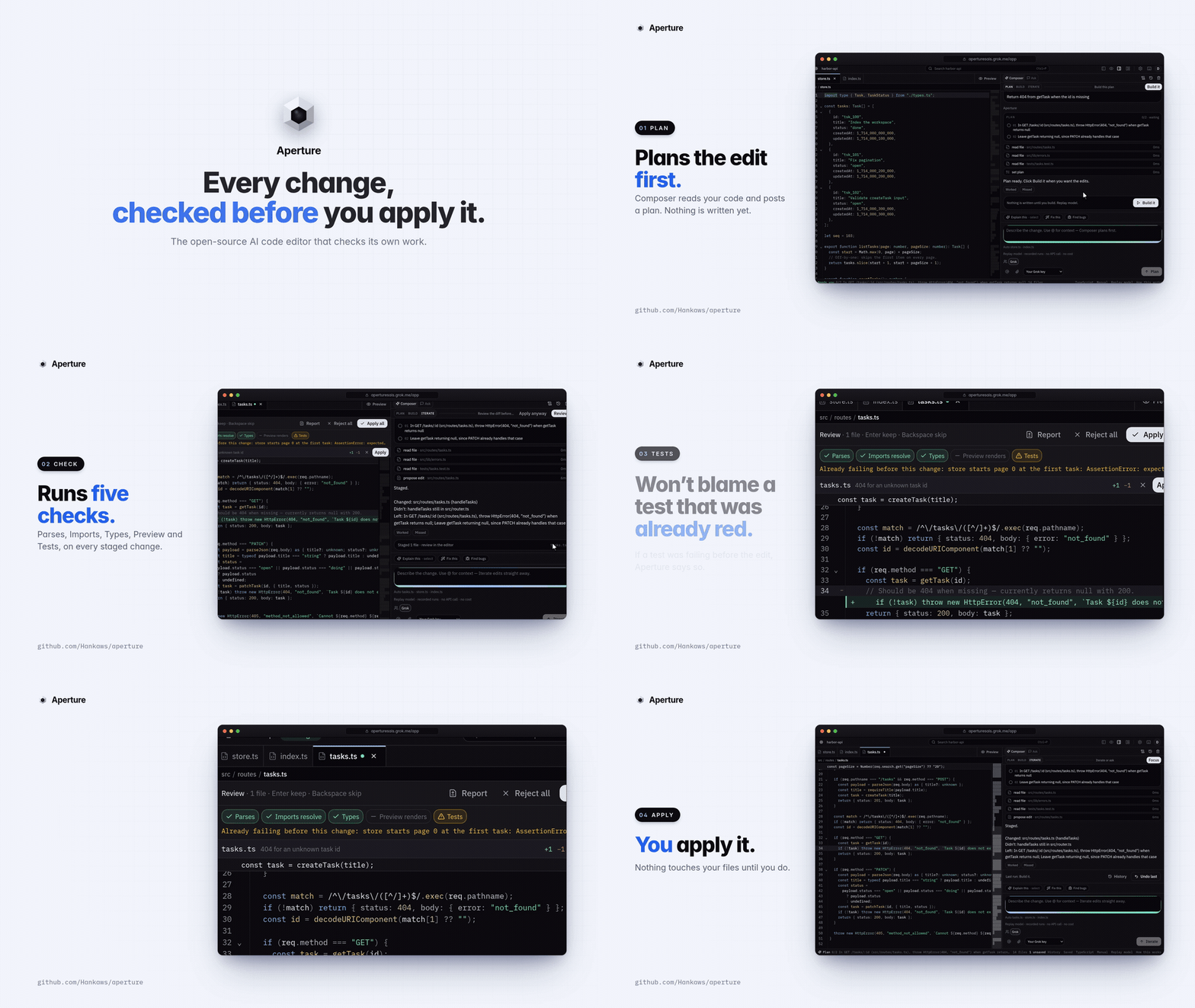
An AI code editor that checks its own work. Composer plans a change and
stages it as a diff. Every staged change is then checked before you apply it:
it parses, its imports resolve, the TypeScript compiler passes, the page
renders, and the tests pass. The tests run in your browser tab, free, in about a second.
▶ Watch the 30-second demo on YouTube
Demo: aperturesais.grok.me. It plays recorded runs. It does not call Grok, so it does not spend anyone's API quota. A key you add in Settings is yours alone.
Try it in a minute, no API key needed
Needs Node 22.6 or newer.
git clone https://github.com/Hankaws/aperture.git
cd aperture
npm ci
APERTURE_MODEL=replay VITE_AUTH_ENABLED=false npm run dev
Open http://localhost:8080/app and click Fix the off-by-one in listTasks,
then Build it. Watch the plan, the staged diff and the checks. The demo
project ships with three known bugs and one failing test for each. The fix
makes its own test pass, and the other two still fail, so the Tests check is
amber: "already failing before this change", not blamed on the edit. Click the
chip to see the run. The other two suggested tasks fix the other two bugs the
same way.
APERTURE_MODEL=replay plays back recorded agent runs on the built-in demo
project (harbor-api) instead of calling a model. It exercises the whole
product and costs nothing. VITE_AUTH_ENABLED=false skips sign-in and uses a
local in-process database (PGlite), so nothing else needs setting up.
What it does
Plan, then build. Composer reads the code, posts a plan, and waits for
Build it. You can reword, reorder, remove or add steps first. Edits
arrive as staged diffs you keep or skip file by file. Nothing touches your
files until you apply. Turn off Plan first to have Composer edit
straight away; either way, nothing is applied until you Apply.An agent board. Every run (its plan, Build it, the test runs and
automatic fix that answer it) is one card: working, needs you, review or
done, with background jobs alongside. Two runs with staged changes can be
compared side by side, file by file (Ctrl/Cmd+Shift+B).Background runs. Send a task with the clock button (or
Ctrl/Cmd+Shift+Enter) and keep working; up to three run at once, beside
whatever Composer is doing on screen. Each works on a copy of your files
as they were when it started, in this tab, with any model, including the
replay demo and a model on your own computer. When the agent finishes, the
change goes through the same checks as any other: parse, imports, tsc,
the tests and your stage hooks. A red check goes back to the agent once.
Then the run waits on the agent board under Review.- Open brings it into Composer as its own run, staged and unapplied.
If you changed the same file meanwhile, your edits and the run's are
merged. - If you changed the very same lines, the run waits under Needs you with
Run again, which starts the task over on your current files. - A run that was working when the tab closed says so after the reload; it
does not resume. External agents (ACP) still run as server jobs on Pro.
- Open brings it into Composer as its own run, staged and unapplied.
Best of 3, judged by the checks. Type a task and pick Best of 3
from the + menu: it shows what three runs cost on your key, then runs the
task three times in the background, each checked like any other run. The
agent board ranks the attempts by what the checks found (fewer red, clear
on the first try, fewer amber, more checks passed, then the smaller
change) and says why the best one won. Compare any two side by side, or
open the best for review and Apply.Check results on every change. Six checks, each computed from the
staged change itself:- Parses: the changed code, markup and JSON files parse.
- Imports resolve: every import in the changed scripts resolves.
- Types: the real TypeScript compiler, run in a worker in your tab on
the staged change. It checks the changed files and the files that depend
on them (importers, files that re-export them, and their importers in
turn, up to 40), against the whole project and itstsconfig.json, so a
change that breaks a caller in another file is caught. An error the files already had
is shown amber, not blamed on the change. The editor has nonode_modules, so packages are typedany(their types are not there to
check against), and so are Node's and a test runner's globals; implicitanyis not reported for the same reason. The compiler (about 1.3 MB
compressed) loads the first time a Composer turn starts in a TypeScript
project and is reused after that. If it cannot run (a project over 600
TypeScript files, say), a lighter check that reads each file on its own
stands in, and the row says so. A repository that size, or an older one
with years of files, belongs on Agent Check rather than in the browser
tab: it reads up to 5,000 files (50 MB) and typechecks up to 3,000 (30 MB)
on your runner, with the installed packages' real types./benchmark
publishes both limits, including a 601-file project the editor refuses
and Agent Check still accepts. Counted the same way, nestjs/nest atde2574e
(13 Oct 2026) is 2,111 TypeScript files: the editor refuses it and Agent
Check still reads it./benchmarkhas the count. - Preview renders: the staged page renders, without errors and not blank.
- Tests: the project's tests pass.
- Safety: red for a key or token written into the code (GitHub, AWS, xAI, OpenAI, Anthropic, Google, Slack, Stripe, a private key) or values written into a
.envfile, and for a check switched off:// @ts-nocheck,strictloosened in tsconfig, a lint or typecheck script emptied. Amber, to look at and not held, for a new dependency, one installed from a URL, an install script, an edited CI workflow, a lockfile that moved with no dependency change, and a new@ts-ignoreoreslint-disable. Safety reads every changed text file, code or not, so a key in a workflow, a YAML config, a.pemor a Python script is red too. A key is never repeated, only its kind and line. - Project checks: your project's own rules, in
.aperture/checks.json: a pattern for one line, the files it applies to, the line it was made to catch, and what to write instead. Each line a change adds is read against them, code or not, so a mistake you have seen once is red every time after; Agent Check and Aperture Bot read the same file. The checks in force are the ones the project already has, so a change cannot remove one to get past it, and Safety says when one is removed or changed. Make it a check under a red check asks Composer to write the check for that mistake, and a new check must catch its own example before it is kept.
A check that could not run says why. It never shows as a pass.
A review guide. Under the checks, every staged change says where to
start reading and why: each file in order of risk (changes the tests, the
CI or the dependencies, touches sign-in or billing code, deletes a file,
changes what other files import, is large, or was edited without the agent
reading it first), with the plan step that made it, and the files the agent
read without changing. Open PR can add the same receipt to the pull
request's description.Visual proof. When a staged change touches a page, the check strip
shows it before and after, side by side, at desktop or phone width, with
what changed outlined and how much of the page moved. A change that makes
the page scroll sideways where it did not is said in so many words. The
pictures are drawn in your tab from the files: no model, nothing sent.A fix starts from the evidence. When a check is red, the fix turn
(the automatic one, Send back, a background run's fix) gets what the
editor saw, not only one line:- every new issue;
- a failing test's message and its stack, mapped back to your files and
lines; - the code around the line where it broke.
A second try that is still red is not applied. The replay demo shows it:
ask Composer to makelistTasksreturn a number, Send back, and the change
stops. A clip of that ispublic/caught-a-bad-change.webm.The live preview's script errors are shown at the line of your script
file that threw, and every Composer turn is told about them.How well they work is measured on the
/benchmarkpage: 48 staged
edits, 33 with a mistake and 15 correct, across four small projects in
TypeScript and plain JavaScript, put through these checks. Every case is
listed there, misses and false alarms included, andnpm run bench
reproduces it.Tests in the browser.
npm run testruns in a sandboxed Worker in your
tab. This coversnode,node --testandtsxscripts, withnode:test
andnode:assert. It also covers Vitest and Jest:describe,it,expect, mock functions,vi.mockandjest.mock, and fake timers. A
Vitest or Jest config is honoured when it only picks test files or turns
on globals. A DOM environment, plugins, aliases, setup files and snapshots
need a real Node. The sandbox blocks all network access, so code the agent
just wrote cannot reach the app or anything else.- If a test fails, it is re-run on your current files. A failure that was
already there is reported as such. - A new failure goes back to the agent once to fix.
- The agent runs them too. When it calls
run_scriptfor a script the
browser can run, the tests run in your tab after its turn, and the
output goes straight back to it as the next turn. It can check a fix,
see a failure and try again, at no cost, up to three runs per task. - Projects that need a real Node can run in Vercel Sandbox instead. The
sandbox can reach only the package registries (registry.npmjs.org,*.npmjs.org,registry.yarnpkg.com) andcodeload.github.comfor
tarballs an install downloads. It is given no secrets. A run that asks
for any other host, or for a token or key in its environment, does not
start until that run is explicitly approved.
- If a test fails, it is re-run on your current files. A failure that was
Hooks.
.aperture/hooks.jsonnames project scripts that run by
themselves, in the same sandboxed browser runner as the tests:{ "hooks": [{ "run": "check:store", "files": ["src/**"], "on": ["save", "stage"] }] }- On
save, Ctrl/Cmd+S on a matching file runs the script, and the status
bar shows the result. If it fails, Fix with Composer is offered. - On
stage, the script is one more row in the check strip for any staged
change to a matching file. Red holds Apply like any other check, and a
script that needs a real Node is shown as not run. - Hooks are read from the applied files, so a staged change cannot switch
off the hook that judges it.
- On
Rules for some files. A Markdown file in
.aperture/rules/withfiles: tests/**in its front matter is given to Composer only when a turn
touches a matching file: the open file, an@mention, or a file the agent
reads or edits. Test conventions stay out of a CSS change, and the message
lists the rules it followed.globs:(as in Cursor) works too. A rule with
no files applies to every turn. The command palette has Add a rule for
some files and Edit hooks. The demo project ships with one hook and
two rules.Design mode. Click an element in the preview to work on it. No model
needed for the first two tabs:- Style edits the CSS rule behind the element: colours (or one of
the page's tokens), size, weight, spacing, corners. The change goes
into your stylesheet and the preview updates at once. - Theme edits the page's design tokens (
:root { --accent: … }) and
has one-click themes. - Notes sends what you want changed to Composer, along with the
rules that style the element and the page's tokens. - Every edit session is one undo step, and the preview can be shown at
phone and tablet widths.
- Style edits the CSS rule behind the element: colours (or one of
Composer's lessons stay yours. What Composer learns in a project
(.aperture/lessons.md) is left out of what is sent to GitHub unless you
tick it in, so a shared repository does not fill with one person's notes.Pull requests driven to green. After Open PR, the status bar shows
the pull request's CI. When a check fails, the dialog lists where GitHub
pinned it and the end of the job's log. Fix with Composer sends all of
that to Composer; you review and apply the fix as usual, then push it to
the same pull request and the checks are watched again. Each step is a
click.Your layout. Every panel resizes and moves. The preview can dock right,
below or full-screen, and the sidebars can swap sides.Any model. Your own key for Grok, OpenAI, Anthropic, Gemini or DeepSeek
(Settings → Models). The app does not spend a shared Grok key.A model on your own computer, even on the hosted site. Settings →
Models → This computer points Composer at Ollama or LM Studio onlocalhost. The agent loop then runs in your browser tab and calls the
model directly, so a turn never passes through Aperture's server and costs
nothing. Ollama has to allow the page first:OLLAMA_ORIGINS=https://your-aperture-address ollama serve(on a Mac with
the Ollama app,launchctl setenv OLLAMA_ORIGINS "…", then restart it). Pick
a model that can call tools, such asqwen2.5-coderorllama3.1. A crew
and the sandbox's script runs stay on the server, so a local turn builds
alone and checks with the browser test runner. Its TypeScript tools
(references, renames) use the compiler in your tab.The checks, for any agent. Aperture is also an MCP server. Make a token
under Settings → Agents → Connect an agent and point Grok Bot, Claude
Code, Cursor or any MCP client at/api/mcp. Its one tool,check_change,
takes the project and a change and answers with Parses, Imports resolve,
Types (the real compiler, new errors only), whether the change tampers
with the tests, and Safety, the same verdicts the editor gives. Nothing is run or kept,
so the agent runs its own tests. Free on every plan./agentshas the
setup for each agent and a real answer.Aperture Agent Check, for every pull request. The same checks as a
GitHub Action (packages/agent-check): add one step, and every pull
request, an agent's or yours, gets Parses, Imports resolve, Types with
your installed packages' real types, your own tests, and Safety, with red lines
on the files it changed. It runs on your runner; nothing leaves it.
Using a real model
Leave out APERTURE_MODEL=replay. Sign in and add your own key under Settings → Models.
Configuration
Everything is optional for local use. Set these in your shell or your host's
environment settings, never in a committed file.
| Variable | What it does |
|---|---|
APERTURE_MODEL=replay |
Recorded runs instead of a model; no key, no cost |
VITE_AUTH_ENABLED=false |
No sign-in. Each browser gets its own anonymous workspace, settings and keys; the plan and usage limits are shared by all anonymous visitors |
DATABASE_URL |
Postgres for accounts and saved work. Without it, an in-process PGlite database |
BETTER_AUTH_SECRET, BETTER_AUTH_URL |
Session signing and the public URL when sign-in is on |
APERTURE_SECRETS_KEY |
Encrypts saved API keys and tokens: any string of 32 or more characters, kept somewhere safe. Without it they are encrypted under BETTER_AUTH_SECRET, and changing that secret makes them unreadable. Set it in every environment that shares the database |
APERTURE_SECRETS_KEY_PREVIOUS |
The old value while you rotate APERTURE_SECRETS_KEY: still read, and saved secrets move to the new key |
GROK_AUTH_ISSUER, GROK_AUTH_CLIENT_ID, GROK_AUTH_CLIENT_SECRET |
"Sign in with Grok". Only apps hosted by Grok App Builder have these; email and password sign-in works without them |
APERTURE_LOCAL_ENDPOINTS |
1 lets a custom model endpoint on http://127.0.0.1 (Ollama, LM Studio) be called from a production server you run yourself. On by default in local dev, off when deployed: there, loopback is the server itself, not your machine |
APERTURE_SANDBOX=vercel-oidc |
Lets the agent run projects in Vercel Sandbox, when deployed on Vercel |
VERCEL_SANDBOX_TOKEN, VERCEL_TEAM_ID, VERCEL_PROJECT_ID |
Vercel Sandbox from any other host |
PADDLE_ENVIRONMENT |
sandbox (Paddle's test mode) or production. Paid plans stay off unless it is one of the two |
PADDLE_API_KEY, PADDLE_WEBHOOK_SECRET |
Paddle's API key and the webhook destination's secret. Server only |
PADDLE_CLIENT_TOKEN |
Paddle's client-side token, which loads the checkout. Paddle makes it to be public |
PADDLE_PRICE_PRO_MONTHLY, PADDLE_PRICE_PRO_YEARLY, PADDLE_PRICE_TEAM_MONTHLY, PADDLE_PRICE_TEAM_YEARLY |
The Paddle price IDs (pri_…) for each plan and period |
Don't set VITE_AUTH_ENABLED=false together with DATABASE_URL. The app
refuses that combination on purpose, so a shared database is never opened
without sign-in.
Selling Pro and Team
Pro and Team sell server sandbox runs (300 and 1,000 a month), so they can be
bought only when both Paddle and the sandbox are configured. Until then the
pricing page shows them as coming soon. Paddle is the seller of record and
handles payment and sales tax.
- In Paddle, create a Pro and a Team product, each with a monthly and a yearly
price, and put the four price IDs in the variables above. - Checkout settings → default payment link:
https://<your site>/billing/pay.
Paddle reviews the site before approving it for live payments. - Notifications → new destination:
https://<your site>/api/billing/webhook,
with thesubscription.*events. Its secret isPADDLE_WEBHOOK_SECRET. - Test end to end with
PADDLE_ENVIRONMENT=sandboxand Paddle's test cards,
then switch toproductionkeys.
A plan changes only when a signed webhook confirms the payment. A failed renewal
keeps the plan for 7 days, a cancellation keeps it to the end of the period paid
for, and both then move the account to Hobby without deleting anything.
Subscribers switch plan or period (Pro to Team, monthly to yearly) on the pricing
table: Paddle prices the change first, then charges or credits the rest of the
period at once. Paddle's own billing page has no plan change. If one account ever
ends up with a second live subscription (two checkouts both paid), the webhook
cancels the second one immediately and logs[billing] cancelled a second subscription: refund that payment in Paddle →
Transactions.
Development
npm run dev        # the app on http://localhost:8080
npm test           # every *.test.ts / *.test.mjs, no build step
npm run typecheck
npm run lint
npm run build      # production build
CI also runs the replay demo end to end in Chromium against a production
build (scripts/e2e-demo.mjs; how to run it locally is inAGENTS.project.md), and the signed-in visitor path with npm run build && npm run smoke (scripts/smoke-visitor.mjs).
Read AGENTS.project.md before changing things. It lists
the traps in this codebase that type-check cleanly and then fail at runtime,
and how each one is verified.
| Path | What lives there |
|---|---|
src/components/ide/ |
The editor UI: panels, review strip, checks, Composer |
src/lib/agent/ |
The agent loop, tools, plan/build phases and the replay model |
src/lib/runner/ |
The in-browser test runner |
src/lib/workspace/ |
Files, staged edits, checks, preview rendering |
src/lib/sandbox/ |
Verify runs in Vercel Sandbox |
src/lib/indexer/ |
Code search that the agent uses |
See CONTRIBUTING.md to send a change.
License
Aperture's code is under the MIT License. Some scaffolding comes
from the Grok App Builder template and is not covered by it. See
THIRD_PARTY_NOTICES.md.
Reviews (0)
Sign in to leave a review.
Leave a reviewNo results found