matlab-plot-skill
Health Uyari
- License — License: MIT
- Description — Repository has a description
- Active repo — Last push 0 days ago
- Low visibility — Only 7 GitHub stars
Code Basarisiz
- rm -rf — Recursive force deletion command in install.sh
Permissions Gecti
- Permissions — No dangerous permissions requested
Bu listing icin henuz AI raporu yok.
Fix messy MATLAB figures: publication-quality plots, clean subplot layouts, and PDF export for LaTeX/Overleaf in Codex and Claude Code.
Publication-Quality MATLAB Figures
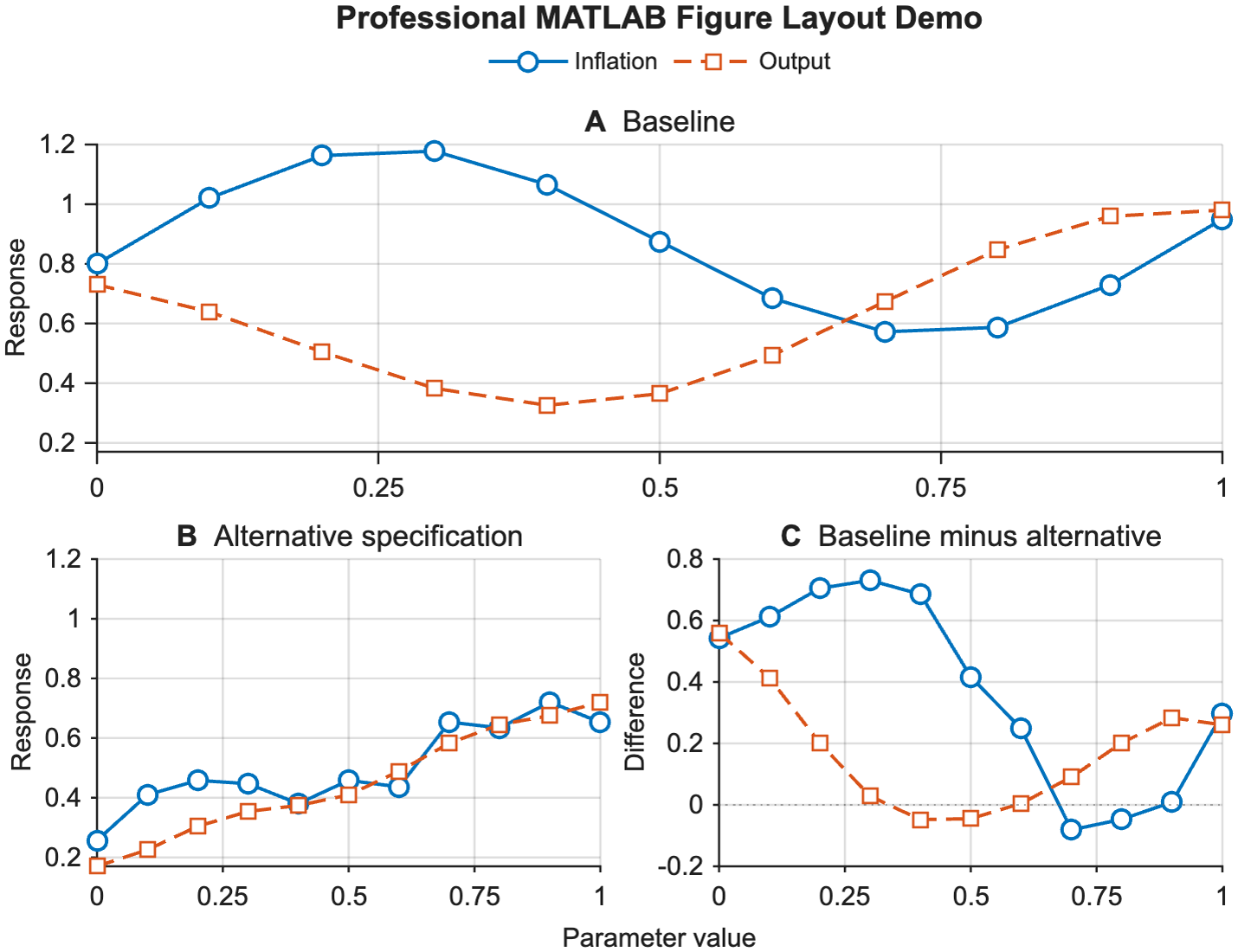
matlab-plot-skill is a reusable skill for Codex and Claude Code that fixes messy MATLAB figures: cramped layouts, unreadable titles, awkward legends, bad white space, and weak PDF output for LaTeX or Overleaf.
The key rule is simple: the agent must not stop after writing plotting code. It must generate the figure, export it, read the rendered figure itself, and iterate until the visual result is no longer a mess.
Find This Repo If You Searched For
- how to make MATLAB figures look professional
- publication-quality MATLAB plots
- fix messy subplot layout in MATLAB
- export MATLAB figure to PDF for LaTeX
- MATLAB figures for Overleaf
- improve MATLAB legend, title, spacing, and white space
What Problem This Solves
- multi-panel MATLAB figures that look cramped or amateurish
- legends that steal too much plot area
- titles that are too long or too small after PDF scaling
- inconsistent colors and symbols across panels
- plots that look acceptable in MATLAB but bad once embedded in a paper
What This Skill Enforces
- MATLAB-first figure cleanup for papers, appendices, and slides
- vector PDF export for LaTeX and Overleaf workflows
- better layout choices for multi-panel figures
- explicit render-review-iterate behavior
- reusable MATLAB export helper code
- a quick PNG review path so the agent can read the rendered figure easily
Repository Layout
matlab-plot-skill/SKILL.mdmatlab-plot-skill/scripts/export_publication_figure.mmatlab-plot-skill/references/render_review_checklist.mdmatlab-plot-skill/references/matlab_figure_guidelines.mdmatlab-plot-skill/agents/openai.yaml(Codex UI metadata).claude-plugin/plugin.jsonand.codex-plugin/plugin.json(plugin manifests for the catalog install)install.ps1install.shexamples/demo_publication_figure.mdocs/demo_publication_figure.png(the preview image above, rendered by the demo)tests/test_export_publication_figure.m(MATLAB unit tests for the helper)evals/(trigger prompts and end-to-end quality checks)tools/validate_repo.pyCHANGELOG.md,RELEASING.md,LICENSE,CITATION.cff
Prerequisites
MATLAB R2021a or newer. The export helper uses
exportgraphics(R2020a+) and argument validators such asmustBeTextScalar(R2020b+); the demo and the documented helper calls use name=value argument syntax (WidthInches=6.5), which requires R2021a+. On newer releases the helper also usesfontname(R2022a+), figure themes (R2025a+), and theexportgraphicsWidth/Heightoptions (R2025a+, which make the PDF exactly the requested size) when they exist.matlabon yourPATH, so the agent can runmatlab -batch. Check withmatlab -batch "disp(version)". On macOS MATLAB is often not onPATHafter installation (MathWorks documents starting it from itsbinfolder). Link it into/usr/local/bin, adjusting the release name:sudo mkdir -p /usr/local/bin sudo ln -s /Applications/MATLAB_R2026a.app/bin/matlab /usr/local/bin/matlabThe skill also tells the agent to look in the usual install folders before it concludes that MATLAB is missing.
In Codex on macOS, MATLAB has to run outside the sandbox: it cannot start inside it (on Apple Silicon it exits with "Incompatible processor ... neon"). The skill tells Codex to ask for escalated permissions for the
matlabcommand; approve that request when it appears. A launch the sandbox blocked can leave amatlab_crash_dump.*file in your home folder, which you can delete.Optional:
pdftoppm(Poppler) or ImageMagick, so the agent can rasterize a PDF it needs to read.For repo validation only:
uv(or Python 3 withpyyaml).
Install
Install the skill as a plugin from the OpenEconAI plugin catalog, ask your agent to install it for you, copy it into your skills folders with the installers below, or upload it on claude.ai. Pick one per client: with both, the skill loads twice.
As a plugin
Claude Code:
/plugin marketplace add OpenEconAI/plugins
/plugin install matlab-plot-skill@openeconai
Codex:
codex plugin marketplace add OpenEconAI/plugins
codex plugin add matlab-plot-skill@openeconai
Start a new Codex session after installing; Codex loads a plugin's skills in new sessions.
Plugin skills are namespaced: invoke this one as /matlab-plot-skill:matlab-plot-skill in Claude Code. In Codex, type @ and pick the plugin or its skill, or mention $matlab-plot-skill:matlab-plot-skill. In either client you can also just describe the task.
Paste-to-agent install
Open Claude Code or Codex in any folder and paste this prompt. It installs the standalone skill (not the plugin) for that client only:
Install or update matlab-plot-skill as a standalone skill for the client I am
using (Claude Code or Codex) from https://github.com/hanlulong/matlab-plot-skill.
If the matlab-plot-skill@openeconai plugin is installed in this client, remove
it first. Clone the repo to a stable folder outside every skills directory, or
git pull an existing clone, then run its installer for this client only:
./install.sh --target claude|codex --force (or .\install.ps1 -Target
claude|codex -Force on Windows). If the installer warns about an older copy in
~/.codex/skills, remove it with the command it prints. Check that
`matlab -batch "disp(version)"` works (in Codex, run it outside the sandbox).
If matlab is not on PATH, look in /Applications/MATLAB_R20*.app/bin,
C:\Program Files\MATLAB\R20*\bin or /usr/local/MATLAB/R20*/bin and tell me how
to add it. Then confirm the skill loads.
Paste it again later to update.
From a clone
Clone the repo first, somewhere outside your skills folders (for example ~/src), since the installers copy the skill out of the clone. They refuse to install into a folder that holds the clone itself, such as a clone made directly in ~/.claude/skills/matlab-plot-skill:
git clone https://github.com/hanlulong/matlab-plot-skill.git
cd matlab-plot-skill
Windows PowerShell
Install into both Codex and Claude Code skill directories:
.\install.ps1
Install only into Codex:
.\install.ps1 -Target codex
Overwrite an existing installed copy:
.\install.ps1 -Force
If PowerShell says running scripts is disabled on this system, its execution policy is blocking scripts (Restricted is the default on Windows clients). Run the installer with a one-time override for that process, which changes no saved setting: powershell -ExecutionPolicy Bypass -File .\install.ps1 (append -Target codex or -Force as needed; use pwsh instead of powershell for PowerShell 7).
macOS / Linux
./install.sh
Install only into Claude Code:
./install.sh --target claude
Overwrite an existing installed copy with --force; see all options with ./install.sh --help.
On claude.ai
Download matlab-plot-skill-X.Y.Z.zip from the latest release and upload it as a skill in claude.ai's settings. There the skill cannot run the MATLAB on your computer: it writes the code and gives you the exact matlab -batch command to run. Attach the PNG it produces to the chat if you want it reviewed against the checklist. For the full render-and-review loop, use Claude Code or Codex.
Manual Install
Copy the matlab-plot-skill folder into one or both of these locations:
- Codex:
~/.agents/skills/matlab-plot-skill - Claude Code:
~/.claude/skills/matlab-plot-skill
If you installed this skill before 2026-05-30 (when the installers still targeted ~/.codex/skills) or copied it there by hand, an old copy may still sit in ~/.codex/skills/matlab-plot-skill ($CODEX_HOME/skills if you set CODEX_HOME). Codex still loads skills from that deprecated location, so the skill appears twice and the old copy can be stale. The installers warn about it but never delete it; remove it yourself:
rm -rf ~/.codex/skills/matlab-plot-skill
On Windows, use Remove-Item -LiteralPath "$HOME\.codex\skills\matlab-plot-skill" -Recurse -Force, unless that path is a symlink or junction to a clone: then remove only the link with (Get-Item -LiteralPath "$HOME\.codex\skills\matlab-plot-skill" -Force).Delete() (install.ps1 prints the right command for your case).
Update
Plugin, Claude Code: in a terminal, run
claude plugin marketplace update openeconai, thenclaude plugin update matlab-plot-skill@openeconai. Open sessions keep the old version until you run/reload-pluginsin them; new sessions load the new one. (Inside a session,/plugin marketplace update openeconai, then Update now on the plugin's page in the/pluginInstalled tab, does the same.)Plugin, Codex: in a terminal, run
codex plugin marketplace upgrade openeconai, thencodex plugin add matlab-plot-skill@openeconai, and start a new Codex session.Clone install: pull the repo and re-run the installer with
--force(-Forceon PowerShell), since the installer copies the skill:cd matlab-plot-skill git pull ./install.sh --forceIf
git pullstops with "Your local changes ... would be overwritten" forexamples/output/demo_publication_figure.png, you ran the demo from a version before 0.2.0, which wrote into that tracked file. Discard the local render withgit checkout -- examples/outputand pull again; the demo now writes only to git-ignored files.
Uninstall
Plugin, Claude Code: in a terminal, run
claude plugin uninstall matlab-plot-skill@openeconai(or, inside a session, choose Uninstall on the plugin's page in the/pluginInstalled tab).Plugin, Codex: in a terminal, run
codex plugin remove matlab-plot-skill@openeconai, then start a new Codex session.Clone install: delete the copied folders (the last one exists only if you installed before 2026-05-30):
rm -rf ~/.claude/skills/matlab-plot-skill ~/.agents/skills/matlab-plot-skill ~/.codex/skills/matlab-plot-skillOn Windows, remove
$HOME\.claude\skills\matlab-plot-skilland$HOME\.agents\skills\matlab-plot-skillthe same way as the legacy copy above. Then start a new Claude Code session and restart Codex so neither lists the skill.
Example Invocation
In Claude Code, invoke the skill directly with /matlab-plot-skill (/matlab-plot-skill:matlab-plot-skill after a plugin install), or just describe the task; Claude loads the skill when the request matches its description:
/matlab-plot-skill Refactor Plots/generate_my_figure.m into a publication-quality PDF figure for a two-column paper. Read the exported PNG, then iterate until the spacing and titles are clean.
Clean up the MATLAB figure in make_irf_plot.m for my LaTeX paper: one shared legend, readable fonts at text width, vector PDF.
In Codex, mention the skill with $matlab-plot-skill (after a plugin install, type @ and pick it, or use $matlab-plot-skill:matlab-plot-skill):
Use $matlab-plot-skill to refactor Plots/generate_my_figure.m into a publication-quality PDF figure. Read the exported figure and the compiled paper page, then iterate until the spacing and titles are clean.
Use $matlab-plot-skill to improve this MATLAB appendix figure. Keep the color mapping fixed across panels, distinguish variants with markers, export a vector PDF, and read the generated figure yourself before stopping.
Demo Example
Run this from the repository root (the path is relative to MATLAB's working directory):
matlab -batch "run('examples/demo_publication_figure.m')"
This generates:
examples/output/demo_publication_figure.pdfexamples/output/demo_publication_figure.png
The PNG is there for fast review. The PDF is the publication-style export for the paper workflow. examples/output/ is git-ignored, so running the demo never changes a tracked file; the preview image above is a copy kept in docs/.
Validation
tools/validate_repo.py is an optional local check (the repo has no CI). Run it before contributing:
uv run --with pyyaml python tools/validate_repo.py .
(Or pip install -r requirements-dev.txt first, then python tools/validate_repo.py ..)
This checks:
- required skill packaging files, including the README preview image in
docs/ SKILL.mdfront matter against the Agent Skills rules and Codex's allowed keys, and that the body still expresses the render-review-iterate workflow- the version in
SKILL.mdmetadata matchesCITATION.cffand both plugin manifests, and has a datedCHANGELOG.mdentry whose compare link ends at thematlab-plot-skill--vX.Y.Ztag - both plugin manifests parse, name the skill, share one description, and point at the folder that holds
SKILL.md, and the Codex display name matchesopenai.yaml - the paste-to-agent install section holds exactly one prompt (the OpenEconAI catalog copies it verbatim)
- the export helper still uses
exportgraphicsvector output, and the demo still calls that helper - relative markdown links resolve (README, CHANGELOG, RELEASING, SKILL.md, and the reference files)
openai.yamlskill metadataevals/trigger-evals.jsonparses and has both should-trigger and should-not-trigger prompts- PowerShell install flow (when PowerShell is available), including the legacy-copy warning, a linked
~/.codex/skills, and the refusal to install over the clone itself - bash install flow (when bash is available), including
--help, the legacy-copy warning, a linked~/.codex/skills, and the refusal to install over the clone itself
With MATLAB installed, also run the helper's unit tests from the repository root:
matlab -batch "assertSuccess(runtests('tests'))"
Making Changes
- If you change the MATLAB code, lint it locally:
matlab -batch "checkcode('matlab-plot-skill/scripts/export_publication_figure.m')"(and the demo), and run the unit tests above. - If you change the demo or the helper, re-run the demo with MATLAB, read the new PNG, then copy it over the preview image and commit it:
cp examples/output/demo_publication_figure.png docs/. - For a release, follow
RELEASING.md: bump the version inSKILL.md, both plugin manifests, andCITATION.cff, add aCHANGELOG.mdentry, and tagmatlab-plot-skill--vX.Y.Z. - Run the validator above before committing.
Notes
- Codex reads
agents/openai.yamlfor optional UI metadata. - Claude Code can use the same
SKILL.md-based folder structure. - The installer copies the skill, so re-run it with
--force(-Forceon PowerShell) after you update the repo to refresh the installed copy. - Claude Code picks up new and changed skills in
~/.claude/skillswithout a restart. If~/.claude/skillsdid not exist when your session started, run/reload-skillsto load the skill, and again after each later change there, until you start a new session. Codex detects newly installed skills automatically; restart Codex if the skill does not appear. - See
CHANGELOG.mdfor what changed in each version. Version 0.2.0 changed the helper's defaults: it now keeps your figure size and layout spacing unless you passWidthInches/HeightInchesorTileSpacing/LayoutPadding. A script that passes onlyWidthInchesto a plainfigurenow keeps MATLAB's default height instead of 4 in (about 6 in undermatlab -batchon R2026a/macOS; it varies by platform and release, and the warning prints the actual size). The helper warns (export_publication_figure:defaultSize), and passingHeightInches=4restores the 0.1.0 figure size. On R2025a+ the PDF is now exactly that size rather than a tight crop.
Yorumlar (0)
Yorum birakmak icin giris yap.
Yorum birakSonuc bulunamadi