AI-Data-Access-Gateway
Health Uyari
- License — License: Apache-2.0
- Description — Repository has a description
- Active repo — Last push 0 days ago
- Low visibility — Only 5 GitHub stars
Code Uyari
- network request — Outbound network request in src/adg/admin_api/console.py
Permissions Gecti
- Permissions — No dangerous permissions requested
Bu listing icin henuz AI raporu yok.
An open-source secure data access gateway for AI agents. It provides database safety access services to AI agents through the MCP protocol. 一个面向 AI Agent 的开源安全数据访问网关,通过 MCP 协议为 AI Agent 提供数据库安全访问服务。
AI Data Access Gateway
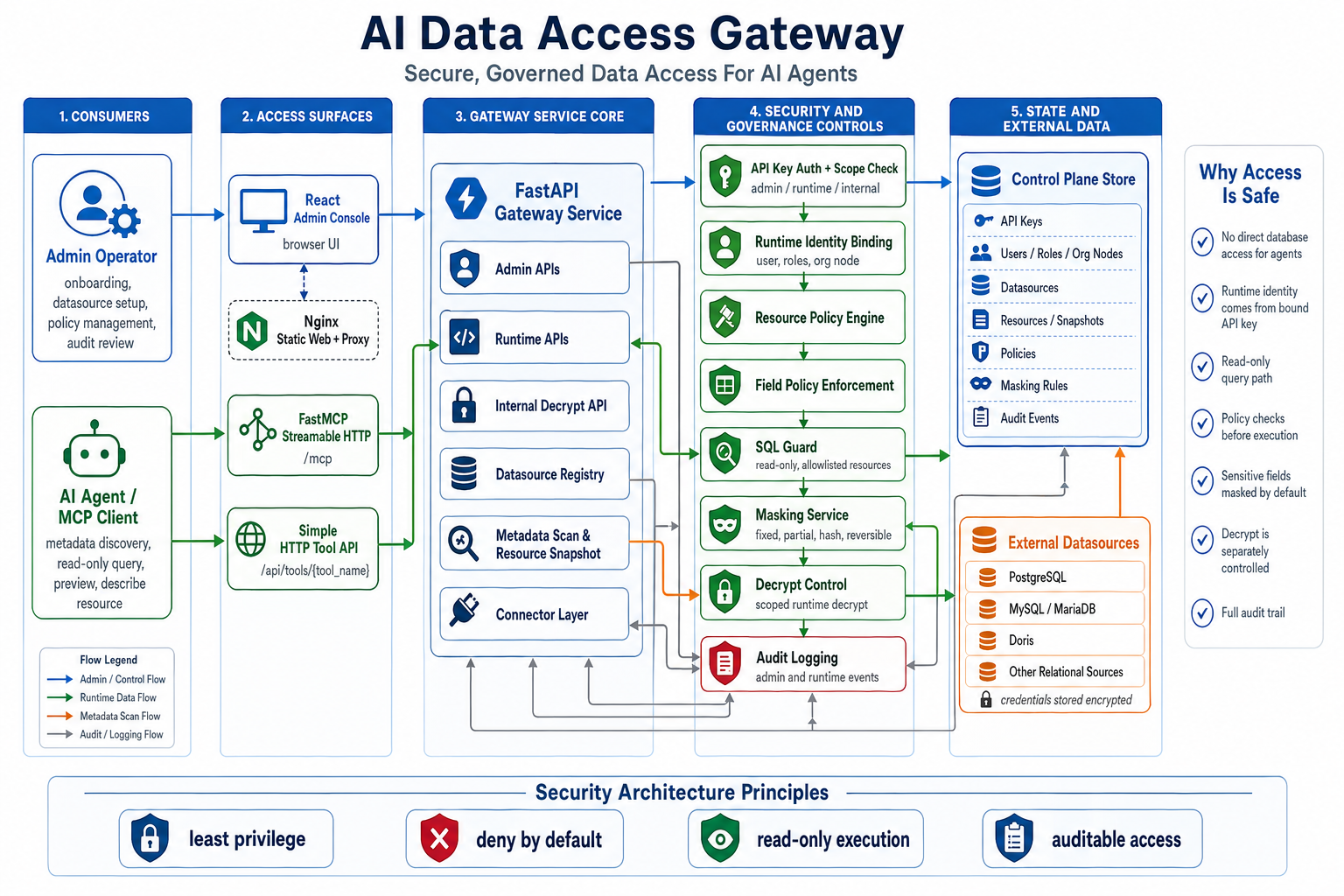
AI Data Access Gateway is an open-source secure data access gateway for AI agents. It provides database safety access services to AI agents through the MCP protocol. It sits between AI agents and real data sources, exposes governed metadata discovery and read-only data access, and enforces authorization, SQL safety checks, field-level policies, masking, data decrypt controls, and audit logging during AI-initiated data queries.
Architecture Overview
The project consists of a data security access layer and an admin console.
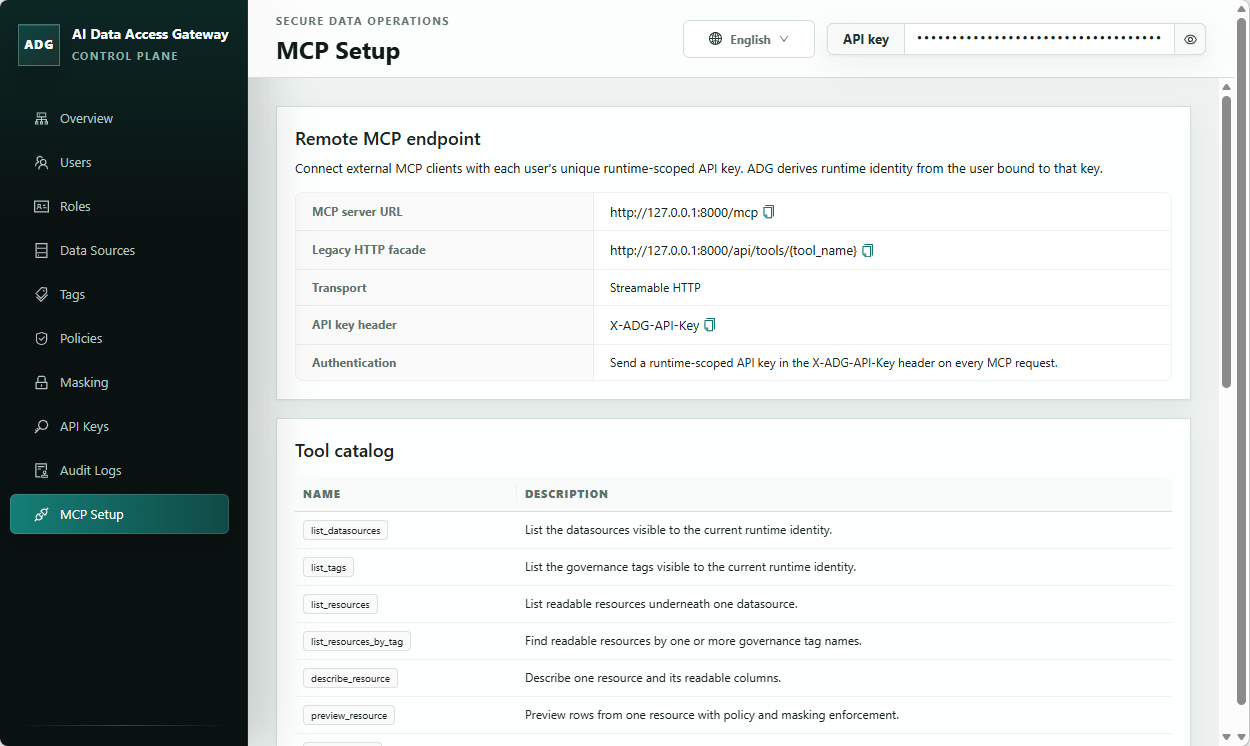
The runtime data access layer uses SQL Guard, resource policies, and field policies to constrain queries to controlled read-only paths. It exposes both a FastMCP Streamable HTTP /mcp endpoint and a simpler /api/tools/{tool_name} HTTP tool API.
The admin console serves a single-admin trust model. It covers data source maintenance, resource governance, and audit review, and manages data source registration, directory identity mapping, resource metadata, field policies, masking configuration, API Key management, and enterprise organization structure management.
The repository also includes demo data initialization, Docker Compose startup, and minimal runtime HTTP call examples.
Admin UI Example
Repository Layout
src/adg/: backend application code, control plane, runtime, connectors, and security capabilitiestests/: backend unit and integration coverageweb/: React + Vite admin consoleexamples/: demo seed data and example client flowsdocs/: internal planning, design, acceptance, and repository memory docs
Quickstart
Prefer Docker Compose for a production-style runtime stack. If you run directly on the host, use non-development dependencies, keep reload disabled, and set production environment variables explicitly.
Backend
uv sync --frozen --no-dev --extra all
$env:ADG_ENV="production"
$env:ADG_CONTROL_PLANE_DATABASE_URL="sqlite:///./data/adg-control-plane.db"
$env:ADG_SECRET_KEY="<generate-a-long-random-secret>"
$env:ADG_CREDENTIAL_ENCRYPTION_KEY="<generate-a-second-long-random-secret>"
uv run --no-dev --extra all alembic upgrade head
uv run --no-dev --extra all init-admin --database-url sqlite:///./data/adg-control-plane.db
uv run --no-dev --extra all uvicorn adg.app.main:create_app --factory --host 0.0.0.0 --port 8000
init-admin prints a one-time admin API key for console onboarding and admin setup. Save it immediately and use it in the console. Runtime HTTP examples require a separate runtime-scoped API key bound to a directory user; create or reset that key after initialization.
Frontend
Set-Location web
npm ci
npm run build
The production build is written to web/dist. The Docker Compose path serves this static frontend with Nginx and exposes the web console at http://127.0.0.1:8080.
Docker Compose
$env:ADG_SECRET_KEY="<generate-a-long-random-secret>"
$env:ADG_CREDENTIAL_ENCRYPTION_KEY="<generate-a-second-long-random-secret>"
docker compose up --build
docker compose exec backend init-admin
The Compose stack starts production backend and static frontend containers. The web console is published at http://127.0.0.1:8080 by default.
Contributor Verification
uv sync --extra dev --extra all
uv run --extra dev pytest
uv run --extra dev ruff check .
uv run --extra dev mypy src tests
Set-Location web
npm test
npm run build
npm run audit:prod
Set-Location ..
uv export --frozen --extra dev --extra all --no-editable --no-hashes --no-emit-project --format requirements-txt --output-file .tmp-audit-requirements.txt
uv tool run --from pip-audit pip-audit -r .tmp-audit-requirements.txt
Remove-Item .tmp-audit-requirements.txt
Documentation
License
This project is licensed under Apache 2.0. See LICENSE.
Yorumlar (0)
Yorum birakmak icin giris yap.
Yorum birakSonuc bulunamadi