coding-usage-bar
Health Warn
- License — License: MIT
- Description — Repository has a description
- Active repo — Last push 0 days ago
- Low visibility — Only 7 GitHub stars
Code Fail
- rm -rf — Recursive force deletion command in package.json
- rm -rf — Recursive force deletion command in scripts/generate-menubar-demo.sh
- rm -rf — Recursive force deletion command in scripts/verify-packed-install.sh
- process.env — Environment variable access in src/cli.ts
Permissions Pass
- Permissions — No dangerous permissions requested
No AI report is available for this listing yet.
macOS menu bar usage monitor for Claude Code, Codex, GLM, DeepSeek, and MiniMax
Coding Usage Bar
Claude Code and Codex usage monitoring in your macOS menu bar. Track rolling plan limits across Claude Code, OpenAI Codex, GLM (Zhipu AI), DeepSeek, MiniMax, and Kimi (Moonshot AI) before a coding session hits the wall.



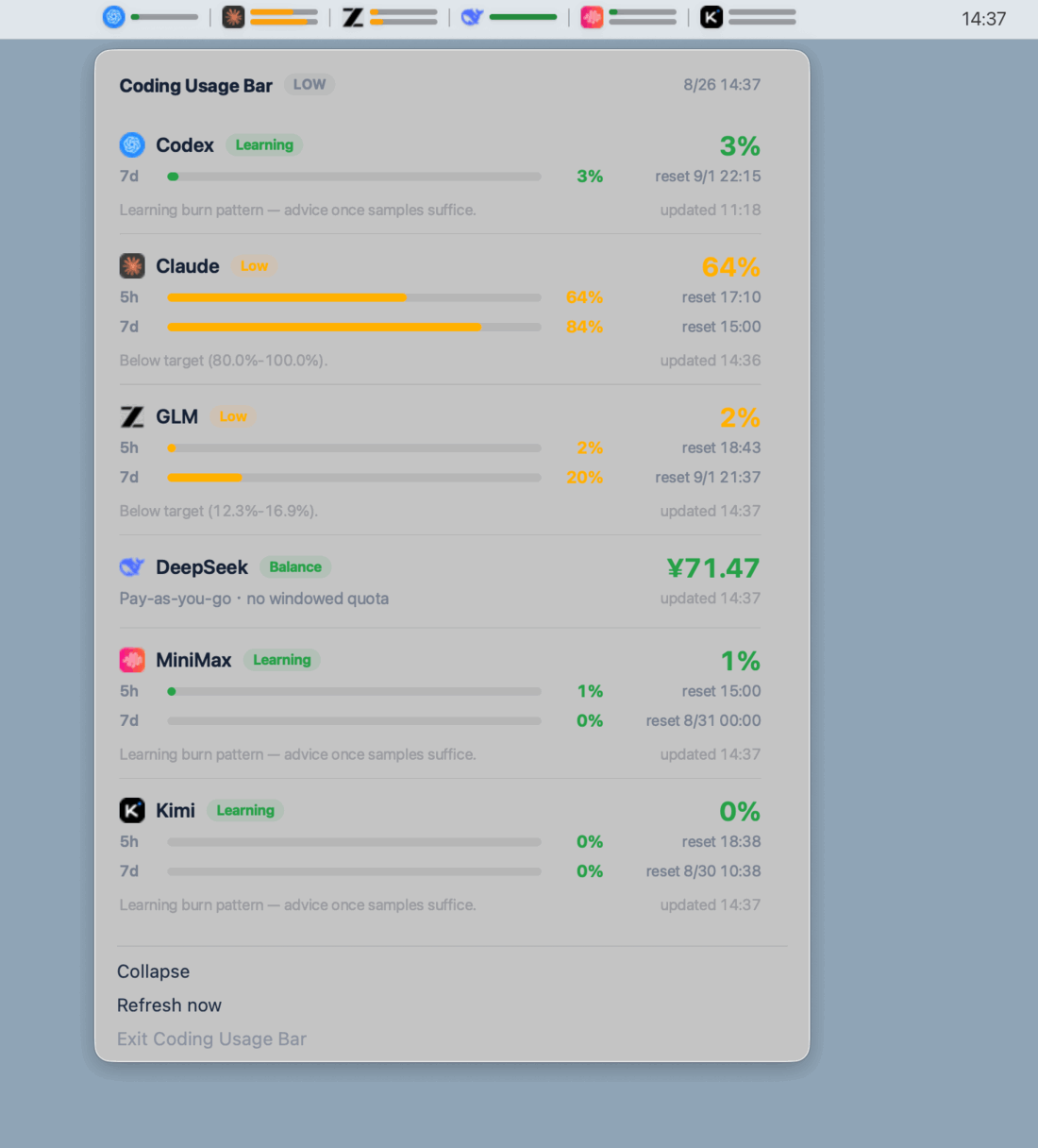
Coding Usage Bar does more than display quota percentages. It compares short rolling windows with the weekly budget and labels your pace as learning, under-burning, on track, over-burning, or close to a limit.
Claude Code and Codex data stays local and is read from files those tools already produce. Provider API keys for GLM, DeepSeek, and MiniMax are stored only in ~/.coding-usage-bar/config.json and sent directly to their respective quota APIs. Kimi reads its key from ~/.coding-usage-bar/config.json or, when unset, from the kimi.com lane in ~/.config/claude-lanes/config.env.
Live SwiftBar Menu
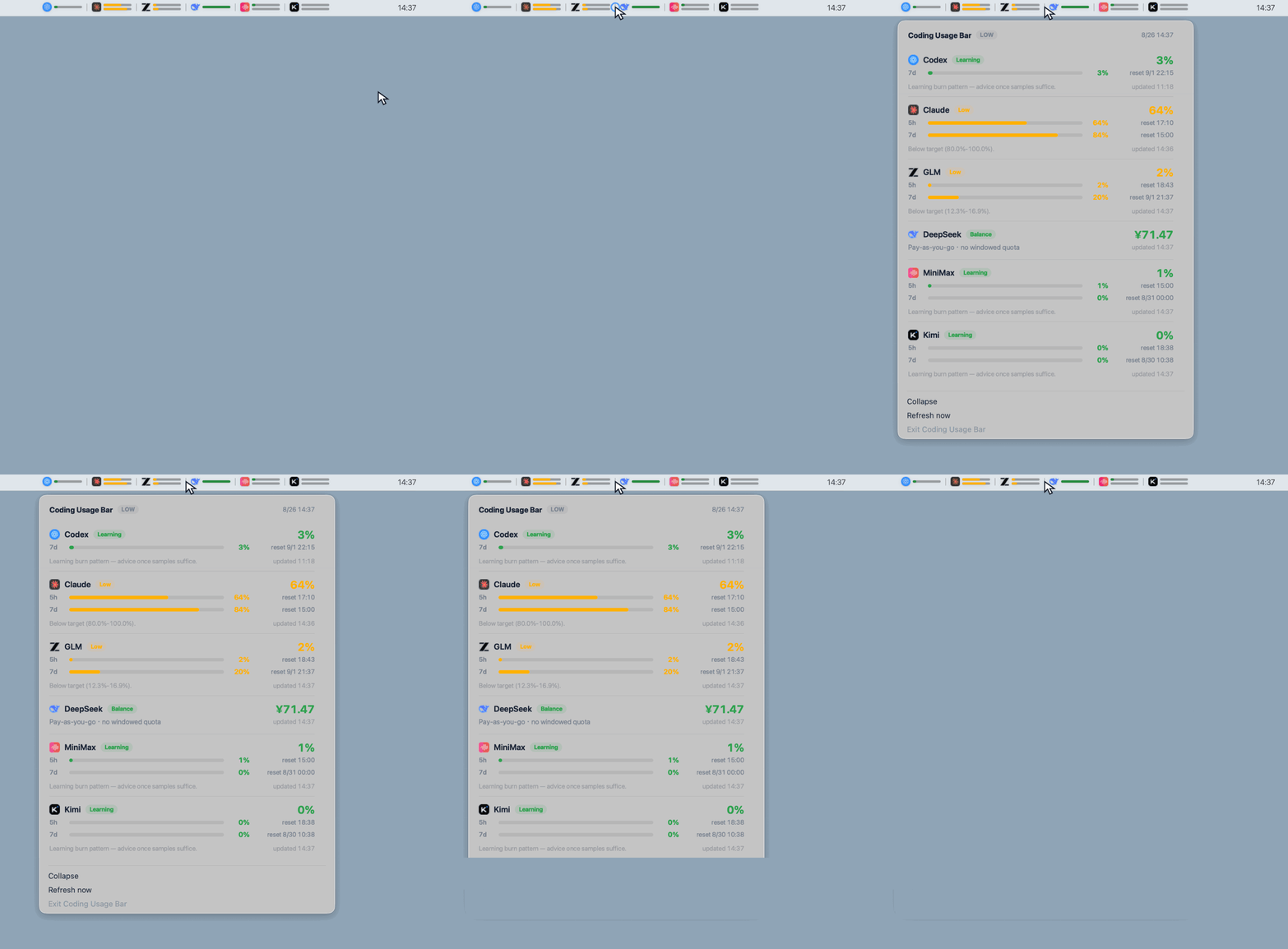
The menu bar title and the dropdown panel are captured from the live SwiftBar plugin and placed on a plain backdrop. The animation reproduces opening and closing that menu without altering the captured usage data.
Quick Start
npx coding-usage-bar install
coding-usage-bar doctor
coding-usage-bar status
install creates a local runtime at ~/.coding-usage-bar/app, a user-level CLI shim at ~/.local/bin/coding-usage-bar, a launchd agent, a default config file, and a SwiftBar menu bar plugin. Make sure ~/.local/bin is in your PATH.
Troubleshooting
Menu bar icon showing on your external display but not on the laptop?
That is a width problem, not a bug. macOS does not clip a menu bar item that is too wide -- it pushes it left, under the notch and into the app menu area, where it is simply gone. A notched 13" leaves 645pt to the right of the notch for every menu bar icon on the machine, and the full six-provider title alone is 511pt.
Coding Usage Bar measures that space and picks a title width to fit (see Menu Bar). Open the dropdown and read the Title row: its tooltip tells you how much space was measured and which width was chosen. Click the row to override.
Menu bar icon not showing after install?
- Run
coding-usage-bar doctor --fix. It relaunches SwiftBar, reinstalls the menu bar plugin if missing, re-adds SwiftBar to login items, and collects status data. - macOS may fold menu bar icons away: check System Settings → Control Center → Menu Bar.
- If macOS showed an Automation permission prompt (System Events) and it was denied, SwiftBar cannot auto-start at login: allow it under System Settings → Privacy & Security → Automation, then run
coding-usage-bar installagain.
coding-usage-bar install verifies at the end that the plugin actually renders and prints Menu bar ready; if that line is missing, the numbered steps it prints tell you exactly what to do.
Commands
| Command | Purpose |
|---|---|
coding-usage-bar install |
Install runtime, launchd checker, SwiftBar host/plugin, and Claude ingest when safe |
coding-usage-bar uninstall |
Remove Coding Usage Bar managed launchd/status line/plugin config |
coding-usage-bar doctor |
Check local Codex/Claude/GLM usage sources and notification backend |
coding-usage-bar doctor --fix |
Repair common issues: missing SwiftBar/plugin, SwiftBar not running, login item, status data |
coding-usage-bar status |
Print the rolling windows reported by each account and their pacing state from ~/.coding-usage-bar/status.json |
coding-usage-bar status --json |
Print the same status snapshot written to ~/.coding-usage-bar/status.json |
coding-usage-bar status --refresh |
Re-collect local usage before printing status |
coding-usage-bar menubar render |
Print SwiftBar-compatible menu text from ~/.coding-usage-bar/status.json |
coding-usage-bar menubar cycle-title-mode |
Cycle the menu bar title width: auto → full → single → icon |
coding-usage-bar menubar install |
Install the SwiftBar plugin wrapper |
coding-usage-bar menubar uninstall |
Remove the Coding Usage Bar managed SwiftBar plugin |
coding-usage-bar ingest claude-statusline |
Read Claude Code status line JSON from stdin and cache usage |
Install Behavior
coding-usage-bar install is designed to be repeatable.
- From
npx coding-usage-bar installornpx --no-install coding-usage-bar install, it copies the current package into~/.coding-usage-bar/appthrough a temporary directory, then restarts launchd. - From a source checkout,
npm run build && npx --no-install coding-usage-bar installinstalls the current local build. - From the installed shim
coding-usage-bar install, it detects that it is already running from~/.coding-usage-bar/app, skips runtime self-copy, and still refreshes the CLI shim, SwiftBar plugin, and launchd agent. - The launchd job runs
~/.coding-usage-bar/app/dist/cli.js daemon --onceevery 300 seconds. - The installer does not overwrite user-managed Claude Code status line scripts. If one already exists, it asks before installing a Coding Usage Bar wrapper around it.
- Long-lived launchd, SwiftBar, and Claude wrapper commands prefer the stable
nodefound inPATH(for example/opt/homebrew/bin/node) instead of a versioned Homebrew Cellar path. SetCODING_USAGE_BAR_NODE=/absolute/path/to/nodebefore installing to override it, and reruncoding-usage-bar installafter moving or replacing Node.
Claude Code Status Line
If you do not have a Claude Code status line, coding-usage-bar install can create a minimal one.
If you already have one, Coding Usage Bar will ask before changing Claude settings. When you answer y, it writes a Coding Usage Bar wrapper at ~/.coding-usage-bar/claude/statusline.sh, saves the original command metadata, and updates statusLine.command so the wrapper runs first. The wrapper ingests Claude usage, then forwards the same input to your existing status line command. coding-usage-bar uninstall restores the original command.
If you answer n or run in a non-interactive shell, Coding Usage Bar skips the status line update and prints manual setup instructions. Add this near the top of your own script:
input="$(cat)"
printf "%s" "$input" | node "$HOME/.coding-usage-bar/app/dist/cli.js" ingest claude-statusline >/dev/null

# Make the rest of your script read from "$input" instead of stdin.
Without this integration, Claude usage stays unavailable in Coding Usage Bar. Claude burn-rate analysis, Claude notifications, and Claude menu bar data will report CLAUDE_INGEST_MISSING; Codex usage is unaffected.
Codex
Coding Usage Bar reads Codex payload.rate_limits from local ~/.codex JSONL session data. It displays the windows the current account actually reports; some accounts expose both 5h and 7d windows, while others currently expose only 7d. If no rate-limit data exists, run Codex CLI or Codex App once and complete a normal interaction.
GLM (Zhipu AI)
Coding Usage Bar calls the Zhipu AI quota API (GET /api/monitor/usage/quota/limit) to read 5h and 7d usage windows. You need to set glm.apiKey in ~/.coding-usage-bar/config.json:
{
  "providers": ["codex", "claude", "glm"],
  "glm": {
    "baseUrl": "https://open.bigmodel.cn",
    "apiKey": "your-api-key"
  }
}
Get your API key from the Zhipu AI console. Without this key, GLM monitoring will report GLM_API_KEY_MISSING.
DeepSeek
Coding Usage Bar calls GET https://api.deepseek.com/user/balance to read your account balance. DeepSeek exposes balance rather than 5h/7d usage windows, so the menu bar shows Available or Depleted plus the currency amount. Set deepseek.apiKey in ~/.coding-usage-bar/config.json:
{
  "providers": ["codex", "claude", "glm", "deepseek"],
  "deepseek": {
    "apiKey": "your-deepseek-api-key"
  }
}
Without this key, DeepSeek monitoring will report DEEPSEEK_API_KEY_MISSING.
MiniMax (M3)
Coding Usage Bar calls GET https://api.minimaxi.com/v1/token_plan/remains to read 5h and 7d usage windows. MiniMax returns two signals per model: a count-based ratio (current_*_usage_count / current_*_total_count) for tiered models like video, and a credit-based current_*_remaining_percent (0-100) for the general model where the count stays at 0. Coding Usage Bar prefers the count ratio when total > 0 and otherwise derives used% as 100 - remaining_percent. Set minimax.apiKey and (optionally) minimax.region in ~/.coding-usage-bar/config.json:
{
  "providers": ["codex", "claude", "glm", "minimax"],
  "minimax": {
    "region": "cn",
    "apiKey": "your-minimax-api-key"
  }
}
region defaults to cn (api.minimaxi.com); set it to global to use api.minimax.io. Without this key, MiniMax monitoring will report MINIMAX_API_KEY_MISSING.
Kimi (Moonshot AI)
Coding Usage Bar calls GET https://api.kimi.com/coding/v1/usages to read 5h and 7d usage windows. The response carries the 300-minute rolling window in limits[] and the weekly window in the top-level usage, with limit/used/remaining as strings; Coding Usage Bar derives used% from used / limit (or from used / (used + remaining) when limit is 0). Set kimi.apiKey in ~/.coding-usage-bar/config.json:
{
  "providers": ["codex", "claude", "glm", "minimax", "kimi"],
  "kimi": {
    "apiKey": "your-kimi-api-key"
  }
}
If kimi.apiKey is empty, Coding Usage Bar falls back to the lane whose CONFIG_<n>_BASE_URL points at kimi.com in ~/.config/claude-lanes/config.env and uses that lane's CONFIG_<n>_AUTH_TOKEN (and base URL). Without either source, Kimi monitoring will report KIMI_API_KEY_MISSING.
Profiles
Set CODING_USAGE_BAR_PROFILE=high for the more aggressive profile. The default is low.
CODING_USAGE_BAR_PROFILE=high coding-usage-bar status
Both profiles are constrained by the weekly budget. When a short window is reported, Coding Usage Bar does not treat filling every short window as the goal.
Provider Config
coding-usage-bar install creates ~/.coding-usage-bar/config.json:
{
  "providers": ["codex", "claude", "glm", "deepseek", "minimax", "kimi"]
}
Remove a provider from this list if you do not want Coding Usage Bar to monitor it. For one-off runs, CODING_USAGE_BAR_PROVIDERS=codex coding-usage-bar status --refresh also works.
Menu Bar
The first menu bar implementation uses SwiftBar as a thin host. Coding Usage Bar still owns collection and state; the SwiftBar plugin only runs coding-usage-bar menubar render and reads ~/.coding-usage-bar/status.json.
coding-usage-bar install checks for SwiftBar and installs it with Homebrew cask when it is missing. It installs the Coding Usage Bar plugin into SwiftBar's configured PluginDirectory, not blindly into a hardcoded default directory, then opens SwiftBar.
coding-usage-bar menubar install
If SwiftBar is not installed, coding-usage-bar doctor will report it. If SwiftBar already has a custom plugin folder, Coding Usage Bar uses that folder.
The compact menu bar title and dropdown use recognizable Provider marks for Codex, Claude Code, Zhipu AI, DeepSeek, MiniMax, and Kimi alongside the rolling-window data (DeepSeek shows balance instead of windows):
{Codex icon} 5H:14%,7D:67% │ {Claude icon} 5H:24%,7D:74% │ {GLM icon} 5H:36%,7D:7%
Title width
The menu bar is the scarcest space on the machine, and macOS gives no way to ask whether an item will fit. So the producer measures what is available and the title picks a width that survives it:
| Tier | Width | Shows |
|---|---|---|
full |
~511pt | Every provider with its own mark and bars |
single |
~68pt | Only the provider closest to trouble |
icon |
~35pt | A state-colored flame; the full title moves to the tooltip |
auto is the default and picks a tier from the measured budget: a full-width menu bar gets full, a notched display gets single, and anything narrower falls to icon. The dropdown card is identical in every tier -- narrowing the title never costs you data, only a glance.
The measurement runs in the daemon, never in the render path, so switching displays takes up to one collection cycle (300s) to follow. Click the Title row in the dropdown to cycle auto → full → single → icon and pin a width immediately.
Whatever fails -- no measurement, a missing asset, a PNG error -- the title falls back to the flame icon. It never renders as nothing, because an invisible menu bar item is indistinguishable from a broken tool.
SwiftBar only supports one bitmap image on a single stable title item, so Coding Usage Bar renders the full title into one transparent PNG at render time. That bitmap keeps each provider marker next to its own usage segment while avoiding SwiftBar's multi-title rotation behavior. The dropdown stays read-only and uses SwiftBar-native symbols, badges, progress meters, reset time, target range, data age, and warnings. SwiftBar is a host dependency; coding-usage-bar uninstall removes the Coding Usage Bar plugin but does not uninstall SwiftBar itself.
Runtime Files
| Path | Purpose |
|---|---|
~/.coding-usage-bar/app/ |
Stable runtime copy used by launchd, Claude ingest hints, and SwiftBar |
~/.coding-usage-bar/config.json |
Provider selection, default ["codex", "claude", "glm", "deepseek", "minimax", "kimi"] |
~/.coding-usage-bar/status.json |
Stable display-layer entry point, including the measured menu bar budget |
~/.coding-usage-bar/compact-mode |
Manual menu bar title width override; absent means auto |
~/.coding-usage-bar/codex/latest.json |
Latest normalized Codex usage |
~/.coding-usage-bar/claude/latest.json |
Latest normalized Claude usage after status line ingest |
~/.coding-usage-bar/glm/latest.json |
Latest normalized GLM usage from Zhipu AI quota API |
~/.coding-usage-bar/deepseek/latest.json |
Latest normalized DeepSeek balance from DeepSeek API |
~/.coding-usage-bar/minimax/latest.json |
Latest normalized MiniMax 5h/7d usage from MiniMax API |
~/.coding-usage-bar/kimi/latest.json |
Latest normalized Kimi 5h/7d usage from Kimi usages API |
~/.local/bin/coding-usage-bar |
CLI shim pointing at the stable runtime |
~/Library/LaunchAgents/com.duying.coding-usage-bar.plist |
macOS launchd agent |
SwiftBar PluginDirectory / coding-usage-bar.1m.js |
Menu bar plugin wrapper |
Notifications
On macOS, Coding Usage Bar uses terminal-notifier when available and attaches a dynamic data card as the notification content image.
The card shows provider, the available rolling-window usage, state label, target range, and reset countdown. This avoids asking users to infer meaning from a red/yellow icon.
After an interactive install, Coding Usage Bar may ask whether you want to star the repository. The prompt defaults to No ([y/N]) and only uses an already authenticated GitHub CLI after explicit y/yes consent.
If terminal-notifier is unavailable, Coding Usage Bar falls back to osascript display notification, which uses the system default notification appearance.
See the product and technical baseline for the current design.
Why Coding Usage Bar?
- One menu bar for multiple coding providers: Claude Code, Codex, GLM, DeepSeek, MiniMax, and Kimi.
- Pacing, not just percentages: short-window usage is evaluated against the weekly budget.
- Local-first: Claude Code and Codex usage is read from local tool output, without a separate account or telemetry service.
- Visible but lightweight: SwiftBar is only the host; collection and display state remain separated and auditable.
- Actionable warnings: limit risk and burn-rate notifications include reset timing and current usage.
Requirements
- macOS
- Node.js 20 or newer
- SwiftBar (the installer can install it through Homebrew)
- Claude Code or Codex for local usage monitoring
Development
npm ci
npm test
npm run build
npm pack
License
Provider names and trademarks belong to their respective owners. Coding Usage Bar is an independent project and is not affiliated with or endorsed by Anthropic, OpenAI, Zhipu AI, DeepSeek, MiniMax, or Moonshot AI. Provider marks are used only for identification, are excluded from the MIT License, and are documented in THIRD_PARTY_NOTICES.md.
Reviews (0)
Sign in to leave a review.
Leave a reviewNo results found