hod
Health Warn
- License — License: MIT
- Description — Repository has a description
- Active repo — Last push 0 days ago
- Low visibility — Only 5 GitHub stars
Code Fail
- rm -rf — Recursive force deletion command in scripts/test-hod.sh
Permissions Pass
- Permissions — No dangerous permissions requested
No AI report is available for this listing yet.
Coordinate Codex, Claude Code, and Grok Build agents safely through Herdr.
hod — Herdr Orchestrator Driver
One command in. One accountable controller. A herd of coding agents, verified.
English · Tiếng Việt




🚀 Get started · What is this? · How it works · Commands · Appendix
🚀 Get started
Three steps. About five minutes.
1 · Prerequisites
macOS or Linux, plus:
| Need | Get it |
|---|---|
| Herdr | brew install herdr |
git, jq |
brew install jq (git usually present) |
| One agent CLI, logged in | claude, codex, or grok — one is enough |
2 · Install hod
curl -fsSL https://raw.githubusercontent.com/hapo-nghialuu/hod/main/install.sh | sh
hod status
main — recommended for teams
curl -fsSL https://raw.githubusercontent.com/hapo-nghialuu/hod/main/install.sh | HOD_REF=v0.1.13 sh
That is the whole setup: nothing to rearrange, no per-project ceremony. hod
clones the skill into ~/.hod/skill/, puts the hod executable on~/.local/bin/, and links global adapters so every agent CLI can find it.
Attach a single project instead with hod install --project /path/to/repo.
Recommended next: herdr integration install claude (and codex) so the
sidebar reports authoritative agent states rather than guesses.
3 · Run your first orchestrated task
cd /path/to/your/project
herdr                 # Herdr opens
claude                # inside the pane — this is your controller
Paste this, naming Herdr and herdr-orchestrator — without both names
the skill stays dormant:
Use Herdr and the herdr-orchestrator skill to <a small, verifiable task>.
One writer, one read-only reviewer. Do not commit or push.
Return changed files, real test results, and unresolved questions.
| CLI | Invocation | Notes |
|---|---|---|
| Claude Code | /herdr-orchestrator |
Slash command; loads the skill up front, then describe the task |
| Codex | $herdr-orchestrator |
Same idea with Codex's prefix |
| Grok Build | plain request | Ask explicitly to use the herdr-orchestrator skill |
| Any | naming it in the request | The example above — works everywhere, no prefix needed |
Loading the skill by command and describing the task in plain words reach the
same place. The prefix forms save you from repeating the skill name; the plain
request is one less thing to remember. Either way the task itself still needs
the outcome, the roles, and what evidence you expect back.
✅ It is working when new panes appear in the Herdr sidebar.
Status dots: 🟡 working (leave it alone) · 🔴 blocked (it needs you — read
that pane, but answer in the controller's pane) · 🟢 idle.
Detach any time withctrl+bthenq; nothing dies.
Need more detail? Quickstart — four levels ·
Getting started — six checked steps ·
Troubleshooting
What is this?
Running several AI coding agents at once is easy. Keeping track of them is
not — you end up with a dozen terminal tabs, no idea which agent is waiting on
you, and no way to tell whether "done" actually means the code works.
hod gives you one agent to talk to. You describe what you want; it plans
the work, hands pieces to other agents in their own Herdr
panes, checks their output against real diffs and real test runs, and comes
back with one answer — plus a list of anything only you can decide.
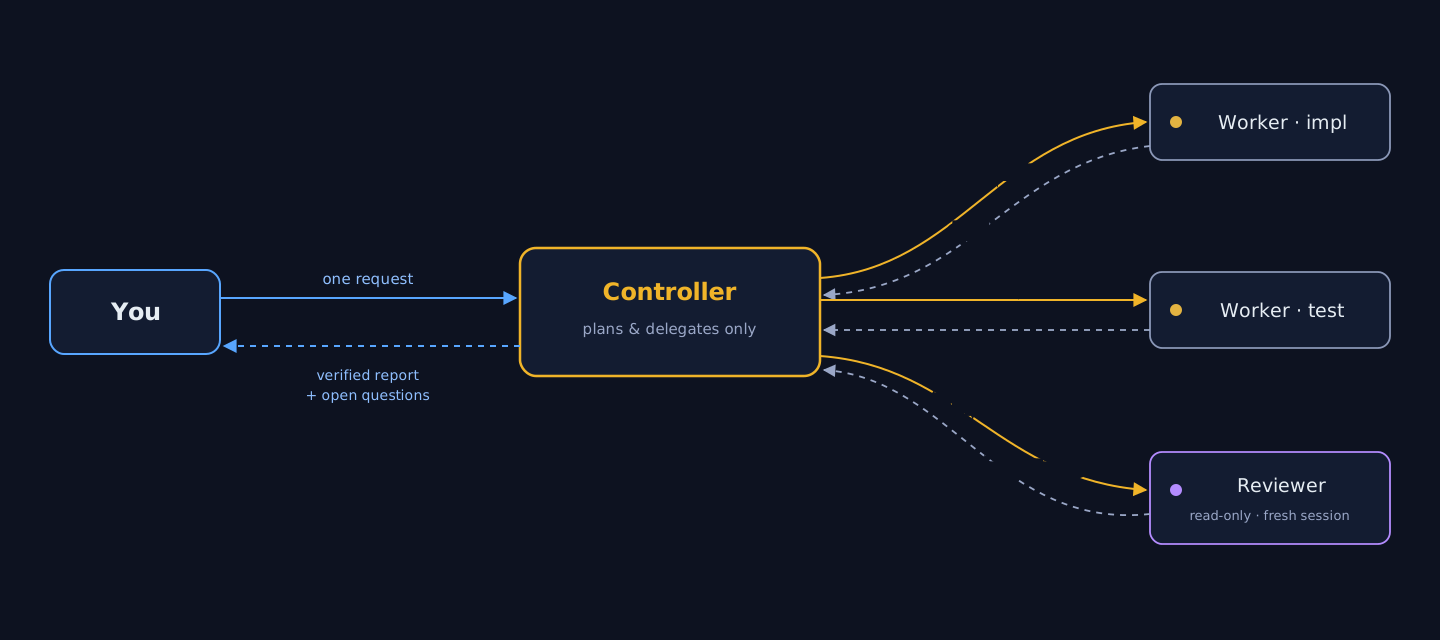
You never manage the workers. You never chase a pane. You get evidence, not
promises.
Good fit if you run more than one coding agent, want a second pair of eyes
on generated code, or need work split across projects without losing track of
who changed what.
Independent community project. Not affiliated with Herdr, OpenAI, Anthropic, or xAI.
Under the hood
hod ships as two deliberately separate parts:
| Part | What it is | What it does |
|---|---|---|
| The skill | Markdown contract (SKILL.md + references/) |
The brain: delegation rules, lifecycle discipline, verification, safety boundaries. Read by the LLM, enforced by its judgment |
The hod CLI |
A single bash binary | The hands: installs the skill anywhere, diagnoses the setup, manages role permission profiles. Contains zero orchestration logic |
This split is intentional: code does the mechanical work, the LLM does the
judgment work — and neither pretends to do the other's job.
How it works
You speak to one agent. Inside a Herdr pane, name the skill explicitly:
Use Herdr and the herdr-orchestrator skill to implement the health
endpoint. One writer, one read-only reviewer. Do not commit or push.
Return changed files, test results, and unresolved questions.
The controller runs a preflight — refuses to act unless it is inside a
Herdr-managed pane (HERDR_ENV=1), the server is compatible, and the
installed command family matches--helpexactly. Anything ambiguous
fails closed.Workers are addressed as if you wrote the prompt. Herdr input carries
no sender field, so wording is the only thing that leaks routing — the
contract forbids "you are a sub-agent, report to the parent" framing
entirely.Nothing is believed, everything is verified. An agent's
donestate
is a screen heuristic, not proof. The controller reads real diffs, runs
checks in panes with per-run sentinels (so stalepassedtext can never
be mistaken for fresh evidence), and sends material changes to an
independent reviewer in a fresh session.The report ends with what still needs you — every worker's open
questions are harvested and attributed, never swallowed by the summary.
You know it is working when new panes appear in the Herdr sidebar. If you
only see "background agents" messages and the sidebar stays still, the CLI is
using its internal sub-agents, not Herdr orchestration — restate the request
naming Herdr and the skill.
Adaptive coordinator (opt-in)
The default workflow remains unchanged unless you explicitly ask for an
adaptive coordinator or coordinator plus advisor. Adaptive mode chooses the
smallest route that fits the request:
| Base mode | Use it for | What happens |
|---|---|---|
DIRECT |
Questions, explanations, read-only inspection, and status | A no-plan fast path; no worker or checkpoint |
SINGLE |
One reversible outcome with one narrow owner | One task packet and mechanical evidence for a repository change |
ORCHESTRATE |
Multiple writers, dependencies, phases, repositories, or large blast radius | A working plan, explicit ownership, and ordered coordination |
CONSULT and ASK_USER are overlays, not additional modes. A consult opens a
fresh independent advisor only when a material technical trigger exists; an
authority, permission, cost, or external-action question pauses for you.
Choose the advisor from Fable, GPT-5.6 Sol, or Opus — the advisor gives an
assessment, never approval. Every repository change still gets a mechanical
E0 evidence receipt before acceptance, and every tripwire holds before
re-routing.
See the adaptive coordinator reference for
the complete protocol and usage examples.
The hod command
| Command | What it does |
|---|---|
hod install |
Clone/update the skill and link global adapters (~/.claude/skills/, ~/.agents/skills/) |
hod install --project <path> |
Attach one project instead — any location, any directory name. Git is optional; outside a repository the .git/info/exclude step is skipped. Also writes the reminder block (--no-memo skips it) |
hod install --ref <tag> |
Pin the skill to a release tag |
hod status |
✓/✗ one-liners: prerequisites, agent CLIs, checkout, adapters, PATH. Exit 0 when healthy |
hod doctor |
Everything status checks plus remediation commands, adapter resolution, checkout mode (branch vs pinned), integration status |
hod update |
Fast-forward the skill; a pinned checkout moves to the newest tag. Refuses a dirty tree |
hod settings list |
Show Claude role profiles, equivalent Codex flags, and ready-to-paste start commands |
hod settings install [--role <r>] [--force] |
Write role profiles into a project's .claude/ |
hod uninstall [--purge] |
Remove only adapters that resolve into ~/.hod/skill, and strip the reminder block; never touches foreign files |
Everything hod runs against Herdr is read-only (herdr status,herdr integration status). It never starts agents, never installs
integrations, never mutates a session — that authority stays with you and the
controller.
The reminder block
Models forget mid-session that Herdr orchestration is available. A project
install writes a few lines into CLAUDE.md and AGENTS.md — the files agent
CLIs read on every turn — so the controller is reminded to delegate rather than
do the work itself:
<!-- hod:begin — managed by hod; edits inside this block are overwritten -->
## Herdr orchestration
...
<!-- hod:end -->
The markers make it safe to re-run: only the block between them is replaced,
everything you wrote outside is preserved byte-for-byte, and hod uninstall --project removes it again. hod refuses to touch a file with unbalanced
markers or one that is a symlink.
These files usually belong to the repository, so the block shows up in git status — review the diff and decide whether to commit; hod never commits.
Skip the block entirely with hod install --project <path> --no-memo.
The block comes in two variants. The default reminds the agent to orchestrate
when you ask for work split across agents. --memo-strict declares a
Herdr-first project: inside a Herdr pane, every implementation, bug-fix,
or multi-step task routes through Herdr workers, and the controller works
directly only for questions or small edits you ask for. Outside a Herdr pane
the preference never blocks work — the agent proceeds normally and just says
once that the project prefers Herdr. A plain re-install keeps
whichever variant the project already carries — teammates running hod install --project cannot accidentally downgrade it — and --memo-default
switches back explicitly.
The block cannot force the skill to load: activation still requires you to name
Herdr or the skill in your request. It reminds, it does not override.
Role profiles: rules the harness enforces
A role written in a prompt is advice. A role installed as a permission profile
is a boundary the agent cannot cross, even if asked to:
Claude enforces these profiles through settings files. Codex workers use native
sandbox and approval flags; exact mappings and honest gaps live in Role
Boundaries.
hod settings install # writes .claude/settings.<role>.json + git-excludes them
| Role | Mode | Denied | Meaning |
|---|---|---|---|
controller |
default |
Edit Write NotebookEdit Agent + git push/merge |
Plans and delegates. Cannot edit files, and cannot spawn in-process sub-agents that would bypass Herdr |
impl |
acceptEdits |
git push merge reset --hard tag |
Writes code freely without a prompt per file; cannot publish |
reviewer |
default |
edit tools + Agent + writing git commands + rm |
Genuinely read-only, and reviews with its own eyes |
Denying a whole tool is airtight — the harness removes it from the model's
context. Denying a shell prefix is not: it matches the first token only, soBash(pytest:*) leaves python -m pytest open. These profiles therefore rely
on tool denies and leave command discipline to the task prompt and the evidence
the controller reads back.
Agent is the rule that keeps orchestration honest. Without it a controller
quietly falls back to its CLI's own sub-agents: no pane appears in the sidebar,
you cannot open or answer them, and their full transcripts land in the
controller's context until the run dies of context exhaustion.
Each profile also pins its own defaultMode, because a --settings file
outranks your ~/.claude/settings.json. That matters if your machine usesdontAsk: that mode auto-denies every tool absent from permissions.allow
and denies AskUserQuestion even when allowed — so a worker loses Bash
and can no longer report itself blocked. The pane stays silent and the
controller waits forever. Never put dontAsk in a role profile.
herdr agent start impl --kind claude --pane "$p" \
  -- --continue --settings .claude/settings.impl.json

herdr agent start reviewer --kind claude --pane "$p2" \
  -- --settings .claude/settings.reviewer.json     # fresh session, never --continue
Two rules proven by live testing, not theory:
- Never combine a profile with
--dangerously-skip-permissions— that
flag overrides every deny rule and the profile stops enforcing anything. - A reviewer is never a resumed session.
--continue/--resumerestores
exactly the bias an independent review exists to remove.
Profiles carry permission boundaries only — never credentials. Claude Code
merges them over the settings it already loads, so tokens, endpoints, and
hooks are inherited untouched. (Codex and Grok enforce roles through their own
flags — sandbox/approval modes and allow/deny rules; see the roles table inSKILL.md.)
What the skill guarantees
The contract the controller operates under, distilled:
- Direct-user voice — workers believe they are talking to you; internal
routing never leaks into prompts. - Your authority is never invented — no fabricated approvals; scope,
risk, cost, and anything externally visible comes back to you. Delegation
is never used to obtain authority you did not grant. - Fail-closed — unknown command families, malformed JSON, ambiguous
targets: stop and report, never guess pane IDs or syntax. - Evidence over claims — verbal
doneis not completion; diffs, fresh
sentinel-guarded check output, and independent review are. - One file, one writer — parallel workers own disjoint paths; shared
manifests get a single integration owner; conflicts go to a named
integrator, never the controller's own hands. - Conservative cleanup — panes and worktrees the task created stay
available for your inspection until you authorize removal.
Every invariant lives in SKILL.md itself — loaded whole whenever
the skill activates — plus references loaded only when needed:
| Reference | Covers |
|---|---|
| Operations | Command recipes, stalled-prompt recovery, sentinels, task packets, session revival, integration checklists |
| Adaptive coordinator | Opt-in routing, tripwires, evidence gates, advisor policy, and handoff checkpoints |
| Portfolio hierarchy | One orchestrator, many projects: tiers, policies, persistent state |
| Legacy Herdr 0.7.1 | Compatibility path for the old command family |
Scaling up
- Parallel work without collisions — put independent tasks in separate
Git worktrees (herdr worktree create), one agent per worktree; ownership
stays disjoint even across checkouts. - Mixed teams —
--kind claude|codex|grokper worker, models passed
through the--separator with exact IDs (-m gpt-5.6-sol -c model_reasoning_effort=max,-m grok-4.5,--model <id>). - Many projects, one orchestrator — the opt-in
portfolio mode: one controller per
project workspace, a strict two-level delegation cap, and user-authored
policy files stored outside every checkout so no agent can widen its own
authority.
Documentation
| Guide | For |
|---|---|
| Quickstart — four levels | Start in 2 minutes; climb only when a level feels limiting |
| Getting started | Full setup detail |
| Usage guide | Prompt recipes: pipelines, parallel teams, steering, model selection |
| Portfolio orchestration | Managing several projects with one orchestrator |
| Troubleshooting | Adapters, preflight, capability mismatches |
Repository structure
herdr-orchestrator/
├── SKILL.md                    # agent-facing entry point (always loaded)
├── references/                 # detailed contracts (loaded on demand)
├── bin/hod                     # the CLI — install, doctor, settings, update
├── install.sh                  # curl | sh bootstrap (HOD_REF pins a version)
├── scripts/
│   ├── test-hod.sh             # 55 hermetic CLI tests
│   └── validate.sh             # syntax + frontmatter + markdown links
├── templates/                  # policy template + role permission profiles
├── docs/                       # human guides
├── assets/                     # README artwork
└── .github/workflows/          # CI: all test entrypoints on Ubuntu + macOS
What it does not do
- Install, authenticate, or pay for agent CLIs.
- Grant permissions you did not already provide.
- Force every task into multi-agent mode — small tasks stay single-agent.
- Treat an agent's
donestate as proof of correctness. - Commit, merge, push, publish, or delete anything without your authority.
Known limitations
- Worker-role enforcement via settings profiles covers Claude Code; Codex and
Grok use their own native flags (documented, not templated). - Capability detection reads installed
--helpoutput — a future Herdr that
rewords its help fails closed (safely) until the skill is updated. - Herdr is pre-1.0; this project tracks current stable (tested against 0.7.5)
with a best-effort legacy path for 0.7.1. - Native Windows is untested.
Appendix
A. Glossary — the words this project uses| Term | Meaning |
|---|---|
| Herdr | The terminal multiplexer everything runs inside. It gives each agent a real pane, detects its state, and exposes a control API. Not part of this project |
| Pane | One terminal window inside Herdr. One interactive agent per pane |
| Workspace | A group of tabs and panes, normally one per project |
| Controller | The one agent you talk to. Plans, delegates, verifies, reports. Writes no code |
| Worker | An agent the controller hires for one scoped task. Starts with an empty context |
| Reviewer | A read-only worker that inspects a diff. Always a fresh session — never the agent that wrote the code |
| Kind | Which CLI an agent is: claude, codex, grok, … |
| Adapter | The symlink that makes the skill visible to a CLI (~/.claude/skills/herdr-orchestrator) |
| Profile | A settings file that removes tools from a worker, enforcing its role at the harness level |
| Sentinel | A unique token printed after a command so old text on screen can never be mistaken for a fresh result |
| Ledger | The controller's internal record of who owns which files, and each worker's state |
| Preflight | The checks the controller runs before touching anything: right environment, compatible server, known commands |
Setup and health
hod status                         # is everything wired up?
hod doctor                         # same, plus the fix for each problem
hod update                         # pull the newest skill (or newest tag if pinned)
hod install --project <path>       # attach one project (+ reminder block)
hod install --project <path> --no-memo   # attach without touching CLAUDE.md
hod settings install               # write role profiles into a project
hod uninstall [--purge]            # remove hod-managed links only
Herdr, day to day
herdr                              # open or reattach the session
herdr agent list                   # every live agent and its state
herdr worktree create --cwd <repo> --branch <name> --no-focus
herdr integration status           # is agent-state detection authoritative?
Detach with ctrl+b then q. Nothing stops running.
Starting a worker by hand (the controller normally does this for you)
split=$(herdr pane split --current --direction right --cwd "$PWD" --no-focus)
pane=$(printf '%s\n' "$split" | jq -er '.result.pane.pane_id')
herdr agent start impl --kind claude --pane "$pane" \
  -- --settings .claude/settings.impl.json
One task, verified — the everyday default:
Use Herdr and the herdr-orchestrator skill to <outcome>.
One writer, one read-only reviewer. Do not commit or push.
Return changed files, real test results, and unresolved questions.
Strict coordinator-only — when you want the controller to touch nothing:
Run coordinator-only: do not create or edit any file yourself. Delegate every
change to a worker, verify its diff and checks, and ask me when a change seems
too small to be worth a worker.
Parallel, non-colliding work — only when the pieces truly do not overlap:
Run these in parallel, one worker each, with disjoint file ownership:
- <task A> owns <paths>
- <task B> owns <paths>
Nobody touches shared manifests; assign those to a single integrator.
Choosing kinds and models explicitly:
Planner: codex, started with -m <id> -c model_reasoning_effort=max
Implementer: grok, started with -m <id>
Reviewer: claude, started with --settings .claude/settings.reviewer.json
If a CLI rejects a model, stop and ask me — do not substitute another.
Steering mid-flight:
Prioritise the production bug and pause the feature work.
The test failed on Ubuntu with this output: <evidence>. Re-read the affected
files, fix only the demonstrated regression, and rerun the test.
| Dot | State | What it means | What you do |
|---|---|---|---|
| 🟡 | working |
The agent is mid-turn | Nothing. Do not send another prompt — Herdr does not track turns, so it may answer the wrong request |
| 🔴 | blocked |
Herdr saw an approval or question prompt | Open the pane to read it, then answer in the controller's pane |
| 🔵 | done |
Finished, nobody has looked yet | Nothing — the controller harvests it. done is not proof the work is correct |
| 🟢 | idle |
Free and waiting | Nothing |
| ⚪ | unknown |
Herdr cannot classify it | Never assume success; the controller runs herdr agent explain |
The litmus test: real orchestration makes new panes appear. If a CLI
reports "background agents" while the sidebar stays still, it is using its own
internal sub-agents — no Herdr involved.
| Symptom | Likely cause | Fix |
|---|---|---|
| "requires a Herdr-managed pane" | You started the CLI outside Herdr | Run herdr first, start the agent inside a pane |
| Skill never activates | The request did not name it | Say both "Herdr" and "herdr-orchestrator" |
| Sidebar shows no state for an agent | No integration for that kind | herdr integration install <kind> — Grok has none by design |
hod: command not found |
~/.local/bin is not on PATH |
Add the export line hod printed, open a new terminal |
| A role profile is not enforcing | --dangerously-skip-permissions was also passed |
Drop that flag — it overrides every deny rule |
| Worker seems stuck | It may be blocked, not dead | Read its pane; if it is waiting on a decision, answer through the controller |
hod update refuses |
The skill checkout has local edits | cd ~/.hod/skill && git status, then commit, stash, or discard |
Start with hod doctor — it names the problem and the command that fixes it.
Full guide: Troubleshooting. Never restart the Herdr
server to "clear" a problem; it kills work that is still running.
Things that never happen without your say-so:
- Commit, push, merge, tag, publish, deploy
- Deleting files, worktrees, branches, panes, or sessions the task did not create
- Installing Herdr integrations or plugins, changing configuration, updating Herdr
- Using credentials, making purchases, or any externally visible action
- Widening a worker's permissions, or using delegation to obtain authority you did not grant
Things that are structurally prevented, not merely discouraged:
- A worker cannot start more agents (except the controller tier in portfolio mode, capped at two levels)
- A role profile removes tools from the agent — it cannot use what it does not have
- Policy files live outside every checkout, so no agent with repository write access can widen its own authority
hod uninstallonly removes symlinks that resolve into its own checkout
Contributing
Small, focused PRs welcome. Read CONTRIBUTING.md — in
short: preserve the direct-user contract, back behavior claims with installed--help evidence, run ./scripts/validate.sh and ./scripts/test-hod.sh
before pushing. Security reports go through
SECURITY.md.
License
MIT © 2026 Luu Trung Nghia
Reviews (0)
Sign in to leave a review.
Leave a reviewNo results found