mcpflo
Health Uyari
- License — License: MIT
- Description — Repository has a description
- Active repo — Last push 0 days ago
- Low visibility — Only 7 GitHub stars
Code Gecti
- Code scan — Scanned 12 files during light audit, no dangerous patterns found
Permissions Gecti
- Permissions — No dangerous permissions requested
Bu listing icin henuz AI raporu yok.
A visual testing tool for MCP (Model Context Protocol) servers — connect, browse capabilities, and inspect tools, resources, and prompts. Think Bruno, but for MCP.

MCPFlo
A visual testing tool for MCP (Model Context Protocol) servers.
Think Bruno, but for MCP.




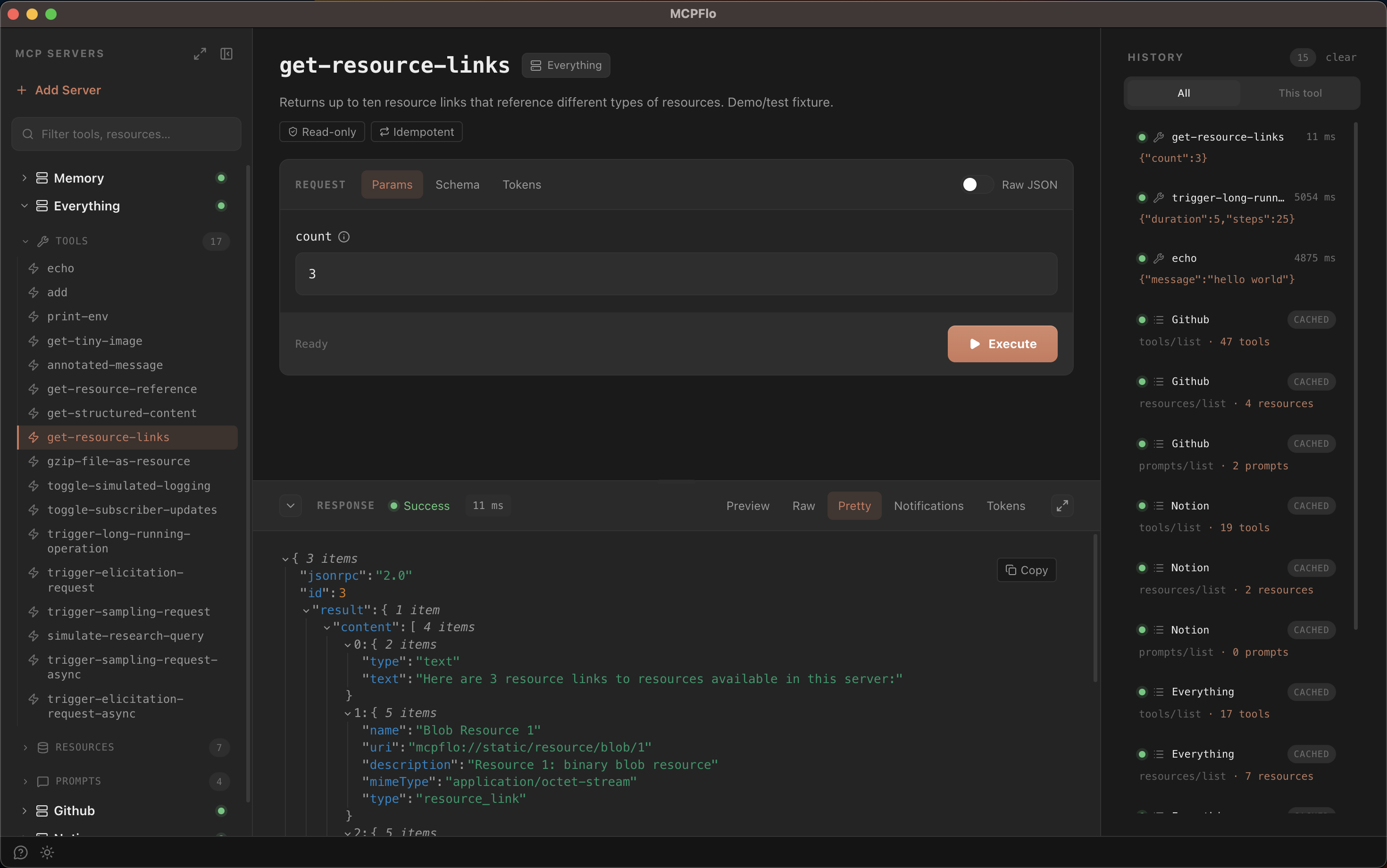
MCPFlo is a desktop app for testing MCP servers by hand. Connect to one or more
servers, browse the tools, resources, and prompts they expose, and invoke them
with real inputs — then inspect the exact response that came back. It's built for
developers writing or integrating MCP servers who want to see what a capability
actually does without wiring it into an AI client first.
Why
When you're building an MCP server, the hard part isn't writing the tool — it's
checking that it behaves. Your options today are limited:
- Hand-write a throwaway script that spins up a client and calls the tool
- Drop the server into an AI client like Claude Desktop and hope the model calls
the tool the way you intended, with no clear view of what it sent or received
Both are slow and opaque. MCPFlo gives you a direct, deterministic way to call a
single tool, read a resource, or render a prompt — with the raw request and
response in front of you, no model in the loop, no tokens spent.
Features
Everything below is implemented and working today.
Connect
- Multiple simultaneous servers. Connect to as many servers as you want and
browse them side by side. Each runs over its own pooled connection, with a
disconnect action per server — and spawned processes are cleaned up when a
server is removed or the app quits. - stdio and Streamable HTTP transports. Spawn a local server over stdio, or
connect to a remote one over Streamable HTTP. HTTP connections support custom
request headers (e.g. anAuthorization: Bearer …token) for token-authed
servers. - OAuth 2.1 for Streamable HTTP. OAuth-protected servers are signed in to
automatically the first time you expand them, using the authorization-code +
PKCE flow: MCPFlo opens your system browser, captures the redirect on a
loopback listener (RFC 8252), and reconnects. Clients register automatically
via Dynamic Client Registration, with a manual Client ID fallback when a
server doesn't support it. An Auth panel in the server detail view shows
your current session — token status, expiry, scopes — with sign-out a click
away. - Secrets encrypted at rest. OAuth tokens, environment variables, and
request headers are encrypted with the OS keychain (safeStorage) and never
leave the main process — the UI layer only ever sees server IDs. - Protocol version override. Pin a connection to a specific MCP protocol
version when you need to test how a server negotiates.
Browse
- Capability tree. View every tool, resource, and prompt across all
connected servers in a grouped tree, with expand/collapse-all controls. - Unified filter. A single search box (⌘K) filters tools, resources, and
prompts across every server at once. - Server detail view. Select a server to see it at a glance: connection
status and actions, its full capability list, and a context-budget card
that estimates how many tokens the server's tool, resource, and prompt
definitions consume in a model's context window — segment by segment. - Cancellable discovery. A slow capability fetch can be cancelled mid-flight
instead of blocking the row.
Invoke
- Schema-driven parameter forms. Tool inputs render as a form generated from
the tool's JSON Schema, powered by react-jsonschema-form.
Nested objects and arrays are supported, with add/remove controls and
client-side validation before the call goes out. - Rich response rendering. Content blocks render by type — text,
pretty-printed JSON with a collapsible tree view, images, audio, and
embedded/linked resources — and mixed content renders inline. The full
JSON-RPC envelope is always available as a raw view. - Token footprint. A Tokens tab on every result shows what the response
costs in context-window terms — and what the tool's own definition costs just
by being connected. - Resource reading and prompt rendering. Read a resource and view its text
or binary contents; render a prompt with named arguments and see the expanded
message turns. - Live notifications. Progress notifications and log messages emitted by a
server while a tool call is in flight are captured and shown in a
notifications tab alongside the call. - Elicitation. When a tool asks the user for input mid-call
(elicitation/create), MCPFlo renders the requested schema as a form and
sends your answer back. Form-mode elicitation is supported; URL-mode is not. - Sampling. When a server asks the client to run an LLM completion
(sampling/createMessage), MCPFlo prompts you to answer by hand instead of
calling a model — keeping every interaction deterministic and token-free.
Revisit
- Call history. Each tool, resource, and prompt keeps a per-capability
history of recent calls (up to 50 each), plus a unified All tab — a
cross-server activity log of everything you've run this session. - One-click replay. Activate any history entry and its parameters prefill
the form, ready to tweak and re-run. - Light and dark themes.
Not supported
These are deliberate limitations, called out so there are no surprises:
- No SSE transport. Only stdio and Streamable HTTP are supported. The
deprecated HTTP+SSE transport is intentionally omitted. - History does not persist. Call history is cleared when the app closes.
- macOS releases are Apple Silicon (arm64) only.
Installation
Download (macOS)
Grab the latest .dmg from the
releases page, open it, and
drag MCPFlo into your Applications folder. Builds are signed with an Apple
Developer ID and notarized, so the app opens without any Gatekeeper warnings.
Upgrading from v0.0.6 or earlier? Those builds were unsigned. Delete the
old copy and install fresh from the latest release — if the old app was ever
quarantined, the right-click → Open workaround is no longer needed.
From source
git clone https://github.com/harshalslimaye/mcpflo.git
cd mcpflo
npm install
npm run dev
Requires Node.js 18+ and npm 9+.
Add your first server
A fresh install is seeded with@mcpflo/server-everything — MCPFlo's own
deterministic test-fixture server, which exercises every capability the app
supports (tools, resources, prompts, elicitation, sampling, notifications) — a
good place to start. To add your own:
- Click + Add Server in the sidebar.
- Enter a name and choose a transport:
- stdio — provide the command and args (e.g.
npxwith args-y @modelcontextprotocol/server-memory), plus any environment variables. - Streamable HTTP — provide the URL, plus any request headers
(e.g.Authorization: Bearer …). - Environment variables and headers use a key/value row editor and live in
collapsible sections, so the form stays short until you need them. - An Advanced section exposes an optional connection timeout and MCP
protocol version override. - Prefer pasting a config? Switch to JSON import and paste an
mcpServersblock (single or multiple entries) instead of filling out the
form by hand.
- stdio — provide the command and args (e.g.
- Click Add Server.
- Expand the server row — MCPFlo connects and discovers all tools, resources,
and prompts automatically. If the server requires OAuth, your browser opens
for sign-in and MCPFlo reconnects on its own.
Server configs are persisted with electron-store
to config.json under the app's user-data directory (secrets encrypted via the
OS keychain):
- macOS:
~/Library/Application Support/MCPFlo/config.json - Windows:
%APPDATA%/MCPFlo/config.json - Linux:
~/.config/MCPFlo/config.json
Discovered capabilities are cached to disk per server under<user-data>/servers/<server-id>/capabilities.json, so they're available
immediately on the next launch before a fresh fetch runs.
Security
MCPFlo runs untrusted server processes and talks to remote endpoints, so the app
is hardened accordingly:
- The renderer runs in Chromium's sandbox with a minimal, typed preload
bridge; transport secrets (tokens, env vars, headers) never enter the renderer. - IPC handlers validate server IDs before any value reaches a filesystem path.
- The main window blocks navigation to non-app origins, and external links
only open through a scheme allowlist. - OAuth is refused over cleartext HTTP to non-loopback hosts.
Tech stack
- Electron + electron-vite
- React 19 + TypeScript
- Tailwind CSS v4
- @modelcontextprotocol/sdk for the MCP client and transports
- react-jsonschema-form (RJSF) for schema-driven parameter forms
- Zustand for state
- electron-store for config persistence
- gpt-tokenizer for context-budget estimation
- Vitest + Testing Library for unit tests,
Playwright for end-to-end tests
Development
npm run dev         # run the app in development
npm test            # run the test suite once
npm run test:watch  # run tests in watch mode
npm run e2e         # build and run the Playwright e2e suite
npm run typecheck   # type-check main and renderer
npm run lint        # lint with ESLint
npm run format      # format with Prettier
npm install sets up Husky hooks; git push runs npm test via the pre-push hook.
The Playwright e2e suite drives the app against@mcpflo/server-everything, a bundled test-fixture
MCP server that exercises every capability MCPFlo supports.
Project structure
src/
├── main/        Electron main process — IPC, MCP client, OAuth, persistence, caching
├── preload/     Typed bridge between main and renderer
├── renderer/    React UI (sidebar, detail views, stores, RJSF forms)
└── shared/      Types shared across processes (MCP schemas, configs)
packages/
└── server-everything/   Test-fixture MCP server used by the e2e suite
Build
npm run build:mac     # macOS (dmg, arm64)
npm run build:win     # Windows (nsis, x64 + arm64)
npm run build:linux   # Linux
Contributing
Contributions are welcome. Open an issue to discuss a change or file a bug at the
issue tracker, and send a pull
request. See CONTRIBUTING.md for setup, conventions, and the
PR process.
License
MIT — free to use, modify, and distribute.
Yorumlar (0)
Yorum birakmak icin giris yap.
Yorum birakSonuc bulunamadi