claude-ultra
Health Uyari
- License — License: MIT
- Description — Repository has a description
- Active repo — Last push 0 days ago
- Low visibility — Only 7 GitHub stars
Code Gecti
- Code scan — Scanned 12 files during light audit, no dangerous patterns found
Permissions Gecti
- Permissions — No dangerous permissions requested
This tool is a macOS desktop application that acts as a local API gateway, allowing users to pool and automatically rotate multiple Claude accounts to bypass single-user rate limits.
Security Assessment
This tool handles highly sensitive data. It explicitly manages user authentication tokens via GitHub OAuth, acts as a transparent proxy intercepting API traffic, and routes requests through residential proxies (IPRoyal) to mask user IPs. While the automated code scan passed without finding dangerous patterns or hardcoded secrets, the tool's fundamental architecture—managing credentials and intercepting local network traffic—presents a significant attack surface. The nature of the tool requires extreme caution with your account credentials. Overall risk: Medium.
Quality Assessment
The project is actively maintained, having received updates as recently as today. It uses a permissive MIT license and is built on a solid technology stack (Tauri 2 with Rust). However, community trust is extremely low. With only 7 GitHub stars and minimal public visibility, the tool has not been widely peer-reviewed by the open-source community. Developers must rely entirely on their own code review to ensure trustworthiness.
Verdict
Use with caution: it is an active and structured project, but its low visibility and direct handling of sensitive authentication credentials require a thorough independent code review before entrusting it with your accounts.
Multi-account manager for Claude Code — local API gateway with automatic account rotation.
Claude Ultra
Multi-account manager for Claude Code — local API gateway with automatic account rotation.




English | 中文
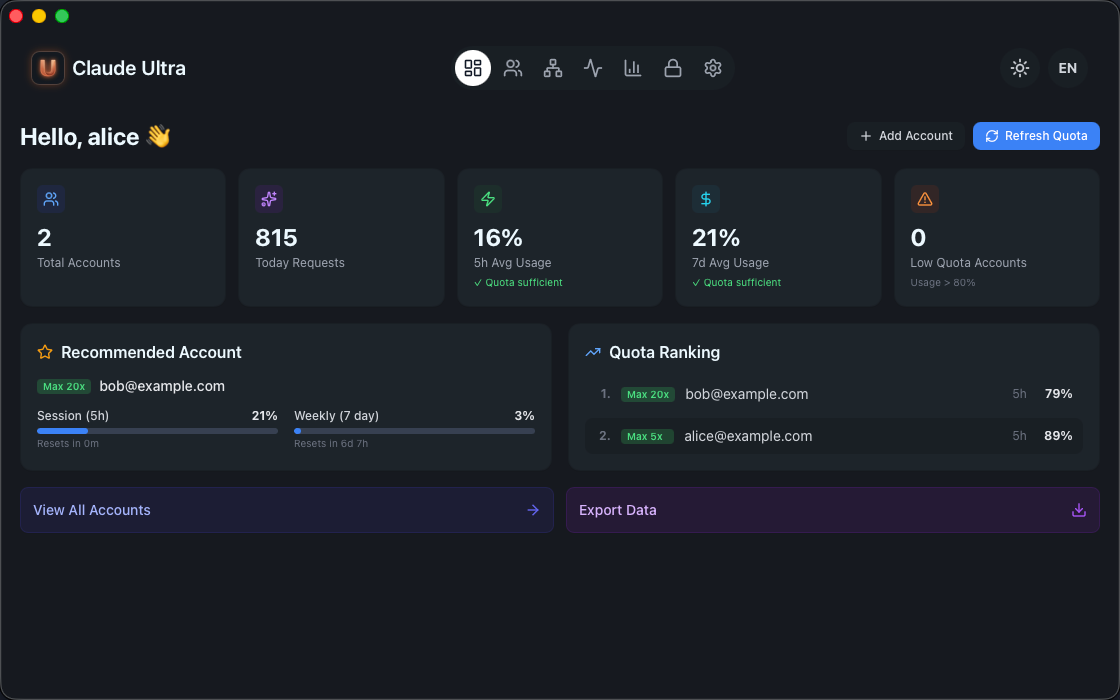
What is Claude Ultra
Claude Ultra is a macOS desktop app that manages multiple Claude Code accounts through a local API gateway. Configure Claude Code to use localhost as the API endpoint, and Claude Ultra handles everything: account selection, quota tracking, automatic failover, and residential proxy rotation.
Features
| Feature | Description |
|---|---|
| Local API Gateway | Transparent HTTP proxy on localhost:9000 — Claude Code connects as if talking to api.anthropic.com |
| Multi-Account Pool | Add multiple Claude accounts, auto-rotate based on quota availability |
| Quota Monitoring | Real-time session (5h) and weekly (7d) usage tracking per account |
| Automatic Failover | Request fails on one account? Seamlessly retries on the next available one |
| Residential Proxy | IPRoyal proxy pool with per-session sticky IPs and automatic rotation (setup guide) |
| Traffic Logs | Full request/response logging with model, tokens, cost, and latency |
| GitHub Login | Device flow authentication via GitHub OAuth |
| Subscription Tiers | Free / Pro / Max / Ultra with different concurrent account limits |
| 12 Languages | English, 简体中文, 繁體中文, 日本語, 한국어, العربية, Español, Português, Русский, Türkçe, Tiếng Việt, Bahasa Melayu |
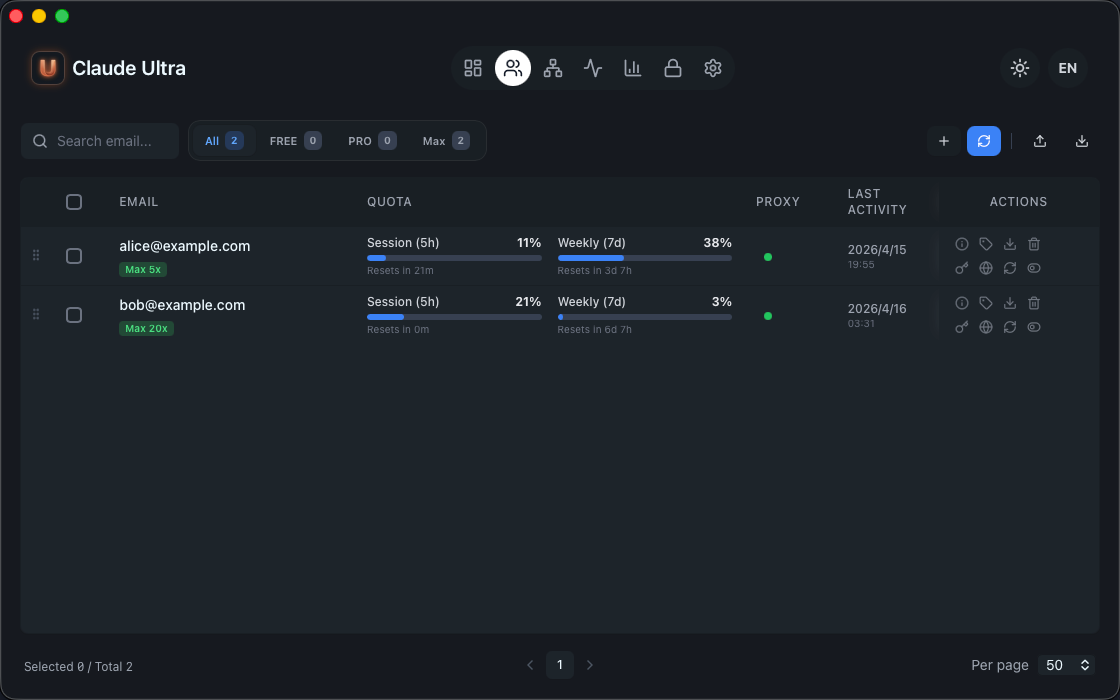
Download & Install
Download
Download the latest .dmg from GitHub Releases.
| Platform | File |
|---|---|
| macOS Apple Silicon (M1/M2/M3/M4) | Claude.Ultra_x.x.x_aarch64.dmg |
Install
- Open the
.dmgand drag Claude Ultra to Applications - First launch: Right-click the app → Open (required once — the app is not notarized)
- If macOS blocks it: Go to System Settings → Privacy & Security → Click Allow Anyway
Requirements
- macOS 12 Monterey or later
- Google Chrome (for web login automation)
- Bun runtime (
curl -fsSL https://bun.sh/install | bash)
Quick Start
- Launch Claude Ultra from Applications
- Login with your GitHub account (Device Flow)
- Add Account — click
+, a Chrome window opens, log in to claude.ai with any method - Configure Claude Code to use the local gateway — add to
~/.claude/settings.json:
{
  "env": {
    "ANTHROPIC_BASE_URL": "http://localhost:9000",
    "ANTHROPIC_API_KEY": "sk-ultra-xxxxxxxxxxxxxxxxxxxxxxxxxxxxxxxx",
    "DISABLE_TELEMETRY": "1",
    "CLAUDE_CODE_DISABLE_NONESSENTIAL_TRAFFIC": "1"
  }
}
The API key is shown in Settings → Gateway.
DISABLE_TELEMETRYandCLAUDE_CODE_DISABLE_NONESSENTIAL_TRAFFICprevent Claude Code from sending non-proxied requests that bypass the gateway.
- Use Claude Code as normal — requests are transparently proxied through your account pool
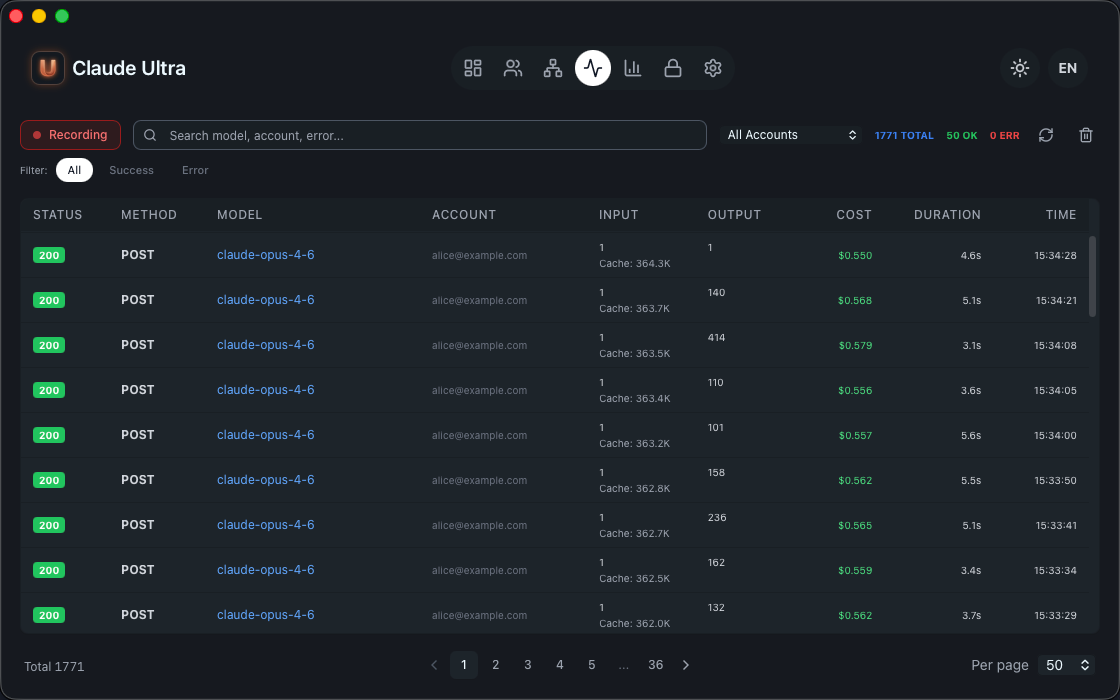
Subscription Tiers
| Tier | Concurrent Accounts | Price |
|---|---|---|
| Free | 1 | Free |
| Pro | 3 | — |
| Max | 10 | — |
| Ultra | Unlimited | — |
Manage your subscription in Settings → Account.
Configuration
All configuration is stored in ~/.claude-ultra/config.json:
{
  "ui": { "language": "en", "theme": "dark" },
  "gateway": { "port": 9000, "auto_start": true },
  "proxy": {
    "residential": {
      "host": "geo.iproyal.com",
      "port": 12321,
      "username": "",
      "password": ""
    }
  }
}
| Path | Description |
|---|---|
~/.claude-ultra/config.json |
App configuration |
~/.claude-ultra/accounts/ |
Account data (JSON per account) |
~/.claude-ultra/auth.json |
GitHub OAuth credentials |
~/.claude-ultra/gateway_logs.db |
Request log database (SQLite) |
Build from Source
Important: Source builds are intended for code review and development contributions only. The official
.dmgis required for production use.
The http/ directory contains a stub implementation of the closed-source HTTP client. It preserves the full public API so the project compiles, but:
- TLS fingerprint: Uses default BoringSSL config (no fingerprint alignment — Cloudflare will block real API requests)
- CCH billing hash: Returns placeholder values (requests with placeholder cch are rejected before sending to protect your account)
- License verification: All checks return OK (stub)
- Webapp: Not included (web login/OAuth automation requires the bundled webapp from the official
.dmg)
# Clone and build
git clone https://github.com/hatawong/claude-ultra.git
cd claude-ultra
bun install

# Type check
bunx tsc --noEmit

# Rust check
cd src-tauri
cargo check --lib
cargo test --test header_order

# Dev server (UI only — gateway won't proxy real requests)
cd ..
bun run tauri:dev
Tech Stack
| Layer | Technology |
|---|---|
| Desktop framework | Tauri 2 |
| Backend | Rust (tokio, axum, hyper, BoringSSL) |
| Frontend | React 19, TypeScript, Tailwind CSS, Ant Design |
| TLS | BoringSSL via boring crate |
| Browser automation | Patchright (Playwright fork) |
| Database | SQLite (rusqlite) for request logs |
| State management | Zustand |
| i18n | i18next |
Contributing
See CONTRIBUTING.md.
Security
See SECURITY.md.
License
Yorumlar (0)
Yorum birakmak icin giris yap.
Yorum birakSonuc bulunamadi