headlessmc-mcp
Health Uyari
- License — License: MIT
- Description — Repository has a description
- Active repo — Last push 0 days ago
- Low visibility — Only 8 GitHub stars
Code Uyari
- fs module — File system access in npm/headlessmc-mcp/bin/headlessmc-mcp.js
Permissions Gecti
- Permissions — No dangerous permissions requested
Bu listing icin henuz AI raporu yok.
A MCP server for HeadlessMc and Minecraft
HeadlessMc - MCP
An MCP server for HeadlessMc: install, launch and control Minecraft: Java Edition from AI agents.

HMC | HMC-Specifics | HMC-Skill



[!WARNING]
This is a prototype. We are looking forward to feedback and feature requests.
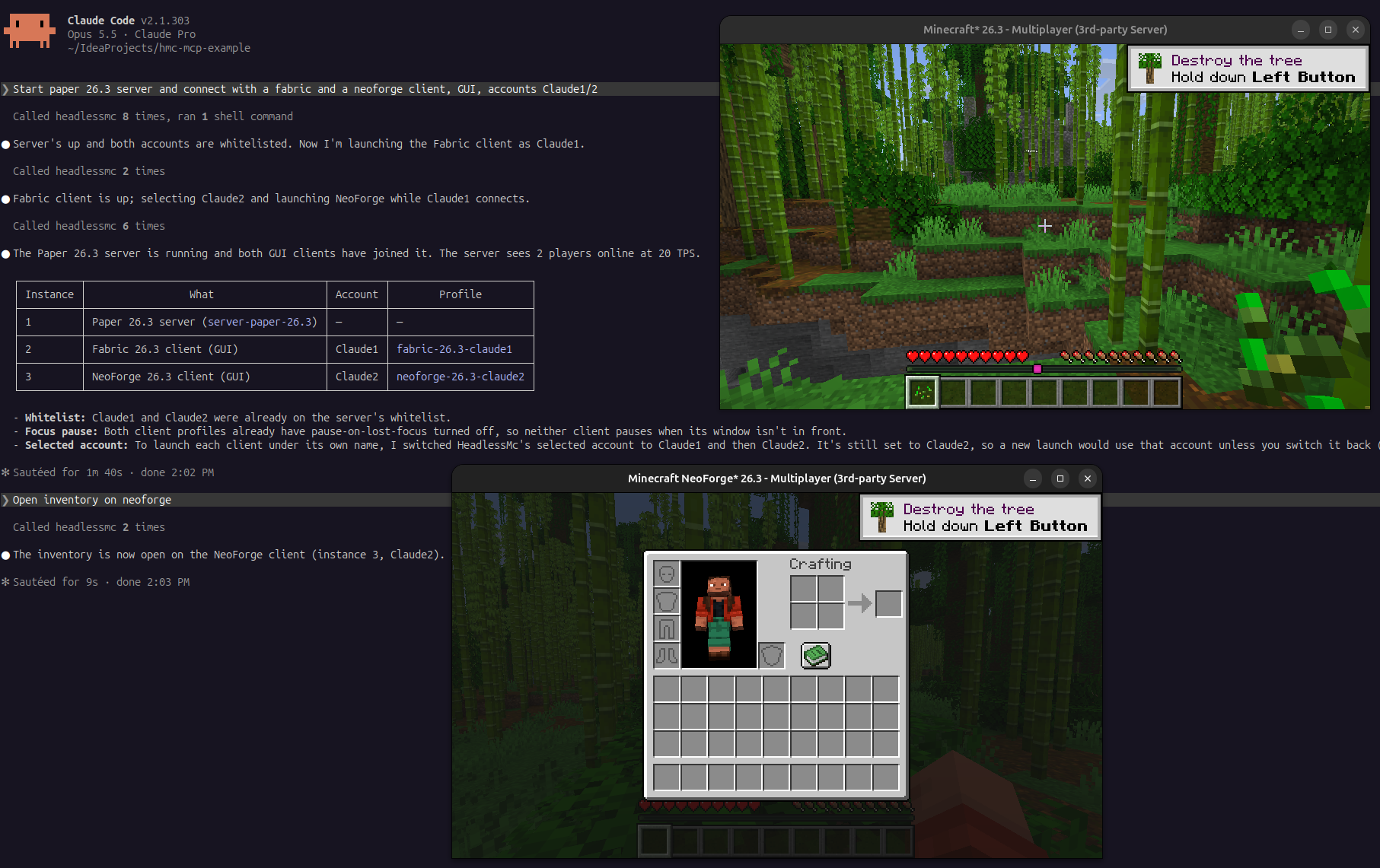
With this MCP server, Claude Code, Codex, Cursor and other MCP clients can:
- install vanilla, Fabric, Forge and NeoForge versions, Java, and mods from Modrinth (everything HeadlessMc can do),
- launch several clients and servers at the same time, optionally headless (no display or GPU, e.g. in CI or Docker),
each client in its own profile (game directory with its own mods, config and worlds), - control running clients: read the screen, click buttons, type, chat, run commands,
connect to servers, etc. - read the logs of every instance and send console commands to servers.
Setup
| Agent | Install |
|---|---|
| Claude Code | /plugin install headlessmc-mcp --marketplace headlesshq/headlessmc-mcp |
| OpenAI Codex | codex plugin marketplace add headlesshq/headlessmc-mcp, then /plugins, tab HeadlessMc MCP, Install plugin |
| GitHub Copilot CLI | copilot plugin marketplace add headlesshq/headlessmc-mcp, then copilot plugin install headlessmc-mcp@headlessmc-mcp |
| Cursor | clone this repository and copy plugin to ~/.cursor/plugins/local/headlessmc-mcp, then Developer: Reload Window |
| Gemini CLI | gemini extensions install https://github.com/headlesshq/headlessmc-mcp |
For instructions on HeadlessMc itself (installing it, mod testing in CI with MC-Runtime-Test), install the
headlessmc-skill as well.
Tools
| Tool | Description |
|---|---|
hmc |
Run any HeadlessMc command line, e.g. version install fabric 1.21.5, mod search sodium, login. Long commands keep running, poll them with hmc_job. |
hmc_job |
Output and status of a running hmc command. |
launch_client |
Install and launch a client (version, loader or profile, headless, offline, server to join, JVM args) and wait until it shows the main menu. |
start_server |
Create and start a Paper/Fabric/Purpur/Forge/NeoForge/vanilla server and wait until it has loaded the world. |
list_profiles, create_profile, delete_profile |
Manage profiles: client setups with their own game directory. |
list_instances |
All launched clients and servers with their status. |
instance_log |
The latest lines of an instance's output, optionally filtered by a regex. |
server_command |
Write a console command to a server and return what it prints. |
stop_instance |
Quit a client or stop a server (or kill it). |
get_screen |
The current screen as JSON: buttons and text fields with ids, texts, positions. |
get_state |
JSON: in world, dead, screen, and metrics like position, health, dimension, server, ping, TPS, players. |
click, set_text, press_key |
Interact with the current screen. click returns the screen it leads to. |
chat |
Send a chat message or a /command. |
connect, disconnect |
Join or leave a server. |
wait_for |
Wait for in_world, menu, screen:<Name>, log:<regex> or exit. |
game_command |
Run any HMC-Specifics command inside the game (help, metrics, render, respawn, commands of other mods). |
Resource template: hmc://instances/{id}/log.
Several clients at once
Every running client needs its own game directory, otherwise they overwrite each other's files and share a mods folder.launch_client takes an optional profile: a HeadlessMc profile with its own game
directory, created in <HeadlessMc data dir>/client/<profile> if it does not exist. Without a profile, a client uses the default
game directory of its version, and if another client of that version is already running there, the MCP server creates a new
profile (fabric-1.21.8-2, ...) automatically. Versions, libraries and assets are shared between all profiles.
Agents can keep profiles for different setups and add mods to them with mod add mod <slug> <profile>.
Game Control
Game control works on every Minecraft version and modloader that
HMC-Specifics supports (1.7.10 to 26.x, Forge, Fabric, NeoForge).
The server downloads the matching HMC-Specifics jar and puts it, together with the version independenthmc-mcp-bridge mod, into the mods folder of the client before launching it.
- The root project (
src/) is the MCP server, a Quarkus application. It uses HeadlessMc's CDI beans and picocli commands
directly, like headlessmc-web. stdout is the MCP channel, so
HeadlessMc's console output and progress bars are captured and returned as tool results instead. hmc-mcp-bridgeis a mod that is not tied to a Minecraft version. It uses the HMC-Specifics API and starts a small
HTTP server on the loopback interface once HMC-Specifics has initialized. The MCP server passes it a random token and a
port file with-Dhmc.mcp.tokenand-Dhmc.mcp.portFile. Without a token the mod does nothing.
Command output comes back separately from the game log, and JSON commands make the screen and state machine-readable.
Agents can also control clients you start yourself, with any launcher (the Minecraft Launcher, Prism, MultiMC, your IDE's
run configuration, ...). Put two mods into the mods folder:
- HMC-Specifics for your Minecraft version and modloader,
hmc-mcp-bridgefrom the releases, one jar for every version and modloader.
When a game with these mods was not launched by the MCP server, the bridge creates a random token, listens on a free port of127.0.0.1 and registers the game in headlessmc-mcp/instances/<pid>.json in the user's state directory
($XDG_STATE_HOME, else ~/.local/state on Linux, ~/Library/Application Support on macOS, %LOCALAPPDATA%\state on Windows).
The file is only readable by you and is deleted when the game exits. list_instances picks up these registrations, so the
game appears as an attached instance, and the game tools work as for launched clients. The log comes from logs/latest.log.
The MCP server never stops attached games on its own, and they have no console for server_command.
Launch the game with -Dhmc.mcp.enabled=false to turn the bridge off.
Asking the user
Some things need the user, not the agent. The MCP server uses elicitation
when the MCP client supports it:
- Minecraft EULA:
start_serverasks the user to accept the EULA with a checkbox before a server is started for the first time.
Without elicitation support, the agent has to ask and passacceptEula. - Microsoft login: the
logincommand asks the client to open Microsoft's device code page (URL mode), so the user signs in
in their browser and the agent never sees credentials. - Prompts of HeadlessMc commands are shown to the user as a form. Passwords and tokens are never requested,
the MCP specification forbids that for form elicitation. - Deleting a profile with its files asks for confirmation.
Long installs and launches send progress notifications, and cancelling a tool call in the client cancels the HeadlessMc command.
Installing
Download the latest release from GitHub Releases:
| File | Platform |
|---|---|
headlessmc-mcp.jar |
Any platform with Java 25 or newer: java -jar headlessmc-mcp.jar |
headlessmc-mcp-windows-x64.exe |
Windows x64 |
headlessmc-mcp-linux-x64, headlessmc-mcp-linux-arm64 |
Linux (e.g. Ubuntu) x64 and arm64 |
headlessmc-mcp-macos-arm64, headlessmc-mcp-macos-x64 |
macOS on Apple silicon and Intel |
Building
Requires JDK 25:
git clone --recurse-submodules https://github.com/headlesshq/headlessmc-mcp.git
cd headlessmc-mcp
./gradlew build
# -> build/headlessmc-mcp-<version>-runner.jar (includes the hmc-mcp-bridge mod)
# -> hmc-mcp-bridge/build/libs/hmc-mcp-bridge-<version>.jar

# native executable for the current platform, needs GraalVM 25 (or add -Dquarkus.native.container-build=true for Linux)
./scripts/build-native.sh
# -> build/headlessmc-mcp-<version>-runner
Configuration
| Property | Default | Description |
|---|---|---|
hmc.mcp.specifics.version |
3.0.1 |
HMC-Specifics release to install into clients. |
hmc.mcp.specifics.url |
GitHub releases | Download URL template with {tag}, {mc} and {loader}. |
hmc.files.game-for-each-version |
true |
Separate game directory per version, so mods folders do not clash. |
hmc.mcp.registry |
<state dir>/headlessmc-mcp/instances |
Where games from other launchers register, set it for the game as well. |
All HeadlessMc properties (hmc.*) work as well, as system properties or in HeadlessMc's config file.
The hmc-mcp-bridge mod reads hmc.mcp.token, hmc.mcp.portFile, hmc.mcp.host (127.0.0.1), hmc.mcp.port (0, any free port),hmc.mcp.registry and hmc.mcp.enabled (true) from system properties. Without hmc.mcp.token it registers the game for attaching.
Privacy and terms
The MCP server runs locally and sends no telemetry. See the Privacy Policy and the Terms of Use.
HeadlessMc - MCP is not an official Minecraft product and is not approved by or associated with Mojang or Microsoft.
Yorumlar (0)
Yorum birakmak icin giris yap.
Yorum birakSonuc bulunamadi