Pointer-Lab
Health Pass
- License — License: GPL-2.0
- Description — Repository has a description
- Active repo — Last push 0 days ago
- Community trust — 10 GitHub stars
Code Pass
- Code scan — Scanned 1 files during light audit, no dangerous patterns found
Permissions Pass
- Permissions — No dangerous permissions requested
No AI report is available for this listing yet.
Free, open-source memory scanner and debugger for Windows, for 32- and 64-bit targets: pointer scanner, find-what-writes, auto-assembler, speed hack, Lua, and an MCP server for AI agents

Pointer Lab
A free, open-source memory scanner and debugger for Windows, for 32- and 64-bit
targets.

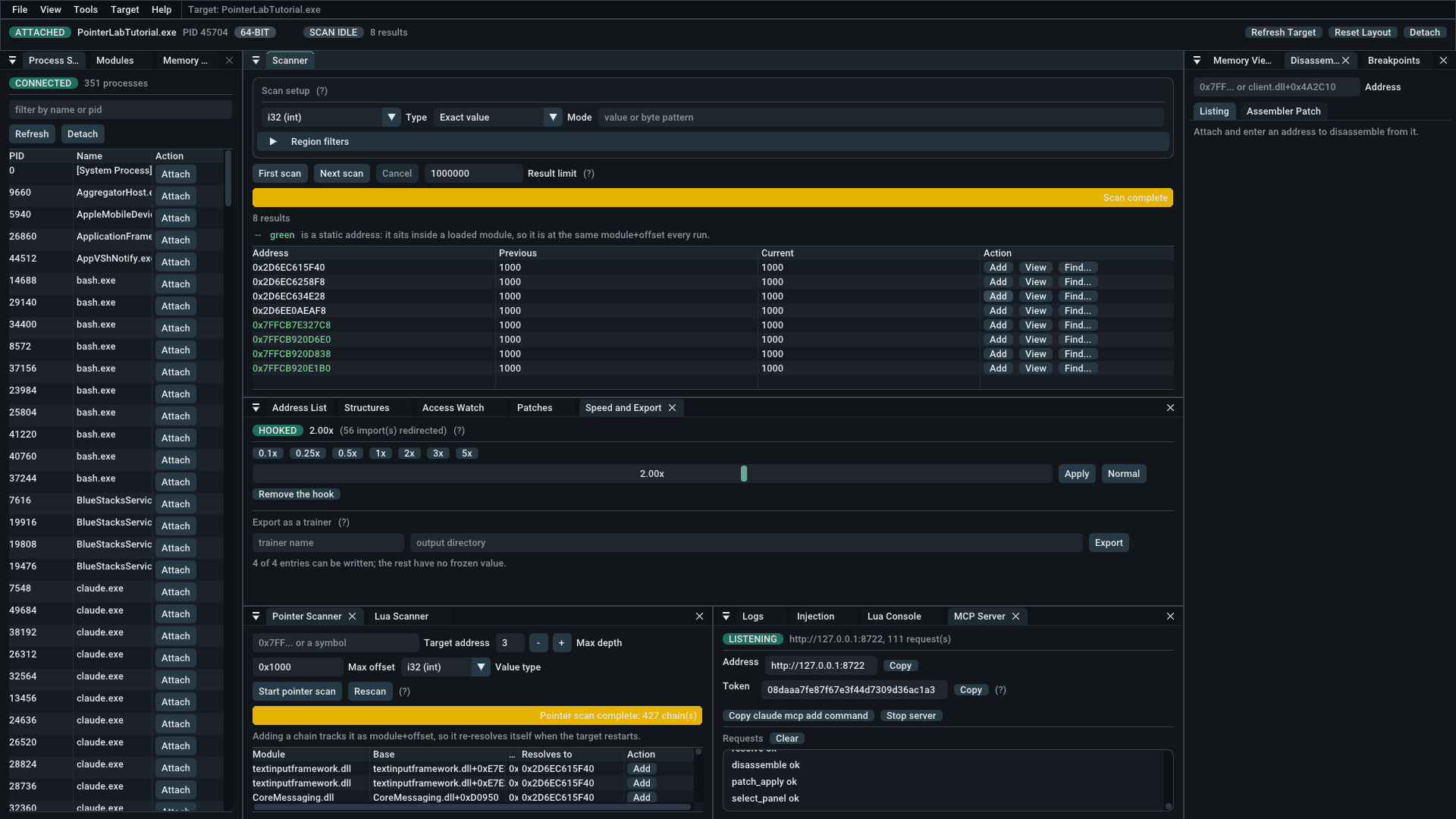
One session, start to finish. Attached to the bundled tutorial, an exact scan
for 1000 narrowed to eight hits; the green ones are static, inside a loaded
module at the same module+offset every run. Four are tracked below, one
frozen, and the pointer scanner has found 427 chains that reach the first.
Pointer Lab attaches to a running process, 32- or 64-bit, searches its memory
for values, tracks the addresses it finds, and lets you read, write, freeze,
disassemble and patch them. It is a research and learning tool — see
Intended use before pointing it at anything.
Pointer Lab is written by Heath Howren
(Cyborg Elf) of
Game Reversal Club as a companion tool to
The Game Hacker's Handbook.
Its page on the club's site is
gamereversal.club/tools/pointer-lab.
Download
Grab the latest release from
Releases. The zip holdsPointerLab.exe alongside the licence, the third-party notices and a copy of
these docs — but the executable is the only part you need. There is no installer
and there are no runtime prerequisites: the C runtime is statically linked and
the fonts are embedded, so PointerLab.exe runs on its own from wherever you
put it.
Four more files sit beside it: PointerLabSpeed64.dll andPointerLabSpeed32.dll, which are the speed hack's payload and are looked for in
that directory, and PointerLabTutorial.exe and PointerLabTutorial32.exe,
which are the practice target described below.
Two things to expect on first run:
- SmartScreen will warn you. Release binaries are unsigned. Code-signing
certificates cost money this project does not have. - Antivirus may flag it. Reading and writing another process's memory,
injecting a DLL and setting software breakpoints are exactly the behaviours
heuristic scanners look for. That is the tool working as designed, not a
reassurance that any given binary is safe — build from source if you would
rather not take that on trust.
Run as administrator for full access. Without it Pointer Lab still works, butSeDebugPrivilege is unavailable, many processes will open read-only, and the
command bar shows a READ-ONLY badge to say so rather than failing writes
silently.
Both 32- and 64-bit targets. Pointer Lab is itself a 64-bit process, and
attaches to either. A 32-bit (WOW64) target is handled as one throughout: chains
step 4 bytes at a time, the disassembler and assembler run in x86 mode, the
debugger reads the thread's 32-bit context rather than the emulation layer's,
and injection resolves LoadLibraryW out of the target's own kernel32. The
current target's width is shown in the command bar, because a DLL you inject has
to match it.
The tutorial
PointerLabTutorial.exe ships in the same zip, in both 32- and 64-bit builds, and
is the fastest way to find out whether any of this makes sense yet. Nine gated
lessons — attach and write, exact scan, unknown initial value, float and double,
find out what writes, a pointer, a multi-level pointer, code injection, and
shared code — each one revealing the password for the next, so nothing has to be
repeated.
It exists because everything else worth practising on belongs to somebody else,
and a first lesson should not depend on a third-party download that has changed
since it was written about.
The checks are the part worth knowing about: they are arranged so the
plausible-but-wrong technique fails. Step 5 calls the writing code and reads back
immediately, so freezing the value proves nothing and only removing the
instruction passes. Steps 6 and 7 move the object before checking, so an address
found by scanning is dead by then. Step 9 damages two objects through one
instruction and reads back immediately, so neither a freeze nor a NOP passes —
only code that looks at which object is being written to.
Screenshots
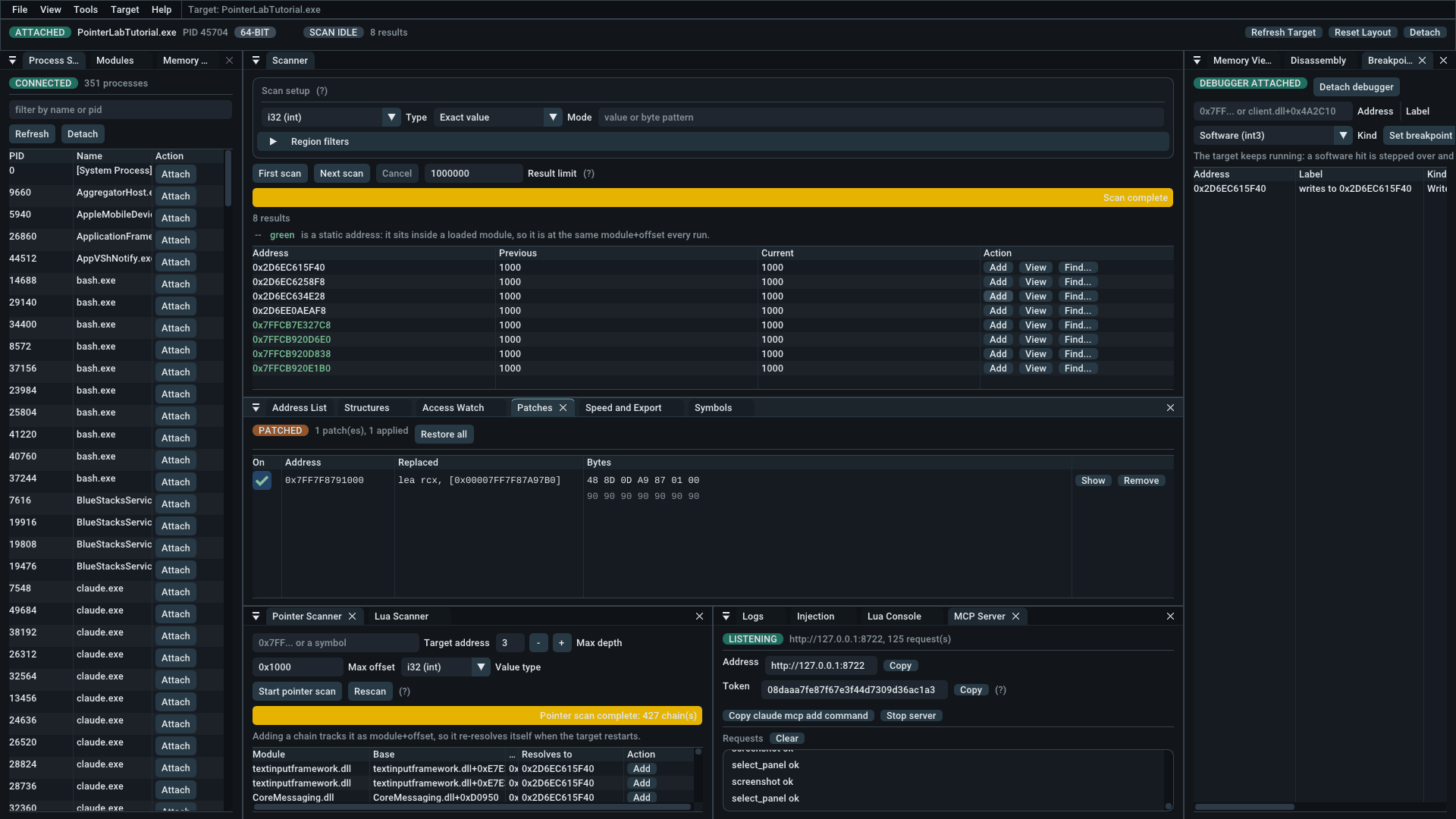
The MCP server, mid-session. Everything in these screenshots was done by an
agent over this connection: the attach, the scan, the address list, the pointer
scan, and the screenshots themselves. The token shown is already dead; a new one
is generated every time the server starts, and it is never written to disk.
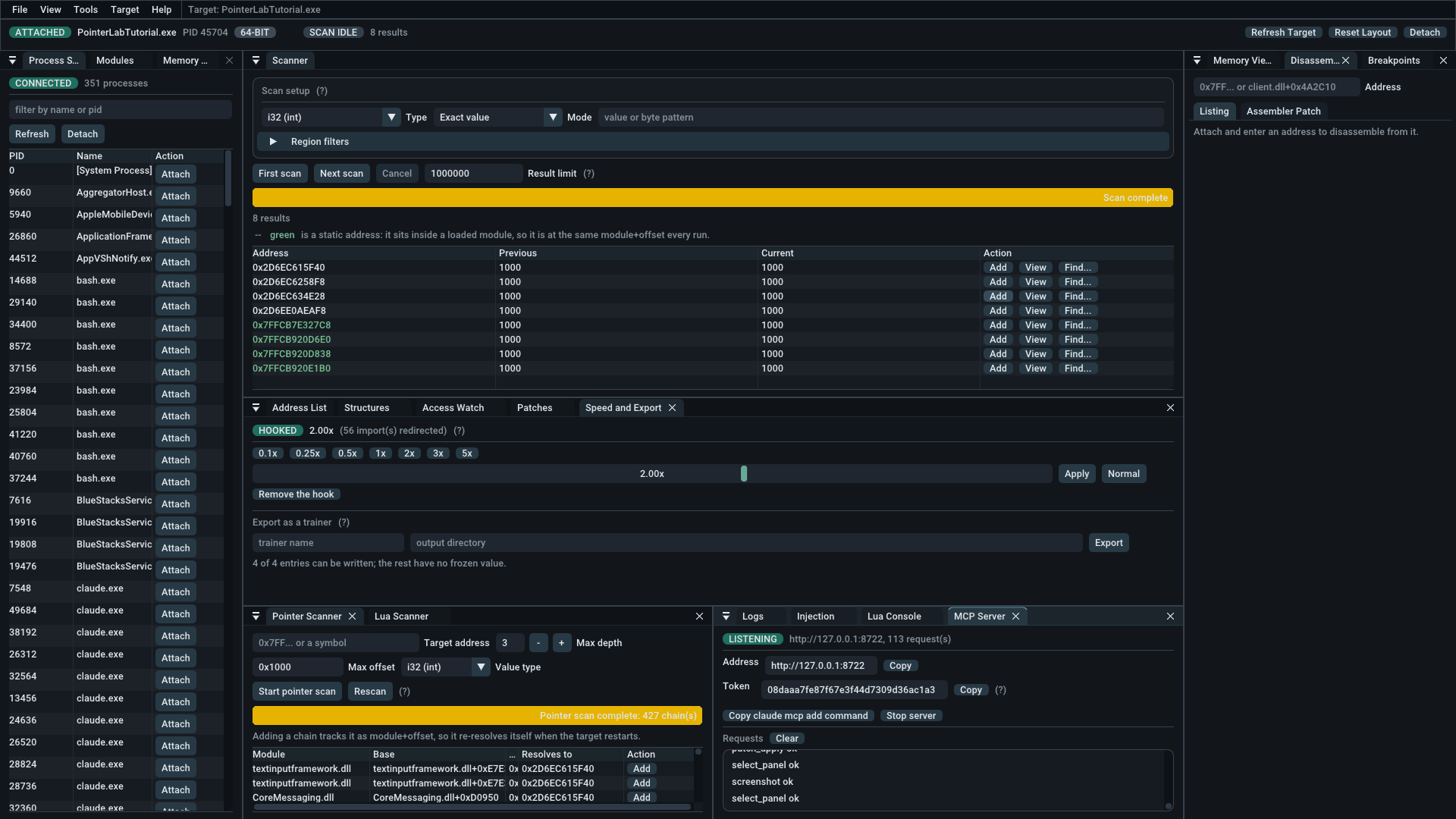
The address list. Descriptions, groups and types, with the current value
re-read on a timer. A ticked freeze box is written back twenty times a second.
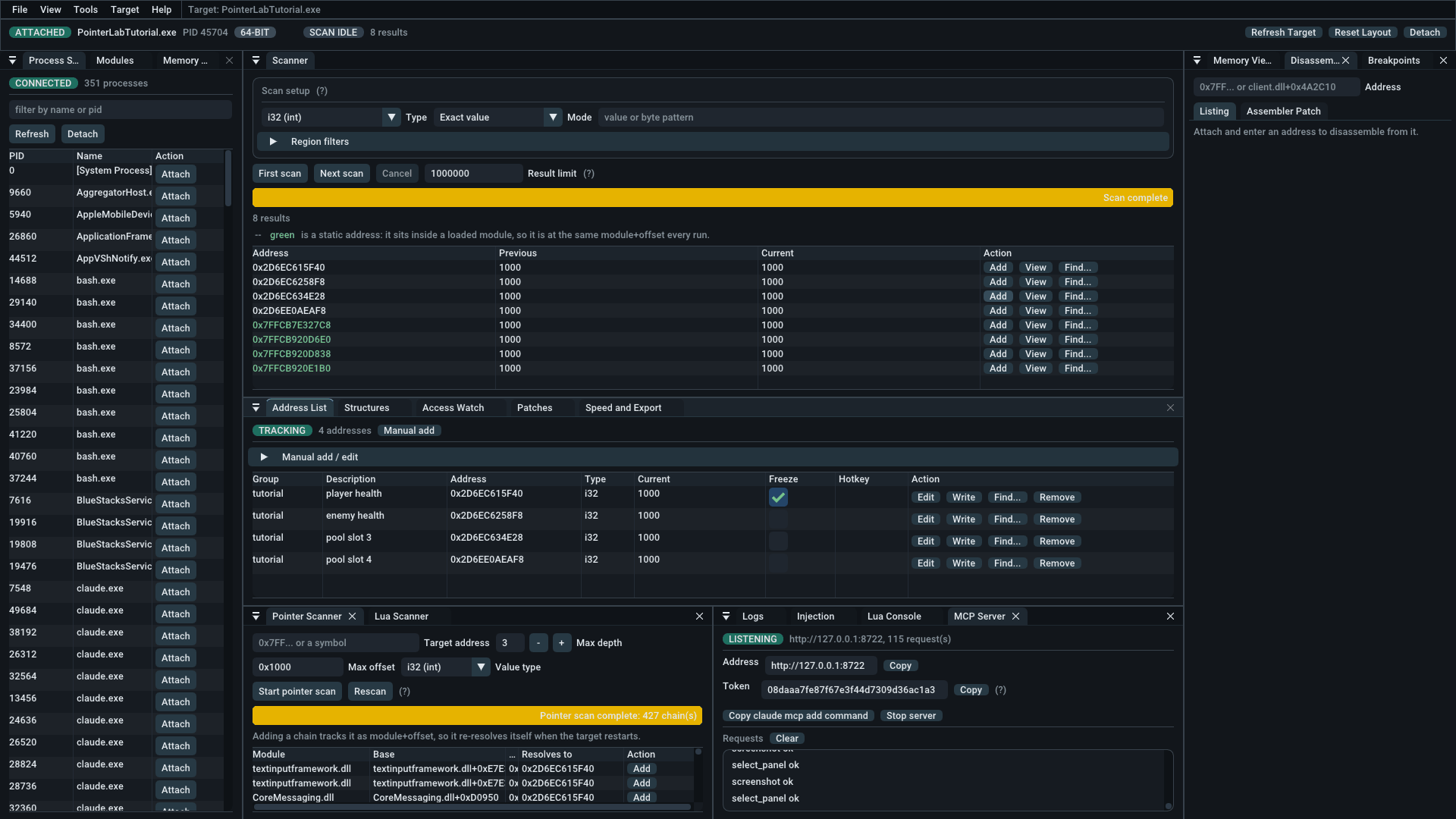
427 chains to one address. A heap address is different every run; a chain
from a module is not. Each row is a base plus offsets that lands on the value.
The patch list. It keeps the bytes that were there before, here alea rcx, so a patch can be unticked and put back. The patch is padded with
nops to cover whole instructions.
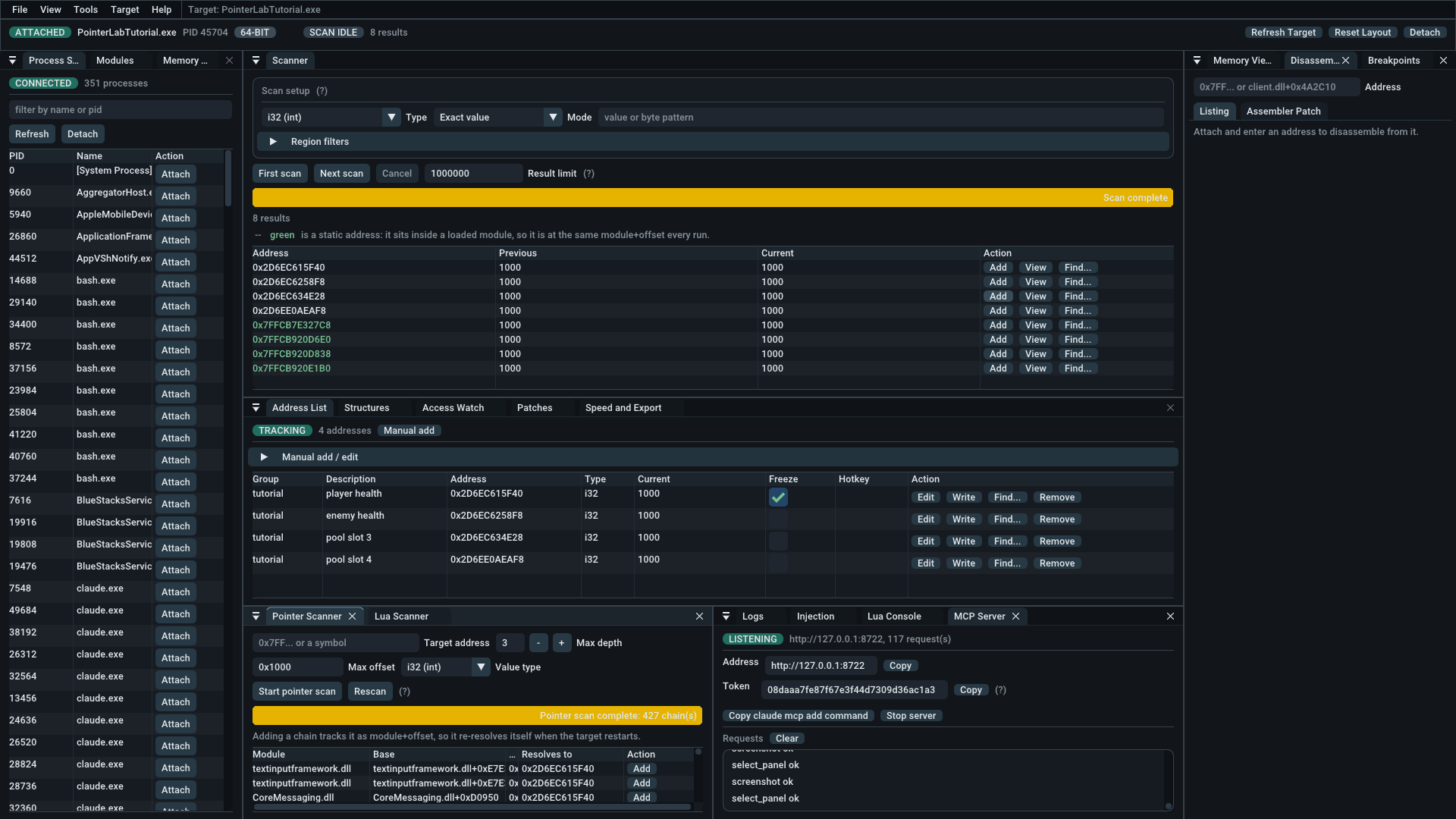
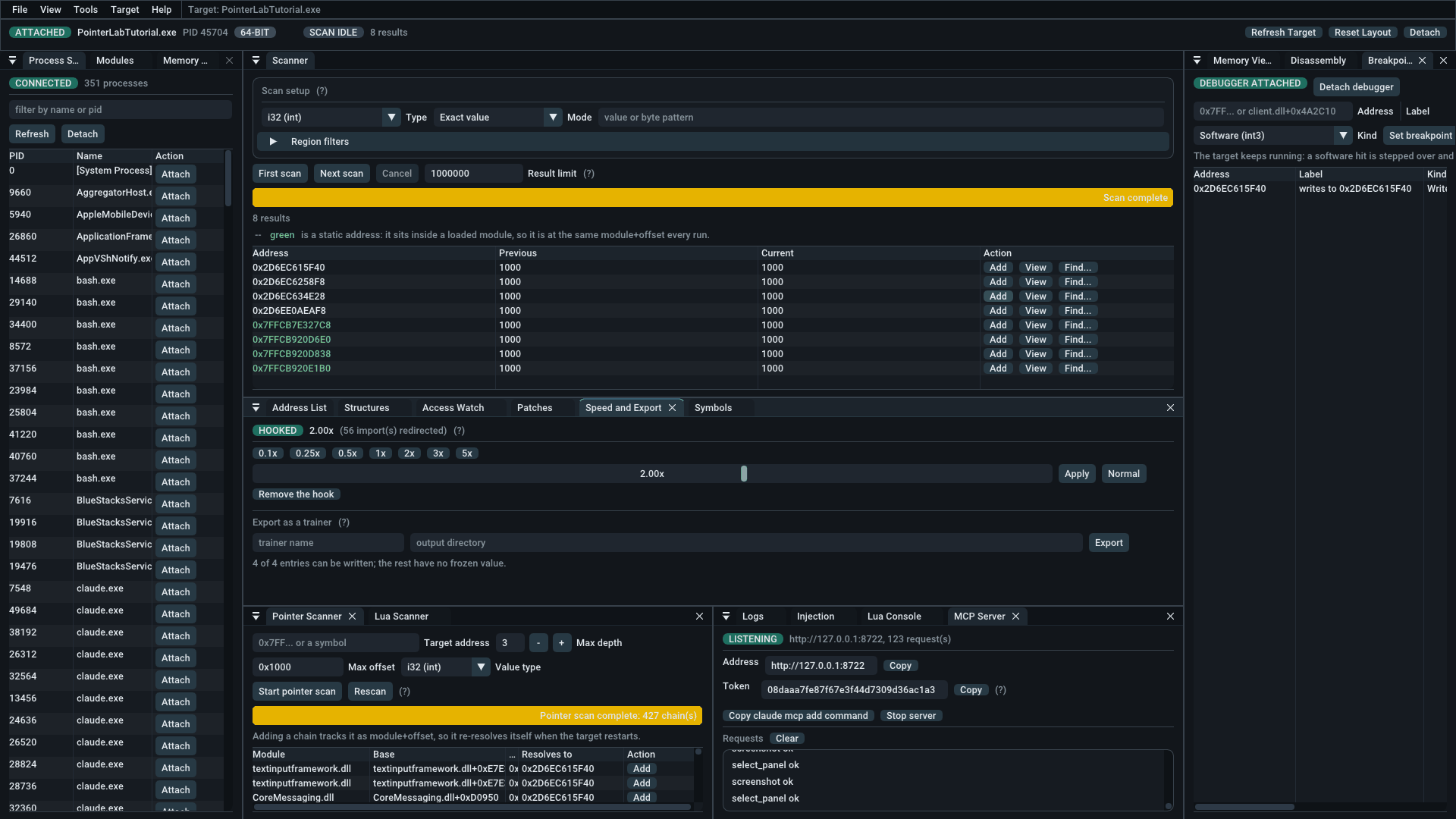
The speed hack at 2.00x. It rebases the clocks the program reads, and it
reports how many imports it redirected, so a target that asks the time some
other way shows up as zero rather than as a silent no-op.
Captured from 3.1.0. 3.2.0 renamed no panel, menu path or tool that they
show.
Features
Scanner — twelve modes over signed and unsigned 8/16/32/64-bit integers,
float, double, byte patterns and text: exact, unknown initial, changed,
unchanged, increased, decreased, value between, bigger than, smaller than,
increased by, decreased by, and same as first scan.Three of those are worth calling out. Increased by and decreased by
take an exact delta, and usually finish a search in one step — "I lost exactly
7 health" is far more selective than "it went down". Same as first scan
compares against the first scan of the run rather than the previous one, which
is the only way to find a value that changed and came back. And the absolute
filters (value between, bigger than, smaller than) work on a first scan,
with nothing to compare against yet.Text comes in both flavours:
strfor one byte per character andwstrfor
the two-byte UTF-16 that Windows means by "Unicode" and that most player names
and chat lines are actually stored in, with optional case folding.Byte patterns support
??wildcards (48 8B ?? 24). Float exact-match uses a
configurable epsilon, because bit-exact float comparison finds nothing in
practice. The result limit is configurable and truncation is reported rather
than hidden. Results that fall inside a loaded module are shown in green: such
an address is at the samemodule+offsetin every run, which is the
difference between an address worth writing down and one that is wherever the
allocator put it today.Address expressions — every address box accepts
client.dll+0x4A2C10,kernel32.LoadLibraryW+0x10, a module name on its own, or a symbol you have
defined, each followed by any number of+/-offsets. Symbols are saved in
the project file as the expression rather than the address it produced, so
they re-resolve against the next run instead of pointing at wherever the
module used to be.Address list — groups, descriptions, value freeze, manual add and edit, and
F1–F12 freeze toggles registered with Windows, so they fire while the target
is in the foreground. Only keys actually assigned to an entry are registered,
so Pointer Lab does not take F1–F12 away from the rest of the machine.Pointer scanner — multi-level pointer chain search with a rescan pass.
Chains are stored asmodule+offsetplus offsets, so a chain found in one run
still resolves after the target restarts and ASLR moves everything. Restart the
target, find the value's new address and rescan: the chains that still resolve
to it are the ones that genuinely track the value, and the thousands that only
pointed the right way once are discarded. Resolved chains can be added to the
address list as live tracked entries.Access watch — "find out what writes to this address", and its read/write
twin. A hardware data breakpoint underneath, with the part that makes it
usable on top: every hit is aggregated by the instruction responsible rather
than arriving as a flood no one can read, and each site can be shown in the
disassembler or replaced with nops from the list.Two details matter here. A data breakpoint traps after the access, so the
instruction pointer names the instruction after the one that touched the
address; Pointer Lab walks back to identify the real one, and says so plainly
when it cannot rather than reporting the wrong instruction confidently.
And each captured register is interpreted against the target — a register
sitting a short way below the watched address is called out as the probable
base of the structure containing it, which is how you get from "I found my
health" to "I found the player object".Patch list — every byte Pointer Lab writes into the target's code is
recorded with the bytes it replaced, and a tick box puts each one back. That
makes the natural experiment — nop an instruction, see what breaks, undo it —
cost a click instead of a restart. Overlapping patches are refused rather than
recorded with a wrong "original", and a patch whose bytes something else has
since changed is flagged instead of quietly claiming a state the memory does
not have.Hex editor — navigable rather than a fixed window: scroll by row or page,
jump to any expression, click a byte to edit it in place, and follow a byte as
a pointer to land wherever it points. Bytes that changed since the last frame
are highlighted, which is how you find a field by watching a structure repaint
itself rather than by scanning for it. Walking backwards from a known
address until the start of a structure appears is a scrolling exercise here,
not a hex-arithmetic one.Disassembler — full x86-64 disassembly via Zydis,
with follow-branch navigation. Undecodable bytes are shown asdbrather than
desynchronising the listing.Assembler — full x86-64 assembly via Keystone.
Patches are NOP-padded to the next instruction boundary so a short patch never
leaves half an instruction behind, and the confirmation dialog tells you
exactly how many bytes will be overwritten.Structure dissector — a named layout laid over several objects at once.
Press Guess and it fills the layout in from what is actually there, calling a
slot a pointer when its value lands in a mapped page and a float when the bytes
decode to a plausible one. Put two instances of the same kind of object side by
side and the fields that read the same in both are greyed: those are padding or
shared state, and the ones that differ are what actually describes an object.
Layouts are saved with the project — the addresses are not, because a layout
outlives every run and one particular enemy does not.Auto-assembler scripts — an injection written down instead of performed: an
[ENABLE]section that patches the target and a[DISABLE]section that puts
it back, withaobscanmodule,alloc … near, labels, symbols,assertand
raw data. Three templates are one button away, and the Access Watch can start
one from the instruction you just found. Written this way an injection can be
read, checked before it runs, kept, and re-run after the target restarts and
everything has moved — none of which is true of the same work done by hand.checkcompiles without writing anything;aobscanmodulerefuses a pattern
that matches twice rather than picking the first; a run that fails part-way
rolls back rather than leaving the target half injected.
Signature Lab, the companion
x64dbg plugin, prints a readyaobscanmodule(...)line for any instruction you
select in x64dbg.Speed hack — 0.1x to 5x from a preset, or anything between 0.05x and 20x
from the slider. A game does not measure time; it asks Windows what time it is
and multiplies everything it does that frame by how much has passed. So this is
a hook on the clock rather than on the game, and it needs to know nothing about
the game at all. The clock is rebased rather than multiplied, so it never jumps
and never runs backwards when the rate changes. The panel reports how many
imports were actually redirected: zero means this target does not ask for the
time through its import table, which is a real limit of the technique and worth
knowing rather than guessing at.Trainer export — the address list written out as a small CMake project for
a standalone external trainer with hotkey toggles. It generates source, not
an executable: a generated binary is a black box that works while teaching
you nothing, and generated source is the same trainer with its reasoning
visible — how a process is found by name, how a module base is looked up, how a
pointer chain is walked one dereference at a time. It is also the difference
between a program you have read and a program of unknown provenance you are
about to point at your own machine.Breakpoints — repeatable user-mode breakpoints via the Windows debug APIs,
so the target keeps running and the hit count climbs. Register context is
captured on hit. Software (int3) breakpoints rewind RIP, single-step and
re-arm; hardware breakpoints use the CPU's four debug registers instead, never
modify the target and are never disarmed, and can break on data being written
or read rather than only on code being executed.Injection — remote allocation, remote thread creation and
LoadLibraryW
helpers, each behind a confirmation dialog.Lua scripting — embedded Lua 5.4 console running off the UI thread, with a
cancel button that actually interrupts a runaway script. See
docs/lua-api.md. It can also drive the window —screenshot,select_panel,set_layout,set_window_size,wait_frames
andquit— so a set of figures is captured by running a file rather than by
a person with a screenshot key:PointerLab.exe --script scripts\capture-figures.luaA figure taken by hand is correct on the day and silently wrong afterwards. A
capture script is re-run on every release, and a panel that has been renamed
since fails the run instead of quietly disagreeing with its caption.MCP server — 76 tools over the
Model Context Protocol, so an AI agent can
attach, scan, read and write memory, walk pointer chains, dissect structures,
set breakpoints and patch code. It runs inside the application and shares
the live session: a scan the agent starts fills the Scanner panel, and an
address it finds appears in the address list. One session with two people at
it, rather than an agent working blind alongside you. See
docs/mcp-api.md.It is off until you start it in View → MCP Server, binds
127.0.0.1only,
and requires a per-session bearer token. Read the next sentence before you use
it: while the server is running, a client holding that token can read and write
the target's memory, patch its code, allocate, inject a DLL and start threads
in it without any of the confirmations the rest of the application asks
for. Pressing Start is the one consent, and it covers everything that
follows. Stop the server when you are done.Persistence —
.iretableproject format with File → New/Open/Save/Save As,
plus autosave on exit and autoload on start. Format documented in
docs/iretable-format.md. Scan options and which
panels are open are remembered separately, in a plainsettings.inibeside the
logs, because they belong to the installation rather than to a project.Diagnostics — structured log with per-thread ids and a level filter, and
automatic minidumps on crash (including uncaught C++ exceptions, not just
access violations).
Known limits
Stated plainly, because a tool that overstates itself wastes your time:
- A software breakpoint can be missed by another thread during the single-step
window in which it is temporarily disarmed. This is inherent toint3
breakpoints and is not specific to Pointer Lab; use a hardware breakpoint,
which is never disarmed, when it matters. - There are only four hardware breakpoints, because the processor has four debug
registers. The fifth is refused rather than silently replacing one. - Breakpoint hit notifications are rate-limited to one every 500 ms so a
breakpoint in a hot loop cannot flood the UI. The hit count in the breakpoint
table is the authoritative record. - Partial reads across partly-mapped regions succeed with a shortened buffer
rather than failing outright, which is what lets a scan cross them. - A DLL injected into a target must be built for that target's architecture.
Pointer Lab reports the mismatch rather than preventing it, because the
loader is the only thing that can actually tell. - The speed hack redirects import table entries, so it misses a call that does
not go through one — an address the target obtained fromGetProcAddress, or a
call made from inside a system DLL. The count of redirected imports is shown so
that case is visible rather than silent. It also deliberately leaves ntdll,
kernel32, kernelbase and winmm alone: those implement the clocks, and patching
them would send the hook's own call to the real function back into the hook. - The MCP server is request/response only. There is no event stream, so a client
pollsscan_status,breakpoint_eventsandaccess_watch_sitesrather than
being told. Its token is transport access control and not a safety check:
anything holding it has the same reach over the target that you do. - There is no kernel driver, no anti-anti-cheat, and no attempt at stealth.
What will not change within a major version
From 3.0.0 on, panel titles, menu paths and Lua function names are fixed for
the life of a major version. Anything written against them — a book, a course,
a capture script, a note to yourself — can quote them and stay correct until
4.0.
This is a real constraint accepted on purpose. Writing that says "open the Access
Watch panel" is worthless the moment the panel is called something else, and the
person who finds out is a reader following an instruction that no longer matches
what is in front of them. A better name for a panel is not worth that; it can
wait for a major version, where a changed name is expected and looked for.
MCP tool names are covered too, from 3.1.0 on. They were added after 3.0.0
shipped and so fall outside the rule above, which is exactly why this says so
explicitly: a tool name is something an agent's prompt and a saved workflow are
written against, which is the whole reason the promise exists. Renaming one would
break work already done, in the same way and for the same reason as renaming a
panel.
Not covered: the arrangement of controls inside a panel, the wording of
explanatory text, colours, the JSON shape a tool returns beyond the fields
documented for it, and anything else added after a major release ships.
Intended use
Pointer Lab is for inspecting software you own or are authorised to test —
your own programs, single-player games, CTF binaries, and reverse-engineering
practice.
Using it against online or competitive games will very likely trip anti-cheat
software and get the account banned. Using it against software you do not have
permission to modify may be illegal where you live. That decision is yours; this
tool does not make it for you.
Building from source
Requirements: Visual Studio 2022 (MSVC v143), CMake 3.28+, and Python 3
on PATH. Python is not used by Pointer Lab itself — Keystone vendors an LLVM
fork whose CMake calls a Python script during configure, so without an
interpreter the first command below fails before anything is compiled. The
Visual Studio C++ workload does not install one.
cmake -S . -B build -G "Visual Studio 17 2022" -A x64
cmake --build build --config Release
ctest --test-dir build -C Release --output-on-failure
The first configure downloads and builds Dear ImGui, Lua 5.4.7, Zydis, Keystone,
nlohmann/json and Catch2 via FetchContent, all pinned by tag or commit. Keystone brings the
LLVM MC layer with it and dominates the first build; it is cached afterwards.
To produce the release zip:
cpack --config build/CPackConfig.cmake -C Release -B build/package
Documentation
- Architecture — how the layers fit together
- Lua API reference
- MCP API reference — the tools, and what starting the server commits you to
.iretableformat- Changelog
- Contributing
- Security policy
License
Pointer Lab is licensed under the GNU General Public License v2.0 — see
LICENSE. GPLv2 rather than something more permissive because Keystone
is GPLv2 and is statically linked into the binary.
Third-party components and their licenses are listed in
THIRD_PARTY_NOTICES.md.
Reviews (0)
Sign in to leave a review.
Leave a reviewNo results found