rex-radar
Health Uyari
- License — License: MIT
- Description — Repository has a description
- Active repo — Last push 0 days ago
- Low visibility — Only 5 GitHub stars
Code Uyari
- process.env — Environment variable access in hooks/pi-rex-questions.ts
Permissions Gecti
- Permissions — No dangerous permissions requested
Bu listing icin henuz AI raporu yok.
A glanceable view of the coding agents running in Rex terminal sessions: macOS menu bar app, iPhone/iPad and Apple Watch apps, with widgets
Rex Radar
A glanceable view of the coding agents running in Rex terminal sessions,
across several Rex servers: a macOS menu bar app and desktop widget, an iPhone and iPad app with widgets, and an
Apple Watch app with complications. See which agent is blocked, done or working, jump to its pane in Rex, answer
its questions and send agents skills, from wherever you are.
A community project, not affiliated with Superlogical. Rex is in beta and its API changes weekly, so things
can break with a Rex update; what's been verified, and on which builds, is noted below.
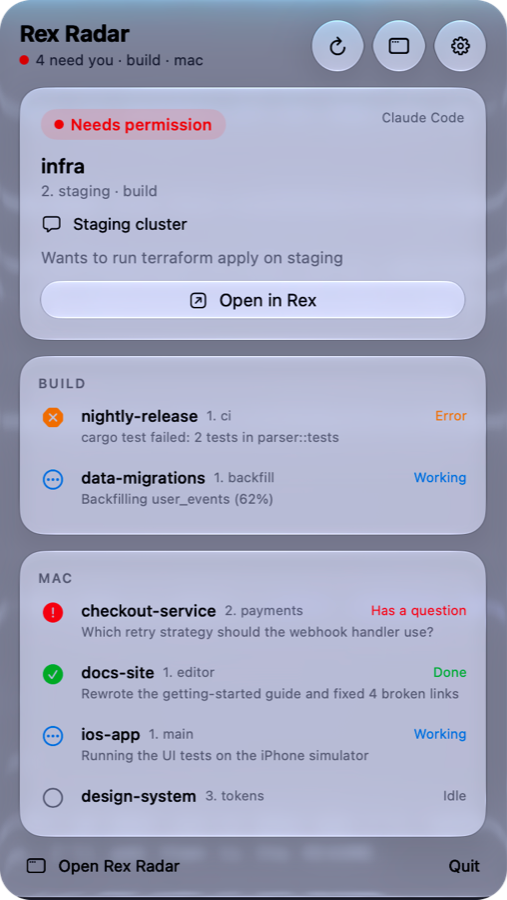
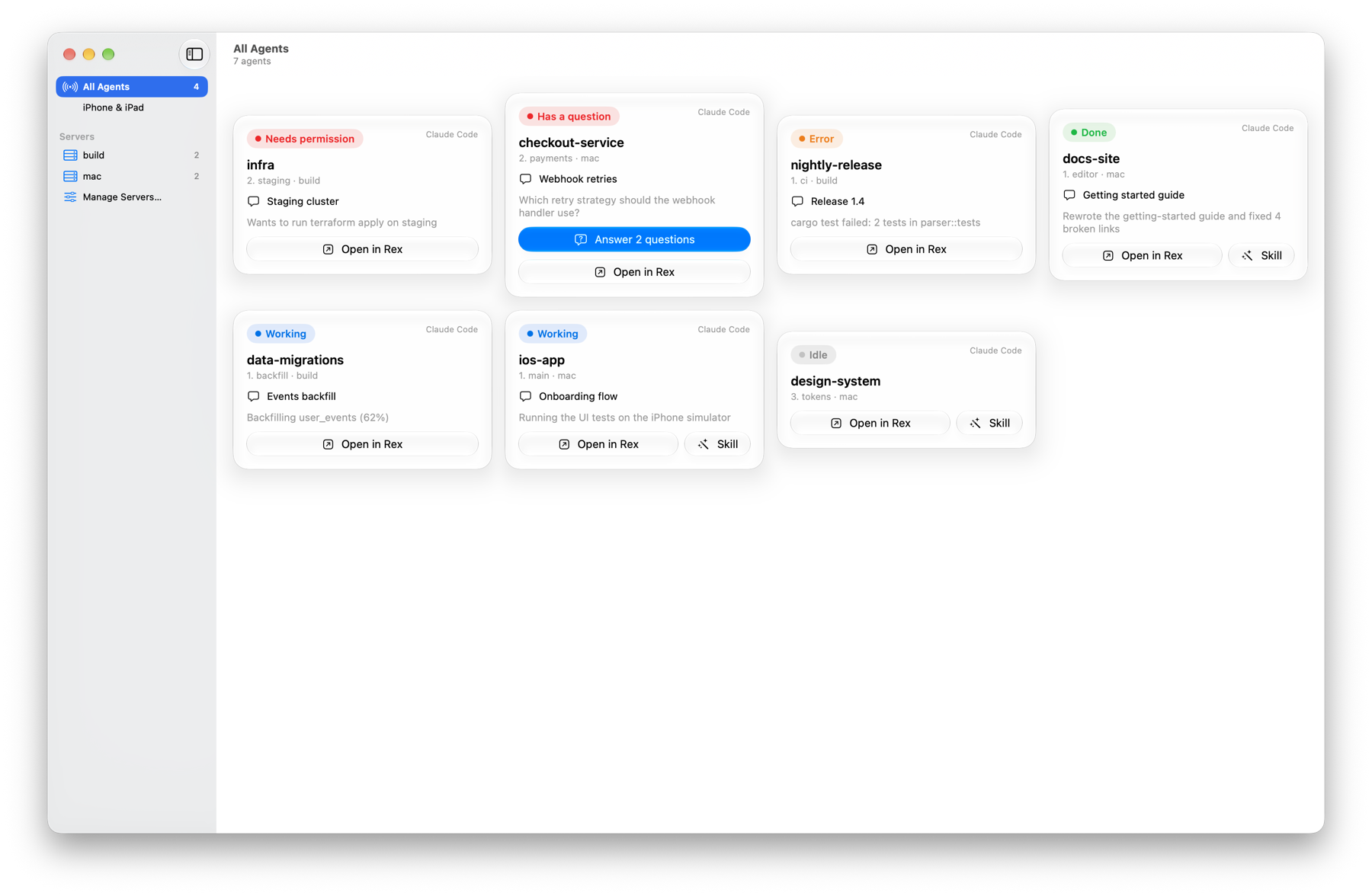
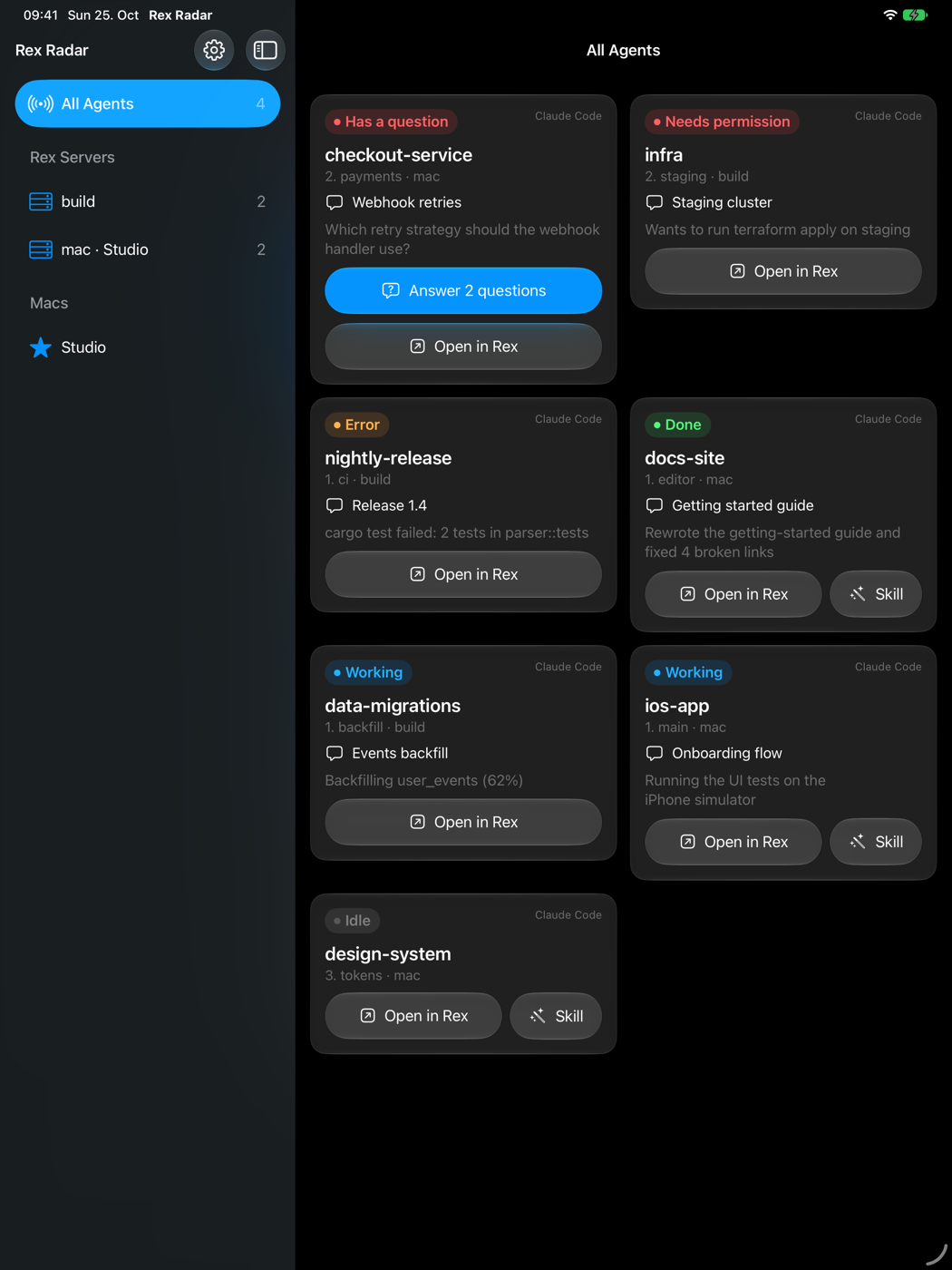
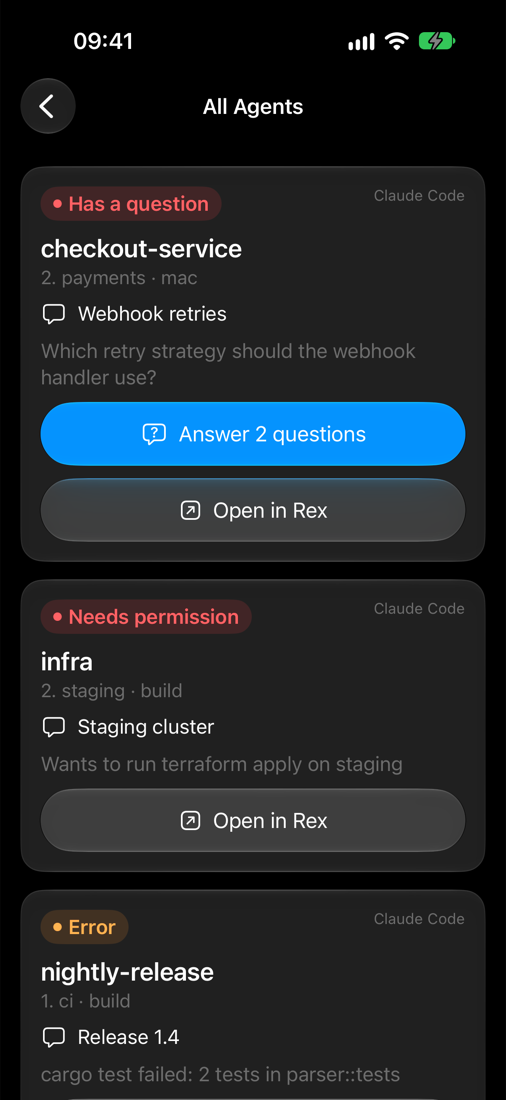
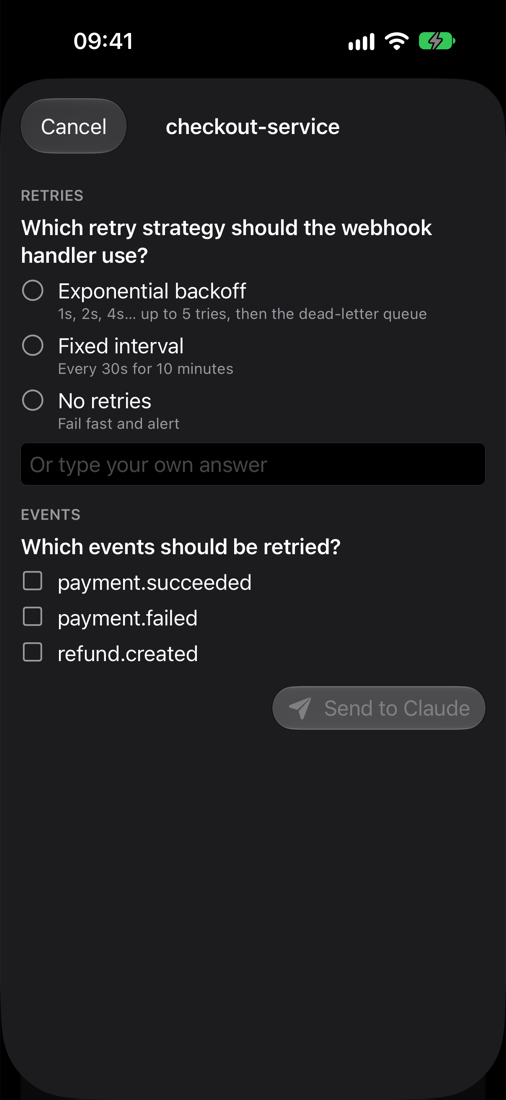
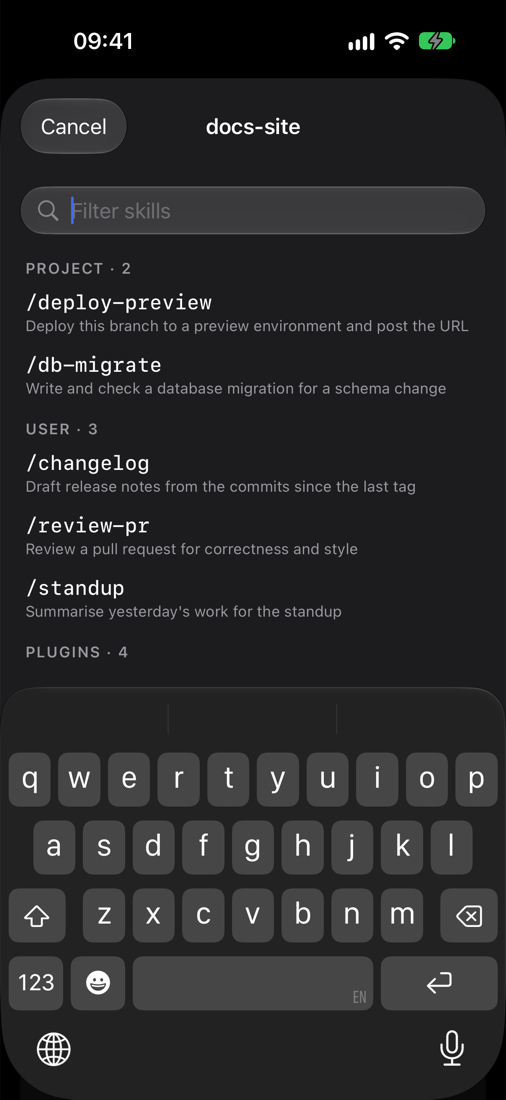
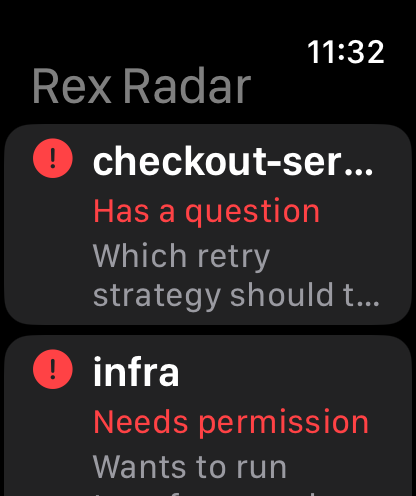
Features
- Every agent at a glance, most urgent first: blocked, error, done, working, idle; with Claude's one-line
summary and conversation topic. - Open in Rex: click or tap an agent to switch your Mac's Rex app to its pane, on any of your Rex servers.
- Answer agents' questions (Claude Code's and Qoder's AskUserQuestion, Codex's and Antigravity's question
forms, Pi'sask_user_questionfrom@juicesharp/rpiv-ask-user-question) from the Mac, iPhone, iPad, watch or
Apple TV. - Send skills: pick any skill or slash command Claude Code, Codex, Antigravity, Qoder or Pi offers in a pane
(project, user and plugin), filtered as you type, and send it with arguments. - New session: start Claude Code, Codex, Antigravity, Qoder or Pi in a new Rex session in a folder, from the Mac,
iPhone or iPad. - Close: end an agent and close its pane in Rex, from the Mac, iPhone or iPad.
- Widgets and complications on the Mac desktop, Home and Lock Screen, and the watch face.
- Apple TV: a full-screen grid of your agents for the wall, paired by allowing it on the Mac, with the same
scope cards (four to a row) and one-line strips as the Mac.
Requirements
- Rex (beta) on a Mac running macOS 26, with Remote Control on in the Rex app's settings.
- Claude Code 2.1.310 or later, which reports its status to Rex. Codex (Rex detects its status itself),
Antigravity (agy, reports its own), Qoder (qodercli, throughhooks/qoder-rex-status) and
Pi (pi, reports its own) show up too. Other
agents show up if they report program status. - To build: Xcode 26 or later and XcodeGen (
brew install xcodegen).
For the widgets, the iOS app and the watch app, an Apple Development team (a free Personal Team works for your
own devices). - iOS/iPadOS 17 and watchOS 10 or later for the mobile apps.
Getting started
There are no prebuilt releases yet: build it from source.
git clone https://github.com/hecspc/rex-radar && cd rex-radar/macos

# Mac app only (command-line tools, ad-hoc signed, no widget)
./bundle.sh --install

# Mac app and desktop widget, signed with your team
DEVELOPMENT_TEAM=<team id> BUNDLE_PREFIX=com.yourname scripts/build.sh --install
- Your team ID is the
OUof your Apple Development certificate
(security find-certificate -c "Apple Development" -p | openssl x509 -noout -subject). BUNDLE_PREFIXis the reverse-DNS prefix for every bundle ID and App Group. Bundle IDs belong to one team, so
use your own (the default,house.milapan, only signs for the author).- The app starts a watcher for this Mac's Rex server on launch. Add remote Rex servers in the window's
Manage Servers… (they need to be hosts your Rex app is connected to). - To answer Claude's question lists, install the hook in
hooks/claude-rex-questions(needsjq); see
Answering questions. Codex and Antigravity need nothing installed. - For Qoder, which Rex doesn't set up yet, register
hooks/qoder-rex-status(its status) andhooks/claude-rex-questions(its question lists) in~/.qoder/settings.json; see
Qoder.
iPhone, iPad and Apple Watch: generate the project and build the RexRadarMobile scheme (the watch app is
embedded) to your device:
cd macos && xcodegen generate
xcodebuild -project RexRadar.xcodeproj -scheme RexRadarMobile -destination 'id=<device udid>' \
  -allowProvisioningUpdates DEVELOPMENT_TEAM=<team id> BUNDLE_PREFIX=com.yourname build
Or open RexRadar.xcodeproj in Xcode and run it there. Then pair: on the Mac open Rex Radar's window →
Devices and scan the QR code with the iPhone's Camera. The watch gets its pairing from the phone. The Apple
TV finds the Mac on the network and asks; allow it on the same page.
Security
The Mac app serves its agents to your phone over plain HTTP on port 7298, with a random bearer token from the
pairing code. Anyone with the token can see your agents and open panes. A device that asks to pair (an Apple
TV, or an iPhone that found the Mac or has only its address) gets the same token, only after you choose Allow
on the Mac, unless you turn on Pair without asking (Settings → iPhone & iPad); answering questions and sending skills
are off until you turn them on in Settings. Use it on a network you trust, ideally over
Tailscale, which encrypts it and lets the phone reach the Mac from anywhere.
Contributing
Issues and pull requests are welcome. CLAUDE.md describes the architecture and conventions (it's written for
Claude Code, and works as well for people). There are no tests: say in a pull request how you checked the change,
and on which Rex and Claude Code builds. When Rex behaviour changes, record what you verified, with the date and
versions, in this README.
License
The agent logos in macos/Resources/AgentIcons.xcassets are trademarks of their owners (Claude Code: Anthropic;
Codex: OpenAI; Antigravity: Google; Qoder: Qoder; Pi: Earendil), used only to show which agent runs in a pane. They're
rendered from lobehub/icons (@lobehub/icons-static-svg 1.100.0, MIT), except
Pi's, which is Rex's own program glyph for Pi (block-glyph-pi in the Rex app's SuperBlockIcons bundle), and
aren't covered by this project's licence.
Design notes
What it shows
A sidebar like Rex's own: servers → sessions → tabs → panes. Each pane running an agent shows:
- Agent: its logo, then its name: Claude Code, Codex, Antigravity, Qoder and Pi
(Resources/AgentIcons.xcassets; Qoder's and Pi's have a white variant for dark mode, since their logos are
drawn in the text colour); any
other agent, and the SwiftPM build (no asset catalog), get a grey chip symbol instead. - State: idle, working, blocked (permission, question or auth), done or error.
- Summary: one line about what the agent did or needs.
- Unread: done or blocked since you last looked.
- Where: session, tab, and the pane's label when it has one other than Rex's default
shell
(2. agents › reviewer), so several helpers in one tab stay distinguishable. - Checkout: the folder the agent runs in (the pane's foreground process, read by the watcher at most once a
minute) and, for the Mac's own server, the git branch there (read from.git/HEAD, or a worktree's gitdir), so
agents working in different worktrees of one project can be told apart.
Cards (window, panel, iPhone, iPad, Apple TV) lead with what tells an agent apart from the others in its session:
its topic, else its tab's name, else its pane's label. Under it come the branch, the folder (unless it's the
session's name) and tab › pane, and above it the state and how long it has been in it ("WORKING · 14M").
Each agent's state is drawn as a small radar scope (Scope in Shared/Components.swift): a beam sweeps while it
works, a contact pings while it needs you (its glyph says what for: a question, a permission, a login), a check
marks it done, an empty ring while it rests, and a broken ring when its watcher went quiet. The motion is driven
by a TimelineView (a repeating animation also animated the scopes' positions as cards moved) and stops with
Reduce Motion.
Every view (Mac window and panel, iPhone, iPad, Apple TV) lays agents out the same way, as a wall: one grid of
cards that fills every row, most urgent first (needs you, done, working; Row.byUrgency), then the resting ones
(idle, done for 5 minutes, stale) as one-line strips under a Resting label. Each card's eyebrow and tint say its
state and each names its session; the title counts them ("3 need you · 2 done · 1 working · 7 resting",RowSection.summary). A click anywhere on a card or strip opens it in Rex; the card's corner has Open, Skill and
Close, the strip's context menu the same. Cards of agents that need you take their state's tint; on the TV it's an
outline, since a fill behind the card style bled into the row.
Ordered by urgency: blocked first, then done-unseen, then working, then idle; within a state, the most recent change
first. Rex keeps a pane done until the agent's next run (Pi never goes back to idle on its own), so a pane done for
5 minutes, or opened from Rex Radar since, counts as idle (Row.doneFadesAfter, Store.fadeDone).
Servers and the main server
rex-radar connects to several Rex servers at once. One of them is the main server, the one whose Rex app you
sit in front of.
| Where you tap | Server of the tapped agent | What opens |
|---|---|---|
| iOS | any | The tab in the main server's Rex app, not on the phone |
| macOS | local | The tab in the local Rex app |
| macOS | remote | The tab in the local Rex app, through its connection to that remote host |
On iOS rex-radar is a remote control: it shows everything and sends you to your desk.
How it works
Data: all from the Rex server API
The server describes its own API (rex api list, rex api describe <method>):
session.list,session.view: sessions, windows (tabs), layouts, blocks (panes) and labels.com.superlogical.terminal.program_status: each pane's status records. Programs report them with
OSC 7501.com.superlogical.terminal.title: the terminal title. Claude Code sets it to the conversation topic.- Events (
rex.onin Lua, orrex events):terminal.program_status_changed, window and session changes, so no
polling.
Claude Code reports its own status from 2.1.310 on. Verified 2026-10-24: idle at start, working while it
runs, done with a summary in msg ("replied 'pong' as requested"). 2.1.283 reported nothing. Not yet verified:blocked on a permission or question prompt.
Rex detects Codex's status itself, through the rex __internal session-start --agent codex SessionStart hook
Rex adds to ~/.codex/hooks.json. Codex asks to trust new hooks at startup; untrusted, the pane reports nothing.
Verified 2026-10-25 with codex-cli 0.164.0: idle at start, working, blocked with kind=permission on a
command approval, then done, all with app=codex and never a msg. Codex's terminal title is<spinner> <topic> | <project>, with [ ! ] Action Required | in front while blocked; the topic strips both.
Antigravity (agy) reports its own status, with no Rex hook. Verified 2026-10-25 with agy 1.4.7: idle at
start, working, blocked with kind=permission and the command in msg ("Approve RunCommand: curl …"), thendone with the reply in msg, all with app=antigravity. It sets no terminal title, so the card shows msg.
Gemini CLI is deprecated in favour of it and was not tested.
Qoder (qodercli) reports its status through hooks/qoder-rex-status, because rex skill setup doesn't
know Qoder yet. Qoder runs Claude Code's hook events with Claude's input, and hooks run with the pane's
environment and terminal. Register the hook in ~/.qoder/settings.json (no matcher) on SessionStart,
UserPromptSubmit, PreToolUse, PermissionRequest, PostToolUse, PostToolUseFailure, Stop and SessionEnd. It
writes OSC 7501 with app=qoder: idle at start, working, blocked with kind=permission and "Approve
Bash: " in msg, blocked with kind=question and the first question for AskUserQuestion (which
Qoder also sends through PermissionRequest), done with the reply in msg, and clear on exit. Verified
2026-10-25 with qodercli 1.1.78. Rex drops a whole report whose msg isn't valid UTF-8, so the hook cutsmsg by character: cut by byte, a reply with "—" near the cut left the pane blocked. After you deny a
permission no hook runs until Stop, so the card stays blocked until Qoder finishes its reply. Qoder's terminal
title is ◇ <topic> | Ready (✦ … | Working), and Qoder CLI | Ready before the first prompt; the topic
drops the status.
Pi (pi) reports its own status, with no Rex hook (rex skill setup --agent pi installs only the skill:
"Pi has no command hooks"). Verified 2026-10-27 with Pi 1.4.0: app=pi, idle at start, working (the session
name in msg), done (the session name again, never the reply), error with the error's first line, andblocked while an extension dialog or a login (kind=auth) waits. Its project
trust prompt at start reports nothing. Pi has no permission prompts and no question tool of its own; with@juicesharp/rpiv-ask-user-question and hooks/pi-rex-questions.ts its questions can be answered (see
Answering questions). An extension's select dialog reports blocked withkind=permission and its title in msg (pi-compact-transcript's first-run settings prompt shows up this way). Its terminal title is π - <session name> - <folder> (/name sets the session name), andπ - <folder> before that; the topic is the session name, and with none the card shows no summary.
Codex (in Plan mode), Antigravity and Qoder also report blocked with kind=question while they ask; see
Answering questions. Answering, permissions and skills work for all four; Pi takes skills too.
Opening a tab in the right app
Rex apps are clients of a server. A Mac app connected to a remote host is also a client of that host. To open
a tab in a given app, ask the server that holds the session to run session.select on that app's client:
rex -S <server> -C <client> do session.select session_id=<session> window_id=<tab>
- Needs Remote Control turned on in that Rex app's settings.
- For a remote agent opening in the main or local Mac app, that app must already have the remote host added.
Connecting
Rex trusts callers by how they connect. The only safe remote access today is Tailscale: a server started withrex server start --tailscale, or Tailscale Serve or a tailnet address on Linux. Any connection gets full control
of that server (Remote Access). Rex Radar reads,
selects panes, and types into one only to answer a question or send a skill you chose, each behind a setting
for phones.
Cloudflare WARP on the Mac
A WARP profile that doesn't exclude the home network sends the Mac's replies into the tunnel, so the iPhone,
watch and Apple TV pair but then can't reach the hub. The profile seen here excluded only 192.168.0.0/16, and it
routed all of 10.0.0.0/8 through WARP, even the Mac's own 10.0.10.0/24, in pieces more specific than the
interface's route. Two fixes, both within what the profile allows:
warp-cli override local-network allowreturns the Mac's own /24 to the interface, but it ends at every WARP
reconnect.- Other subnets (VLANs, WireGuard) need routes through the home router that are more specific than WARP's, e.g.
sudo route -n add -net 10.0.50.0/24 10.0.10.1.
sudo macos/scripts/warp-lan.sh install <start of the Mac's address, e.g. 10.0.10.> <subnet>… installs a launch
daemon that does both while the Mac is on that network, at boot, on every network change and every 5 minutes,
and removes its routes elsewhere (uninstall removes it; check shows what it would do). Verified 2026-10-26 with
WARP 2026.8.2115.0 on macOS 27, the Mac on 10.0.10.0/24, the TV on 10.0.50.0/24.
Prototype
watcher/rex-radar.lua publishes one server's agent panes; bin/rex-radar reads every server's snapshot.
# one watcher per server; leave it running in a Rex pane
rex do watcher/rex-radar.lua --all source=mac
rex -S build do watcher/rex-radar.lua --all source=build server=build

bin/rex-radar                         # every agent pane, most urgent first
bin/rex-radar --json                  # the same as JSON
bin/rex-radar open 2                  # show row 2 in the server's Rex apps
bin/rex-radar open 2 --client my-mac   # only in the app labelled my-mac (the main Mac)
1  ✓ done      mac · rex-config-review · 3. radar-test
       init.lua: tmux-style keybinds, rexurrect restore, loads rexdiff
- Snapshots:
~/.local/state/rex-radar/<source>.json(REX_RADAR_DIR), replaced atomically on every change
(debounced 0.3 s) and every 15 s. A snapshot older than two heartbeats is shown as stale. - A row is a pane with at least one OSC 7501 record; its root record speaks for it (else the most urgent).
opencallssession.focus_block, thenclient.perform→session.selecton the app clients of the pane's
server. For a remote pane it goes throughrex -S <server>, so the Mac app must have that host added.
Verified 2026-10-24 on Rex build 1408 with Claude Code 2.1.310: idle → working → done with the summary, a session
rename picked up live, and open switching the Mac app to the pane's tab. Not yet tried: a second server.
macOS app and widget
macos/ is a SwiftUI menu bar app with a window and a desktop widget, over the same snapshots.
DEVELOPMENT_TEAM=<team id> macos/scripts/build.sh --install   # app + widget, Xcode, signed
macos/bundle.sh --install                                     # app only, command-line tools, ad-hoc signed
- Menu bar: the app icon's dino and radar as a one-ink template glyph (
MenuIcon.swift); a blip and a count
when agents can't go on without you (blocked or error; done agents aren't counted). - Panel (Liquid Glass): the same cards and strips as the window, in one column that scrolls between a
fixed header and footer, as tall as the screen allows. Each part has its ownGlassEffectContainer: glass drawn
by one container around the scroll view isn't clipped by it, and scrolled cards slid over the header. Opening a
pane closes the panel. - Window: a server sidebar and a card per agent, most urgent first (see What it shows).
- New Session (+ in the panel and the window's toolbar): picks an agent (Claude Code by default), a folder
(~by default) and, with several servers, the server, then runsrex new <folder name> -c <folder>and shows the
session in Rex. Verified on 2026-10-27 with Claude Code 2.1.310, Codex 0.164.0, Antigravity 1.4.7, Qoder
1.1.78 and Pi 1.4.0:rex new -cdoesn't expand~and starts in the home folder when the folder is missing, so the app expands
and checks a folder on this Mac. On another server a~/…folder is entered withcdinstead.- Rex starts the command in a login shell, which skips
.zshrc, soagyandqodercliin~/.local/binweren't
found. The agent runs through$SHELL -icto get the PATH a normal tab has. - Test without clicking:
RexRadar --new-session claude-code|codex|antigravity|qoder|pi <folder>. - iPhone and iPad: + at the top of the agent list, once a paired Mac turns on Settings → iPhone & iPad → Start new sessions (off by default). The phone sends
POST /v1/sessionwith the agent, the folder and the server's name;
the Mac starts it as above and shows it in its Rex.SIMCTL_CHILD_REXRADAR_SHOW_NEW_SESSION=1opens the form in
a simulator.
- Dock and menu bar: Settings → Show Rex Radar in picks the Dock, the menu bar, or both (the default).
Clicking the Dock icon opens the window; without the menu bar icon the window also opens at launch. - Widget (small, medium, large): agents by urgency; tap one to open it in Rex (
rexradar://open?id=…).
The sandboxed widget can't read the snapshots, so the app copies the merged rows into the App Group<team>.house.milapan.rex-radarand reloads the widget when they change. - Open in Rex switches the Rex app labelled with this Mac's name (
defaults write house.milapan.rex-radar clientLabel <label>to change it), then brings Rex to the front. - The team ID is the
OUof your Apple Development certificate. A free Personal Team is enough to run it on your
own Mac.
iPhone and iPad
macos/Sources/RexRadarMobile is one SwiftUI app for both (iOS/iPadOS 17+; Liquid Glass on 26+, frosted material before): a server sidebar beside agent cards on iPad, a stack on
iPhone, with the same glass cards. It talks to the Mac app, which is the hub (the "main" server): taps on the
phone open agents in the Mac's Rex.
- Hub (in the Mac app): HTTP on port 7298,
GET /v1/agents,POST /v1/open?id=…,POST /v1/answer?id=…,POST /v1/permission?id=…,GET /v1/skills?id=…,POST /v1/skill?id=…andPOST /v1/session, every request withAuthorization: Bearer <token>; advertised over Bonjour as_rexradar._tcp. - Pairing: the Mac window's Devices page shows a QR code per address (Tailscale first). Scan it with
the Camera app: therexradar://pair?host=…&token=…link opens the app and pairs it. The token goes to the
Keychain. Add a Mac (the first screen, then Settings) also lists the Macs advertising_rexradar._tcp
on this network, and takes an address and port by hand. Tapping a Mac, or an address without a token, asks it
the Apple TV's way (POST /v1/pair, a code to allow on Devices); an address with the token from
Devices pairs at once, afterGET /v1/agentsanswers with it. Either way the pairing takes the Mac's own
name. With Pair without asking (Settings → iPhone & iPad) on (off by default),POST /v1/pairreturnsallowed: trueand the first poll gets the token. Tapping a paired Mac in Settings changes its address, port
or token; Save Anyway keeps an address the phone can't reach yet. Over a VPN that doesn't carry Bonjour
(WireGuard), the app can't find a Mac's new address itself: change it there. - A new address: the pairing keeps the Mac's IPv4 address, which changes between Wi-Fi and Ethernet or with
a new DHCP lease. When a Mac stops answering there (no connection, not a refusal), the app looks for its_rexradar._tcpservice by the Mac's name, at most every 30 s, and moves the pairing to the address it
finds; the widget and the watch get it from the app. Tailscale addresses (100.64.0.0/10) and names are kept,
since they work away from home. The Apple TV does the same. Verified 2026-10-26 in the iPhone simulator
(iOS 27): paired with the Mac's old Wi-Fi address, it moved to the Ethernet one within seconds. - Local network: iOS asks once to allow local network access; the app can't reach the Mac on the LAN until it's
allowed. Over Tailscale the hub is reachable from anywhere, encrypted. - Widget (Home Screen small/medium/large, Lock Screen circular/rectangular/inline): the app shares its
paired Macs (with their tokens) and agents in the App Groupgroup.house.milapan.rex-radar, and the widget
fetches fresh agents itself every few minutes, since the app is often not running. Tap one to open it on the
main Mac. - Orientation: portrait and landscape on iPhone and iPad; cards reflow into as many columns as fit, and the
iPad sidebar sits beside them in landscape and slides over in portrait. - Keep Screen On (Settings): turns off the idle timer while the app is open, so an iPad can stay up as an
agent wall. On by default on iPad, off on iPhone. - Verified 2026-10-25 on an iPhone Air (iOS 27), paired by QR over the local network after allowing local
network access. - Verified 2026-10-25 on an iPad Pro 10.5" (2017, iPadOS 17.7.11), the oldest supported release, without Liquid
Glass. - Builds with the same project:
xcodebuild -scheme RexRadarMobile …. In a simulator, pair without the URL prompt
withSIMCTL_CHILD_REXRADAR_PAIR='rexradar://pair?…' xcrun simctl launch <sim> house.milapan.rex-radar.ios.
Apple Watch
macos/Sources/RexRadarWatch is a watchOS app (watchOS 10+) inside the iOS app, with complications.
- Pairing: none on the watch. The iPhone app sends its paired Macs (with tokens, main one marked) as the
WatchConnectivity application context whenever they change, when the session activates and when the watch app is
installed. The watch reuses the iOSHubClient, so it fetches, opens and answers exactly like the phone; watchOS
routes its requests through the iPhone when it's nearby. - App: agents most urgent first; an agent's page shows its summary, Answer (options only, no free text)
and Open on Mac. - Complications: circular (count), rectangular (most urgent agent), corner and inline, from the watch's App Group
group.house.milapan.rex-radar.watch. - Verified 2026-10-25 on an Apple Watch Series 10 (watchOS 27.0.1): list, agent page and answering. Install it
on a real watch after pairing it in Xcode 27's DeviceHub (+ → Pair Nearby Device) with Developer Mode on.
Apple TV
macos/Sources/RexRadarTV is a tvOS app (tvOS 17+; Liquid Glass on 26+): every agent from every paired Mac as
a grid of cards, most urgent first, for a screen on the wall. Select a card to open it in Rex on the main Mac. It
reuses the iOS HubClient, like the watch. Skills aren't offered.
Focus: each agent is one tvOS card (it lifts under focus), and the header and grid are separate focus
sections, so Down from Settings reaches the cards. Focus starts on the first agent.Answering: a card whose questions can be answered from here (the Mac's Answer questions
setting) says Answer N questions, and Select shows them full screen: options only, no free text. Picking an
option of a single-choice question moves focus to the next question, then to Send; Open in Rex Instead
is below it. Verified 2026-10-25 in the simulator by answering a two-question list from the TV.Pairing: the Apple TV has no camera for the QR code. It lists the Macs advertising
_rexradar._tcpover
Bonjour (or takes an address, for a Mac on Tailscale), resolves the chosen one to its IPv4 address, and asks it:POST /v1/pair(body{"name"}, no token) returns an id and a four-digit code. The Mac brings its window to
Devices, where the request shows the same code with Allow and Deny; the TV pollsGET /v1/pair?id=…until it gets the token (once) or a denial. Requests lapse after two minutes, and at most
three wait at a time. A Mac set to pair devices without asking allows it at once.Keep the Screen On (Settings, on by default): no screen saver or sleep while the app is open.
Icon: a layered icon (night blue behind, radar and dino in front) and Top Shelf images, drawn by
make-icon.swiftintomacos/Resources/TVAssets.xcassets.Builds with
xcodebuild -scheme RexRadarTV …. In a simulator, which can't press the remote from the command
line,SIMCTL_CHILD_REXRADAR_PAIR_WITH=<Mac name> xcrun simctl launch <sim> house.milapan.rex-radar.tvasks
that Mac as soon as it's found, andSIMCTL_CHILD_REXRADAR_SHOW_ANSWER=1opens the first answerable agent's
questions when they appear.
Build it signed (ad hoc is enough,CODE_SIGN_IDENTITY=-): withCODE_SIGNING_ALLOWED=NOthe app can't write
to the Keychain, so it pairs but every request then gets a 401.Verified 2026-10-25 in the Apple TV 4K simulator (Xcode 27): Bonjour found the Mac, it was allowed on the Mac's
Devices page, and the grid showed the Mac's agents.A real Apple TV: pair it in Xcode's Device Hub (TV: Settings → Remotes and Devices → Remote App and
Devices), then build for it with-allowProvisioningUpdates -allowProvisioningDeviceRegistration DEVELOPMENT_TEAM=<team>and install withxcrun devicectl device install app. At run time the TV only needs
TCP 7298 to the Mac and Bonjour reflected (Avahi) across the VLANs. Pair the app itself with the Mac on its
usual network, because it saves the Mac's IPv4 address.
Verified 2026-10-25 on an Apple TV 4K (2nd generation), tvOS 27.0, on a different VLAN from the Mac.
The same day it answered a two-question list whose first question Claude had wrapped over five lines.
The pane check compares the screen without line breaks or the│border, because the wrapped question
never matched as one line and the Mac refused the answer.Installing on a TV on another VLAN: Device Hub pairs, but shows the TV as unavailable, even with the
firewall open both ways and Bonjour reflected. The pairing daemon checks the device with ARP before it
connects (remotepairingd: "CUNetLinkManager reported the device as unavailable using ARP"), and ARP never
crosses subnets. A host route through the Mac's interface makes the TV count as on-link, while the traffic
still goes through the router:sudo route -n add -host <tv address> -interface en0. To keep it across reboots
and network changes,sudo macos/scripts/device-route.sh install <tv address> auto <start of the Mac's address, e.g. 10.0.10.>(autois whichever interface, Wi-Fi or Ethernet, has that address) installs a launch
daemon that adds the route while the Mac is on that network and removes it elsewhere (uninstallremoves it;checkshows what it would do). Proxy ARP on the router isn't needed: the
route alone passed the check with it off. Verified 2026-10-25 with Xcode 27 and tvOS 27.0, the TV on10.0.50.0/24and the Mac on10.0.10.0/24.
Answering questions
When an agent asks a question list, Rex Radar shows it as a form (Mac panel and window, iPhone, iPad, Apple Watch
and Apple TV) and answers it by typing into the pane. Rex's status carries at most the first question, so the
whole list comes from the agent on this Mac: only panes on the Mac's own Rex server can be answered.
Claude Code (AskUserQuestion), as tested on Claude Code 2.1.310:
- a single-choice option's number selects it and moves on; free text is the number after the options, the text
and Enter (single-choice only: a multi-select question doesn't take typed text); - on a multi-select question numbers toggle and Tab moves on;
- a list ends on Claude's review screen, which must show exactly the chosen answers before
1submits; a single
single-choice question submits when picked.
Before typing, Rex must report the pane as blocked on a question and the screen must show the first question;
answers are validated (one per question, options in range, one short line of text). A mismatch at review leaves
the form open in Rex. Phones can answer only when Settings → iPhone & iPad → Answer questions is
on (off by default): POST /v1/answer?id=… answers 403 otherwise.
hooks/claude-rex-questions saves the full question list per pane (Rex's status carries only the first
question). Register it in ~/.claude/settings.json: ask on PreToolUse with matcher AskUserQuestion, done on
PostToolUse and PostToolUseFailure (same matcher), Stop and UserPromptSubmit (a cancelled list runs no post-tool
hook).
Qoder (AskUserQuestion), verified 2026-10-25 with qodercli 1.1.78: the same tool, input and form as Claude
Code, so the same hook saves the list: register hooks/claude-rex-questions in ~/.qoder/settings.json exactly
as for Claude (Qoder honours the AskUserQuestion matcher). Rex Radar takes the agent from the pane. The keys
are Claude's, except that the review's "Submit answers" has no number, so Enter submits it. Tested with a
single-choice plus a multi-select list, a single question answered with free text ("4. Type something.") and a
free-text answer followed by an option.
Codex (request_user_input), verified 2026-10-25 with codex-cli 0.164.0 (Sources/RexRadar/AgentQuestions.swift):
- Codex has the tool only in Plan mode (Shift+Tab): one to three single-choice questions, each with two or three
options, to which its form adds "None of the above" with a note. There is no multi-select. Rex reportsblocked,kind=question,app=codexand nomsg. (request_user_input_async, which doesn't wait, isn't a form.) - The form shows one question at a time ("Question 1/3 (3 unanswered)"). An option's number picks it and moves
on; on the last question it submits them all, with no review screen. Free text is a note on "None of the
above": Down to it, Tab, the text, Enter. - Where the list comes from: the Codex TUI runs its threads in a shared
codex app-serverdaemon, and hooks run
in that daemon with the environment (REX_BLOCK) of whichever pane started it, so no hook can tell which pane
asks, and the TUI process holds no thread file open. The call is in the thread's rollout,~/.codex/sessions/YYYY/MM/DD/rollout-*.jsonl($CODEX_HOME), as afunction_callnamedrequest_user_input, written just before Rex reports the question. Rex Radar reads the rollouts written since,
takes the newest unanswered call (nofunction_call_outputwith itscall_id) whose question the screen shows
("Question k/N" and that question's text), and prefers a rollout started in the pane's working directory.
Antigravity (ask_question), verified 2026-10-25 with agy 1.4.7 (tested in Plan mode):
- Questions with plain options, single or multiple choice, to which its form adds "Write-in...". Rex reports
blocked,kind=question,app=antigravity, with the first question inmsg. - The form lists every question ("? …") above the current one ("Question 1/3: …"). On a single-choice question
an option's number picks it and moves on; on a multi-select one numbers toggle and Enter moves on (with none
ticked, it skips). Free text is the "Write-in..." number, the text and Enter. On the last question the pick or
Enter submits them all, with no review screen. - Where the list comes from: Antigravity has no hooks. Each conversation is a SQLite file,
~/.gemini/antigravity-cli/conversations/<id>.db, which theagyprocess (Rex'sowner.pid) keeps open. While
it asks, the conversation's latest step is the call, and its payload holds the JSON arguments
({"questions":[{"question","options","is_multi_select"}]}); Rex'smsgmust equal the first question.
Pi (ask_user_question from @juicesharp/rpiv-ask-user-question),
verified 2026-10-31 with Pi 1.4.0 and the package at 2.15.0. Pi has no question tool of its own; install the
package (pi install npm:@juicesharp/rpiv-ask-user-question) and link the bridge into Pi's extensions:ln -s "$PWD/hooks/pi-rex-questions.ts" ~/.pi/agent/extensions/.
- The package's form is a custom component, which Pi reports as nothing at all: the pane stays
working. The
bridge reportsblocked,kind=questionand the first question itself (OSC 7501, Pi's root record), and puts
backworkingwith the session name when the form closes. Pi re-reportsworkingwhen the form mounts (the
package loads it lazily, up to ~0.6 s later), so the bridge repeats its report for 4 s, then every 10 s; Rex
doesn't touchupdated_atfor a repeated report. - The package emits
rpiv:ask-user:promptwith the questions andrpiv:ask-user:blockedaround the wait; the
bridge saves the list toquestions/<block>.json(Claude's hook's shape, plusapp: "pi") and removes it when
the form closes, however it closes. - No keystrokes: the package takes answers on its
rpiv:ask-user:answerevent. Rex Radar writesanswers/<block>.json(toolCallId,requestId, one{questionIndex, optionIndexes | text}per question); the
bridge, polling every 0.4 s while a form is open, hands it to the package and writes the verdict toanswers/<block>.result.json, which Rex Radar waits up to 4 s for. The package refuses a partial or
out-of-range answer and leaves the form open; it also refuses a multi-select question with nothing ticked, so
the form asks for at least one there. Up to 4 questions with 2–4 options each. - Tested with a single-choice plus a multi-select question, answered with
RexRadar --answer <block> '[{"options":[2]},{"options":[0,1]}]': Pi got"Blue"and"Crisps, Fruit".
For Codex and Antigravity, before typing Rex must report the question and the screen must show "Question 1/N" with the first
question (if you've already moved on in Rex, it refuses: finish there); afterwards Rex must no longer report it.
Free text stays single-choice only, as for Claude. Test without clicking: RexRadar --answer <block id> '[{"options":[1]},{"text":"Teal"}]'.
Closing agents
Each card has ✕ in its corner (Mac window and panel, iPhone, iPad); a strip has Close in its context menu. On a
card the first press arms it, showing a red Close for 3 s, and the second closes. Closing runs rex block close
on the pane, which ends the agent whatever it was doing; Rex closes the tab with its last pane (verified
2026-10-31). Phones can close only when Settings → iPhone & iPad → Close agents is on (off by default):POST /v1/close?id=… answers 403 otherwise.
Allowing permissions
When Claude Code, Codex, Antigravity or Qoder waits on a permission (Rex: blocked, kind=permission), the card
shows what it asks, with Allow and Deny (Mac panel and window, iPhone, iPad, Apple Watch, and Select on
Apple TV). Allow presses 1, the first option ("Yes", this once); Deny presses Esc. Verified 2026-10-25 on Claude
Code 2.1.310, Codex 0.164.0 and Antigravity 1.4.7: all three put "1. Yes…" first and cancel on Esc, which leaves
the agent idle. Qoder 1.1.78 puts "1. Allow once" first (then "Always allow…", "Reject and type something",
"No"); Esc rejects the tool and Qoder goes on to reply, then reports done.
- What it asks is Rex's
msg(Claude Code: "approve Bash: …", Antigravity: "Approve RunCommand: …", Qoder:
"Approve Bash: …"). Codex sends
nomsg, so the Mac reads the prompt off the screen, once per status update: the lines above "1. Yes", up to
its "• Running …" line, rejoined where a narrow pane wrapped them. - Before pressing a key, Rex must still report a permission, the screen must show "1. Yes" (or "1. Allow
once"), and the prompt must
equal the one the device showed (the phone sends it back inPermissionReply). Afterwards the prompt must be
gone, else it says so. - Phones can do it only when Settings → iPhone & iPad → Allow or deny permissions is on (off by default):
POST /v1/permission?id=…answers403otherwise. Unlike questions, it works for remote servers too: no hook
file is needed. - Test without clicking:
RexRadar --decide <block id> allow|deny.
Sending skills
Any Claude Code, Codex, Antigravity, Qoder or Pi pane on the Mac's own Rex server can be sent a skill from the Mac panel,
the window, iPhone and iPad (not the watch or Apple TV): Skill on its card opens a picker that filters as you type
(every word must appear in the name or description; Return picks the first match), grouped Project, User
and Plugins, then takes optional arguments.
- Catalog (
SkillCatalog.swift): what the agent's menu lists, read from the Mac's disk for the pane's working
directory (the foreground process'scwdfromcom.superlogical.terminal.process). A name found in more than
one place counts once, from the first place below. Built-in commands and skills that don't live on disk aren't
listed.- Claude Code,
/name. Project:.claude/skills/*/SKILL.mdand.claude/commands/**/*.mdin that directory
and its parents below~, nearest first. User: the same under~/.claude. Plugins:skills/andcommands/
of each plugin in~/.claude/plugins/installed_plugins.jsonthatenabledPluginsturns on (user, then project
settings), or that's managed and not turned off, as/<plugin>:<name>.user-invocable: falseskills are
left out. - Codex,
$name(skills only, no commands). Project:.agents/skills/*/SKILL.mdand.codex/skills/*/SKILL.md
in that directory and its parents up to the repository root (the folder with.git), not above. User:~/.agents/skills,~/.codex/skillsand its bundled~/.codex/skills/.system. Plugins: the newest cached
version of each installed plugin,~/.codex/plugins/cache/<marketplace>/<plugin>/<version>/skills, as$<plugin>:<name>, unlessconfig.tomlhasenabled = falseunder[plugins."<plugin>@<marketplace>"].
Codex's menu shows a skill's display name (agents/openai.yaml) and inserts$name; the picker shows$name. - Antigravity,
/name. Project:skills/*/SKILL.mdin.agents,.agent,_agentsor_agent, in that
directory and its parents up to the repository root. User:~/.gemini/config/skills. Plugins:plugins/<dir>/
in those same folders with aplugin.jsonmanifest, as/<plugin>:<name>, unless~/.gemini/config/config.json
hasplugins.<dir>.enabled: false(whatagy plugin disablewrites), or has no entry and the manifest says"disabled": true.disable-slash-command: trueskills are left out, and so are the built-in skills
in~/.gemini/antigravity-cli/builtin/skills: agy's menu offers only some of them (on 1.4.7,agy-customizationsandantigravity-guide) and nothing on disk says which. Not offered:.gemini/skills,~/.agents/skillsand legacy.agents/workflows. - Qoder,
/name, asqodercli skills listand the slash menu show them on 1.1.78. Project:.qoder/skills/*/SKILL.md,.qoder/commands/**/*.mdand.agents/skills/*/SKILL.mdin the working directory
only (not its parents, nor.claude/). User: the same under~(~/.qoder/skills,~/.qoder/commands,~/.agents/skills; not~/.claude/skills). Plugins: each plugin in~/.qoder/plugins/installed_plugins_v2.json
that'senabledthere and not turned off inenabledPluginsof~/.qoder/settings.json, and whose manifest
(.qoder-plugin/plugin.jsonorplugin.json) has aname(Qoder skips the Atlassian plugin, which has
none): its skills as/<plugin>:<name>(the menu shows the bare name with the plugin beside it, and Tab
completes the full one), and the commands its manifest'scommandsmap names as/<plugin>:<key>
(/slack:slack-standup).user-invocable: falseskills are left out (the menu hides them;skills list
doesn't), and so are its bundled skills and commands (/review,/imagegen,/sites-…). - Pi,
/namefor prompt templates and/skill:namefor skills. Pi's discovery depends on its settings
(skills,prompts), packages and project trust, so instead of reading the disk the Mac asks Pi: it runspi --mode rpc --no-session --no-extensionsin the working directory (through$SHELL -ic, for the PATH),
sends{"type":"get_commands"}and lists the prompts and skills it answers with (0.5 s on 1.4.0). Project ones
(.pi/prompts,.pi/skills,.agents/skillsup to the repository root) come only for a project trusted in~/.pi/agent/trust.json, which a "this session only" trust isn't; a package's are grouped under Plugins.
Extensions stay off for that run, because they run code as they load (the built-in MCP extension connects
its servers), so extension commands (/mcp, …) and Pi's built-in commands aren't listed.
- Claude Code,
- Sending: types the skill and its arguments into the pane, then the key that submits it. Refused when Rex
reports any blocked record (a question or permission prompt would take the keys), when the name isn't in the
pane's catalog, or when the arguments aren't one line of at most 500 characters. Whatever is already typed at the
prompt stays and comes first. Verified 2026-10-25 with temporary "pong" skills in each location above:- Claude Code 2.1.310:
/name arguments, then Enter. One Enter submits with or without arguments, even while
the slash menu is open; while Claude works the message queues. - Codex 0.164.0:
$name arguments($namewith a trailing space when there are none), then Tab. Enter would
only insert the highlighted entry while the$menu is open, which a bare name leaves open and a space closes;
and while Codex works, Enter steers the running turn (the skill replaced the reply in progress) while Tab
queues it as a follow-up. Tab submits right away when Codex is idle. Codex attaches the skill as a<skill>
block (seen in its session log), plugin skills too ($plugin-management:plugin-management). - Antigravity 1.4.7:
/name arguments, then Enter, which submits even while the slash menu is open; while agy
works the message queues and runs after the reply. - Qoder 1.1.78:
/name arguments, then Enter, which submits even while the slash menu is open, for project,
user and plugin skills and commands (plugin ones tested with a--plugin-dirplugin). While Qoder works it
says "Slash commands cannot be queued" and leaves the line at its prompt, so Rex Radar refuses a skill for a
working Qoder pane (and the Skill button is off until it's done). - Pi 1.4.0 (2026-10-27):
/name argumentsor/skill:name arguments, then Alt+Enter. When Pi is idle,
Alt+Enter submits like Enter, even with the slash menu open; while Pi works, Enter would steer the running
turn (cutting off its remaining tool calls) and Alt+Enter queues a follow-up, which Pi expands at once
("Follow-up: Say hello to radar.") and runs after the reply. Tested with a user and a project prompt template
and a~/.agents/skillsskill.
- Claude Code 2.1.310:
- Phones: only when Settings → iPhone & iPad → Send skills is on (off by default):
GET /v1/skills?id=…andPOST /v1/skill?id=…(body{"name", "arguments"}) answer403otherwise. EachSkillcarries itssigil(/or$); a Mac without it means/. Remote servers aren't offered: their skills
are on another machine's disk. - Test without clicking:
RexRadar --skill <block id> listprints the pane's catalog, andRexRadar --skill <block id> '{"name": "…", "arguments": "…"}'sends one.
App icon
macos/scripts/make-icon.swift draws the icon (our own dino in front of a radar, on a night-blue tile) intomacos/Resources/Assets.xcassets; run it from macos/ after changing the drawing.
Risks
- The transport isn't public. The API methods are documented; the protocol the
rexCLI speaks to the server
(rex.control.v1over the server's socket or HTTP) is not. A native Swift client would have to follow a beta that
changes weekly. Going throughrex(CLI or Lua) avoids that. - Overlap with Rex. Rex's own iOS app and the Mac app's Activity view already show per-pane status and navigate
on tap, for one host at a time. What rex-radar adds: several servers in one view, main-server routing, and the
summary up front. - Auth. Until Rex has its own authentication, everything rides on Tailscale ACLs.
Related
- Rex docs: Server API,
Program Status Protocol,
Lua events - rexurrect: session restore; holds each pane's
claude --resume <id>
Yorumlar (0)
Yorum birakmak icin giris yap.
Yorum birakSonuc bulunamadi