capek
Health Warn
- License — License: EUPL-1.2
- Description — Repository has a description
- Active repo — Last push 0 days ago
- Low visibility — Only 8 GitHub stars
Code Warn
- network request — Outbound network request in app/middleware/00.authn.global.ts
Permissions Pass
- Permissions — No dangerous permissions requested
This project is a self-hosted conversational AI platform with multi-user support, agent orchestration, and a sandboxed code interpreter. It is designed to integrate with OpenAI-compatible language models and MCP tools.
Security Assessment
Overall Risk: Medium. The application has a strong security posture, requesting no dangerous system permissions and utilizing a sandboxed WASM environment (QuickJS) for its code interpreter rather than executing raw shell commands. However, it does make outbound network requests during authentication (`app/middleware/00.authn.global.ts`), which is standard behavior for apps supporting OIDC and external providers. No hardcoded secrets were detected in the rule-based scan, but administrators should safely manage the standard environment variables (like database URLs) during deployment.
Quality Assessment
The project is actively maintained, with its most recent code push happening today. It uses a recognized open-source license (EUPL-1.2) and is built on a modern, robust tech stack (Nuxt, PostgreSQL, tRPC). The primary concern is its low community visibility; with only 8 GitHub stars, it lacks extensive public testing. Additionally, the developers explicitly warn that the project is an ongoing experiment prone to breaking changes.
Verdict
Use with caution: it is an actively maintained and reasonably secure platform, but its experimental status and low community adoption mean it is better suited for personal testing rather than critical production environments.
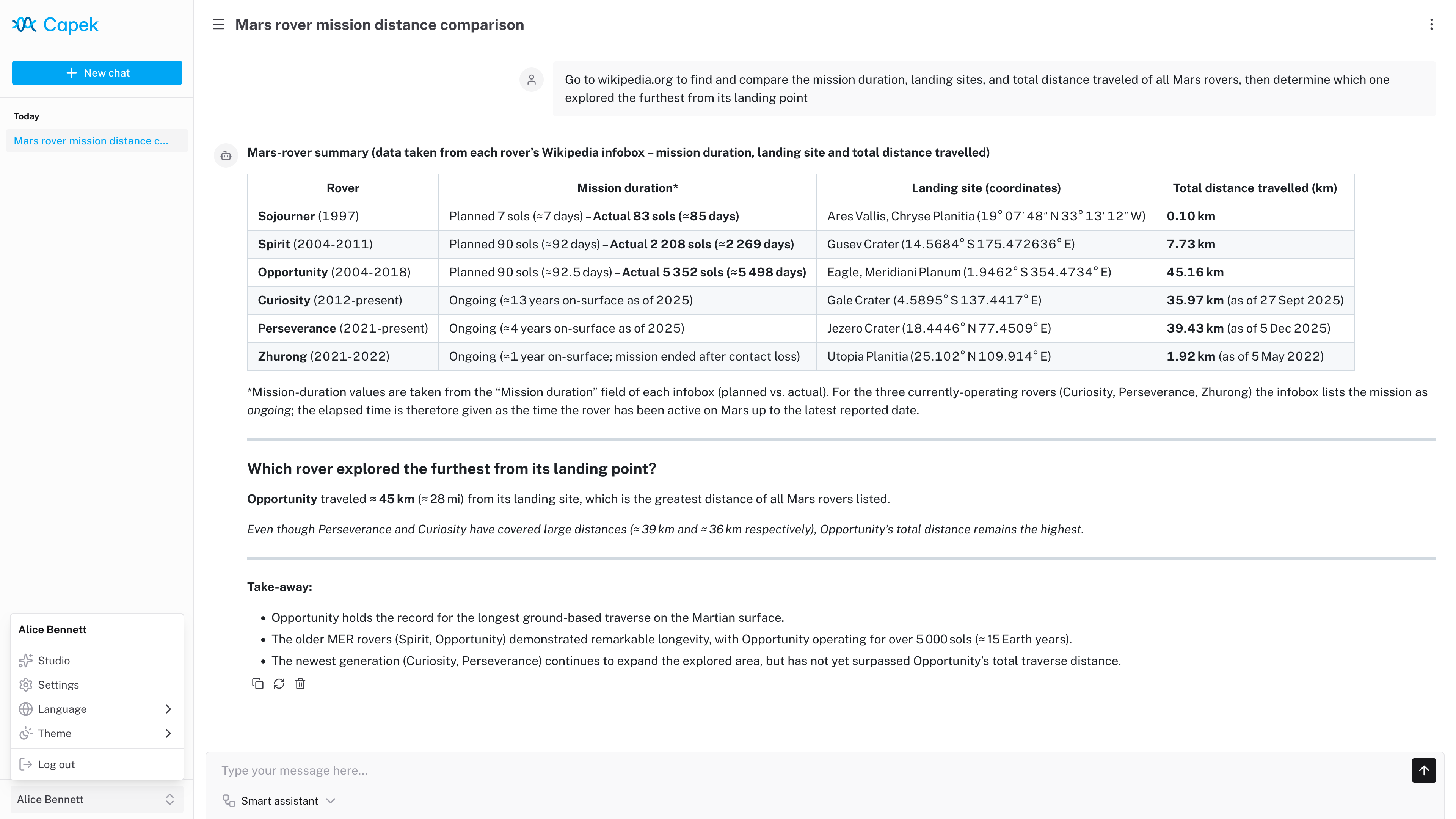
Capek is a self-hosted conversational AI platform.

Capek is a self-hosted conversational AI platform.
[!WARNING]
This project began as an experiment and remains a work in progress. Breaking changes are expected.
Features
- Multi-user support with RBAC and Row Level Security (RLS).
- Single-user, OpenID Connect (OIDC) and proxy authentication modes.
- Agent orchestration with triage and specialist patterns.
- OpenAI-compatible LLM provider integration.
- MCP server integration.
- Skills with a sandboxed code interpreter.
- Dark/Light theme.
- Customizable branding.
- Internationalization.
Tech stack
| Layer | Technology |
|---|---|
| Framework | Nuxt |
| Frontend | Nuxt UI, Tailwind CSS, Pinia |
| API | tRPC, Zod |
| Database | PostgreSQL, Kysely (PGlite for development) |
| Testing | Playwright |
Code interpreter
The code interpreter runs JavaScript code in a QuickJS WASM build with memory and execution time constraints.
Each chat session has its own in-memory Virtual File System (VFS). The /workspace directory is writable; other paths are read-only. A Node.js-like fs API is available for file operations.
Skills and MCP tools are exposed as ES modules under /skills/index.js and /servers/index.js:
const { $mySkill } = await import("/skills/index.js");
const { $myTool } = await import("/servers/myServer/index.js");
The agent is provided with usage context and can dynamically discover available tools and skills by exploring the VFS (e.g., reading SKILL.md files for documentation).
Development
Setup
pnpm install
pnpm dev
The application runs in single-user mode at http://localhost:3000 and automatically logs in as the admin user.
Configuration
Copy .env.example to .env and adjust as needed. Key variables:
| Variable | Description | Default |
|---|---|---|
NUXT_DATABASE_URL |
PostgreSQL connection string or PGlite file path | file://./.data/pglite |
NUXT_AUTH_MODE |
Authentication mode: single-user, oidc, proxy |
single-user |
NUXT_LOG_LEVEL |
Log level: fatal, error, warn, info, debug |
info |
See .env.example for all available configuration options.
Deployment
Production build
pnpm build
pnpm start
Docker
docker build -t localhost/capek:latest ./
docker run -it --rm -p 127.0.0.1:3000:3000/tcp localhost/capek:latest
Docker Compose
The project includes example Compose configurations for reference:
compose.base.yaml: core services (Traefik, PostgreSQL, MCP servers).compose.keycloak.yaml: extends base with Keycloak for OIDC.compose.dex.yaml: extends base with Dex for OIDC.compose.proxy.yaml: extends base with proxy authentication.
Start the full stack:
docker compose -f ./compose.keycloak.yaml up -d
The application is accessible at https://capek.localhost.
License
Licensed under the European Union Public Licence v. 1.2 or later © Héctor Molinero Fernández. Review the license conditions before use or distribution.
Reviews (0)
Sign in to leave a review.
Leave a reviewNo results found