quire
Health Warn
- License — License: AGPL-3.0
- Description — Repository has a description
- Active repo — Last push 0 days ago
- Low visibility — Only 9 GitHub stars
Code Pass
- Code scan — Scanned 12 files during light audit, no dangerous patterns found
Permissions Pass
- Permissions — No dangerous permissions requested
No AI report is available for this listing yet.
Local-first Markdown collaboration for humans and AI agents, with live attribution, suggestions, and Git-friendly plain files.
Quire




Local Markdown for humans and AI agents, with every edit visible, attributable, and reviewable.
Point Quire at a folder of Markdown. The original .md files become a live multiplayer workspace,
and AI agents can join the same editing sessions as first-class collaborators with visible cursors
and separately revertable edits. There is no import step, cloud copy, or conversion round trip:
your filesystem remains the source of truth, ready for git, vim, VS Code, and every other tool you
already use.
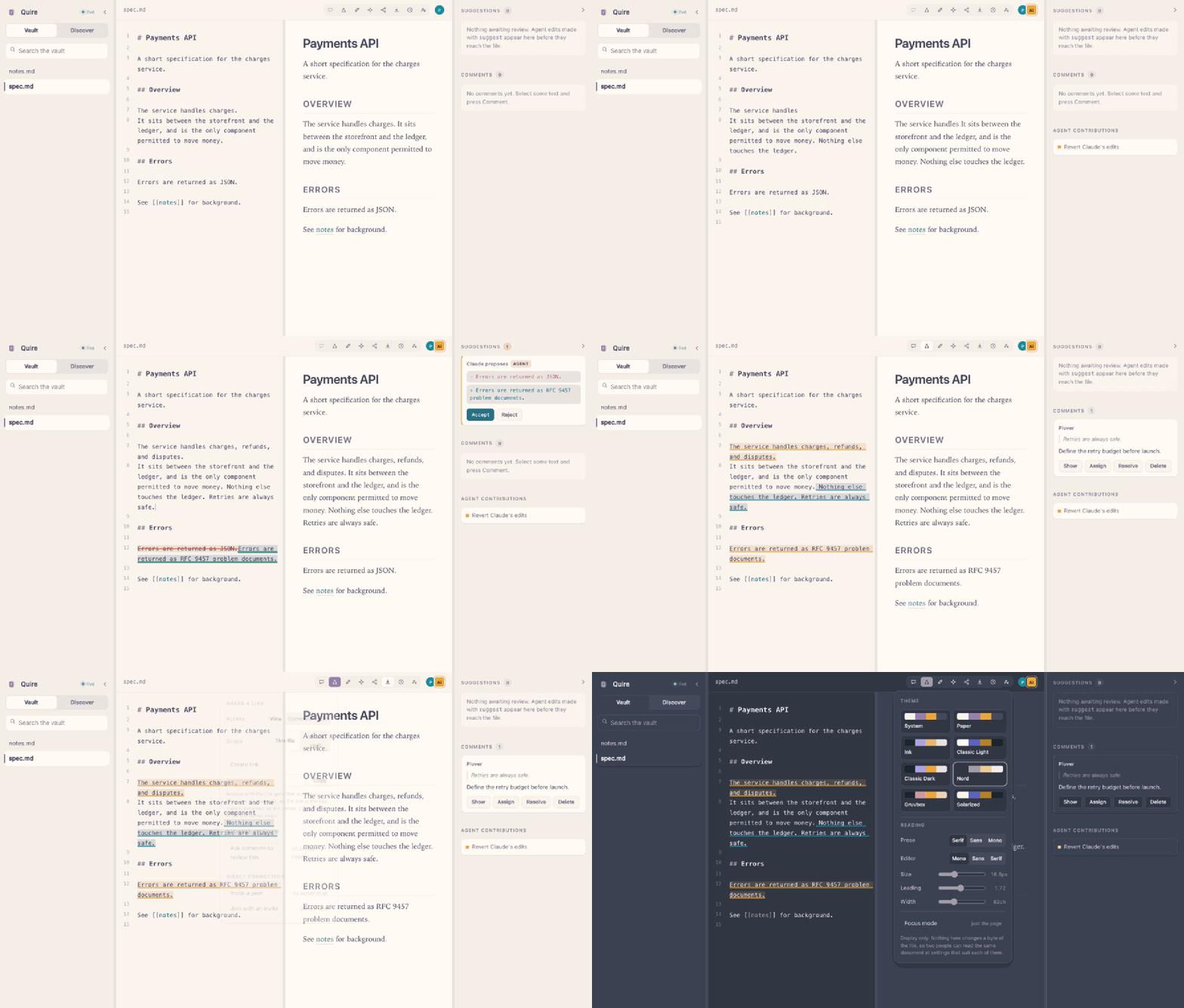
Recorded against the real application. A person types while an agent edits the same document,
proposes a change that never touches the file until it is accepted, and then authorship is
revealed. Nobody reloads, and nothing conflicts.
Public beta: Quire requires Node.js 22 or newer and runs locally with no Quire account,
subscription, or telemetry.
Quick start
npx quiredocs ~/my-notes
Open http://127.0.0.1:4321 in a browser. Press Ctrl+C in the terminal when you are done.
Or from a clone:
npm install && npm run build
node packages/cli/bin/quire.js ~/my-notes
No account. No signup. Binds 127.0.0.1 by default. Core editing makes no outbound requests.
Not ready to point it at your own files? Start a sample vault that is deleted when Quire stops:
npx quiredocs --demo
Files and smaller screens
The vault sidebar groups documents into collapsible folders. Search matches filenames, folder
paths, and document contents. On phones and tablets, use Files, Edit, Preview, and
Comments to switch between full-width views without losing your place. Desktop windows also
have Edit / Split / Preview controls.
A phone connects to the computer running Quire; localhost on the phone refers to the phone
itself. Before making a vault reachable by workshop attendees, read the
network access limitations.
Where it sits
Plenty of tools do two of these. Quire is the one that does all three.
| Multiplayer | Agent-native | Plain files | |
|---|---|---|---|
| Notion · Outline · Docmost · HedgeDoc | ✅ | ❌ | ❌ |
| Obsidian · SilverBullet · Logseq | ❌ | ~ | ✅ |
| SoloMD | ❌ | ✅ | ✅ |
| CollabMD | ✅ | ❌ | ✅ |
| Quire | ✅ | ✅ | ✅ |
The difference that matters: in Quire the agent is a peer in the same CRDT session you are typing
in — visible cursor, attributed spans, separately revertable — rather than a batch process whose
diff you read afterwards.
Not another Markdown import/export workflow
Google Docs can import and export Markdown,
and other cloud editors offer similar conversion workflows. That is useful when the cloud document
is the workspace. Quire is for the opposite workflow: the files in your local folder stay
authoritative while people, agents, external editors, and git can all work with them.
| Cloud Markdown import/export | Quire | |
|---|---|---|
| Source of truth | A converted cloud document | The original local .md file |
| File workflow | Import, collaborate, export | Edit in place with continuous filesystem sync |
| External tools | Reconcile after export | Changes from editors and git merge into the live session |
| AI collaboration | Assistant output inside a document | MCP agents with presence, attribution, policies, suggestions, and author-specific revert |
| Account and hosting | Provider account and cloud service | No Quire account; localhost by default |
Quire does not claim that every renderer interprets every Markdown extension identically. It does
keep syntax-rich Markdown as source text, and the release suite checks a fixture containing YAML
frontmatter, task lists, tables, fenced code, Mermaid, wiki-links, footnotes, raw HTML, and comments
for byte-for-byte stability through an unchanged editing session. The same fixture changed by 22
inserted and 30 deleted lines after an untouched Google Docs import/export round trip; see the
reproducible comparison, including what Google preserved.
What works today
| Live co-editing | Multiple browsers on one file, remote cursors and selections, offline-tolerant reconnect |
| Plain files | The filesystem is the source of truth. Edit in vim or git pull mid-session and it merges as a delta, not an overwrite |
| Agents as peers | An MCP endpoint lets Claude Code (or any MCP client) join the same CRDT session — not rewrite files behind your back |
| Attribution | Every span carries its author. Toggle Authors to tint text by who wrote it |
| Suggest mode | Agent edits can be proposed rather than applied. They show inline, and never reach disk until accepted |
| Revert by author | Remove one agent's contributions without touching the paragraph you wrote beside them |
| Comments | Anchored to text ranges, survive concurrent edits, and are flagged rather than dropped when their anchor is deleted |
| Wiki-links | [[links]], backlinks panel, unresolved links flagged |
| Search | ripgrep-backed, with an in-process fallback |
| Mermaid | Rendered in the live preview |
| Git snapshots | Optional --git restore points commit only Markdown paths Quire changed; snapshots are off by default |
| Discover | Browse widely-used Markdown — agent configs, skills, conventions — and add it to your vault with provenance recorded. An index, not a host: files come from their own repositories |
| Durable collaboration | Authorship, comments, provenance and policy persist in .quire/state/ and survive a restart. The Markdown stays clean; delete the directory and you lose only the collaboration layer |
| Themes | Sixteen colourways — Paper, Ink, Nord, Gruvbox, Solarized, Dracula, Tokyo Night, Catppuccin, Everforest, Monokai, Sepia, Terminal, and classic light and dark. Contrast is corrected per theme and asserted in tests |
| Live updates | Files created by an agent, by Discover, or by another tool appear immediately |
| Provenance receipts | One click turns a document into a shareable page: how much a person wrote, how much an agent did, which suggestions were accepted, and a replay of it being written. Self-contained HTML — no server, no account, works offline |
| Review requests | Send a link with a brief. The reviewer comments without an account, and comment-only is enforced by the server rather than by hiding the editor |
| Suggesting mode | People get the same suggest mode agents have. Your edits become proposals and stay off disk until accepted |
| Share links | Capability links scoped to a file or the vault, with view / comment / edit. View is enforced server-side |
| Export | Markdown, self-contained HTML, plain text, copy-with-formatting for pasting into Docs, and print or save as PDF |
| Typography | Prose and editor typefaces, size, leading, measure, theme, and a focus mode. Display only — never a byte of the file |
| GitHub search | Search GitHub from Discover for anything the curated index misses, then pick which Markdown file to bring across |
| Adjustable panels | Drag any divider, double-click to reset. Each panel closes from its own corner and leaves a stub to reopen it — sidebar (Cmd+), source (Cmd+Shift+E), comments (Cmd+Shift+). Sizes persist |
Connecting an agent
Keep Quire running, then add its local MCP server to the client you use. These commands download
the published Quire package from npm; they do not require a Quire account or credential.
Claude Code
claude mcp add quire -- npx -y -p quiredocs@latest quire-mcp \
  --url http://127.0.0.1:4321 --name "Claude Code"
On native Windows, put cmd /c before npx:
claude mcp add quire -- cmd /c npx -y -p quiredocs@latest quire-mcp --url http://127.0.0.1:4321 --name "Claude Code"
Codex
codex mcp add quire -- npx -y -p quiredocs@latest quire-mcp \
  --url http://127.0.0.1:4321 --name Codex
Cursor
Add this to .cursor/mcp.json in the project where Cursor should use Quire:
{
  "mcpServers": {
    "quire": {
      "command": "npx",
      "args": [
        "-y", "-p", "quiredocs@latest", "quire-mcp",
        "--url", "http://127.0.0.1:4321",
        "--name", "Cursor"
      ]
    }
  }
}
Restart or reload the client after adding Quire. The AI client may require its own account or paid
plan; that is separate from Quire, which remains free and local.
Tools: list_documents, read_document, edit_document (with suggest), append_document,list_suggestions, list_comments, add_comment, search_vault.
The agent gets a presence identity and a cursor. You can type straight through its edits —
CRDTs make that a non-event.
Trust and permissions
Quire is open source under AGPL-3.0-or-later, and the npm package is built from this
repository. The package has no runtime dependency downloads and no preinstall, install, orpostinstall hooks. Its prepublishOnly script is a maintainer-side release check; npm does not
run it when somebody installs Quire.
What Quire can do on a user's computer:
| Surface | Default | Exact behavior |
|---|---|---|
| Files | On | Reads Markdown under the folder passed on the command line. Writes edited Markdown, collaboration state in .quire/state/, and quire.lock when a Discover item is added. Paths outside the chosen folder are rejected |
| Git | Off | --git enables local snapshots. Quire commits only Markdown paths it changed and does not push, pull, alter remotes, or include unrelated staged work |
| Network | Core editing is offline | Discover contacts api.github.com and raw.githubusercontent.com only after a person searches, previews, or installs. Direct peer setup contacts Google's public STUN service only after a person chooses that command; document bytes then travel over encrypted WebRTC directly between peers, with no Quire relay |
| Code execution | Off | --allow-exec permits a person to run a selected fenced block as their own OS user. Nothing runs when a document opens, and execution is refused when Quire is bound beyond loopback |
| Agents | Disconnected | An MCP client receives vault read/edit tools only after the user starts quire-mcp and points it at the local server. Connect only agents you trust with that folder |
| Sharing | Local only | Share links are capabilities served by the running Quire process. Quire does not upload the vault or operate a hosted relay |
Quire has no analytics, advertising SDK, auto-updater, credential prompt, background service, or
payment integration. Discover does not read or forward GITHUB_TOKEN. Third-party Markdown added
through Discover is data, not executable code, but agent instruction files can influence an agent
that later reads them; inspect imported content before relying on it.
The server serves only its own origin and rejects cross-origin browser requests. There is no
authentication, so treat --host 0.0.0.0 as "anyone who can reach this port can read and edit the
vault." The complete threat model and limitations are in SECURITY.md.
Cost
Quire itself is free to download, run, self-host, and publish as a public npm package. It requires
no paid Quire infrastructure. Your computer, internet connection, and any AI provider you connect
are separate: Claude, OpenAI, a hosted VM, a domain, a tunnel, Codespaces, or a larger CI runner may
charge under that provider's own plan. None is required for local Quire.
Self-hosting
docker compose up --build
The container binds to 127.0.0.1 deliberately. Quire has no authentication, so anyone who
can reach the port can read and edit every document — read SECURITY.md
before widening that.
Community
Questions and ideas belong in Discussions.
Use the issue tracker for reproducible bugs and
planned features, and read CONTRIBUTING.md before opening a pull request.
If Quire solves a problem you care about, starring the repository helps other people find it.
Contact
- General questions and feedback: GitHub Discussions
- Bug reports: GitHub Issues
- Security vulnerabilities: report privately
Documents
| File | What's in it |
|---|---|
| CONTRIBUTING.md | Development setup, verification, and architecture invariants |
| SECURITY.md | Threat model and known limitations |
| RELEASING.md | How to build, verify and publish a release |
| CHANGELOG.md | What is in each version |
| docs/markdown-roundtrip.md | Reproducible Quire and Google Docs Markdown fidelity comparison |
| tools/recorder | Regenerates docs/demo.gif from the real app |
Licence
The entire repository and the bundled quiredocs distribution are licensed under
AGPL-3.0-or-later. Quire does not currently publish a separate permissive SDK.
Reviews (0)
Sign in to leave a review.
Leave a reviewNo results found