escritorio-agentes
Health Uyari
- License — License: AGPL-3.0
- Description — Repository has a description
- Active repo — Last push 0 days ago
- Low visibility — Only 5 GitHub stars
Code Basarisiz
- fs module — File system access in ferramentas/checar_festas.js
- new Function() — Dynamic code execution via Function constructor in ferramentas/checar_planta_mapa.mjs
- process.env — Environment variable access in ferramentas/checar_planta_mapa.mjs
- network request — Outbound network request in ferramentas/checar_planta_mapa.mjs
- network request — Outbound network request in ferramentas/checar_visitas.mjs
- process.env — Environment variable access in ferramentas/estresse_vida.mjs
- network request — Outbound network request in ferramentas/estresse_vida.mjs
Permissions Gecti
- Permissions — No dangerous permissions requested
Bu listing icin henuz AI raporu yok.
A live pixel-art office for your agentes.chat team: see who is working, who is free and who is waiting for you, and read or reply to today's conversations. Read-only by default, self-hosted, no AI calls.
🇺🇸 English | 🇧🇷 Português (Brasil)
Escritório de agentes
A live pixel-art office for your agentes.chat team
See who is at their desk, who is playing pool in the lounge and who is waiting for your approval. Read-only (except for the optional reply mode), every 30 seconds, no AI and no tokens spent.




Features · Screenshots · Install · Customize · Social life · Construction mode · TV mode · Installable app · Visitors · Newspaper · Time-lapse · Phone alerts · Security · Architecture · Development · Changelog · Contributing · Code of Conduct
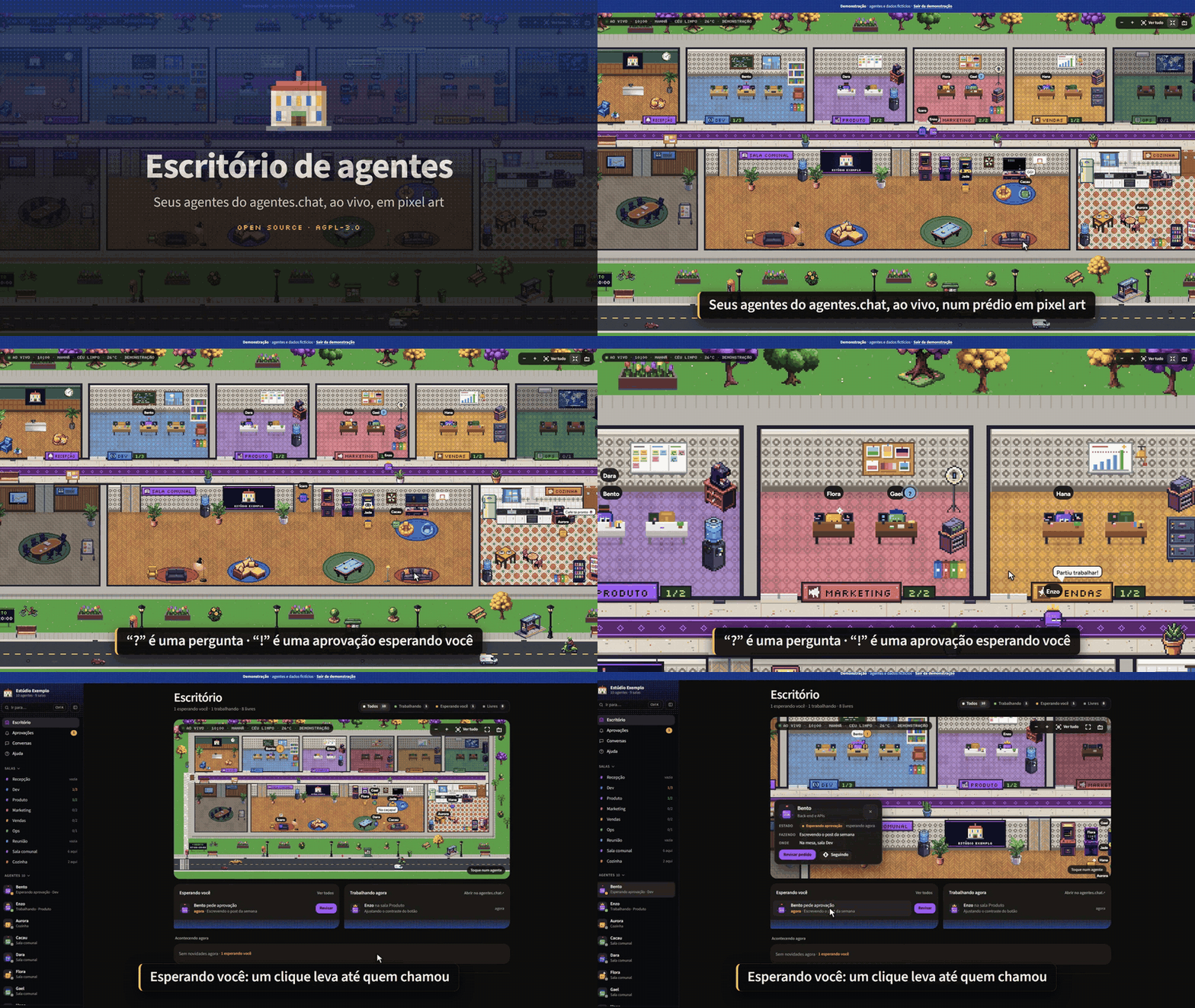
🎬 Launch video (narrated in Brazilian Portuguese, with subtitles), attached to the release.
What it is
Escritório de agentes ("agents' office") is a small self-hosted web page that turns your agentes.chat workspace into a living office. It reads agentes.chat through the external apps connector (MCP, read-only OAuth scope; write only if you turn on the "responder" mode) every 30 seconds and draws your team as pixel-art people in a building that assembles itself from your teams.
It does not call any AI model and does not spend tokens. Approving always happens in agentes.chat; answering too, except in the optional "responder" mode. Otherwise, the office only shows what is going on and links you there.
Who it is for: teams and companies that run agents on agentes.chat and want a glanceable, fun view of the team: on a wall screen, a second monitor or a phone. It is white-label: any company can install its own copy and brand it.
Features
- 🏢 A building made from your teams: reception with your logo, one room per team (it grows with the number of agents), corridor, meeting room, lounge and kitchen. A new agent gets a desk in the "New" room.
- 🧑💻 Live map: agents go to their desk and type when they get a task. When they are free they play arcade, video games, pool, foosball, ping-pong, chess, darts and basketball by themselves, play the piano or the guitar, grab a coffee or chat in pairs. They arrive in the morning and leave at night through the front door.
- ✋ Approvals at a glance: a "!" or "?" over anyone waiting for your approval or answer, and a "Waiting for you" list with how long each request has been waiting. Each one opens the right request in agentes.chat (approving is always done there).
- 🎵 Life and sounds: 21 poses, games in pairs up to 3 points with a cheering crowd, a coffee circle, high-fives, a robot vacuum at night and more. 45 optional sound effects synthesized in the browser (keyboard, "simlish" chatter with a voice per agent, games, alerts, the ring and the strike, rain and thunder), with a volume control and on/off per category. Audio only starts after you interact with the page.
- 🖱️ Clickable objects (mouse, touch, or Tab and Enter): the TV (5 channels), arcade machines, jukebox, coffee maker, aquarium, lamps, notice board, plants, the opening-hours sign, the cat, the wall clock, the code board, kanban and moodboard, the sales bell, the ring scoreboard and the strike signs. Most of them also bring a free agent over. The games (pool, foosball, ping-pong, chess, darts, basketball) are not clickable: the agents play them on their own.
- 🌦️ Real time and weather: day and night follow the real clock, empty rooms turn their lights off and windows show the sky of the hour. Real weather for your city (Open-Meteo, no key): rain, drizzle, thunderstorm, snow, fog, overcast.
- 🎉 Holidays: Christmas, New Year (fireworks), Carnival and Easter (calculated), Lunar New Year, Halloween, Festa Junina, Brazilian Independence Day, Programmers' Day, Diwali and more, with decorations, hats and lines.
- 🎨 Customization: company name, accent color and logo from the Customize screen; teams, rooms, floors, walls, icons and avatars in
times.json. - 🕹️ Simulation: a panel to preview the office on another date, time or weather (Christmas at night in the snow, for example). Nothing is saved: it only changes the URL of that tab, and a "Simulation" banner stays visible with "Back to real".
- 🥊 Social life: friendships and rivals, cartoon fights in the Ring with a weekly scoreboard, complaints, gossip and a strike that ends with a delivery (pizza by motorbike, coffee, a "Sexta livre aprovada!" banner...). The same on every screen and only among agents who are free (see Social life).
- 🧱 Construction mode: paint the rooms and move, mirror, remove and add furniture with the mouse or the keyboard, with undo; the plan is saved on the server for everyone (see Construction mode).
- 📺 TV mode: full screen, the screen kept on and a camera director that rushes to requests, fights and strikes, with a news ticker (see TV mode).
- 📲 App and phone alerts: install the office on your home screen and get an alert when an agent asks for your approval or asks a question (see Installable app and Phone alerts).
- 👀 Visitors: whoever else has the office open shows up on the map, wearing a badge (see Visitors).
- 📰 Weekly newspaper: a headline, notes and each agent's numbers for this week and last week (see Newspaper).
- 🎞️ Daily time-lapse: the office's day in a ~30 s video, recorded only in your browser (see Time-lapse).
- 📸 Photo mode: hides the interface and saves a PNG of the office.
- 🧪 Demo mode:
?demo=1shows fictional agents and an accelerated day, ring and strike included, with nothing sent to or read from the server. Good for trying it out and for screenshots. - 🎥 Camera: zoom with the wheel or pinch, drag, double-click to focus a room, "Go to…" an agent (
/orCtrl+K), and keyboard shortcuts (+,-,0). - 📱 Phone friendly, with clickable objects that also work with the keyboard and touch.
- 🔒 Login with username and password, published only on your Tailscale network.
Screenshots
All screenshots come from demo mode or from a preview with fictional data (made-up agents, tasks and conversations), never from a real workspace. The full list, with how each one was taken, is in docs/screenshots/README.md.

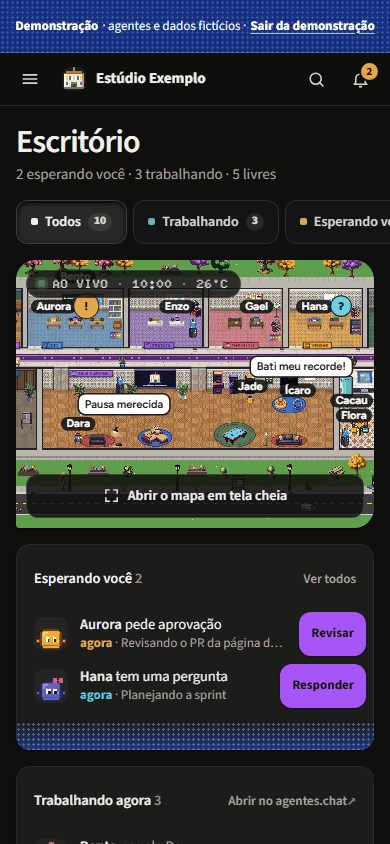
Approvals at a glance: "!" and "?" on the map and the "Waiting for you" list. |

Night and rain: lights go off in empty rooms and the street lamps come on. |

Holidays: Christmas night in the snow, from the Simulation panel. |

Conversations: today's tasks and, in the optional reply mode, a reply box. |

The Ring: a cartoon fight, with the crowd gathering around. |

Weekly scoreboard, with last week's champion. |

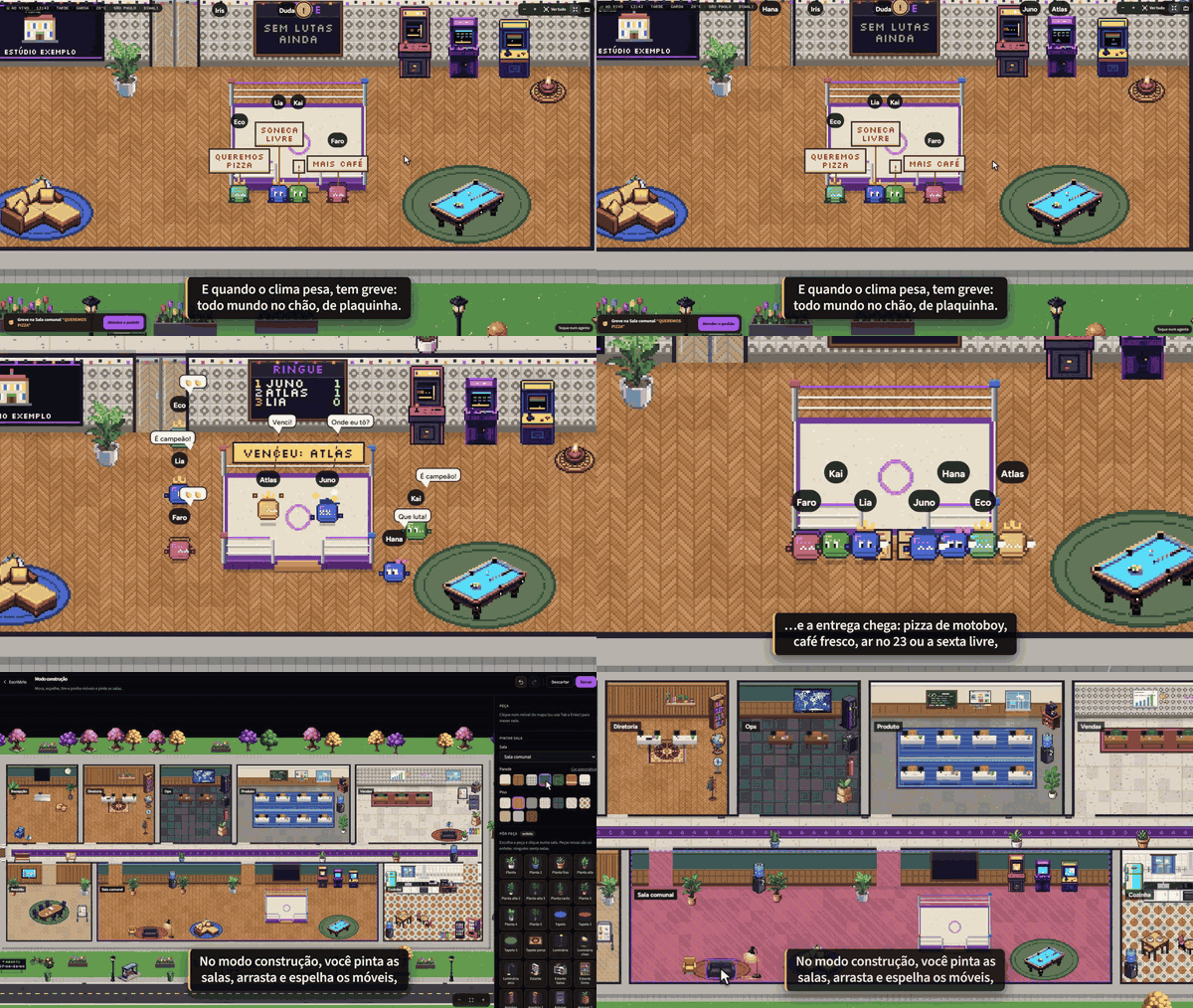
Strike: cardboard signs and the "Atender o pedido" button. |

Demand met: the pizza arrives and the crew eats in front of the ring. |

Each demand has its own delivery: here, the "Sexta livre aprovada!" banner. |

Construction mode: pick a piece, paint the room, add decorations. |

Before and after: the same lounge, repainted and rearranged.
Install
Requirements: Linux with systemd, Python 3.10+ and Tailscale with MagicDNS and HTTPS enabled.
DNS: the service only reaches the public internet. Its systemd unit blocks private addresses (IPAddressDeny), and that includes a DNS resolver on a private IP, such as the VPC resolver on AWS or 169.254.169.254 on GCP and Oracle. The systemd-resolved stub (127.0.0.53) and Tailscale MagicDNS (100.100.100.100) are allowed. Without a resolver it can reach, the office never reads agentes.chat, and journalctl -u escritorio shows name-resolution errors. To fix it, use systemd-resolved (with /etc/resolv.conf pointing to 127.0.0.53) or allow only your resolver's address in a drop-in, which survives reinstalls (sudo systemctl edit escritorio):
[Service]
IPAddressAllow=<your resolver IP>/32
On GCP and Oracle, 169.254.169.254 is also the metadata server, so prefer systemd-resolved there.
sudo AGENTES_ORG=<your organization id> bash instalar.sh
At the end, in a terminal, the installer shows the first-access code. To see it again, run sudo escritorio-codigo. The code works once, only while no user exists, and does not expire. When the output is not a terminal (automation, | tee), the code is not printed: run sudo escritorio-codigo afterwards.
The organization id is what comes after /org/ in your agentes.chat address. Without it neither the installer nor the server starts: it is what filters links to your organization.
The service listens on 127.0.0.1:737, a privileged port, so no regular user on the machine can grab it while the service restarts. To use another one, pass ESCRITORIO_PORTA=<port below 1024>. The installer stops if net.ipv4.ip_unprivileged_port_start is below 1024, and the service will not start in that case either.
The source-code address the page offers its users (AGPL section 13) is this repository by default; if you run a modified version, pass ESCRITORIO_FONTE=<https address of your code> (a plain https:// address, up to 200 characters, without quotes or spaces; the installer refuses anything else).
The installer publishes the / path of port 443 of this machine on your tailnet (tailscale serve). If that route already publishes something else, it stops without changing anything, so it never takes down what is already there. This also applies when reinstalling with another ESCRITORIO_PORTA: free port 443 first (see tailscale serve status).
Reinstalling or updating: run the installer again with the same variables. It rewrites /etc/escritorio.env every time, so ESCRITORIO_PORTA and ESCRITORIO_FONTE go back to their defaults when left out (in a fork, the source-code link would point back to this repository). Users, sessions, tokens and /opt/escritorio/times.json are kept.
Open https://<your-machine>.<your-tailnet>.ts.net/ and use the code to create your username and password. Then authorize read access in agentes.chat (see Connect to agentes.chat). On a phone, the Tailscale app turned on is all you need.
Connect to agentes.chat
ESCRITORIO_BASE is the office's public address, origin only, like https://escritorio.example.com: no path and no trailing slash. agentes.chat sends you back to it after the authorization, and the server checks the origin of every submission against it. In any other format, the service does not start and says why.
While the office is not connected, the bar above the map shows a Connect to agentes.chat button, which opens /oauth/conectar in the same tab. When you come back from the authorization, the first read happens right away. Copy link copies <ESCRITORIO_BASE>/oauth/conectar, to open it in another tab or browser. Without a clipboard (outside https), the bar shows the address already selected.
If agentes.chat refuses the read (HTTP 401, 402 or 403), the bar says so, with the code, and the button becomes Reconnect. Check that the connected account belongs to the organization and that the plan allows external apps. While it keeps refusing, the office retries with a growing wait, from 30 s up to 5 min.
If the office is opened from an address other than ESCRITORIO_BASE, the bar warns you before anything else, because agentes.chat always sends you back to ESCRITORIO_BASE: fix the variable on the server. The sign-in screen shows the right address too.
When Connect fails, a short page says why, in the office's own words: the server cannot reach agentes.chat, the return address was refused, or the authorization was refused or expired (it is valid for 10 minutes). The text that comes from agentes.chat is never shown.
Docker and Coolify
The repository ships a Dockerfile and a docker-compose.yml. There is no published image: Coolify (or you) builds it straight from Git. The image carries only the code and the static/ folder, with no pip, and runs as its own user, with no shell. The .dockerignore is an allowlist: even when built from a folder that has dados/ or times.json, the image carries none of it.
On Coolify:
- Create a resource from the repository, with the Docker Compose build pack and the
docker-compose.ymlfile. - Set the
escritorioservice domain tohttps://escritorio.example.com:7371. The:7371only tells the Coolify proxy which port the container listens on; visitors still use plainhttps://. - In the variables, set
ESCRITORIO_BASE=https://escritorio.example.com(the same domain, without the port and with no trailing slash) andAGENTES_ORG=<your organization id>. Coolify does not deploy without both. - Deploy. Then, in the service Terminal, run
python3 -I -B escritorio.py codigoto see the first-access code. It never goes to the log. - Open the address, create the user right after the deploy (see Public address) and connect.
Outside Coolify, behind your own HTTPS proxy on the same Docker network: ESCRITORIO_BASE=https://... AGENTES_ORG=... docker compose up -d. The first-access code comes from docker exec -it <container> python3 -I -B escritorio.py codigo. The compose file publishes no port: a published port serves HTTP without TLS, with the password in plain text. To test on your own machine only, uncomment the 127.0.0.1:7381:7371 line and use ESCRITORIO_BASE=http://127.0.0.1:7381.
- The
/dadosvolume holds the agentes.chat token, the users, the sessions, the branding and the floor plan. Keep an encrypted backup and never make it public. With the repository'sdocker-compose.yml, the container runs with a read-only file system, no capabilities and 256 MB of memory. conversas(read or reply) still comes fromtimes.json: create/dados/times.jsonin the volume, for example withdocker exec -i <container> sh -c 'cat > /dados/times.json' < times.json. It applies without a restart. Name, color, logo, office hours, the weather city, the holidays, the teams and the appearance already go through the Customize screen.- Updating is a redeploy. The volume stays.
- Changing the domain means updating
ESCRITORIO_BASEand connecting again. - Forgot the password:
docker exec <container> rm /dados/usuarios.json /dados/sessoes.json, thendocker restart <container>anddocker exec -it <container> python3 -I -B escritorio.py codigofor the new code. On Coolify, through the service Terminal. - Already built your own Docker setup? Replace your workaround for the
127.0.0.1bind withESCRITORIO_BIND=0.0.0.0, which the image already sets. With it,ESCRITORIO_BASEis required and the below-1024 port rule does not apply, because the port belongs to the container.
Customize (white-label)
From the Customize screen: company name, accent color and logo (PNG, JPEG or WEBP), plus:
- Weather city: search by name. The search goes through the server, which asks Open-Meteo's geocoding (Open-Meteo data, under the same terms as the weather, in Third-party), with at most 10 searches per minute and 200 per day for the whole office. Pick Usar esta (use this one), Sem clima (no weather) or Voltar ao times.json (back to times.json). The new city applies without a restart or reload; its weather shows up within 1 minute. It lives in
dados/clima.json, with the coordinates rounded to 2 decimals (about 1 km). - Holidays: turn each of the 13 built-in dates on or off and create up to 24 of your own, with a name, a day (every year, or just once), 1 to 14 days, a theme (the colors, decorations and hat of one of the holidays, or the generic one) and up to 3 lines. They live in
dados/festas.json. - Teams and appearance: name, type, color and icon of each team (up to 12), the agents in each one (each agent in one team only) and each agent's appearance. They live in
dados/equipe.jsonand fully replacetimesandaparenciafromtimes.json; Voltar ao times.json (back to times.json) deletes the file. Renaming a team removes the construction mode paint and furniture from its room: the screen warns before saving.
What the screen saves overrides times.json, and the screen says where the current value comes from.
In times.json (start by copying times.exemplo.json; the installer does that if there is no times.json):
| Field | What for |
|---|---|
empresa, cor |
default name and color (the Customize screen overrides them). Without a name anywhere, the page shows a placeholder name tagged "example" |
times[] |
nome, tipo (mesas, ops, gabinete), cor, icone (codigo, megafone, servidor, coroa, grafico, pincel, estrela…), parede (0–5), piso (0–9) and agentes (agentes.chat handles) |
aparencia |
per handle: color, eyes, accessory, the same as in agentes.chat. Anyone not listed gets an automatic look of their own |
clima |
cidade, lat, lon for real weather, from Open-Meteo (see the terms in Third-party). Without clima, the weather is off and the sky stays clear. The city chosen on screen overrides it |
expediente |
office hours, {"abre": "07:00", "fecha": "20:00"} (HH:MM, the default). Outside them, agents without a task go home and a banner says when the office opens. abre later than fecha is a shift past midnight (22:00 to 06:00); the Customize screen overrides it |
conversas |
"ler" adds See conversation to an agent's card and the Conversations page, with the tasks in progress and the ones that ended today: the latest 20 messages of each one's conversation (the task's thread; if no one wrote in it, the conversation's loose messages), read on demand (read_conversation, still the read scope). Off by default; read the warning in Security before turning it on. "responder" does the same and lets you send messages to the agents in the day's direct conversations, from the Conversations page (read write scope; see Security) |
To test without waiting, add to the URL: ?hora=21.5, ?clima=tempestade (chuva, garoa, neve, neblina, nublado, limpo) and ?data=2026-12-25. The Simulation panel builds these for you.
Social life
A layer of fun, drawn by the server. Free agents make friends and rivals, grab coffee together, bump into each other and walk off with someone else's stapler. Every now and then they settle it in the Ring of the lounge, with a gong, a crowd and a cartoon dust cloud; a while later, they make up. It is just for fun: it reflects nothing of the agents' real work.
- Real work comes first: an agent with a task, or one waiting for your approval or answer, never fights, never watches and never leaves the desk. One who gets a task mid-fight goes back to the desk.
- The same for everyone: the server decides the friendship values, each event (who, what, when) and each fight (who, when and who wins), and sends it all in
/api/estado. Two open screens show the same fight with the same winner. - Per screen: where each agent walks, who in the crowd came to watch, the exact timing of the animation (a few seconds apart) and the usual games.
- Send to the ring: in an agent's card, any signed-in user picks a free colleague and sends both to the ring. One fight at a time, 1 minute apart, up to 20 a day and only during office hours.
- Complaints, suggestions and gossip: now and then a free agent complains about the air conditioning or suggests cake Friday in a speech bubble, and two free agents go whisper by the coffee about a third one ("Psiu…"), with no name in the bubble.
- Strike: at most one a day. It starts when at least 4 free agents are unhappy with each other, or after 5 complaints in the day. Up to 8 free agents sit on the floor in front of the ring, holding little signs ("MAIS CAFÉ", "PUFE JÁ!"). One who gets a task leaves the strike at once. It ends by itself within 30 minutes ("Por hoje chega…") or when someone clicks a sign or the Atender o pedido ("meet the demand") notice, and then the strikers become better friends ("Obrigado, chefe!") and the demand arrives, the same on every screen: the delivery rider brings pizza through the reception and the crew eats in front of the ring, a courier brings fresh coffee and everyone grabs a cup, someone sets the air conditioning to 23 ("Ahh, agora sim"), a "Sexta livre aprovada!" banner goes up with a little party... About 20 seconds later, everyone goes back to their spot.
- Best friends and rivals: the card shows up to 3 of each, with a value from 0 to 100, and the day's last fight.
- Ring scoreboard: each agent's wins, losses and streak for the week (Monday to Sunday, Brasília time), with the top 3 on a board on the ring's wall, the full ranking when you click it and last week's champion. Automatic and sent fights count; one canceled before the end does not. The winner shows up on a banner above the ring.
- Serious mode: the box in Customize pauses the whole layer, with no events, fights or strikes; a scene in progress disappears within 10 s on every screen. Good for presentations.
- Demo and Simulation: in demo mode (
?demo=1) the ring, the strike, the scoreboard and Send to the ring also run, locally, with no server: the first fight comes in about a minute and the strike a little later. The Simulation parameters (?hora=,?data=,?clima=) turn the social life off on that tab. - Starts over on restart, except the scoreboard: friendships, rivalries and events live only in the service's memory; a restart takes everyone back to the starting point, the same for all. Only the week's scoreboard goes to disk, in
dados/placar.json(up to 64 KB and 500 agents, written atomically when it changes). If the file is unreadable, the scoreboard starts empty, with a note in the log; switching the agentes.chat account also clears it. - Does not call agentes.chat or touch the agents' work: it only uses the reading the office already does.
- The numbers (chances, caps and intervals) are at the top of
social.py, and the lines are inFRASES.socialinstatic/vida.js, to change for white-label.
Construction mode
Rearrange the office with the mouse, on a computer. Open it from the Customize screen (construir.html); on a phone, the editor only shows a notice, and the main page shows the result.
- Paint: pick a room, then one of 7 walls and one of 10 floors.
- Furniture: drag a piece, or pick it with Tab and Enter and move it with the arrows (8 px; Shift: 1 px).
Emirrors it,Deleteremoves it, and the catalog adds one of 53 decorations (plants, rugs, sofas, armchairs, beanbags, bookcases, lamps, a guitar, a bicycle...): pick it and click a room. New pieces are decoration only: nobody sits on them. - Undo and redo (
Ctrl+Z,Ctrl+Shift+ZorCtrl+Y, up to 100 steps), Discard (back to what is saved) and Back to automatic, which asks first and saves an empty plan; while the editor is open, it can still be undone. - Save writes the plan for everyone; other open screens show it when they reload. If another screen saved first, the editor says so and offers to reload. Save stays blocked while a seat has no way in, and that seat is marked in red on the map.
- What stays automatic: desks and chairs (a new agent still gets a desk), the kitchen counter, the ring, everything on the walls (boards, windows, signs, the logo panel and the scoreboard board) and the pieces in the corridor and outside. Pieces with an animation tied to their spot (the coffee counter and the TV rack) can only be removed; arcade machines, the jukebox and a few others do not mirror. Nothing moved or added may touch the ring or cover what is on the walls.
- A layer on top of the automatic building: the plan keeps only what changed (paint and moved, mirrored, removed and added pieces). With an empty plan, the building is exactly the automatic one. When teams change, the building is rebuilt and the plan reapplies whatever still exists and fits; the editor says how many adjustments no longer show up and offers to clear them.
- Try it without saving:
construir.html?demo=1builds an example of its own. - Limits: 64 painted rooms, 400 adjusted pieces and 200 new pieces, in up to 64 KB (
dados/planta.json).
TV mode
For keeping the office on a wall TV or a second monitor. Open it with the Modo TV button on the map bar, or at /?tv=1. The Modo TV shortcut of the installed app opens straight into it.
- Full screen and screen on: from the button, the browser goes full screen. From the address, a Tela cheia (full screen) button shows up, because browsers only allow full screen after a click. The screen does not turn off (Wake Lock) while the tab is visible, in browsers that support it; when the tab shows again, the TV asks again.
- Camera director: with nothing new, the camera tours: 10 s in a room with people and 10 s on the overview. When something happens, it rushes there and shows a TV-news style ticker at the bottom, with the avatar, the name and what happened. Requests for your approval or answer come first, then fights and strikes, then who finished and who started a task. Each item stays 8 to 12 s; a more important one cuts in after 4 s; one that waited more than 2 minutes is dropped. Whatever was already going on when the TV turned on is not news.
- Touching the map (tap, drag, wheel or the zoom keys
+,-and0) hands the camera back to you for 30 s. With the mouse still for 3 s, the cursor and the buttons hide. - Exit:
Esc(twice in full screen: the first one only leaves full screen) or the Sair do modo TV (exit TV mode) button, which gets the focus when the TV turns on (soEnterexits too). Exiting releases full screen and the screen lock and removes?tv=1from the address. - Reloads by itself: on every read (10 s), the TV checks
config_vin/api/estado. When a configuration file changes (times.jsonand, indados/, the brand, the logo, the plan, the weather, the holidays and the teams), the page reloads and stays in TV mode. After the reload, the browser leaves full screen: just press Tela cheia again. - The TV is the map:
/?tv=1#jornalopens the TV on the office, not on the newspaper. - Visitors: the TV does not show up as a visitor and does not show visitors either (see Visitors).
- Sound and motion: the TV has no sound of its own and follows whatever is on in the sound panel. With reduced motion on in the system, the camera cuts instead of gliding and the ticker does not animate.
- Time-lapse: while on, the TV takes over recording that browser's time-lapse.
Installable app (PWA)
The office can go on a phone's home screen or become an app on a computer, with its own icon and no browser bar.
- Android: in Chrome or Edge, use Install app (or Add to Home screen) in the browser menu.
- iPhone and iPad: in Safari, tap Share, then Add to Home Screen.
- Computer: in Chrome or Edge, use the install icon in the address bar.
- TV mode shortcut: on Android and on a computer, long-pressing the icon (or right-clicking it) shows the shortcut that opens straight into TV mode.
- Sign-in: the app asks you to sign in just like the browser. On iPhone, the home screen app keeps its own cookies, so it may ask you to sign in once more.
- Needs https: browsers only install it with the office on https (like the installer does, through Tailscale, or on a domain with TLS) or on
localhost. - No cache:
sw.jsexists only for installing and for phone alerts. It caches nothing and intercepts no request: every page and every read go straight to the server, and a new version arrives right away, as in the browser. Without a network, the app does not open. - Generic name: the manifest uses the name "Escritório" and the project's icons, the same in every installation, because these files are served without sign-in (see Security).
Visitors
Whoever else has the office open (another device, another browser or another person with the password) shows up on the map as a Visitante (visitor), wearing a badge, in a random color. The visitor comes in from the street, strolls between the reception and the lounge and, when the person closes the page, leaves through the street. Visitors take no desk and stay out of the social life. The map shows up to 8.
- "N pessoas olhando" (N people watching): the line under the office title counts you (with the Aparecer no escritório box on) and the others ("Só você está olhando", only you are watching, when nobody else is). Tabs of the same browser share the cookie and count as one person.
- Aparecer no escritório (show me in the office): the box starts on. When off, you watch without showing up for the others and leave the count: yours right away (with 3 visitors, "4 pessoas olhando" becomes "3") and theirs within 45 s. The choice applies to this browser only, which keeps it for the next visit.
?invisivel=1: with the box off, or on the TV, the page asks for/api/estado?invisivel=1, which does not mark presence. A client of your own can use the same parameter.- On the TV, nobody shows up: the TV does not count as a visitor and does not draw visitors, so the wall map shows only the agents.
- In demo mode, the line does not show. What the server keeps and sends is in Security.
Newspaper
The Jornal (newspaper) page, in the menu, tells the office's week as a newspaper: the issue number (the week of the year), the period, the headline, the notes and a table with everyone.
- Weeks: Esta semana (this week) and Semana passada (last week), Monday to Sunday, Brasília time. The server keeps only these two.
- What counts: per agent, finished tasks, requests for your approval, questions for you and time working; per day, the weather at noon, strikes and fights. The headline goes to whoever finished the most tasks. The notes cover who asked for your approval the most, who asked the most questions, who worked the most, the ring champion (with social life on), the week's weather and the strikes and fights. The Todo mundo na semana (everyone this week) table has each agent's numbers.
- Approximate time: the office checks every 30 seconds, so the time working is approximate, and the page says so.
- Only agents present: whoever is not in the workspace's current read is left out, even with saved numbers.
- Counts while the service runs: the newspaper comes from the reads the office already does, with no new call to agentes.chat. With the service stopped, nothing is counted. Switching the agentes.chat account restarts the newspaper.
- Sentences: no AI. They come from
FRASES.jornalinstatic/vida.js(change them there for white-label), one fixed per week. - There is no newspaper in demo mode. What goes on disk is in Security.
Time-lapse
The Time-lapse do dia (daily time-lapse) button, on the map bar, puts the office's day in a short video.
- Recording: one frame of the whole building every 2 minutes of the work hours, while the page is open and visible. Outside work hours, in Simulation and in demo mode, it does not record. Only one tab records per browser, and TV mode takes over.
- This browser only: the frames stay in the browser's IndexedDB. Nothing goes to the server or to agentes.chat, and each device has its own time-lapse.
- Limits: up to 400 frames or 30 MB. Beyond that, the oldest ones go.
- Today only: at the turn of the day (Brasília time), the previous day's frames are deleted, even when the page only opens the next day. Apagar os quadros (delete the frames) clears them right away.
- Video: Baixar o vídeo (download the video) builds, in the browser itself, a ~30 s video for a full day (8 s at least), in MP4 or WebM, depending on the browser. If it records neither, the dialog says so.
- Privacy: before the download, the dialog warns that the video shows the names of the agents and the rooms. A frame carries no task label or conversation text, only names, signs and the office's fixed lines. Even so, think about who will see the video before sharing it.
Phone alerts
An alert on your phone, or computer, when an agent asks for your approval or asks a question. The Avisar no celular (alert on phone) box is on the Aprovações (approvals) page.
- Needs https:
ESCRITORIO_BASEmust start withhttps://, as with the installer. On http, the box explains that alerts need https and does not turn on. - Turning on: tap Avisar no celular on each device. The notification permission is only asked on that tap. Desligar os avisos (turn off alerts) turns off that device only. Up to 10 devices fit per office.
- New key: if the server's key changes, the device goes back to off; just turn it on again.
- Android and computer: Chrome, Edge or Firefox.
- iPhone and iPad: only with the office on the home screen, on iOS 16.4 or newer. Tap Share and Add to Home Screen, open the office from there and turn on the alert.
- The alert: "<name> pede a sua aprovação" (asks for your approval) or "<name> tem uma pergunta para você" (has a question for you); tapping it opens the office on the agent. Approving and answering stay in agentes.chat. With no session on the device, the alert is generic ("Um agente precisa de você", an agent needs you). One alert at a time stays in the tray, and each device gets at most 1 per minute and 50 per day.
- The message is empty: the browser's push service (Google, Mozilla, Apple or Microsoft) only wakes the app, which asks the office what happened. That service receives the empty message, the time and the VAPID signature: a JWT with
aud(the push service's own address),exp(valid for 12 hours) andsub(ESCRITORIO_BASE), plus the office's public key. No name, task or conversation goes through it. - Sign out of all devices, in Customize, also turns off the alert on every device.
- Blocked it by mistake? Allow notifications in the site settings and tap Tentar de novo (try again).
- What the server keeps (the key, the devices and the caps) is in Security.
Security
In short: with the installer, the office is reachable only on your tailnet (on Docker with a public address, read Public address); it fails closed when its user file cannot be read, and no secret ever reaches the browser: the agentes.chat token stays on the server, and the browser only holds an HttpOnly session cookie.
Read-only on agentes.chat: OAuth scope
read. A token with more permissions is refused. The exception is the"responder"mode (below), which asks forread write;manageis always refused.Passwords and sessions:
- passwords are stored as scrypt hashes (N=2^15, r=8, p=1), and the session travels in a
__Host-esc_sessaocookie, HttpOnly, SameSite=Lax and Secure; - every form submission is checked by origin;
- there is an attempt limit: 8 errors every 15 minutes per user (non-existent users share one limit, and the first access has its own). The counter lives in memory, so restarting the service resets it.
- passwords are stored as scrypt hashes (N=2^15, r=8, p=1), and the session travels in a
Revoke sessions (for example, after changing computers or suspecting theft): the simplest way is the Sign out of all devices button, in Customize, under Access (below). Without the screen, on the server:
sudo systemctl stop escritorio
sudo rm /var/lib/escritorio/sessoes.json
sudo systemctl start escritorio
To start from scratch, also delete
usuarios.json: the service creates a new first-access code, and no old session works again, even if you recreate the same username.The first-access code leaked before you created your user: create the user right away, which deletes the code. Or replace the code:
sudo rm /var/lib/escritorio/codigo-primeiro-acesso.txt
sudo systemctl restart escritorio
sudo escritorio-codigo
Unreadable
usuarios.json: if the file exists and cannot be read (permissions, empty file or broken JSON), the service does not start and the journal says why (journalctl -u escritorio). This way a corrupted file never reopens the first access. To get out: fix the owner and permissions (escritorio, 0600) or restore the backup. To start from scratch, delete the file.Conversations (
"conversas": "ler", off by default): anyone who has the password, or sees a signed-in screen (a TV on the wall, for example), sees the list of the day's tasks, with each one's agent and subject, and reads the conversations of the tasks in progress and of the ones that ended today, until midnight Brasília time. It reads with what the connected agentes.chat account reads: that person's direct and private conversations and, in channels, what other people wrote (without their names). Turn it on only if that audience may read them. The server picks the conversation from the tasks it has seen itself (the browser never chooses a channel); for a task that has ended, it shows only the messages up to its end, cleans the text (no control or invisible characters), never sends people's names or attachments (only how many), caches each conversation for 60 seconds and allows at most 20 reads a minute and 200 a day, within the agentes.chat limit. Nothing from the conversations goes to disk or to the log. The day's list lives only in memory: it is gone at midnight and when the service restarts.Reply (
"conversas": "responder", off by default): the office is no longer read-only. It asks agentes.chat for theread writescope ("Read and send tasks to agents"; switching modes needs a new connection at/oauth/conectar), and whoever opens reply mode sends messages to the agents in the day's direct conversations, as the connected account, and not only answers questions: each message may start a new task for the agent. For now, direct conversations only: for a channel task, reply in agentes.chat. Sensitive actions still ask for approval in agentes.chat, and approving happens only there. Each message lands in the task's thread, inside the direct conversation, marked "via Escritório dos agentes", and shows in the agentes.chat Audit. The Conversations page reads that thread, so the message and the agent's reply show there (use Refresh).- Reply mode: the office password, confirmed again, unlocks sending for 1 hour, renewed by each successful message, with an 8-hour cap from the password. It is valid only in that browser and that session (another signed-in device does not inherit it), and it closes with "Close now", on sign-out and when the service restarts. Closing the browser closes it too, but only as best effort: browsers that restore sessions (and mobile browsers, which rarely close) keep the cookie; the server is what guarantees it (1 h, 8 h, sign-out). Do not open reply mode on a shared screen; close it when you leave.
- Limits: at most 5 messages a minute and 50 a day; a pause request from agentes.chat pauses only the sending. Each message's log line keeps the user, the agent, the task and the length, never the text.
- Turn it off right away (for example, if a message lands in the wrong place): 1) "Close now" on the mode badge; 2)
"ler"intimes.json, which applies without a restart; 3) in Settings › AI apps, on agentes.chat, disconnect "Escritório dos agentes". - Back to read-only: switch to
"ler"(or"desligado") intimes.json. The office revokes the write token and asks for a new, read-only connection; until then, reading stops too. An unreadabletimes.jsonor a typo revokes nothing (it only blocks sending). Then disconnect the old app in Settings › AI apps, on agentes.chat.
Construction mode (
POST /api/planta): whoever is signed in can edit, the same rule as Customize (there is a single account). The route requires anOriginequal to the server address (with no fallback to theReferer), a session,application/json(otherwise 415), a body of up to 64 KB and the plan's currentrev(409 when another screen saved first). The plan is validated all or nothing, the same way on save and on read, and written atomically (0600), under a lock, todados/planta.json; the log keeps counts, never the content. An unreadable or invalid file falls back to the automatic building, with one line in the log. The server only checks the format and the limits: the list of pieces is a closed catalog in the browser, and a bad plan never takes the page down.Sign out of all devices (
POST /api/sair-todos): asks for the password again, which counts toward the same attempt limit as the sign-in, ends every session and reply mode, turns off phone alerts on every device, and deletes this browser's cookies. Use it after losing a device or suspecting someone has the password. There is no screen to change the password yet: to do that, start from scratch (deleteusuarios.jsonandsessoes.jsonand create the user again with the first-access code), as in Forgot the password and Revoke sessions.Settings (
POST /api/clima,POST /api/festasandPOST /api/equipe): the same rules as the construction mode:Originequal to the server address, a session, JSON only, a body cap (512 B, 16 KB and 32 KB), all-or-nothing validation (NaN,Infinityandtruedo not pass as numbers) and an atomic write, under a lock. The holidays and the teams use therev(409 when another screen saved first). The teams screen does not acceptconversas,clima,empresaor any other field: the conversations mode changes the OAuth scope and stays on the server only. An unreadable file counts as absent, with one log line. The log never keeps the city, the coordinates or the search terms. The city search (GET /api/clima/busca) requires a session and only talks togeocoding-api.open-meteo.com, without following redirects. None of this goes to agentes.chat.Social life routes: Send to the ring (
POST /api/social/briga) and Atender o pedido (POST /api/social/greve/atender) follow the same strict origin and JSON-only rules. The weekly scoreboard (dados/placar.json) holds only agent ids and numbers.Visitors: every signed-in screen asks for
/api/estadoevery 10 s, and that is where "who is watching" comes from. The server keeps only the sha256 of the session and the time, in memory (nothing goes to disk or to the log), up to 50 sessions, and each mark expires in 45 s. Everyone else gets only{"id", "cor"}: the id is an HMAC of the session's sha with a key drawn at each start, cut to 8 hex characters, that leads back neither to the session nor to the device and changes when the service restarts. Nobody sees themselves in their own list. With?invisivel=1(the TV, or whoever turns off Show me in the office), the request does not mark presence; the previous mark is gone within 45 s. The tabs of one browser share the cookie and count as a single visitor. None of this goes to agentes.chat.Newspaper (
GET /api/jornal, signed in): the week's numbers, Monday to Sunday in Brasília time, for the Newspaper page to build its sentences in the browser. Per agent: finished tasks, approvals and answers requested, and minutes working (approximated from the 30 s reads). Per day: the weather at noon, the strikes and the fights. It comes from what the office has already read, with no new call to agentes.chat.dados/jornal.jsonholds only agent ids and numbers (no labels, conversations or people), only this week and the previous one, up to 64 KB and 500 agents per week, written atomically at most once a minute. If it is unreadable or malformed, it starts empty, with one log line; switching the agentes.chat account also empties it. The route returns only the agents in the current read.What's new (
GET /api/novidades, signed in): the 10 newest entries of the installed version'sCHANGELOG.pt-BR.md(shipped in the image and byinstalar.sh), read from disk and kept in memory until the file changes, with no call to agentes.chat. Items are raw inline markdown, up to 2,000 characters each; links only point to the repository, and the browser draws everything withtextContent. If the file is missing or unreadable, the list is empty, with one log line.POST bodies: every
POSTreads its body (up to 128 KB) before answering, so a refusal (wrong origin, wrong type, too big) reaches the client instead of a connection reset. Each route keeps its own size cap; above 128 KB, only the logo upload reads the body.Phone alerts (push): the office alerts your phone when an agent asks for your approval or an answer. The message is empty: only the VAPID signature (ES256,
vapid.py, in pure Python), with a 5-minute TTL andUrgency: high, no encryption and no content. The push service only wakes the app, which fetchesGET /api/avisoswith the cookie (the agent, its name, the type and the time, never the task label); without a session, the alert is generic. It works only withESCRITORIO_BASEon https (without it, the routes answer 409precisa_httpsand nothing is signed or sent). The private key lives indados/vapid.json(0600) and never leaves the server or goes to the log; if it is unreadable, push turns off (the routes answer 404push_desligado, with one log line) without writing a new key over it. Up to 10 devices indados/push.json(0600, written atomically), with only the endpoint and the date. The endpoint must be https on a host from a closed list (fcm.googleapis.com,updates.push.services.mozilla.com,web.push.apple.comand*.notify.windows.com), sending does not follow redirects and the endpoint never goes to the log. One alert per task and state, at most 1 a minute and 50 a day per device; a 404 or 410 from the service deletes the subscription.POST /api/push/assinarand/api/push/sairfollow the construction mode rules (Originequal to the address, session, JSON only, up to 2 KB). The push services (Google, Mozilla, Apple, Microsoft) receive the empty message, the time and the VAPID signature: a JWT with the office's address (ESCRITORIO_BASE) as the contact (sub) and the public key; none of this goes to agentes.chat. The signed header serves every device of the same service and is renewed every 11 hours.App files (PWA): the manifest (
manifest.webmanifest, with the generic name "Escritório"),sw.jsand the 4 icons are served without signing in, because the browser fetches the manifest without cookies. None of them holds a secret, branding or the organization's address; the rest of the page still requires signing in.Branding on the sign-in screen: the company name, color and logo are shown to anyone who reaches the page on the tailnet (or on the internet, with a public address), before login. The logo only accepts PNG, JPEG and WEBP, up to 600 KB. Prefer an image without sensitive metadata (EXIF, GPS).
Connect: the OAuth error pages use only the office's own texts. The
error_descriptionand the body agentes.chat sends never reach the screen, and the log keeps the error code, never the authorization code, thestateor the token.Network: with the installer, the service listens only on 127.0.0.1, on a privileged port, and Tailscale publishes it. On Docker,
ESCRITORIO_BIND=0.0.0.0(only127.0.0.1and0.0.0.0are accepted), always withESCRITORIO_BASEset. The server does not readX-Forwarded-*: the accepted origin and the cookie come fromESCRITORIO_BASE, and nothing uses the visitor's IP.System: runs as its own user with a hardened systemd unit. Tokens, passwords and the logo live in
/var/lib/escritorio(0700). On Docker, they live in the/dadosvolume (0700); with the repository'sdocker-compose.yml, the container runs read-only and with no capabilities (in a build from theDockerfilealone, those locks are up to whoever runs the container).
Public address
On Coolify, or on any Docker setup with an internet domain, there is no Tailscale layer. The sign-in is enough to start, but adjust what you expect from it:
- Anyone sees the sign-in screen, with the name, color and logo.
- Anyone can lock your sign-in with 8 wrong passwords every 15 minutes. Sessions already open keep working.
- The password becomes the only barrier, including for reading conversations (
ler) and sending messages (responder). - There is no per-IP limit or log.
- If the container port is published, it serves HTTP without TLS, with the password in plain text. The compose file does not publish it.
- Against slow connections, the proxy is the defense.
So:
- use a long password, 14 characters or more, or a passphrase;
- create the user right after the deploy: until then, the first-access screen is open on the internet (the code is secret and has an attempt limit);
- keep
conversasoff or onler, and useresponderonly if you need it; - if you can, add one more layer in front: Cloudflare Access, Tailscale or an IP allowlist on the proxy.
Found a vulnerability? Please read SECURITY.md and report it privately.
Architecture
agentes.chat (MCP, OAuth "read")
        ▲  every 30 s
        │
escritorio.py ── 127.0.0.1:737 ── tailscale serve (HTTPS, tailnet only) ──▶ browser
   │  stdlib HTTP server, login, OAuth + PKCE, MCP reader, weather, branding
   ├─ acesso.py: users (scrypt), sessions, first access
   ├─ social.py: social life director (in memory; the weekly scoreboard in dados/placar.json)
   ├─ planta.py: construction mode plan (validation, lock and rev; dados/planta.json)
   ├─ jornal.py: the week's numbers for the Newspaper page (only ids and numbers; dados/jornal.json)
   ├─ avisos.py: phone alerts (push without content; dados/push.json)
   ├─ vapid.py: VAPID signature (ES256 in pure Python; dados/vapid.json)
   └─ ajustes.py: settings validation (dados/clima.json and dados/festas.json)
- Server: Python 3 standard library only (
escritorio.py,acesso.py,social.py, the director of the social life,planta.py, the plan of the construction mode,jornal.py, the newspaper's weekly numbers,avisos.pyandvapid.py, the phone alerts, andajustes.py, the validation of the settings saved on screen). No database: a few files in the data folder. - Front-end: vanilla JavaScript and canvas, no build step (
static/).app.js(UI, camera, panels),mapa.js(procedural building, furniture collision, doors, and the plan applied on top),vida.js(agent life),avatar.js,efeitos.js,ceu.js,clima.js,festas.js,expediente.js,som.js(WebAudio),simular.js,brincar.js(clickable objects, photo mode, demo),personalizar.js,planta.jsandconstruir.*(construction mode editor) andentrar.*(sign-in). - Install:
instalar.shsets up the user, files, a hardened systemd unit andtailscale serve. Or, in a container, theDockerfileanddocker-compose.yml(see Docker and Coolify).
Transition log
On every read (30 s), the server compares tasks with the previous read, by run_id, and keeps in memory since when each one has been in its current status. That produces the recent events (at most 50): comecou, pediu_aprovacao, pediu_resposta, voltou_a_trabalhar and terminou, with time, agent handle and run_id, without any conversation content. The first read after starting is only the baseline, with no events. Nothing goes to disk: restarting the service clears the log, and "since" starts again at the first read.
Development
python -m unittest test_escritorio test_planta test_ajustes
ESCRITORIO_TIMES=times.exemplo.json python ferramentas/previa.py ferramentas/previa.exemplo.json   # local preview at http://127.0.0.1:7372, no login
python -B ferramentas/checar_seguranca.py .  # checks login, origin, cookie, attempt limit and the POST routes
node ferramentas/estresse_vida.mjs [url] [--minutos 40] [--acoes] [--brigas 10] [--times 20]  # agent-life regression on the preview (headless Chrome/Edge); exits 1 if it finds something
node ferramentas/checar_planta_mapa.mjs [url] [--ref main] [--prints]  # construction mode: with an empty plan the building is identical to the reference; example and tampered plans
In the preview, the construction mode saves to a temporary folder (the preview prints its path on startup, and the folder is gone when it stops); --greve starts a strike at the first step of the social life director; --conexao <state> (carregando, sem_conexao, recusada, pausa or falha) shows the bar for each connection state, with no OAuth.
To test the whole Connect flow without the real agentes.chat, use the fake server: python -I -B ferramentas/agentes_falso.py --escritorio. It starts the fake on 127.0.0.1:7390 (consent with Autorizar and Recusar, token with PKCE and an /mcp with the previa.exemplo.json data) and the office on http://127.0.0.1:7381, with a temporary data folder. --modo (or, with everything running, curl -d mcp_403 http://127.0.0.1:7390/_modo) simulates each failure: registration down or refused, consent refused, code exchange refused, extra scope and /mcp answering 401, 402, 403 or 429. Another port for the office: --porta-escritorio.
ferramentas/previa.exemplo.json holds fictional MCP responses (agents and tasks, with the handles of times.exemplo.json) to test without connecting; ESCRITORIO_TIMES makes the rooms of the example show up. To test with your own workspace, copy its responses to dados.json, which git ignores, and run python ferramentas/previa.py dados.json. The preview rereads the file when it changes: to see events live, change a task's status or remove and add tasks. Another port: PREVIA_PORTA=7373.
Art
- Furniture and objects: generated with PixelLab for this project (
arte/pixellab). - Floors, walls, desks, avatars, sky, weather and procedural decorations: drawn in code.
- Default logo (
static/logo.png, also the favicon): drawn in code, withpython ferramentas/montar_tema.py --logo.
To change the art, build another atlas with python ferramentas/montar_tema.py <PNG folder>; the map uses the atlas names and skips whatever is missing.
The art (arte/pixellab and static/tema) is released under the same license as the project, the AGPL-3.0-or-later. The PixelLab terms of service (updated on 2026-10-30) give whoever generates the images their ownership and allow them to "use, modify, and distribute the outputs from our tools for any purpose", except for training other models without PixelLab's explicit permission.
Third-party
- Fonts Figtree, Silkscreen, Source Sans 3 and Doto: SIL Open Font License 1.1 (
static/fontes, licenses instatic/fontes/OFL-*.txt). - Weather: Open-Meteo (no key), with data under CC BY 4.0. Its free API is for non-commercial use only (terms): a company, or a site with subscriptions or ads, needs a paid Open-Meteo plan or its own Open-Meteo server (open source). The city search uses Open-Meteo's geocoding (
geocoding-api.open-meteo.com), under the same terms. This server calls the free addresses (in theClimaandBuscaCidadesclasses ofescritorio.py), so either option means changing those addresses (and adding the plan's key). Otherwise, turn the weather off: Sem clima on Customize, or removeclimafromtimes.json.
License
Copyright (C) 2026 Dev Maniac's. Licensed under the GNU Affero General Public License v3.0 or later. If you run a modified version of this office for other people over a network, the AGPL requires you to offer them the source code of your version (section 13): set ESCRITORIO_FONTE to it (see Install).
Made for agentes.chat
Built for agentes.chat, with permission from its developers. A partnership agentes.chat + Dev Maniac's.
Acknowledgements
- The agentes.chat team, for the read-only MCP connector and for supporting an open-source office.
- Open-Meteo, Tailscale and PixelLab.
- The designers of Figtree, Silkscreen, Source Sans 3 and Doto, for releasing them under the OFL.
Yorumlar (0)
Yorum birakmak icin giris yap.
Yorum birakSonuc bulunamadi