omnifocus-operator
Health Warn
- No license — Repository has no license file
- Description — Repository has a description
- Active repo — Last push 0 days ago
- Low visibility — Only 5 GitHub stars
Code Pass
- Code scan — Scanned 12 files during light audit, no dangerous patterns found
Permissions Pass
- Permissions — No dangerous permissions requested
No AI report is available for this listing yet.
An MCP server that exposes OmniFocus to AI agents via the Model Context Protocol (MCP).
🎯 OmniFocus Operator
The last OmniFocus MCP Server you'll ever need.




Production-grade MCP server exposing OmniFocus as structured task infrastructure for AI agents. Agent-first design, SQLite-cached performance, 2,561 tests.
→ See the full landing page — features, architecture, benchmarks, and comparison
🚀 Quick Start
Prerequisites: macOS, OmniFocus 4, Python 3.12+
🪄 Not sure where this config goes? The setup wizard on the landing page walks you through it step-by-step — including auto-merging with your existing config.
For Claude Desktop
Paste this into ~/Library/Application Support/Claude/claude_desktop_config.json:
{
  "mcpServers": {
    "omnifocus-operator": {
      "command": "uvx",
      "args": ["omnifocus-operator"]
    }
  }
}
uvx downloads, isolates, and runs the server automatically. No install step.
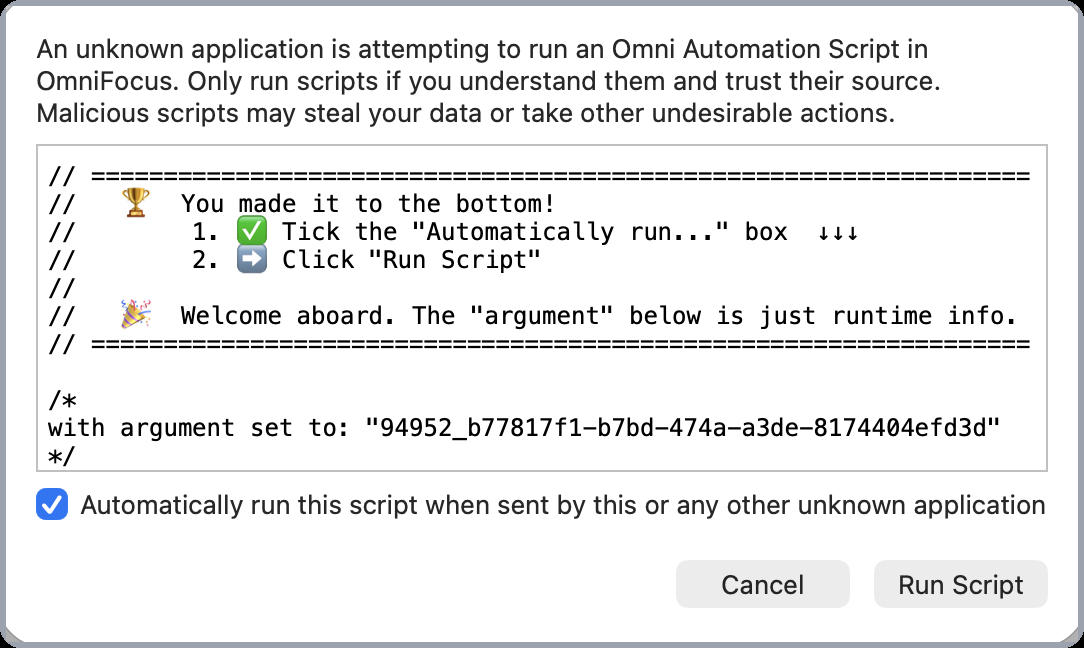
First run: OmniFocus shows a one-time permission dialog. Tick the box, click Run Script. You won't see it again.
For Claude Code, OpenCode, Cursor…
Ask your agent — copy this prompt:
Add this MCP server to my client config. Just edit the config file — don't install anything, don't run any scripts.
"omnifocus-operator": {
  "command": "uvx",
  "args": ["omnifocus-operator"]
}
Development install (contributors)⚠️ This doesn't work with Claude Desktop — Desktop has no config-editing tools. Use the manual paste above.
git clone https://github.com/HelloThisIsFlo/omnifocus-operator.git
cd omnifocus-operator
uv sync
See CONTRIBUTING.md for dev workflow details.
✨ Features
- ⚡ 46ms reads — SQLite caching gives 30–60x faster reads than bridge-only servers
- 🛠️ 11 MCP tools — lookups, filtered lists, task creation & editing
- 🤖 Agent-first design — warnings that teach, errors that educate, guidance in every response
- 🧪 2,561 tests, 97% coverage — strict mypy, no corners cut
- 🛡️ Graceful degradation — server stays alive no matter what, always recoverable
- 🔄 Automatic fallback — SQLite → OmniJS bridge when needed
See the full documentation for architecture details, examples, and deep dives.
🛠️ Available Tools
Lookups
| Tool | Description |
|---|---|
get_all |
Full OmniFocus database as structured data (last-resort debugging) |
get_task |
Single task by ID — urgency, availability, dates, tags, parent, project |
get_project |
Single project by ID — status, review interval, next task |
get_tag |
Single tag by ID — availability, parent hierarchy |
List & Filter
| Tool | Description |
|---|---|
list_tasks |
Filter by date, availability, flags, tags, project, parent subtree, search — with pagination, field selection, and presence-flag derivation |
list_projects |
Filter by status, folder, review schedule, flags |
list_tags |
List tags with parent hierarchy |
list_folders |
List folders with parent hierarchy |
list_perspectives |
List custom perspectives |
Write
| Tool | Description |
|---|---|
add_tasks |
Create tasks with full field control — parent, tags, dates, flags, notes, repetition rules, parallel/sequential, completes-with-children |
edit_tasks |
Patch semantics — update fields, move tasks, complete/drop, manage tags, repetition rules, and hierarchy properties |
All read tools are idempotent. Write tools reference projects and tags by name or ID.
🔍 Tool Examples
Filter tasks (list_tasks):
{
  "query": {
    "flagged": true,
    "due": "soon",
    "availability": "remaining",
    "include": ["notes"],
    "limit": 10
  }
}
Create a task (add_tasks):
{
  "items": [{
    "name": "Review Q3 roadmap",
    "parent": "Work Projects",
    "tags": ["Planning"],
    "dueDate": "2026-03-15T17:00:00",
    "flagged": true,
    "estimatedMinutes": 30,
    "note": "Focus on v1.3-v1.5 milestones"
  }]
}
Edit with patch semantics (edit_tasks):
{
  "items": [{
    "id": "oRx3bL_UYq7",
    "dueDate": null,
    "actions": {
      "tags": {"add": ["Urgent"]},
      "move": {"ending": "Work Projects"}
    }
  }]
}
Patch semantics cheat sheet:
| Input | Meaning |
|---|---|
| Field omitted | No change |
Field set to null |
Clear the value |
| Field set to a value | Update |
🗺️ Roadmap
| Version | Focus |
|---|---|
| v1.0 | Foundation — read tools, three-layer arch, test suite ✅ |
| v1.1 | Performance — SQLite caching, 30–60x speedup ✅ |
| v1.2 | Writes & Lookups — add/edit tasks, get-by-ID ✅ |
| v1.2.1 | Architectural Cleanup — contracts, service refactor, golden master tests ✅ |
| v1.2.2 | FastMCP v3 Migration ✅ |
| v1.2.3 | Repetition Rule Write Support ✅ |
| v1.3 | Read Tools — SQL filtering, list/count, 5 new tools ✅ |
| v1.3.1 | First-Class References — name resolution, $inbox, rich refs ✅ |
| v1.3.2 | Date Filtering — 7 dimensions, shortcuts, calendar math ✅ |
| v1.3.3 | Task Ordering — dotted notation, outline order ✅ |
| v1.4 | Response Shaping & Batch Processing ✅ |
| v1.4.1 | Task Properties & Subtree — presence flags, auto-complete, parallel/sequential, parent filter ✅ |
| v1.4.2 | UNTIL Format Hotfix — parser accepts RFC 5545 DATE form; builder aligns with OmniFocus UI ✅ |
| v1.4.3 | First-Run UX — welcome banners in bridge.js that frame OmniFocus's permission dialog with two-click instructions; startup log line ✅ |
| v1.4.4 | Batch Limit Increase — add_tasks / edit_tasks accept up to 150 items per call ✅ |
| v1.5 | Project Writes — add/edit projects, review marking |
| v1.6 | UI & Perspectives — perspective switching, deep links |
| v1.7 | Smart Perspective Content — perspective-aware response shapes |
| v1.8 | Production Hardening — retry, crash recovery, serial execution |
🔗 Links
- 📖 Full Documentation — features, architecture, examples
- 📦 PyPI — package page
- 🐛 Issues
- 💬 Discussions
📄 License
Proprietary — all rights reserved. Free to use, not to redistribute. License under review.
🤝 Contributing
See CONTRIBUTING.md for guidelines. In short: fork, branch, test, PR.
Reviews (0)
Sign in to leave a review.
Leave a reviewNo results found