scrubjay
Health Uyari
- License — License: MIT
- Description — Repository has a description
- Active repo — Last push 0 days ago
- Low visibility — Only 9 GitHub stars
Code Basarisiz
- rm -rf — Recursive force deletion command in bin/adapters/claude.sh
- rm -rf — Recursive force deletion command in bin/claude-sync.sh
Permissions Gecti
- Permissions — No dangerous permissions requested
Bu listing icin henuz AI raporu yok.
Recall what · where · when. Sync your AI coding agents across machines: git config-sync + a peer-to-peer transcript relay to your own NAS (or GitHub), with topic recall over MCP. Claude Code, opencode, codex.






scrubjay
Your AI coding sessions and setup, on every machine you own.
You use a coding agent — Claude Code, opencode,
codex — on more than one machine. So you have two problems
you probably solve by hand today:
- Your setup doesn't travel. The instructions, commands and agents you tuned on the laptop
aren't on the workstation. - Your chats don't travel — and then they're gone. Yesterday's session, the one where you
worked out the tricky thing, is on the other machine. Or it aged out.
scrubjay fixes both, and keeps it all on hardware you own.
- One config, every machine. Write your instructions, commands and agents once. Every machine
picks them up — and so does every agent, since the same setup lands in Claude Code and opencode. - Every session archived, and searchable in plain English. When a session ends it's copied to
your own NAS automatically. Later you ask "what was that fix for the auth timeout?" and get the
real conversation back — whichever machine and whichever agent it happened on. - Yours. Your config and chats live in private repos on your own account; transcripts go
straight to your own storage. This repo is only the machinery, which is why it can be public.
Three repos, so the machinery can be public without leaking anything you wrote:
| Repo | What's in it | Visibility |
|---|---|---|
| scrubjay (this) | the scripts, hooks and docs — the logic, no content | public |
| scrubjay-data | your config: instructions, commands, agents, settings, memory, session log | private, your account |
| scrubjay-chats | your full transcripts — only if you pick the GitHub relay instead of a NAS | private, your account |
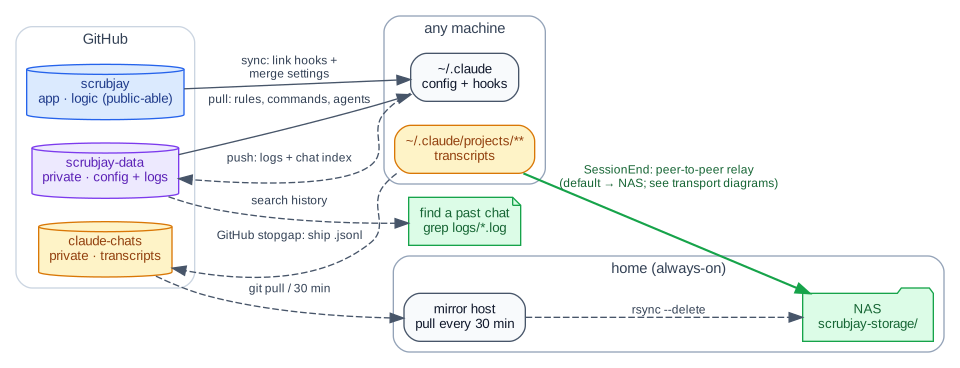
Diagram source: docs/overview.dot — dot -Tsvg docs/overview.dot -o docs/overview.svg.
How it flows. When a session starts, scrubjay pulls your config out of
scrubjay-dataand
applies it into whichever agents this machine has. When a session ends, a hook writes one line
to a shared log ("what ran, where, when") and ships the session itself — transcript, subagents,
plans — off the machine. Where it ships is your choice: peer-to-peer to your own NAS (over
WireGuard or a local mount), or to a private GitHub repo if you'd rather not run storage. The
archive is keyed by machine, so each one's history stays its own and your agent can adapt one
machine's rules for another.
What you'd actually use it for
Start on the laptop, finish on the workstation. You're deep in a debugging session on the couch
and want the big screen. On the workstation you run /sjresume and pick the session out of a list —
it comes back with every turn, the subagents it spawned, its task list, and its file history, so even/rewind still works. The conversation travels; your code doesn't, so git still does its job.
/sjresume                       # pick from what's resumable on your other machines
/sjresume the foolbox refactor  # …or just describe it
Find the thing you already solved. Three weeks ago you fixed a nasty auth timeout. You don't
remember which machine, which repo, or which agent. Ask for it by topic and scrubjay searches every
session it ever archived — across all your machines and all your agents at once — then pulls the
right conversation into your current one.
/sjrecall that auth timeout fix
Move between agents. You started in opencode and want to continue in Claude Code (or the other
way round). /sjresume carries the whole conversation across and seeds a fresh session with it.
Be clear on what this is: same-agent hand-off resumes the actual session, id and tool history
intact; across different agents you keep the conversation but start a new session. That's usually
what people mean anyway, and it works in every direction today.
Set up a new machine. Clone this repo, run the onboarder, and the machine has your instructions,
commands, agents and settings — in each agent you use. Nothing to copy by hand.
Teams: pick up where a colleague left off. scrubjay has no concept of a user — only of a
host. So if two people point their machines at the same archive, each one's /sjresume and/sjrecall simply see the other's sessions as "another host", and a colleague can continue your
conversation with its full context instead of asking you to explain it.
Honesty note. That last one falls out of the design rather than being a feature we built and
tested — sharing an archive also means sharing the config and memory that ride along with it, and
there's no per-person access control. Treat it as a promising trick for a small, trusting team,
not a supported multi-tenant mode.
The core idea: two kinds of sync
Everything scrubjay moves is one of two things, and which one it is decides how it moves:
| Things you write | Things that happen | |
|---|---|---|
| For example | instructions, commands, agents, settings, memory | transcripts, subagents, plans |
| Direction | every machine, both ways — edits merge | one way only: machine → archive |
| So it uses | git | rsync (or a NAS mount) |
The second question is privacy: anything sensitive goes straight to storage you own, never a third
party. That's the whole design in one line — what you author vs. what got recorded picks git vs.
rsync; sensitive vs. not picks your NAS vs. GitHub. The long version is in
Concepts.
Quick start
Don't fork. Clone this repo straight from upstream — it's the app, and it keeps itself current
with git pull. Nothing of yours goes in it. Your content lands in private repos on your own
GitHub account, which the onboarder creates for you.
Easiest — let the agent do it. Clone, open your agent inside the clone, and ask. It readsAGENTS.md, asks you the handful of questions it needs, and runs the onboarder for you:
git clone [email protected]:henba1/scrubjay.git ~/.scrubjay/scrubjay
cd ~/.scrubjay/scrubjay && claude      # or: opencode
# then just say: "set up scrubjay on this machine"
By hand — run the onboarder yourself; it asks the same questions:
git clone [email protected]:henba1/scrubjay.git ~/.scrubjay/scrubjay
~/.scrubjay/scrubjay/bin/onboard.sh    # asks for your GitHub account (or set SCRUBJAY_OWNER)
Either way it creates your private repos, registers this machine, applies your config, and — if you
chose a peer-to-peer relay — prints one line for you to paste into the receiving machine'sauthorized_keys. That paste is the one step nothing here will do for you, and that's
deliberate: a new machine must not be able to grant itself access to your archive.
You'll need bash, jq, git, an SSH key on GitHub, and the gh CLI —
without gh the onboarder prints the exact gh repo create commands and stops, so you can run them
yourself. No root required. Full walkthrough:
Onboarding.
Platforms. Linux and Windows via WSL 2 are supported. macOS should work but isn't regularly
tested yet. Native Windows (PowerShell/CMD/Git Bash) is not supported — the config sync is built on
symlinks, which Git Bash turns into copies. On WSL, install Claude Code inside the distro and
launch it from there; a native-Windows Claude Code is a separate installation that scrubjay won't
see. Details and the rest of the WSL caveats:
Platforms.
Documentation
Full docs — henba1.github.io/scrubjay:
- Concepts — the two-kinds-of-sync model and what lives in the database.
- Harnesses — Claude Code, opencode, codex: what's supported, and what syncs into opencode.
- Onboarding — install on a new machine, the repo layout, and machine-local pointers.
- Day-to-day — the hooks that keep it hands-off, finding a past chat, troubleshooting.
- Query the archive (MCP) — recall a past session by topic from inside a live Claude session.
- Slash commands — the
/sj*command reference. - Transcripts: relay + NAS — the peer-to-peer paths (WireGuard / SSH) to your own NAS.
- Reference — the by-hand command cheatsheet and environment toggles.
The docs also publish an llms.txt index for agents.
Why the name?
Western scrub jays are the textbook case of episodic-like memory in animals. They cache food in
places they control, and later recover it by what they buried, where they buried it, and when —
including whether it's still worth eating. That was the first solid evidence any non-human animal
remembers a specific past event, and not just a learned habit (Clayton & Dickinson,
1998).
Which is this system, precisely:
| The bird | scrubjay |
|---|---|
| caches food in places it controls | ships records to hardware you own |
| what it cached | the topic — searchable in plain English |
| where it cached | which machine, which project |
| when it cached | the date, and how stale it is |
Hence the tagline: recall what · where · when.
The name also has to do a duller job, and does: it's vendor-neutral (nothing here is Claude-only),
it's a coined compound, so it survives a namespace check, and sjrecall reads well in a terminal.
License
MIT © 2026 Hendrik
Yorumlar (0)
Yorum birakmak icin giris yap.
Yorum birakSonuc bulunamadi