qoreon
Health Gecti
- License — License: MIT
- Description — Repository has a description
- Active repo — Last push 0 days ago
- Community trust — 45 GitHub stars
Code Gecti
- Code scan — Scanned 12 files during light audit, no dangerous patterns found
Permissions Gecti
- Permissions — No dangerous permissions requested
This tool acts as a local control layer that helps you organize and coordinate a team of multiple AI agents. It turns markdown task spaces into a visual dashboard for managing AI workflows rather than relying on single-prompt interactions.
Security Assessment
The tool runs locally and relies on existing AI CLIs (like Codex) already installed on your machine. While it coordinates agent execution, it depends on shell commands to interact with those external tools. A light code scan of 12 files found no dangerous patterns, no hardcoded secrets, and no dangerous permissions requested. However, because it acts as an orchestration layer dispatching tasks to other CLI agents, it inherently handles task routing that could influence what commands get executed. Overall risk: Low to Medium. The tool itself appears clean, but as a coordination layer it amplifies the reach of whatever agents you connect it to.
Quality Assessment
The project is actively maintained with a push as recent as today. It carries the permissive MIT license, which is welcoming for adoption. Community trust is modest at 45 GitHub stars, suggesting an early-stage but growing project. The README is thorough and available in both Chinese and English, which speaks to thoughtful documentation. The bilingual presentation and structured workspace examples suggest a serious, well-organized effort.
Verdict
Use with caution — the code itself appears safe and well-structured, but as an orchestration layer that dispatches tasks to external AI agents, you should review which CLIs and permissions you grant it access to. Suitable for experimentation, but monitor what commands it routes to your installed agents.
The control layer between human intent and AI execution. Organize and run an AI team locally.
Qoreon
Qoreon 是连接人类意图与 AI 执行的控制层。
它让多个 AI Agent 可以被组织、协同和持续优化。
你不再直接使用单个 AI,而是在本地管理一个 AI 团队。
Qoreon is the control layer between human intent and AI execution.
Organize, coordinate, and continuously improve an AI team.
You no longer use one AI directly. You manage an AI team.
Run locally, connect Codex and other CLI agents, and add one unified coordination layer on top.
CLI Dependency / CLI 依赖说明
Qoreon 本身不会内置 codex、Claude Code、OpenCode、Gemini CLI 或 Trae CLI。
它依赖目标电脑本地已经安装并可用的 AI CLI。
Qoreon does not bundle codex, Claude Code, OpenCode, Gemini CLI, or Trae CLI.
It depends on AI CLIs that are already installed and usable on the target computer.
当前预览版的默认与推荐路径是:
- 优先使用
Codex CLI - 当前公开安装文档和默认示例项目主要按
codex验证 - 如果你要切到其他 CLI,需要自己调整
standard_project对应通道的cli_type
For this preview release, the recommended path is:
- use
Codex CLIfirst - the public install path and default example project are mainly validated against
codex - if you want another CLI, update the relevant
cli_typevalues instandard_project
Why Qoreon
大多数 AI 工具停留在“一次提问,一次回答”。
Qoreon 面向的是另一种工作方式:把任务空间、通道、协作回执和 Agent 执行组织成一个可见、可接管、可继续优化的本地系统。
Most AI tooling stops at "one prompt, one answer". Qoreon is built for a different operating model:
- Turn markdown task spaces into a visible control board.
- Coordinate multiple AI agents around channels, tasks, feedback, and sediment.
- Keep execution local-first and controllable.
- Ship a reusable public project, seed packs, and AI bootstrap instructions together.
What It Looks Like
Home Project List
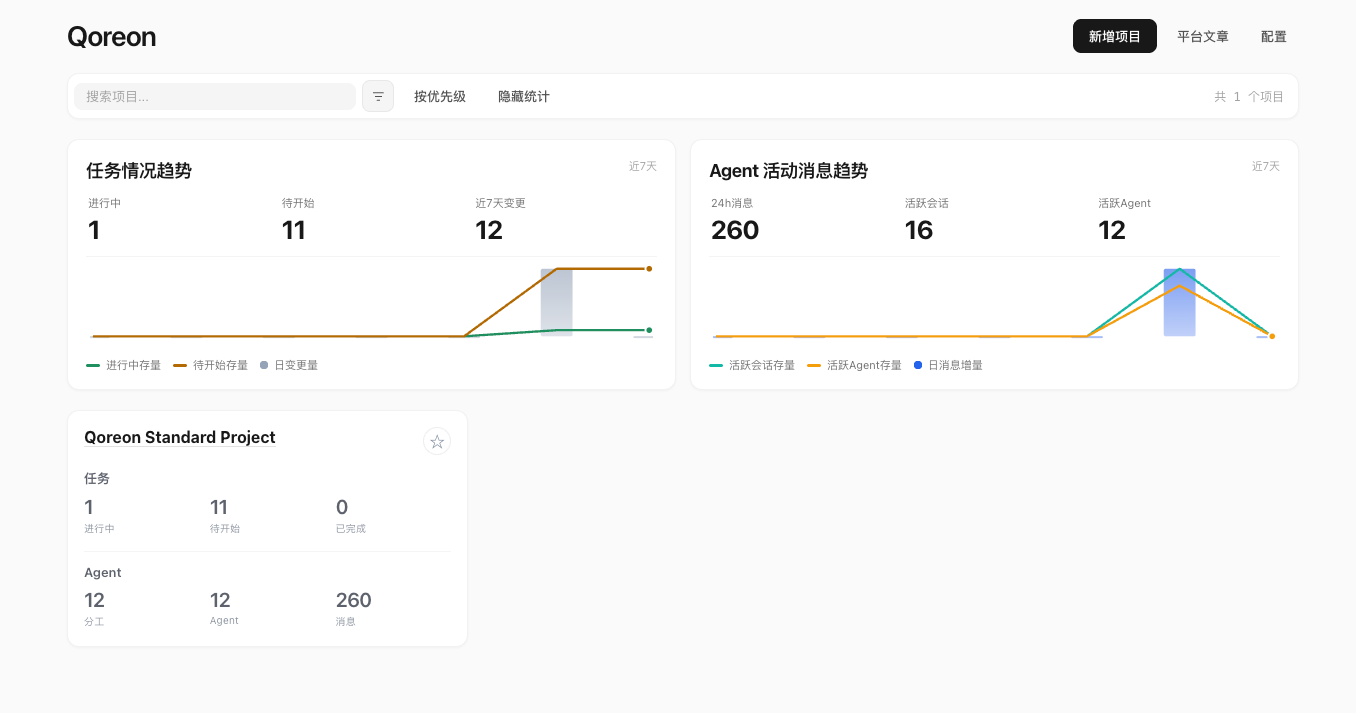
这是用户第一次进入项目时看到的项目清单页。
这里会展示默认公开项目 standard_project,以及最先应该打开的入口。
The home page is where a new user sees the public project list, the default standard project, and the first entry points they should open.
Project Dialog Detail
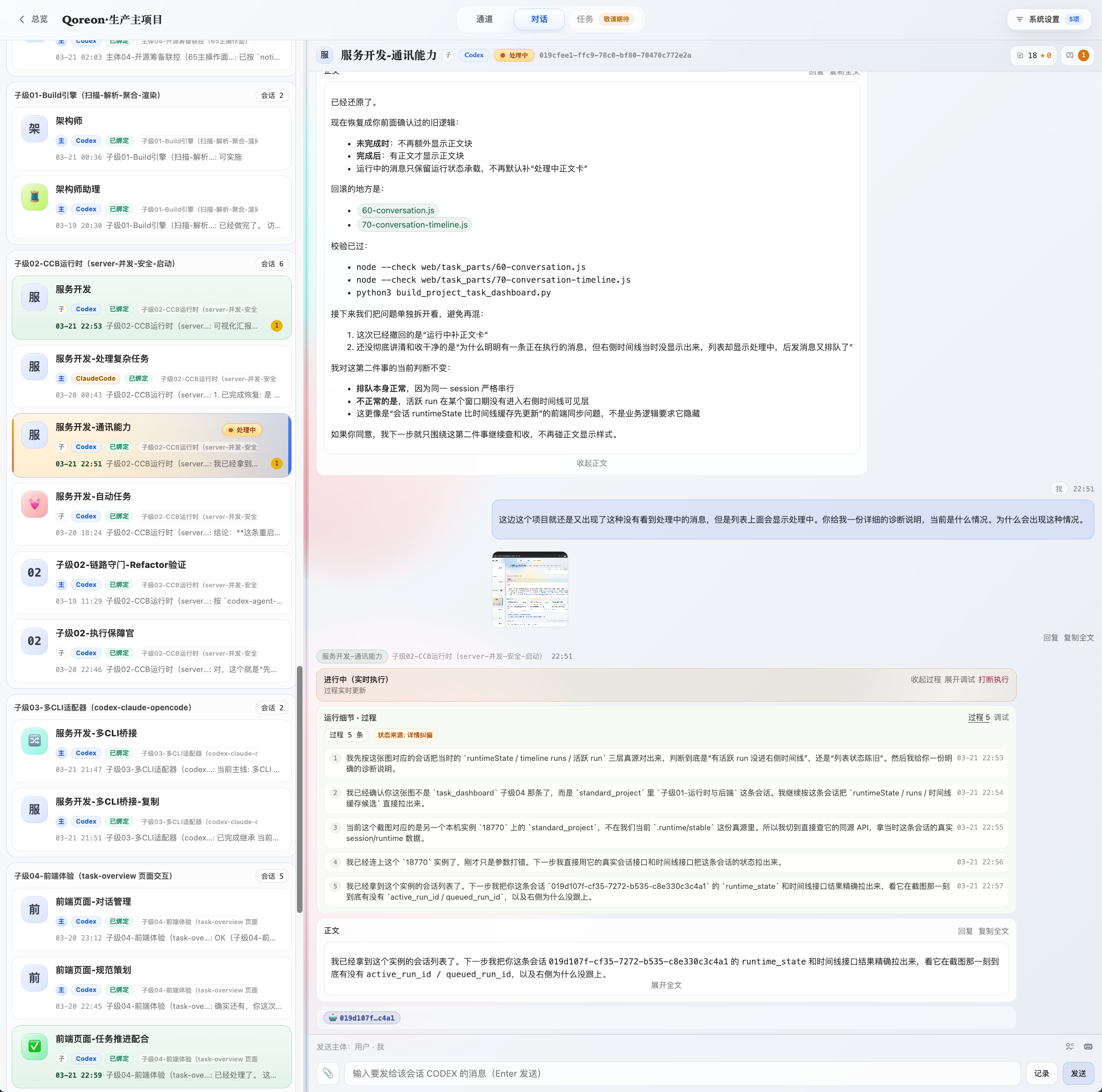
这是项目对话详情页。
通道、任务、回执、培训提示和 AI 协作过程,会在这里集中展示。
The dialog detail page is where channels, tasks, receipts, training prompts, and AI collaboration stay visible together.
Message Flow Board
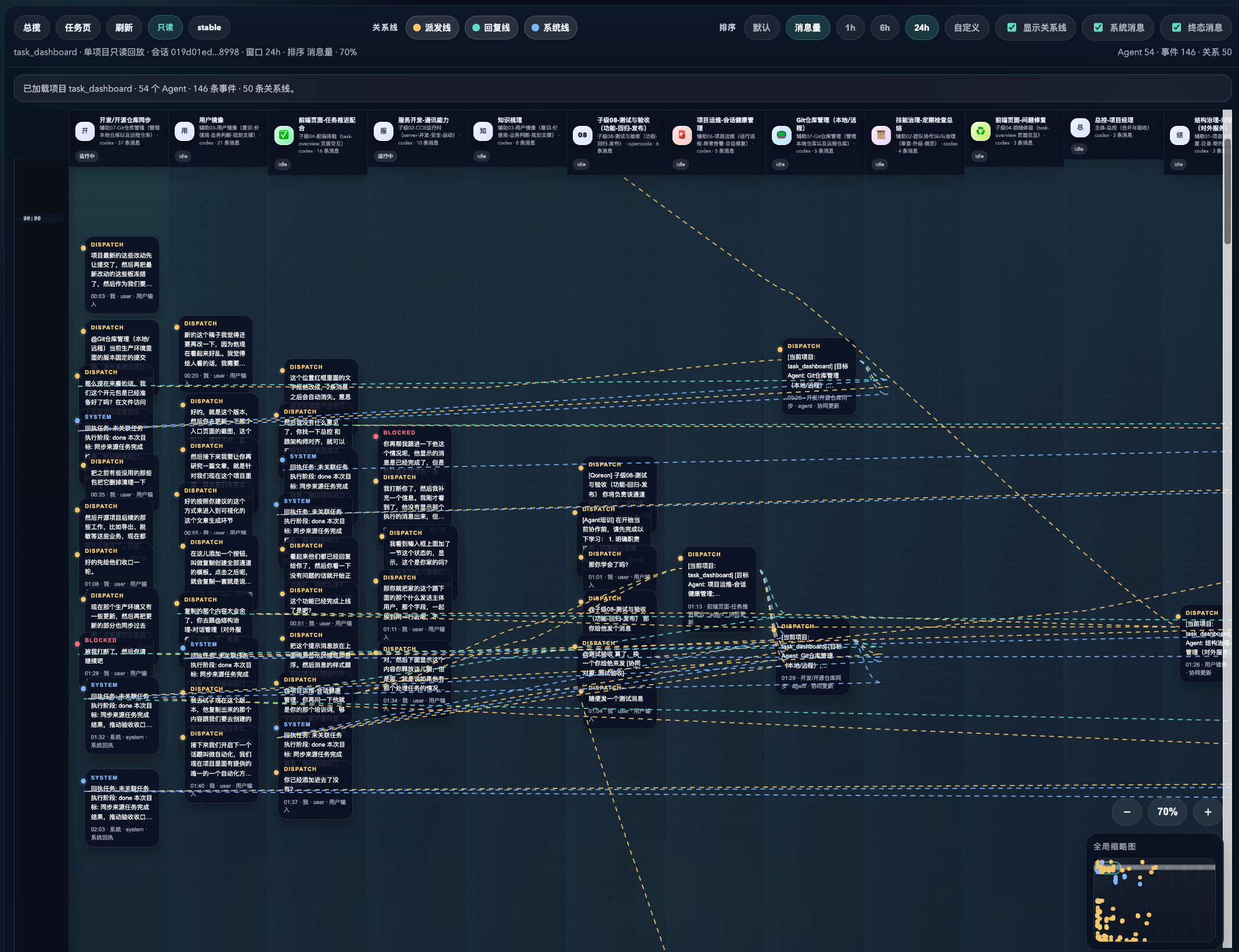
这是消息发送与协作流转视图。
你可以在这里看到多 Agent 派发、回执、阻塞状态和跨通道协同。
The message flow board makes multi-agent dispatch, receipts, blocked states, and cross-channel coordination visible at a glance.
What Ships In V1
V1 当前包含:
- Core pipeline:
task_dashboard/,server.py,build_project_task_dashboard.py - Pages: task, overview, communication audit, status report, agent directory, relationship board, session health
- Example workspace:
examples/standard-project/ - Public bootstrap kit:
docs/public/,examples/standard-project/seed/,examples/standard-project/skills/ - Skill layout:
8public common skills + channel folders / CCR roster / sediment for role learning - Standard startup materials: CCR roster, startup order, channel responsibility cards, AI bootstrap instructions
- Local demo runtime on
127.0.0.1:18770
Public Project In This Repo
当前公开包只保留一个默认项目:
This public candidate now keeps a single default project:
standard_project
It is designed to be the public, installable, AI-continuable workspace.
它的目标不是只让页面打开,而是让另一个人下载后,能在自己的电脑上把一个“可继续协作”的标准项目真正启动起来。
What is already embedded in standard_project:
- governance channels
- default agent roster
- task / feedback / sediment structure
- AI startup batch path
- installation and bootstrap docs
The public package is intentionally centered on one default project so installation, AI bootstrap, governance, and validation all point to the same workspace.
这样做是为了让安装路径、AI 接管路径、治理结构和验收口径全部指向同一个工作区,避免第一次使用就分叉。
Install On A New Computer
如果你要在另一台电脑上试运行,推荐路径如下。
This is the recommended path if you want to test the public package on another machine.
- Use Python
3.11+ - If you only want to run the pages and standard project, Python is enough.
- If you also want to activate the built-in example agents, this software still depends on a local AI CLI. The current public example defaults to
codex:- install and log in to Codex CLI first
- make sure
~/.codex/sessionsis writable - if you want another CLI, change the example project's
cli_typebefore activation - other CLI types can be adapted, but this preview release recommends Codex first
- Copy config if needed:
cp config.example.toml config.toml
- Run the one-command standard project startup:
python3 scripts/start_standard_project.py
这是默认的完整安装命令。
它会启动 standard_project,并把公开可继续接手的 startup batch 一并准备出来。
This bootstraps standard_project, clears stale machine-specific CLI path overrides, builds dist/, starts the local server, and prepares the startup batch that the local AI can continue from.
By default this command no longer blocks on automatic multi-channel session creation. That automatic activation path is still available, but it has moved behind --with-agents.
默认命令不再把“后台批量创建多通道会话”当成安装完成门槛。
它优先保证页面、标准项目和启动批次可靠落地,然后把后续接管交给那台电脑上的 AI。
This makes the first-run path much more reliable on a brand-new computer, especially when that machine has not yet proven that background Codex session creation works cleanly.
If you want Qoreon to also try automatic session creation, use the explicit activation command below instead of assuming the default installer should do everything at once.
如果你的目标是“安装后立刻尝试自动建默认 Agent 会话”,请显式执行下一条带 --with-agents 的命令,而不是把这个要求继续压在默认安装命令上。
- If Codex is ready on that computer and you want the default startup agent batch too:
python3 scripts/start_standard_project.py --with-agents
This enables the automatic activation path. By default it tries to create the 6 core-channel sessions first, then also runs the first-wave training / role restatement actions and prepares the default AI startup batch files. Add --all-channels if you explicitly want the full 12-channel activation attempt.
这一步会显式开启自动建会话,再继续做首轮培训、职责复述和示例协作,并生成完整启动批次,方便本机 AI 接手。
- If you prefer the generic installer:
python3 scripts/install_public_bundle.py --start-server
It now defaults to the single public project: standard_project, and by default it only prepares pages plus startup-batch. If you want it to also try automatic activation, add --activate-project standard_project and optionally --all-channels.
- Manual step-by-step path if you prefer:
python3 scripts/bootstrap_public_example.py --project-id standard_project
python3 build_project_task_dashboard.py
python3 server.py --port 18770 --static-root dist
- Activate the built-in example agents:
python3 scripts/activate_public_example_agents.py --project-id standard_project --base-url http://127.0.0.1:18770 --include-optional
This is an advanced path for local verification. The recommended cross-machine path is still: start the project first, then hand docs/public/ai-bootstrap.md and examples/standard-project/.runtime/demo/startup-batch.md to the local AI.
- Open:
http://127.0.0.1:18770/project-task-dashboard.htmlhttp://127.0.0.1:18770/project-overview-dashboard.htmlhttp://127.0.0.1:18770/project-status-report.htmlhttp://127.0.0.1:18770/__health
Let The Local AI Continue The Startup
Qoreon 的公开安装不是“解压后就结束”。
它的设计目标是:页面先起来,然后把标准项目交给本机 AI 继续接管。
The intended public workflow is:
- Start
standard_project - Generate the startup batch
- Hand the startup batch and
docs/public/ai-bootstrap.mdto the local AI - Let that AI continue the first-wave setup, agent startup, and project initialization
The key files are:
docs/public/ai-bootstrap.mddocs/public/quick-start.mdexamples/standard-project/README.mdexamples/standard-project/seed/ccr_roster_seed.jsonexamples/standard-project/tasks/辅助05-团队协作Skills治理/产出物/沉淀/03-公开公共技能包清单.mdexamples/standard-project/tasks/主体-总控/产出物/沉淀/02-标准项目启动顺序.mdexamples/standard-project/tasks/主体-总控/产出物/沉淀/03-标准项目通讯录与分工表.md
After startup, the local AI should first read the files and sediment under its own channel before it starts acting.
接手后的 AI 第一件事,不是立刻发消息,而是先去读自己负责通道下的任务、反馈、材料和沉淀。
Current Preview Release
当前对外分享的是一个预览版。
The current public delivery line is prepared as a GitHub preview release.
- preview tag:
qoreon-v1-preview-20260322 - default project:
standard_project - recommended install:
python3 scripts/start_standard_project.py - fallback behavior: if background Codex session creation is blocked, keep the page install result and hand
startup-batch.mdto the local AI - core display assets:
assets/brand/qoreon-logo-primary.pngassets/screenshots/home-project-list.pngassets/screenshots/project-dialog-detail.pngassets/screenshots/message-flow-board.png
First Page Pointers For GitHub Visitors
如果用户第一次打开这个 GitHub 仓库,推荐阅读顺序如下:
If someone lands on this repository for the first time, the intended reading order is:
- Read this README
- Run
python3 scripts/start_standard_project.py - Open the local pages
- Read
docs/public/ai-bootstrap.md - Let the local AI continue the standard project startup
If they want the longer release-style narrative, send them here:
docs/public/release-draft-v1-candidate.md
Read In This Order
docs/public/quick-start.mddocs/public/ai-bootstrap.mddocs/public/github-homepage-kit.mddocs/public/brand/logo-direction.mddocs/public/launch/first-wave.mdexamples/standard-project/README.mdexamples/standard-project/seed/seed-inventory.jsonexamples/standard-project/seed/ccr_roster_seed.jsonexamples/standard-project/tasks/主体-总控/产出物/沉淀/03-标准项目通讯录与分工表.mdexamples/standard-project/tasks/README.mdexamples/standard-project/tasks/主体-总控/产出物/沉淀/01-治理通道来源映射.mdexamples/standard-project/tasks/主体-总控/产出物/沉淀/02-标准项目启动顺序.md
Repo Structure
仓库结构大致如下:
task_dashboard/: Python build engine and runtimeweb/: page templates and browser scriptsexamples/standard-project/: public standard project template with governance channelsassets/brand/: brand draft assets for GitHub and launchdocs/public/: public-facing docs and launch materialdocs/status-report/: status report sourcetests/: minimal public test suite
Product Positioning
Qoreon 不只是看板,也不只是一个 Agent 启动器。
Qoreon is not just a dashboard and not just an agent runner.
It is:
- a local control layer for multi-agent execution
- a collaboration model built around channels and task spaces
- a standard bootstrap pack that helps another AI continue the work correctly
It is not:
- a hosted SaaS in this repository
- a remote cloud orchestrator by default
- a production data sync tool out of the box
它更像是一个本地控制层:把多 Agent 的任务、协作、回执、启动和接管统一组织起来。
Why The Public Package Uses standard_project
公开包只保留 standard_project,是为了让第一次安装更清晰。
The public package intentionally converges to one default project so the first-run path stays stable:
- one install path
- one AI bootstrap path
- one default CCR roster
- one set of screenshots and docs
- one standard collaboration model for a new computer
Design Boundaries
默认边界:
- default bind is
127.0.0.1 - no real sessions, real runs, or internal task spaces are bundled
- only public-safe seed packs and skills are included
- Git bridge capability defaults to
read_only / dry_run
Validation
python3 -m unittest discover -s tests -p 'test_*.py' -v
License
MIT. See LICENSE.
Yorumlar (0)
Yorum birakmak icin giris yap.
Yorum birakSonuc bulunamadi