herdr-over9k
Health Warn
- License — License: MIT
- Description — Repository has a description
- Active repo — Last push 0 days ago
- Low visibility — Only 5 GitHub stars
Code Fail
- rm -rf — Recursive force deletion command in install.sh
- exec() — Shell command execution in over9k-launcher/mods/over9k-new-menu/main.js
- exec() — Shell command execution in over9k-launcher/mods/over9k-server-stop/main.js
Permissions Pass
- Permissions — No dangerous permissions requested
No AI report is available for this listing yet.
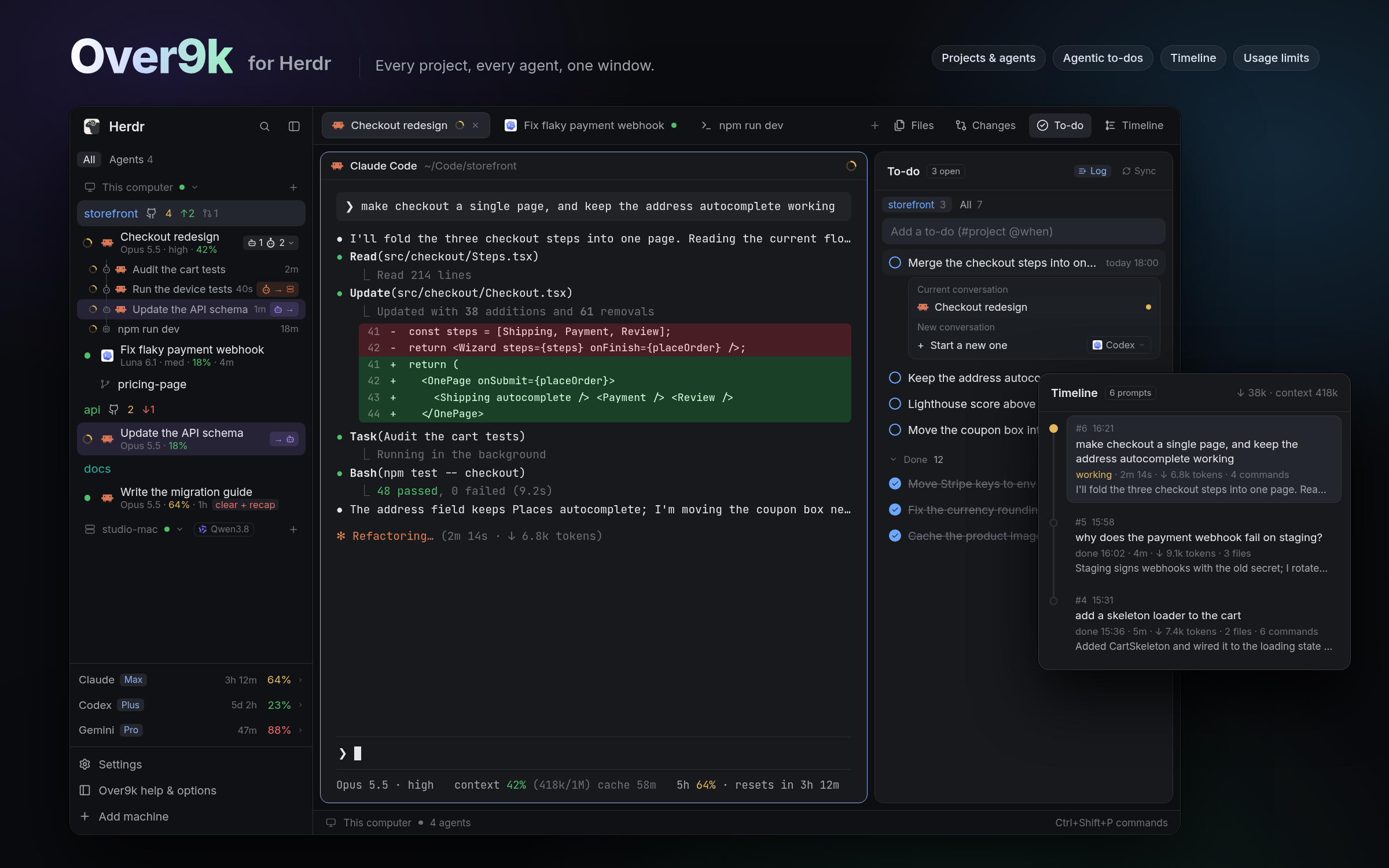
Run a fleet of coding agents and actually know what they're doing. A Herdr layout with every project and agent in one sidebar, agentic to-dos, a prompt-by-prompt Timeline, token-saving recaps, one-click resume and local models. Also as six standalone mods.
Over9k for Herdr
Run a fleet of coding agents and actually know what they're doing. Over9k is
a layout for Herdr that brings every project and every agent
into one view. See what each agent is doing and where its work is going, let your
agents keep your to-do lists, follow every prompt in the Timeline, and restart
expired chats for a fraction of the tokens. Use the whole layout, or add just the
parts you want to your own.
Sidebar: see every agent
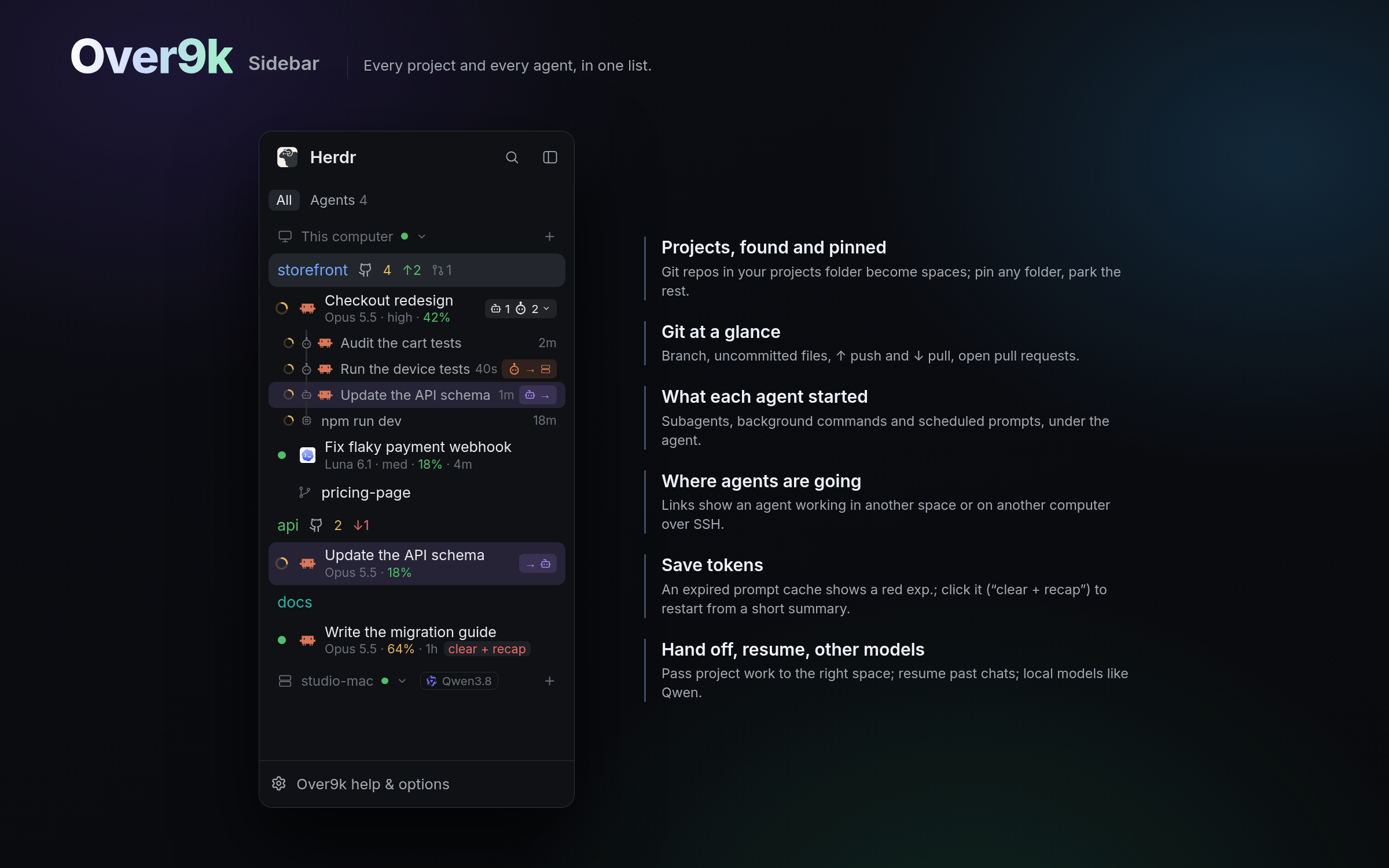
Every project and every agent working in it, in one list. Point it at your code
folder and each repo shows up on its own, with its branch, uncommitted files,
pull requests and push/pull; pin the projects you care about and park the rest.
Every agent shows whether it's working or needs you, its model, how full its
context is and how long since it replied, with the subagents, background
commands and scheduled prompts it started underneath. Links show where the work
is going, into another space or over SSH to another computer. When an agent's
prompt cache has expired, one click clears it and restarts it from a short
recap, instead of paying to re-read the whole chat. And a chat you started
anywhere can hand off to a new agent in the right project, so it becomes
project work (turn that on in Options › Folders).
Launcher: start, resume, run local
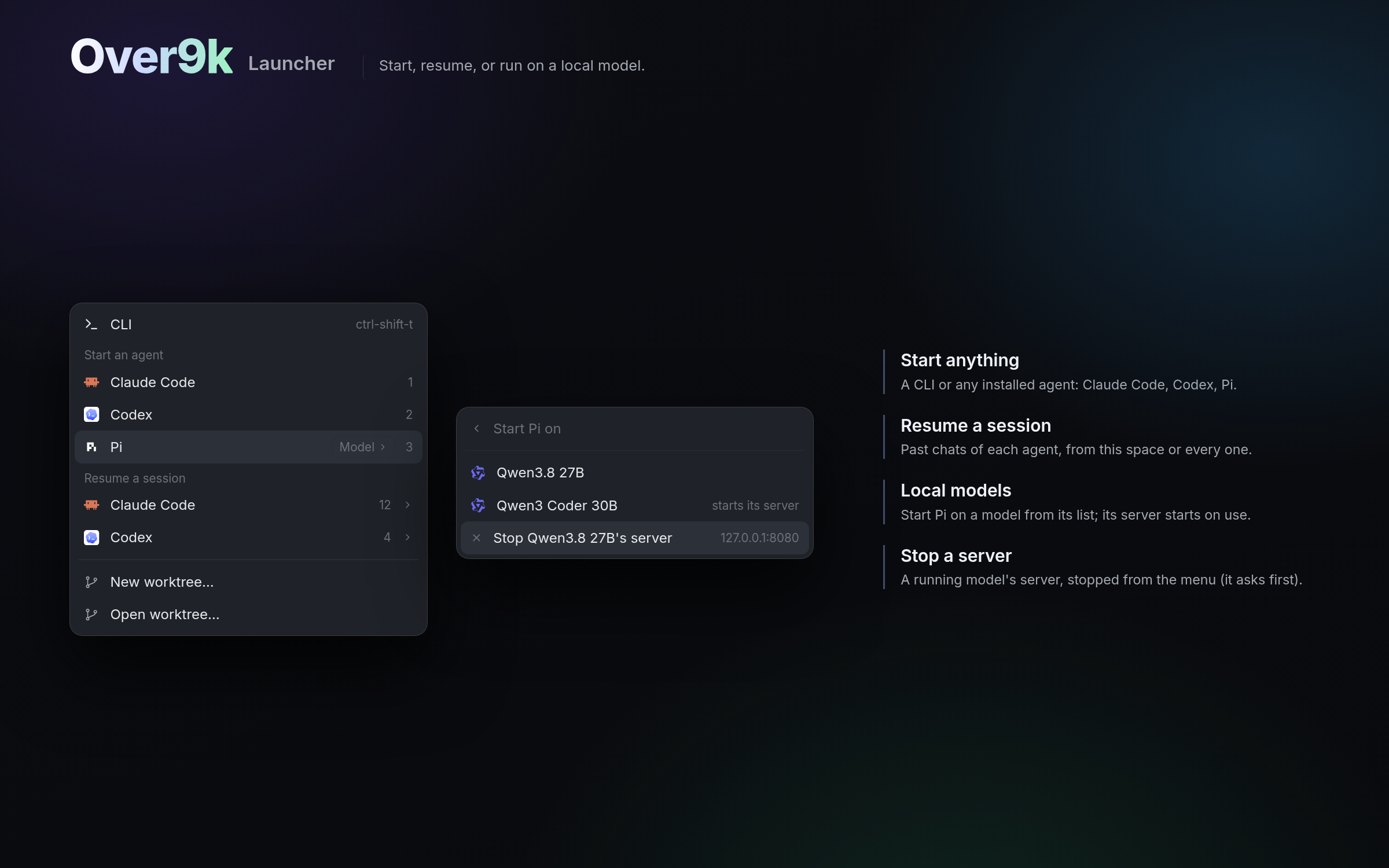
Ctrl+Shift+A (Cmd+Shift+A on macOS), or the sidebar's +, opens one menu for
starting work: a CLI or any installed agent in the space you're in, a new git
worktree, or a past Claude Code, Codex or Pi session to pick up where you left
off. Pi can run on a local
model like Qwen: pick it and its server starts for you, then stop the server
from the same menu when you're done. The models come from Pi's own list
(~/.pi/agent/models.json), and over9k-new-menu/servers.json says how to
start and stop each one's server.
To-do: agentic to-dos
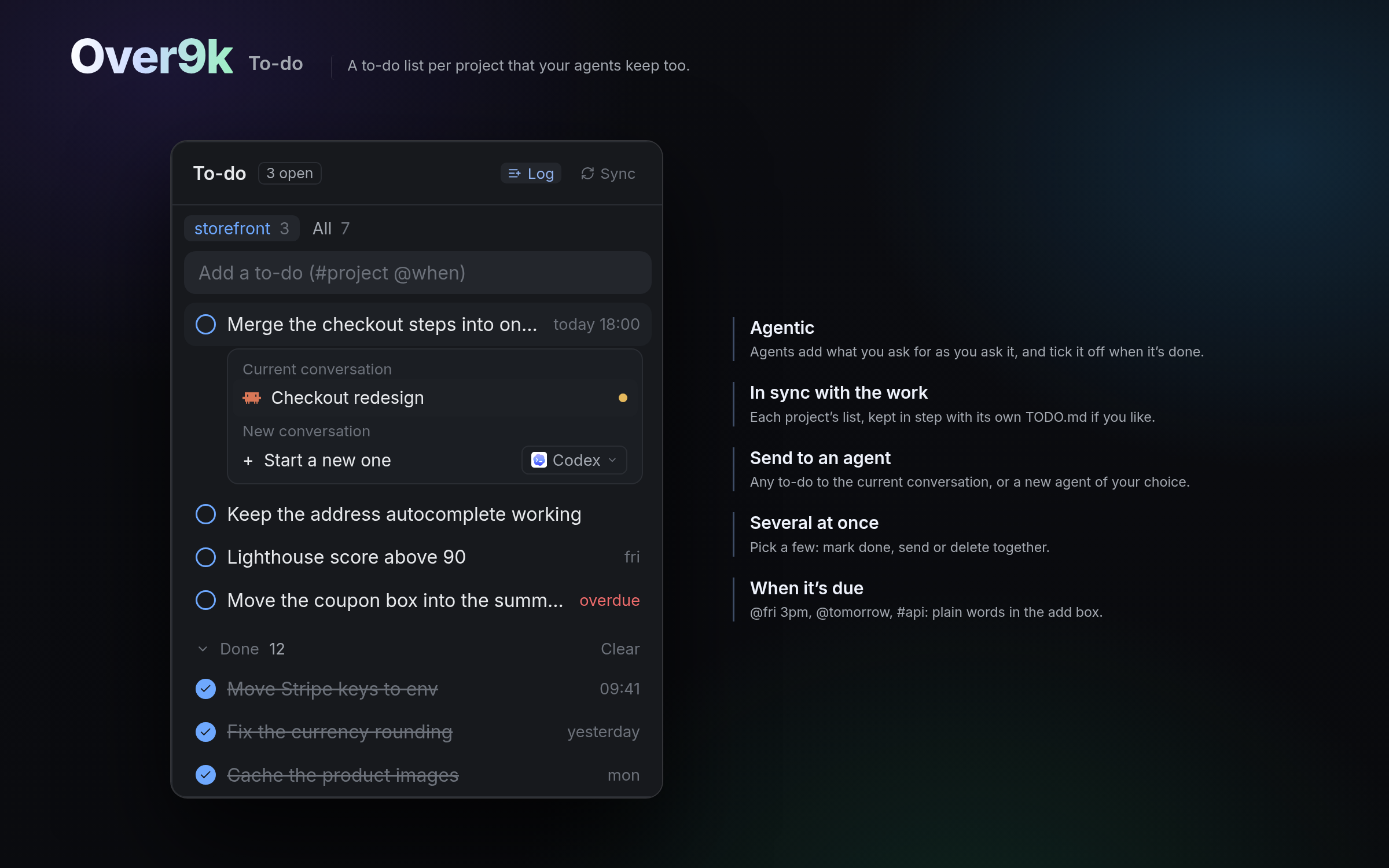
A to-do list for every project, kept by you and your agents together. Agents get
a todo command and a short rule (in CLAUDE.md for Claude Code, AGENTS.md for
Codex and Pi). With Log on, they add what you ask for the moment you ask it,
reword an item when you change your mind, and tick it off once it's done and
checked. Turn on Sync and the list stays in step with the project's own
TODO.md. Lines in a project's TODO.md that aren't on the list yet show up as
suggestions, to add with one click or delete from the file.
You can add to-dos yourself in plain words: @fri 3pm or @tomorrow sets when
it's due, and #api files it under another project. Any to-do goes to the
current conversation or to a new agent of your choice, with a brief to tick it
when it's done. Ctrl+click (Cmd+click on macOS) picks several, to mark done,
send or delete together. The panel
opens on the project you're in, with All a tab away, and done items keep
when they were finished.
Timeline: what happened, prompt by prompt
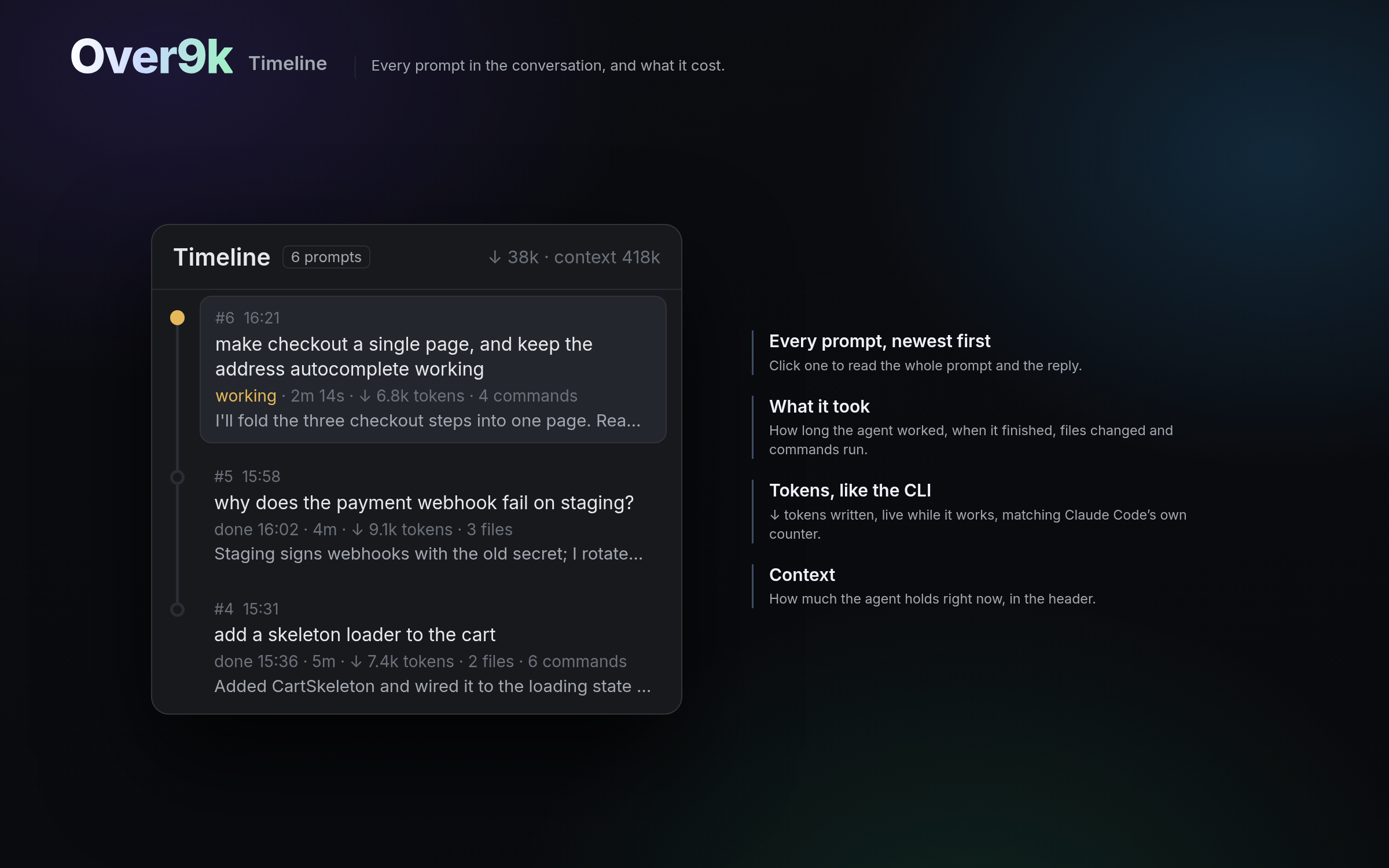
The conversation you're in, newest first: each prompt, how long the agent worked
on it, when it finished, the files it changed, the commands it ran and what it
replied, with the tokens it wrote. While the agent works, the time and tokens
tick live, matching the CLI, and the header shows how full its context is.
Usage: your limits before you hit them
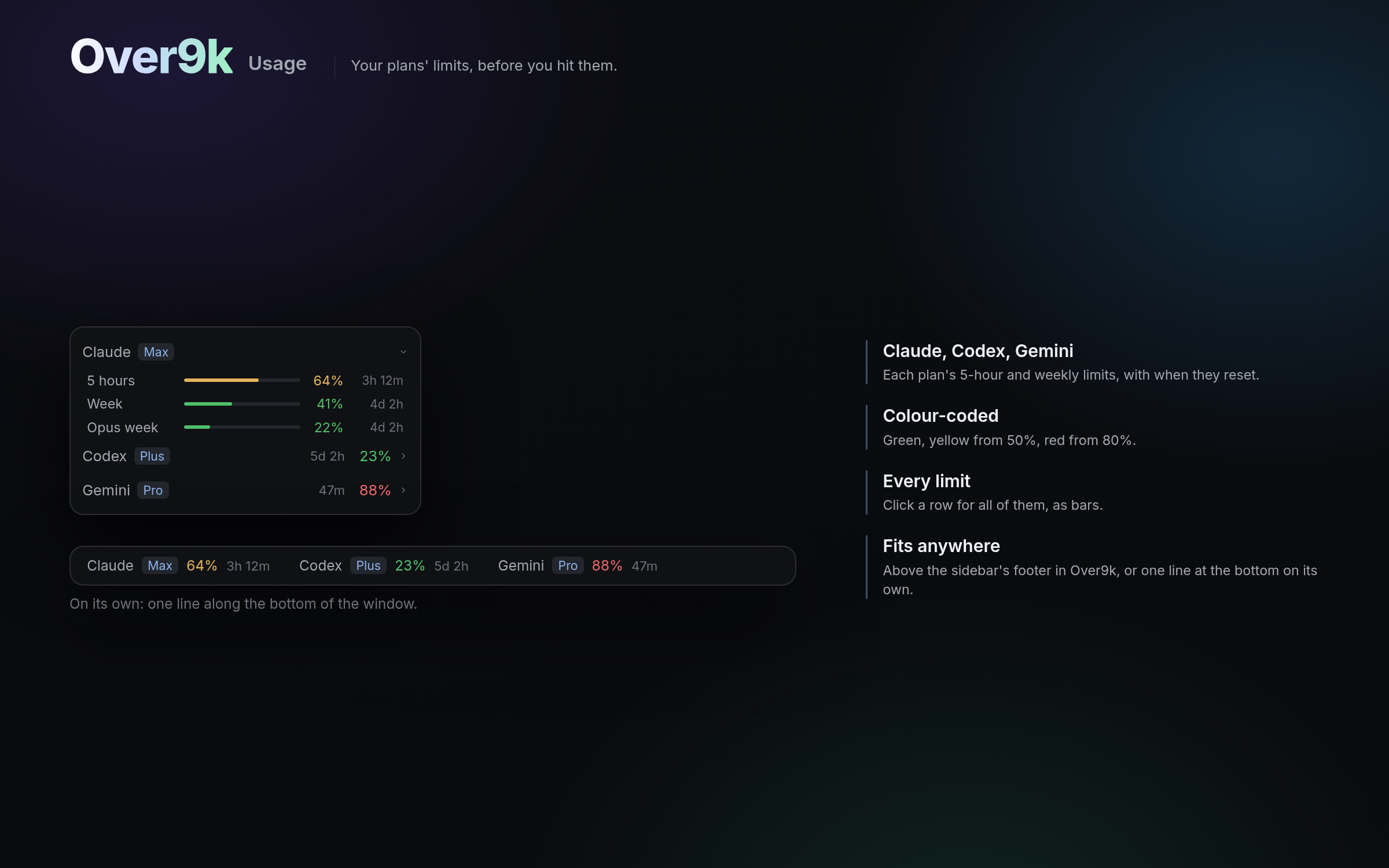
The 5-hour and weekly limits of each plan you use (Claude, Codex and Gemini),
with the plan's name, the percentage used in green, yellow from 50% or red from
80%, and how long until it resets. Click a service to see every limit it
reports, as bars, and click a limit to make it that service's headline instead
of its fullest. Claude on Amazon Bedrock has no limits, so its row shows cost
(an estimate from tokens at list prices), one row per computer: click it for
tabs (30 days, 2 weeks, 1 week, 1 day) and a chart of each day's cost by model.
The tab you pick is also the row's number. In the layout it sits above the sidebar's footer; on its
own, it's a single line along the bottom of the window. Codex's numbers come
from its latest session. Claude's need Over9k's session footer for Claude
Code, and Gemini's the one for Antigravity (see Session footers). Claude on Amazon
Bedrock has no plan limits, since it's paid per use, so its row shows what
you've spent today instead, with each session's cost. Hide any you don't use
in Options.
Switcher: Ctrl+Tab between agents
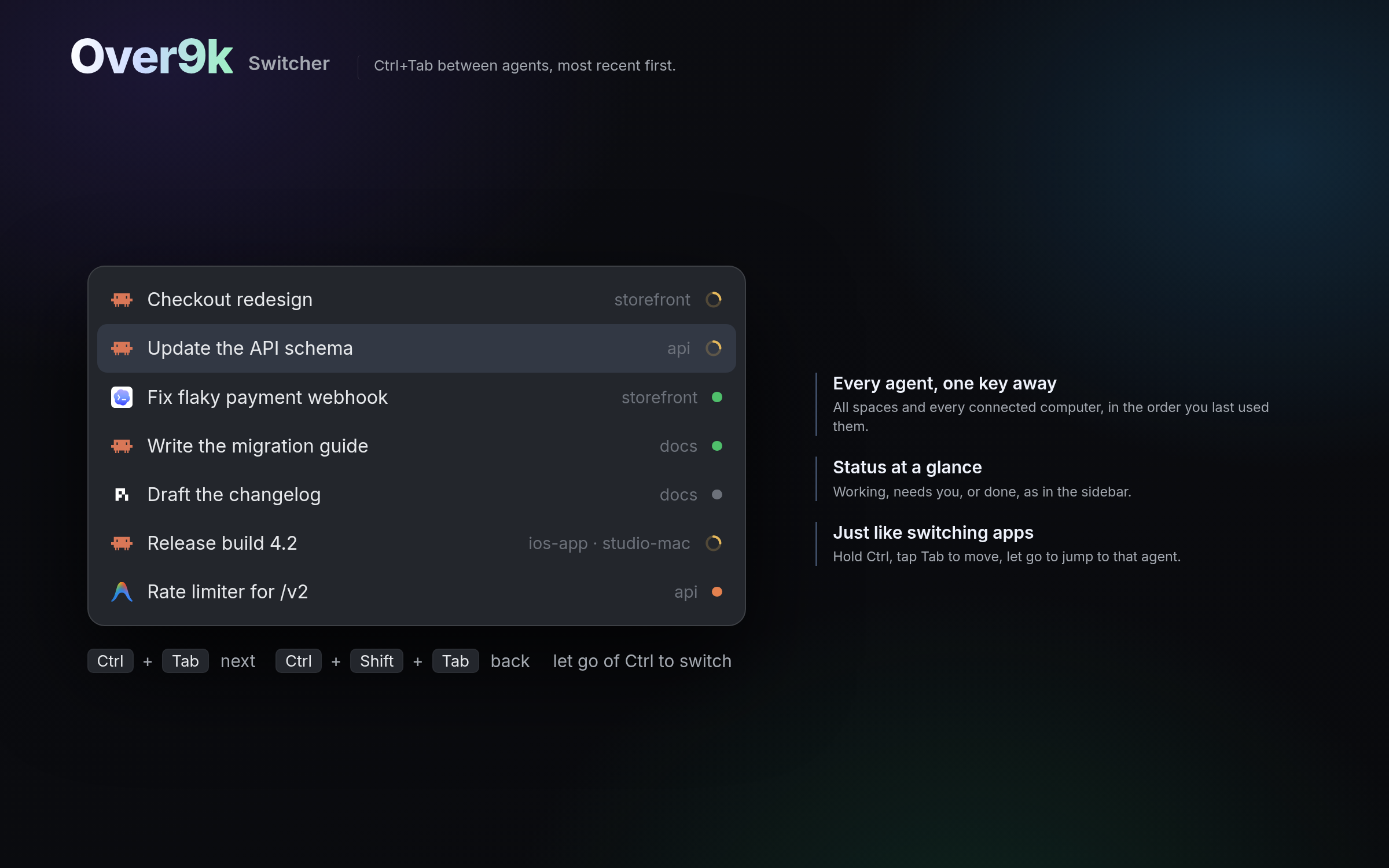
Jump between agents the way you switch apps. Hold Ctrl and tap Tab: a list
opens with every agent on every space and every connected computer, most
recently used first, each with its status, the name of its conversation and the
space it's in. Tap Tab again to move down, Shift+Tab to go back, and let go of
Ctrl to land on that agent, switching space if it has to. A single tap takes you
straight back to the agent you were in before. It's Ctrl+Tab on macOS too,
since Cmd+Tab belongs to macOS's own app switcher.
All together
The Over9k layout puts all six in one window, with To-do and Timeline added to
Herdr's own tab bar. Over9k help & options, at the bottom of the sidebar,
decides what every row shows, which panels appear and what's set up for your
agents, and its illustrated Help walks through each part.
Get started
git clone https://github.com/herunan/herdr-over9k.git
cd herdr-over9k
sh install.sh                # Linux, macOS, or Git Bash on Windows
On Windows, from PowerShell: powershell -ExecutionPolicy Bypass -File install.ps1.
Then open Herdr and pick Settings › Layout › Over9k (or, if it's running,herdr-app do layout.switch '{"name":"over9k"}'). Over9k help & options
walks you through picking your projects folder. To update: installed from a git
clone, Over9k help & options shows an Update chip when there's a newer
version, with what changed and an Update button (it pulls and installs again;
turn the check off in Options › Folders). Otherwise run the installer again from
a newer copy. Either way your settings and lists stay.
Just the parts you want. Each mod above also works on its own in your own
layout: sh install.sh over9k-todo (on Windows, install.ps1 -Mod over9k-todo),
and likewise over9k-sidebar, over9k-launcher, over9k-timeline,over9k-usage and over9k-switcher. A mod docks itself the first time Herdr
sees it. The layout already includes all six, so install one or the other, not
both.
What it needs. Herdr 0.1.12 or newer. git, jq and Python 3 power the git
badges, Claude Code agents' details, the to-do hook and the Timeline; without one, Over9k leaves
out what needs it, and the installer says what's missing. Claude Code gets the
most out of it; Codex, Pi and Antigravity agents are listed too. Over9k is
developed on Linux. On macOS, install the tools with brew install jq python git. On Windows, it runs its scripts with Git for Windows'sh (winget install Git.Git jqlang.jq Python.Python.3.12; the installer can
add Git's tools to your PATH with -AddGitToPath). The macOS and Windows paths
haven't been run there yet, so please report what doesn't work. Two extras read
Linux's /proc and stay off elsewhere: finding Codex sessions, and listing
Antigravity's subagents. Claude Code and Antigravity agents' details find
their terminal through /proc on Linux and ps on macOS, and are left out on
Windows.
Shortcuts
| Linux and Windows | macOS | |
|---|---|---|
| Launcher | Ctrl+Shift+A | Cmd+Shift+A |
| Switch agents | Ctrl+Tab, then Tab / Shift+Tab | Ctrl+Tab, then Tab / Shift+Tab |
| Close the tab (asks first) | Ctrl+Shift+W | Cmd+Shift+W |
| Close the pane (asks first) | Ctrl+Shift+X | Cmd+Shift+X |
| Pick one more row or to-do | Ctrl+click | Cmd+click |
| Pick a range | Shift+click | Shift+click |
The switcher keeps Ctrl+Tab on macOS because Cmd+Tab is macOS's own app
switcher. The installers pick the right key file for your OS (keys.json, orkeys.macos.json on macOS).
Where agent details come from
From each agent's own files, with nothing to set up:
- Claude Code:
~/.claude/sessions/<pid>.jsonsays which conversation each
running Claude Code is in, and its process says which Herdr terminal. The
conversation in~/.claude/projectsgives the model, effort, context, when
the prompt cache runs out and when it last replied. - Codex: its session files in
~/.codex/sessionsand its terminal title. - Pi: its footer on screen, and Pi's own model list.
- Antigravity: the conversation file its process holds open, in
~/.gemini/antigravity-cli, gives the model, effort, the conversation's
title and when it last changed. Its context isn't readable there, so that
one needs a session footer (below).
Session footers
Some details only reach an agent's session footer, the status line under its
prompt. For those, Options › Session footers adds Over9k's, one switch per
agent that needs it, each off unless you turn it on:
- Claude Code: needed for your 5-hour and weekly limits (on Amazon
Bedrock, each session's cost). It shows model and effort, context, how long
the prompt cache lasts and those limits. "Show its limits" on the Usage
strip turns it on too. - Antigravity: needed for the agent's context and Gemini's limits.
It shows context and the limits per model group, under Antigravity's own.
Codex and Pi need none. While one is on, it shows instead of any session footer
you set up yourself, and yours comes back when it's off.
What the installer changes
In Herdr's home (~/.config/herdr-app, or wherever herdr-app --help says), it
adds the mods (mods/over9k*) and the layout (layouts/over9k.json), and merges
Over9k's key bindings into keys.json. Your earlier keys.json is kept askeys.json.before-over9k, and any binding Over9k replaces comes back when you
uninstall.
For Claude Code, and only if you say yes, it sets up two things:
- The to-do rule in
~/.claude/CLAUDE.md(and in Codex's and Pi'sAGENTS.md),
plus thetodocommand in~/.local/bin. - A hook that reminds agents when request logging is on.
Both can be turned off again in Options. It never touches your Claude Code
status line; Over9k's own is a separate switch in Options, off unless you turn
it on. The installer's other options are--home <dir>, --no-claude and --yes (-HerdrHome, -NoClaude and -Yes
on Windows).
Uninstall
sh install.sh --uninstall (or install.ps1 -Uninstall) removes the mods, the
layout, Over9k's key bindings (giving yours back) and its Claude Code pieces.
For a single mod, add its name. Your to-do lists
stay in ~/.local/share/over9k; delete that folder to remove them too.
Privacy
Over9k has no server of its own and collects nothing. It reads your agents'
conversation files, your git repos and Herdr's state on your computer, and only
reaches the network through your own tools, in three ways:
- git: every 5 minutes it fetches each project with a GitHub remote, to show
how far ahead or behind it is. It pushes and pulls only when you click. - gh: in the same pass, if
ghis installed, it counts open pull requests
and checks whether your review is wanted. - curl: the + menu checks whether the local model servers in Pi's list are
up.
Other computers you've added to Herdr are reached through Herdr itself.
In this repo
install.sh, install.ps1   install, update, uninstall (the layout, or one mod)
tools/build-mods.py       builds the mod folders below from over9k/mods
over9k/                   the layout: layouts/, mods/, keys.json (keys.macos.json), RECIPE.md, preview.png
  mods/over9k/            the sidebar (+ antigravity/)
  mods/over9k-tabs/       Herdr's tab bar, with To-do and Timeline added
  mods/over9k-todos/      the To-do panel, todo.sh (the `todo` command), its hook
  mods/over9k-prompts/    the Timeline panel
  mods/over9k-usage/      the usage rows
  mods/over9k-options/    Help & Options, setup.sh (what the switches set up)
  mods/over9k-menu/       right-click menus
  mods/over9k-new-menu/   the + menu (start agents, resume chats, local models)
  mods/over9k-footer/     the sidebar's footer
  mods/over9k-switcher/   Ctrl+Tab between agents
  mods/over9k-close/      asks before closing what's still running
  mods/over9k-handoff/    hand an agent's work to another space
  mods/over9k-rename/     rename dialogs
  mods/over9k-server-stop/  stop a local model's server
  mods/over9k-panel/      the header over a subagent shown in the side panel
over9k-sidebar/ … over9k-switcher/   the six mods on their own, each with
                          mods/, RECIPE.md, preview.png (and keys.json)
Licence
MIT. See LICENSE.
Reviews (0)
Sign in to leave a review.
Leave a reviewNo results found