littleguys
Health Pass
- License — License: MIT
- Description — Repository has a description
- Active repo — Last push 0 days ago
- Community trust — 12 GitHub stars
Code Fail
- rm -rf — Recursive force deletion command in install.sh
Permissions Pass
- Permissions — No dangerous permissions requested
No AI report is available for this listing yet.
A little guy in your menu bar for each of your AI agents: OpenClaw, Hermes, Claude Code, Codex and any other ACP agent.
littleguys
A little guy in your menu bar for each of your AI agents: OpenClaw, Hermes, Claude Code, Codex and any other ACP agent.
brew install herval/tap/littleguys
Or grab the .dmg from Releases. It needs macOS 13 or later, runs on Apple silicon and Intel, and updates itself.
What you get
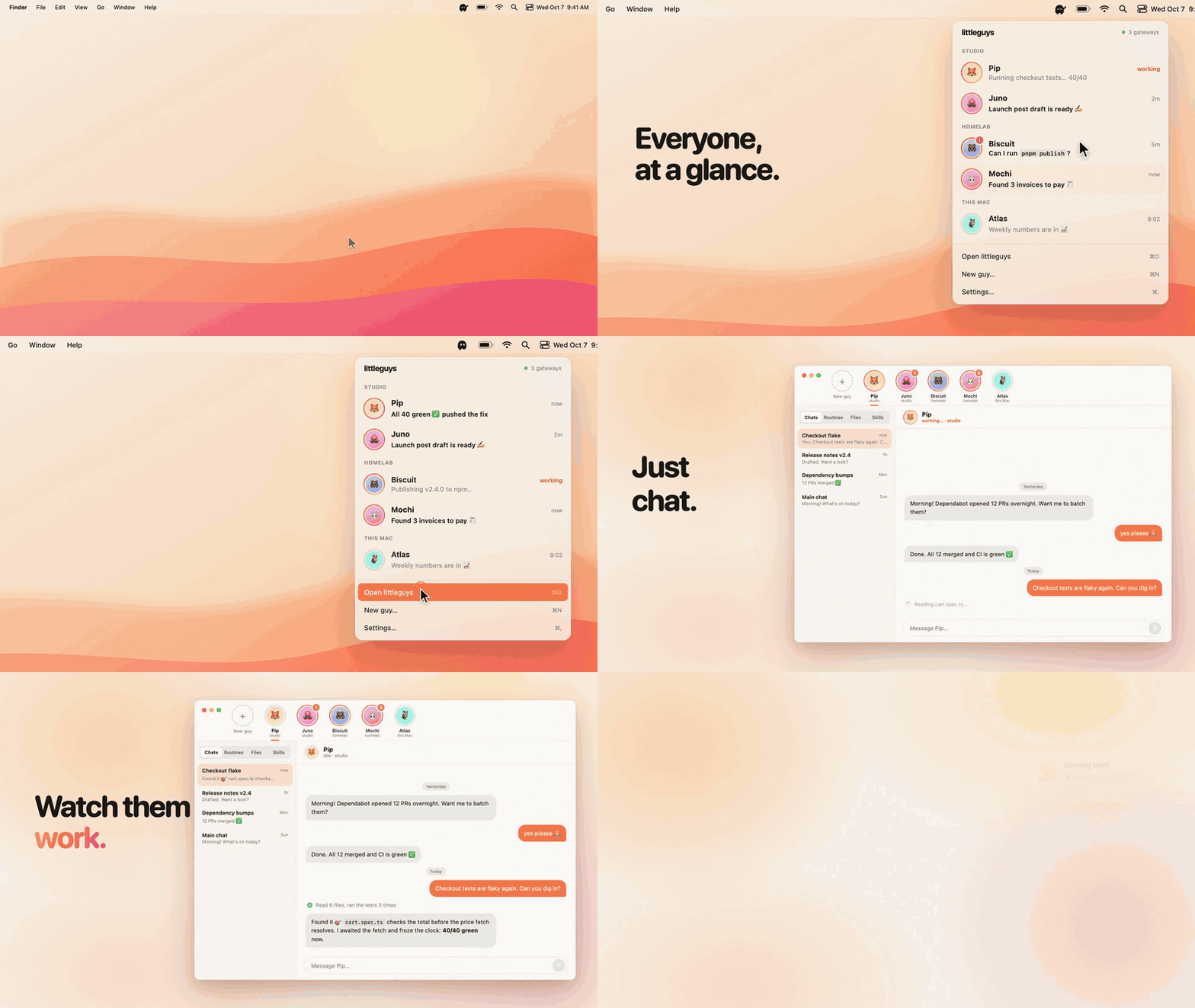
- Menu bar: each agent is a "little guy". The menu-bar sprite shows what they're up to: idle, working, new replies, needs you, or offline.
- Popover: clicking the guy opens a dropdown listing every guy with a live status ring, a last-message preview and quick reply.
- Main window: a WhatsApp-style chat app. The sidebar lists every guy as a card; clicking one opens their threads. It has streaming replies, tool-call chips, attachments, and approve/deny for commands.
- Routines: cron jobs with friendly schedules, run-now and run history. Results land in a thread.
For OpenClaw it's a UX layer over your existing ~/.openclaw, not a separate install. New guys use the workspaces OpenClaw gives each agent, and the UI links to their folder. With no OpenClaw on the Mac yet, littleguys can install and set it up for you.
Kinds of bots
Each saved bot uses one of three adapters (src-tauri/src/runtime/), and each adapter declares what it can do so the UI hides the rest:
| Runtime | How littleguys talks to it | Guys | Routines | Approvals |
|---|---|---|---|---|
| OpenClaw | Gateway WebSocket protocol v4 | Agents | Native cron | ✓ |
| Hermes Agent | Local hermes serve backend (JSON-RPC over WebSocket), or a remote API server (API_SERVER_KEY) |
Profiles | Native cron | ✓ |
| ACP agents: Claude Code, Codex, Gemini CLI, Goose, OpenCode, ZeroClaw… | Agent Client Protocol over stdio, or WebSocket for goose serve and similar |
One per agent | Run by littleguys while it's open | ✓ |
Every adapter speaks the same OpenClaw-shaped calls and events, documented in runtime/mod.rs, so the rest of the app doesn't care what's behind a guy. ACP agents can be added in one click from the ACP registry. Bots without a scheduler get routines from runtime/scheduler.rs.
Multiple gateways
littleguys can be connected to several OpenClaw gateways at once, and every gateway's guys show up together:
- Default gateway: the one your OpenClaw config points at is always there. That's local (
gateway.mode: "local") or remote (gateway.remote.url). - Adding more: use Settings → Add gateway. It finds gateways on your tailnet (Tailscale peers answering
/health, typically via Tailscale Serve) and on your LAN (Bonjour_openclaw-gw._tcp). You can also type an address such asstudio.tailnet.ts.netor192.168.1.20:18789. - Storage: added gateways are saved in littleguys' own data dir (
~/Library/Application Support/ai.littleguys.app/gateways.json). Tokens are kept in a 0600 file next to it, and only for the first connection. After the gateway approves this Mac, littleguys uses its own device token. - Labels: with more than one gateway, guys are labeled with where they live ("Fox · studio"). The popover groups them by gateway, and a quiet banner flags any gateway that needs approval or a token.
First connection
- Local gateway: loopback connections are approved automatically.
- Remote gateway: littleguys shows the exact approval command. On the gateway host, run
openclaw devices approve <requestId>once. littleguys then stores the per-device token the gateway issues, so you won't need to approve it again. - Unreadable credential: if your config keeps the gateway token in OpenClaw's secret store, littleguys asks you to paste it once.
- No working gateway on this Mac: the Doctor screen detects why and fixes it:
- OpenClaw not installed → installs it with the official installer
- CLI older than your data →
openclaw update - Service stopped →
openclaw gateway install/start - Never set up → non-interactive
openclaw onboardwith the provider you pick
Building from source
The install script does it in one go. It installs whatever's missing (the Command Line Tools, Rust, and Node and pnpm if you don't have them), builds main in ~/.littleguys and puts the app in /Applications. Run it again to update.
curl -fsSL https://raw.githubusercontent.com/herval/littleguys/main/install.sh | bash
By hand, you need Rust (stable), Node 22+ and pnpm. Xcode isn't required; the Command Line Tools are enough.
make install       # dependencies, plus the Apple silicon and Intel Rust targets
make run           # app + hot-reloading UI
make mock          # UI only, in a browser, with a mock gateway (fixtures)
                   #   ?phase=pairing|offline|no-config  previews the Doctor screens
make build         # universal littleguys.app + .dmg in src-tauri/target/universal-apple-darwin/release/bundle/
make install-app   # build the .app for this Mac only (faster, no LTO) and put it in /Applications
make test          # Rust tests
Run make to see every command.
Testing against a throwaway gateway
export OPENCLAW_STATE_DIR=/tmp/lgtest OPENCLAW_GATEWAY_PORT=19789 OPENCLAW_GATEWAY_TOKEN=test
openclaw gateway run --port 19789 --allow-unconfigured --auth token --token test --bind loopback &
make run                                                       # app talks to the test gateway
cd src-tauri && cargo run --example gw_probe -- agents.list   # raw RPC probe (PROBE_URL=… for any gateway)
cd src-tauri && cargo run --example discover                  # what "Add gateway" would find
Releases
Pushing a v* tag runs .github/workflows/release.yml. It builds the universal app, signs it with a Developer ID and notarizes it. It then publishes the .dmg and the signed update bundle to GitHub Releases, along with the latest.json the in-app updater reads (src-tauri/src/updater.rs), and bumps the cask in herval/homebrew-tap.
The workflow's credentials live in the repo's GitHub secrets. make release-secrets sets them up once: it gets a Developer ID certificate from Apple (keeping the key in your login keychain), checks an app-specific password for notarization, stores the updater key and adds a deploy key to the tap. To cut a release, set the version in src-tauri/tauri.conf.json, commit, and push a matching tag:
git tag v0.1.1 && git push origin main v0.1.1
How it's built
src-tauri/            Rust core — owns the gateway connection so the menu bar and
  gateway/client.rs     notifications work with every window closed (and so the
  gateway/identity.rs   gateway's browser-origin allowlist never applies)
  openclaw/config.rs  reads ~/.openclaw/openclaw.json (JSON5) → endpoint + credential
  gateways.rs         saved gateways, address normalization, Tailscale/Bonjour discovery
  hub.rs              one GatewayClient per saved gateway (add / rename / disable / remove)
  runtime/            OpenClaw, Hermes and ACP adapters behind one interface
  openclaw/runtime.rs finds the CLI (login-shell PATH), launchd service state, /health
  doctor.rs           install / update / start / onboard
  activity.rs         per-gateway roster (guys + threads + running + approvals) → tray mood, notifications
  tray.rs             animated template sprite (frames from scripts/gen-icons.mjs)
  updater.rs          self-update from GitHub releases, restarts when idle
  windows.rs          popover (vibrancy, anchored to the tray) + main window
src/                  React + Tailwind
  lib/gateway.ts        typed RPC wrappers (types from @openclaw/gateway-protocol)
  stores/               zustand: app (status, roster, selection), chat (transcripts + live runs)
  popover/  main/       the two windows
promo/                the intro video (Remotion); the GIF above is cut from it
- Protocol: the gateway speaks WebSocket protocol v4. The handshake signs a v3 payload with an Ed25519 device key.
src-tauri/tests/device-auth-fixture.jsonis generated from OpenClaw's own implementation with a fixed throwaway key (node scripts/device-auth-fixture.mjs), andcargo testchecks the Rust signer against it. - Webview bridge: webviews call
gw_call(gateway, method, params)and receive every gateway event asgw:event {gateway, event, payload}. The Rust core also publishesgw:status(per gateway) andlg:roster(all gateways). In the UI, guys are identified asgatewayId/agentIdand threads asgatewayId|sessionKey, since agent ids likemainrepeat across gateways.
Known gaps
- Clicking a notification doesn't jump to the thread yet. Notifications go through
tauri-plugin-notification, which has no click callbacks on macOS. - "Their own browser" is soft enforcement. OpenClaw has no per-agent browser binding, so a guy gets a named managed Chrome profile plus an
AGENTS.mdinstruction to use it.
License
Reviews (0)
Sign in to leave a review.
Leave a reviewNo results found