ai-cut
Health Uyari
- License — License: Apache-2.0
- Description — Repository has a description
- Active repo — Last push 0 days ago
- Low visibility — Only 5 GitHub stars
Code Uyari
- process.env — Environment variable access in .github/workflows/release.yml
- fs module — File system access in .github/workflows/release.yml
Permissions Gecti
- Permissions — No dangerous permissions requested
Bu listing icin henuz AI raporu yok.
An AI-native video editing workstation that teaches AI to edit videos, supporting MCP and Agent Skills to connect to any AI Harness!让AI学会剪视频的AI原生视频编辑工作站,支持MCP和Agent Skills接入任意AI Harness!



What is AI Cut?
AI Cut is a small, AI-native video editor for your desktop — cut, caption, voice, mix, and export in one lightweight app, and let an AI agent work in the timeline alongside you.
It is a real editor: a multi-track timeline, a media library, an inspector, text clips, captions, voiceover, audio and video AI tools, and export to MP4, ProRes, or GIF. It is also built to be operated by a model — a bundled Skill teaches any AI harness to drive the running app over MCP, so an agent can import media, add tracks, place and trim clips, rewrite text, and read the project back while you watch the UI update.
Everything runs on your own machine. No account, no uploads, and no API key needed for the editor itself.
Why this matters
Models got good at writing code because they could run it through a coding-agent framework; models got good at 3D modelling because they could drive real modelling software through Blender MCP. In both cases the model gets a real tool, a real result, and a real feedback loop — and that is what makes fast iteration possible.
Video has mostly been missing that loop. A model can generate a clip, but it cannot work on a timeline the way an editor does: no arrangement to edit, no tracks to balance, no undo history, no way to notice that its last cut made things worse.
AI Cut is a small, deliberate attempt to close that gap. It is a real editor an AI agent can operate through a Skill and MCP, which makes it useful for:
- Testing what a model actually knows about editing — not whether it can generate footage, but whether it can build a sequence, choose shots, and fix pacing.
- Collecting real editing traces — every agent edit lands in a normal project with a normal undo history, so a session becomes data about how a model reasons about video.
- A step toward models that can edit video the way they write code — with a timeline that talks back.
Lightweight by design
Being small is a feature, not a compromise.
- A lightweight footprint — no Electron, no cloud, no bundled model zoo. The app is a Tauri build, and ffmpeg / ffprobe ship as static sidecars, so users do not need ffmpeg installed.
- Fast to start — nothing heavyweight loads at boot; AI models are pulled in only when you use them.
- Heavy AI stays where it belongs — generation is deliberately external. Your AI harness can generate or source footage, then hand the files to AI Cut for editing, captioning, mixing, and export.
- Built to be extended — every edit is a serializable command, so new editing operations do not need a new CLI or MCP tool.
- OFX plugin manager — the download manager handles installed / external / available OpenFX plugins, search, import, updates and removal; the OFX plugins pane opens the interface of an installed plugin. Free/open-source entries come from the AI Cut OFX Registry, with SHA-256 verification. GPL/AGPL entries may download from the author's upstream release, but the app never hosts or bundles their binaries. The native host (
crates/ofx-host, CLIofx-host probe|render) loads OFX 1.5.1 bundles at the input size; clips can carry aneffects[]chain managed in the inspector, with parameters edited in a dedicated Parameters pane, previewed when paused, and baked for export.
Drive it from any AI harness
AI Cut ships a Skill (skills/aicut) that teaches an AI agent how to operate the running app — reading and writing the project, importing media, adding tracks and clips, moving / trimming / splitting, changing text and clip properties, undo and redo, plus production, storyboard, framework, review, and asset references loaded on demand. It works over the built-in MCP server, so any harness that supports Agent Skills can pick it up.
Option 1 · Install from the command line
npx skills add heshengtao/ai-cut
Option 2 · Ask your agent to install it
Install this Skill: https://github.com/heshengtao/ai-cut
The app also ships aicut, a thin MCP client installable onto your PATH from Settings. The command surface is the tool surface:
aicut status
aicut tools
aicut call get_project
Every edit an agent makes goes through the same command pipeline as the UI: it lands in the undo history, shows up in the interface, and is attributed to the agent — so you can always see what it did and undo it.
Features
🎬 Timeline editing — Compose on a real timeline
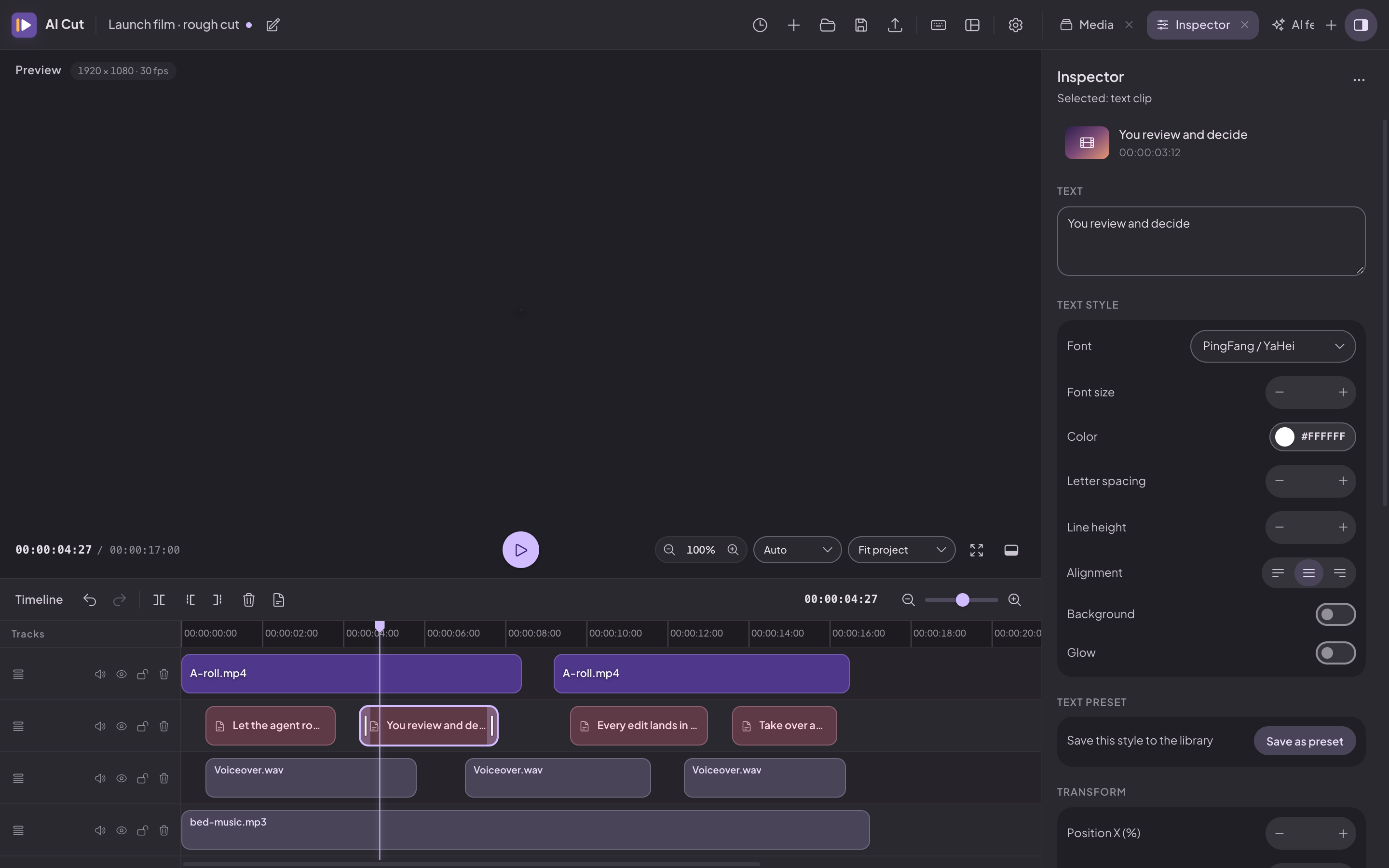
Lay out a video the way you hear it. Drag clips across tracks, split them where the story changes, trim the edges, and let snapping and the frame grid keep everything aligned. Video, audio, image, and text clips share the same timeline, and every edit is one command in one undo history.
- Multi-track arranging — video, audio, image, and text clips side by side; cross-track drag and drop; marquee select
- A real editing toolkit — move, split, trim, snapping, frame grid
- Undo that respects gestures — drags and sliders coalesce into one step, so undo goes back to before the gesture
- Safe sessions — autosave, crash-draft recovery, and project history
- Text on the timeline — title and subtitle clips with editable styling
🎞️ Media & inspector — Read the material, shape the shot
Import a file and AI Cut probes it immediately: duration, resolution, frame rate, and audio. The media library shows thumbnails and waveforms; the inspector gives you the parameters behind the selected clip, so framing, layering, and sound are edited in place rather than in a separate dialog.
- Drag-in import — ffprobe metadata, thumbnails, waveforms, and cached previews
- Transform — position, scale, rotation, opacity, blend modes, corner radius
- Audio per clip — gain, fades, pitch, stereo balance, mute
- Text styling — font, size, colour, spacing, background, stroke, shadow, glow
- Project output — resolution and frame rate changes re-fit clips proportionally
🤖 AI & automation — Turn footage into material you can keep editing
The AI features are built for real sessions, not demos. Point them at a clip and they hand back something you can keep editing: a caption track you can correct, a voiceover aligned to its original timing, a cleaner vocal take, separated stems you can rebalance. Local tools run on your own hardware.
- Captions — local speech recognition into an editable caption track
- Voiceover — local TTS plus OpenAI, ElevenLabs, Azure, Google, Baidu, MiniMax, Volcengine, or custom HTTP
- Audio AI — loudness matching, denoise, vocal polish, source separation, audio translation
- Video AI — super resolution, frame interpolation, smart reframing, camera tracking
- Media probe — one call returns metadata, motion/cut samples, face/person boxes, and a local transcript
- Review loop —
film.jsonimport, structured review notes (severity,sceneId,resolved), dirty-segment detection, range re-rendering with a content-hash cache, take comparison (SSIM + side-by-side frames), and contact sheets - Offline by design — the editor and its local models need no account and no upload
🔌 MCP server & clip agent — Let an AI agent work in your session
Flip one switch and your project becomes something an AI assistant can operate. The built-in MCP (Model Context Protocol) server exposes the session over HTTP bound to 127.0.0.1 — connect your agent, hand it a task, and watch it add tracks, place clips, or rewrite text while the UI updates in real time. The same tool definitions also power the built-in clip agent, an OpenAI-compatible chat panel with streaming, tool calls, and a branching session tree.
- MCP over HTTP — a loopback-only endpoint, JSON and SSE transports
- Project lifecycle —
new_project/open_project/save_projectread and write the project JSON directly, with no save/open dialogs - Live edits — agent actions appear immediately as ordinary project changes
aicutCLI — a thin client; new tools need no CLI changesaicut start— auto-discovers the installed app and detaches it from the launcher's job (Windows included)- Clip agent — OpenAI-compatible endpoint, streaming answers, tool cards, session branches
- Skills — editing and production docs loaded on demand by the agent
📦 Export & updates — Finish and ship
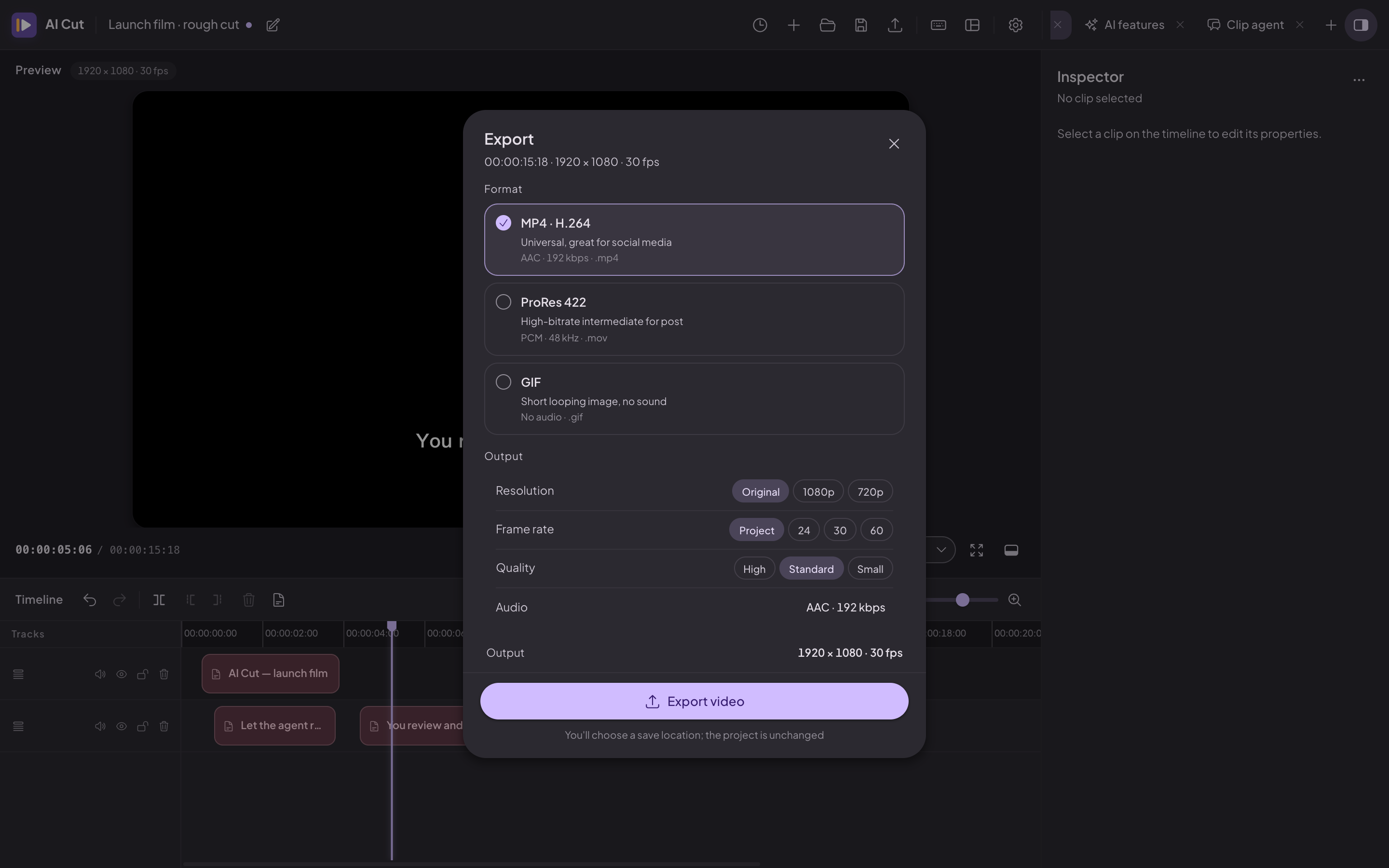
When the cut is right, render it. Pick a delivery format and AI Cut writes a release-ready file in the background while you keep working. Installed apps check GitHub Releases for signed updates, so a new version is one click away.
- Formats — MP4 / H.264, ProRes 422, GIF
- Output controls — presets or custom width/height, contain/cover fit, frame rate, quality; GIF palette, dither, and loop
- Background export — live progress and cancellation
- Signed auto-update — startup check, manual check, download, install, restart
- Verified bundles — the updater public key is embedded; the private key lives only in the release environment
Installation
Pre-built binaries are published on the GitHub Releases page.
Requirements
- Rust (stable) with Cargo
- Node.js ≥ 20 and pnpm (pnpm 11 recommended)
- Tauri v2 system prerequisites — see https://tauri.app/start/prerequisites/
Build from Source
git clone https://github.com/heshengtao/ai-cut.git
cd ai-cut

pnpm install
pnpm tauri dev        # run the app in development
pnpm tauri build      # produce a release build
Other useful commands:
pnpm build            # type-check the frontend and build it
pnpm test             # unit tests (Vitest)
pnpm fetch:sidecars   # prepare the ffmpeg / ffprobe sidecars
pnpm build:aicut      # build the aicut CLI
ffmpeg and ffprobe ship as static binaries, so users do not need ffmpeg installed. Model files live in src-tauri/resources/models/; larger models are downloaded on demand.
Platform Support
| Platform | Status |
|---|---|
| Windows (x86_64) | ✅ Supported |
| macOS (Apple Silicon) | ✅ Supported (see the “app is damaged” note below) |
| Linux (x86_64 / arm64) | ✅ Supported |
macOS says “App is damaged”? The app is ad-hoc signed (not notarized), so macOS
quarantines downloads. Run this in Terminal, then open the app normally:xattr -cr "/Applications/AI Cut.app"
Intel Macs are not supported by the current release pipeline. Release builds are
produced for Apple Silicon (aarch64-apple-darwin) only.
FAQ
Is AI Cut free?
Yes. AI Cut is open source under Apache 2.0. There are no paid tiers and no feature gates.
Does it work offline?
Yes. Editing, export, and the local AI models run on your machine. Network access happens only when you start a model download, check for updates, or configure a cloud service such as an OpenAI-compatible agent endpoint or cloud TTS.
Do I need a GPU?
No. The bundled AI models run on CPU; there is no CUDA or driver setup. Larger models take longer on slower machines, but they do not require a GPU.
Which AI models ship with the app?
Small models ship in the bundle so basic features work immediately. Larger models — speech recognition, TTS, source separation, super resolution, and frame interpolation — download on demand from the in-app model manager and are stored outside the source tree.
Do I need the app running to let an agent drive it?
Yes. The Skill and the aicut CLI talk to a running AI Cut over MCP, so start the app first (aicut status will tell you if it is up).
Can an agent export the final video?
Yes. export_video renders the timeline over MCP — MP4, ProRes, or GIF. outputPath is optional: when omitted, AI Cut writes next to the project file (or to your Downloads folder for an unsaved project) and returns the final path. Captions, voiceover, audio / video AI, and export are all available as tools, so the agent can prepare the timeline, render it, and hand the file back for review.
License
Apache-2.0. See LICENSE.
Third-Party Licenses
This project builds on third-party open source software. Dependency licenses are declared in package.json, src-tauri/Cargo.toml, and the manifests under crates/. Bundled FFmpeg binaries and AI model weights keep their own upstream licenses; model licenses are collected in src-tauri/resources/models/LICENSES/.
Yorumlar (0)
Yorum birakmak icin giris yap.
Yorum birakSonuc bulunamadi