pairlet
Health Pass
- License — License: MIT
- Description — Repository has a description
- Active repo — Last push 0 days ago
- Community trust — 117 GitHub stars
Code Fail
- network request — Outbound network request in .github/workflows/ios-release.yml
- rm -rf — Recursive force deletion command in deploy/mirror-sync.sh
Permissions Pass
- Permissions — No dangerous permissions requested
No AI report is available for this listing yet.
Pairlet (formerly CC Pocket / cc-pocket) — Continue your local AI coding tasks from phone, tablet, or desktop.
Pairlet
Pairlet was formerly called CC Pocket (cc-pocket). This is the same project, with its history and existing download links preserved.


English | 简体中文
Your coding agents stay on your computer. You stay in control from anywhere.
Pairlet is an open-source, local-first control plane for command-line coding agents. The agent keeps running on your own machine, against your own checkout; from a phone, a tablet or another computer you watch it work, answer the permission prompts that block it, continue the same session, and read what it changed. Traffic is end-to-end encrypted and passes through a zero-knowledge relay that only ever forwards ciphertext — no Pairlet account, no content logging. Clean-room Kotlin, MIT.
v1.9.4 drives six agent backends — Claude Code, OpenAI Codex, OpenCode, Kimi Code (Preview), ZCode and DeepSeek. They are not equivalent: see the capability matrix before you pick one.
🌐 Website · 📖 User manual · 💬 Support, no sign-in · 📦 Latest release
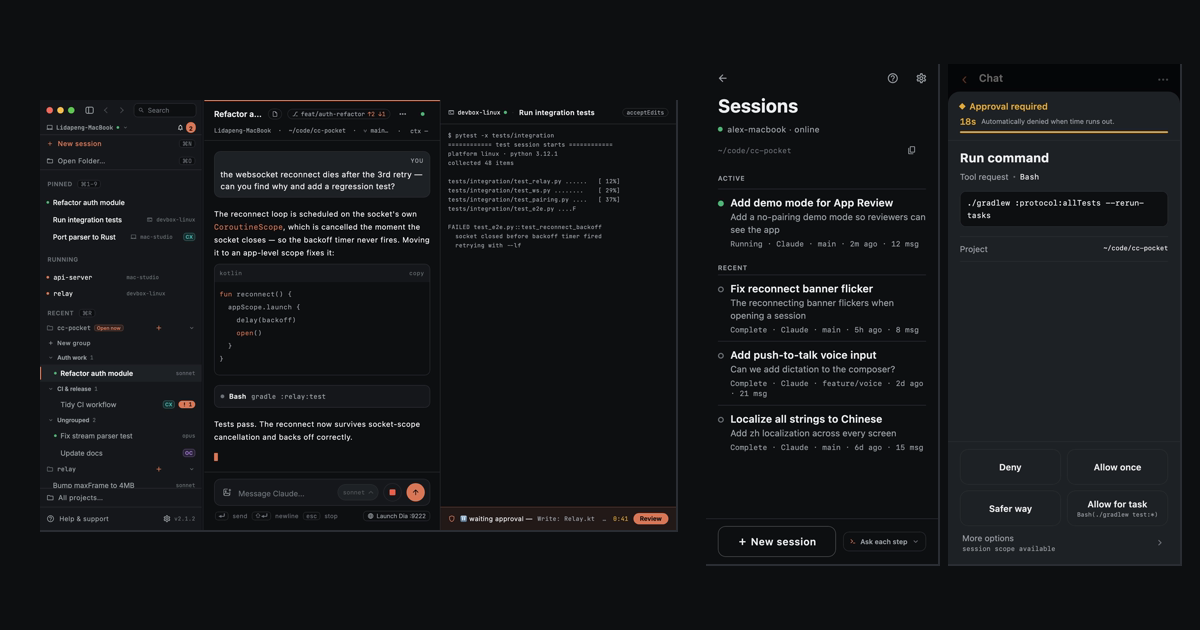
Real product UI with scripted demo data — regenerate with bash marketing/site/generate-assets.sh. Provenance: site/assets/product/manifest.json.
Quick start
1 · Get the app — App Store (iPhone · iPad) · TestFlight beta · Android APK. Prefer a computer? See the Desktop app.
2 · Install the daemon on the machine that runs your agent CLI — any supported one, not Claude specifically:
curl -fsSL https://raw.githubusercontent.com/heypandax/pairlet/main/scripts/install.sh | bash   # macOS · Linux
irm https://raw.githubusercontent.com/heypandax/pairlet/main/scripts/install.ps1 | iex          # Windows
3 · Pair — run cc-pocket-daemon pair, then scan the QR it prints (or type the 6-digit code) in the app. You are connected end-to-end.
Package managers, mirrors, updates and per-platform notes: Install details.
The four jobs
| Job | What you get | |
|---|---|---|
| 01 | Watch | Streaming output, tool events with timing, sub-agent cards and background-task state, across devices. Filter projects, sessions and usage by agent. |
| 02 | Approve | A permission request reaches your phone the moment the agent raises one. Allow or deny in seconds; no answer times out to a safe deny. |
| 03 | Continue | Take a running session over in place instead of forking it, start a new task straight from the phone or the desktop app, and get missed output backfilled after a reconnect. |
| 04 | Inspect | Changed files with line-level diffs, file preview, context and usage. Images in your own prompts stay visible in replay. |
Capability differs by backend — the matrix below is the source of truth.
Agent support
Public capability claims for v1.9.4, audited against commit e9ee816f on main. Machine-readable copy: site/public-capabilities.json.
| Agent | Core session | Approval & mode | Changes & diff | Usage |
|---|---|---|---|---|
| Claude Code | ✓ Yes | ✓ Yes | ✓ Yes | ✓ Yes |
| OpenAI Codex | ✓ Yes | ✓ Yes | ✓ Yes | ✓ Yes |
| OpenCode | ✓ Yes | ✕ No — always Full access | ✕ No | ✓ Yes |
Kimi Code Preview |
✓ Yes | ✓ Yes | ✕ No | ✓ Yes · new in v1.8.0 |
| ZCode | ✓ Yes | ✓ Yes | ✕ No | ✓ Yes · new in v1.8.0 |
DeepSeek Harness narrow v1 |
✓ Yes | ✓ Yes | ✕ No | ✕ No |
- Core session means discover, replay, create, resume, send and receive text, and live streaming. Every backend does all of it.
- OpenCode has no enforceable interactive approval.
opencode runhas no approval protocol, so those sessions run at Full access and the app says so up front instead of offering modes it cannot enforce. - Kimi Code is Preview. DeepSeek is supported, but narrow: approvals and multiple-choice questions are bridged to the app, but the sandbox mode is fixed at launch (changing it relaunches the session), and there is no Changed-files/diff view, no usage accounting and no model switching.
- DeepSeek Harness has no timeout of its own. Left alone, an unanswered approval or question blocks its turn indefinitely — it does not deny. Pairlet puts the request on the daemon's normal approval window instead: an approval that expires is answered reject, and a question that expires is answered skipped, so an unanswered request ends the wait rather than hanging it. DeepSeek also has no "always allow" — every request is a one-off decision.
- Boundaries follow the release. Full detail: Features and the User manual.
Architecture & trust boundary
flowchart LR
    app["📱🖥️ Pairlet app<br/>(phone · tablet · desktop)"] -- "wss · ciphertext" --> relay["relay<br/>(zero-knowledge broker)"]
    relay -- "wss · ciphertext" --> daemon["local daemon<br/>(your computer)"]
    daemon -- "stdio" --> agent["agent CLI<br/>(claude · codex · opencode · kimi · zcode · DeepSeek)"]
The daemon runs on your computer, drives the agent CLI as a subprocess and dials out to the relay — no inbound ports to open. The relay pairs your devices and routes opaque encrypted frames; it holds no message content and no private keys. The app and the daemon run an end-to-end session (P-256 ECDH + HKDF + AES-256-GCM, an X3DH/Noise-style handshake), so plaintext never leaves the two trusted endpoints. On the same network the app connects to the daemon directly for lower latency; the relay stays as the from-anywhere fallback. Pairings expire and can be revoked.
Honest limits: the agent still executes with your own operating-system permissions — end-to-end encryption is not a sandbox. OpenCode sessions have no enforceable interactive approval. The custom Noise-style channel has not had an independent third-party audit. Threat model: docs/SECURITY.md. Report vulnerabilities privately via GitHub security advisories.
Platforms & distribution
| Surface | Official packages |
|---|---|
| Phone / tablet app | iOS · iPadOS (App Store, TestFlight) · Android APK |
| Desktop app | macOS Apple Silicon · Intel (signed .dmg) · Windows x86_64 .msi. No official Linux desktop package — build from source. |
| Local daemon | macOS Apple Silicon · macOS Intel · Linux x86_64 · Linux arm64 · Windows x86_64 |
| HarmonyOS | Signed HAP, Preview — limited capability |
| Relay | Hosted zero-knowledge relay by default; self-hosting supported |
The desktop app and the local daemon are different packages: the app is a client, the daemon is what actually runs the agent.
Install details
macOS — signed & notarizedcurl -fsSL https://raw.githubusercontent.com/heypandax/pairlet/main/scripts/install.sh | bash
cc-pocket-daemon pair
Verifies the download against the release's SHA256SUMS, installs under ~/.local (one directory per version), and registers the launchd service so it runs on login and reconnects itself. Homebrew: brew install --cask heypandax/tap/cc-pocket (use the full name; an unrelated cask is also called cc-pocket).
curl -fsSL https://raw.githubusercontent.com/heypandax/pairlet/main/scripts/install.sh | bash
cc-pocket-daemon pair
Pulls a self-contained tarball (bundled JRE, no system Java), installs under ~/.local and registers a systemd --user service. Voice transcription uses ffmpeg instead of macOS's afconvert. There is no official Linux desktop app package — build it from source.
irm https://raw.githubusercontent.com/heypandax/pairlet/main/scripts/install.ps1 | iex
One command: installs, registers a logon Scheduled Task, and drops straight into pairing. Scoop: scoop bucket add heypandax https://github.com/heypandax/scoop-bucket then scoop install cc-pocket-daemon.
GitHub downloads crawl there, so the installer and release artifacts are mirrored on the relay: curl -fsSL https://pocket.ark-nexus.cc/dl/install.sh | bash (Windows: irm https://pocket.ark-nexus.cc/dl/install.ps1 | iex). Same script, checksum-verified, with automatic fallback to GitHub. The daemon's self-update uses the mirror too.
cc-pocket-daemon version reports what is running, how it was installed, and the single command that updates this install — offline, and whether or not the daemon is up. The app shows the same under Settings ▸ Versions.
A daemon installed by the one-liner keeps itself current: it checks daily and applies the update in the background. Turn that off with cc-pocket-daemon config --auto-update off and you get a phone notification instead. Homebrew, Scoop and Windows installs never self-apply — update them through their own package manager (brew upgrade --cask heypandax/tap/cc-pocket, scoop update cc-pocket-daemon). The desktop app states it plainly when an update check fails, rather than showing "up to date".
Using OpenCode
Install the OpenCode CLI on the computer running the daemon and configure a model provider in OpenCode. Confirm that opencode --version and an OpenCode conversation work there first.
The daemon probes the standalone install directory ~/.opencode/bin as well as PATH and package-manager locations, so a background service can find a standard installation without a manually created symlink. This lookup fix is newer than v1.9.8; existing v1.9.8 installations need a daemon release containing the fix.
For a custom CLI location or an older daemon, persist its absolute path with cc-pocket-daemon service-install --apply --opencode-bin /absolute/path/to/opencode. This restarts the service; finish active sessions first and include any existing custom service options, such as --relay. Exporting a variable in a terminal does not change the environment of an already running background service.
Works with third-party gateways
If you route Claude Code through an LLM gateway or API relay (ANTHROPIC_BASE_URL), the official Remote Control is disabled as of v2.1.196 — it requires talking to api.anthropic.com directly. Pairlet drives the CLI over stdio on your machine, so the endpoint does not matter. The daemon detects a gateway ANTHROPIC_BASE_URL and the model picker leads with one-tap presets for common vendor ids (DeepSeek, GLM, Kimi, Qwen, MiniMax) alongside a free-form custom id field. Which model an id actually reaches is decided by your gateway.
Build from source
| Module | What | Stack |
|---|---|---|
:protocol |
Shared wire protocol (pocket/* frames) — single source of truth |
Kotlin Multiplatform + kotlinx.serialization |
:daemon |
Runs on your computer; drives the agent CLI as a subprocess, dials out to the relay | Kotlin/JVM + Ktor |
:relay |
Cloud broker: device-key pairing, ciphertext routing, multi-tenant, rate-limited | Kotlin/JVM + Ktor + SQLite |
:mobile |
The Pairlet app | Compose Multiplatform — Android · iOS · desktop |
Requires JDK 17 (any distribution — the Gradle toolchain downloads one if yours differs), the Android SDK (ANDROID_HOME or local.properties; the Android modules are configured even for JVM-only tasks), and at least one installed, logged-in agent CLI. To build the mobile app, copy the committed Firebase placeholder once (a real Firebase project is only needed for push/analytics):
cp mobile/composeApp/google-services.json.template mobile/composeApp/google-services.json
Local single-machine (no relay), for development:
./gradlew :protocol:check                         # protocol contract test
./gradlew :daemon:run --args="run"                # daemon — local WebSocket on 127.0.0.1:8765
./gradlew :daemon:run --args="test-client"        # drive it against a real agent CLI
Through the relay (off-LAN), the real product path:
./gradlew :daemon:installDist
daemon/build/install/cc-pocket-daemon/bin/cc-pocket-daemon run --relay wss://<your-relay>
daemon/build/install/cc-pocket-daemon/bin/cc-pocket-daemon pair    # in another terminal
Build the app: Android via ./gradlew :mobile:composeApp:assembleDebug; iOS via iosApp/iosApp.xcodeproj (Xcode — first copy iosApp/iosApp/GoogleService-Info.plist.template to GoogleService-Info.plist next to it). Desktop (including Linux) via ./gradlew :mobile:composeApp:packageDistributionForCurrentOS. On-device iOS install: docs/ios-device.md.
Docs
- Website · Full feature list
- User manual · Smart support, no sign-in
- Security model & threat analysis —
docs/SECURITY.md - Run / operate the daemon —
docs/RUN.md· User guide (中文) —docs/USAGE.md - Relay deployment (Caddy + Cloudflare + systemd) —
deploy/README.md - Product media pipeline —
marketing/site/README.md - Design deliverables —
docs/design/· Provenance / clean-room statement —docs/ANTIPLAGIARISM.md
Contributing
Issues and PRs welcome — CONTRIBUTING.md covers build prerequisites, test entry points, and which scripts are maintainer-only. Please report security issues privately via GitHub security advisories.
License
MIT — see LICENSE.
Reviews (0)
Sign in to leave a review.
Leave a reviewNo results found