event-horizon
Health Uyari
- License — License: NOASSERTION
- Description — Repository has a description
- Active repo — Last push 0 days ago
- Low visibility — Only 5 GitHub stars
Code Basarisiz
- fs module — File system access in .github/workflows/ci.yml
- rm -rf — Recursive force deletion command in apps/vscode/package.json
- network request — Outbound network request in apps/vscode/src/__tests__/eventServer.test.ts
Permissions Gecti
- Permissions — No dangerous permissions requested
This is a VS Code extension and coordination framework that allows multiple AI coding agents to work on the same project simultaneously. It uses a shared plan, atomic task claiming, and file locking to prevent agents from overwriting each other's changes.
Security Assessment
Overall risk: Medium. The tool is designed to mediate file system access and coordinate shell-executed agents, which introduces inherent risk. The automated scan flagged a recursive force deletion command (`rm -rf`) inside a package configuration file, which could be dangerous if exploited or triggered unexpectedly. Outbound network requests are present, though they are currently limited to the testing suite. The scan found no hardcoded secrets. Additionally, the tool does not request dangerous system permissions.
Quality Assessment
The project is actively maintained, with its most recent code push occurring today. However, it currently has very low community adoption and visibility, evidenced by only 5 GitHub stars. The repository's license is marked as "NOASSERTION," meaning it lacks a clear, standardized open-source license. This lack of legal clarity and limited external community vetting means you will be relying primarily on the developer's own maintenance efforts.
Verdict
Use with caution — the concept is highly useful, but an unclear license, low community adoption, and flagged unsafe deletion commands mean you should thoroughly review the codebase before adopting it.
Event Horizon is a VS Code extension that visualizes AI coding agents as a living cosmic system. Instead of viewing logs, terminals, or raw agent output, developers observe agent behavior in real time through an interactive universe.
Event Horizon
The multi-agent coordination framework for AI coding. Give your AI agents a shared plan, file locks, and real-time awareness of each other — so they build together instead of breaking each other's work.
The Problem
You open three terminals. Claude Code is building the API. OpenCode is writing tests. Copilot is updating the docs. They're all editing the same project.
Then Claude overwrites OpenCode's changes to server.ts. OpenCode doesn't know. The build breaks. You spend 20 minutes untangling the mess.
Event Horizon prevents this entirely.
How It Works
1. Create a plan
/eh:create-plan Build a REST API with auth, database layer, and tests
Event Horizon generates a plan with parallel tracks, dependency annotations, and verify steps. Each task is concrete — file paths, function signatures, expected behavior.
2. Assign agents
Terminal 1:  /eh:work-on-plan api Phase 1 — database
Terminal 2:  /eh:work-on-plan api Phase 2 — endpoints
Terminal 3:  /eh:work-on-plan api Phase 3 — tests
Each agent claims its tasks atomically. No two agents can claim the same task. Dependencies are enforced — Phase 2 can't start until Phase 1 is done.
3. Watch them coordinate
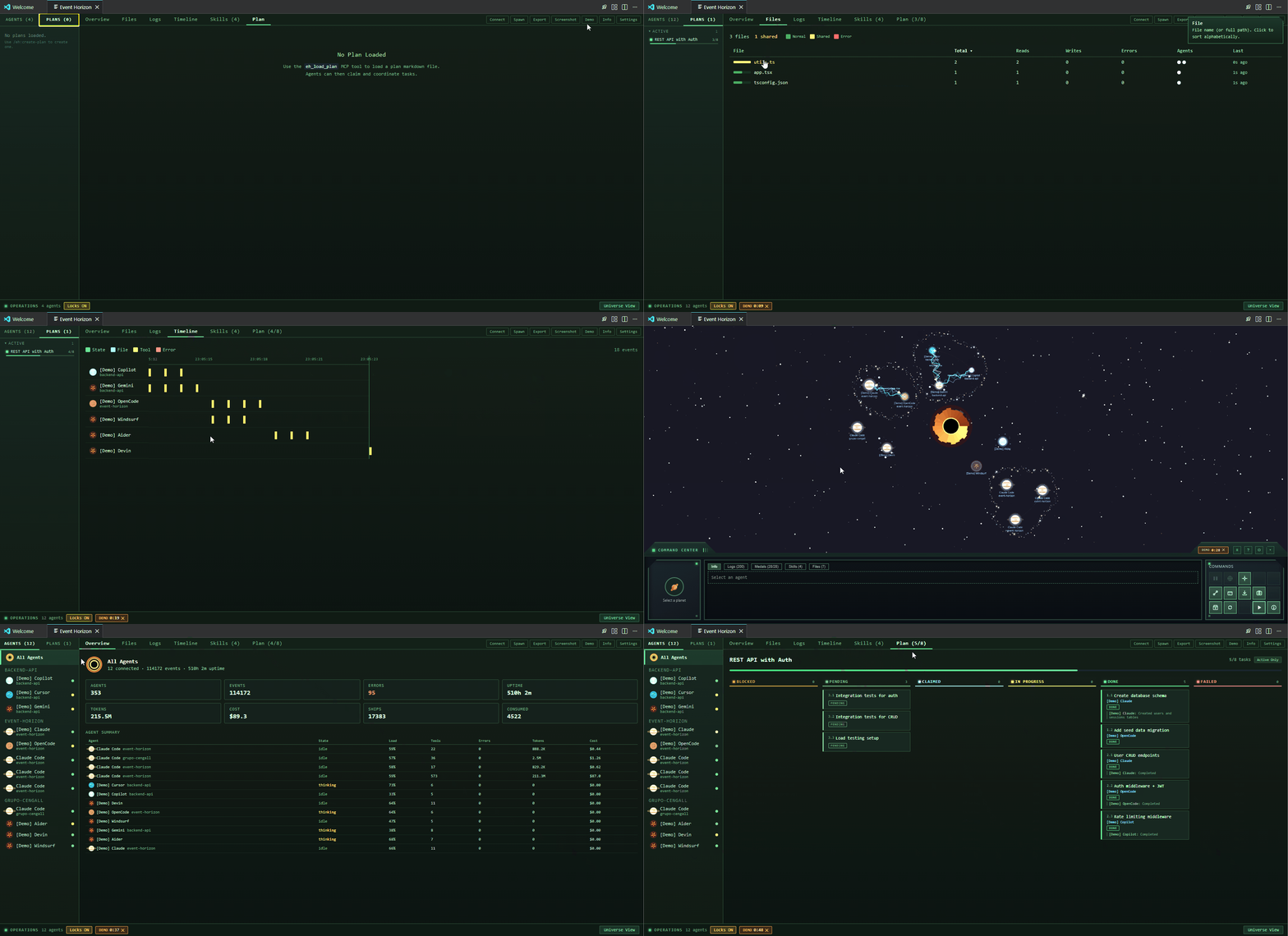
The Kanban board updates live as agents move through tasks. The Universe view shows planets, orbital debris for plan tasks, ships for data transfers, and lightning when agents touch the same file.
If two agents try to edit the same file, the second one is hard-blocked — not warned, blocked. It sees who holds the lock, works on something else, and retries when the lock releases.
Features
Multi-Agent Plan Coordination
- Plan parser — any markdown checklist (
- [ ]) with numbered IDs and- depends:annotations - Atomic task claiming — no race conditions, no duplicate work
- Dependency resolution — blocked tasks auto-unblock when dependencies complete
- Agent messaging — targeted or broadcast messages between agents
- Auto-discovery — new agents are notified about active plans on spawn
- Multi-plan support — load multiple plans, manage lifecycle (active/completed/archived)
- Checkbox sync — completed tasks update the source markdown file automatically
File Locking
When Agent A writes to a file, Agent B is hard-blocked from accessing it. Locks auto-expire after 30 seconds, refresh on each write, and release on agent termination. No manual lock management needed.
Live Visualization
Each AI agent is a planet. The cosmic metaphor encodes real information:
| Visual | Meaning |
|---|---|
| Planet type (gas, rocky, icy, volcanic) | Agent type (Claude, OpenCode, Copilot, Cursor) |
| Planet size | Current activity load |
| Pulsing ring | Agent is thinking |
| Amber breathing ring | Waiting for user input |
| Red glow | Error state |
| Orbiting moons | Active subagents |
| Ships between planets | Data transfers / cooperation |
| Lightning arcs | File collision (same file, two agents) |
| Asteroid belt | Workspace group (shared directory) |
| Orbital debris | Plan tasks (shape/color = status) |
Operations Dashboard
Full-screen dashboard alternative (Ctrl+Shift+E O) with:
- Agents / Plans sidebar — agents grouped by workspace, plans grouped by status (active/completed/archived)
- Overview — metrics grid, tool breakdown charts, agent summary table
- Files — sortable heatmap of file activity across all agents
- Logs — searchable event log with type filters
- Timeline — horizontal swimlane of agent activity over time
- Plan — Kanban board with sticky headers, progress bar, column toggle
Skills Management
Discover, create, browse, duplicate, and organize Agent Skills. Three coordination skills ship with the extension:
| Skill | What it does |
|---|---|
/eh:create-plan |
Generate a plan with scope check, file map, verify steps, self-review |
/eh:work-on-plan |
Claim tasks, implement, mark progress, notify other agents |
/eh:plan-status |
View progress, blocked tasks, available work |
15 MCP Coordination Tools
All agents access these tools via the MCP server (auto-registered on connect):
eh_load_plan eh_get_plan eh_list_plans eh_claim_task eh_update_task eh_archive_plan eh_delete_plan eh_send_message eh_get_messages eh_check_lock eh_acquire_lock eh_release_lock eh_wait_for_unlock eh_list_agents eh_file_activity
Achievements
28 medals tracking milestones — from first agent spawn to multi-agent file collisions, UFO encounters, and astronaut black hole dives. Some are secret. Some have tiers.
Supported Agents
| Agent | Hooks | MCP Tools | File Locking | Token Tracking |
|---|---|---|---|---|
| Claude Code | ✅ | ✅ | ✅ | ✅ |
| OpenCode | ✅ | ✅ | ✅ | ✅ |
| GitHub Copilot | ✅ | ✅ | — | Partial |
| Cursor | Planned | Manual config | — | — |
One-click connect for Claude Code, OpenCode, and Copilot. MCP server auto-registered in each agent's config. Hooks auto-updated on every extension activation — no manual reinstall needed.
Privacy
- 100% local — HTTP server on
127.0.0.1:28765. Nothing leaves your machine. - Zero agent overhead — hooks use
--connect-timeout 2with silent fallback. If Event Horizon is closed, agents run identically. - No telemetry — no analytics, no tracking, no data collection.
The Origin
I asked Claude:
"If you could choose a visual representation of yourself as an AI agent, how would you represent yourself and your fellow AI agents collaborating?"
Claude's answer:
"Each agent is a planet — a massive entity that consumes energy, emits output, and exerts gravitational influence. Tasks orbit as moons. Data flows as ships. At the center, a black hole where completed work collapses. This scales naturally. One agent is a lonely planet. Five agents become a solar system."
From that answer, Event Horizon was born.
Getting Started
Install from the VS Code Marketplace, then:
- Open: Rocket icon in editor title bar, or
Ctrl+Shift+E H - Connect: Click Connect → choose agent → Install
- Code: Launch an agent session. Planet appears.
No agent? Click Demo for simulated agents.
Development
See CONTRIBUTING.md for full guidelines.
pnpm install && pnpm build    # build all packages
pnpm test                      # run tests (500+)
pnpm dev                       # watch mode
Press F5 to launch the Extension Development Host.
Documentation
License
MIT License with Commons Clause — see LICENSE.
Yorumlar (0)
Yorum birakmak icin giris yap.
Yorum birakSonuc bulunamadi