watch-anything
Health Pass
- License — License: MIT
- Description — Repository has a description
- Active repo — Last push 0 days ago
- Community trust — 16 GitHub stars
Code Warn
- process.env — Environment variable access in scripts/transcribe-video.mjs
Permissions Pass
- Permissions — No dangerous permissions requested
No AI report is available for this listing yet.
看不完的视频,让 AI 替你看懂:X/YouTube/B站视频 → 中文卡片解读(read-anything 的姊妹)
watch-anything · 看不完的视频,让 AI 替你看懂
丢一个 X / YouTube / B站 视频链接进来,几分钟后拿到一张一眼看完的中文卡片
(摘要 + 要点 + 金句中英对照)+ 完整解读,还能就着它追问。
Drop in an X / YouTube / Bilibili video link, and minutes later get a glanceable card
(summary + key points + bilingual highlights) + full breakdown you can then ask questions about.
它是 read-anything 的姊妹:
read 管读文字,watch 管看视频。
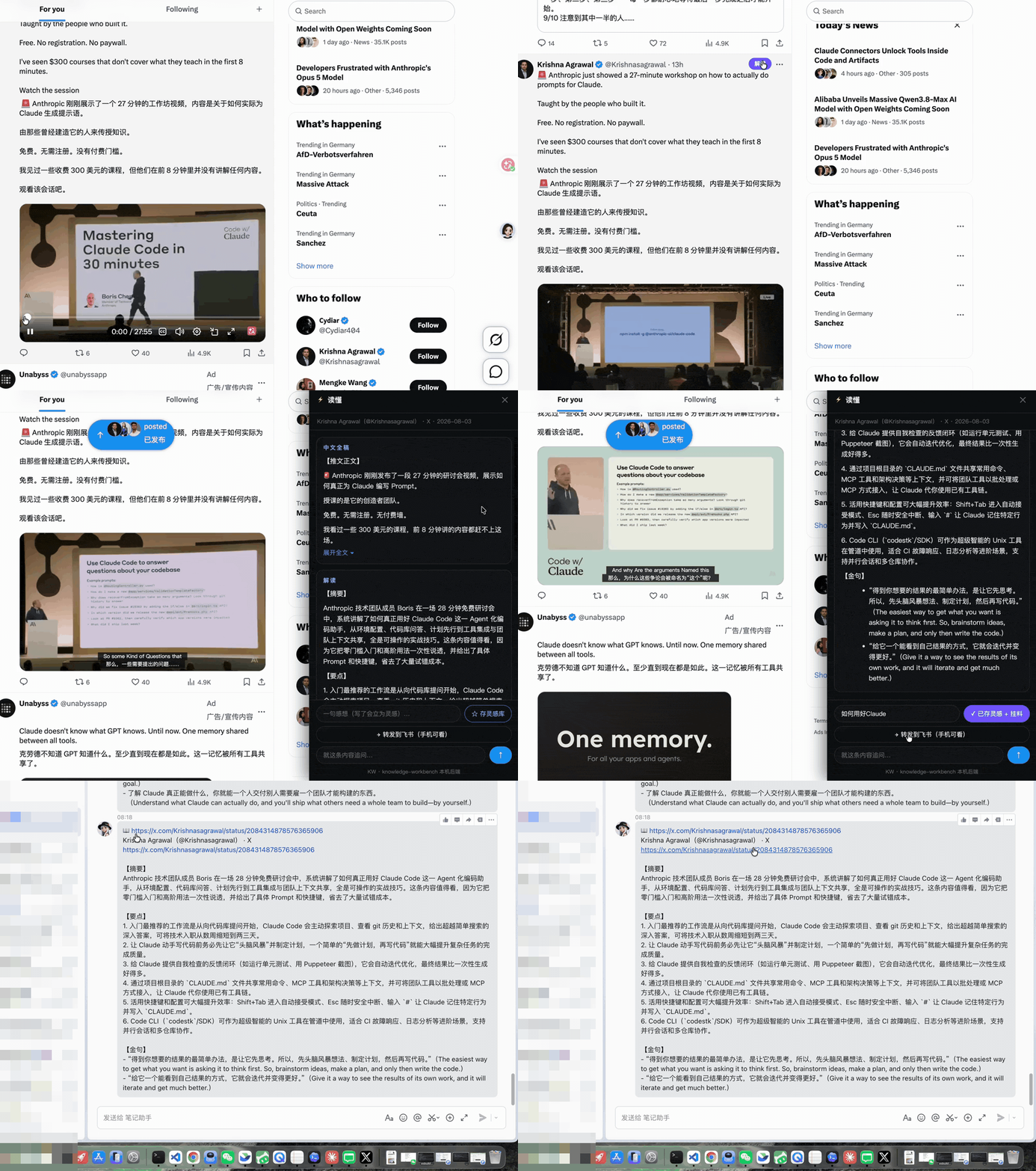
演示:在 X 刷到一条带 28 分钟视频的推文(Anthropic 官方 prompt 工作坊)→ 点「解读」→
自动下载音轨转写 → 出中文卡片(全文 / 摘要 / 要点 / 金句中英对照)→ 存进灵感库 / 转发到飞书。
上图是我的知识工作台的完整产品体验(读懂面板 + 灵感库 + 飞书同步,接本机后端)。
开源的 watch-anything skill 提供其中的核心——抓取 + 转写 + 中文卡片,在你自己的
Claude Code / Agent 里跑,产物是 markdown;灵感库 / 飞书同步是工作台的功能,不在 skill 里。
English · 中文
English
What is this
Your bookmarks are probably full of videos you "meant to watch someday" — a forty-minute
English tech talk, a tweet with a video, a podcast conversation, a caption-less long video on
Bilibili... and they just sit there collecting dust, too long to finish, too much to get through.
watch-anything is a Claude Code / Agent skill: drop in a video link, it first fetches the
content, transcribes the audio track into text (if there are no captions), then has your AI produce
a Chinese card breakdown, with the output landing as markdown in your own knowledge base. The whole
thing happens inside your agent — no switching back and forth between a dozen web tools.
The specific pain it solves
- Bookmarked it but no time to watch → in minutes you get a card that lets you "get it without watching the original"
- English / caption-less videos, where other summary tools just give up → auto-downloads the audio track and transcribes, then produces a Chinese breakdown
- Want to dig into details → chat over the transcript, answers grounded only in the source, no fabrication
- Watch and forget, scattered everywhere → the breakdown lands as markdown, accumulating into your own system
The killer feature: understand even without captions
Most "video summary" tools rely on the platform's existing captions, and choke on videos without
them. The core of watch-anything is a complete transcription fallback chain, where each level
automatically drops down to the next on failure:
Video captions (fast, accurate) → Groq cloud whisper (tens of seconds, nearly free) → local faster-whisper (zero API cost, never leaves your machine)
If there are captions, use them; if not, download the audio track and transcribe. With GROQ_API_KEY
configured it goes through the cloud; without it, transcribe locally (audio never leaves your machine).
This is also its real value relative to read-anything: read currently only grabs X as text, and
does not download and transcribe video; watch fills in exactly that gap.
Why a skill, not a browser extension
Because the killer feature "caption-less video transcription" needs yt-dlp + whisper — these
can't run inside a browser extension. A skill is the only form that is "zero-server + full-capability":
the host Claude Code is itself the large model, and the skill just provides the fetching / transcription
scripts, leaving translation and interpretation to the host agent. So it doesn't need you to stand up
your own backend — clone it and it just works.
How to use
Install (Claude Code, one command):
git clone https://github.com/heyuxuan0209/watch-anything.git ~/.claude/skills/watch-anything
Once installed, in any session just drop a video link and say "break this down / what's it about" to
trigger it. Update with git -C ~/.claude/skills/watch-anything pull. To install it only for a
specific project, clone it into that project's .claude/skills/watch-anything.
It looks like this in use (taking the tweet in the GIF above as an example, real link
x.com/Krishnasagrawal/status/2084314878576365906):
You: https://x.com/Krishnasagrawal/status/2084314878576365906 what's this video about
It: (fetch-x gets the tweet → finds a 28-min video → yt-dlp downloads the audio track → Groq/local whisper transcribes → produces card)
The card that comes out (full version in the GIF at the top) looks roughly like this:
# Anthropic official prompt workshop: how to really get the most out of Claude Code
> Krishna Agrawal(@Krishnasagrawal)| X | 2026-08-03 | 视频转写(语音听写,可能有少量误差)

【摘要】
Anthropic 团队成员 Boris 在一场 28 分钟免费研讨会里,系统讲解如何真正用好 Claude Code
这个 Agent 化编码助手:从环境配置、代码库上下文,到让它记住特定行为、写入 CLAUDE.md……

【要点】
- 给 Claude 一个能自我检查的反馈闭环(跑测试、Puppeteer 截图),它会自动迭代,比一次成型好得多
- 通过项目里的 CLAUDE.md 共享常用命令 / MCP 工具 / 斜杠决策,把团队工具接成 MCP 供它调用
- 用好快捷键:Shift+Tab 进自动接受、Esc 随时安全中断、输入「#」让它记住特定行为
- Code CLI 可当超级智能的 Unix 工具接进管道,适合 CI 故障响应、日志分析等进阶场景

【金句】
> 得到你想要的结果的最简单办法,是让它先思考。所以,先头脑风暴想法、制定计划,然后再写代码。
> The easiest way to get what you want is asking it to think first. So, brainstorm ideas, make a plan, and only then write the code.

> 给它一个能看到自己成果的方式,它就会迭代、越做越好。
> Give it a way to see the results of its own work, and it will iterate and get much better.

—— 附完整中文全稿 ——
Not just Claude — any agent that can run shell commands works (Codex / Cursor / Gemini CLI /
WorkBuddy / OpenClaw…): the core logic all lives in PLAYBOOK.md (a pure-markdown playbook) +scripts/ (ordinary command-line tools, JSON in/out), depending on no Claude-specific features. In
every case the hookup is clone + paste a paragraph into your agent's instruction file:
git clone https://github.com/heyuxuan0209/watch-anything.git ~/.agent-skills/watch-anything
Paste this into the file below (each tool just differs by file name):
## watch-anything(视频/推文 → 中文卡片解读)
当我丢 X / YouTube / B站 / 视频链接并要求「解读 / 看懂 / 讲了啥 / 转写」时,
按 ~/.agent-skills/watch-anything/PLAYBOOK.md 执行(路由、转写降级链、卡片格式、降级规则都在里面)。
| Agent | Instruction file |
|---|---|
| Codex CLI | ~/.codex/AGENTS.md (global) or project-root AGENTS.md |
| Cursor | Create a new rule under the project's .cursor/rules/ (or the legacy .cursorrules) |
| Gemini CLI | ~/.gemini/GEMINI.md (global) or project-root GEMINI.md |
| WorkBuddy / others / can't be bothered to configure | Paste the paragraph above into its instruction/rules file; or each time just say "handle this link per ~/.agent-skills/watch-anything/PLAYBOOK.md" |
What it can chew on
- X tweets / tweet videos: login-free fetch of the body + quoted tweets + media list; auto-downloads and transcribes audio if there's a video
- YouTube: captions first, local/cloud transcription if no captions
- Bilibili: same as above
- Other video links: tries whatever yt-dlp supports
English videos directly produce a Chinese breakdown (no need to translate first and then read). Images
/ video frames are P0 not parsed — it only covers "what was said," and doesn't pretend to have watched
"what's in the frame."
Card format (default) + three alternatives
The default output is a single card: 【Summary】3 sentences · 【Key points】3-6 items · 【Highlights】
bilingual with timestamps, plus the full Chinese transcript appended.
| What you want | Which template to use |
|---|---|
| Card + full breakdown (default) | Card breakdown card.md |
| Judge in 30 seconds whether it's worth watching | Quick scan brief.md |
| Podcast / conversation, split views by person | Interview breakdown interview.md |
| X thread / long tweet | Thread breakdown thread.md |
| how-to / tutorial / hands-on video, broken into actionable steps | Tutorial breakdown tutorial.md |
| Launch event / new product / industry news video | Launch breakdown news.md |
Templates can all be edited and added to: every .md in templates/ can be deleted or changed, drop
one of your own in and it's a new template, just say "use my xx template." These templates are clean,
general-purpose perspectives, containing no personalized / productized content — if you want the
breakdown to fit your own focus (e.g. "implications for my product"), just add a template yourself.
One principle: if it can't be seen, say so
Can't fetch the tweet, audio didn't transcribe, frame not parsed — it tells you all of this truthfully,
and never uses incomplete material to fabricate a plausible-looking breakdown. Transcription output is
labeled "may contain dictation errors," and quoted highlights remind you to check against the original
video. Every sentence you read is traceable.
Dependencies
| Dependency | Required? | Purpose |
|---|---|---|
| Node.js 18+ | Required | Runtime for the three scripts (zero npm dependencies) |
| curl | Required (ships with the system) | Network layer, natively supports proxy environment variables |
| yt-dlp | Required for the video route | Pulls captions + downloads audio track (brew install yt-dlp); without it, only text-only X tweets can be handled |
| GROQ_API_KEY | Optional | Groq cloud whisper transcription (fast, nearly free, ≤25MB); get one free at console.groq.com |
| faster-whisper | Optional | Local transcription fallback (pip install faster-whisper, first run auto-downloads a ~460MB model) |
Transcription needs at least one of a Groq key or faster-whisper; when you have neither, caption-less
videos can only fall back to title + description and will explicitly tell you it fell back. Missing
optional dependencies don't error out — the corresponding content degrades automatically.
For access to YouTube / X from within China, set the YOUTUBE_PROXY_URL environment variable (e.g.http://127.0.0.1:7890). Groq uploads go through the HTTPS_PROXY / http_proxy environment variables
(curl reads them natively).
File structure
watch-anything/
├── SKILL.md          # Claude Code 触发入口(薄壳)
├── PLAYBOOK.md       # 通用剧本:路由/转写降级链/卡片格式/诚实守则(agent 无关)★
├── templates/        # 解读模板(卡片/快扫/访谈/Thread + 你自己的)
└── scripts/          # fetch-x / transcribe-video / vtt-to-text(零依赖)+ transcribe.py(本地 whisper)
Each script runs standalone, JSON in/out, making it easy to hook into your own pipeline.
Is there a browser extension? Can it explain as you watch web pages?
Not for now. watch-anything is a pure agent skill — you drop a link in Claude Code / another agent,
and it fetches + transcribes + interprets. That browser side panel in the GIF at the top is the
built-in version of my own knowledge workbench (connected to a local backend), and is not in this
skill. The browser version — "install an extension, get explanations while you browse" — is on the
roadmap (P2), and when it's built it'll get its own separate repo; here we first make the "zero-server +
full-capability" skill version solid.
Provenance
Distilled from the content-collection pipeline (ADR-064 cloud transcription channel) of my personal
knowledge management system knowledge-workbench —
the hardening points in the scripts (FxTwitter login-free tweet fetching, X video audio-video mergebestaudio/best fallback, the caption en.* wildcard triggering 429 pitfall, Node fetch not reading the
proxy so it must go through curl, the whisper Chinese homophone mis-hearing names warning, the explicit
declaration when tweet video transcription fails, etc.) all come from real pitfalls hit in practice, with
the reasons preserved in the comments.
中文
这是什么
收藏夹里是不是躺着一堆「打算有空再看」的视频——四十分钟的英文技术演讲、
一条带视频的推文、一期播客对谈、一个没字幕的 B 站长视频……结果一直吃灰,
看不完也看不动。
watch-anything 是一个 Claude Code / Agent skill:丢一个视频链接进去,它先抓内容、
(没字幕就)把音轨转写成文字,再由你的 AI 出一张中文卡片解读,产物落成 markdown
进你自己的知识库。全程在你的 agent 里完成,不用在十几个网页工具间来回切。
它解决的那个具体麻烦
- 收藏了没时间看 → 几分钟给你一张「不看原视频也懂」的卡片
- 英文 / 无字幕视频,别的总结工具直接歇菜 → 自动下音轨转写,再产出中文解读
- 想追问细节 → 就着转写对话,答案只基于原文,不编造
- 看完就忘、散落各处 → 解读落成 markdown,沉淀进你自己的系统
杀手锏:无字幕也能看懂
大多数「视频总结」工具依赖平台已有的字幕,碰上没字幕的视频就歇菜。
watch-anything 的核心是一条完整的转写降级链,每一级失败自动降下一级:
视频字幕(快、准) → Groq 云 whisper(几十秒、近乎免费) → 本地 faster-whisper(零 API 费、不出本机)
有字幕就用字幕;没字幕就下音轨转写。配了 GROQ_API_KEY 走云端,没配就本地转
(音频不出本机)。这也是它相对 read-anything 的真价值:read 现在只把 X 当文字抓,
不下载转写视频;watch 补上的正是这块。
为什么是 skill,不是浏览器插件
因为杀手锏「无字幕视频转写」需要 yt-dlp + whisper——这些在浏览器插件里跑不了。
skill 是唯一「零服务器 + 全能力」的形态:宿主 Claude Code 本身就是大模型,skill 只
负责提供抓取 / 转写脚本,翻译解读交给宿主 agent。所以它不需要你自己架后端,
克隆下来就能用。
怎么用
安装(Claude Code,一条命令):
git clone https://github.com/heyuxuan0209/watch-anything.git ~/.claude/skills/watch-anything
装完在任何会话里丢个视频链接说「解读一下 / 讲了啥」即可触发。更新用git -C ~/.claude/skills/watch-anything pull。只装到某个项目就克隆到项目的.claude/skills/watch-anything。
用起来长这样(以上图那条推文为例,真实链接 x.com/Krishnasagrawal/status/2084314878576365906):
你:https://x.com/Krishnasagrawal/status/2084314878576365906 这条视频讲了啥
它:(fetch-x 拿推文 → 发现带 28 分钟视频 → yt-dlp 下音轨 → Groq/本地 whisper 转写 → 出卡片)
出来的卡片(完整版见顶部 GIF)大致是这样:
# Anthropic 官方 prompt 工作坊:如何真正用好 Claude Code
> Krishna Agrawal(@Krishnasagrawal)| X | 2026-08-03 | 视频转写(语音听写,可能有少量误差)

【摘要】
Anthropic 团队成员 Boris 在一场 28 分钟免费研讨会里,系统讲解如何真正用好 Claude Code
这个 Agent 化编码助手:从环境配置、代码库上下文,到让它记住特定行为、写入 CLAUDE.md……

【要点】
- 给 Claude 一个能自我检查的反馈闭环(跑测试、Puppeteer 截图),它会自动迭代,比一次成型好得多
- 通过项目里的 CLAUDE.md 共享常用命令 / MCP 工具 / 斜杠决策,把团队工具接成 MCP 供它调用
- 用好快捷键:Shift+Tab 进自动接受、Esc 随时安全中断、输入「#」让它记住特定行为
- Code CLI 可当超级智能的 Unix 工具接进管道,适合 CI 故障响应、日志分析等进阶场景

【金句】
> 得到你想要的结果的最简单办法,是让它先思考。所以,先头脑风暴想法、制定计划,然后再写代码。
> The easiest way to get what you want is asking it to think first. So, brainstorm ideas, make a plan, and only then write the code.

> 给它一个能看到自己成果的方式,它就会迭代、越做越好。
> Give it a way to see the results of its own work, and it will iterate and get much better.

—— 附完整中文全稿 ——
不止 Claude——任何能跑 shell 命令的 agent 都能用(Codex / Cursor / Gemini CLI /
WorkBuddy / OpenClaw…):核心逻辑全在 PLAYBOOK.md(纯 markdown 剧本)+ scripts/
(普通命令行工具,JSON 进出),不依赖任何 Claude 特性。接法都是克隆 + 在你的 agent
指令文件里贴一段话:
git clone https://github.com/heyuxuan0209/watch-anything.git ~/.agent-skills/watch-anything
往下面这个文件里贴这段(各家只是文件名不同):
## watch-anything(视频/推文 → 中文卡片解读)
当我丢 X / YouTube / B站 / 视频链接并要求「解读 / 看懂 / 讲了啥 / 转写」时,
按 ~/.agent-skills/watch-anything/PLAYBOOK.md 执行(路由、转写降级链、卡片格式、降级规则都在里面)。
| Agent | 指令文件 |
|---|---|
| Codex CLI | ~/.codex/AGENTS.md(全局)或项目根 AGENTS.md |
| Cursor | 项目 .cursor/rules/ 下新建规则(或旧版 .cursorrules) |
| Gemini CLI | ~/.gemini/GEMINI.md(全局)或项目根 GEMINI.md |
| WorkBuddy / 其他 / 懒得配 | 往它的指令/规则文件贴上面那段;或每次直接说「按 ~/.agent-skills/watch-anything/PLAYBOOK.md 处理这个链接」 |
吃得下这些
- X 推文 / 推文视频:免登录抓正文 + 引用推文 + 媒体清单;带视频自动下音轨转写
- YouTube:字幕优先,无字幕本地/云转写
- B站:同上
- 其他视频链接:yt-dlp 支持的都试
英文视频直接产出中文解读(不用先翻译再看)。图片 / 视频画面 P0 不解析——
只覆盖「说了什么」,不假装看过「画面里有什么」。
卡片格式(默认)+ 三种备选
默认输出一张卡片:【摘要】3 句 · 【要点】3-6 条 · 【金句】中英对照带时间戳,
再附完整中文稿。
| 你想要 | 用哪个模板 |
|---|---|
| 卡片 + 完整解读(默认) | 卡片解读 card.md |
| 30 秒判断值不值得看 | 快扫 brief.md |
| 播客 / 对谈,按人拆观点 | 访谈拆解 interview.md |
| X 连推 thread / 长推文 | Thread 拆解 thread.md |
| how-to / 教学 / 上手视频,拆成可照做的步骤 | 教程拆解 tutorial.md |
| 发布会 / 新品 / 行业新闻视频 | 发布会解读 news.md |
模板都能改、能加:templates/ 里每个 .md 都可删可改,丢一个你自己的进去就是新模板,
说一句「用我的 xx 模板」即可。这些模板是干净的通用视角,不含任何个人化 / 产品化内容——
想让解读贴合你自己的关注点(比如"对我产品的启发"),自己加一个模板就行。
一个原则:看不到就说看不到
推文抓不到、音频没转成、画面没解析——都如实告诉你,绝不拿残缺材料硬编一篇
像模像样的解读。转写产物标注「可能存在听写误差」,引用金句提醒你核对原视频。
你读到的每一句都有据可查。
依赖
| 依赖 | 是否必需 | 用途 |
|---|---|---|
| Node.js 18+ | 必需 | 三个脚本的运行时(零 npm 依赖) |
| curl | 必需(系统自带) | 网络层,天然支持代理环境变量 |
| yt-dlp | 视频路由必需 | 拉字幕 + 下音轨(brew install yt-dlp);缺了则只能处理 X 纯文字推文 |
| GROQ_API_KEY | 可选 | Groq 云 whisper 转写(快、近乎免费、≤25MB);console.groq.com 免费领 |
| faster-whisper | 可选 | 本地转写兜底(pip install faster-whisper,首次自动下载 ~460MB 模型) |
转写至少需要 Groq key 或 faster-whisper 其一;两者都没有时,无字幕视频只能
降级到标题 + 简介并显式告知你降级了。缺可选依赖不报错——对应内容自动降级。
国内网络访问 YouTube / X 需设置 YOUTUBE_PROXY_URL 环境变量(如 http://127.0.0.1:7890)。
Groq 上传走 HTTPS_PROXY / http_proxy 环境变量(curl 天然读)。
文件结构
watch-anything/
├── SKILL.md          # Claude Code 触发入口(薄壳)
├── PLAYBOOK.md       # 通用剧本:路由/转写降级链/卡片格式/诚实守则(agent 无关)★
├── templates/        # 解读模板(卡片/快扫/访谈/Thread + 你自己的)
└── scripts/          # fetch-x / transcribe-video / vtt-to-text(零依赖)+ transcribe.py(本地 whisper)
各脚本单独可跑,JSON 进出,方便你接进自己的管道。
有浏览器插件吗?能边看网页边讲解吗?
暂时没有。 watch-anything 是纯 agent skill——你在 Claude Code / 别的 agent 里丢链接,
它抓取 + 转写 + 解读。顶部 GIF 里那个浏览器侧边面板,是我自己知识工作台的内置版
(接本机后端),不在本 skill 里。「装个插件、边刷网页边看讲解」的浏览器版在路线图上
(P2),做出来会另开一个仓——这里先把「零服务器 + 全能力」的 skill 版做扎实。
出处
从个人知识管理系统 knowledge-workbench
的内容采集链路(ADR-064 云转写通道)提炼——脚本里的加固点(FxTwitter 免登录抓推文、
X 视频音画合流 bestaudio/best 兜底、字幕 en.* 通配触发 429 的坑、Node fetch 不读代理
必须走 curl、whisper 中文同音字误听人名警示、推文视频转写失败的显式声明等)都来自真实
踩坑,注释里保留了原因。
🔗 关注我 · Follow me
边做 AI 产品边把一手经验和思考公开分享,欢迎关注、来聊。
I build AI products in public and share the notes here — come say hi:
| 小红书 · Xiaohongshu | 公众号 · WeChat | 视频号 · Channels | 抖音 · Douyin |
 |
 |
 |
 |
License & 二开须知 · Contributing
MIT — 见 LICENSE。欢迎 Star / Fork / Issue,也欢迎二次开发、魔改、接进你自己的产品或工作流。唯一的请求:二开或转载时注明出处,并 @ 一下我(公众号 / 小红书「杰西卡聊AI」,主页见上)——让顺着来的人能找到源头,就是最好的感谢 🙏。
MIT licensed — see LICENSE. Star / Fork / Issues welcome, and feel free to remix, modify, or build it into your own product or workflow. One ask: if you fork/remix or repost, please credit the source and @ me (Jessica · 杰西卡聊AI). That's the best thank-you 🙏.
Reviews (0)
Sign in to leave a review.
Leave a reviewNo results found