kaizen
Health Warn
- License — License: MIT
- Description — Repository has a description
- Active repo — Last push 0 days ago
- Low visibility — Only 5 GitHub stars
Code Fail
- new Function() — Dynamic code execution via Function constructor in cli/board.test.ts
- exec() — Shell command execution in cli/dashboard.ts
- process.env — Environment variable access in cli/install.ts
- network request — Outbound network request in cli/install.ts
- rm -rf — Recursive force deletion command in cli/publish-gh.sh
- exec() — Shell command execution in cli/settings.ts
- exec() — Shell command execution in cli/sources.test.ts
- spawnSync — Synchronous process spawning in cli/sources.test.ts
- process.env — Environment variable access in cli/sources.test.ts
- network request — Outbound network request in cli/sources.test.ts
- exec() — Shell command execution in cli/sources.ts
Permissions Pass
- Permissions — No dangerous permissions requested
No AI report is available for this listing yet.
Your AI agent shows you the plan before it does the work, and a second agent checks what it did.

Your AI agent shows you the plan before it does the work,
and a second agent checks what it did.




macOS, Linux, WSL — one paste:
curl -fsSL https://bun.sh/install | bash && ~/.bun/bin/bunx kaizen-agent
Windows PowerShell — one paste:
irm bun.sh/install.ps1 | iex; & "$env:USERPROFILE\.bun\bin\bunx.exe" kaizen-agent
Already have Bun? bunx kaizen-agent.
The problem
You ask an AI to do something real — write the launch email, draft the policy,
build the feature, plan the migration. It goes quiet, then hands back a finished
thing.
Now the work is yours. What did it actually change? Did it understand what you
meant? Is any of it wrong in a way you would only notice next week? And if it
misread you in the first thirty seconds, everything after that was wasted.
kaizen puts two checkpoints in that gap.
Before it starts, you see a plan and say yes or no. After it finishes, a
second agent — one that never saw the first agent's reasoning, so it has nothing to
defend — checks the work and tells you what is wrong. You decide what gets fixed.
See it
Pick whichever looks like your work. The five stages are identical in all of them —
what changes is what done and wrong mean, which kaizen works out from your
request rather than asking you.
you    /kaizen rewrite the onboarding email — the new pricing starts on the 1st

kaizen Here is the plan.

       This is a customer email, not a policy page.
       Done means: a customer knows what changes, when, and what to do — in one read.
       Wrong means: a claim we cannot stand behind, or someone thinks they are being
       charged more than they are.

       What I will do:
         1. Rewrite the opening so the date and the amount come first
         2. Add one line on what happens if they do nothing
         3. Keep the existing sign-off and legal footer untouched

       Not doing: touching the pricing page itself — say the word if you want that too.

       Approve this plan?                    [ approve ]  [ change something ]

you    approve

kaizen Done, and reviewed. Two things found:

       1. paragraph 2  high    "Your price will not change" is not true for annual
                               plans renewing after the 1st. Fix: name both cases.
       2. subject line low     14 words, cut off on mobile. Fix: lead with the date.

       Fix them?                             [ both ]  [ just 1 ]  [ leave it ]
Nobody told the reviewer to look for an untrue claim or a truncated subject line. It
read the request, concluded this was a customer email, and reviewed it as one.
you    /kaizen the discount field lets you enter more than 100%

kaizen Here is the plan.

       This is a bug fix in the checkout code.
       Done means: a discount above 100 is rejected, and the existing tests still pass.
       Wrong means: valid discounts stop working.

       What I will do:
         1. Add a check in apply_discount() — cart.py:9
         2. Cover it with three tests — 0%, 100%, 101%

       Approve this plan?

you    approve

kaizen Done, and reviewed.
       Verified: ran the suite — 47 passed, 0 failed. Before the change: 44 passed.

       One problem found:

       1. cart.py:12  medium  A discount of exactly 100 now returns 0 instead of
                              being rejected. Fix: use > not >=.
done is a passing suite, so the builder has to show the run and its numbers —
before and after. "It should work" is not accepted in any track.
you    /kaizen landing page copy for the Pro tier launch

kaizen Here is the plan.

       This is launch copy aimed at existing free users, not new visitors.
       Done means: a free user understands what Pro adds and what it costs, and can
       act without opening another page.
       Wrong means: an overclaim, a benefit we do not actually ship, or a price that
       disagrees with billing.

       What I will do:
         1. Headline and subhead — lead with the one thing free users ask for most
         2. Four benefits, each tied to a shipped feature
         3. Price block, pulled from the billing config so it cannot drift
         4. One CTA, repeated twice

       Out of scope: the pricing page, the in-app upgrade banner.

       Approve this plan?

you    approve

kaizen Done, and reviewed. Three things found:

       1. benefits 3   high    "Unlimited exports" — the shipped limit is 500/month.
       2. headline     medium  Names a competitor. Legal reviews those; flagging, not fixing.
       3. CTA          low     "Get started" appears on the free signup too. Ambiguous.
The reviewer checked each claim against what actually ships. Finding 2 it refused to
fix on its own and handed to you — deliberately.
you    /kaizen should we move from per-seat to usage-based pricing? write it up

kaizen Here is the plan.

       This is a decision memo for the founders, not a market report.
       Done means: a recommendation with the reasoning shown, and the case against it
       stated fairly enough that someone could disagree on the evidence.
       Wrong means: a conclusion the evidence does not support, or only looking at
       the data that agrees with it.

       What I will do:
         1. Pull the last 12 months of seat counts and usage from the billing export
         2. Model both against actual accounts — who pays more, who pays less
         3. Name the three accounts that break the model, and by how much
         4. Recommend, with the strongest argument against it stated first

       Approve this plan?

you    approve

kaizen Done, and reviewed. Two things found:

       1. section 3  high    The recommendation rests on 4 accounts out of 60. That
                             is not stated where the conclusion is.
       2. section 2  medium  Churned accounts were excluded with no reason given —
                             they are the ones the model treats worst.
Nothing here was checked for tests or tone. wrong was defined as an unsupported
leap and cherry-picked data, so that is what the reviewer went looking for.
you    /kaizen runbook for moving the database to the new region on Saturday

kaizen Here is the plan.

       This is a runbook someone else executes at 2am, not a description of a plan.
       Done means: a colleague can follow it start to finish without asking a question.
       Wrong means: a missing prerequisite, no way back, or a step that silently
       loses data.

       What I will do:
         1. Prerequisites, with how to verify each one is true before starting
         2. Steps in order, each with the exact command and what you should see
         3. A rollback for every step that changes state
         4. The point of no return, marked

       Approve this plan?

you    approve

kaizen Done, and reviewed. Two things found:

       1. step 7   critical  No rollback after the DNS cutover, and it is not marked
                             as the point of no return. Fix: mark it, add the TTL wait.
       2. step 3   high      Says "restore the backup" but never says which backup or
                             how to confirm it is the right one.
The board
kaizen opens a dashboard; Board is the screen where your work lives. Ideas you have
not started sit on the left, runs sit under the stage they are actually in, and it redraws
itself as your agents write to disk — a run that moves while you are looking at it moves on
screen.
  Board   ~/work/acme

  IDEA                     PLANNING              BUILDING           REVIEW          DONE
  ──────────────────────   ───────────────────   ────────────────   ─────────────   ──────────────
  › · FAQ page for the     ● q3 board memo       ◐ billing runbook  ● pricing       ○ chapter three
      pricing change                                                  email
                                                 ● oauth login                      ○ pricing
    · onboarding video                                                                research
      script, two minutes

  ↑↓←→ move     n new  e edit  x reject  d delete  r run     a all projects  q back
  ● running    ◐ stalled    ◌ starting    ● waiting on you    ○ done    · idea
Throw an idea in with n and it lands in <state.dir>/inbox.md, one line each, in the
same format a run's backlog already uses. e edits, x rejects with a reason, d deletes.
r starts a run from an idea — it asks full or lite, then opens your configured
agent with the request already typed. The idea retires from the board once a run exists
that was started from its text, whoever started it, so the same work never appears twice.
That check spans every project you have opened, because an idea thrown into the global
inbox becomes a run inside whichever project you launched the agent in.
The dot is what the run is doing. ● cyan is running and ◐ is stalled — kaizen
records no liveness signal anywhere, so "running" means the run's state.json has changed
in the last half hour. A run whose terminal you closed three days ago shows as stalled,
which is the distinction the board exists to make. ● amber, with the name in red, is a
run that cannot move until you decide something; the legend lists only the states actually
on screen.
A run's stage is kaizen's, not yours. You cannot drag a card between columns — a board
that could do that would be lying about what happened. The one exception is x on a run
card, which abandons it: the same transition /kaizen abort makes, with your reason
recorded in the run's approval file.
a switches between this project and every project kaizen knows about. Below a hundred
columns the board stacks into a list rather than squeezing five columns into sixty.
In a browser
kaizen web
serves the same board on http://127.0.0.1:7420/ — loopback only, no account — and
opens it in a Chromium-family browser as an app window when one is installed, otherwise
in a tab.
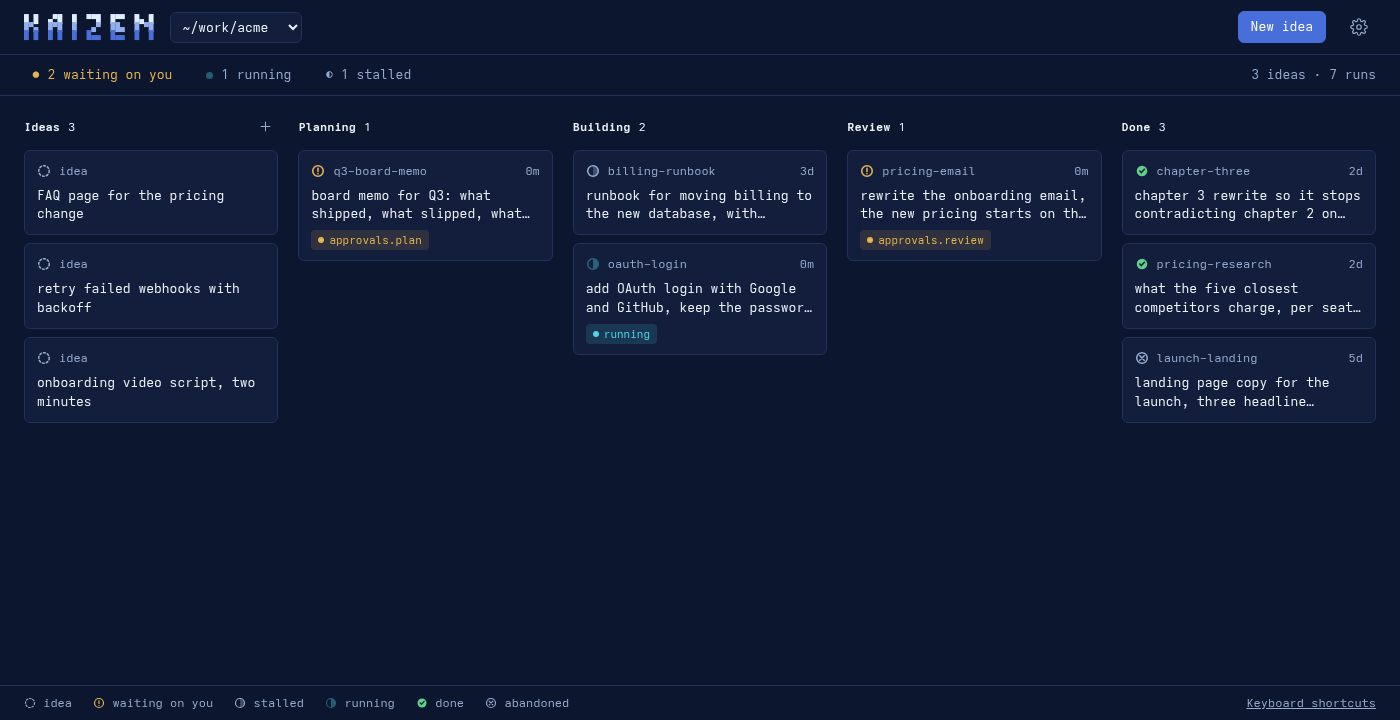
Same columns, same files: an idea added here lands in inbox.md, a run
started here opens your agent in a new terminal exactly as r does (a new herdr tab
or tmux window when one of those is running), and the board
redraws as your agents write to disk. Mouse first; the TUI's keys still work. Click a card for its plan, review and
backlog; ⋯ on a card runs, edits, rejects, abandons or archives. Clear on Done sends
every finished run to the archive (.kaizen/archive.md, a list, nothing moves), andArchive in the strip shows what is there, with Restore on each card. A finished run in a project with a git remote gets Commit & push in its panel: it lists the changed files that run's report names, offers the commit message the builder wrote for the work (the ## Commit section of its report; a message must start with a type such as feat: or fix:), commits those files and no others and pushes, and reads Committed & pushed afterwards (Push alone when the work is already committed). The Review tab of such a run, or of one waiting on you at the review, lists the findings with a checkbox each: Fix all or Fix N selected opens your agent in the project to fix exactly those and recheck them. The gear at the top right holds the browser's theme
and every kaizen settings knob, same rows, same config.yml. --port N picks a port, --no-open just
serves, the board opens on every project, or on the one picked last time in that browser; ?all=0 in the URL narrows it to the one it was started in. --daemon starts the server
detached so it outlives the terminal (pid kept in ~/.kaizen/web.pid); --stop ends it. kaizen web --shortcut adds a launcher
the OS can find — Spotlight on macOS, the app menu on Linux, a Desktop shortcut on Windows. Each one starts the board in the background (--daemon) and opens it; kaizen web --stop ends it.
A notebook beside the board. The note icon in the board's header opens/notebook: markdown notes for the project, kept as plain files in .kaizen/notes/
(folders included, so Obsidian can open the same folder). Notes are edited in place —
the line you are on shows its markdown, the rest reads typeset, and / at the start of a line offers checkboxes, dividers, headings and the other blocks. [[Other note]] links
notes and creates the one that does not exist yet, every note lists what links to it,#tags filter the list, and a / in a note's name puts it in a folder. Notes save as
you type; a note changed elsewhere since you opened it is never overwritten without
asking, and a deleted one goes to .kaizen/notes/.trash/. Notes link to the board too: [[run:<id>#finding-2]], a tab (#review, #backlog), a backlog item (#backlog-3) or [[idea:…]] show as chips that open the board on that item, and a run's Notes tab lists the notes that link to it. The editor is CodeMirror,
bundled into the package, so the notebook works offline.
Dictate instead of type. Every text field on the board — a new idea, its notes, an
edit, a reject reason, a note on a run — has a mic. Press it, talk, press it again; the
words land at the caret next to whatever you had typed. Recognition is Whisper running
inside the page, so audio never leaves your machine. The first press downloads the model
from huggingface.co and caches it in the browser: small by default (about 410 MB,
accurate across languages); kaizen settings → Dictation model — or the gear on the
board — switches to tiny, base, or large-v3-turbo (about 1.5 GB, needs a capable GPU). The transformers.js library itself is fetched from jsDelivr the
first time you press the mic in a session, so that first press needs the network; the
model does not download again. Chromium and Edge qualify (Firefox falls back to the
slower CPU path); a browser without a microphone API or WebAssembly shows no mic.
Request sources
Requests that already live somewhere else — a team's Google Sheet, a Doc, a shared
note — do not have to be retyped. The link icon beside the gear opens Request
sources: paste a link, and kaizen reads it and adds every request it has not seen
before to Ideas, each with a note saying where it came from. In a sheet, a column headedRequest, Idea, Title, Task, PBI, Summary or Name is the request and the
other cells become its notes; without such a header the request is one column for the whole sheet, the one holding the most text. A row whose Status column says Done,Finish or Finished is left out, and gathered later if its status changes. A doc or
a plain-text link gives one idea per line.
Nothing starts on its own: gathered requests sit in Ideas until you press Run.
Gathering twice adds nothing, and an idea you deleted, edited or rejected does not come
back. Rewording a row in the source makes it a new request. At most 50 arrive per
gather; the rest come with the next one.
While the board is running it checks each source every 24 hours — kaizen settings →
Gather requests, or the gear, sets off, 1h, 6h or 24h — and Gather now
does it on demand. With the board stopped nothing is gathered. From a terminal:
kaizen sources add <link> [label]     kaizen sources        kaizen sources rm <link>
kaizen gather
Kaizen fetches public https links only, with no login and no cookies: share a sheet
or doc as "anyone with the link can view". A link that needs a sign-in, or a note app
that only renders in a browser, says so in the panel; run /kaizen gather in your
agent, which reads it with its own access and hands the requests over. Either way what
a source says is treated as text for an idea, never as instructions. The links live in<state.dir>/sources.json.
Mouse
Off by default. Turn it on in kaizen settings under ui.mouse, and clicking a row or
card selects it, clicking it again opens or runs it, and the wheel scrolls — on the board,
the menu, runs, backlog, projects and settings.
It ships off because the trade is real: while the TUI holds the mouse, your terminal cannot
select text with it, so copying a run id out of the dashboard stops working until you
leave. Hold Shift and drag to select text anyway.
Install
Kaizen's installer and interactive dashboard require Bun — it is
the only prerequisite. Pick your platform:
In PowerShell:
irm bun.sh/install.ps1 | iex; & "$env:USERPROFILE\.bun\bin\bunx.exe" kaizen-agent
One line, because the shell that just installed Bun does not have it on PATH yet;
the full path sidesteps that. Next time, plain bunx kaizen-agent.
Git is not required. Where it is missing, kaizen copies itself into %USERPROFILE%\kaizen
instead of cloning, and bunx kaizen-agent is also how you update. Links are made as
directory junctions and file copies, so no administrator rights or Developer Mode are
needed. WSL users can follow the Linux instructions instead.
curl -fsSL https://bun.sh/install | bash && ~/.bun/bin/bunx kaizen-agent
Or brew install oven-sh/bun/bun, then bunx kaizen-agent.
curl -fsSL https://bun.sh/install | bash && ~/.bun/bin/bunx kaizen-agent
The full path is there because the shell that just installed Bun does not have it onPATH until you open a new one. Next time, plain bunx kaizen-agent.
The installer walks you through where to install, prompts for your workflow preset (medium, low, or ultra), then tells you what to type next. Restart your editor afterwards.
Run from inside a project it asks whether to install globally or for that project
alone; anywhere else — your home directory, a plain folder, a script — it installs
globally without asking, since a project install outside a project has nothing to
belong to.
It installs for every agent you already have. The skill folders follow the open
Agent Skills standard, so the same workflow runs under any of them:
| Agent | Gets | Stages run |
|---|---|---|
| Claude Code | Skills, the three stage agents, the slash commands | Each as its own subagent |
| Codex | Skills | Sequentially, one session |
| Antigravity | Skills | Parallel agents where available, else sequentially |
| OpenCode, Cursor, Gemini CLI | Skills | Sequentially, one session |
An agent counts as present if it has a config directory or a command on your PATH.
Only what is already there is touched — installing does not create ~/.opencode for
someone who does not use OpenCode. Install again after adding an agent and it picks
the new one up.
No agent yet? kaizen does nothing on its own — it is a workflow an agent runs.
If none is found, the installer says so and offers the list above, opening the
install page for whichever you pick. Install it, run kaizen again, and carry on.
The stage agents and slash commands are Claude Code's own formats and are not copied
elsewhere; under the others you invoke the skill by name. .kaizen/ is plain files
either way, so a run started in one tool can be finished in another.
Run kaizen anytime to open the terminal dashboard:
  ⠀⠀⠀⣰⠖⠾⣟⣛⠋⢉⣩⠽⢛⡽⠀⠀⠀⠀⠀⠀⠀⠀⠀⠀
  ⠀⠀⢰⢻⠀⠀⢀⡬⠟⠉⢀⠴⠋⠀⠀⠀⠀⠀⠀⠀⠀⠀⠀⠀
  ⠀⢠⠇⣾⡠⠞⢩⠤⢄⡚⣁⣀⣀⣀⢀⣠⠤⡄⠀⠀⠀⠀⠀⠀    █ █  ▄▀█  █  ▀▀█  █▀▀  █▄ █
  ⢠⣏⠔⣫⣀⡤⢸⠀⠀⠉⠁⠀⠀⠈⠉⠀⠀⡇⠀⠀⠀⠀⠀⠀    █▀▄  █▀█  █   ▄▀  ██▄  █ ▀█
  ⢾⠥⢾⡅⢧⠀⢸⠃⡤⠖⠢⡀⢀⠔⠲⢤⠘⡇⠀⠀⣀⣀⠀⠀    █ █  █ █  █  █▄▄  █▄▄  █  █
  ⠀⠀⠈⣇⠈⢠⣫⠞⠀⠘⢱⢣⡜⡎⠃⠀⠳⣝⡄⢠⠇⢻⢉⣷
  ⠀⠀⠀⠘⢆⠀⠑⢦⣀⡀⠈⠓⠚⠁⢀⣀⣤⣊⣠⢾⡀⢠⣿⠃    0.7.2   plan · approve · build · review
  ⠀⠀⠀⠀⠈⠓⢄⠀⠀⠉⣉⣭⣭⣉⠉⠀⠈⢀⣠⢔⡩⠥⢥⡀    ~/Projects/app
  ⠀⠀⠀⠀⠀⠀⢠⡇⠀⡞⠁⠀⠀⠈⢳⠀⢰⣍⣠⠚⠧⡀⠀⡷    Claude Code, Codex, Antigravity, OpenCode, Gemini CLI
  ⠀⠀⠀⠀⠀⠀⠸⡇⠀⣇⠀⠀⠀⠀⣸⠀⢠⡏⠀⠀⢀⣳⠞⠁
  ⠀⠀⠀⠀⠀⠀⠀⠳⣀⣨⠥⠤⠶⠾⣅⣀⠞⠉⠉⠉⠉⠀⠀⠀

  ╭─ Runs ──────────────────────────────────╮ ╭─ Backlog — 4 open ──────────────────────────╮
  │ ● fix-discount       waiting on you     │ │ cart.py:12    low   use > not >=            │
  │ ● cache-headers      in review          │ │ headline      med   legal review            │
  │ ● 3 done                                │ │ … 2 more                                    │
  ╰─────────────────────────────────────────╯ ╰─────────────────────────────────────────────╯

  › All projects        every project kaizen knows about
    Runs
    Backlog
    Settings
    Upgrade
    Quit
It monitors your runs and backlog across all your projects without having to open an agent.
Installing puts the kaizen command on your PATH, so updating later is:
kaizen upgrade
That pulls the latest workflow, relinks anything new, and clears the installer cachebunx keeps — which is what otherwise leaves you on an old version without saying
so. bunx kaizen-agent upgrade does the same thing if you would rather not have the
command. kaizen --version prints what is installed; bunx kaizen-agent --version
prints what npm has.
Then, in any project, just ask for something:
/kaizen <what you want done>
The first run sets the project up on its own — a .kaizen/ folder holding the run's
files. Nothing to initialise by hand. (/kaizen-init exists if you want to do it
ahead of time, and the installer offers it for the project you install from.)
Setup also adds a short section to the project's CLAUDE.md, so you can stop typing/kaizen entirely — ask for something the normal way and work worth a plan goes
through the stages on its own. It draws the line at work worth a plan: a change
across more than one file, anything with a migration or a rollback, a document
someone else will act on. Questions and one-line fixes are answered, not staged.
Delete that section to go back to /kaizen being explicit.
That is the whole thing. Everything below is detail.
How a run goes
| Stage | What happens | |
|---|---|---|
| 1 | Plan | Reads your request and the existing material, writes a plan. Changes nothing. |
| 2 | You approve | You see the plan and the work list. Say yes, or say what to change. |
| 3 | Build | Does the work, then proves it — runs the tests, checks the claim against its source, walks the steps — and records what actually came back. |
| 4 | Review | A different agent, which never saw stage 3's reasoning, checks the work and lists what is wrong, numbered and graded. |
| 5 | Fix | Serious findings get fixed and re-checked, up to a limit. Anything left over is handed to you, never quietly dropped. |
Each stage runs as its own agent with a clean slate, and writes a file before the
next one starts. That is what makes stage 4 worth anything: a reviewer that watched
itself do the work will defend it.
Stage 3 is the one you can move. Set build.executor to inline and the agent you
are already talking to does the work — you watch each step and can interrupt — or
leave it as subagent and it is handed off and reported back, which keeps your
conversation short and is the only workable choice on a big run. Set it to ask to
be offered the choice each time you approve a plan. Stage 4 does not move: the
reviewer is a separate agent either way, because that is the whole reason its
findings are worth reading.
How it knows what kind of work this is
kaizen is not a software workflow. The same five stages hold for a book chapter, a
launch email, a migration runbook, or a research memo — what changes is what
deliverable, done, and wrong mean.
Each run works that out for itself — its track — by answering three questions
from your request:
- What is the deliverable? A merged change, a chapter, a landing page, a runbook.
- What counts as done? Tests pass. The chapter reads end to end. A colleague can
follow the runbook unaided. - What would make it wrong? A security hole. A claim that is not true. A step
that silently loses data.
The third answer is what the reviewer becomes. A reviewer hunting race conditions in
a book manuscript is worse than no reviewer at all, and the track is what prevents
it. You are never asked to categorise your own request — it reads the request and
tells you what it concluded, so you correct a sentence instead of filling in a form.
Commands
| Command | What it does |
|---|---|
/kaizen <request> |
Start a run |
/kaizen-plan <request> |
Plan only — stop before anything is built |
/kaizen-auto <request> |
No approval stops; report at the end |
/kaizen-lite <request> |
Every stage in this session — cheap, and the reviewer has seen the work |
/kaizen-full <request> |
Every stage its own cold agent — the independent review |
/kaizen-review [target] |
Review something that already exists |
/kaizen-status |
What is waiting on you, in flight, done |
/kaizen-approve |
Approve whatever the run is waiting on |
/kaizen-reject <reason> |
Send it back with a reason, or kill the run |
/kaizen-run |
Carry on with an approved plan |
/kaizen-backlog |
Everything noticed but not done, across all runs |
/kaizen-abort |
Abandon the current run |
/kaizen-gather |
Read the request sources kaizen cannot read by itself into Ideas |
kaizen sources [add|rm <link>] |
In a terminal: list, add or remove request sources |
kaizen gather |
In a terminal: check every source now and add new requests to Ideas |
/kaizen-config |
Show this project's settings and change them |
/kaizen-init |
Set up the current project — optional, the first run does it |
/kaizen-help |
The full card |
What it writes
Everything a run knows lives in files next to the work, not in a chat window:
.kaizen/
  memory.md             # what past reviews learned about this project
  runs/2026-09-07-onboarding-email/
    00-request.md       # what you asked, word for word
    01-plan.md          # the plan you approved
    02-approval.md      # what you decided, and why
    03-impl.md          # what changed, and the proof it works
    04-review.md        # findings, numbered and graded
    06-backlog.md       # what was noticed but not done
Plain files, so you can read them, commit them, and pick a run back up tomorrow —
or in another tool. kaizen also runs under Codex and Antigravity, and a run started
in one can be finished in another. See adapters.md.
Settings
~/.kaizen/config.yml — one file, every project. The three worth knowing:
| Setting | Default | Meaning |
|---|---|---|
mode |
approve |
approve stops for you; auto never does; plan-only stops after the plan |
runner |
full |
full gives each stage its own agent, so the reviewer never saw the work — several times the cost. lite runs every stage here, at about the cost of doing it by hand |
build.executor |
subagent |
Who does the work: a separate agent, inline in the current one, or ask each time |
auto_fix.min_severity |
high |
Findings this bad or worse get fixed without asking |
approvals.plan |
true |
Stop and show the plan before anything is built |
ui.mouse |
false |
Click to select, click again to act; while on, the terminal cannot select text |
subagents.model |
inherit |
Model the stage subagents run on: inherit, opus, sonnet, haiku (Claude Code only) |
agent.<cmd>.model, agent.<cmd>.effort |
— | Model/effort the board launches a session with, per tool: claude, codex, agy, opencode, gemini. Model names are the tool's own (agy models) |
subagents.effort |
inherit |
Reasoning effort for the stage subagents: inherit, low, medium, high (Claude Code only) |
kaizen settings
opens a full-screen browser over the whole file — arrows to move and change, every
change written as you make it, esc to close:
  kaizen settings   ~/.kaizen/config.yml

  › preset                         medium
    mode                           approve
    runner                         full
    build.executor                 subagent
    approvals.plan                 true
    approvals.review               false
    auto_fix.enabled               true
    auto_fix.min_severity          high
    auto_fix.max_iterations        2
    ...

  Quick preset — low: inline & manual, medium: balanced, ultra: autonomous subagents

  ↑↓ move · ←→ change · esc close     saved preset = medium
One project can differ: put a .kaizen/config.yml in it with just the keys to
override, and it wins there while everything else follows the global file.
It edits each line in place, so the comment above every key survives. /kaizen-config
does the same thing from inside your agent if you would rather not leave it. Everything is also
in config.default.yml,
with a comment on each key, if you would rather edit the file.
Under the hood
SKILL.md— how the workflow behavesspec.md— the tool-neutral contract every stage followsadapters.md— running it under Codex or Antigravity
| Flag | Effect |
|---|---|
| (none) | Ask when standing in a project, otherwise install globally |
--global |
Globally, no question asked |
--project |
Into the current directory only |
--check |
Report what is linked, exit non-zero if anything is missing |
--force |
Replace a real file sitting where a link belongs |
--preset <name> |
Pre-select workflow preset (low, medium, or ultra) |
--yes |
Take every default, ask nothing |
--verbose |
List every link instead of a one-line summary |
upgrade |
Pull, relink, and clear the installer cache. No prompts. |
uninstall |
Remove the links, the clone, and the launcher. Asks whether to keep your runs and settings. |
uninstall --purge |
The same, and delete ~/.kaizen and this project's .kaizen/ too. |
settings |
Open the settings browser for the nearest .kaizen/. Also config. |
Uninstalling works the same on Linux, macOS and Windows — kaizen uninstall, orbunx kaizen-agent uninstall when the command itself is already gone. It offers three
answers — keep your runs and settings, remove everything, or cancel — and takes the
first without asking when the output is not a terminal. It lists what it removed; the ## Kaizen workflow line in each project's CLAUDE.md is left for
you to delete, since you may have edited around it.
A global install also writes ~/.local/bin/kaizen (kaizen.cmd in bun's bin
directory on Windows), a two-line launcher pointing at
the clone, so kaizen upgrade works from anywhere. It tells you if that directory is
not on your PATH. uninstall removes it; --project installs skip it.
Re-running is safe: correct links are left alone.
bunx extracts a package once and reuses it without re-resolving, so a plainbunx kaizen-agent can keep running an old installer even after a new one is
published. upgrade clears that copy, so the next run resolves fresh. The workflow
itself — skills, agents, commands — comes from the clone and updates on any run.
To work on kaizen itself, install from your own checkout so the links point at it:
git clone https://github.com/hfadhlullah/kaizen.git ~/kaizen
cd ~/kaizen && bun run cli/install.ts
Without bun:
mkdir -p ~/.claude/skills ~/.claude/agents ~/.claude/commands
ln -s ~/kaizen/skills/kaizen ~/.claude/skills/kaizen
ln -s ~/kaizen/skills/kaizen-help ~/.claude/skills/kaizen-help
for f in ~/kaizen/agents/kaizen-*.md; do ln -s "$f" ~/.claude/agents/"$(basename "$f")"; done
for f in ~/kaizen/commands/kaizen-*.md; do ln -s "$f" ~/.claude/commands/"$(basename "$f")"; done
License
MIT. Kaizen (改善) is Japanese for continuous improvement — small changes, checked
as you go.
Reviews (0)
Sign in to leave a review.
Leave a reviewNo results found