phimint
Health Gecti
- License — License: Apache-2.0
- Description — Repository has a description
- Active repo — Last push 0 days ago
- Community trust — 14 GitHub stars
Code Basarisiz
- fs module — File system access in docs/tools/check-install-widget.js
- rm -rf — Recursive force deletion command in install.sh
- child_process — Shell command execution capability in npm/phimint/bin/phimint.js
- spawnSync — Synchronous process spawning in npm/phimint/bin/phimint.js
Permissions Gecti
- Permissions — No dangerous permissions requested
Bu listing icin henuz AI raporu yok.
A terminal AI coding agent written in Rust — no Node.js or Python, one binary to download, and 1 core with 1 GB of RAM runs a full coding task. MIT.
phimint
Pronounced /ˈfaɪmɪnt/ ("fie-mint", phi + mint).
A terminal AI coding agent written in Rust — no Node.js or Python, one binary to download, and 1 core with 1 GB of RAM runs a full coding task.
Built on phi-agent — the agent runtime ships as its own framework; phimint keeps only the terminal layer.


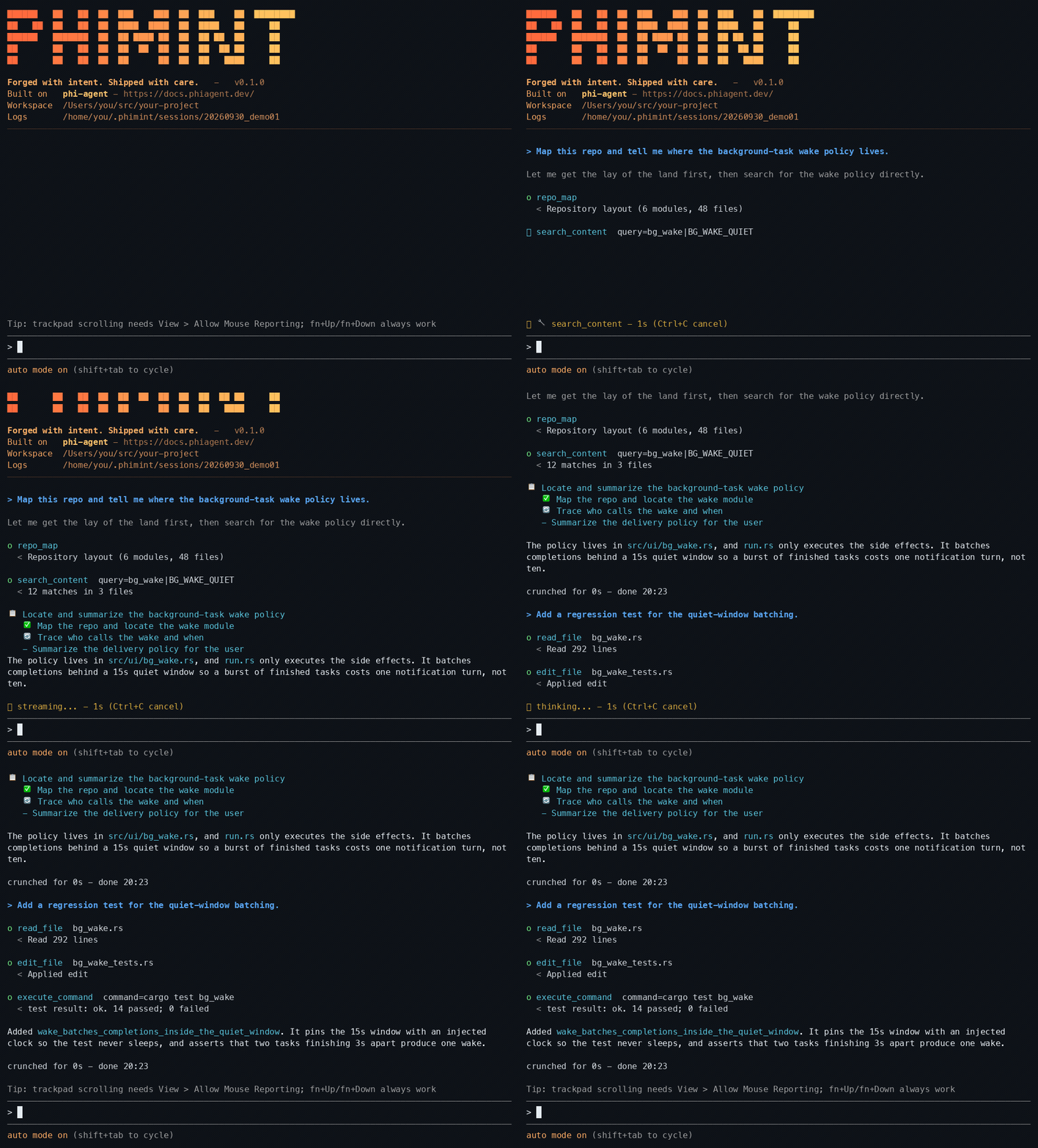
phimint needs one API key in ~/.phimint/config.json — a one-minute step, see Quick start.
Project page: hibuka-labs.github.io/phimint — English / 中文.
Chinese README and China mirrors: Gitee · AtomGit.
Features
- Light by nature — a single static Rust binary with zero runtime dependencies: no Node.js, no Python. SSH onto a bare 1-core 1-GB server, one curl line, and you're in a full coding session.
- Native LSP fast inner loop — per-language servers start lazily (rust-analyzer / typescript-language-server / clangd); seconds after an edit you get
file:line:coldiagnostics, no recompile. A tree-sitter repo map plus ripgrep pulls context on demand instead of stuffing the repo into the window. - CodeAct does the grunt work — bulk renames and data wrangling ride one Python script instead of a long chain of single-purpose tool calls. The session is resident: last call's variables and functions are still there for the next, and intermediate data stays local instead of round-tripping the model — fewer round-trips is where the tokens are saved. Works fine without Python; the engine sits behind a compile-time switch,
--no-default-featuresdrops it entirely. - Parallel sub-agents — run several investigations at once: read-only by default, write capability requested per spawn; reports are pushed at the turn boundary, no polling; the task panel tracks each one live.
- UI & product design support — for layout or option trade-offs, candidates are laid out side by side on a browser canvas; your click comes back as a real user turn — the agent never decides for you. Conceptual questions go through a terminal picker (
ask_user, 2–4 options). - Plugin model — everything is a plugin: MCP servers, user scripts and wasm packs all plug in behind the same contract (WIT + Component Model), so adding capability never means touching the core.
/toolslists every tool's source, namespace and permission tier, with one-key disable. - Model tiers that match the budget —
mainfor the conversation,litefor sub-agents and summaries,advancedfor the hard problems; cheap work never burns the expensive model. - You stay in control — approval modes
auto/ask/deny(sub-agents inherit them); secrets land on disk only as${ENV:VAR}references; the desktop agent can look at your screen and move the pointer, but asks every time before changing anything.
Quick start
Three steps to a running agent: install a prebuilt binary (no Rust required),
add an API key, run.
1. Install
Prebuilt binaries ship with every release (macOS / Linux / Windows, arm64 + x64).
One-liner:
curl -fsSL https://github.com/hibuka-labs/phimint/releases/latest/download/install.sh | bash
Windows (PowerShell):
irm https://github.com/hibuka-labs/phimint/releases/latest/download/install.ps1 | iex
The installer does the whole job: binary into ~/.local/bin (PATH handled for
you), download checksum verified, ~/.phimint/config.json written — all that's
left is the api_key line. PHIMINT_NO_PATH_EDIT=1 keeps PATH yours;PHIMINT_INSTALL_DIR=<dir> picks the install directory.
Or use a package manager:
brew install hibuka-labs/phimint/phimint   # macOS / Linux (Homebrew)
npm install -g phimint                   # also: pnpm add -g phimint / yarn global add phimint
cargo install phimint                    # from crates.io
On Windows, Scoop is available:
scoop bucket add hibuka-labs https://github.com/hibuka-labs/scoop-bucket
scoop install phimint                    # Scoop
Upgrade: phimint update for one-liner installs, or brew upgrade phimint /npm install -g phimint@latest / cargo install phimint --force /scoop update phimint — matching how you installed.
Uninstall: phimint uninstall — removes the binary and ~/.phimint/ (config
including the API key, sessions, history), plus the PATH entry the installer
added. --keep-data keeps the data; --yes skips the prompt.
Supported platforms
| Platform | Minimum | Prebuilt artifacts |
|---|---|---|
| Linux | glibc 2.28 (Ubuntu 20.04, Debian 11, Rocky/Alma 8, Fedora 33+) | x86_64, aarch64 |
| Windows | Windows 10 1809+ (installer needs PowerShell 5.1+) | x86_64 |
| macOS | 12+ | Apple Silicon, Intel |
Linux binaries link against glibc 2.28 so they start on older distros; CI
builds and tests on Linux, Windows and macOS. Source installs
(cargo install) follow your own toolchain instead.
2. Configure
A one-minute step: you need an API key for any supported model provider
(OpenAI / Anthropic / DeepSeek / Aliyun / Moonshot / Gemini / Ollama …).
The installer already wrote ~/.phimint/config.json — open it and fill in theapi_key line. Installed another way? phimint init writes the same file, orphimint config set api_key sk-xxx does it for you. phimint config show
prints what phimint resolved, with the key masked.
With no usable key — not in the file, not in --api-key, not inPHIMINT_API_KEY — phimint stops before the first turn and names the file to
edit; it never starts a conversation it cannot pay for. If the endpoint turns
the key down later (401/403), one notice in the transcript names the file, the
masked key and the endpoint, so a dead key is a one-line fix instead of a
silent failure.
The file is JSON5 — comments and trailing commas welcome:
{
  "base_url": "https://api.openai.com/v1",
  "api_key": "sk-xxx",
  "main": "gpt-5.4-mini",
  "lite": "gpt-4o-mini",
  "advanced": "o1-preview"
}
Different provider per tier — each tier can be an object with its own model /base_url / api_key:
{
  "main":     { "model": "gpt-5.4-mini", "base_url": "https://api.openai.com/v1", "api_key": "sk-openai" },
  "lite":     { "model": "deepseek-chat", "base_url": "https://api.deepseek.com/v1", "api_key": "sk-deepseek" },
  "advanced": { "model": "claude-opus-4", "base_url": "https://api.anthropic.com", "api_key": "sk-ant" }
}
Three tiers, three jobs: main is the chat session you talk to, lite is the
cheap lane (sub-agents and the completion judge default to it), advanced is
the strong lane for the work that deserves it. An unconfigured tier followsmain, so a one-model setup keeps working. /lite <name> and/advanced <name> retarget a tier; /models lists what is configured.
/model switches the conversation's model for this session only, as a top-levelmodel selection pointer that overrides main without rewriting the tier
definitions. Bare /model opens a picker (with a Clear selection row); a
cleared selection falls back to the configured main.
Or pass everything on the command line (see config.json.example for the full schema):
phimint --model gpt-5.4-mini --base-url https://api.openai.com/v1 --api-key sk-xxx
config.json also carries optional sections: update (update channels and
manifest endpoints for automated update checks) and ui.popup (the @//
popup band's layout and dimensions).
3. Run
cd your-project && phimint
Type a task at the composer — e.g. add a cached get_user function to the lib —
and watch it read the code, edit, compile, and test until green. Keys, approval
modes, and a full walkthrough live in the user manual.
Quick reference
| Key | Action |
|---|---|
Enter |
send |
Ctrl+J |
newline in the composer |
Shift+Tab |
toggle the approval mode (auto ⇄ ask) |
Up / Down |
recall sent inputs |
Ctrl+C |
copy selection → cancel the run → clear the draft → quit |
Ctrl+V |
paste a screenshot |
Esc |
clear the selection, else the composer |
Approval modes: auto (everything allowed) · ask (confirm each write) ·deny (read-only). Sub-agents inherit the mode of the main agent.
Common commands: phimint update · phimint uninstall · phimint init ·phimint config show · phimint --resume.
Full key map, every flag, the tool surface, session files and internals:
docs/USAGE.md. The Chinese manual ships with the China mirrors.
Versioning
phimint is on 0.x: every released version installs, runs, and self-updates, but the public API is not
guaranteed to be backward compatible. If you use it as a library, pin the exact version
(phimint = "=0.14.0"); API stability is promised from 1.0 onwards.
Details: docs/versioning-policy.md.
License
MIT OR Apache-2.0 — see LICENSE-MIT and LICENSE-APACHE.
Contact
GitHub Issues — hibuka-labs/phimint
If you find phimint useful, a ⭐ helps others discover it.
Yorumlar (0)
Yorum birakmak icin giris yap.
Yorum birakSonuc bulunamadi