openrig-studio
Health Uyari
- License — License: MIT
- Description — Repository has a description
- Active repo — Last push 0 days ago
- Low visibility — Only 5 GitHub stars
Code Gecti
- Code scan — Scanned 12 files during light audit, no dangerous patterns found
Permissions Gecti
- Permissions — No dangerous permissions requested
Bu listing icin henuz AI raporu yok.
Generate Roblox R15 animations with the AI you already pay for: Claude Code, Codex CLI or API keys. Preview, compare models, send to Roblox Studio.
OpenRig Studio
Generate Roblox R15 animations with the AI you already pay for. Describe a motion, watch it on a 3D rig, tweak keyframes, compare models side by side and send the result straight into Roblox Studio. Free and open source.
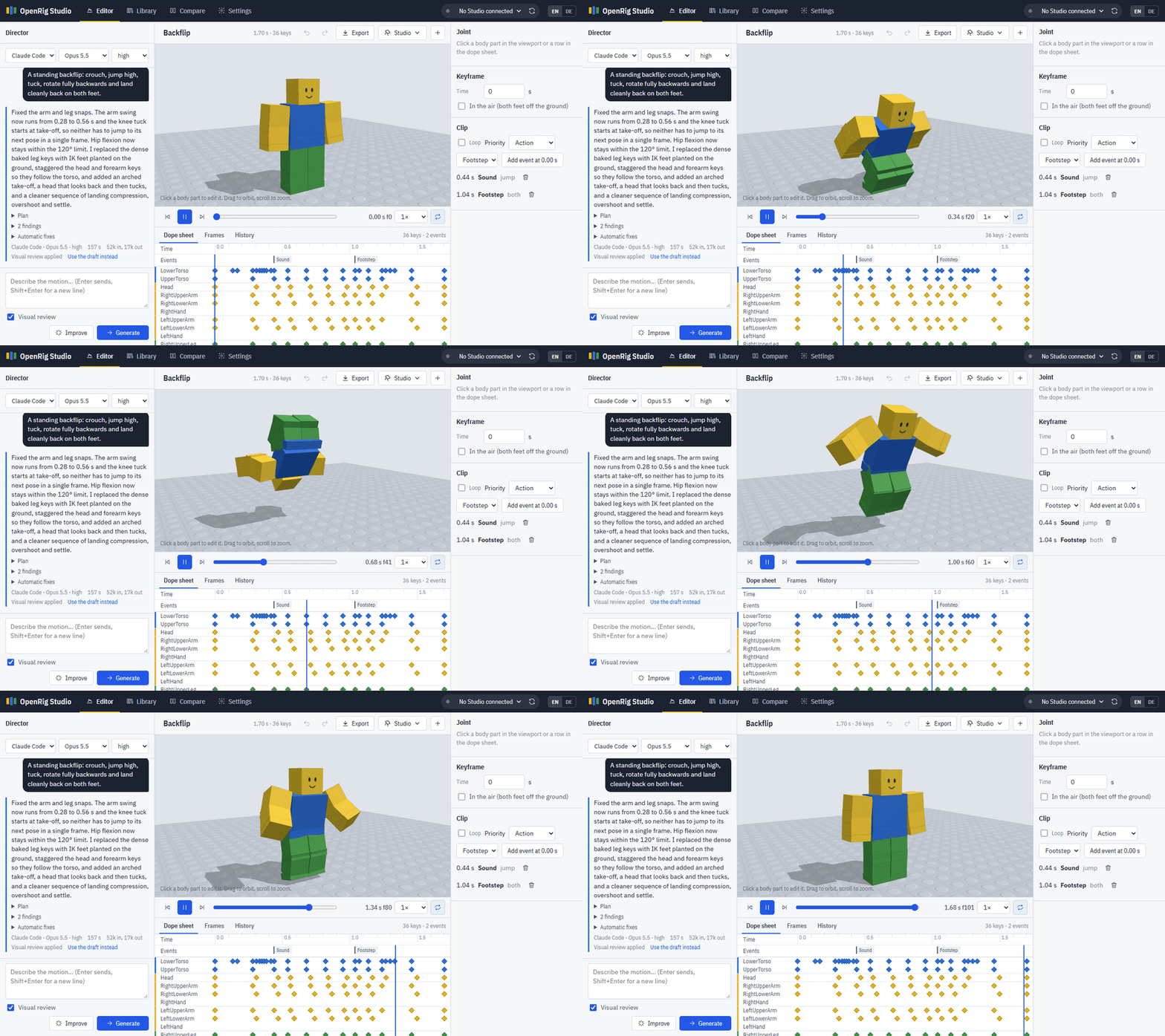
- Use your own AI. Claude Code and the Codex CLI run on your existing Claude or ChatGPT subscription. Anthropic and OpenAI API keys work too. No accounts, no credits, nothing in between.
- Pick the model and effort for every request, from fast and cheap to slow and thorough.
- Preview that matches Roblox. The playback math was measured against Roblox Studio, including its easing and rotation blending quirks.
- Built-in animation rules. Hand and foot targets (IK), foot locking for planted feet, automatic grounding, spins and flips, and checks for snapping joints or limbs inside the body.
- Visual review. Optionally the model looks at a contact sheet of its own draft and fixes what it sees.
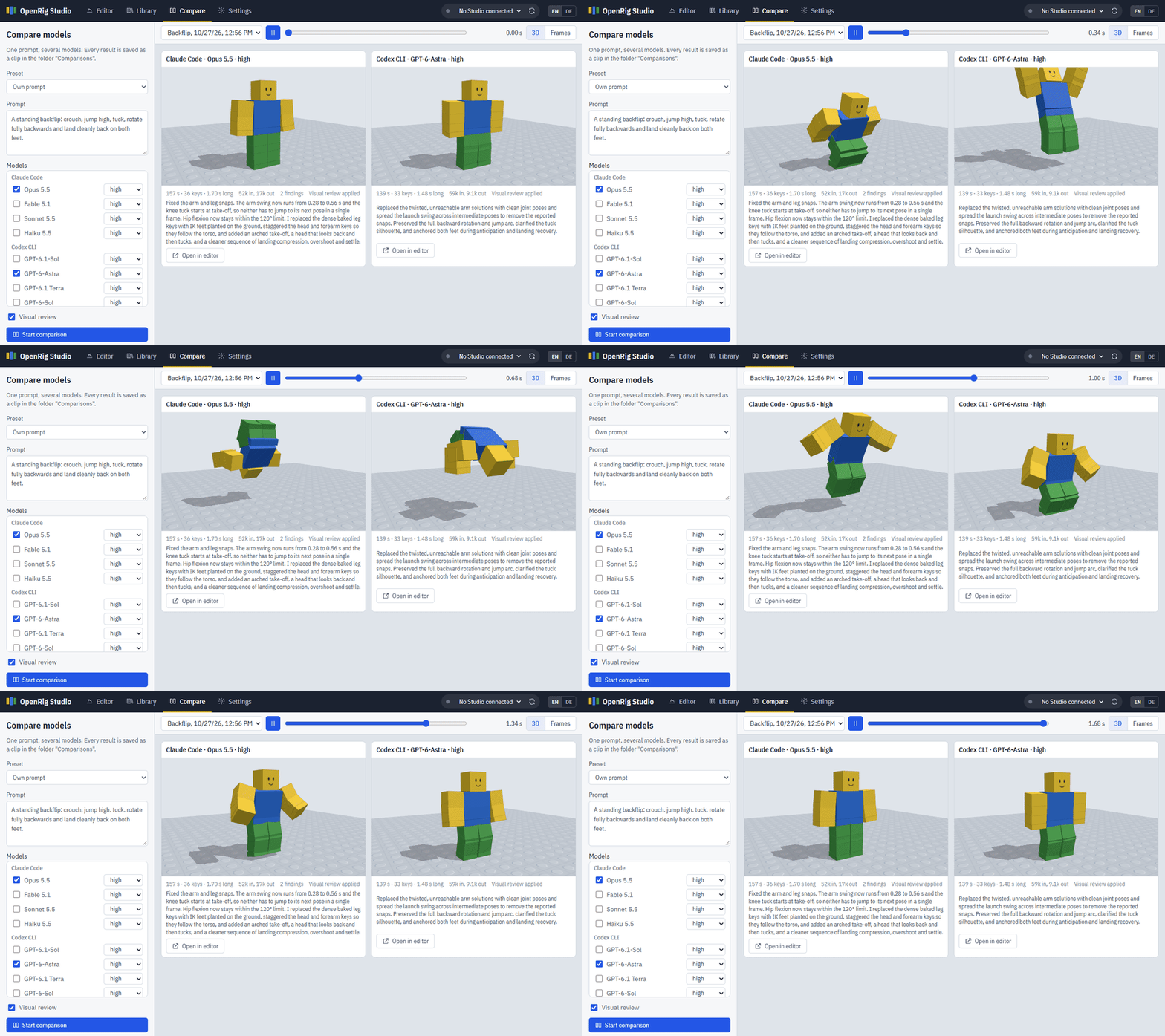
- Compare models. One prompt, several models, results play in sync.
- Library. Folders, search, rename, star, bulk export, bulk send to Studio. Five example clips (idle, walk, wave, cheer, jump) are there from the first start.
- Roblox Studio bridge. Send clips to Studio, play them on a preview rig or on your avatar in a playtest, and import versions you refined in the Animation Editor.
Quick start
You need Node.js 20 or newer and at least one AI provider:
| Provider | What you need |
|---|---|
| Claude Code | Claude Code installed. Run claude once in a terminal and log in with your Claude subscription. |
| Codex CLI | The Codex CLI installed. Run codex once and log in with your ChatGPT subscription. |
| Anthropic API | An API key from console.anthropic.com |
| OpenAI API | An API key from platform.openai.com |
| OpenAI-compatible API | Any server in the OpenAI Chat Completions format: DeepSeek, Qwen, Kimi, GLM, OpenRouter, or local models through Ollama or LM Studio. Enter the base URL, a key if needed and the model ids in Settings. |
git clone https://github.com/hildlabs/openrig-studio.git
cd openrig-studio
npm install        # only needed for API keys
npm start          # or double-click start.cmd (Windows) / run ./start.sh (macOS, Linux)
Open http://localhost:4330. The Settings tab shows which providers were found and is where you paste API keys. Keys are stored only on your computer in data/settings.json; you can also put them in a .env file (see .env.example).
Notes for the OpenAI-compatible API:
- Answers are long (8,000 to 20,000 tokens, thinking models more). If the app says the answer was cut off, raise Max output tokens in Settings. Ollama loads models with a small context by default; start it with a larger one, e.g.
OLLAMA_CONTEXT_LENGTH=32768. - Visual review sends an image of the draft. Tick The models can see images only if yours can; otherwise review is skipped.
- Small local models run, but expect much rougher results than the large hosted ones.
Working with Roblox Studio
OpenRig Studio talks to Roblox Studio through the MCP server that ships with Studio. Open your place in Studio, pick it in the top bar, then use the Studio menu:
- Send to Studio saves the clip under
ServerStorage › RBX_ANIMSAVESand places a preview rig in front of your Studio camera. Open the Animation Editor, select the rig and use Load to refine or Publish to Roblox to get an asset id. - Play in Studio plays the clip on the preview rig in edit mode.
- Play on my avatar plays it on your character during a playtest (F5). The playtest avatar must be R15.
- Import from Studio brings a version you edited in the Animation Editor back as the newest version of the clip.
Without the bridge you can still Export › Download .rbxmx and use Insert from File in Studio, or copy a Luau snippet that builds the KeyframeSequence.
If no Studio window shows up, keep the place open and check that Roblox Studio's built-in MCP server is available; on unusual installs set the path to StudioMCP in Settings.
How it works
- Your request goes to the chosen model together with a system prompt (
prompts/system.md) that teaches the R15 rig: axes, landmarks, reach, joint limits, tested poses, timing and easing rules. - The model answers with keyframes as JSON, optionally using hand and foot targets instead of angles.
- The pipeline normalises the clip, splits large rotations, solves IK, plants feet, puts the body on the ground, smooths easing on pass-through keys and checks for problems.
- With visual review on, a contact sheet of the draft goes back to the model for a second pass.
- Every result is kept in the clip's history, so you can go back at any time.
Details and the Roblox measurements behind the preview: docs/how-it-works.md.
Known limitations
OpenRig Studio gives you a solid first draft, not a finished hand-keyed animation. Plan to polish important clips in the Animation Editor.
- R15 only. No R6, no custom or non-humanoid rigs.
- Made for default R15 proportions. The rotations play on any R15 rig, but IK, planted feet and grounding are calculated for the standard blocky body. On Rthro or scaled avatars feet can slide or sink and hands miss their targets.
- It takes a while. With Claude Code · Opus 5.5 · high (the default) a clip took 1 to 3.5 minutes in the benchmark, about 2 on average. Faster models and lower effort are quicker but less reliable.
- It uses your plan's limits. One clip with visual review is two model calls and 6,000 to 22,000 output tokens. Free for the app, not free for your usage quota.
- Turning on the spot is the weak spot. Planted feet still slide during spins and sitting down. Fast arm motions such as a cheer can snap between two keys; the checks flag these.
- Measured for one model so far. The benchmark numbers are from Opus 5.5. Other models work, but nobody has measured them yet; runs for other models are very welcome.
- The checks catch technical problems, like feet in the ground, limbs inside the body or snapping joints. Whether a motion looks good is still up to you.
- The Studio bridge needs Roblox Studio's built-in MCP server. Without it, use Export › Download .rbxmx instead.
- Tested mainly on Windows. macOS and Linux run the test suite in CI, but have seen far less real use.
Project layout
prompts/            system prompt and presets (edit these to tune results)
examples/           example clips added to the library on first start
bench/              fixed requests for the benchmark (npm run bench)
src/core/           rig, animation pipeline, IK, renderer (no dependencies)
src/server/         local web server, providers, library, Studio bridge
web/                the browser app (plain ES modules, three.js from a CDN)
test/               node --test suite with Roblox reference values
data/               your clips and settings (created on first start, not in git)
Contributing
Issues and pull requests are welcome. Most of the code was written with Claude Code, so a critical read of the code itself is just as welcome as bug reports. Most of the animation quality comes from prompts/system.md, so prompt improvements are as valuable as code.
If a generated clip looks wrong, open an issue with the Animation looks wrong template: the prompt, the model and the exported clip make it reproducible. Before opening a pull request:
- Run
npm test. It checks the Roblox reference values and that every example clip passes the checks. - If you changed the system prompt or the animation pipeline, run the benchmark before and after and mention the result (see below).
- If you improved the example clips in the library folder Examples, run
npm run save-examplesto write them back toexamples/. - Keep it dependency-free in
src/core/andweb/; the API SDKs are the only packages.
Benchmark
npm run bench sends the 20 fixed requests in bench/cases.json (idle, walk, wave, punch, backflip, …) through the same pipeline as the app and measures every result: check findings, missed expectations (loop, length, airtime, torso movement), sliding and sinking feet, how many joints move, time and tokens. Nothing is added to your library; each run goes to data/bench/<run>/ with the clips, contact sheets and a report.html to look through.
npm run bench -- --list                                              # engines and earlier runs
npm run bench -- --engine claude-code:claude-sonnet-5-5:medium       # all cases, one model
npm run bench -- --engine claude-code:claude-sonnet-5-5:medium --engine codex:gpt-6-sol:medium --cases jump,backflip --runs 3
npm run bench -- --engine claude-code:claude-sonnet-5-5:medium --prompt prompts/my-test.md --baseline <run>
npm run bench -- --compare <runA> <runB>
Models answer differently every time, so compare with --runs 2 or more before trusting small differences, and still look at the contact sheets: the numbers catch technical problems, not whether a motion looks good.
Privacy
Everything runs locally. Prompts and clip data are sent only to the AI provider you pick for a request. API keys never leave your machine except in requests to their own provider. The server listens on 127.0.0.1 only and rejects requests from other websites open in your browser.
License
MIT, see LICENSE.
Kurz auf Deutsch
OpenRig Studio erzeugt Roblox-R15-Animationen mit den KI-Abos, die du schon hast (Claude Code, Codex CLI), mit API-Keys oder über jede OpenAI-kompatible API (DeepSeek, Qwen, Kimi, OpenRouter, Ollama …). Node.js 20+ installieren, Repo klonen, npm start ausführen bzw. start.cmd doppelklicken und http://localhost:4330 öffnen. In den Einstellungen siehst du, welche Anbieter gefunden wurden; oben rechts schaltest du die Oberfläche auf Deutsch um.
Yorumlar (0)
Yorum birakmak icin giris yap.
Yorum birakSonuc bulunamadi