happy-next
Health Gecti
- License — License: MIT
- Description — Repository has a description
- Active repo — Last push 0 days ago
- Community trust — 61 GitHub stars
Code Basarisiz
- rm -rf — Recursive force deletion command in .claude/skills/happy-ios-build/scripts/build-dev.sh
- rm -rf — Recursive force deletion command in .claude/skills/happy-ios-build/scripts/build-prod.sh
- execSync — Synchronous shell command execution in .github/workflows/model-catalog-sync.yml
- process.env — Environment variable access in .github/workflows/model-catalog-sync.yml
Permissions Gecti
- Permissions — No dangerous permissions requested
Bu listing icin henuz AI raporu yok.
Mobile, web & Apple Watch client for Claude Code, Codex, Gemini & Qoder — multi-agent orchestration, realtime voice, end-to-end encrypted, self-hostable.

Mobile and Web Client for Claude Code, Codex, Gemini & Qoder
Use Claude Code, Codex, Gemini, or Qoder from anywhere with end-to-end encryption.
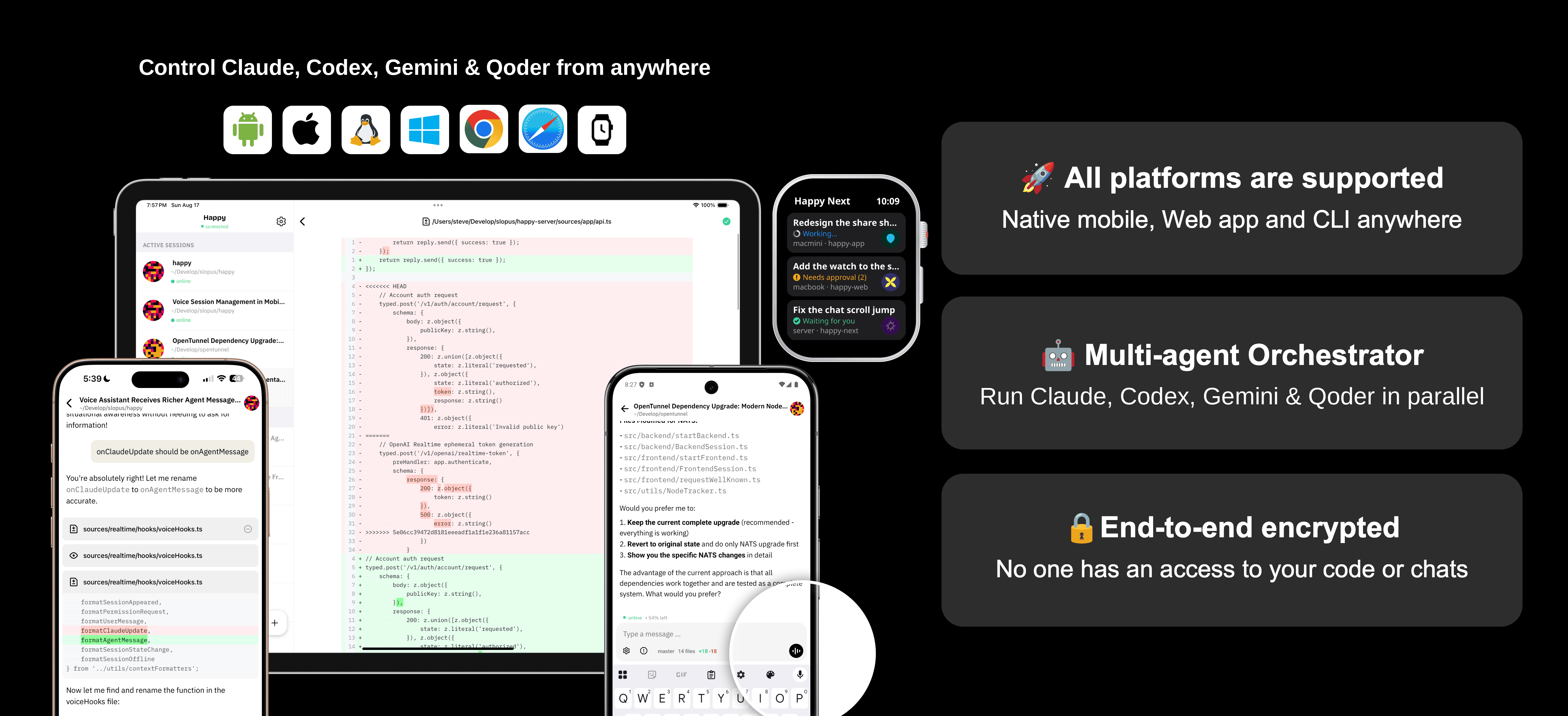
Step 1: Download App

Step 2: Install CLI on your computer
npm i -g happy-next-cli
Step 3: Start using `happy` instead of `claude`, `codex`, `gemini`, or `qodercli`
# Instead of: claude
# Use: happy

happy

# Instead of: codex
# Use: happy codex

happy codex

# Instead of: gemini
# Use: happy gemini

happy gemini

# Instead of: qodercli
# Use: happy qoder

happy qoder
Running happy prints a QR code for device pairing.
- Scan the QR code with the app you downloaded in Step 1 (or open app.happy-next.com in a browser).
- Prerequisite: install the vendor CLI(s) you want to control (
claude,codex,gemini, and/orqodercli).

🔥 Why Happy Next?
- 🎛️ Remote control for Claude, Codex, Gemini & Qoder - All four agents as first-class citizens
- 🤖 Orchestrator - Define multi-agent task DAGs, auto-schedule execution, and inspect linked run history
- ⚡ Instant device handoff - Take back control with a single keypress
- 🔔 Push notifications - Know when your agent needs attention, and answer permission requests from the notification
- ⌚ Apple Watch - Sessions, messages and replies on your wrist, with a complication counting the sessions that need you
- 🔐 E2EE + self-host option - Encrypted by default, one-command Docker deployment
- 🎙️ Voice assistant - Volcano (Doubao) real-time gateway with streaming speech, native iOS voice calls, and selectable voice timbre / speech rate
- 🧰 Multi-repo workspaces - Worktree-based multi-repo flows with branch selection and PR creation
- 📁 Code browser & git management - Browse files, view diffs, stage/commit/discard from your phone
- 📋 DooTask integration - Task management with real-time chat and one-click AI sessions
- 📨 Pending message queue - Messages queued and auto-dispatched when CLI is ready
- 📱 Native mobile UX - Platform-native bottom tabs and headers on iOS / Android, iPad windowed-mode polish
- 🖥️ Desktop apps - Native-feeling macOS and Windows clients with tray residency, notifications, shortcuts, and signed updates
How does it work?
On your computer, run happy instead of claude, happy codex instead of codex, happy gemini instead of gemini, or happy qoder instead of qodercli to start your AI through our wrapper. When you want to control your coding agent from your phone, it restarts the session in remote mode. To switch back to your computer, just press any key on your keyboard.
What’s new in Happy Next
Happy Next is a major evolution of the original Happy. Here are the highlights:
Desktop Apps (macOS + Windows)
Direct-download clients for macOS 12+ Universal, Windows x64, and Windows ARM64
Click the macOS sidebar title to return to the session home screen
Native window sizing and restoration, frameless macOS title-bar integration with stable traffic-light placement and a refined sidebar header, an integrated Windows title bar whose logo returns to Sessions, refined fullscreen/title-bar interactions, multi-monitor bounds protection, and theme-correct startup with a native startup logo
Tray residency, close-to-tray behavior, single-instance activation, clean plain-text native notifications with consistent app icons that reliably restore the app and open the corresponding session, and unified Dock/taskbar unread indicators
Native application menus, search and navigation shortcuts, optional launch at sign-in, and a global show/hide shortcut
Signed automatic updates are checked periodically and when the app regains focus, download quietly in the background, and wait for the user to install and restart
Desktop diagnostics, rotating local logs, WebKit storage maintenance, upload retry recovery, microphone/camera support, native context menus, reliable theme-isolated HTML preview windows, CSP-compatible code editing, system-browser external links, and restricted native capabilities
Terminals open in a dedicated desktop window with a tab bar of their own, titled by the directory the shell is in
Terminals on this computer are reached directly through the local daemon rather than the server, so typing is immediate and an open terminal keeps working while the server is down, falling back to the server when the daemon can't be reached; a tab's tooltip adds "(direct)" when connected directly
The macOS title bar is a compact toolbar
Apple Watch
- Allow, allow for this session, deny, stop or reply straight from a permission notification on iPhone or the watch
- A watch app lists your sessions in the app's order with their avatars and pinned ones first, opens a session on its latest messages with earlier ones a tap away, and replies by dictation or a quick reply; stopping a task asks first
- A watch face complication counts the sessions waiting for approval and those working
Orchestrator
- Define task dependency graphs (DAGs) with per-task model and working directory
- Auto-schedule execution across Claude, Codex, Gemini, and Qoder agents
- Real-time status badges, an activity count that includes queued (not just running) tasks, and status-colored progress bars
- Clear task execution history, streamlined run navigation, and direct links from Orchestrator messages to their runs
- Follow up on completed tasks via session resume
- MCP tool integration with auto-filled working directory
- Happy CLI auto-installs the orchestrator skill and
/orchestratorslash commands on startup — fan a task out to parallel or dependency-ordered Claude / Codex / Gemini / Qoder agents straight from the CLI - Built-in
/preview-htmlslash command — generate a self-contained HTML document from the CLI and preview it directly in the app - Runs and tasks show how long they take, run filters are simplified to All, Active, Completed, Failed and Cancelled, and a task's result is just the agent's final message, followed live while it runs
- A resumed task reports back to the session that sent the follow-up, and the run is listed in both sessions
orchestrator_execruns shell commands on one or every online machine, with long output saved on the machine- Orchestrator tasks are end-to-end encrypted — the server never sees a task's title, prompt, command, working directory or target machines — and only go to machines whose CLI can open them
orchestrator_transfercopies files and directories between machines, streamed end-to-end encrypted- Search runs by title and filter them by status, agent and machine, each run showing its agent's icon
Pending Message Queue
- Messages sent while the CLI is busy are queued server-side and auto-dispatched
- Queue panel UI with image count badges and send-now option
- Edit a queued message before it sends, or pause it / save it as a draft instead of dispatching
- Reconnect sync and concurrent dispatch safety, and the next queued message goes out as soon as the turn ends
- Schedule a message to send later from the composer's add menu — in 30 minutes, in an hour, after the usage limit resets, or at a time you pick
Multi-Agent (Claude Code + Codex + Gemini + Qoder)
- All four agents are first-class citizens with session resume, duplicate/fork, and history
- Multi-agent history page with per-provider tabs, device and agent filter dropdowns
- Per-agent model selection, cost tracking, and context window display
- ACP and App-Server (JSON-RPC) backends for Codex, with Codex v0.155.1 and fast mode
- Codex archive actions synchronize with native history, show archived state consistently, and support restoring archived sessions when continuing work
- Reliable Codex duplication and forking, with clear active-session conflict errors
- Codex interactive questions and approval requests render in the app, including choices, custom Other values, free-form text, and masked sensitive answers
- Claude Opus 4.8 support with empty thinking block filtering for clean 4.x rendering
- Claude Fable 5.1 and Fable 5 in the Claude model catalog, with 1M context and low / medium / high / xhigh / max reasoning effort presets
- Claude Opus 5 and Claude Sonnet 5 with 1M context, current reasoning-effort presets, fast-mode capability detection, and updated cost tracking
- Streamlined model picker: one entry per Claude model at its full context window, reasoning-effort presets side by side on wide screens, and Claude defaults to High effort; the context bar follows the window Claude Code actually uses
- GPT-6 Astra catalog support plus GPT-5.6 Sol, Terra, and Luna with their current reasoning-effort and context settings
- Gemini 3.8 Flash joins the refreshed Gemini catalog alongside the existing Gemini models
- Qoder CLI over ACP, with the account's models and reasoning efforts, permission modes and plan mode, and context usage for Qoder and Gemini sessions
- "Don't ask again" on a shell command picks which programs or subcommands it covers, for all four agents
- The model catalog is served by the server, so new models show up without an app update — now with Claude Opus 5.5, Claude Sonnet 5.5, GPT-6.1-Sol, GPT-6-Sol, and GPT-6-Luna
- The settings popover explains each permission mode and AI vendor, and model descriptions follow the app language, including Simplified and Traditional Chinese
- Codex's "Approve for Me" mode routes approvals to Codex's own reviewer, and orchestrator tools that act — running commands, sending messages, transferring files, cancelling tasks — ask for permission under every agent
Voice Assistant (Happy Voice)
- Voice gateway auth now uses short-lived tokens for improved security
- Volcano (火山引擎 / Doubao) real-time gateway powering speech-to-text, LLM, and text-to-speech, replacing the earlier LiveKit / ElevenLabs stack
- Native in-call voice on iOS with streaming text-to-speech, connection state gated on room-state changes, and the microphone guarded during a call
- Selectable voice timbre and speech rate; multilingual replies default to the seed-tts-2.0 voice
- Smarter LLM text cleaning before speech — trivial short text skips cleaning to cut latency, with localized in-call announcements
- Voice assistant configuration syncs across devices via end-to-end-encrypted user settings
- Microphone mute, voice message send confirmation, "thinking" indicator
- Context-aware voice: app state is injected into the voice LLM automatically
- Read any AI reply aloud with a one-tap voice button in the message footer — true streaming text-to-speech starts playback as audio is synthesized, backed by a global read-aloud queue and a draggable floating player so you can line up messages and control playback from anywhere; a v2 text-cleanup prompt with a digest mode condenses long messages for smoother narration
- Manage sessions by voice — start, switch, and message a session through dedicated voice tools with a single session-settings mode parameter, clearer titles, and an auto-close countdown on the session-picker cancel button
GitHub Integration
- Browse connected repositories and move between GitHub-backed work from the app
- Connect your GitHub account and browse repositories, issues, and pull requests
- Create, comment on, close, and reopen issues and pull requests from the app
- Start an AI session with issue or pull request context, and return to linked sessions from the detail page
- GitHub lists use Octicons, and the repository list is cached locally so returning to it is instant
- List totals are cached with a spinner while they refresh, and issue and pull request comments get a scroll-to-bottom button
Multi-Repo Worktree Workspaces
- Create, switch, and archive multi-repo workspaces from the app
- Per-repo branch selection, settings, and scripts
- Aggregated git status across repos
- Auto-generate workspace
CLAUDE.md/AGENTS.mdwith@importrefs - Worktree merge and PR creation with target branch selection
- AI-powered PR code review with results posted as GitHub comments
Code Browser & Git Management
- Securely preview images and supported files, with downloads up to 100 MiB
- Full file browser with search, Monaco editor viewing/editing
- Commit history with branch selector (local + remote)
- Git changes page: stage, unstage, commit, discard
- Per-file diff stats (+N/-N) for Claude, Codex, and Gemini
- Image preview with sharing support
- Commits list tags the commit at the upstream branch tip
- Copy the current browser breadcrumb path directly from the navigation bar
- Loading feedback for bulk git actions while the operation runs
- Opening Files from git status focuses the relevant changed files
Session Sharing
- Share sessions with friends via direct invite or public link
- End-to-end encrypted: NaCl Box (direct) and token-derived keys (public links)
- Real-time sync of messages, git status, and voice chat across shared users
- Access control with view, edit, and admin permission levels
- "All / Shared with me / Shared by me" filter tabs and share indicator in session list
- Public share web viewer for link-based access, with paginated message loading so long shared conversations open faster
- Recipients of a shared session can upload chat images, and a failed send names the real reason
DooTask Integration
- Task list with filters, search, pagination, and status workflows
- Task detail with HTML rendering, assignees, files, sub-tasks
- Real-time WebSocket chat (Slack-style layout, emoji reactions, voice playback, images/video)
- One-click AI session launch from any task (MCP server passthrough)
- Create tasks and projects directly from the app with cross-platform date picker
- Globalized WebSocket connection with real-time task updates and persistent server-side connection
- DooTask recents merged into the main inbox with persistent cache and silent background refresh
- Session avatars on DooTask-related sessions, chat header adapts to dialog type
- Empty chats show a consistently centered empty state
- DooTask devices are identified as Happy Next, with a simpler connection login and cross-device connection sync
- The task list is cached per filter and refreshed in the background
Self-Hosting
- One-command
docker-compose up(Web + API + Voice + Postgres + Redis + MinIO) - Custom server shortcut button in desktop settings for quick server configuration
- Service discovery for API and voice config endpoints
- Default API endpoint racing chooses the fastest official config endpoint when no custom/self-host server is configured
- Separate origins architecture (no path reverse proxy)
.env.examplewith full configuration reference- Runtime env var injection for Docker builds
- Zero-cost nginx
/healthzendpoint for load-balancer / uptime probes - The server image runs database migrations automatically on container start (set
SKIP_DB_MIGRATIONS=trueto opt out)
Sync & Reliability
- v3 messages API with seq-based sync, batch writes, and cursor pagination
- HTTP outbox for reliable delivery when WebSocket is unavailable
- Server-confirmed message sending with retry and message receipt tracking
- Fixes for cursor skip, outbox race, message duplication/loss
- Chat reducer no longer synthesizes out-of-order completed-permission messages
- Message send hardened for flaky networks; draft restore is suppressed while a send is in flight
- Session loading reliability: 60s message-fetch timeout, recovery from permanent load failure, refresh indicator across the entire retry loop, and chunked base64 encoding to avoid stack overflow on very large payloads
- Persistent local message cache shows existing conversation history faster when reopening sessions
- Session draft rewritten as a single source of truth — fewer cases of drafts vanishing or reappearing
Chat & Session UX
Image attachment, clipboard paste (web), and desktop drag-and-drop in new or active sessions, and any other file can be dropped or pasted on web too; image support in drafts and high-quality pass-through up to 1568px preserve text sharpness in code/UI screenshots, while multi-image previews stay on the selected image
Session titles seeded from the first user message for new sessions (until an AI summary takes over)
Slash command results surface even when the agent emits no assistant message (e.g. unknown commands no longer blank out)
Slash-command autocomplete shows each command's source scope (repo / user / plugin / system) and kind; after selecting a root command, suggestions stay limited to its matching subcommands instead of mixing in skills for free-form arguments; session capabilities are stored separately from metadata and sync live so command and skill lists stay fresh
/duplicatecommand to fork a session from any message, including directly from an AI reply, with more reliable user-message target resolutionSending shows an optimistic "Processing…" status immediately, plus a "refreshing" indicator while the message list reloads
Message pagination, unread blue dot indicator, compact list view
Conversation minimap panel — tap to jump to any part of a long conversation at a glance, populated from the offline message cache so the overview is available even before messages finish loading or while offline
Minimap overlay placement is polished for smoother long-conversation navigation
Web conversation list rebuilt as a model-driven virtualized list — jumping to a message centers instantly (with a subtle shake when you're already there) and history loads on demand as you scroll; scrolling is stabilized so gestures don't jump, scroll-to-bottom lands on the true bottom, and a proxy scrollbar replaces the distorted native one for an honest scroll position
Context usage tooltip on the context indicator showing token-count breakdown details
Resizable sidebar on web — drag the edge to adjust width
New session defaults now pick the best available machine automatically
Per-machine session tabs (sessions grouped by the machine they run on), each tab showing a stable status dot — orange when a session on that machine needs permission, reflecting the live thinking state — while the aggregate 'all' tab stays dot-free; session preview expand/collapse, metadata caching
Collapsible project folders group related sessions, with folder state retained locally
Machine tabs remain visible when shared sessions are present, and the Shared by me list refreshes after sharing changes
Recent session history pagination for faster initial load
Session rename with lock (prevent AI auto-update), search in history
Session-info quick actions for common session tasks
Seven session color markers can be assigned or cleared from session menus for quick visual organization across session lists
Options click-to-send / long-press-to-fill, scroll-to-bottom button
"Always show context size" defaults to on so usage is visible without opening session details
Per-message action bar with copy, fork-from-here (with progress spinner), read-aloud, and full timestamp on web hover / native tap
Web desktop: hover-to-show copy button on chat messages and right-click on options reusing the mobile long-press behavior
Mobile text selection: in-app selection page uses browser-native long-press with static syntax highlighting (Lezer) for reliable first-tap selection on Android
Pull-to-refresh, inset dividers, Agent tool display with robot icon
Tool input/output formatted as key-value pairs instead of raw JSON
Unrecognized tool calls render as a generic 'other' block with a dynamic title and icon, instead of an empty placeholder
Agent event messages strip ANSI escape codes from child-CLI stderr so subprocess banner color sequences no longer leak into the chat as raw
[90m…[0mpreview_htmltool for full-page HTML preview, with supported tool messages opening previews directly, plus colon-separated MCP tool namingCodex in-progress plan steps remain visible while a session is running
CLI hot-upgrade support mid-session
Path picker with directory autocomplete via remote machine listing (web + mobile)
Session header unified across iOS / Android / web with left-aligned title, new-session button on the header right, and a header title in the session info screen
Desktop project headers include a direct new-session action
Consistent back-button and header-action alignment across session and machine screens
Long user messages (>20k characters) collapse to a preview with a Show More toggle; text selection inside messages on web is fixed
Installed Codex skills appear in slash-command autocomplete; short-screen empty states and initial web-message layout are more reliable
Codex interactive questions support choices, custom Other values, free-form text, and masked sensitive answers
Session rename and mark-as-read / mark-as-unread from the session context menu, with the acting row ringed so the menu's target stays unambiguous
Session color markers are drawn as a bar down the row edge, so a column of them can be scanned and unmarked rows reserve no space; the compact list now marks every session state
Compact list view is stored per platform, so the denser desktop list and the mobile list keep their own setting
A new session is no longer offered from a session shared with you
Assistant turns carry a timer above the reply — counting up while the turn runs and reading as a duration once it settles (hover on web, tap on native)
The conversation minimap marks AskUserQuestion calls and HTML previews, and keeps compaction summaries off the rail
In-progress AskUserQuestion answers survive scrolling away, new messages, and reloads as drafts
Images opened by file-reading tools render as previews, and
preview_htmlcan read a document from a file pathThinking and image placeholder rows are hidden, and "show thinking messages" now defaults to off for new users
A turn's process folds into one line — how long it took and how many tool calls it hid — that opens on a tap, with the line naming what the agent is doing while the turn runs
A compacted conversation's summary collapses to a single tap-to-view line, however short it is
The landmark minimap rail is summoned by a swipe in from the right edge on touch — slide to pick a mark, release to jump — with a card previewing the mark under your finger
The composer's standalone abort button is gone: the round button becomes a stop button while the agent is busy and there is nothing to send, and Escape aborts on a double press
A local session's folder can be revealed in Finder, or in Explorer on Windows, from a session menu now split into sections
A plan proposal shows folded at the shape of a proposal — marked on the landmark rail and kept out of the turn's fold — and submitting one sends it as the request it is
A step waiting on a permission stays out of the fold, so the question is never folded away
The fold line holds the position it was tapped at on web and native alike, instead of snapping when the page settles around it
On iOS a glass composer floats over every chat screen, docked to the keyboard, so new messages, short chats, and empty states stay in step as it opens and closes
The native message list runs on LegendList for smoother scrolling, follows new messages to the end even in bursts, and starts short chats at the top
An open session is no longer marked read while the window is unfocused or idle, and archived sessions stay offline
The session list is scoped by machine — a machine rail beside the list on tablets and desktop, a machine switcher sheet on phones — with shared sessions folded into their own sections and machines reorderable by dragging in Settings
Projects are named by their directory, with the machine or parent directory added only where two projects would read the same, and a setting brings back full paths
A turn's steps fold in runs between the agent's words, so narration, questions and permissions stay on screen, and folded lines show running delegated tasks
Long-running tool times read as mm:ss and HH:mm:ss, the web minimap sits at the right edge, and the web chat list no longer jumps while scrolling
Text selection previews open as code, JSON or markdown to match the source, and the web session history preview supports text selection, smooth scrolling and timestamps
Claude's built-in slash commands show their descriptions, and the header's connection status keeps its color on Android and the web
Attach files to a message from the add menu; the agent reads them on the session's machine, and they show as cards with typed, colored file icons that open in the file viewer
Pin sessions to the top of the list, including in the sharing views, and hover a session on web for a card to rename, locate, pin or archive it
The session list lies flat on the background: in the all machines view each machine heads its sessions with a pinned band, rows are inset and rounded, a session marked with a colour is tinted with it, and the selected one gets a bar at the list's edge
Double-tap the sessions tab, or tap the shown machine on the rail, to jump to the next session that wants a look
Copy, read aloud and long-press take a reply split across several blocks as one whole
The new session wizard and the remaining English strings follow the app language
Machines get preset avatars, can be reordered by dragging in the sidebar from its right-click menu, and idle machines can be hidden from the rail and the switcher
The machine page opens a terminal in the machine's home directory, and its recent sessions link to that machine's full session history
Qoder CLI is a fourth agent (
happy qoder), with its account's models and reasoning efforts, permission modes and plan mode, session history, resume, forks and/duplicate, image input and context usageThe command palette searches every machine's message history, groups hits by session, keeps a search history, and shows its commands as tiles when idle
A terminal panel docks along the bottom of the app on web and desktop, holding every shell under whatever page is open
The new session screen gathers session type, machine, path and repos into one card, picks the agent from an AI tab, and offers
/command and$skill autocomplete, file attachments and scheduled send before the session startsRecall sent messages with ArrowUp/ArrowDown, and
/and$suggestions rank by match quality and recent useSessions with scheduled messages are marked in the list with a countdown in the hover card, and the list sorts by last message time
Turns fold on iOS and Android as on web, the previous turn slides shut when you send, thinking folds like a tool call, and automatic compaction is announced like a manual
/compactEvery bottom sheet shares one look and returns to its place when the keyboard hides
Copying or resuming a session brings over only what was said, with a divider naming where it came from, and archived sessions (Codex included) can be forked, with a banner offering resume in place of the composer
A turn an agent starts on its own, such as a background task reporting in, gets its own place in the chat for all four agents
Read aloud picks up where a flaky network cut it off, retrying through an outage of up to 30 seconds
The reset time in a Claude usage-limit notice opens the schedule sheet
Session list rows tell when a session last moved, a project's header opens its card, and machines fold in the all machines view
On phones the session list opens a search page over sessions, machines, pages, actions and messages, with recent searches, and every search field shares the iOS system look on every platform
The session list's "+" starts a new session on a tap and opens its menu on a long press, and menus show an icon on each row
Scheduled messages offer finer relative times, from 10 minutes to 5 hours
A copied Claude session's context bar reads right from the start
Session rows no longer swipe; archive and delete stay in the long-press and right-click menu, and the inbox deletes an update and handles friend requests and friends from the same kind of menu
The image viewer moves between images with the arrow keys on web and desktop, previous and next buttons on the web, and a tap on a pagination dot
The command palette marks archived sessions with an Archived badge
CLI
happy updateself-upgrade,happy --versionwith all agent versionsDaemon auto-start on boot (
happy daemon enable/disable), restart commandUnified system prompt injection for Codex and Gemini
Message receipt tracking with legacy compatibility
Permission-mode switches from the app forward synchronously to the running Claude subprocess (no longer wait until the next message)
Stop/ESC interrupts now keep the Claude and Codex backends warm so the next message resumes instantly instead of cold-restarting; Gemini's interrupt feedback now matches Claude/Codex with a
[Request interrupted by user]markerSwitching model or toggling plan mode hot-swaps on the already-warm Claude subprocess instead of cold-restarting, so changes apply instantly mid-session
Switching a session from remote back to local cleans up terminal stdin so leftover raw-mode input no longer leaks into the terminal
Multiline skill metadata parses correctly, and enabled Codex plugin skills are discovered consistently
Happy CLI v0.9.1 bundles Codex v0.155.1 with current App-Server interaction support
Cost estimates bill Claude fast mode (Opus 5 and Opus 4.8) at its premium rate
Stale archived Codex session index entries are cleaned up
Resume Codex sessions from a scrolling picker, by session ID, or from the latest session, with working-directory selection
Codex exits cleanly without leaving the terminal hanging
Terminals run on the machine rather than in the app: each shell lives in a forked worker of its own so a misbehaving shell cannot take the daemon down, output streams as its own event rather than riding RPC, and the server relays the frames with the control bytes inside the opaque payload escaped
Where tmux is installed those shells outlive the daemon — the next daemon attaches to what the last one left, so a restart costs the connection and not the session
Automatic compaction summaries are flagged the same way manual ones are, and Happy's own UI tools are never put to the user as permission questions
Happy CLI v0.9.2 bundles Codex v0.155.1; terminal shells start with better defaults and handle input more predictably, and a cold Codex download no longer reads as a failed handshake
The Codex model list gains GPT-6-Astra's Ultra effort and drops the models OpenAI retired (GPT-5.4, GPT-5.4-Mini, GPT-5.2), while a session already running on a retired model keeps the model and effort it was created with
Happy CLI v0.10.0 bundles Codex v0.159.1, follows the server's model catalog, and drops the deprecated OpenClaw integration
New Codex sessions start on Codex v0.159.3, and archiving a Codex session goes through the running app-server daemon
Happy CLI v0.11.0 keeps Codex fast mode off unless a delegated task asks for it, and counts messages correctly in Claude, Codex and Gemini history lists; new Codex sessions start on Codex v0.160.1
Happy CLI v0.12.0 sends attached files to the agent, keeps session profiles separate per agent, and no longer misreports not-logged-in on
sudo happy update; new Codex sessions start on Codex v0.162.0New Codex sessions start on Codex v0.162.1
Happy CLI v0.13.0 adds Qoder, checks for new releases on its own and installs them when you ask from the app, upgrades a root-owned global install through passwordless sudo, archives each session's messages for search, and sends Gemini's and Qoder's reasoning as one thinking message
Happy CLI v0.14.0 adds
orchestrator_transferand encrypted orchestrator tasks, forks archived Codex sessions, keeps Qoder's model list cached, and a daemon started from inside a session no longer makes new sessions resume it; new Codex sessions start on Codex v0.163.0Happy CLI v0.15.0 serves terminals to the desktop app on the same computer over a local, token-protected connection
Happy CLI v0.16.0 fixes Codex's "Approve for Me" mode, asks before orchestrator tools act, carries a copied session's context window, and marks each message as text or other so the watch loads only text
Happy CLI v0.16.1 describes the orchestrator and
preview_htmltools more accurately, so agents pick the right working directory and prefer a file path for HTML previews
Bug Fixes & Stability
- 255+ bug fixes: message sending reliability, session lifecycle, Markdown rendering, navigation, voice, DooTask, sharing
- Push tokens remain bound to only the active account and are cleaned up reliably during logout
- DooPush mobile notifications with registration cleanup when switching accounts or signing out
- Correct cost estimates for Claude Opus 4.5-4.8 and Haiku model IDs
- Security: shell command injection fix, plan mode permission handling
- Performance: payload trimming for mobile, lazy-load diffs, rendering optimization, incremental session catch-up on open
UI & Polish
- Native platform-feel mobile UX: iOS / Android use the platform-native bottom tab bar and native header on home, chat, and inbox screens
- Inbox-first bottom tab order, "Session" tab label, dedicated navigation icons (no more brutalist placeholders)
- iOS polish: chevron-only back button, header avatar geometry/clipping fixes, centered native header title, centralized status bar controller, stable action menus while the keyboard is visible, conflict-free image opening after dismissing the keyboard, and duplicate sheets without white overlays
- iOS 26 fixes: scroll-edge fade suppression, full-screen translucent chat overlay with keyboard, prompt modal presentation
- iPad / Mac windowed-mode polish: sidebar header reserves space for window controls, fixed session header resize, top-tab insets, list divider rendering, and windowed keyboard overlap
- Web: bottom tab bundling fix, session header navigation fix, path autocomplete focus handling
- Refreshed Happy Next logos, favicons, splash screens, notification assets, and mobile/desktop icons
- Adaptive system-theme updates now apply reliably across app and desktop authentication windows
- iOS scanner camera-permission flow proceeds directly from its explanation to the system request, with the unused motion permission removed
- Dark mode fixes throughout the app
- i18n improvements (Chinese Simplified/Traditional, CJK input handling)
- Markdown rendering: tables, inline code, nested fences, clickable file paths
- Keyboard handling, loading states, navigation stability, icon font preloading
- Text is set in the system font, so Chinese takes the same weights as Latin, and the inbox, DooTask and GitHub lists lie flat like the session list
Full changelog: docs/changes-from-happy.md
The status row marks the session's vendor with a small logo in front of the model label, derived from the same source as the model list
The desktop sidebar, welcome screen and settings draw the brand wordmark from the outlined SVG logos
iOS 26: floating buttons, the action menu, and bottom sheets use Liquid Glass; header, row, long-press, picker, filter, and attachment menus open as native iOS menus; and every screen sits under the soft scroll-edge header with connection status in its subtitle
Pressed session rows, task cards, and GitHub rows highlight like the other lists
Terminals open from the Features group in Settings, and the HTML preview takes the page's own title
Terminals also open from a session's quick actions, are drawn with xterm.js on the web with CJK text, spaces and styled runs kept on their cells, open in a popup window in desktop browsers, stay mounted while recently shown, and show a hollow cursor when unfocused
The empty-session placeholder shows on web and desktop in every language, the iOS new session card spacing is even, and the DooTask error banner floats above the tab bar
📦 Project Components
- Happy App - Web UI + mobile client (Expo)
- Happy CLI - Command-line interface for Claude Code, Codex, Gemini, and Qoder
- Happy Server - Backend server for encrypted sync
- Happy Voice - Voice gateway (Volcengine/Doubao-based)
- Happy Wire - Shared wire types and schemas
Self-host (Docker Compose)
See the Self-Hosting Guide for complete setup instructions.
Compatibility note
Happy Next intentionally changed client KDF labels as part of the rebrand. Treat this as a new generation: do not expect encrypted data created by older clients to be readable by Happy Next (and vice versa).
🏠 Who We Are
We build Happy Next because we want to supervise coding agents from anywhere (web/mobile) without giving up control, privacy, or the option to self-host.
📚 Documentation & Contributing
- Documentation - Learn how Happy Next works (protocol, deployment, self-host, architecture)
- CONTRIBUTING.md - Development setup and contributing guidelines
- SECURITY.md - Security vulnerability reporting policy
- SUPPORT.md - Support and troubleshooting
License
MIT License - see LICENSE for details.
Yorumlar (0)
Yorum birakmak icin giris yap.
Yorum birakSonuc bulunamadi