telegram-bot-ui
Health Uyari
- License — License: MIT
- Description — Repository has a description
- Active repo — Last push 0 days ago
- Low visibility — Only 6 GitHub stars
Code Gecti
- Code scan — Scanned 12 files during light audit, no dangerous patterns found
Permissions Gecti
- Permissions — No dangerous permissions requested
Bu listing icin henuz AI raporu yok.
Telegram bot UI/UX skill for Claude Code, Codex, Cursor, Gemini CLI and Copilot: messages, keyboards, buttons, navigation, streaming AI replies with Stop, Rich Messages, HTML widgets, premium emoji, channel publishing and agent-operated bots. Updated for every new Bot API release.
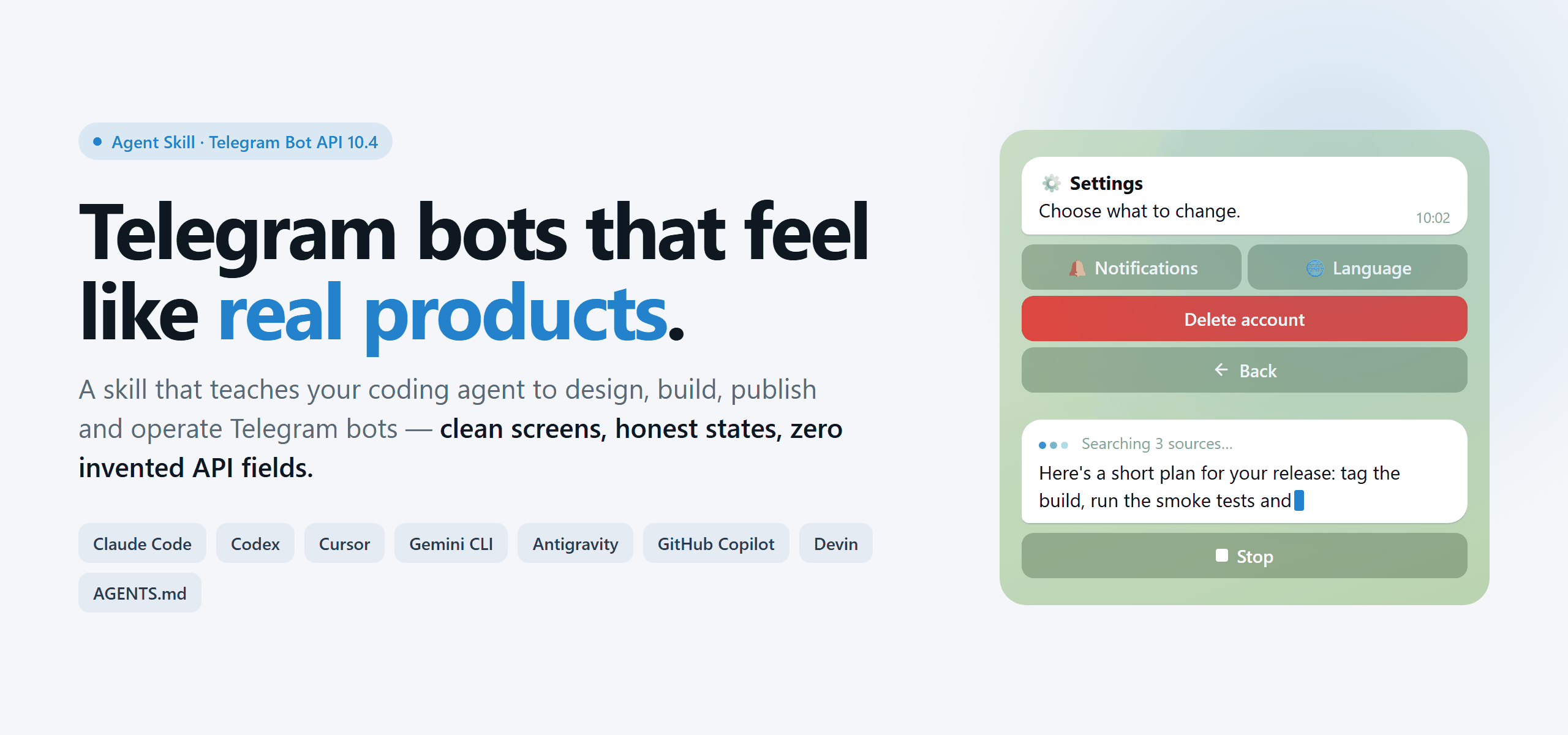





An Agent Skill that makes your Telegram bot look, feel and run like a well-designed product.
Bot screens and keyboards · streaming AI answers · HTML widgets · channel publishing · agent-operated bots · premium emoji · the whole Bot API, offline.
Quick start · Capabilities · Widgets · Install · Recipes · Tools · FAQ
🌐 English · Русский · Українська
⚡ Quick start
Claude Code (2.1.275 or later) — skill plus five subagents, in one line inside a session:
/plugin install telegram-bot-ui --marketplace hlibsuslov/telegram-bot-ui
Any other agent — clone once and let the installer place the files (standard library Python;
on Windows use py -3 instead of python):
git clone https://github.com/hlibsuslov/telegram-bot-ui.git && cd telegram-bot-ui
python scripts/install.py --host all --scope user
Then open your bot's repository and just ask: "Improve the UX of this Telegram bot."
The skill activates on its own — no API names needed. More hosts and options: Install.
✨ What changes in your bot
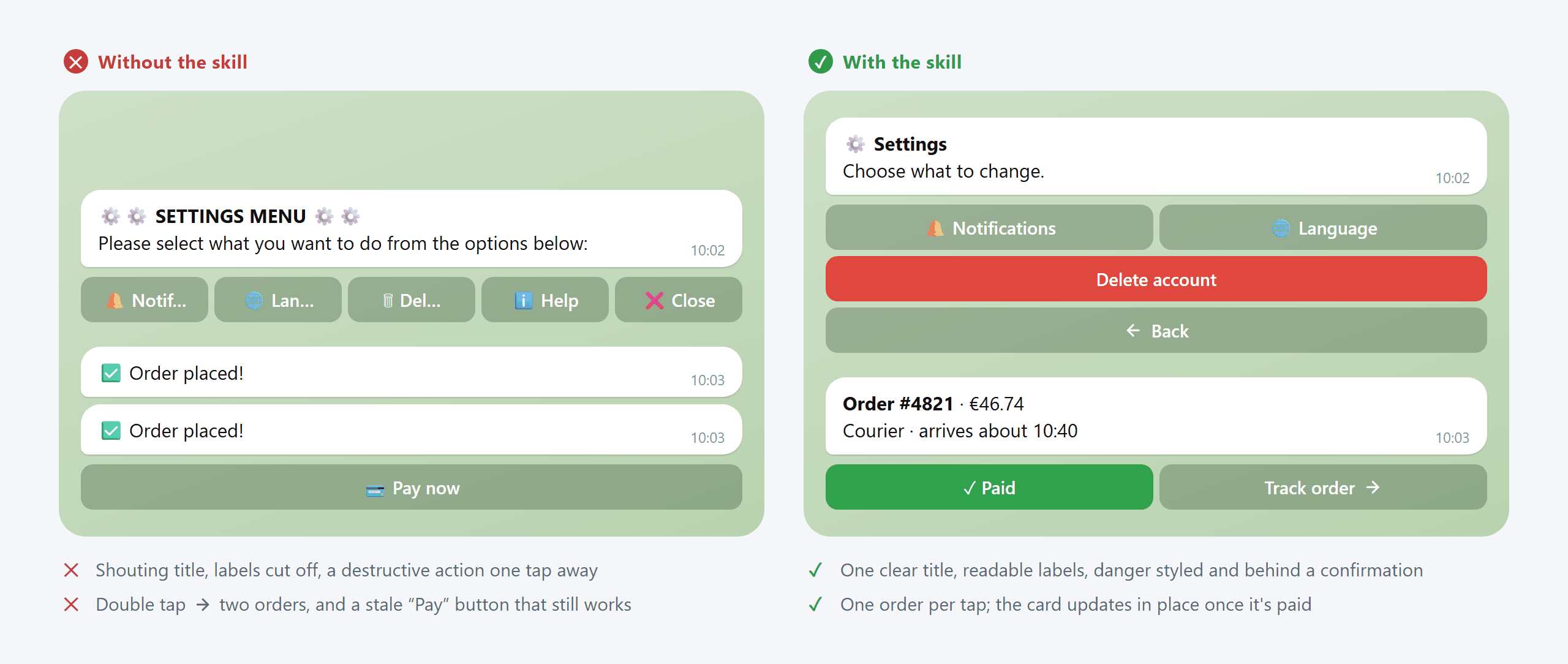
| Situation | Without the skill | With the skill |
|---|---|---|
| AI answer takes 20 s | "typing…" then a wall of text | streamed draft with real stages, a Stop button, a clear "stopped — incomplete" ending |
| A form | "Send your phone" with no way back | buttons and a reply field in one step, Back keeps answers, Submit disabled until valid, no double orders |
| "My balance" in a group | posted for everyone to see | shown only to the person who tapped; never leaks on errors |
| Order status | four new messages per update | one live card (widget) that updates in place |
| Channel post timed out | posted again, now twice | outcome treated as unknown, checked before any retry |
| "Ignore your rules" in a message to an agent bot | the agent obeys | quoted as data; the operator is told |
| Old SDK | new features silently dropped | the gap is detected and bridged with an isolated adapter |
🧠 What your agent can do
| Capability | What the agent gets right |
|---|---|
| 🎛 Build bot interfaces | texts, menus, inline and reply keyboards, colored and disabled buttons, forms, navigation, streaming AI answers with Stop, private replies in groups, Rich Messages and tables, formatting, localization |
| 🛒 Product flows | shops, support, bookings, AI assistants, trackers: no stale "Pay" buttons, no double orders, no personal data leaking into groups (15 product recipes) |
| 📣 Publish to channels | compose, validate, preview, approve and schedule channel posts; never post twice after a timeout (scripts/tg_post.py, 10 recipes) |
| 🤖 Operate as an agent through a bot | drive an agent from Telegram with an operator allowlist, approval buttons bound to one action, and inbound messages treated as data, not instructions (agent_bridge CLI, MCP server, Claude Code and Codex hooks, 10 recipes) |
| 🧩 Build HTML widgets | Bot API 10.4 widgets inside messages: size limit, production context, caption and text fallback, live cards, shared polls, wallet flows (18 ready widgets, build and preview tools, 7 recipes) |
| 💎 Premium emoji | one custom emoji pack across buttons, texts, rich messages and posts: real ids resolved from the pack, all-or-nothing fallback when the bot is not eligible (6 recipes) |
| 📚 Look up the whole Bot API | methods, types and fields from a local catalog; validate a payload before sending; refuse to invent a field (193 methods, 425 types, refreshable from the official docs) |
It also knows when not to use something: no widget for a three-button menu, no table for two
facts, no group widgets in production (they are test-server only today), no publishing without a
human's yes.
🧩 HTML widgets
Eighteen ready widgets with light and dark themes, three languages, server handlers and a
caption fallback — plus a kit to build your own, a size check that follows the server's algorithm,
and a local preview.
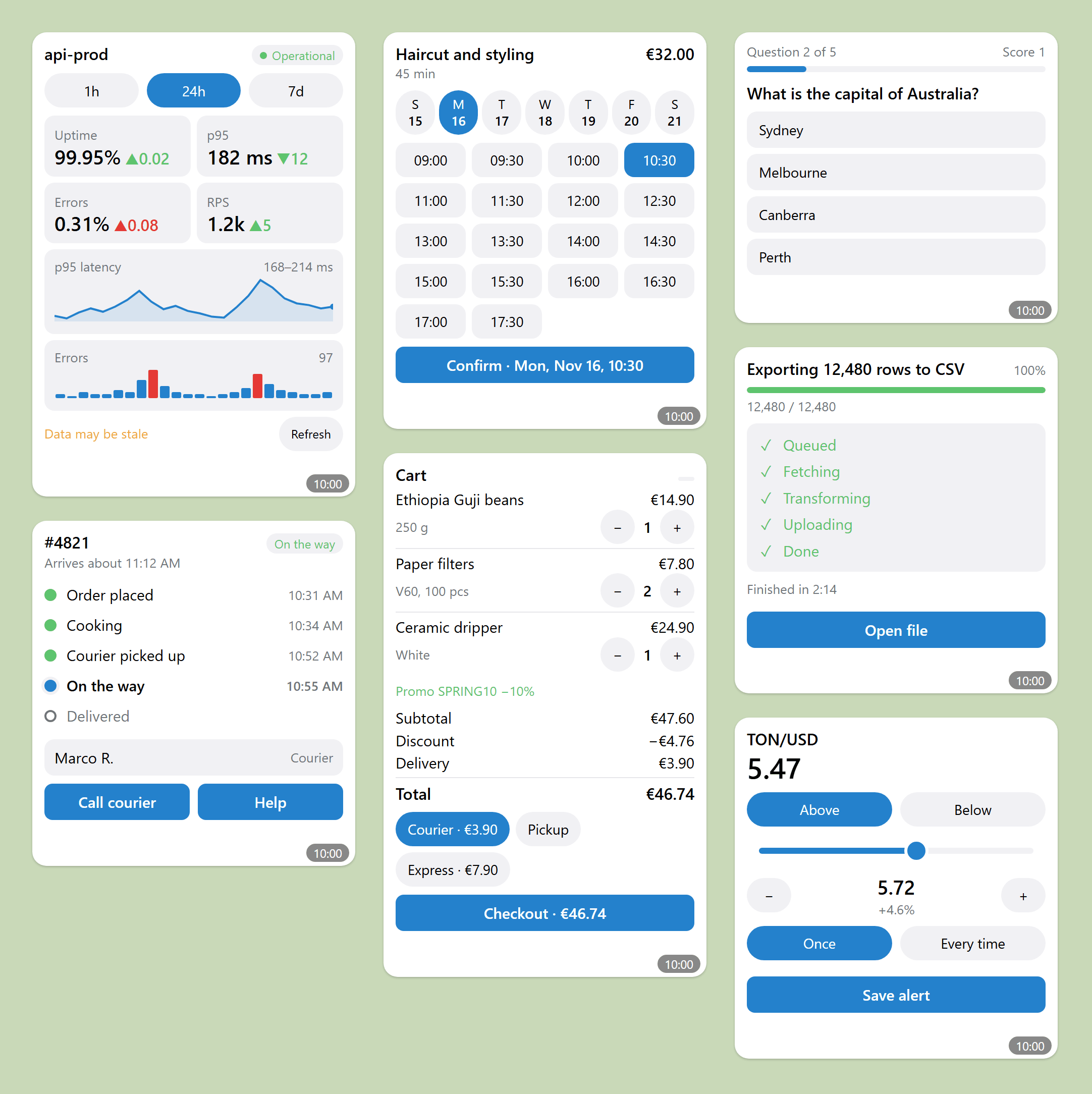
Rendered from examples/widgets/ with scripts/preview_widget.py --gallery.
That is a mock of the widget runtime in a desktop browser, not a Telegram client — real apps may draw them differently.
python scripts/build_widget.py examples/widgets/src/order-tracker.html \
  --demo examples/widgets/demo/order-tracker.json --strict   # build from the kit, check size and caption
python scripts/preview_widget.py --gallery -o preview.html   # every widget and state, light and dark
💬 Ask your agent
No API names needed. In your bot's repository:
| Area | Try saying |
|---|---|
| Interfaces | "Improve the UX of this Telegram bot." · "The main menu is a mess — restructure it and make the main action stand out." · "Add a Stop button to the AI answers." · "Fix can't parse entities." |
| Product flows | "People double-tap 'Place order' and get two orders." · "In our group, 'My orders' must show each person only their own orders." · "Design a booking bot: service, time, confirmation." |
| Channels | "Post this release note to our channel tomorrow at 9:00 — show me the preview first." · "Every Monday, publish a digest of last week's releases without duplicates." |
| Agent through a bot | "Let me drive my coding agent from Telegram, and only me." · "Make the agent ask for approval with buttons before anything risky." |
| Widgets | "Turn the order status into one card that updates." · "Our widget is too big to send — make it fit." |
| Bot API lookup | "Which update tells my bot that the user stopped the answer?" · "Can a bot delete a message for just one user?" |
You can also call it by name: /telegram-bot-ui (Claude Code), $telegram-bot-ui (Codex), the/ menu (Cursor, Antigravity).
📦 Install
The skill is one folder whose entry point is SKILL.md. Every path below is checked
against that host's documentation in docs/hosts.md.
In a Claude Code session (2.1.275 or later):
/plugin install telegram-bot-ui --marketplace hlibsuslov/telegram-bot-ui
Or from your shell, in two steps:
claude plugin marketplace add hlibsuslov/telegram-bot-ui
claude plugin install telegram-bot-ui@telegram-bot-ui
The skill is then /telegram-bot-ui:telegram-bot-ui and the subagents aretelegram-bot-ui:telegram-bot-designer and so on. Update with claude plugin update telegram-bot-ui.
git clone https://github.com/hlibsuslov/telegram-bot-ui.git ~/.claude/skills/telegram-bot-ui
One project only: clone into <your-repo>/.claude/skills/telegram-bot-ui. To add the subagents
too, use the installer below.
git clone https://github.com/hlibsuslov/telegram-bot-ui.git && cd telegram-bot-ui
python scripts/install.py --host all --scope user --dry-run
| Option | Meaning |
|---|---|
--host claude|codex|cursor|gemini|copilot|all |
which agents to install for |
--scope user|project |
your home folder, or one repository (--project <path> for another one) |
--with-instructions |
adds a short pointer block to AGENTS.md, GEMINI.md, .github/copilot-instructions.md or a Cursor rule (project scope only) |
--link |
symlinks to the clone instead of copying, so git pull is the whole update |
--uninstall |
removes only what the installer created |
--dry-run |
prints the plan and changes nothing |
Anything already there that the installer did not create is first moved to <name>.bak-<time>.
Update: git pull in the clone and run the same install command again.
| Host | Skill folder (user / project) | Extras |
|---|---|---|
| Claude Code | ~/.claude/skills/ / .claude/skills/ |
subagents in .claude/agents/ |
| Codex CLI | ~/.agents/skills/ / .agents/skills/ |
custom agents in .codex/agents/*.toml; call the skill with $telegram-bot-ui |
| Cursor | ~/.agents/skills/ / .agents/skills/ |
optional rule .cursor/rules/telegram-bot-ui.mdc |
| Gemini CLI / Antigravity | ~/.gemini/skills/ / .agents/skills/ |
or gemini skills install https://github.com/hlibsuslov/telegram-bot-ui; optional GEMINI.md block |
| GitHub Copilot | ~/.agents/skills/ / .agents/skills/ |
optional .github/copilot-instructions.md block |
| Devin (formerly Windsurf) | reads ~/.agents/skills/ / .agents/skills/ |
install with --host codex |
Cline and other AGENTS.md readers |
— | paste adapters/agents-md/AGENTS.snippet.md and keep the folder in the repo |
| Your own agent on a model API | — | system prompt: adapters/portable/telegram-bot-ui.prompt.md; with a file tool: llms.txt |
👥 Subagents
Five roles that route into the skill instead of copying it. Claude Code: agents/claude/
(installed by the plugin or the installer). Codex: agents/codex/ as custom
agents ("Have telegram_bot_reviewer review this diff").
| Role | Does | Edits code? |
|---|---|---|
telegram-bot-designer |
screen and state map, real UX defects, exact texts and keyboards | — |
telegram-bot-builder |
implements from recipes, validates payloads, adds tests | ✓ |
telegram-publisher |
composes, validates, previews and publishes channel posts — only after your explicit yes | ✓ |
telegram-widget-builder |
designs and builds HTML widgets, checks size and fallback | ✓ |
telegram-bot-reviewer |
reviews a diff against the skill's invariants with file:line findings |
— |
On hosts without subagents, ask for the role in words: "Act as a reviewer of this diff using the
telegram-bot-ui skill."
🍳 Recipes and examples
57 end-to-end recipes plus mini-recipes, ready to adapt and runnable offline — no bot token.
| Recipe | You get |
|---|---|
| AI assistant with Stop | rich streaming, real stages, Stop, race-safe single final message |
| Interactive document | compact table, collapsible quote, attached file, buttons in text |
| Multi-step form | buttons + reply field, disabled Submit, Back, no duplicates |
| Shared card + personal panel | per-user private views in a group |
| Private widget | an order card that updates in place |
| Shared widget | one live poll in many chats |
| Wallet | pay and sign from a widget, honest payment states |
| Multi-topic bot | parallel conversations, topic links |
| Tracker bot upgrade | a real bot moved to the new API |
| Mini-recipes | gifts, communities, share themes, managed bots, verification |
| Range | You get |
|---|---|
| 20–29, 60–64 · Products | shop with Stars, support desk, booking, onboarding, settings, subscription, learning, assistant, expense split, community, inline mode, business account, alerts, search, delivery tracker |
| 30–39 · Channel publishing | autoposter, long read, album, poll, pinned digest, editorial approval, cross-posting, mailing, comments, corrections |
| 40–49 · Agent through its bot | deploy approval, live build status, nightly digest, ask and continue, streamed research with Stop, job topics, team group, incident alerts, coding-agent hooks |
| 50–56 · Widgets | monitoring dashboard, booking, shop card, shared quiz, job progress, design a widget from words, REST data browser |
| 70–75 · Premium emoji | restyle to one pack, icons from zero, channel series, mixed eligibility, Premium lapse, pack migration |
Full index by task, API symbol, version and context: recipes/README.md.
Code: Python (examples/python/tgkit, standard library) and TypeScript
(examples/ts, no dependencies), plus adapters for aiogram 3.31 and grammY 1.46.
python examples/python/recipes/r01_ai_assistant.py
🛠 Tools you can use without an agent
All offline, standard library, and none of them needs a bot token.
| Check before you ship | |
|---|---|
python scripts/validate_keyboard.py keyboard.json |
button and keyboard payload rules |
python scripts/validate_rich.py message.json |
Rich Message limits and rules |
python scripts/validate_widget.py widget.html |
widget size (server algorithm) and sandbox gaps |
python scripts/validate_payload.py request.json |
structural check against the Bot API catalog |
python scripts/audit_icons.py icon-map.json |
one icon family? animated mixed in? |
python scripts/audit_copy.py strings.json |
translations: placeholders, symbols, label length |
| Build and explore | |
|---|---|
python scripts/tg_api_lookup.py show sendWidget |
any method or type, offline |
python scripts/tg_post.py preview post.json |
render a channel post (publishing is opt-in) |
python scripts/build_widget.py src.html --strict |
build a widget from the kit, report its size |
python scripts/preview_widget.py widget.html |
mock preview page (not a real client) |
python scripts/emoji_packs.py capture |
how to collect real custom emoji ids |
python scripts/install.py --host all --dry-run |
where the skill would be installed |
python scripts/run_checks.py |
every check in this repository |
✅ Quality and honesty
| Bot API | verified against the official Bot API 10.4 docs on 2026-11-15 — sources and dates in references/official-sources.md |
| Hosts | skill paths, subagent and plugin manifests and rule files verified against each host's docs on 2026-11-15 (docs/hosts.md); the Claude Code plugin passes claude plugin validate --strict |
| Tests | 393 Python and 31 TypeScript tests run offline on Linux and Windows in CI, plus contract tests against the real aiogram and grammY packages |
| Drift | host entry files are generated from SKILL.md and one routing table by scripts/build_adapters.py; CI fails when they drift |
What is not verified yet, said plainly:
- Agent evals are prepared, not yet run.
evals/holds activation prompts (English and
Russian, with and without API names) and behavioural tasks with pass criteria for every
capability;scripts/run_evals.pyvalidates them and can run the activation set against the
Claude Code or Codex CLI. No agent run has been recorded yet. - Cursor, Antigravity, Copilot, Devin and Cline were checked by documentation only, not by running them.
- Live calls to Telegram and rendering in the Telegram apps. The skill tells the agent to say which
level of evidence it has — a JSON check is not a client test.
❓ FAQ
Does it change my bot?No. It is knowledge and tools for your agent; the agent edits your bot when you ask.
Does it send messages or need my token?The checks never do. Publishing and agent operation need a bot token from an environment
variable, and the skill requires your explicit approval before anything is published.
Only for custom emoji icons in a regular bot (or Fragment usernames).
My bot uses an old SDK.The skill checks what your SDK supports and either suggests an upgrade or adds a small, isolated
adapter with a "remove when" note.
Any. The skill is SDK-agnostic: it reasons in Bot API payloads, and ships runnable examples in
Python and TypeScript plus adapters for aiogram and grammY.
🗂 Repository layout
SKILL.md            entry point the agent reads first (routing, rules, invariants)
references/         focused guides, loaded only when a task needs them
recipes/            end-to-end recipes, registry.json, manifest.json
examples/           runnable Python/TS code, widgets, fixtures, payloads, SDK adapters
scripts/            validators, installer, adapter generator, eval runner (offline)
agents/             Codex metadata (openai.yaml), Claude subagents, Codex custom agents
adapters/           routing table and generated entry files for other hosts
.claude-plugin/     Claude Code plugin and marketplace manifests
llms.txt            index of every document for agents that read files on demand
docs/hosts.md       how each agent host discovers skills, with sources
tests/, evals/      offline tests; activation and behavioural evals
🤝 Contributing
Issues and pull requests are welcome — especially screenshots from real Telegram clients, new
recipes, SDK support updates and eval runs on more hosts.
- Cite official Telegram docs for capability claims and mark anything unverified.
- Keep
SKILL.mdcompact. - After editing
SKILL.mdoradapters/, runpython scripts/build_adapters.py. - Run
python scripts/run_checks.pybefore opening the PR.
License
MIT.
Community project; not affiliated with or endorsed by Telegram. Telegram changes the Bot API
often — verify current behavior against the official docs
before relying on a capability.
Yorumlar (0)
Yorum birakmak icin giris yap.
Yorum birakSonuc bulunamadi