gwae
Health Warn
- License — License: MIT
- Description — Repository has a description
- Active repo — Last push 0 days ago
- Low visibility — Only 5 GitHub stars
Code Pass
- Code scan — Scanned 12 files during light audit, no dangerous patterns found
Permissions Pass
- Permissions — No dangerous permissions requested
No AI report is available for this listing yet.
gwae: niri's scrolling tiling for your CLI agents, in any terminal (daemon-free, MIT)

gwae



most tactile terminal-native multiplexer for agent orchestration
infinite scrolling tiling over parallel CLI agents, OS-agnostic (MacOS, Windows, Linux)
Website · Install · Quick Start · Keyboard Shortcuts · FAQ · Docs
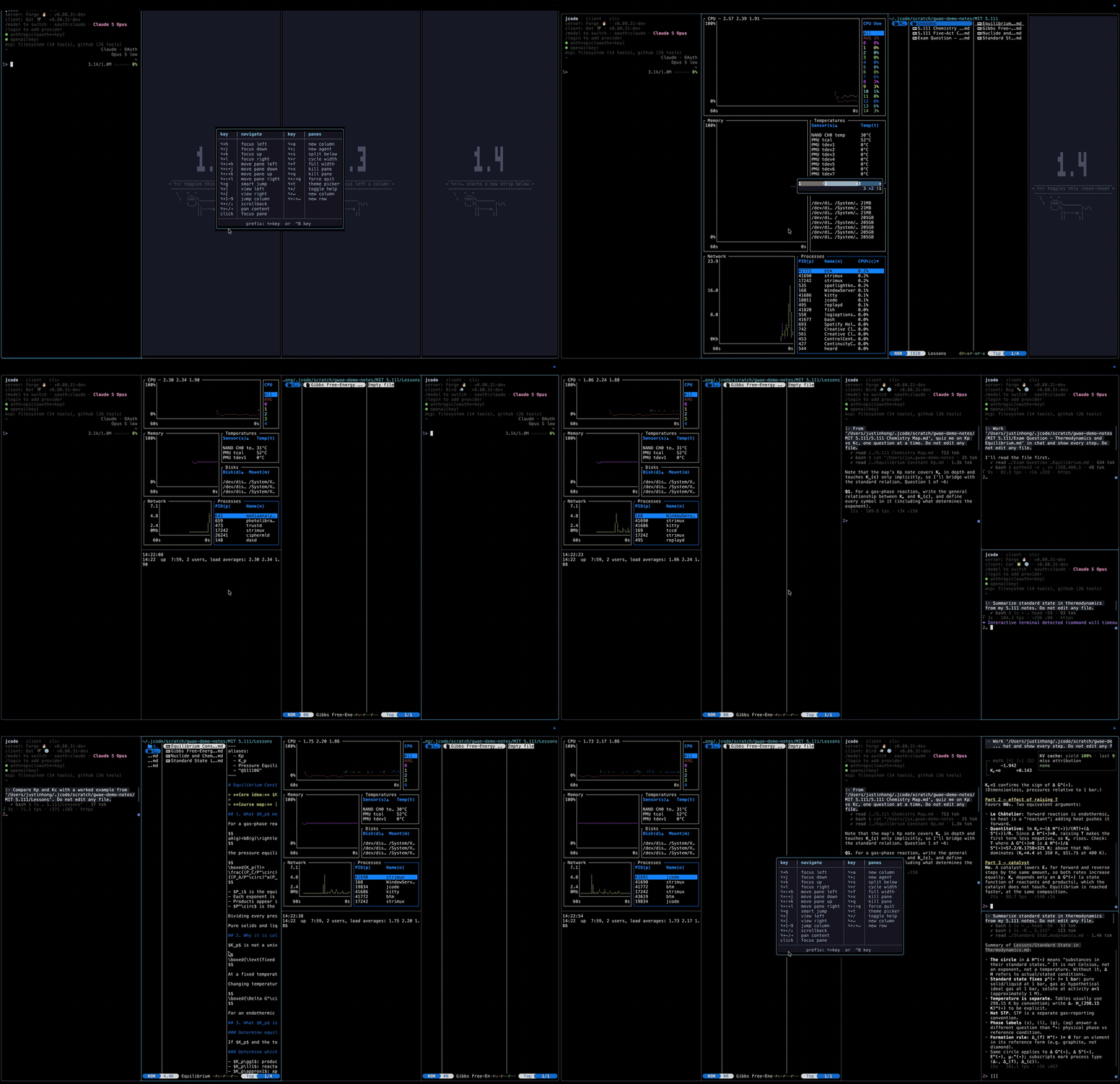
Demo use case - learning solid state chemistry (btm for tiling/paint showcase)
NOT SPED UP: You could be much faster than demo
Features
Panes never shrink
Fixed-width columns (1/4 by default, 1/3 → 1/2 → 1/4 on ⌥+r). A row that outgrows the screen scrolls past the viewport edge — it doesn't cram. Strips stack infinitely downward.
Quantized scroll
The viewport rests only on column boundaries, so the same grid paints pixel-identically in every scroll state. No slivers, no wobble — verified end-to-end at hostile widths like 342 columns.
Agent dashboard
Panes speak standard OSC 133 — zero instrumentation. Hold ⌥ for a minimap tinted by status (working / wants attention / done / failed) and press ⌥+g to smart-jump to the pane that needs you.
Single process, no daemon
No socket, no attach/detach. Crashing one pane's emulator can't take the TUI down. Persistence is each harness's own --resume.
Kitty graphics passthroughkitten icat and agent screenshots render inside their pane — APC sequences forwarded verbatim and clipped to the pane rect.
Mouse that helps, and stays out of the way
Click to focus, drag to copy. Full-screen apps that ask for mouse reporting (vim, agent TUIs) get every event forwarded in their own coordinates, so the wheel behaves natively inside them. gwae claims no wheel of its own.
Guided onboardinggwae init walks theme, layout, chrome, and agent setup with a live mockup under every question. Catppuccin Mocha by default, 8 theme presets, ⌥+t previews them live on the running session.
Cross-platform
Any terminal on macOS and Linux; Windows (ConPTY) builds natively and is experimental until M3 runtime verification. 256-color minimum; truecolor, synchronized updates, kitty keyboard protocol, and SGR mouse are auto-detected and gracefully degraded.
Install
Shell script (recommended)
# macOS & Linux
curl -fsSL https://raw.githubusercontent.com/hongnoul/gwae/main/scripts/install.sh | bash
Downloads the latest prebuilt binary for your platform to ~/.local/bin (override with GWAE_INSTALL_DIR), verifying the checksum.
On Windows, grab gwae-x86_64-pc-windows-msvc.zip from the latest release and put gwae.exe on your PATH.
Homebrew (macOS)
brew install hongnoul/tap/gwae
Prebuilt binaries
Every release ships static binaries with SHA-256 checksums for:
| Platform | Asset |
|---|---|
| macOS (Apple Silicon) | gwae-aarch64-apple-darwin.tar.gz |
| macOS (Intel) | gwae-x86_64-apple-darwin.tar.gz |
| Linux (x86_64, musl static) | gwae-x86_64-unknown-linux-musl.tar.gz |
| Linux (aarch64, musl static) | gwae-aarch64-unknown-linux-musl.tar.gz |
| Windows (x86_64) | gwae-x86_64-pc-windows-msvc.zip |
From source
Rust 1.85+:
cargo install gwae                   # from crates.io

# or from a checkout
git clone https://github.com/hongnoul/gwae && cd gwae
cargo install --path crates/gwae     # -> ~/.cargo/bin/gwae
# or: make install                      # first writable bin dir on PATH
Packaging scaffolding for Homebrew, AUR, and Nix lives in packaging/.
Quick start
gwae                     # one strip, one 1/4-width pane + placeholder boxes
gwae run "claude"        # command runs in column 0, rest are shells ($SHELL)
gwae new -- htop         # (subcommand form) new column in a fresh session
gwae init                # guided setup: theme, layout, chrome (safe to re-run)
gwae setup               # optional per-terminal bindings (e.g. Cmd+hjkl on iTerm2/kitty)
gwae doctor              # diagnostics: config + theme validity, layout smoke
The default layout is one strip, one quarter-width column. Skeleton placeholders tile the empty right side so the 4-column container always reads. New columns appear to the right of the focused pane, not at the strip end. ⌥+; spawns your agent in a new column and focuses it.
Why gwae?
I run a lot of coding agents in parallel, and every multiplexer I tried divides a fixed screen: more agents means smaller panes, until nothing is readable. niri solved this on the desktop with scrolling tiling — columns keep their size and the viewport moves instead. gwae brings that model into the terminal you already use.
The narrative: why now
- GUI ADEs (Orca, Conductor, etc.) trade away your control over single agents through opinionated orchestration surfaces, vendor gravity, and managed flows. You steer a fleet dashboard instead of talking to each agent directly at full size.[^1]
- The future is parallelization on performant, cheap, low-reasoning inference. Cheap tokens mean more concurrent agents, so the bottleneck moves to your ability to see and steer them.[^2]
- Existing terminal orchestrators ship unnecessary features, chiefly persistence/attach daemons. Frontier harnesses (Claude Code, Jcode) already carry their own persistence layer via
--resume, which covers desk work: close the laptop, come back, resume the conversation. What it does not cover — unattended long-running work and non-agent panes — belongs in tmux, which you can run inside a gwae pane.[^3] - Therefore the most important thing is an ultraminimal spatial canvas multiplexer that spawns lightweight terminals fast and lets you prompt efficiently. No terminal-first orchestrator builds this: they all rent tmux for display and own no layout at all.[^4] The two projects that do own this layout model, Séance and tairi, are GUI-bound (GTK app, macOS app) — not in a terminal, not over SSH.[^5]
What gwae is deliberately not: an Orca-in-a-TTY. Feature parity on diff review, embedded browsers, PR boards, and mobile is a non-goal.[^6] And at 2 panes, plain kitty splits are fine; gwae's value is a function of agent count.[^7]
The pitch
macOS and Windows can have Linux niri-level native spatial canvas.
- tmux is POSIX-bound: on Windows it requires WSL, Cygwin, or MSYS2, and it has no infinite canvas.[^8] The entire tmux-based orchestrator tier (Claude Squad, dmux, workmux, amux, uzi) inherits that ceiling.[^9] gwae hosts its own PTYs and builds natively for Windows via ConPTY (runtime verification lands in M3), giving you the full 2D plane: orchestrate freely on grids, the 2D is yours to draw.[^5]
- macOS is unfriendly to tiling WMs by design (real tiling via yabai requires partially disabling SIP) and niri itself is Wayland-only.[^10] gwae delivers the niri layout model inside any macOS or Windows terminal instead.
- GUI ADEs cannot copy the structural properties of a terminal tool: runs over SSH, inside any terminal, on the machine the agents already run on, no daemon, no Electron.[^1]
- gwae runs over SSH, including on headless machines, if you want to allocate every resource to your agents.
- The only bottleneck should be your brain. Between your keystroke and the pane there is one process and no daemon round-trip: 2.5 ms echo RTT measured, ~1/6 of a 60 Hz frame.[^11]
Benchmarks: gwae vs the incumbents
Every mux runs headless in a real PTY, driven the way a terminal drives it, on the same machine in the same run: scripts/bench_vs_muxes.py, raw JSON in docs/bench-2026-08-25.json.[^11]
Footprint and speed (measured 2026-08-25)
| Metric | gwae | tmux 3.7c | Zellij 0.45.0 | bare /bin/sh (floor) |
|---|---|---|---|---|
| First output after exec | 10.7 ms | 15.9 ms | 44.7 ms | 6.6 ms |
| Interactive (first keystroke echoed) | 64.9 ms | 66.6 ms | 99.9 ms | 61.0 ms |
| Echo RTT, median (150 samples) | 2.50 ms | 0.24 ms | 12.48 ms | 0.10 ms |
| Echo RTT, p99 | 2.86 ms | 0.91 ms | 13.10 ms | 0.21 ms |
| Mux RSS, 1 pane | 7.5 MB | 9.5 MB | 102 MB | 0 |
| Mux RSS, 4 panes | 7.9 MB | 13.6 MB | (n/a)[^12] | 0 |
| Idle CPU, 4 panes | 3.2% | 0.0% | (n/a)[^12] | 0 |
| Binary size | 2.6 MB | 1.0 MB(+libevent) | 41.4 MB | - |
| Processes per session | 1 (+ 1 shell per pane) | 2 (client+server) | 2 (client+server) | 1 |
TL;DR:
- vs Zellij: gwae is 5x lower echo latency, 13x less memory, 16x smaller binary, 4x faster to first paint. "Lightweight spatial canvas" is measured, not marketing.
- vs tmux: tmux wins raw echo RTT (event-driven C vs gwae's 1ms poll loop) and idle CPU. Both are invisible in practice (2.5 ms is ~1/6 of a 60 Hz frame) but tmux earns the row. gwae wins memory at 4 panes and needs no daemon.
- So why gwae over tmux, if tmux echoes faster? Because the comparison tmux cannot enter is the capability table below: layout and Windows. tmux crams N panes into one screen; gwae's panes never shrink. tmux needs WSL on Windows;[^8] gwae builds natively (ConPTY runtime verification is M3).[^5]
The capability axis
| Capability | tmux/Zellij | Claude Squad | amux | dmux/workmux | Séance / tairi | gwae |
|---|---|---|---|---|---|---|
| 4+ agents visible at full size at once | ✗ crams to fit | ✗ one at a time | ✗ dashboard | ✗ | ✓ niri strips | ✓ no-shrink strips |
| Layout scales past screen width | ✗ | ✗ | n/a | ✗ | ✓ | ✓ infinite 2D grid |
| In a terminal / over SSH | ✓ | ✓ | ✓ | ✓ | ✗ GUI-bound | ✓ |
| At-a-glance fleet state | ✗ | session list | kanban + push | ✗ | ✗ | ✓ OSC 133 minimap |
| Extra daemons/deps | daemon | tmux + gh | server + SQLite + tmux | tmux + git | GTK / macOS app | none, single process |
| Windows without WSL | tmux ✗ / Zellij ✓[^5] | ✗ | ✗ | ✗ | ✗ | ✓ builds (ConPTY = M3) |
| License | ISC / MIT | AGPL | MIT | MIT | MIT / MIT | MIT |
| Survives disconnect | ✓ | ✓ tmux | ✓ server | ✓ tmux | socket / workspaces | ✗ by design → nest in tmux |
Every terminal-first orchestrator is a task manager renting tmux for display; none owns a pixel of layout.[^4] gwae is the mirror image, and the disconnect row is the honest cost of that trade. Deeper prose comparison in docs/COMPARISON.md.
The recommended stack
gwae is general, but it pairs best with service layers that share the same vision. None of these are dependencies. Research, aggregate, and swap every layer for the latest open-source frontier at will, because gwae does not care what runs inside its panes.
| Layer | Recommendation | Alternatives | Why |
|---|---|---|---|
| Agent harness (TUI) | Jcode | Claude Code, Codex CLI, OpenCode, Gemini CLI, Aider | Extremely lightweight, 18.5k stars.[^13] Own persistence via --resume. Disclosure: same author as gwae. |
| Inference (API) | Makora | OneTriangle, Baseten, CoreWeave, DeepInfra, official Meta, SiliconFlow, official DeepSeek | Best measured price/speed for DeepSeek V4 Flash: 300 tps decode, 0.71s TTFT, $0.13/1M blended, OpenAI-compatible.[^14] OneTriangle is a solid failover (KV-cache-preserving, ~100-300 tps self-measured, no public benchmarks).[^15] |
| Knowledge base (MD) | Obsidian | Logseq, Foam, Dendron, plain git repo of markdown | Plain markdown you version-control with git. High-level plan drafts, or just learning new stuff. Agents can read and edit it directly. |
| Editors and monitors | neovim, btm, and any other TUI | helix, kakoune, htop, btop, yazi, lazygit, k9s | Monitor compute overhead, occasionally make direct code and markdown changes at your discretion. The whole open-source TUI ecosystem is the app store. |
Documentation
- Architecture: single process, no client-server; layout core, pane tasks, composer, renderer
- Layout spec: the normative quantized-scroll / strip-grid spec
- Configuration: every key, generated from code
- Comparison: tmux, Zellij, Séance, tairi
- Latency: input-latency tuning, macOS + terminal + gwae together
- Roadmap
Keyboard Shortcuts
Every action is an ⌥ chord. ⌥ is the Option key on macOS, Alt elsewhere. It works when the terminal delivers Option as Meta/Alt, plus a fallback that decodes macOS's Unicode glyphs (… for ⌥+;, œ for ⌥+q, ÓÔÒ for ⌥+Shift+hjkl) with no "Option as Alt" toggle.
⌥ chord |
Action |
|---|---|
⌥+h / ⌥+l |
Focus left / right (adjacent column; scrolls minimally to reveal) |
⌥+k / ⌥+j |
Focus up / down within stack; at edge crosses strips. Past the last strip creates an empty strip (niri workspace semantics); leaving an empty strip discards it |
⌥+Shift+h / ⌥+Shift+l |
Move focused column left / right (swap with neighbor) |
⌥+Shift+k / ⌥+Shift+j |
Move pane up / down within stack; at the stack edge carries the pane to the neighboring strip (creating one past the end), discarding an emptied strip |
⌥+Enter |
New column to the right of focused |
⌥+Shift+Enter |
New strip (row) below the focused one |
⌥+; (… on macOS) |
Spawn agent column right of focus and focus it (default_agent, or pick one if unset) |
⌥+Shift+; (Ú on macOS) |
Spawn agent on a new strip below the focused one |
⌥+s |
Split focused column — new pane below |
⌥+r |
Cycle focused column width 1/3 → 1/2 → 1/4 |
⌥+f (ƒ on macOS) |
Toggle focused column between full width and 1/4 |
⌥+q (œ) |
Kill focused pane — columns compact, focus keeps its slot (falls left only at right edge); emptied strip is dropped, last pane quits gwae |
⌥+← / ⌥+→ |
Scroll pane's logical content horizontally (when content_width > column width) |
⌥+[ / ⌥+] |
Scroll the row viewport left / right without moving focus |
⌥+↑ / ⌥+↓ |
Scrollback — read back through the focused pane's history, 3 rows a notch. ⌥+Shift+↑/↓ and ⌥+PageUp/PageDown move ~a screenful. Typing snaps back to live. A full-screen app (vim, less) owns its own scrolling, so it gets the arrow keys instead |
⌥+← / ⌥+→ |
Pan wide content sideways when content_width exceeds the column (⌥+Shift for a bigger step) |
⌥+1 … ⌥+9 |
Jump to column N in focused strip. Keep ⌥ down and keep typing to address columns past 9 (⌥ + 1 2 → column 12); the number commits when ⌥ is released, or after ~500ms on terminals that don't report the release |
⌥+g (©) |
Smart-jump — jump to pane that needs you (see below) |
⌥+t († on macOS) |
Theme picker — step presets with ←/→, live-previewed on the real UI; ⏎ keeps, esc restores |
⌥+/ or ⌥+? (÷ / ¿ on macOS) |
Toggle the cheat-sheet HUD — same overlay shown at startup; any other key dismisses it |
⌥+Shift+q |
Force-quit gwae — opens a centered confirmation overlay; press ⌥+Shift+q again (or ⏎) to kill every pane, any other key cancels |
| click | Left-click focuses the clicked pane |
| drag | Left-drag inside a pane selects text (inverse highlight) and copies it on release. Panes that grab the mouse (vim, agent TUIs) keep it, so hold Shift there to select instead |
| wheel | Forwarded as SGR to a pane that asked for mouse reporting (vim, agent TUIs), so it behaves natively there. gwae claims no wheel of its own |
All other keys pass through to the focused pane. Closing a pane by exit / process death behaves identically to kill-pane.
Bindings live in one place, crates/gwae/src/binds.rs, and tests enforce that the dispatcher, the cheat-sheet HUD, the cowsay hints, and this table all agree — a new or re-bound key fails the build until every surface is consistent.
Agent awareness
OSC 133 status
If a pane's shell emits OSC 133 (A prompt → C running → D;n done/failed), gwae tracks per-pane status natively:
»Working (blue) — command running!Wants attention (amber) — idle with output / prompt waiting✓Done (green) — exited 0✗Failed (red) — non-zero exit
Panes without shell integration fall back to a quiet heuristic: a pane silent for a few seconds flips to ! so the dashboard still triages it.
Minimap
No bottom status row. Hold ⌥/Alt to see status (centered, no pane shrinkage): one row per strip, one tile per pane (width ∝ column share), tinted by status, focused tile accented, digit ⌥+1..9 per tile, summary like 5 »2 !1 ✓1 ✗1. A HUD line names the pane that needs you: » 1.3 needs you — ⌥+g.
minimap.mode |
Behavior |
|---|---|
off (default) |
No persistent chrome. ⌥ reveals the centered HUD + minimap |
overlay |
Legacy bottom-right overlay — max_width/max_rows apply |
edge_ticks |
Single-cell ticks on the outer frame, no box |
Smart-jump
⌥+g jumps to the pane that needs you most — failed beats wants-attention beats done, nearest in layout order first, crossing strips and following with the scroll. Does nothing when every other pane is happily working.
Configuration
gwae init runs a short guided setup on first launch (theme with live swatches, panes at launch, column width, scroll style, labels — each question drawn over a live mockup of the grid). Re-run it any time; defaults become whatever your config currently says.
File: $XDG_CONFIG_HOME/gwae/gwae.toml (or ~/.config/gwae/gwae.toml). TOML, all keys optional. Full reference in docs/CONFIG.md.
default_column_width = "quarter"  # or "half", "two-thirds", "full", or 80 (cells)
content_width = 0                 # >0 gives panes a wider logical grid, panned with ⌥+←/→
default_agent = "claude"          # first pane + ⌥+; spawn this
startup_panes = 1
theme = "catppuccin-mocha"        # or nord, tokyo-night, gruvbox, rose-pine, dracula, ...
cell_labels = false

[minimap]
mode = "off"                      # off | overlay | edge_ticks
FAQ
How does it compare to tmux?
tmux is a fixed-screen tiler with a client-server daemon. gwae is a scrolling tiler with no daemon: columns keep their width and the row scrolls, so ten agents are as readable as two. If you need detach/attach that outlives the process, keep tmux; gwae delegates persistence to each harness's own --resume.
What coding agents does it work with?
All of them. gwae hosts ordinary PTYs, so any agent that runs in a terminal works out of the box: Claude Code, Jcode, Codex, OpenCode, Gemini CLI, Aider, and anything else you can launch from a command line. Status tracking uses standard OSC 133 with a quiet-heuristic fallback, so no agent needs instrumentation.
Does it need a specific terminal?
No. Minimum is 256-color plus cursor addressing. Truecolor, synchronized updates (ESC[?2026h), kitty keyboard protocol, and SGR mouse are auto-detected and gracefully degraded. It runs over SSH.
Can I detach and reattach?
No, deliberately. There is no daemon and no socket. Your agents already persist themselves (claude --resume, jcode --resume); a shell that must survive the terminal belongs in tmux, which you can happily run inside a gwae pane.
What's not planned?
No free 2D canvas (structured strips only), no floating panes, no plugin system, no overview zoom (post-1.0). See Non-goals.
Development
cargo build --release
cargo test --workspace          # layout proptests + unit tests + live-PTY E2E
cargo clippy --workspace --all-targets -- -D warnings
cargo fmt --all
CI runs fmt, clippy (-D warnings), check, and the full test suite on macOS and Linux, plus a Windows build gate, on every push and PR. Nightly PTY integration tests run the real binary through a live PTY. Tags matching v* build binaries for all five targets, checksum them, and publish a GitHub Release.
Architecture:
gwae (one process)
├── Layout core (rows/strips/columns/panes) — pure, no I/O
├── Pane tasks (one per PTY: bytes → parse → grid + OSC 133)
├── Composer (coalesce damage → single 2D cell buffer)
├── Render (diff buffer → batched ANSI, sync-update markers)
├── Input (raw mode: decode keys, route to pane or ⌥)
└── Minimap / smart-jump (per-pane status → chrome)
| Crate | Role |
|---|---|
gwae |
bin — raw mode, PTY hosting, composer, render, input, minimap, OSC 133, Kitty APC forwarding, mouse |
gwae-layout |
pure 2D grid + verbs + quantized scroll + minimap model. proptest invariants |
gwae-term |
TermGrid emulator facade + damage tracking |
gwae-testkit |
fake PTYs + scripted terminals + snapshot harness |
Layout invariants live as proptest properties in crates/gwae-layout/tests/invariants.rs (quantized-stop, tiling, shape-identity, focus-never-clipped, page-stop, cross-strip move).
Contributing
- Open an issue or pull request
- Read the contributing guide and docs/
- Changes to keybindings must update
binds.rsand this README together — the tests will hold you to it
License
gwae is open source under the MIT license.
References
[^1]: See docs/COMPARISON.md. Primary sources: onorca.dev, conductor.build, amux.io/guides, agentsroom.dev (retrieved 2026-08-25). The counter-narrative — that past ~4 agents the bottleneck is visibility and you should leave the terminal — is answered by the OSC 133 minimap and smart-jump.
[^2]: DeepSeek V4 Flash official API: $0.14 in / $0.28 out per 1M tokens, $0.0028 on cache hits. Prices as of 2026-08-25, verified against v4flash.com/pricing and benchlm.ai; they will drift.
[^3]: --resume restores conversation state, not process state. It covers desk work (close the laptop, come back later) but not unattended runs, non-agent panes, or layout. See the FAQ: a shell that must survive the terminal belongs in tmux, inside a gwae pane.
[^4]: Claude Squad, amux, dmux, workmux, and uzi all render through tmux or a single-agent TUI list. Their competition is on watchdogs, kanban boards, and YAML, not layout. Details in docs/COMPARISON.md.
[^5]: Honest scope of the Windows/layout moat: Zellij 0.44.0+ ships native Windows (zellij.dev/news) and psmux is a native ConPTY tmux reimplementation (github.com/psmux/psmux), so the moat is against the tmux orchestrators, not all multiplexers. Séance (Linux/GTK) and tairi (macOS app) own the niri strip model but are GUI-bound. And compiling is not running: gwae's Windows build passes CI, ConPTY runtime verification is M3. Until then: "builds for Windows", not "Windows supported".
[^6]: Feature parity with GUI ADEs (browser, diff review, PR boards, mobile) is unwinnable for a sole developer and off-mission. See Non-goals.
[^7]: Against plain kitty splits, gwae's only argument is layout: no-shrink strips past the screen edge plus the minimap. That argument is worthless at 2 agents and decisive at 6.
[^8]: tmux is POSIX-bound (ptys, signals, termios). Windows install guides offer only WSL2, Cygwin, or MSYS2: tmux.app/install/windows.
[^9]: The entire tmux-orchestrator tier is Unix-or-WSL-only; none can be Windows-native without replacing their whole runtime. See docs/COMPARISON.md.
[^10]: yabai requires partially disabling System Integrity Protection for full tiling (yabai wiki); niri is a Wayland compositor, Linux-only.
[^11]: Method: each mux spawned headless in a 120x30 PTY (pty.fork), macOS aarch64, same machine, same run, 2026-08-25. Startup = exec-to-first-byte and exec-to-first-echoed-keystroke. Echo RTT = write 1 char to the mux PTY, wait for it to appear in output; 150 samples after 20 warmup, through /bin/sh in the focused pane; the mux sits on this path twice (input in, echo out). RSS = mux's own processes only, shells excluded, via ps on the spawned process tree. Idle CPU = cputime delta over 10 s with no input. gwae ran with input_poll_ms = 1, tmux with -f /dev/null, Zellij with default config plus tips disabled. Script: scripts/bench_vs_muxes.py, raw output: docs/bench-2026-08-25.json. Caveats: single machine, single run, release binaries as installed (no debug builds); tmux's echo RTT advantage is real and reproducible; the idle CPU row is gwae's poll loop and is fixable (event-driven wakeup is on the roadmap).
[^12]: Zellij's 4-pane layout session did not become interactive under the harness (it opened its session-resurrect screen instead). Rather than hand-tune it, the cells are n/a; its 1-pane numbers stand.
[^13]: 18,562 stars per GitHub API, 2026-08-25.
[^14]: Provider speed/price data as of 2026-08-25: Artificial Analysis and OpenRouter. Open items: Makora concurrency under swarm fan-out and cache-hit billing are unverified.
[^15]: OneTriangle throughput estimated from the author's own jcode session logs (589 assistant turns, wall-clock including TTFT and thinking). No public benchmarks exist. It remains a good failover because it sits on or near the Pareto frontier.
Reviews (0)
Sign in to leave a review.
Leave a reviewNo results found