rs
Health Uyari
- License — License: MIT
- Description — Repository has a description
- Active repo — Last push 0 days ago
- Low visibility — Only 9 GitHub stars
Code Basarisiz
- crypto private key — Private key handling in examples/guardrails.json
- process.env — Environment variable access in homebrew/build.mjs
- rm -rf — Recursive force deletion command in install.sh
- process.env — Environment variable access in npm/build.mjs
Permissions Gecti
- Permissions — No dangerous permissions requested
Bu listing icin henuz AI raporu yok.
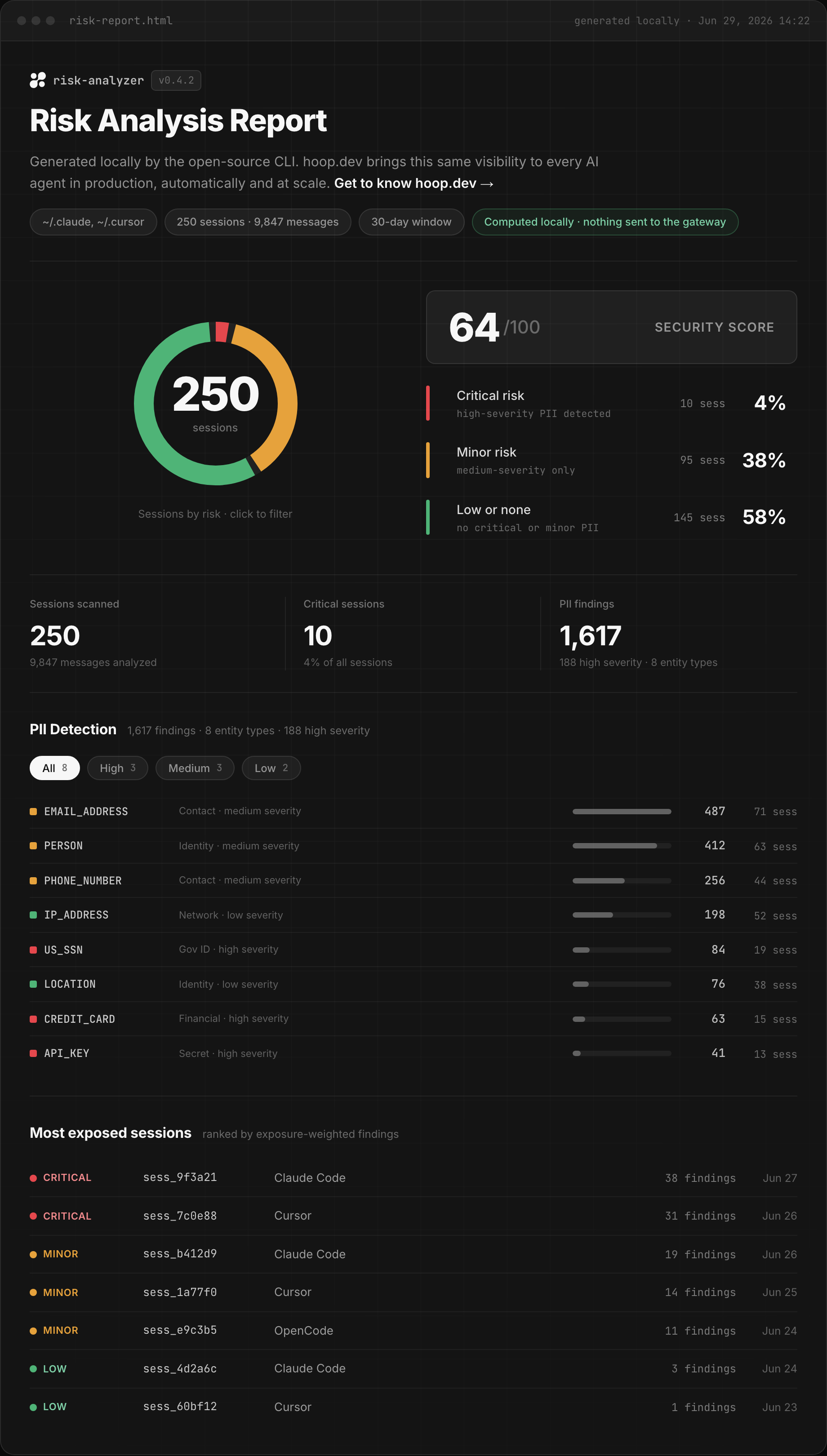
AI session risk summary. See what sensitive information is sitting in your local AI coding sessions. Runs locally, nothing leaves your machine.
🔍 hooprs
What did your AI coding agent see?
hooprs scans your local AI coding sessions — Claude Code, Cursor, OpenCode —
for PII and secrets, entirely on your machine, and shows you exactly
which sessions leaked what.

· No gateway · No network · No API calls
brew install hoophq/tap/hooprs && hooprs
One command. It discovers every session on disk, runs detection in-process,
prints a risk summary to the terminal, and opens a self-contained HTML report
ranking your most exposed sessions.
Why hooprs
Every prompt you type and every file your agent reads becomes session history
on your disk — and some of it is credentials, customer data, national IDs.
You have no idea how much until you look. hooprs looks:
- 🔒 Local only. Detection runs in-process on your machine. No DLP
service, no API calls, nothing leaves your disk — for a scanner that reads
your secrets, this is the whole point. - ✅ Verified, not just shape-matched. Credit cards are Luhn-checked,
IBANs mod-97-checked, SSNs range-validated. A 16-digit number that fails
the checksum never reaches your report. - 🎯 Ranked, not dumped. Sessions are tiered
critical/minor/low
and ranked by exposure, so you triage the ten sessions that matter instead
of scrolling ten thousand findings. - 🤫 Value-free reports. The HTML and JSON reports carry entity types,
counts, and severities — never the matched values. Sharing the report never
re-leaks the leak. - 🚦 Direction-aware. Findings split into input (what you typed) and
output (what the agent pulled into its context) — leaks the agent read
weigh heavier than ones you pasted.
The command is
hooprsrather thanrsbecause macOS and the BSDs ship a
stockrs(1)utility (reshape a data array) that would otherwise be
shadowed.
Install
# Homebrew — macOS & Linux
brew install hoophq/tap/hooprs

# Shell script — macOS & Linux
curl -fsSL https://raw.githubusercontent.com/hoophq/rs/main/install.sh | sh

# npm — also covers Windows (x64)
npx @hoophq/rs
All three install a prebuilt binary — no compile step. The shell script
verifies the checksum and installs to /usr/local/bin (or ~/.local/bin when
that's not writable); pin a version with HOOPRS_VERSION=v0.2.0 or change the
destination with HOOPRS_INSTALL_DIR=~/bin. The Homebrew formula lives in
hoophq/homebrew-tap; npm pulls the
binary through optional dependencies (@hoophq/rs-<os>-<arch>).
Building from source needs Go 1.24+ and has a single pure-Go dependency (the
alcatraz detection library):
go build -o hooprs ./cmd/hooprs
Quickstart
Scan everything, print the summary, write and open risk-report.html:
hooprs
Narrow it down:
# only the last 30 days, plus a machine-readable JSON report
hooprs -days 30 -json risk-report.json

# only Cursor sessions whose project matches a pattern
hooprs -tools cursor -project 'my-app'

# raise the confidence bar (default 0.4)
hooprs -min-score 0.6

# show the actual leaked values in the terminal (never in the reports)
hooprs -show-values
| Flag | Default | Description |
|---|---|---|
-out |
risk-report.html |
Path for the self-contained HTML report |
-json |
(off) | Also write the machine-readable risk report here |
-tools |
claude,cursor,opencode |
Sources to scan |
-project |
(all) | Regexp filter on session project |
-session |
(all) | Regexp filter on session id |
-days |
0 (all time) |
Only sessions started within the last N days |
-home |
$HOME |
Home directory to discover sessions under |
-rules |
(none) | Guardrails rules JSON file |
-min-score |
0.4 |
Minimum detection confidence (0 to 1) to count |
-critical-weight |
60 |
Security-score penalty weight (0 to 100) for the critical-session share |
-engine |
alcatraz |
Detection engine: alcatraz (full PII set) or stub (zero-dependency fallback) |
-incremental |
false |
Only scan content appended since the last run |
-state |
~/.risk-analyzer/state.json |
Incremental scan state file |
-quiet |
false |
Suppress the terminal summary |
-show-values |
false |
Print the matched high-severity values for the top 10 critical sessions in the terminal summary (never written to the HTML/JSON reports) |
-open |
true |
Open the HTML report in the default browser when done |
-version |
false |
Print the hooprs version and exit |
By default every run is a full snapshot of all your sessions. -incremental
persists per-file byte offsets so subsequent runs read only the content
appended since the last run (useful for "what changed since last time").
Share it
The report's title bar has two buttons, so a scan turns into a message to your
team in one click:
- Share rasterizes a 1200×630 summary card (score, risk donut, headline
counts) to PNG and copies it to your clipboard, then shows the ready-to-paste
Slack message — paste the image, send the text. If your browser blocks
clipboard access, the same panel offers a PNG download. - Save PDF opens the print dialog with a print stylesheet that keeps the
branded dark look and drops the interactive chrome — pick "Save as PDF".
Both run entirely in the page: the card is built from the same value-free data
as the report (entity types and counts, never the matched values), and the
Slack message carries only aggregate counts plus the install one-liner. Sharing
a scan never re-leaks a leak.
What it detects
Structured PII (via the alcatraz engine)
plus the secret types common in coding sessions (via hooprs's own secrets
pack):
| Family | What's in it |
|---|---|
| Secrets | API keys (GitHub, OpenAI, Google, Slack, Stripe, JWT, and a generic high-entropy key = value heuristic), AWS access keys, private keys, passwords |
| Financial | Credit cards (Luhn-checked), IBAN (mod-97-checked), crypto addresses, ABA routing numbers |
| Government / national IDs | US SSN, ITIN, passport, driver license; UK NINO; plus national identifiers for AU, IN, IT, ES, SG, PL, KR, FI and TH |
| Health | Medical license; UK NHS and AU Medicare numbers |
| Contact / network | Email, phone, IP address, URL |
Detection pairs regex patterns with checksum and format validators
(Luhn, IBAN mod-97, SSN/national-ID range rules), and matches below the-min-score threshold are dropped. Pass -engine stub for a zero-dependency
regex fallback.
Note on NER:
PERSON/LOCATION-style entities that need an NLP model
stay out of this version. The analyzer sits behind a smallanalyze.Analyzerinterface, so a future NLP-backed engine drops in without
touching the pipeline.
How it works
sources  →  analyze  →  risk  →  report
claude/      regex +     tiers ·    terminal +
cursor/      validators  score ·    html + json
opencode     (local)     exposure
Sources discover and parse each tool's on-disk session format into one
normalized model; analyze runs the detection engine over every message;
risk turns raw findings into tiers, exposure ranking, and a score;
report renders the terminal summary and the self-contained HTML.
The risk model:
- Tier per session:
critical(any high-severity entity),minor
(medium-severity only), orlow. - Exposure ranks sessions by a severity-weighted finding count that favors
output (data pulled into the agent context) over input. - Security Score =
clamp(0, 100, round(100 − W·critical/total − 20·minor/total)),
whereWis the critical penalty weight (-critical-weight, default 60).
Severity and data-family per entity type live inrisk/entities.go.
Make it yours
Layer your own detection rules with -rules <file> — direction-aware
(input = what you typed, output = assistant/tool output). Seeexamples/guardrails.json:
{
  "rules": [
    { "name": "internal-hostnames", "type": "regex", "direction": "both",
      "pattern": "\\b[a-z0-9-]+\\.internal\\.example\\.com\\b" },
    { "name": "private-key-material", "type": "deny_words", "direction": "output",
      "words": ["BEGIN RSA PRIVATE KEY"] }
  ]
}
Violations get their own section in the summary and the report, counted per
rule.
Privacy
Everything runs on your machine. The HTML/JSON reports contain only entity
types, counts, severities, and session identifiers — never the matched values.
Nothing leaves your machine.
-show-values is the one deliberate exception: it prints the matched
high-severity values for the top 10 critical sessions to the terminal only,
so you can locate the actual leaks. The HTML and JSON reports stay value-free
even with the flag on — and there's a test pinning that guarantee.
Layout
cmd/hooprs/    CLI: flags → discover → analyze → risk → render
sources/       discover & parse claude/cursor/opencode sessions
state/         incremental scan offsets
types/         normalized Session/Message model
analyze/       Analyzer interface + alcatraz engine, shared secrets pack, Stub fallback
guardrails/    local rules loader + direction-aware matcher
risk/          severity catalog + risk model (tiers, exposure, score)
report/        terminal + self-contained HTML renderer (embedded CSS/JS)
Built by the team behind hoop.dev.
Yorumlar (0)
Yorum birakmak icin giris yap.
Yorum birakSonuc bulunamadi