tessera
Health Pass
- License — License: Apache-2.0
- Description — Repository has a description
- Active repo — Last push 0 days ago
- Community trust — 13 GitHub stars
Code Fail
- process.env — Environment variable access in bin/tessera.mjs
- spawnSync — Synchronous process spawning in electron/main.ts
- process.env — Environment variable access in electron/main.ts
- process.env — Environment variable access in electron/server-child.ts
- process.env — Environment variable access in next.config.mjs
- child_process — Shell command execution capability in package.json
- fs module — File system access in package.json
Permissions Pass
- Permissions — No dangerous permissions requested
This tool is an open-source desktop and web workspace designed to manage and run multiple AI coding agents, like Claude Code and Codex, in parallel. It provides a visual interface to track git worktrees, file diffs, and agent workflows in real time.
Security Assessment
The overall risk is Medium. The application is designed to wrap and control other command-line tools, which inherently requires elevated system permissions. Specifically, it uses synchronous process spawning and child process execution to launch and interact with external coding agents. It also accesses environment variables and the file system, which is expected for a tool that manages local git repositories and agent configurations. No hardcoded secrets were detected, and the tool does not request any inherently dangerous standalone permissions beyond what is necessary for its core functionality.
Quality Assessment
The project appears to be in active development, with its most recent push happening today. It uses the permissive Apache-2.0 license, making it safe for most open-source and commercial use cases. However, community trust and adoption are currently very low, as indicated by only 13 GitHub stars. The provided README is comprehensive and includes clear documentation alongside visual demonstrations of the product.
Verdict
Use with caution: the workspace functions exactly as intended for power users, but its early-stage, low-community footprint and high system privileges warrant a thorough code review before integrating it into sensitive environments.
Tessera — multi-CLI coding-agent desktop app and web UI
Tessera
An open-source web and desktop workspace for AI coding agents.



Tessera is an open-source workspace that turns AI coding agents into a visual command center for parallel software work.
 |
 |
Open source | Claude Code + Codex + OpenCode | Full CLI workflows in UI | From idea to pull request | Desktop + browser
| Link | Purpose |
|---|---|
| Download Latest Release | Get the Windows or macOS desktop beta |
| npm package | Install the browser runtime |
| Team design partner waitlist | Help shape team workspaces, permissions, and enterprise adoption |
| GitHub Issues | Report bugs, rough edges, and feature ideas |
| Use Tessera to | Instead of |
|---|---|
| Run Claude Code, Codex, OpenCode, and their model options side by side in one workspace | Switching between separate CLIs for every agent or model |
| Move from chat exploration to isolated worktree tasks | Restarting context when work becomes real |
| Watch output, reasoning, tool calls, approvals, and workflow events | Treating agent work as a black box |
| Review files, diffs, branches, and PR state from the same UI | Jumping between terminal, editor, and browser |
| Use macOS, Windows, or browser-based npm installs | Being locked into one runtime shape |
Product Demos
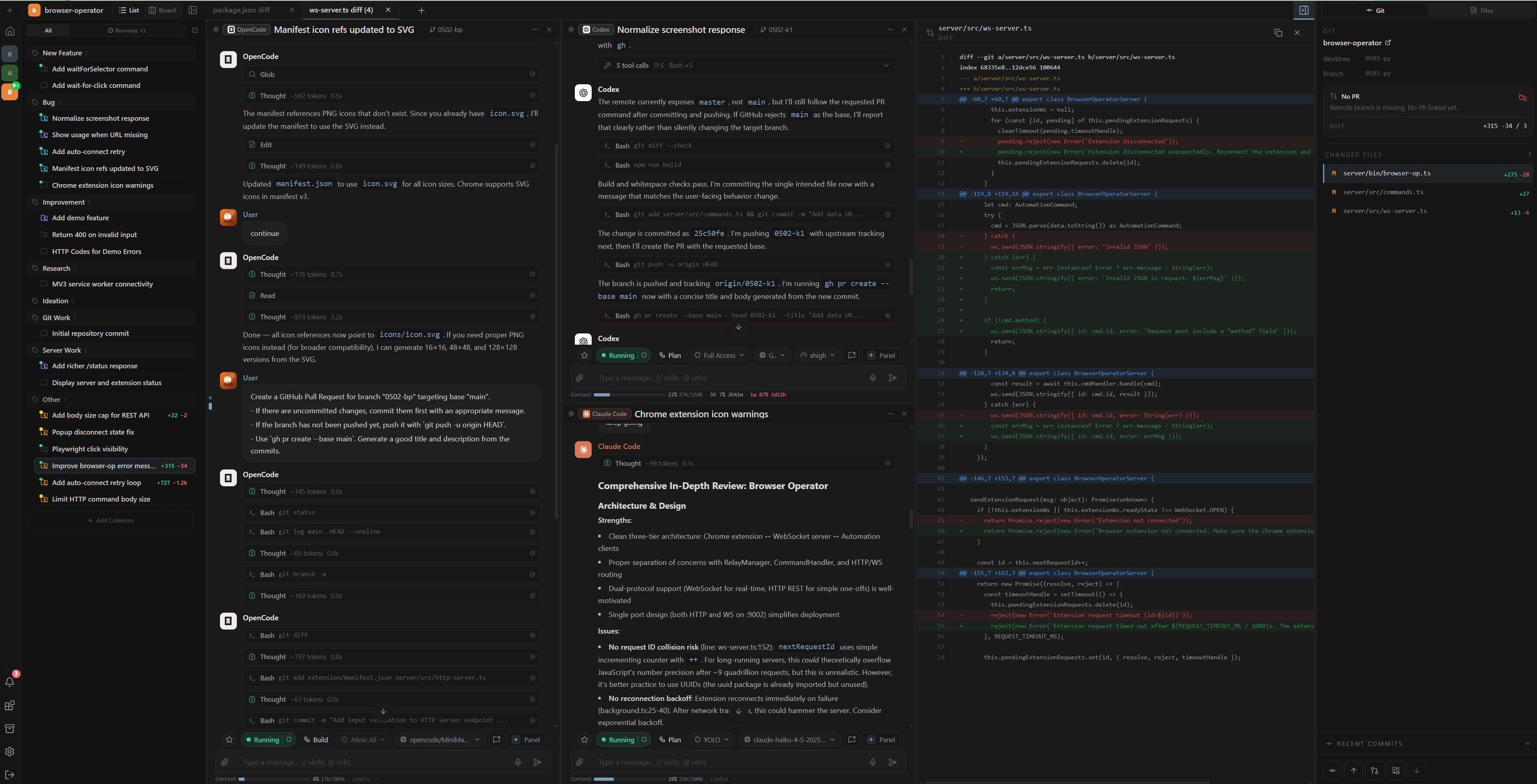
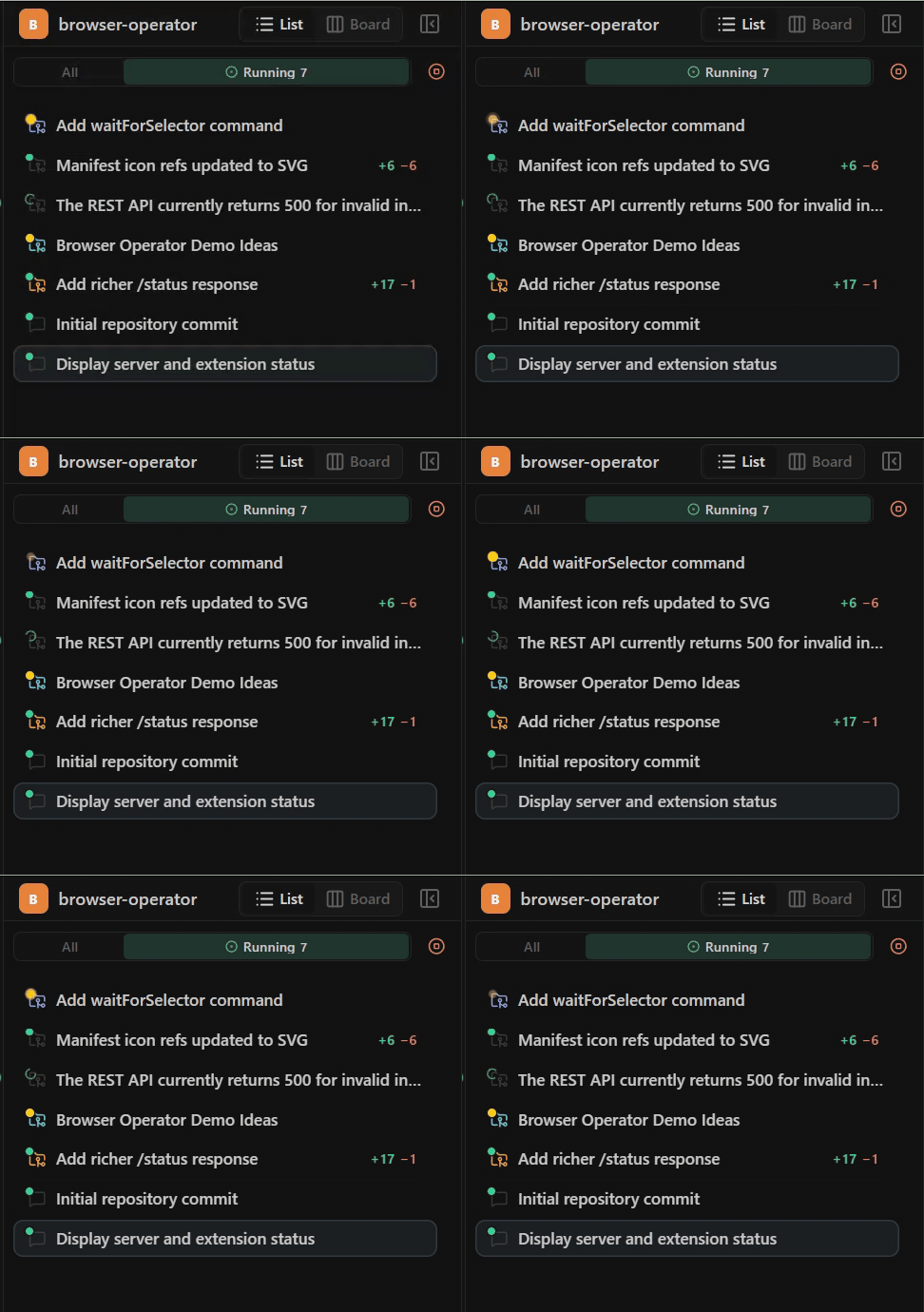
Parallel agent workspace
Run Claude Code, Codex, and OpenCode agents in parallel while keeping each task, worktree file, and diff visible in a multi-panel workspace.
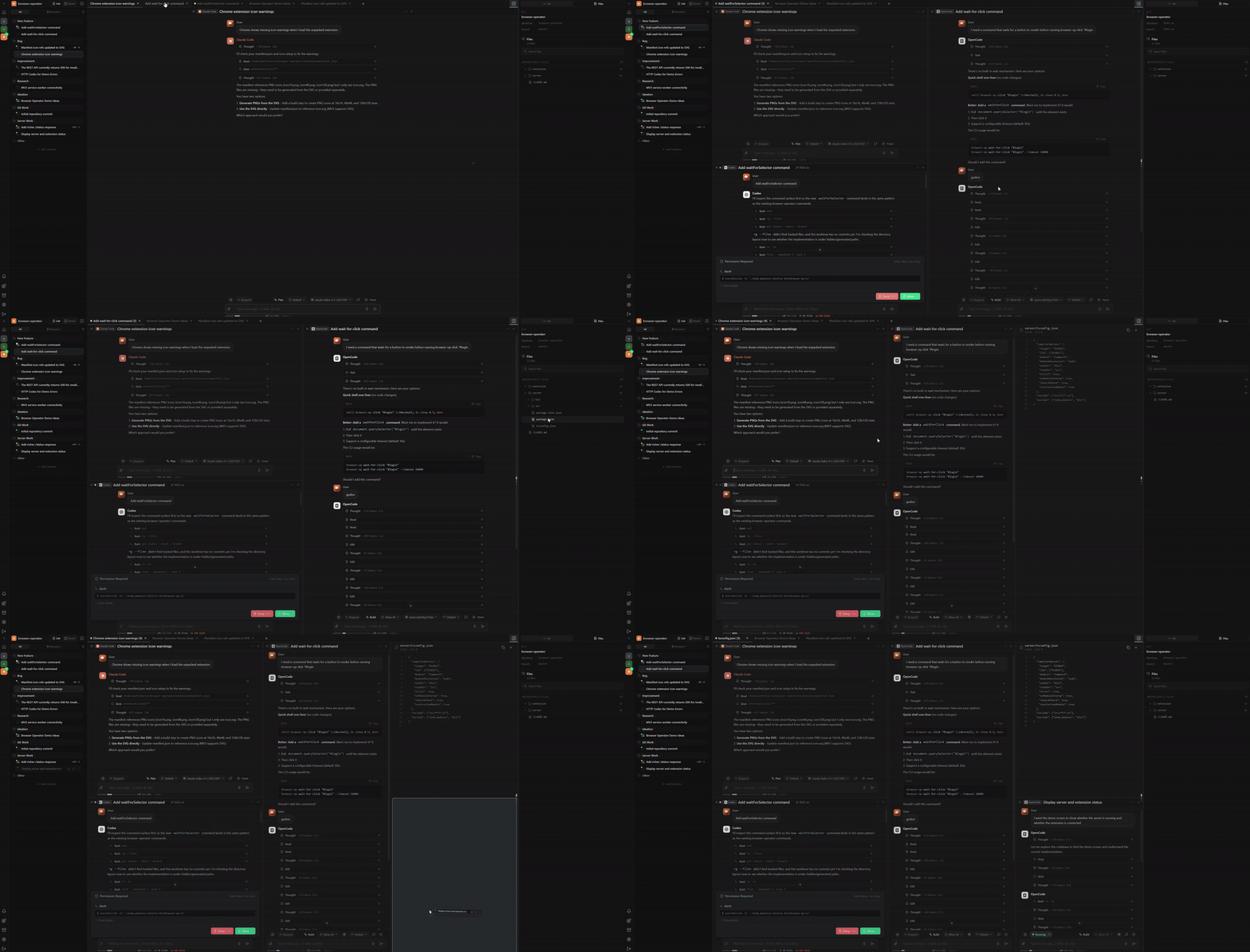
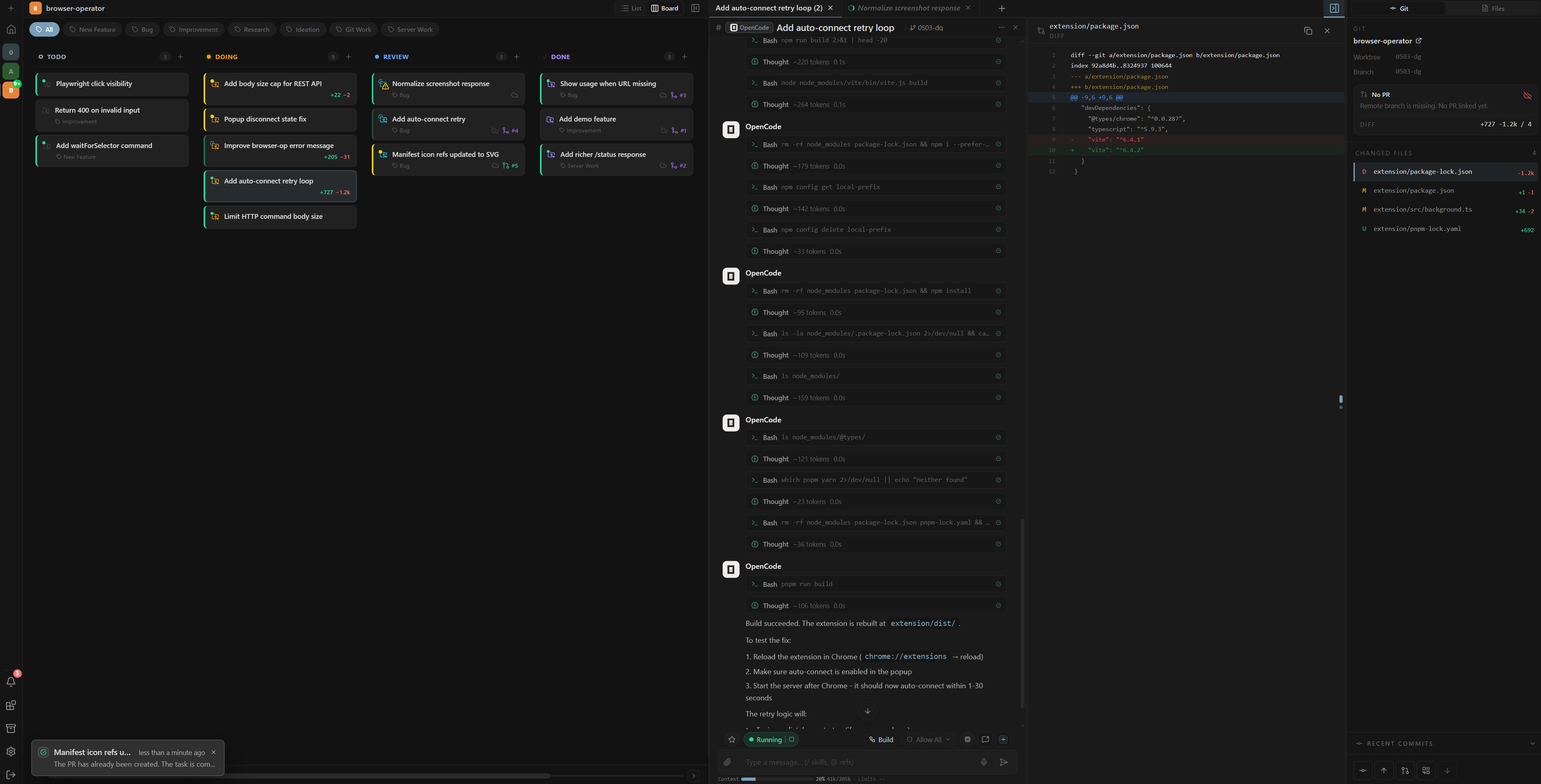
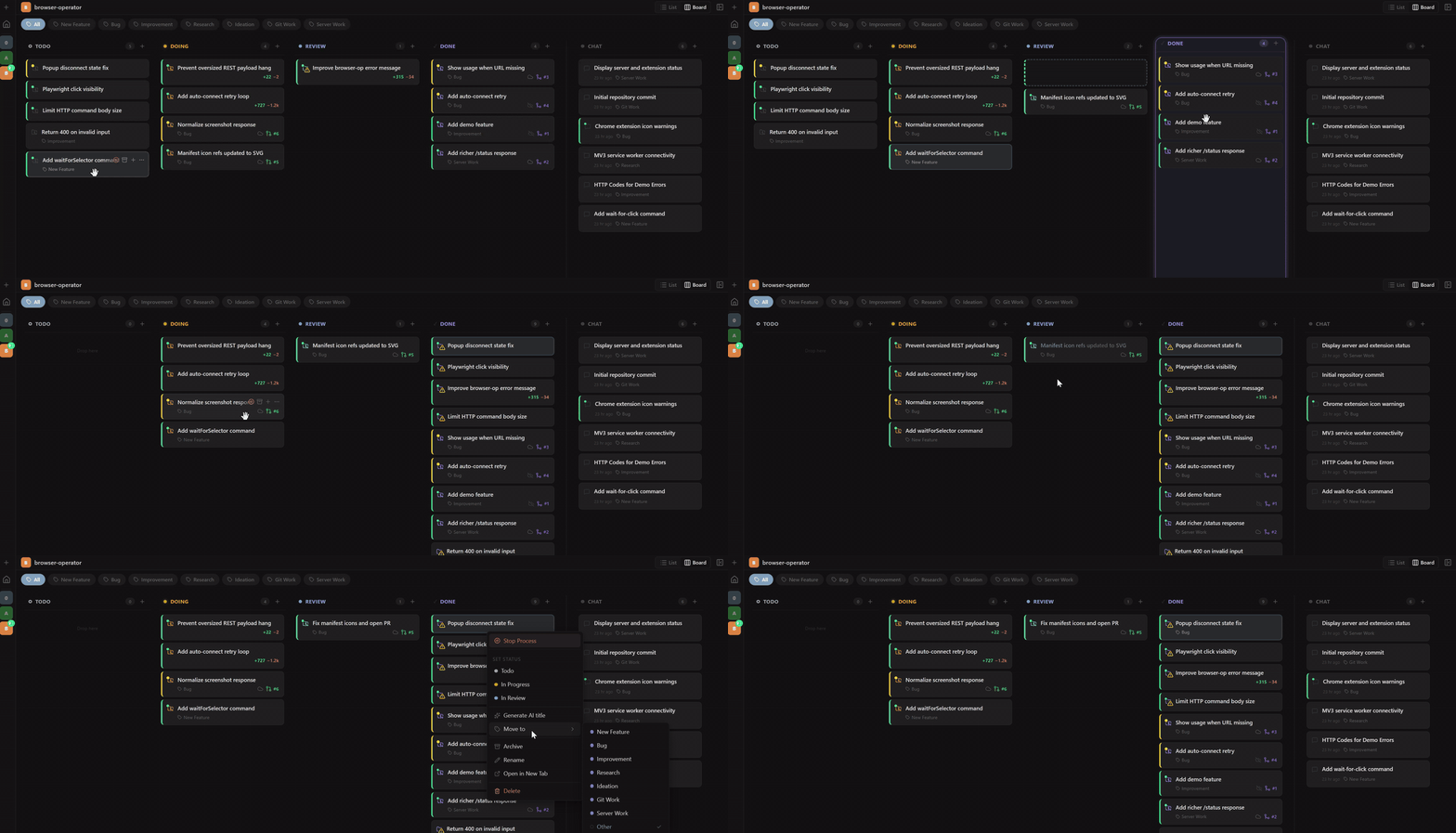
Kanban board workflow
Move work across the board with drag-and-drop, create new work with AI-generated titles, and organize tasks by collection.
Realtime Git worktree tracking
Track each task's worktree, branch, diff, PR state, and workflow status as agents continue working.
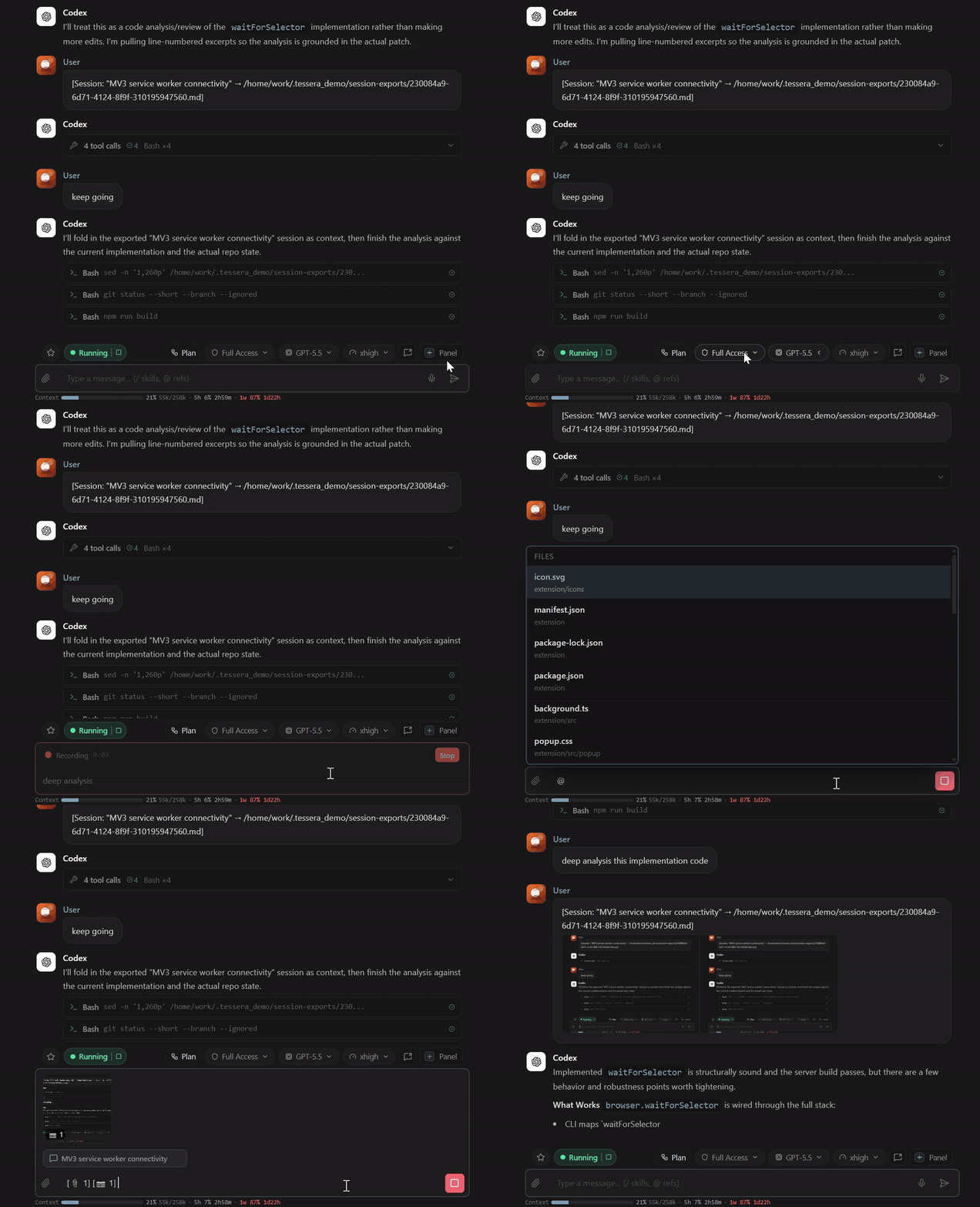
Rich composer controls
Open new panels, continue an existing conversation, tune reasoning, select models, choose permissions, use voice input (browser runtime only), add @ references, attach images, and send context-rich prompts from one composer.
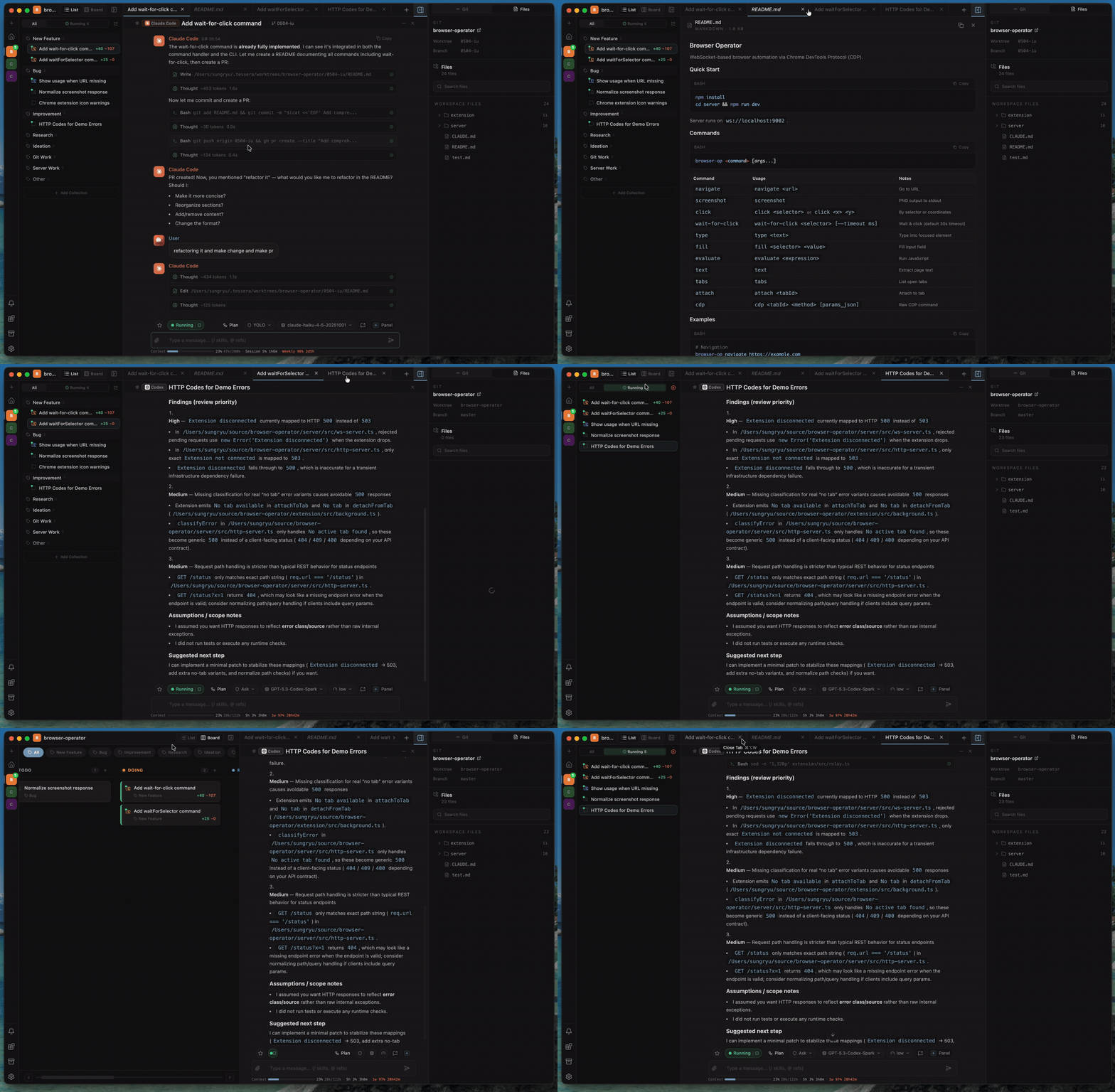
Cross-platform agent workspace
Use the same multi-agent workspace in the browser, on macOS, or on Windows while running Claude Code, Codex, OpenCode, and their model choices side by side.
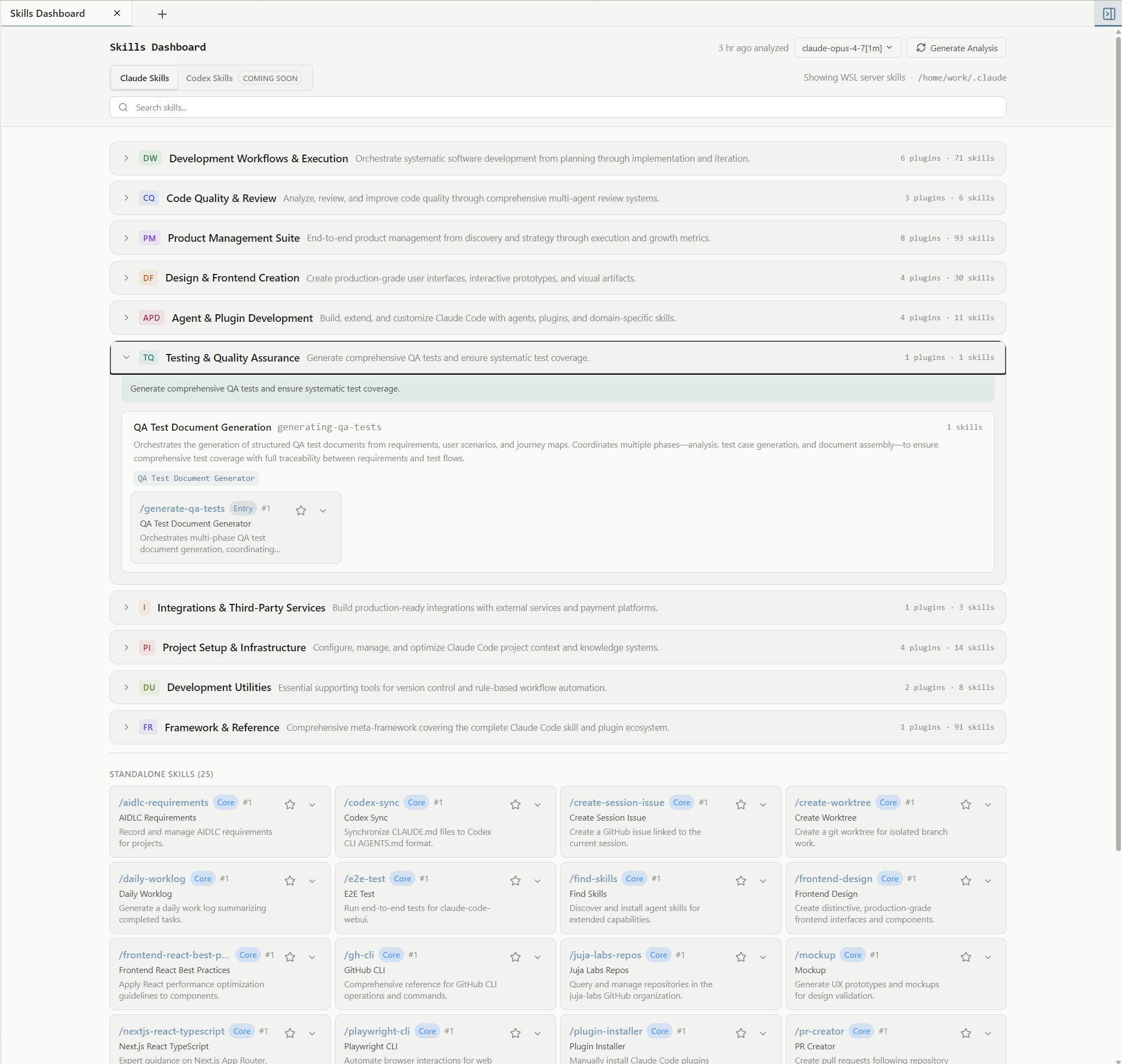
Skills dashboard
Browse locally discovered Claude Code skills by category, review plugin and skill counts, search available skills, favorite frequently used skills for quick access, and generate an analysis from the selected model.
Install
Choose the runtime that fits your setup:
| Runtime | How to run |
|---|---|
| Windows desktop | Download the portable .exe from GitHub Releases |
| macOS desktop | Download the .dmg from GitHub Releases |
| Browser | Install the npm CLI and open the printed local URL |
macOS release DMGs are Developer ID signed and notarized. Windows portable .exe builds are not code-signed yet, so Windows SmartScreen may show an unknown-publisher warning. See Desktop Releases.
For the browser runtime:
npm install -g @horang-labs/tessera
tessera
Tessera prints the local browser URL after startup:
Tessera is running at:
  http://127.0.0.1:32123

Press Ctrl+C to stop.
The default port is 32123. If that port is already in use, Tessera scans upward and prints the actual URL it selected.
To request a specific port:
tessera --port 3100
Core Features
Tessera is designed for developers who run multiple AI coding sessions and need more structure than terminal tabs:
| Feature | Details |
|---|---|
| Parallel workspace | Run many chats and implementation tasks side by side without losing status, context, or ownership |
| Multi-panel UI | Split panels, tabbed workspaces, session movement, and long-running workspace layouts |
| Chat-to-task flow | Start with research or ideation, then continue the conversation into a managed git worktree |
| Observable session timeline | Agent output, reasoning, tool calls, permissions, plans, user prompts, files, diffs, branches, and PR state in one place |
| List and Kanban views | Use list view for high-volume exploration and Kanban view when implementation status matters |
| Git and PR workflow | Commit, push, create PRs, merge PRs, inspect diffs, and track branch/PR state from the Git panel |
| Context-rich composer | @ file references, chat/task references, pasted images, and local file attachments |
| Drag-and-drop workspace | Move sessions, arrange workspace structure, and attach context through drag-and-drop interactions |
| Provider-native controls | Permission prompts, plan approvals, runtime modes, reasoning controls, and provider access controls in the workspace |
| Model choice through OpenCode | Use the models and providers configured in OpenCode, including local or air-gapped LLM setups |
| Cross-environment support | macOS, Windows, and browser-based npm runtime |
| Unified session history | Session history, multi-agent conversation data, attachments, settings, worktree metadata, and workspace state in one place |
Also included: keyboard-first navigation, browser-native voice input through the Web Speech API in the browser runtime, and a Claude Code skills dashboard discovered from the local environment.
Technical Highlights
Tessera is built around a local runtime and provider-based CLI layer:
- Provider adapter architecture: each CLI is isolated behind a
CliProvidercontract for process lifecycle, protocol parsing, runtime controls, approvals, interrupts, and skills. - Protocol normalization layer: Claude Code
stream-json, Codexapp-server, and OpenCode ACP JSON-RPC events are translated into a shared realtime message model. - Agent workspace model: chats, tasks, collections, workflow states, managed git worktrees, PR state, diffs, provider controls, and interactive prompts are modeled as first-class workspace concepts.
- OpenCode model bridge: Tessera reads OpenCode's model catalog and exposes configured models, providers, and reasoning variants in the workspace.
- Shared local runtime: desktop and browser runtimes share the same local server, provider layer, and configurable app-data directory.
First Run
On first run, Tessera opens a setup flow.
- If you are using the npm browser runtime, create the first local account. No default password is created. The desktop app does not require this step.
- Confirm that at least one supported provider CLI is installed and authenticated.
- Add or select a project folder.
- Start a chat for exploration or create a task for worktree-backed implementation.
For provider login, use the provider's own CLI first, for example claude login, codex login, or OpenCode's configured provider credentials.
Supported CLIs
| Provider | Local command | Status | Notes |
|---|---|---|---|
| Claude Code | claude |
Supported | Uses streaming JSON mode, permission modes, plan approval, AskUserQuestion prompts, and installed skill discovery |
| Codex | codex |
Supported | Uses app-server JSON-RPC events, approval requests, plan deltas, sandbox/access controls, and reasoning effort |
| OpenCode | opencode |
Supported | Uses ACP JSON-RPC, OpenCode modes, permission presets, and the models/providers configured in OpenCode |
Provider-specific implementation lives under src/lib/cli/providers/. The rest of the app talks to the shared provider contract instead of CLI-specific internals.
Requirements
- Node.js 20 or later
- npm 10 or later
- At least one supported CLI installed and authenticated:
You can check your local tools with:
node -v
npm -v
claude --version
codex --version
opencode --version
Build From Source
For development, clone the repository and install dependencies:
git clone https://github.com/horang-labs/tessera.git
cd tessera
npm install
Tessera uses a custom Node.js server for the Next.js app, WebSocket transport, database initialization, provider bootstrapping, and background pollers. Run server.ts instead of starting Next.js directly:
PORT=3100 npx tsx server.ts
Supported environment variables:
| Variable | Default | Purpose |
|---|---|---|
TESSERA_DATA_DIR |
~/.tessera |
App data root for the database, local users, auth keys, settings, worktrees, attachments, and session history |
PORT |
3000 from source, 32123 from the npm CLI |
HTTP server port for source and npm runs |
TESSERA_HOST |
127.0.0.1 |
Host interface for source and npm runs. HOST is also accepted by the source server |
LOG_LEVEL |
info |
Backend log level: debug, info, warn, or error |
CLAUDE_CONFIG_DIR |
~/.claude |
Override the Claude Code config directory used for skill discovery |
Desktop release builds use Electron:
| Target | Command |
|---|---|
Windows portable .exe |
npm run electron:build:win |
macOS Apple Silicon dev .dmg |
npm run electron:build:mac-arm64 |
Electron build outputs are written under release/.
Stored Data And Privacy
Tessera runs locally and stores app data under ~/.tessera/ by default.
Tessera includes anonymous telemetry in published npm and desktop builds to measure minimal usage. Telemetry is collected with PostHog and stored in the US region.
Tessera does not collect sensitive data such as IP addresses, prompts, messages, file paths, command output, repository names, or account details. You can disable telemetry during onboarding or later in Settings. Local source development runs do not send telemetry unless TESSERA_TELEMETRY_LOCAL=1 is set.
Common default paths:
| Path | Purpose |
|---|---|
~/.tessera/tessera.db |
SQLite app database |
~/.tessera/users.json |
Local user account records |
~/.tessera/auth/ |
Auto-generated RSA keys for login sessions |
~/.tessera/settings/ |
User settings |
~/.tessera/worktrees/ |
Managed temporary git worktrees, when used |
~/.tessera/attachments/ |
Local attachment files, when used |
~/.tessera/session-history/ |
Session event history, when used |
~/.tessera/session-exports/ |
Exported session files, when used |
Back up the data directory if you want to preserve Tessera's local state.
Provider requests are handled by the provider CLIs installed on your machine. Tessera does not replace the provider's authentication, billing, model access, or network behavior.
Tech Stack
| Area | Stack |
|---|---|
| App runtime | Next.js, React, TypeScript, custom Node.js server |
| UI | Tailwind CSS, Zustand, TanStack Virtual |
| Realtime | ws WebSocket transport |
| Local database | sql.js SQLite |
| Auth | bcryptjs, RS256 JWT cookies |
| Desktop shell | Electron |
| Packaging | npm global CLI, Electron builds via electron-builder |
Desktop Releases
Desktop release assets are built by GitHub Actions for v* tags and attached to GitHub Releases:
- Windows portable
.exe(not code-signed yet) - macOS
.dmgfor Apple Silicon and Intel, Developer ID signed and notarized
macOS release DMGs are signed and notarized with Apple Developer ID, so downloaded releases should open normally on macOS.
Windows release builds are portable .exe files and are not code-signed yet. SmartScreen may show an unknown-publisher warning; choose More info and then Run anyway to start Tessera.
If Gatekeeper still blocks a macOS release DMG, please report it as a release-signing issue.
See macOS Distribution for local and CI setup.
Status
Tessera is currently published as a beta. Ideas, bug reports, usability feedback, and feature requests are welcome through GitHub Issues, and we actively review them while Tessera evolves. External code contributions are not being accepted yet while the project structure and review process settle.
Teams And Design Partners
Tessera is currently focused on individual local workflows, but we are preparing team and enterprise features for companies running coding agents across multiple developers.
The team product is being shaped around three areas: shared workspaces for parallel agent work, governance for permissions and tool use, and operational visibility into agent usage, cost, and review state.
If your team wants to use Tessera in production, join the design partner waitlist.
Roadmap
Planned areas include:
| Area | Direction |
|---|---|
| Cloud team collaboration | Shared projects, team-visible task state, and collaborative review workflows |
| Enterprise governance | Permission management, tool-use policies, audit trails, and controls for blocked or unapproved agent actions |
| Agent operations analytics | Visibility into agent efficiency, model/provider usage, and cost patterns across a team workspace |
| Team memory | Shared project context and team-specific agent memory for recurring workflows |
| Multi-agent collaboration | A lead agent that coordinates task creation, review, Git workflow management, and parallel worker agents |
| Tessera-native agent | A built-in agent experience in addition to external CLI providers |
| Web debugging | Browser inspection, logs, screenshots, and frontend debugging context |
Troubleshooting
claude, codex, or opencode is not found
Install the CLI you want to use, authenticate it, and make sure the command works in the same terminal where you run tessera.
Provider status says needs_login
Run the provider's login or setup command, then refresh Tessera's provider status.
Reset local login keys
If login tokens become invalid after moving files between machines, stop Tessera and remove the generated auth keys:
rm -rf ~/.tessera/auth
tessera
If you start Tessera with TESSERA_DATA_DIR, remove the auth/ directory under that custom data directory instead.
License
Tessera is open source under the Apache License 2.0 (Apache-2.0).
Copyright (c) 2026 Horang Labs, Inc.
See the LICENSE file for the full text.
Claude Code is a trademark of Anthropic. Codex and OpenAI are trademarks of OpenAI. Tessera is not affiliated with or endorsed by Anthropic or OpenAI.
Reviews (0)
Sign in to leave a review.
Leave a reviewNo results found