Clawie
Health Warn
- No license — Repository has no license file
- Description — Repository has a description
- Active repo — Last push 0 days ago
- Low visibility — Only 5 GitHub stars
Code Pass
- Code scan — Scanned 12 files during light audit, no dangerous patterns found
Permissions Pass
- Permissions — No dangerous permissions requested
No AI report is available for this listing yet.
Clawie is a fast terminal coding agent built to write code well, stay easy to use, and run with serious local-model power when you want speed and control on your own machine.

Clawie by ShrimpAI
Clawie is a packaged workspace that keeps both sides of the project together:
rust-clawie(main CLI/runtime side)python-clawie(Python mirror/workspace side)
This repository exists so the full project is shareable and runnable from one folder.
Key Features & Recent Updates
1. Interactive Setup Wizard
Configure your environment variables, provider, model, API key, and base URL interactively:
./clawie setup
Settings are persisted in settings.json under the Clawie config directory.
2. Lazy Senior Dev Mode (Lean Mode)
Clawie enforces a Lean Ladder to prevent over-engineering:
- Does this need to exist?
- Is it already in this codebase?
- Does stdlib do it?
- Does a native platform feature cover it?
- Does an installed dependency solve it?
- Can it be one line?
- Only then write the minimum code.
Manage this mode directly inside the REPL session:
/lean [lite|full|ultra|off]: Switch or view the active lean mode (default isfull)./lean-review: Review current diff for over-engineering./lean-audit: Scan repository for over-engineering./lean-debt: Harvestclawie:simplification comments into a ledger./lean-gain: Show benchmark impact metrics./lean-help: Print command reference.
3. Repository Mapping
Use the /map (or /repo-map) command in the REPL to generate a ranked map of the repository's files and extracted symbols, helping navigate large codebases.
4. Git Integration
Manage commits directly from the REPL:
/commit: Preflight checks changes, generates a commit message, and commits them./undo: Undoes the last commit (soft reset, keeping changes).
5. Workspace RAG Service (claw-rag-service)
SQLite-backed vector indexing service for semantic repository searches:
- Ingest files:
cargo run -p claw-rag-service -- ingest --workspace . - Serve API & UI:
cargo run -p claw-rag-service -- serve
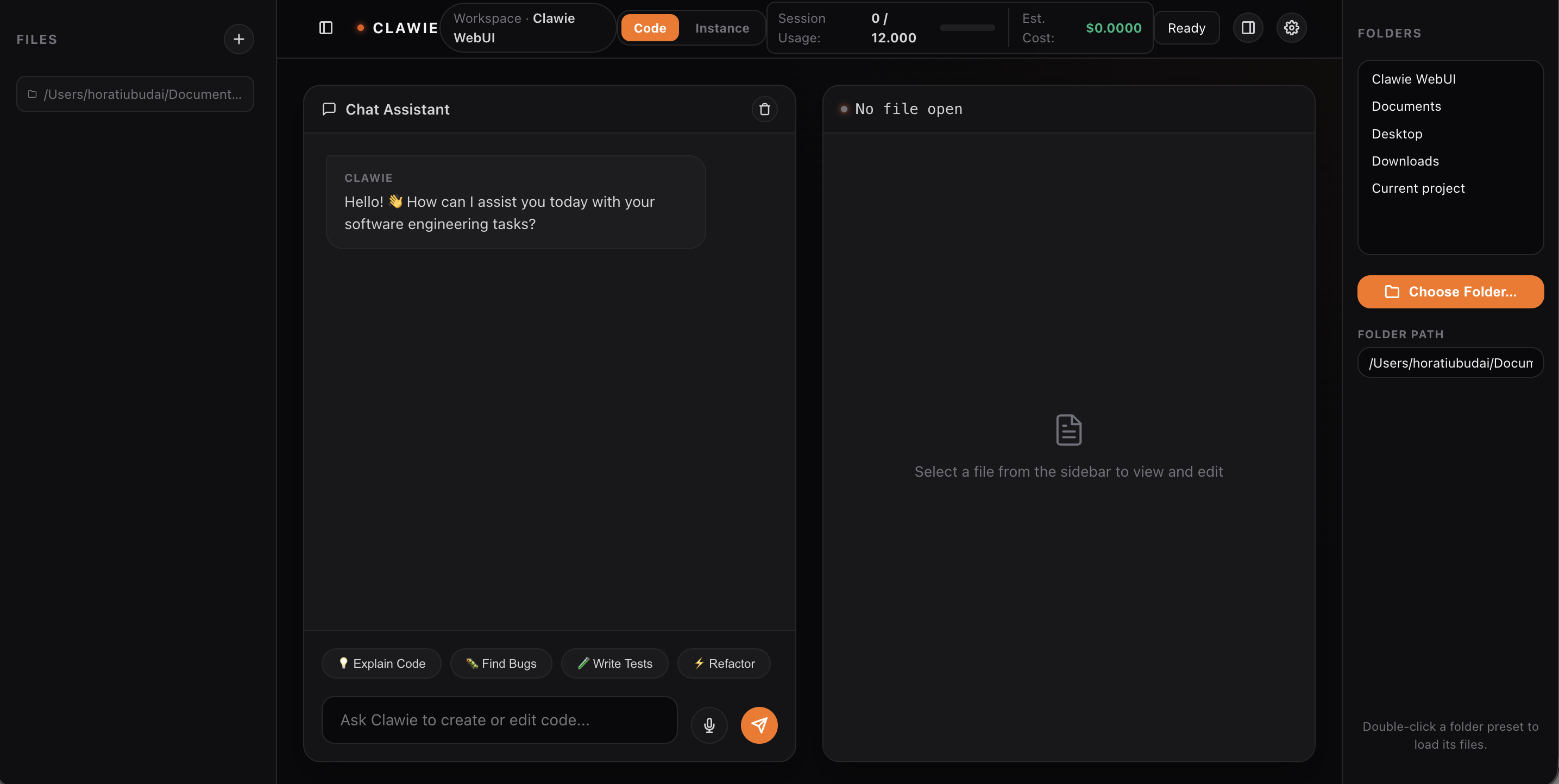
6. Web UI Visual Upgrades
Advanced graphical interface features for the local Clawie Web UI:
- WebSocket Live Log Streaming: Dynamic real-time execution log streams. Rather than pulling static snapshots, the UI connects to a background socket (
/ws-log) to monitor process events as they happen. - Side-by-Side Visual Diffing: Compare original files vs agent improvements or current edits. Clicking "Show Diff" provides visual red/green deletions/additions side-by-side with automatic layout alignment.
7. Automated Parity Pipelines
Checks sync and parity between the Rust codebase and Python mirrors:
- Sync Auditor CLI:
./scripts/check_rust_python_sync.pyanalyzes command/tool definitions and file parity. - Unit Testing: Tests defined in
test_rust_python_sync.pyrun checks in continuous integration.
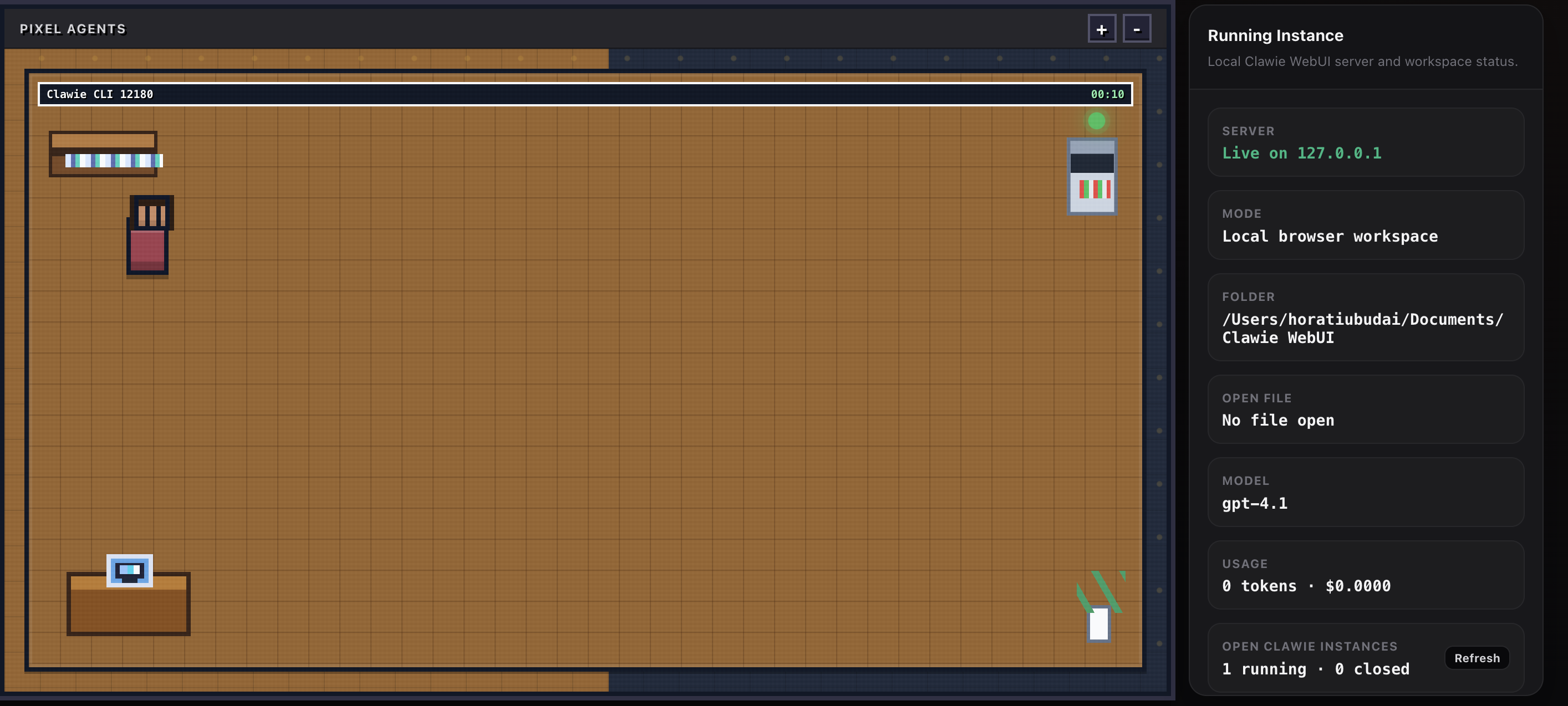
8. Pixel Agents Dashboard (Visual Interface)
A gamified, real-time pixel-art dashboard showing active agent instances and status:
- Draggable Agents: CLI processes are rendered as active pixel-art characters in visual rooms (complete with desks, computers, bookshelves, and server racks).
- Session Actions: Terminate active agent sessions directly from the visual interface.
- State Beacons: Displays process statuses (thinking, executing, idle, closed) dynamically via color-coded status lights.
Quick Start
- Set up the workspace:
./clawie setup
- Launch the Clawie agent REPL:
./clawie
- Work in these folders depending on focus:
rust-clawiefor CLI/runtime behaviorpython-clawiefor Python-side mirrored modules and tooling
Repository Layout
Clawie/
├── README.md
├── clawie
├── rust-clawie/
└── python-clawie/
Long Coding Sessions (Improved)
The runtime defaults were increased to better support longer sessions:
max_turns:64(was lower)max_budget_tokens:12000(was lower)compact_after_turns:48turn-loop --max-turns: default12
You can tune these at runtime with environment variables:
export CLAWIE_MAX_TURNS=120
export CLAWIE_MAX_BUDGET_TOKENS=30000
export CLAWIE_COMPACT_AFTER_TURNS=80
export CLAWIE_STRUCTURED_OUTPUT=false
export CLAWIE_STRUCTURED_RETRY_LIMIT=2
./clawie
Notes:
- Invalid values fall back to defaults.
- Numeric values are clamped to at least
1.
Useful Commands
Run from repository root.
# Python-side summary
python3 -m python-clawie.src.main summary

# Run a stateful loop with explicit turn count
python3 -m python-clawie.src.main turn-loop "audit this module" --max-turns 30

# Resume an existing session
python3 -m python-clawie.src.main resume-session <session_id> "continue"
Use Cases & Workflows
1. Live Background Agent Monitoring (WebSocket Logs)
When running complex agent tasks (e.g. running a multi-turn audit session with /lean-audit), developers can launch the Web UI alongside their terminal and watch the agent's actions live.
- Workflow:
- Start a CLI session:
./clawie - Open the Web UI by running
/webuiin the CLI REPL or by running./clawie --webui - Click on the active room's terminal monitor inside the Web UI dashboard to open the Log Console.
- The console connects via WebSocket to
/ws-log?pid=<PID>and streams process lifecycle updates, command elapsed times, and execution details in real time as the agent runs.
- Start a CLI session:
2. Code Improvement Review (Side-by-Side Diff)
When Clawie suggests changes to code files, you can review, edit, and apply them using the side-by-side split screen.
- Workflow:
- Ask Clawie to improve a file:
"Optimize main.py"(which generates a.improvements.mdfile). - Open the Web UI and select the file from the workspace explorer sidebar.
- Click the "Show Diff" button at the top right of the editor.
- Compare the Original File (left pane, red deletions) and the Improvements / Edited (right pane, green additions).
- Switch back to the editor with "Show Editor" to make manual refinements, then click "Save".
- Ask Clawie to improve a file:
3. Continuous Parity Checking (Automated Pipelines)
To ensure that CLI runtime command/tool updates inside rust-clawie are mirrored properly inside python-clawie without creating feature drift:
- Workflow:
- Run the sync check CLI tool:
./scripts/check_rust_python_sync.py - The tool outputs a detailed parity report comparing commands in Rust
commands.jsonvs Python's snapshot, and tool specifications in Rusttools/src/lib.rsvs Python's snapshot. - If there are missing files or content drifts, the script exits with code
1, serving as a validator in Git hooks or CI pipelines. - Run
python3 -m unittest python-clawie/tests/test_rust_python_sync.pyto assert package structure sync.
- Run the sync check CLI tool:
Product Naming
Clawie: product nameShrimpAI: parent brandJameclaw: legacy/origin naming context
Why This Package Exists
Earlier working copies were split across multiple local folders. This package keeps everything in one Git-ready structure so onboarding, development, and sharing are simpler.

Reviews (0)
Sign in to leave a review.
Leave a reviewNo results found