naviscoord-mcp
Health Gecti
- License — License: MIT
- Description — Repository has a description
- Active repo — Last push 0 days ago
- Community trust — 12 GitHub stars
Code Gecti
- Code scan — Scanned 12 files during light audit, no dangerous patterns found
Permissions Gecti
- Permissions — No dangerous permissions requested
Bu listing icin henuz AI raporu yok.
Open-source MCP server for Autodesk Navisworks Manage 2024-2026: AI-assisted BIM clash detection, root-cause analysis, coordination plans and verified model workflows.
NavisCoord
Turn thousands of Autodesk Navisworks clashes into explainable, verified
decisions your coordination team can schedule.






Install in five minutes ·
Latest release ·
What is verified ·
Security model ·
Ask a question
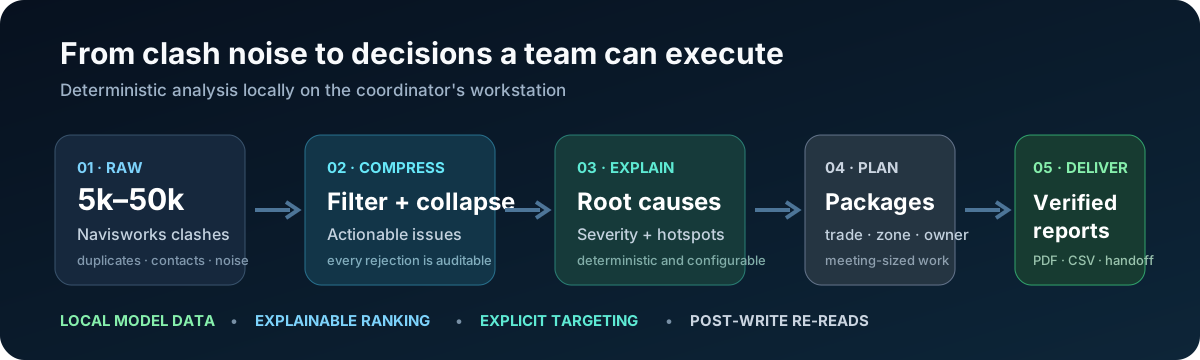
NavisCoord is an open-source, local MCP server plus a native Navisworks add-in.
It is built for BIM/VDC coordination, not generic UI automation. Model data
stays on the workstation.
Not affiliated with Autodesk. A licensed installation of Autodesk
Navisworks Manage is required for the live add-in.
The problem it solves
A federation can produce 5,000–50,000 clashes. Those are not 50,000 separate
decisions. NavisCoord filters expected contacts, collapses duplicate geometry,
reconciles levels, ranks actionable issues, detects systemic root causes and
builds meeting-sized work packages.
| Instead of | NavisCoord returns |
|---|---|
| One row per raw clash | Auditable issues after noise filtering and duplicate collapse |
| An unexplained “AI priority” | Deterministic severity with a sentence for every component |
| A giant ranked backlog | Root causes, hotspots and packages by trade, zone and owner |
| “The API call did not throw” | Explicit targeting and post-write verification by re-reading |
| A dead-end screenshot | PDF/CSV/handoff data linked back to authoring-model element IDs |
Install — beginner path
Requirements: Windows, Python 3.10+, and Navisworks Manage 2024, 2025 or 2026.
You do not need Visual Studio or the .NET SDK when using a release.
1. Install the Navisworks add-in
Close Navisworks. DownloadInstall-NavisCoord.ps1, then run:
powershell -ExecutionPolicy Bypass -File .\Install-NavisCoord.ps1
The installer detects installed Navisworks versions, downloads the correct
assets from the latest release, verifies SHA256SUMS.txt, validates the ZIP
and publishes only NavisCoord-owned files with rollback.
Prefer doing it manually? Download the ZIP for your version from the
latest release
and extract it to:
%APPDATA%\Autodesk\Navisworks Manage <version>\Plugins\NavisCoord\
2. Add the MCP plugin
Claude Code:
/plugin marketplace add HorizunGroup/naviscoord-mcp
/plugin install naviscoord-mcp@horizun-navis
For Codex, add this repository as a plugin marketplace and enablenaviscoord-mcp@horizun-navis.
The launcher creates a private, versioned Python environment on first start.
It does not modify your normal interpreter and installs only hash-locked
dependencies.
3. Paste the first safe prompt
Verify NavisCoord without modifying or saving the model. Then discover and
analyze the open Navisworks document, identify root causes, and produce a
coordination work plan in read-only mode.
Full screenshots-free walkthrough and troubleshooting:
Quick start.
What it can do
- Discover the real model/property structure instead of assuming one BIM
standard or language. - Build selection/search sets and clash matrices from a versioned profile.
- Run tests, group results and prepare viewpoints through guarded workflows.
- Filter non-actionable contacts and collapse repeated clashes.
- Reconcile inconsistent storey names from geometry.
- Rank severity and explain why an issue matters and which side should move.
- Detect systemic elevations, missing penetrations, repeated typologies and
congested zones. - Produce work plans, narratives, PDFs, CSV star schemas and Revit/BI handoff
files. - Target one of several simultaneously open Navisworks sessions explicitly.
- Run long operations as jobs with honest progress and cancellation semantics.
The analysis engine also works offline against an exported JSON file, without
Navisworks:
python -m naviscoord analyze export.json --profile my-project.json
First workflows
Read-only analysis:
navis_health
→ navis_discover
→ navis_analyze
→ navis_root_causes
→ navis_work_plan
→ navis_pdf_report
Operational coordination:
navis_audit_models
→ navis_configure
→ navis_run
→ navis_group_levels
→ navis_save_as
Ask for navis_capabilities before relying on a mutation. If multiple
Navisworks instances are open, choose one with navis_target; NavisCoord
refuses to guess.
Why it is different
Coordination intelligence, not remote control
The deterministic server does the large computation and gives the language
model compact evidence. If an LLM has to read clashes one by one, the design
has already failed.
Explainable by construction
Weights, tolerances, discipline rules, criticality and movability live in a
project profile. The score is arithmetic rather than learned, so a coordinator
can challenge it, change it and reproduce it.
Honest writes
Every mutation uses a dry-run/commit contract, explicit session and document
identity, idempotency where retries matter, and post-commit re-reads whenever
Navisworks exposes a reliable getter. Unsupported verification is reported as
unsupported — never upgraded to success because a call returned.
Local security boundary
The C# bridge listens on loopback, uses a per-session bearer token stored under
an explicit Windows DACL and marshals bounded work onto Navisworks' UI thread.
Output paths are confined; profile checksums and document fingerprints bind
state to the intended model.
See the complete security model and report
vulnerabilities through GitHub private advisories, not issues.
Compatibility
| Component | Supported |
|---|---|
| Operating system | Windows |
| Navisworks | Autodesk Navisworks Manage 2024, 2025, 2026 |
| Python | 3.10–3.14 |
| MCP Python SDK | 1.9.x and 2.x |
| Add-in runtime | .NET Framework 4.8, x64 |
| MCP clients | Claude Code, Codex, and clients that support local stdio servers |
One source is compiled once per Navisworks release because Autodesk ships a
version-specific API assembly. Autodesk binaries are never redistributed.
Architecture
MCP client (Claude / Codex / compatible host)
        │ stdio
        ▼
Python server ── analysis · planning · reporting · output policy
        │ authenticated loopback HTTP
        ▼
Native C# add-in ── UI-thread dispatch · Navisworks API · document re-reads
        │
        ▼
Active Navisworks Manage document
The split is deliberate: analysis stays deterministic and testable without a
license; only API-bound work enters Navisworks.
Evidence, not test-count marketing
Public CI exercises Python 3.10–3.14, both supported MCP major versions,
packaging, schemas, security contracts and the Navisworks-free C# logic.
Release builds are deterministic, binary artifacts are scanned for private
absolute paths, dependencies are hash-locked, and mutations are tested against
their common envelope.
Navisworks itself does not run on a public hosted runner. Live checks are
recorded by version and model type in Testing, including
what was not exercised. A green hosted-CI badge is not presented as proof
that a live model was opened.
Run the repository-safe suites:
python -m pytest -q
dotnet run --project addin\NavisCoord.Tests -c Release
python scripts\build_artifacts.py --check
.\Install-NavisCoord.ps1 -SelfTest
Install from source
Close Navisworks, then:
git clone https://github.com/HorizunGroup/naviscoord-mcp.git
cd naviscoord-mcp
.\install.ps1
cd server
python -m pip install -e .
install.ps1 detects compatible local Navisworks installations and compiles
against each API. Building requires the .NET SDK 8+; the project supplies the
.NET Framework 4.8 reference assemblies.
Manual MCP configuration starts from .mcp.json.example.
Documentation
| Read this | When you need it |
|---|---|
| Quick start | First installation, no developer background |
| Installation | Manual configuration and troubleshooting |
| Profiles | Adapt rules, disciplines, tolerances and priorities |
| Architecture | Understand the server/add-in boundary |
| Security model | Threat model and protected assets |
| Sessions | Multiple Navisworks versions/documents |
| Jobs | Long operations, progress and cancellation |
| Saving | save, save_as and ACC documents |
| Testing | Automated and live evidence |
| Product benchmark | Positioning, gaps and public comparison |
| Launch playbook | Demo script, distribution sequence and honest metrics |
Community
- Ask usage and installation questions in
Discussions. - Search existing issues before reporting a reproducible bug.
- Read CONTRIBUTING.md before a pull request.
- Use private security reporting for tokens, paths or
vulnerabilities. - If NavisCoord saves your team a coordination session, star the repository
and share the before/after counts — sanitized, never with client data.
The project benchmark is intentionally public. Current gaps such as a real
sanitized demo, signed beginner installer, PyPI distribution and official MCP
Registry publication are tracked in docs/BENCHMARK.md, not
hidden behind the badge row.
License
MIT — see LICENSE. Autodesk trademark and third-party notices are in
NOTICE. No Autodesk assembly, model or client dataset is included.
Yorumlar (0)
Yorum birakmak icin giris yap.
Yorum birakSonuc bulunamadi