houtini-lm
Health Pass
- License — License: MIT
- Description — Repository has a description
- Active repo — Last push 0 days ago
- Community trust — 19 GitHub stars
Code Warn
- process.env — Environment variable access in benchmark.mjs
- network request — Outbound network request in benchmark.mjs
- process.env — Environment variable access in src/index.ts
- network request — Outbound network request in src/index.ts
- network request — Outbound network request in src/model-cache.ts
- process.env — Environment variable access in test.mjs
- network request — Outbound network request in test.mjs
Permissions Pass
- Permissions — No dangerous permissions requested
This MCP server reduces Claude Code token usage by delegating bounded, lower-complexity programming tasks (like writing boilerplate or generating commit messages) to cheaper local or cloud-based LLMs.
Security Assessment
The tool does not request any dangerous system permissions and does not appear to execute arbitrary shell commands. However, it does make outbound network requests to external LLM APIs (like Ollama, Groq, or DeepSeek) in its core source code and testing files. It also accesses environment variables, which is the standard and expected method for loading API keys and local server ports required for these connections. There are no hardcoded secrets. Overall risk is rated as Low, provided you trust the external API endpoints you configure it to connect to.
Quality Assessment
The project is actively maintained, with its most recent push happening today. It is properly licensed under the highly permissive MIT license (though the README mentions Apache 2.0, the audit confirms MIT). Community trust is currently low but organic, sitting at 19 GitHub stars, which is typical for a newer, niche developer utility.
Verdict
Safe to use — It is a well-maintained, safely licensed utility that operates exactly as expected without overstepping boundaries, making it a solid choice for developers looking to optimize their AI token costs.
MCP server that saves Claude Code tokens by delegating bounded tasks to local or cloud LLMs. 93% token savings benchmarked. Works with LM Studio, Ollama, vLLM, DeepSeek, Groq, Cerebras.
@houtini/lm Houtini LM - Save Tokens by Offloading Tasks from Claude Code to Your Local LLM Server (LM Studio / Ollama) or a Cloud API




Quick Navigation
How it works | Token savings | Quick start | What gets offloaded | Tools | Model routing | Configuration | Compatible endpoints
I built this because I kept leaving Claude Code running overnight on big refactors and the token bill was painful. A huge chunk of that spend goes on bounded tasks any decent model handles fine - generating boilerplate, code review, commit messages, format conversion. Stuff that doesn't need Claude's reasoning or tool access.
Houtini LM connects Claude Code to a local LLM on your network - or any OpenAI-compatible API. Claude keeps doing the hard work - architecture, planning, multi-file changes - and offloads the grunt work to whatever cheaper model you've got running. Free. No rate limits. Private.
I wrote a full walkthrough of why I built this and how I use it day to day.
How it works
Claude Code (orchestrator)
   |
   |-- Complex reasoning, planning, architecture --> Claude API (your tokens)
   |
   +-- Bounded grunt work --> houtini-lm --HTTP/SSE--> Your local LLM (free)
       . Boilerplate & test stubs          Qwen, Llama, Nemotron, GLM...
       . Code review & explanations        LM Studio, Ollama, vLLM, llama.cpp
       . Commit messages & docs            DeepSeek, Groq, Cerebras (cloud)
       . Format conversion
       . Mock data & type definitions
       . Embeddings for RAG pipelines
Claude's the architect. Your local model's the drafter. Claude QAs everything.
Token savings — benchmarked
We built a benchmark using real source files (581–2022 lines of TypeScript) across realistic delegation patterns. The savings come from context avoidance — when Claude delegates, it never reads the source file into its context window.
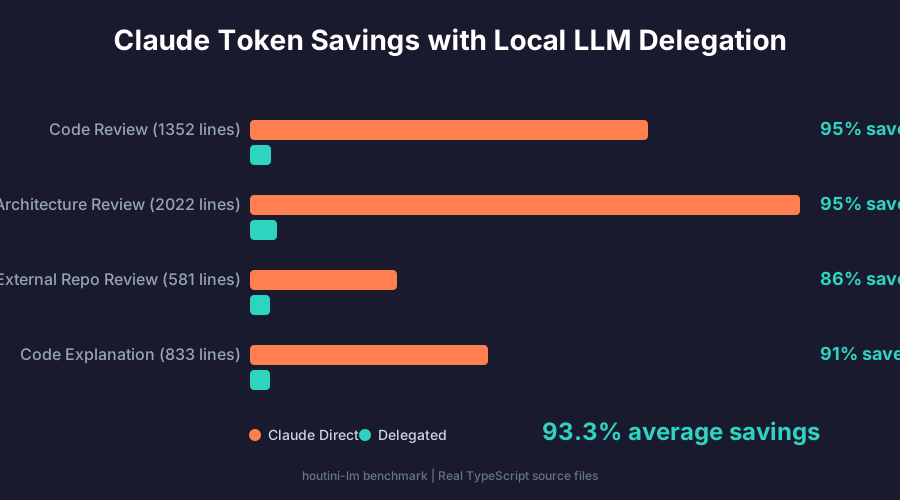
| Task | Claude direct | Delegated | Saved |
|---|---|---|---|
| Code review (1352 lines) | 14,466 tok | 769 tok | 95% |
| Architecture review (2022 lines) | 20,014 tok | 983 tok | 95% |
| External repo review (581 lines) | 5,344 tok | 741 tok | 86% |
| Code explanation (833 lines) | 8,678 tok | 744 tok | 91% |
93.3% net token savings across the session. Without delegation, Claude reads 14,000 tokens of source code then generates a 500-token review. With delegation, Claude sends a ~250 token tool call and reads back a ~500 token summary. The source file never enters Claude's context.
Small tasks (quick answers, commit messages) don't save tokens — the ~250 token MCP overhead dominates. But for anything involving reading and analysing files, which is the majority of real coding sessions, delegation pays for itself immediately.
Run the benchmark against your own setup: LM_STUDIO_URL=http://your-server:1234 node benchmark.mjs
Every response comes back with performance stats - TTFT, tokens per second, generation time - so you can actually see what your local hardware is doing. The session footer tracks cumulative offloaded tokens across every call. Every response also includes quality signals - truncation detection, think-block stripping flags, token estimation accuracy - so Claude can make informed trust decisions about the output.
Quick start
Claude Code
claude mcp add houtini-lm -- npx -y @houtini/lm
That's it. If LM Studio's running on localhost:1234 (the default), Claude can start delegating straight away.
LLM on a different machine
I've got a GPU box on my local network running Qwen 3 Coder Next in LM Studio. If you've got a similar setup, point the URL at it:
claude mcp add houtini-lm -e LM_STUDIO_URL=http://192.168.1.50:1234 -- npx -y @houtini/lm
Cloud APIs
Works with anything speaking the OpenAI format. DeepSeek at twenty-eight cents per million tokens, Groq for speed, Cerebras if you want three thousand tokens per second - whatever you fancy:
claude mcp add houtini-lm \
  -e LM_STUDIO_URL=https://api.deepseek.com \
  -e LM_STUDIO_PASSWORD=your-key-here \
  -- npx -y @houtini/lm
Claude Desktop
Drop this into your claude_desktop_config.json:
{
  "mcpServers": {
    "houtini-lm": {
      "command": "npx",
      "args": ["-y", "@houtini/lm"],
      "env": {
        "LM_STUDIO_URL": "http://localhost:1234"
      }
    }
  }
}
Model discovery
This is where things get interesting. At startup, houtini-lm queries your LLM server for every model available - loaded and downloaded - then looks each one up on HuggingFace's free API to pull metadata: architecture, licence, download count, pipeline type. All of that gets cached in a local SQLite database (~/.houtini-lm/model-cache.db) so subsequent startups are instant.
The result is that houtini-lm actually knows what your models are good at. Not just the name - the capabilities, the strengths, what tasks to send where. If you've got Nemotron loaded but a Qwen Coder sitting idle, it'll flag that. If someone on a completely different setup loads a Mistral model houtini-lm has never seen before, the HuggingFace lookup auto-generates a profile for it.
Run list_models and you get the full picture:
Loaded models (ready to use):

  nvidia/nemotron-3-nano
    type: llm, arch: nemotron_h_moe, quant: Q4_K_M, format: gguf
    context: 200,082 (max 1,048,576), by: nvidia
    Capabilities: tool_use
    NVIDIA Nemotron: compact reasoning model optimised for step-by-step logic
    Best for: analysis tasks, code bug-finding, math/science questions
    HuggingFace: text-generation, 1.7M downloads, MIT licence

Available models (downloaded, not loaded):

  qwen3-coder-30b-a3b-instruct
    type: llm, arch: qwen3moe, quant: BF16, context: 262,144
    Qwen3 Coder: code-specialised model with agentic capabilities
    Best for: code generation, code review, test stubs, refactoring
    HuggingFace: text-generation, 12.9K downloads, Apache-2.0
For models we know well - Qwen, Nemotron, Granite, LLaMA, GLM, GPT-OSS - there's a curated profile built in with specific strengths and weaknesses. For everything else, the HuggingFace lookup fills the gaps. Cache refreshes every 7 days. Zero friction - sql.js is pure WASM, no native dependencies, no build tools needed.
What gets offloaded
Delegate to the local model - bounded, well-defined tasks:
| Task | Why it works locally |
|---|---|
| Generate test stubs | Clear input (source), clear output (tests) |
| Explain a function | Summarisation doesn't need tool access |
| Draft commit messages | Diff in, message out |
| Code review | Paste full source, ask for bugs |
| Convert formats | JSON to YAML, snake_case to camelCase |
| Generate mock data | Schema in, data out |
| Write type definitions | Source in, types out |
| Structured JSON output | Grammar-constrained, guaranteed valid |
| Text embeddings | Semantic search, RAG pipelines |
| Brainstorm approaches | Doesn't commit to anything |
Keep on Claude - anything that needs reasoning, tool access, or multi-step orchestration:
- Architectural decisions
- Reading/writing files
- Running tests and interpreting results
- Multi-file refactoring plans
- Anything that needs to call other tools
The tool descriptions are written to nudge Claude into planning delegation at the start of large tasks, not just using it when it happens to think of it.
Performance tracking
Every response includes a footer with real performance data - computed from the SSE stream, not from any proprietary API:
Model: zai-org/glm-4.7-flash | 125->430 tokens | TTFT: 678ms, 48.7 tok/s, 12.5s
Session: 8,450 tokens offloaded across 14 calls
The discover tool shows per-model averages across the session:
Performance (this session):
  nvidia/nemotron-3-nano: 6 calls, avg TTFT 234ms, avg 45.2 tok/s
  zai-org/glm-4.7-flash: 8 calls, avg TTFT 678ms, avg 48.7 tok/s
In practice, Claude delegates more aggressively the longer a session runs. After about 5,000 offloaded tokens, it starts hunting for more work to push over. Reinforcing loop.
Model routing
If you've got multiple models loaded (or downloaded), houtini-lm picks the best one for each task automatically. Each model family has per-family prompt hints - temperature, output constraints, and think-block flags - so GLM gets told "no preamble, no step-by-step reasoning" while Qwen Coder gets a low temperature for focused code output.
The routing scores loaded models against the task type (code, chat, analysis, embedding). If the best loaded model isn't ideal for the task, you'll see a suggestion in the response footer pointing to a better downloaded model. No runtime model swapping - model loading takes minutes, so houtini-lm suggests rather than blocks.
Supported model families with curated prompt hints: GLM-4, Qwen3 Coder, Qwen3, LLaMA 3, Nemotron, Granite, GPT-OSS, Nomic Embed. Unknown models get sensible defaults.
Tools
chat
The workhorse. Send a task, get an answer. The description includes planning triggers that nudge Claude to identify offloadable work when it's starting a big task.
| Parameter | Required | Default | What it does |
|---|---|---|---|
message |
yes | - | The task. Be specific about output format. |
system |
no | - | Persona - "Senior TypeScript dev" not "helpful assistant" |
temperature |
no | 0.3 | 0.1 for code, 0.3 for analysis, 0.7 for creative |
max_tokens |
no | 2048 | Lower for quick answers, higher for generation |
json_schema |
no | - | Force structured JSON output conforming to a schema |
custom_prompt
Three-part prompt: system, context, instruction. Keeping them separate prevents context bleed - consistently outperforms stuffing everything into one message, especially with local models. I tested this properly one weekend - took the same batch of review tasks and ran them both ways. Splitting things into three parts won every round.
| Parameter | Required | Default | What it does |
|---|---|---|---|
instruction |
yes | - | What to produce. Under 50 words works best. |
system |
no | - | Persona + constraints, under 30 words |
context |
no | - | Complete data to analyse. Never truncate. |
temperature |
no | 0.3 | 0.1 for review, 0.3 for analysis |
max_tokens |
no | 2048 | Match to expected output length |
json_schema |
no | - | Force structured JSON output |
code_task
Built for code analysis. Pre-configured system prompt with temperature and output constraints tuned per model family via the routing layer.
| Parameter | Required | Default | What it does |
|---|---|---|---|
code |
yes | - | Complete source code. Never truncate. |
task |
yes | - | "Find bugs", "Explain this", "Write tests" |
language |
no | - | "typescript", "python", "rust", etc. |
max_tokens |
no | 2048 | Match to expected output length |
embed
Generate text embeddings via the OpenAI-compatible /v1/embeddings endpoint. Requires an embedding model to be available - Nomic Embed is a solid choice. Returns the vector, dimension count, and usage stats.
| Parameter | Required | Default | What it does |
|---|---|---|---|
input |
yes | - | Text to embed |
model |
no | auto | Embedding model ID |
discover
Health check. Returns model name, context window, latency, capability profile, and cumulative session stats including per-model performance averages. Call before delegating if you're not sure the LLM's available.
list_models
Lists everything on the LLM server - loaded and downloaded - with full metadata: architecture, quantisation, context window, capabilities, and HuggingFace enrichment data. Shows capability profiles describing what each model is best at, so Claude can make informed delegation decisions.
Structured JSON output
Both chat and custom_prompt accept a json_schema parameter that forces the response to conform to a JSON Schema. LM Studio uses grammar-based sampling to guarantee valid output - no hoping the model remembers to close its brackets.
{
  "json_schema": {
    "name": "code_review",
    "schema": {
      "type": "object",
      "properties": {
        "issues": {
          "type": "array",
          "items": {
            "type": "object",
            "properties": {
              "line": { "type": "number" },
              "severity": { "type": "string" },
              "description": { "type": "string" }
            },
            "required": ["line", "severity", "description"]
          }
        }
      },
      "required": ["issues"]
    }
  }
}
Getting good results from local models
Qwen, Llama, Nemotron, GLM - they score brilliantly on coding benchmarks now. The gap between a good and bad result is almost always prompt quality, not model capability. I've spent a fair bit of time on this.
Send complete code. Local models hallucinate details when you give them truncated input. If a file's too large, send the relevant function - not a snippet with ... in the middle.
Be explicit about output format. "Return a JSON array" or "respond in bullet points" - don't leave it open-ended. Smaller models need this.
Set a specific persona. "Expert Rust developer who cares about memory safety" gets noticeably better results than "helpful assistant."
State constraints. "No preamble", "reference line numbers", "max 5 bullet points" - tell the model what not to do as well as what to do.
Include surrounding context. For code generation, send imports, types, and function signatures - not just the function body.
One call at a time. As of v2.8.0, houtini-lm enforces this automatically with a request semaphore. Parallel calls queue up and run one at a time, so each gets the full timeout budget instead of stacking.
Think-block handling
Some models emit <think>...</think> reasoning blocks before the actual answer. Houtini-lm handles this in two ways:
Suppression at source — at startup, houtini-lm checks each model's HuggingFace chat template for thinking support. Models that support the
enable_thinkingtoggle (like Qwen3) get thinking disabled at inference time, reclaiming the generation budget for actual output. This detection is fully automatic — no hardcoded model lists.Stripping as fallback — for models that always emit think blocks regardless (GLM Flash, Nemotron), the content is stripped after assembly so Claude gets clean output. Orphaned opening tags from truncated responses are handled too.
The quality footer flags think-blocks-stripped when stripping occurred, so you know the model was reasoning internally even though the output is clean.
Quality metadata
Every response includes structured quality signals in the footer so Claude (or any orchestrator) can make informed trust decisions:
Model: qwen3-coder-30b-a3b | 413→81 tokens | TTFT: 2355ms, 15.0 tok/s, 5.4s
Quality: think-blocks-stripped, tokens-estimated
Session: 494 tokens offloaded across 1 call
Flags include: TRUNCATED (partial result), think-blocks-stripped, tokens-estimated (usage data was missing, estimated from content length), hit-max-tokens. When no flags fire, the quality line is omitted — clean output, nothing to report.
Session metrics resource
The houtini://metrics/session MCP resource exposes cumulative offload stats as JSON. Claude can read this proactively to make smarter delegation decisions based on actual session performance:
{
  "session": {
    "totalCalls": 14,
    "promptTokens": 3200,
    "completionTokens": 5250,
    "totalTokensOffloaded": 8450
  },
  "perModel": {
    "qwen3-coder-30b-a3b": {
      "calls": 14,
      "avgTtftMs": 2100,
      "avgTokPerSec": 15.2
    }
  }
}
Request serialisation
Parallel MCP tool calls are automatically queued and run one at a time. Most local LLM servers run a single model — without serialisation, parallel requests stack timeouts and waste the generation budget. The semaphore ensures each call gets the full timeout window.
Configuration
| Variable | Default | What it does |
|---|---|---|
LM_STUDIO_URL |
http://localhost:1234 |
Base URL of the OpenAI-compatible API |
LM_STUDIO_MODEL |
(auto-detect) | Model identifier - leave blank to use whatever's loaded |
LM_STUDIO_PASSWORD |
(none) | Bearer token for authenticated endpoints |
LM_CONTEXT_WINDOW |
100000 |
Fallback context window if the API doesn't report it |
Compatible endpoints
Works with anything that speaks the OpenAI /v1/chat/completions API:
| What | URL | Notes |
|---|---|---|
| LM Studio | http://localhost:1234 |
Default, zero config. Rich metadata via v0 API. |
| Ollama | http://localhost:11434 |
Set LM_STUDIO_URL |
| vLLM | http://localhost:8000 |
Native OpenAI API |
| llama.cpp | http://localhost:8080 |
Server mode |
| DeepSeek | https://api.deepseek.com |
28c/M input tokens |
| Groq | https://api.groq.com/openai |
~750 tok/s |
| Cerebras | https://api.cerebras.ai |
~3000 tok/s |
| Any OpenAI-compatible API | Any URL | Set URL + password |
Streaming and timeouts
All inference uses Server-Sent Events streaming. Tokens arrive incrementally. As of v2.8.0, houtini-lm sends MCP progress notifications on every streamed chunk, which resets the SDK's 60-second client timeout. This means generation can run as long as the model needs — there's no hard ceiling as long as tokens keep flowing.
If the connection stalls (no new tokens for an extended period), you get a partial result instead of a timeout error. The footer shows TRUNCATED when this happens, and the quality metadata flags it so Claude knows to treat the output with appropriate caution.
Architecture
index.ts          Main MCP server - tools, streaming, session tracking
model-cache.ts    SQLite-backed model profile cache (sql.js / WASM)
                  Auto-profiles models via HuggingFace API at startup
                  Persists to ~/.houtini-lm/model-cache.db

Inference:        POST /v1/chat/completions  (OpenAI-compatible, works everywhere)
Model metadata:   GET  /api/v0/models        (LM Studio, falls back to /v1/models)
Embeddings:       POST /v1/embeddings        (OpenAI-compatible)
Development
git clone https://github.com/houtini-ai/lm.git
cd lm
npm install
npm run build
Licence
Apache-2.0
Reviews (0)
Sign in to leave a review.
Leave a reviewNo results found