tmux-bridge-mcp
Health Uyari
- No license — Repository has no license file
- Description — Repository has a description
- Active repo — Last push 0 days ago
- Low visibility — Only 8 GitHub stars
Code Gecti
- Code scan — Scanned 12 files during light audit, no dangerous patterns found
Permissions Gecti
- Permissions — No dangerous permissions requested
Bu listing icin henuz AI raporu yok.
Standalone MCP server for cross-pane AI agent communication via tmux. Lets Claude Code, Gemini CLI, Codex, and Kimi CLI talk to each other through tmux panes.
tmux-bridge-mcp
English | 简体中文
A standalone MCP server that lets AI agents (Claude Code, Gemini CLI, Codex, Kimi CLI) communicate with each other through tmux panes. It talks directly to tmux -- no external dependencies beyond tmux itself.
🖥️ What is tmux?
tmux is a terminal multiplexer -- it lets you split one terminal window into multiple panes, each running its own process independently. Think of it as "tabs on steroids" for your terminal.
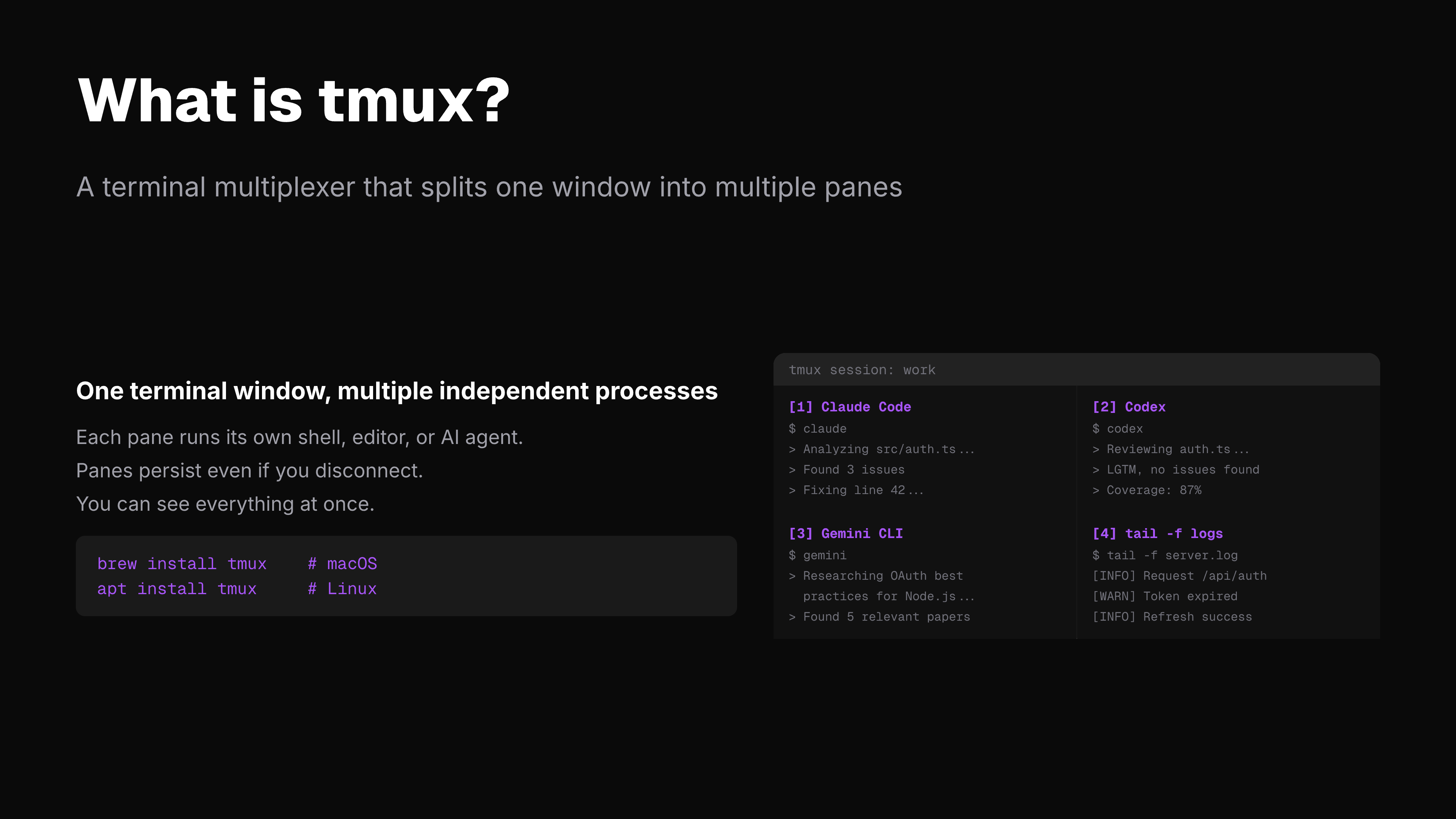
+-------------------------------+
|  Pane 1       |  Pane 2       |
|  Claude Code  |  Codex        |
|  writing code |  reviewing    |
|               |               |
+---------------+---------------+
|  Pane 3       |  Pane 4       |
|  Gemini CLI   |  tail -f logs |
|  researching  |  monitoring   |
+-------------------------------+
Each pane is a full terminal. You can have Claude Code running in one, Codex in another, Gemini in a third -- all visible at the same time, all on the same machine.
The problem: these panes can't talk to each other. An agent in Pane 1 has no idea what's happening in Pane 2.
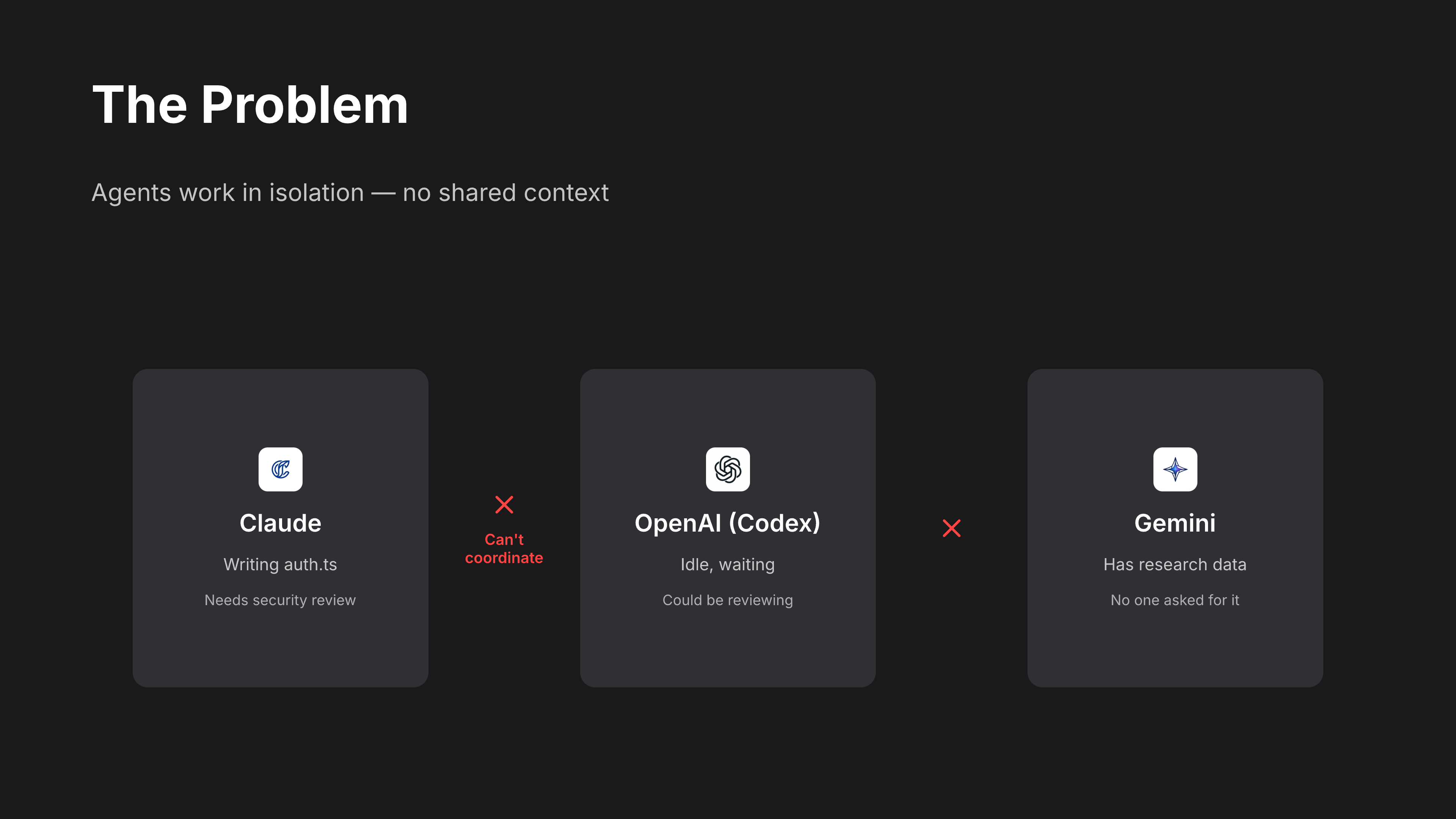
tmux-bridge fixes this. It gives every agent the ability to read, type, and send messages into any other pane.
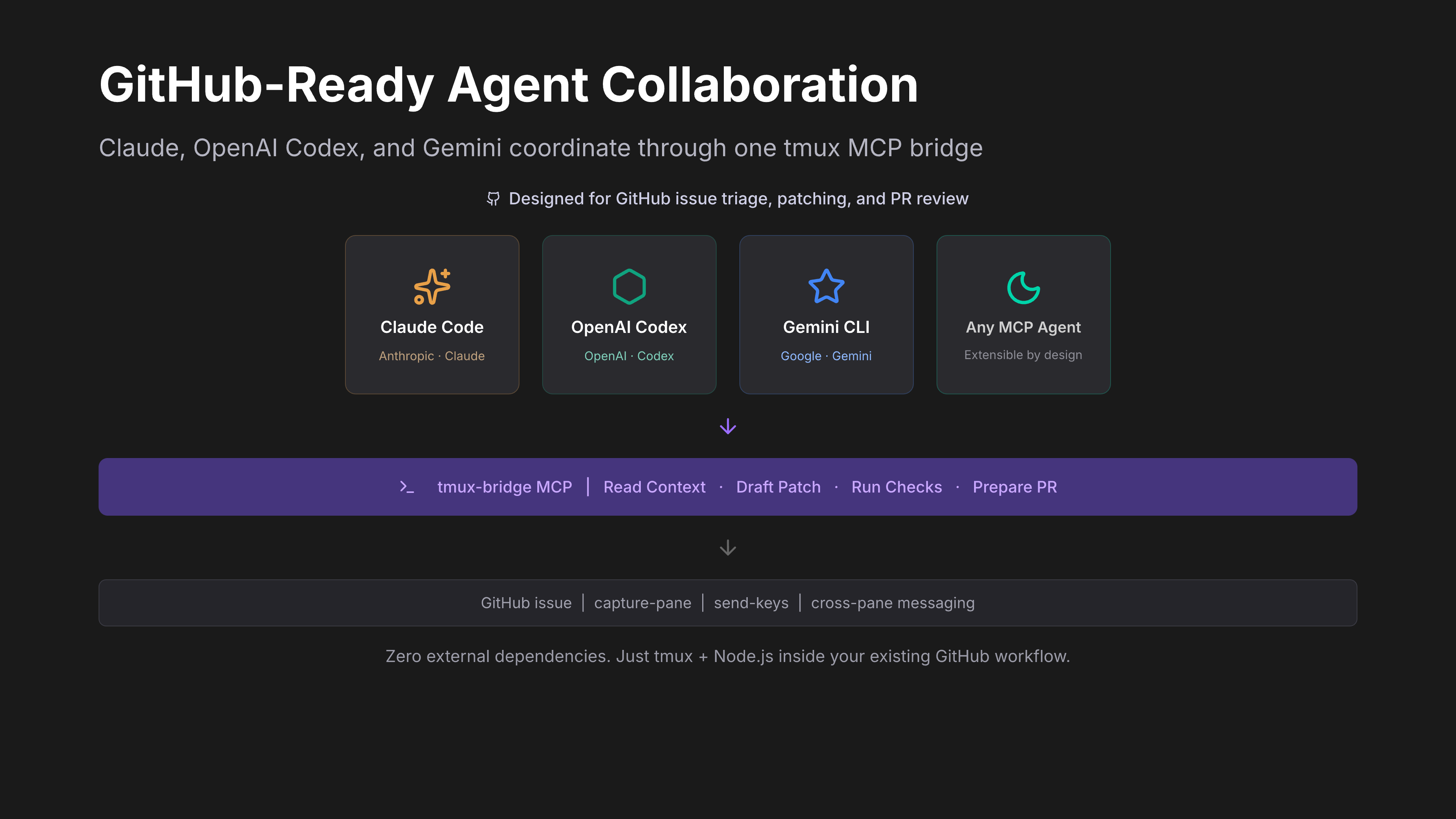
⚡ What can you do with tmux-bridge?
Once installed, your AI agents can:
| Action | How | Example |
|---|---|---|
| See what another agent is doing | tmux_read |
Read the last 20 lines of Codex's pane |
| Send a task to another agent | tmux_message + tmux_keys |
Tell Claude to review a file |
| Coordinate multi-agent workflows | Chain tool calls | Gemini researches -> Claude implements -> Codex reviews |
| Monitor processes | tmux_read on a shell pane |
Watch build logs, test output, server status |
| Label panes by role | tmux_name |
Name panes "claude", "codex", "gemini" for easy targeting |
All of this happens through standard MCP tool calls -- your agent doesn't need to learn any new syntax. If it supports MCP, it already knows how.
🤖 Supported Agents
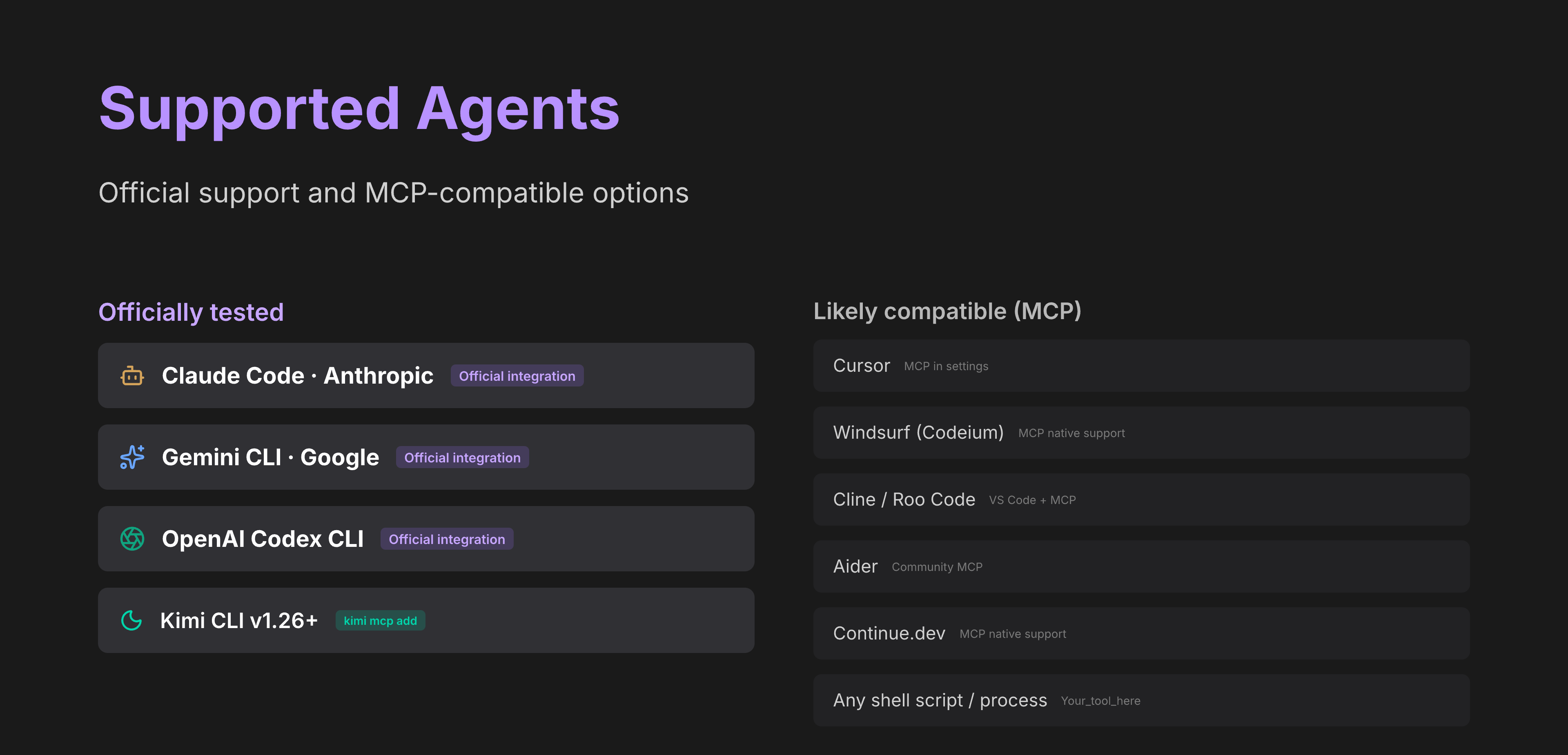
Tested and documented
| Agent | Connection | Status |
|---|---|---|
| Claude Code | Native MCP (stdio) | Supported |
| Gemini CLI | Native MCP (stdio) | Supported |
| Codex CLI | Native MCP (stdio) | Supported |
| Kimi CLI v1.26+ | Native MCP (kimi mcp add) |
Supported |
| Kimi CLI older | Legacy wrapper (kimi-tmux) |
Supported |
Should work (any MCP-compatible agent)
| Agent | Notes |
|---|---|
| Cursor | Supports MCP servers in settings |
| Windsurf (Codeium) | MCP server support |
| Copilot CLI | If MCP-compatible |
| Aider | Community MCP support |
| Continue.dev | MCP server support |
| Cline | VS Code extension with MCP |
| Roo Code | Fork of Cline with MCP |
| Any shell script or process | Read pane output with tmux_read, no MCP needed |
tmux-bridge works with any agent that supports MCP over stdio. If your agent isn't listed, try adding the MCP config -- it will likely just work.
💡 Why
When you run multiple AI agents in separate terminals, they work in isolation. You end up copy-pasting context between them, manually relaying questions and answers, or losing track of what each agent is doing.
tmux-bridge solves this by giving every agent the ability to read, type, and send messages into any other terminal pane -- programmatically, through standard MCP tool calls.
Use cases:
- Code review pipeline -- Claude Code writes code in one pane, Codex reviews it in another, results flow back automatically
- Multi-model reasoning -- ask Gemini for research, feed the findings to Claude, let Codex verify the implementation
- Parallel workflows -- multiple Claude Code instances each handling a different part of a large task, coordinating through pane messages
- Monitoring -- an agent reads log output from a
tail -fpane and reacts to errors in real time
What you need:
| Requirement | Why |
|---|---|
| tmux | The terminal multiplexer that hosts your panes -- this is the communication channel |
| Node.js 18+ | Runs the MCP server |
| At least one MCP-compatible agent | Claude Code, Gemini CLI, Codex, or Kimi CLI v1.26+ |
If you already use tmux to run multiple agents side by side, tmux-bridge just makes them aware of each other.
😩 Without tmux-bridge
You're running Claude Code in one pane, Codex in another. Claude finishes writing a function and you want Codex to review it. Here's what actually happens:
- You read Claude's output. Scroll up. Copy the relevant part.
- Switch to Codex's pane. Paste it in. Type "review this code."
- Codex gives feedback. You copy that.
- Switch back to Claude. Paste Codex's feedback. "Fix these issues."
- Repeat for every round of review.
You are the message bus. Every interaction flows through your clipboard. You're not writing code anymore -- you're routing context between agents. With 3+ agents running, this becomes unmanageable within minutes.
🤔 Why not LangChain / CrewAI / A2A?
| Approach | What it asks you to do | tmux-bridge difference |
|---|---|---|
| LangChain / CrewAI / AutoGen | Rewrite your workflow inside their framework. Your agents must be Python objects in their orchestration layer. | You keep using Claude Code, Codex, Gemini CLI as-is. No framework, no SDK, no rewrite. |
| Google A2A Protocol | Wait for agents to adopt a new protocol spec. Designed for distributed, networked agents. | Works today with any MCP agent. No protocol adoption needed. |
| Custom WebSocket / HTTP glue | Build and maintain your own IPC layer. Handle serialization, discovery, error handling. | Zero infrastructure. tmux is the transport -- it's already running. |
| Shared files / pipes | Roll your own convention. Each agent needs custom tooling to read/write. | Standard MCP tools. Any agent that speaks MCP gets cross-pane superpowers instantly. |
The key insight: you don't need a multi-agent framework. You need your existing agents to see each other. tmux-bridge adds exactly that -- a thin MCP layer over tmux -- and nothing more.
🚀 Quick Start
Prerequisites: tmux 3.2+ and Node.js 18+ must be installed.
One command to configure all your agents:
npx tmux-bridge-mcp setup
This auto-detects Claude Code, Gemini CLI, Codex, and Kimi CLI on your machine, then writes the correct MCP config for each one. Done in seconds.
Verify it works:
npx tmux-bridge-mcp --help
You should see the version and available commands. Restart your AI agent to activate the new tools.
See it in action:
npx tmux-bridge-mcp demo
Opens a 3-pane tmux session and runs a live cross-pane communication demo.
Manual setup (if you prefer)1. Install tmux
brew install tmux    # macOS
apt install tmux     # Linux
2. Add to your agent's MCP config
{
  "mcpServers": {
    "tmux-bridge": {
      "command": "npx",
      "args": ["-y", "tmux-bridge-mcp"]
    }
  }
}
Restart your agent. It now has 9 MCP tools for cross-pane communication.
🔄 Updating
# If installed globally
npm update -g tmux-bridge-mcp

# If using npx (auto-updates, but to force latest)
npx tmux-bridge-mcp@latest

# Check your current version
npx tmux-bridge-mcp --version
After updating, restart your agents to pick up the new version. If you use npx in your MCP config, it caches the package — run npx --yes tmux-bridge-mcp@latest once to pull the latest, then your agents will use it on next startup.
🏗️ How It Works
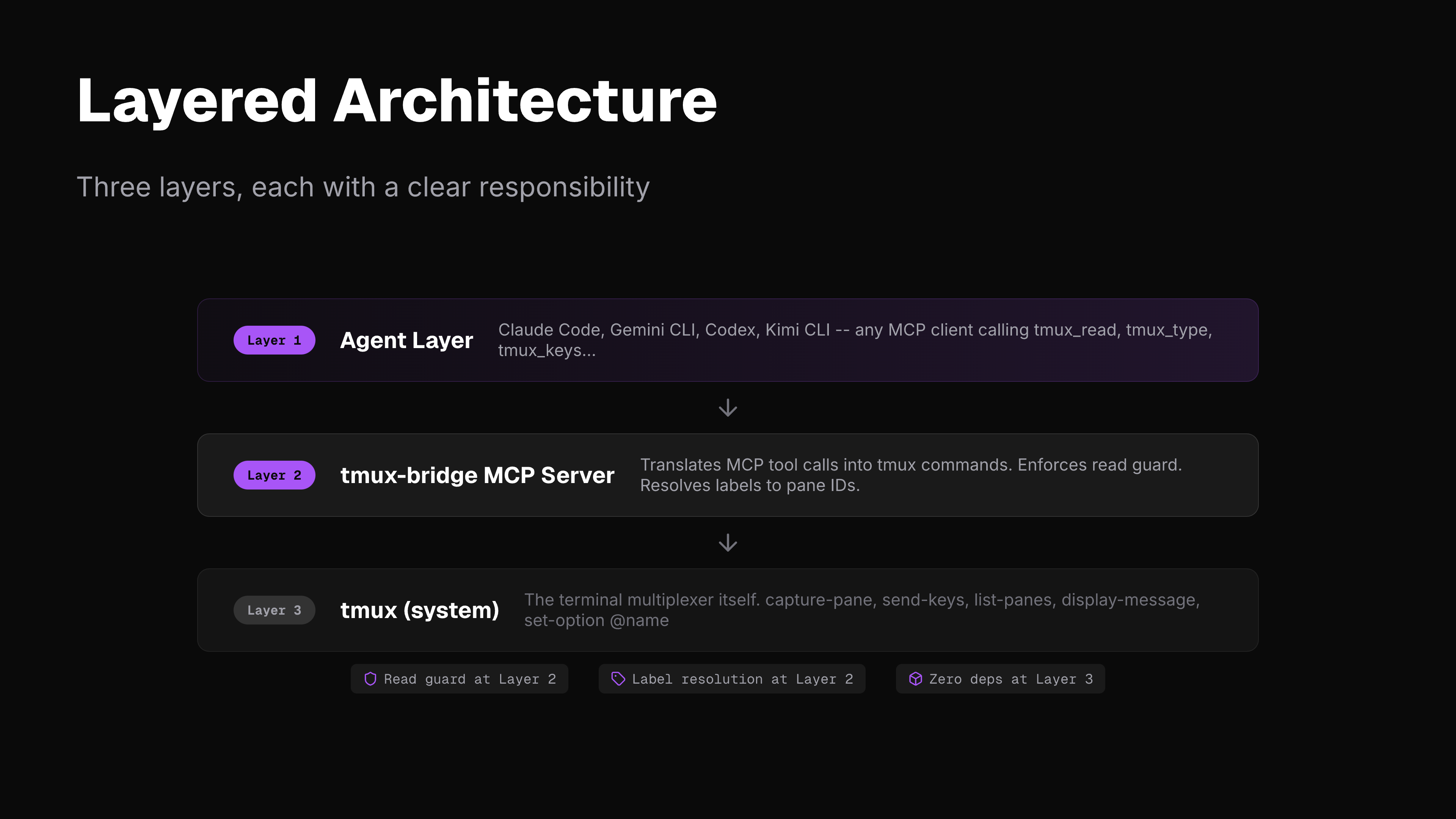
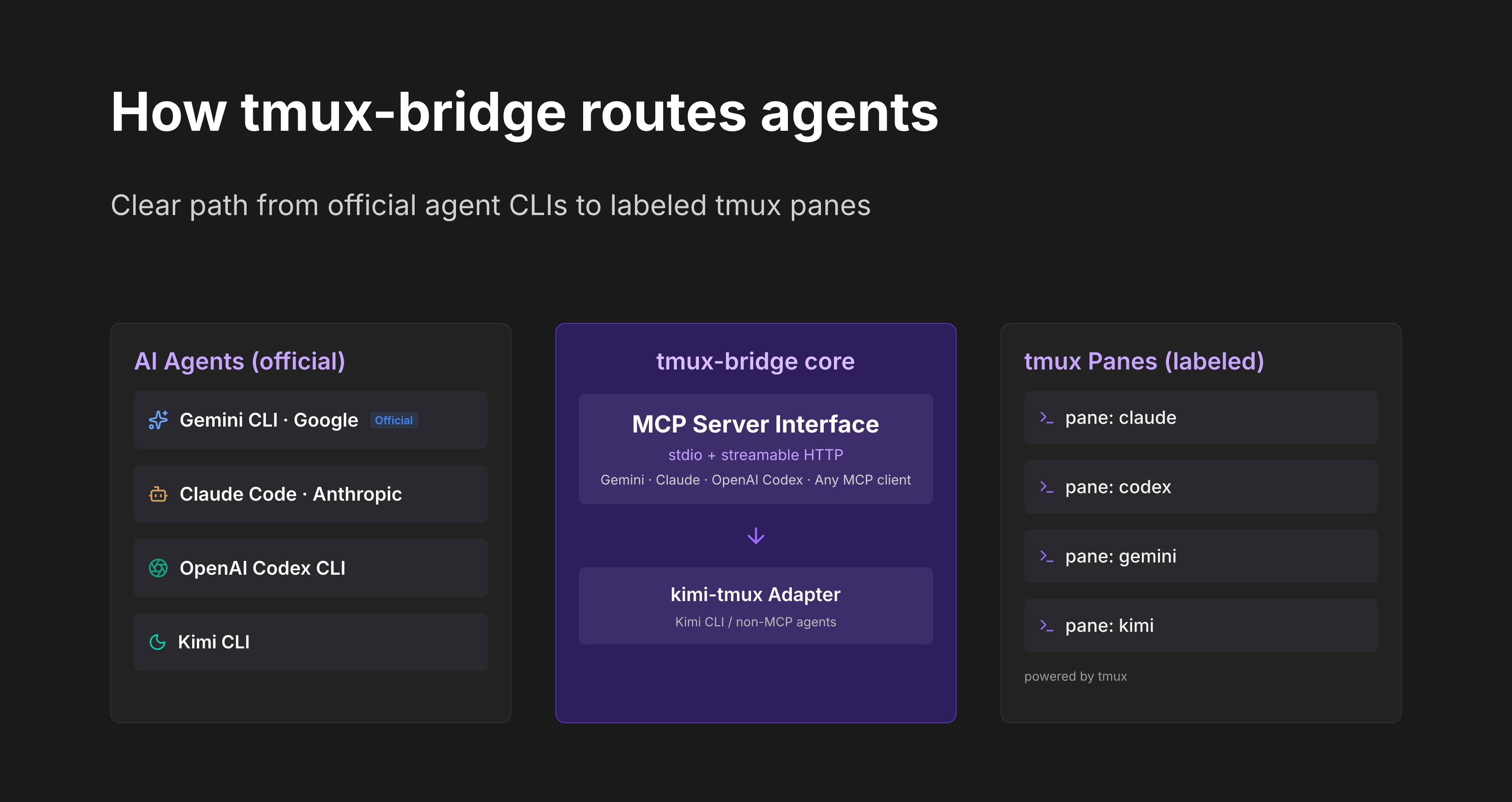
tmux-bridge runs as an MCP server over stdio. It calls tmux directly (capture-pane, send-keys, list-panes, etc.) -- no intermediate CLI layer.
MCP path (Gemini, Claude Code, Codex, any MCP client):
+--------------+  MCP/stdio  +---------------+  tmux API  +--------------+
|  MCP Agent   |<----------->|  tmux-bridge  |<---------->|  tmux panes  |
+--------------+             |  MCP server   |            +--------------+
                             +---------------+

CLI path (Kimi):
+--------------+  --print    +---------------+  tmux API  +--------------+
|  Kimi CLI    |<----------->|  kimi-tmux    |<---------->|  tmux panes  |
+--------------+  tool parse |  adapter      |            +--------------+
                             +---------------+
All cross-pane interactions follow the read-act-read workflow:
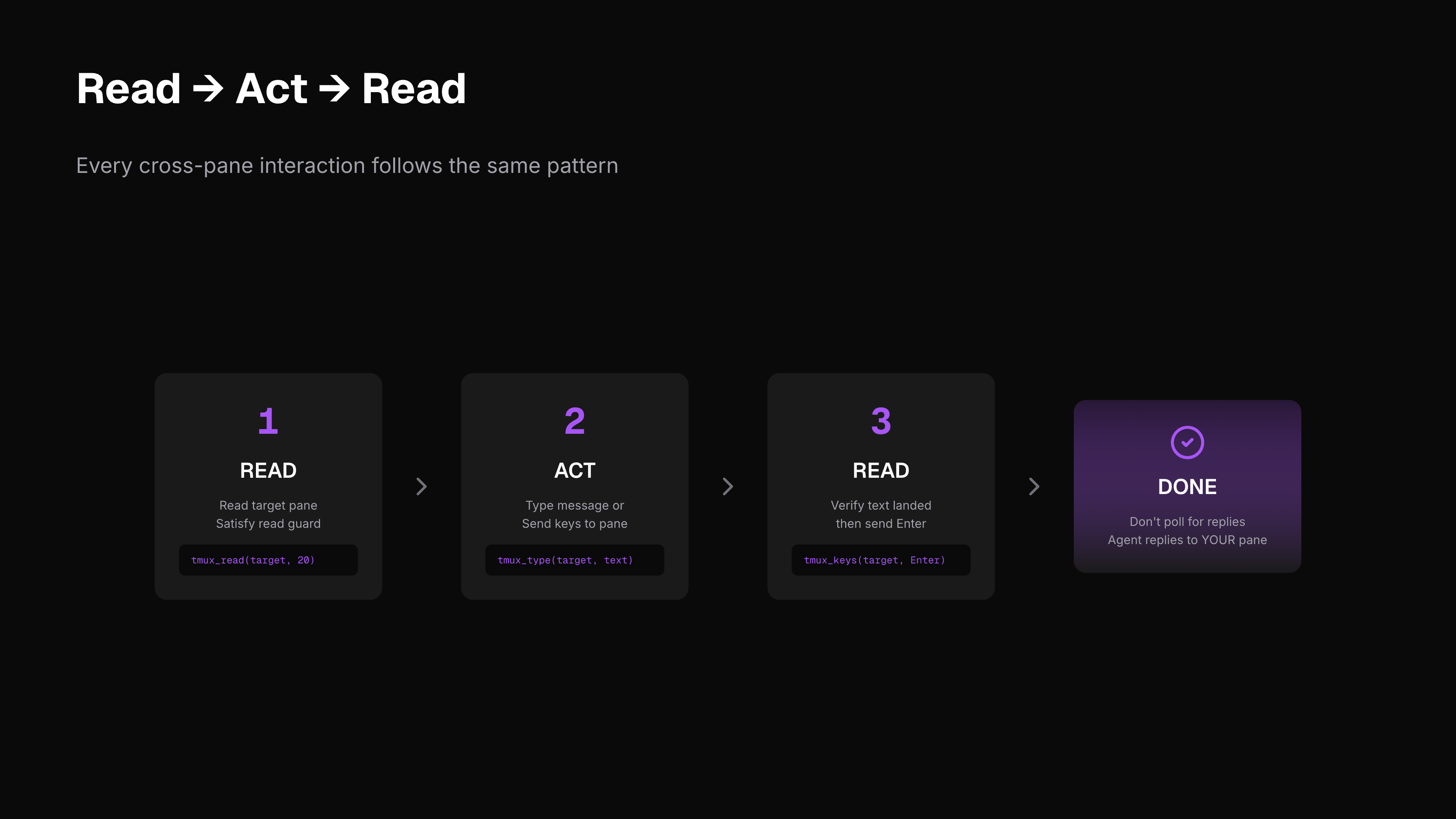
| Step | Action | Purpose |
|---|---|---|
| 1 | tmux_read |
Read target pane (satisfies read guard) |
| 2 | tmux_message / tmux_type |
Type your message or command |
| 3 | tmux_read |
Verify text landed correctly |
| 4 | tmux_keys |
Press Enter to submit |
| -- | STOP | Don't poll. The other agent replies directly into your pane. |
The read guard is enforced at the MCP layer: tmux_type, tmux_message, and tmux_keys will fail unless you call tmux_read on the target pane first.
⚙️ Setup Per Agent
Gemini CLI (native MCP)
Add to ~/.gemini/settings.json:
{
  "mcpServers": {
    "tmux-bridge": {
      "command": "npx",
      "args": ["tmux-bridge-mcp"]
    }
  }
}
Claude Code (native MCP)
Add to your project's .mcp.json or global MCP config:
{
  "mcpServers": {
    "tmux-bridge": {
      "command": "npx",
      "args": ["tmux-bridge-mcp"]
    }
  }
}
Codex (native MCP)
Add to your MCP config following the Codex MCP setup docs:
{
  "mcpServers": {
    "tmux-bridge": {
      "command": "npx",
      "args": ["tmux-bridge-mcp"]
    }
  }
}
Kimi CLI
# Check your Kimi version
kimi --version
# v1.26+ → use native MCP (recommended)
# older  → use kimi-tmux wrapper
Native MCP (recommended, v1.26+):
kimi mcp add tmux-bridge -- npx tmux-bridge-mcp
Once added, Kimi uses all tmux-bridge tools directly -- no adapter needed.
Legacy wrapper (older versions):
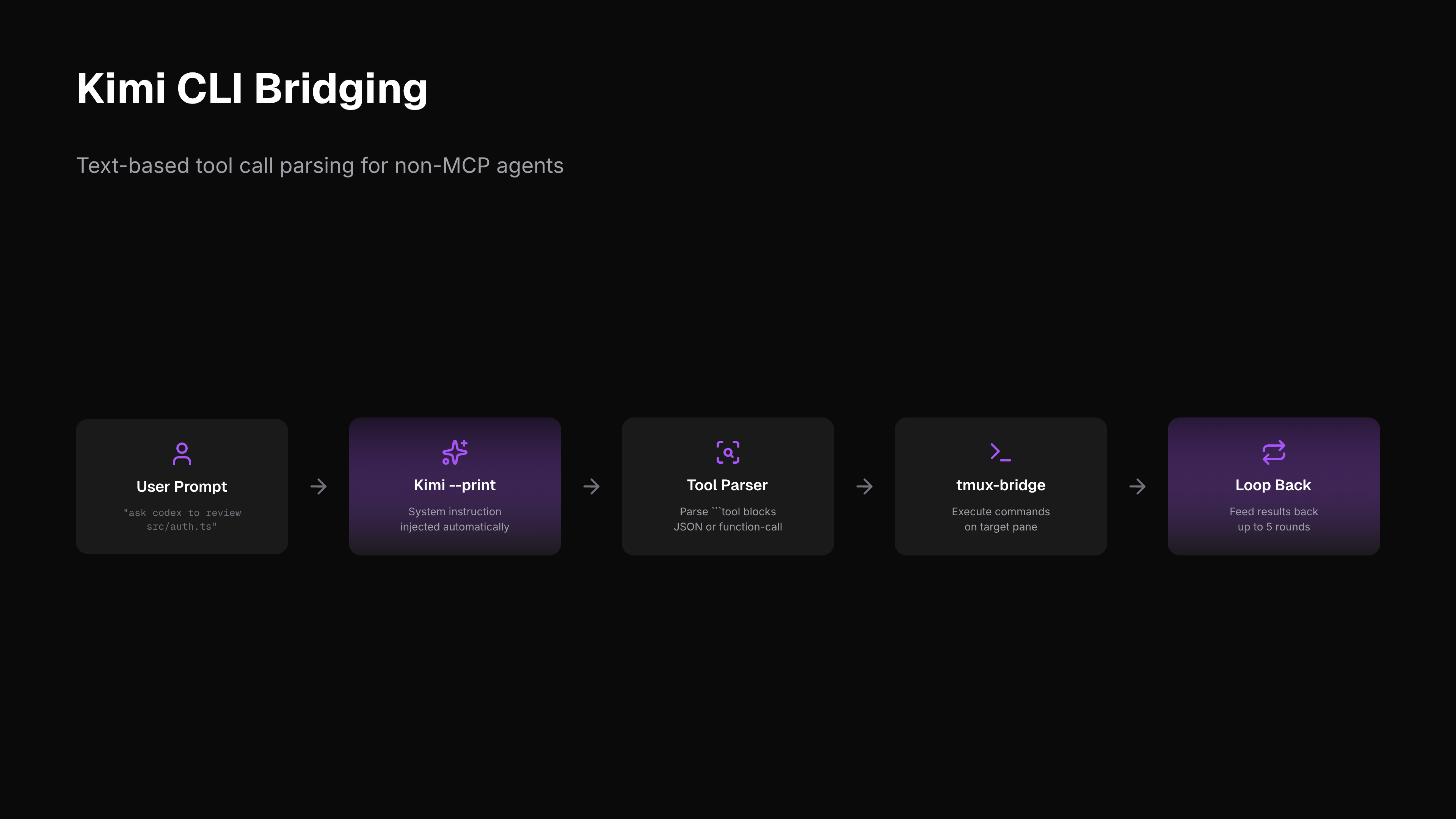
For Kimi CLI versions without native MCP, kimi-tmux bridges the gap by injecting the system instruction as a prompt, running Kimi in --print mode, parsing tool-call blocks from output, and executing them via tmux.
kimi-tmux "list all tmux panes"
kimi-tmux "ask the agent in codex pane to review src/auth.ts"
kimi-tmux "read what claude is working on"
kimi-tmux --rounds 3 "send a message to gemini and wait for the result"
🔧 Tools Reference
| Tool | Description |
|---|---|
tmux_list |
List all panes with target ID, process, label, and working directory |
tmux_read |
Read last N lines from a pane (satisfies read guard) |
tmux_type |
Type text into a pane without pressing Enter (requires prior read) |
tmux_message |
Send message with auto-prepended sender info (requires prior read) |
tmux_keys |
Send special keys -- Enter, Escape, C-c, etc. (requires prior read) |
tmux_name |
Label a pane for easy targeting (e.g., "claude", "gemini") |
tmux_resolve |
Look up pane ID by label |
tmux_id |
Print current pane's tmux ID |
tmux_doctor |
Diagnose tmux connectivity issues |
Targets can be a pane ID (%0), session:window.pane (main:0.1), or a label (claude).
📖 Examples
Ask Claude to review a file (from Gemini)
tmux_list()
tmux_read(target="claude", lines=20)
tmux_message(target="claude", text="Please review src/auth.ts for security issues")
tmux_read(target="claude", lines=5)
tmux_keys(target="claude", keys=["Enter"])
Multi-agent coordination (from Kimi)
kimi-tmux "tell the claude pane to run the test suite"
kimi-tmux "ask gemini to summarize the test results in claude's pane"
Multi-agent layout
+-----------------------------------------------------------+
| tmux session                                              |
|                                                           |
| +------------+ +------------+ +----------+ +-----------+  |
| | Claude Code | |   Codex    | | Gemini   | |   Kimi    | |
| |  (MCP)     | |  (MCP)     | |  (MCP)   | |(kimi-tmux)| |
| |            | |            | |          | |           |  |
| | label:     | | label:     | | label:   | | label:    |  |
| | claude     | | codex      | | gemini   | | kimi      |  |
| +-----+------+ +-----+------+ +----+-----+ +-----+-----+ |
|       +---------------+-----------+--------------+        |
|           tmux-bridge (direct tmux IPC, no deps)          |
+-----------------------------------------------------------+
🌐 Environment Variables
| Variable | Description | Default |
|---|---|---|
TMUX_BRIDGE_SOCKET |
Override tmux server socket path | Auto-detected from $TMUX |
KIMI_PATH |
Path to kimi binary (kimi-tmux only) |
kimi (in PATH) |
🔒 Security Model
tmux-bridge is designed for local development on a single machine. It assumes all connected MCP agents are trusted:
- Any agent can read from or write to any pane in the tmux server — there is no per-pane access control.
- The read guard (must
tmux_readbeforetmux_type/tmux_keys) is a sequencing aid to prevent blind typing. It is not a security boundary. - Pane labels set via
tmux_nameare not authenticated — any agent can label or relabel any pane. - There is no encryption or authentication between agents. Communication happens through tmux's own IPC (Unix socket).
Do not use tmux-bridge in multi-tenant environments or expose the tmux socket over a network. It is built for the common case: one developer running multiple AI agents side by side on their own machine.
📝 System Instruction
For agents that support custom system prompts, use system-instruction/smux-skill.md. It teaches the read-act-read workflow and documents all available MCP tools.
🔗 Related Projects
| Project | Approach | Focus |
|---|---|---|
| smux | tmux skill + bash CLI | Agent-agnostic tmux setup |
| agent-bridge | WebSocket daemon + MCP plugin | Claude Code <-> Codex |
| tmux-bridge-mcp (this) | Standalone MCP server + direct tmux | Any agent, zero deps beyond tmux |
smux vs tmux-bridge-mcp
| Dimension | smux | tmux-bridge-mcp (this) |
|---|---|---|
| 🔌 How agents connect | Agent runs bash commands (tmux-bridge read/type/keys) |
Agent uses MCP tool calls (tmux_read/tmux_type/tmux_keys) |
| 🚀 Agent onboarding | Install skill or inject system prompt to teach bash commands | Add MCP config JSON -- agent auto-discovers 9 tools |
| 📦 Prerequisites | curl | bash installs tmux + tmux.conf + CLI script |
Just tmux + Node.js, npx to run |
| ⚙️ tmux configuration | Ships full tmux.conf (keybindings, mouse, status bar) | Doesn't touch tmux.conf -- no config conflicts |
| 🛡️ Read guard | Bash CLI layer (/tmp file lock) |
MCP server layer (/tmp file lock, same concept) |
| 💻 Language | Bash (~300 LOC) | TypeScript (~600 LOC) |
| 📥 Install | curl | bash, writes to ~/.smux/ |
npm install -g or npx |
| 🤝 Agent compatibility | Any agent that can run bash (needs skill/prompt) | Any agent with MCP support (standard protocol) |
👉 When to use smux: You want a complete tmux setup (keybindings, mouse support, status bar) and your agents support the skills system or you're comfortable injecting system prompts.
👉 When to use tmux-bridge-mcp: You want a drop-in MCP server that works with any MCP-compatible agent out of the box, without touching your tmux configuration.
📄 License
MIT
Yorumlar (0)
Yorum birakmak icin giris yap.
Yorum birakSonuc bulunamadi