phonedesk
Health Pass
- License — License: MIT
- Description — Repository has a description
- Active repo — Last push 0 days ago
- Community trust — 11 GitHub stars
Code Fail
- process.env — Environment variable access in scripts/check-overflow.ts
- network request — Outbound network request in scripts/check-overflow.ts
- spawnSync — Synchronous process spawning in scripts/gen-assets.ts
- exec() — Shell command execution in scripts/gen-icons.ts
- spawnSync — Synchronous process spawning in scripts/sign-macos.ts
- rm -rf — Recursive force deletion command in setup.sh
- exec() — Shell command execution in src/actions.ts
Permissions Pass
- Permissions — No dangerous permissions requested
No AI report is available for this listing yet.
Turn an old phone into a Stream Deck-style control panel and dashboard for your Mac or Windows PC. No app, no account, no cloud.
PhoneDesk
Your old phone, a control panel for your computer.



English · Tiếng Việt
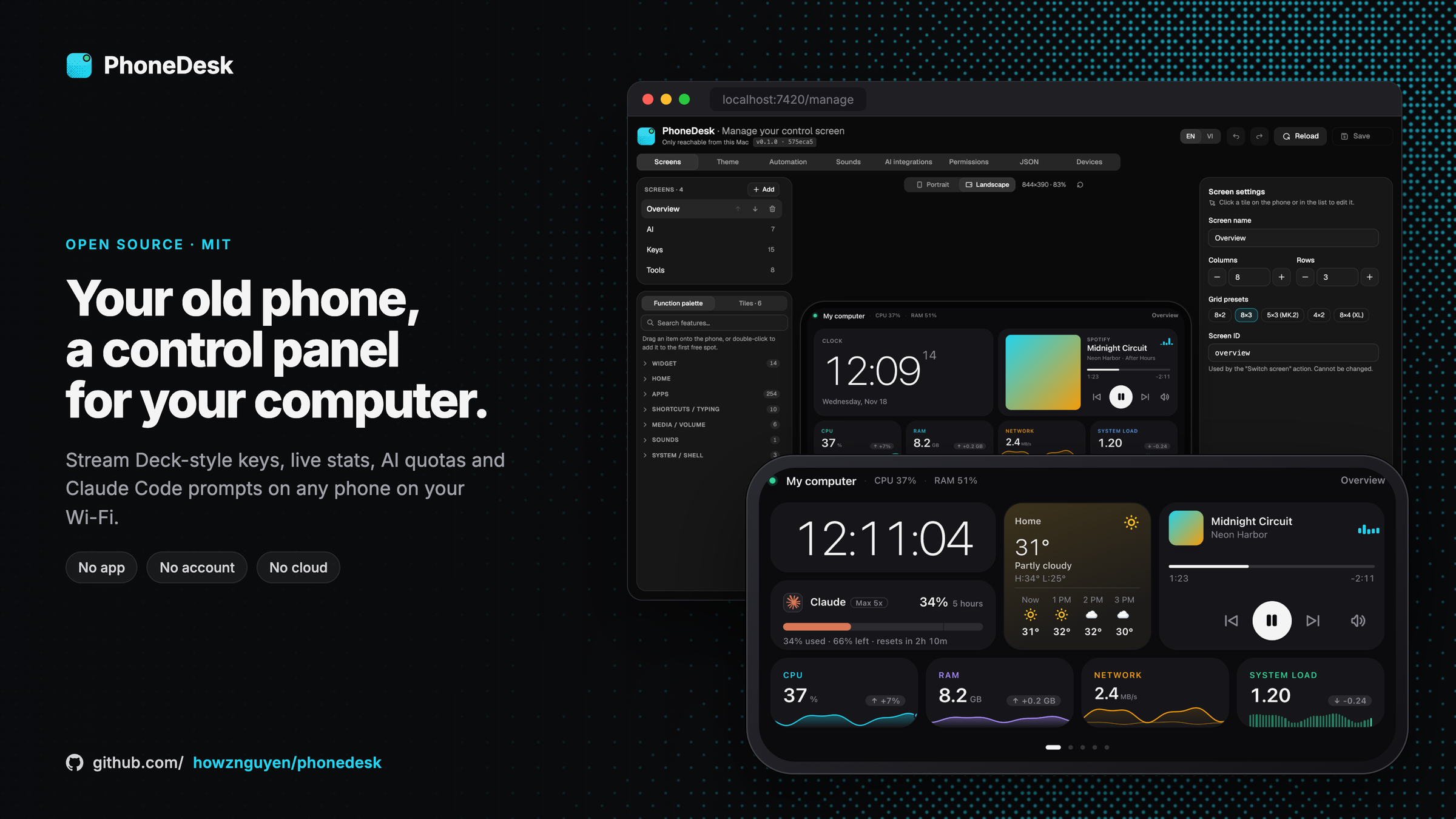
Turn an old phone or tablet into a Stream Deck-style control panel and dashboard for your Mac or Windows PC. PhoneDesk is a small
agent that runs on your computer and serves a touch overlay to any browser on the same Wi-Fi. There is no app to
install on the phone and no account or cloud service.
Status: early (0.x). macOS is the main target, Windows is experimental. Builds are not signed with a Developer ID or notarized: see Install.
What you can do
| Use it for | On the phone |
|---|---|
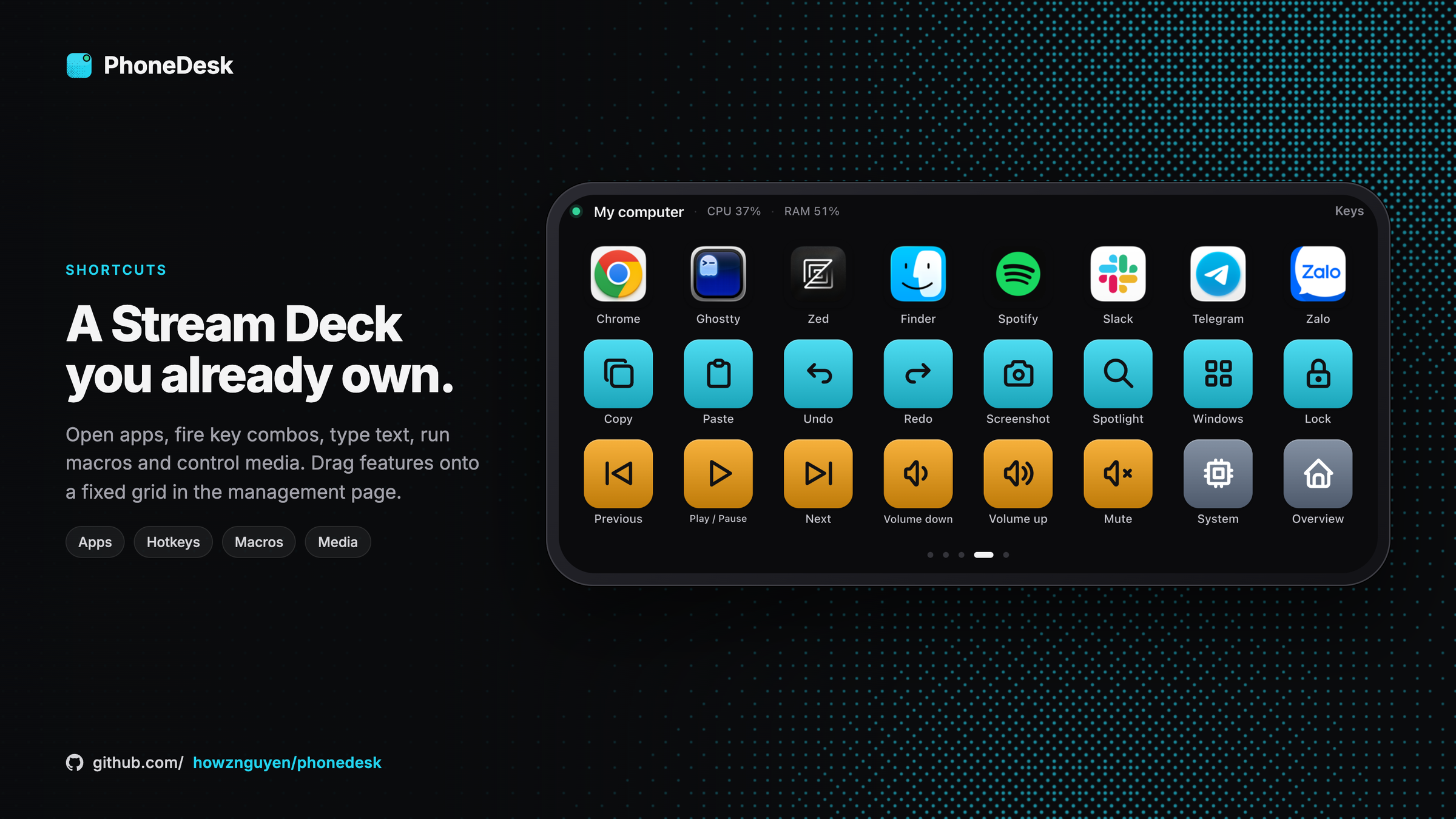
| Shortcuts | Open apps (with their real icons) and URLs, key combinations, type text, shell commands, macros, media and volume keys |
| Monitoring | CPU, memory, network, load and uptime with selectable chart styles; tap CPU for the process list |
| AI coding | Claude, Codex and Antigravity quotas with reset times; pick which windows to show (5 hours, 7 days, per model); local Claude Code / Codex sessions |
| Claude Code from the couch | Answer Allow / Deny permission prompts and Claude's multiple-choice questions on the phone (opt-in hooks) |
| Everyday | Now Playing with artwork and Resume, 6 clock styles and world clocks, weather (hourly and daily, °C or °F), a soundboard, notifications |
| Home Assistant | Lights with colour, colour temperature, scenes and effects; climate (mode, fan, swing), fans, covers, vacuums, locks and sensors (optional) |
| Automation | Webhooks that push values and notifications, rules that react to activity on the computer |
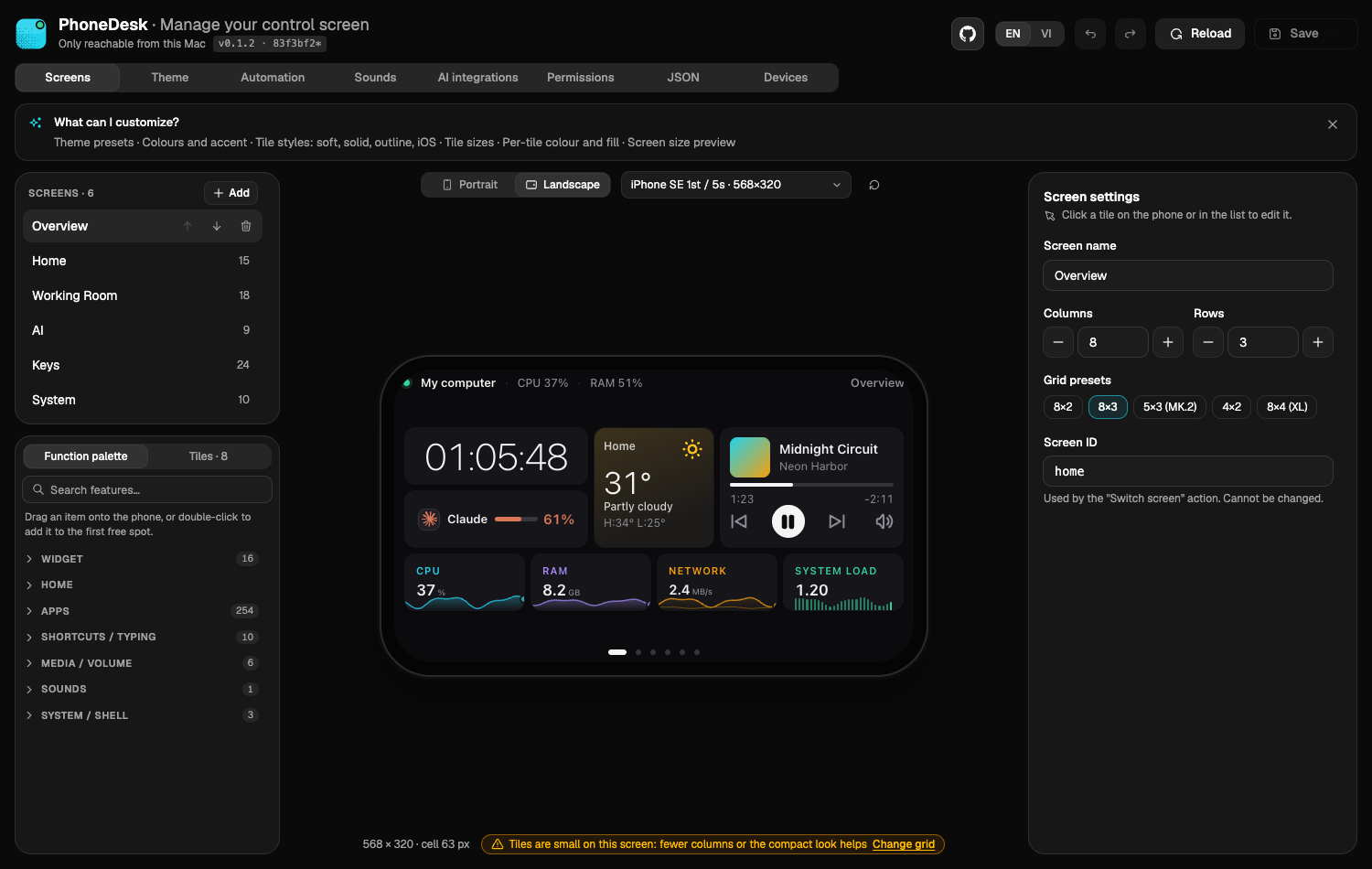
| Make it yours | Drag-and-drop grid (8×4, 8×3, 5×3…) with a preview for every screen size, 4 tile styles (Soft, Solid, Outline, iOS), any colour per tile, 5,000+ icons, English or Vietnamese |
The layout is a fixed grid of square tiles built in a drag-and-drop management page at http://localhost:7420/manage/.
An MCP server lets an AI assistant arrange the layout for you. Runs on macOS, and on Windows 10/11 (experimental).
Screenshots
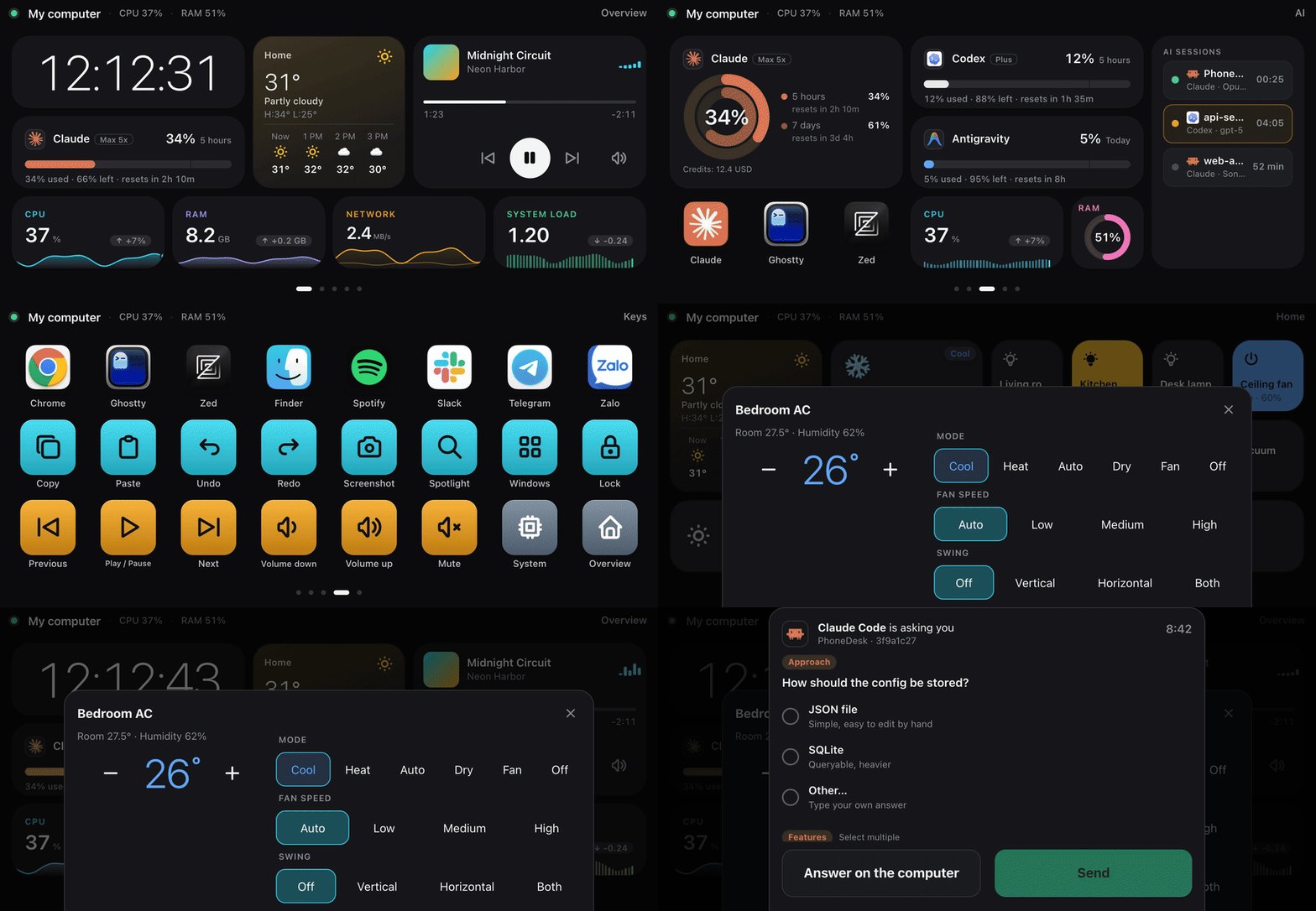
A 16-second tour with demo data: pages, AI quotas, keys, Home Assistant and a Claude Code question.
 |
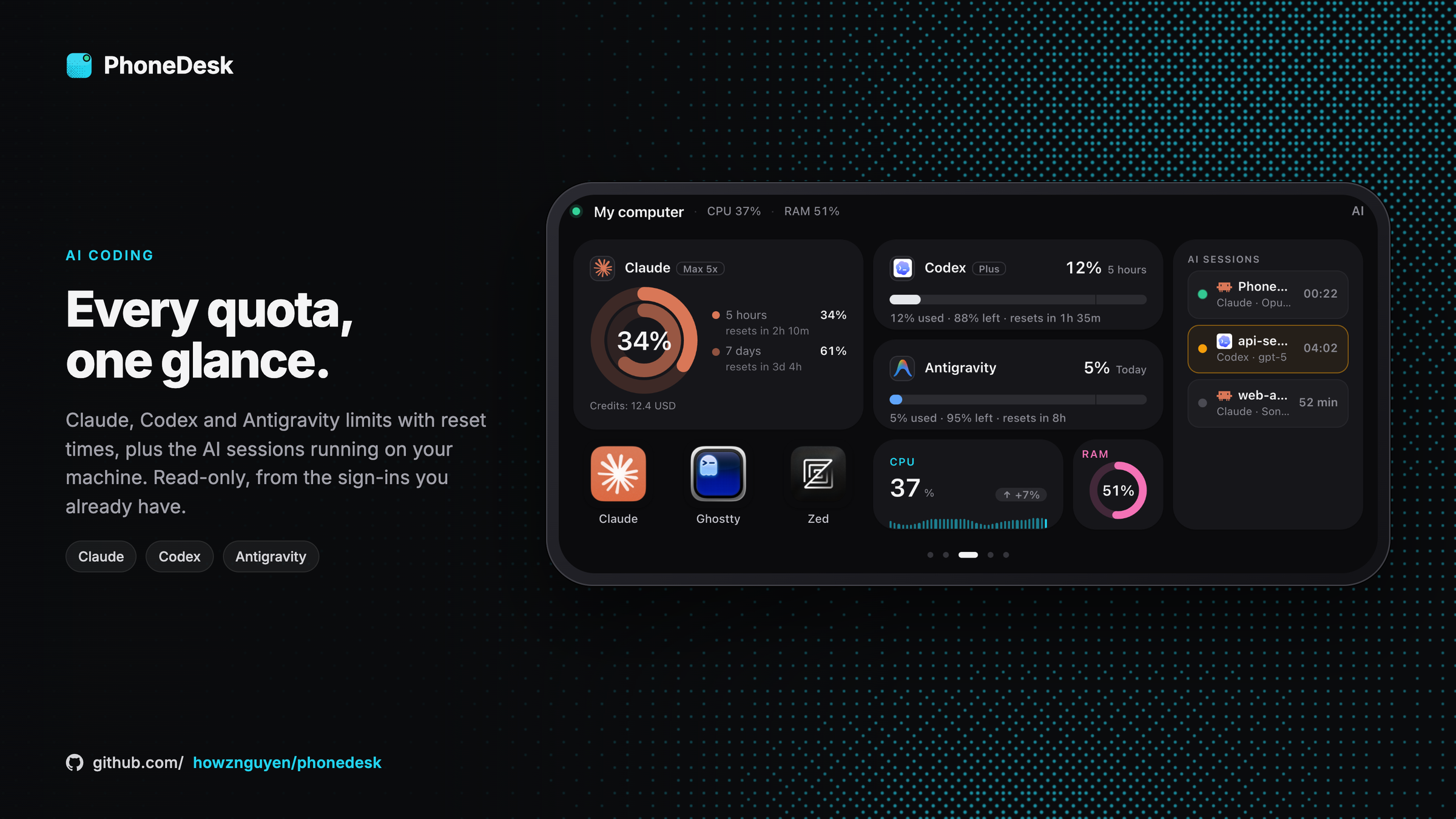 |
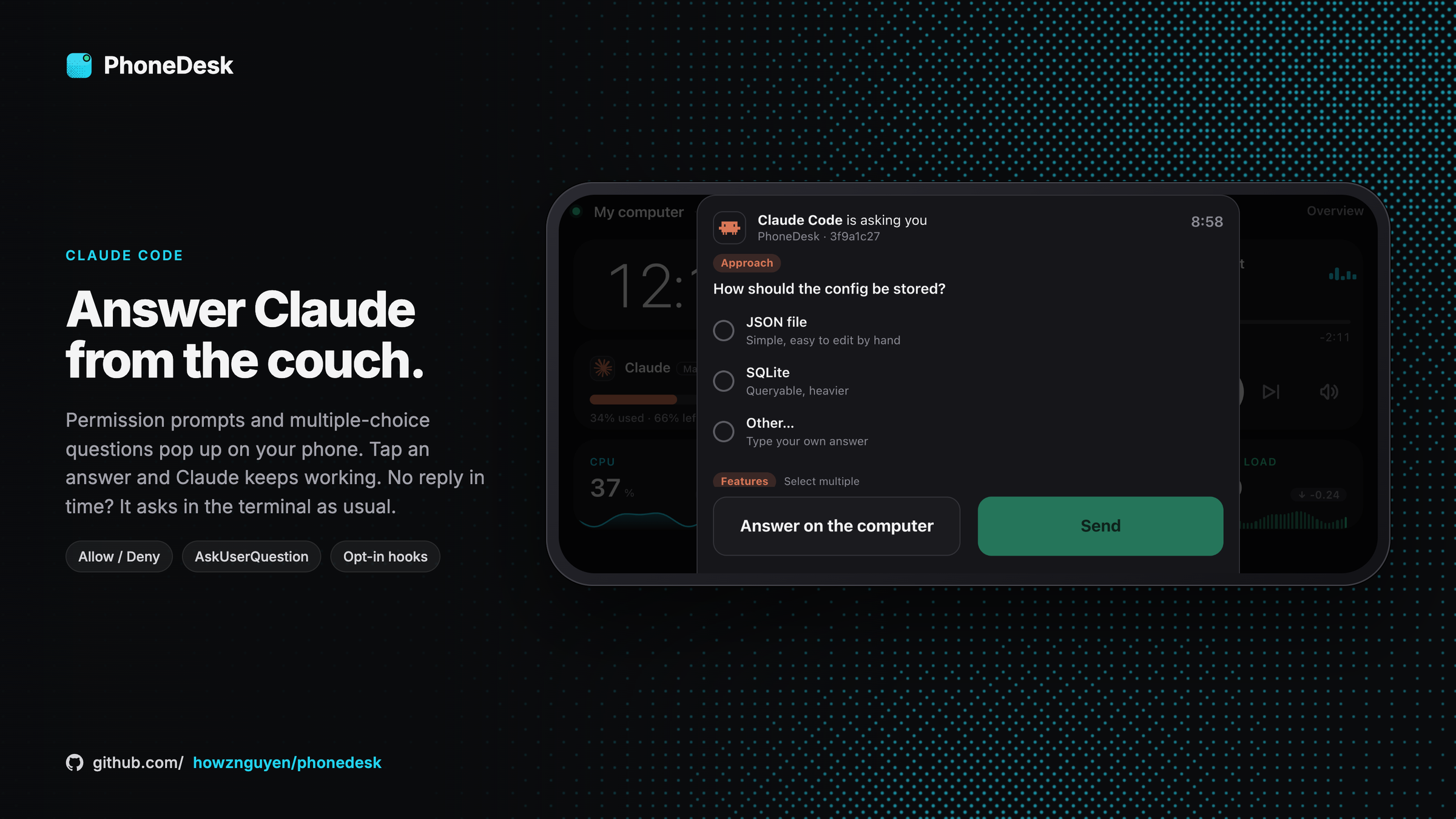
| Answer Claude Code from your phone | AI quotas and sessions |
 |
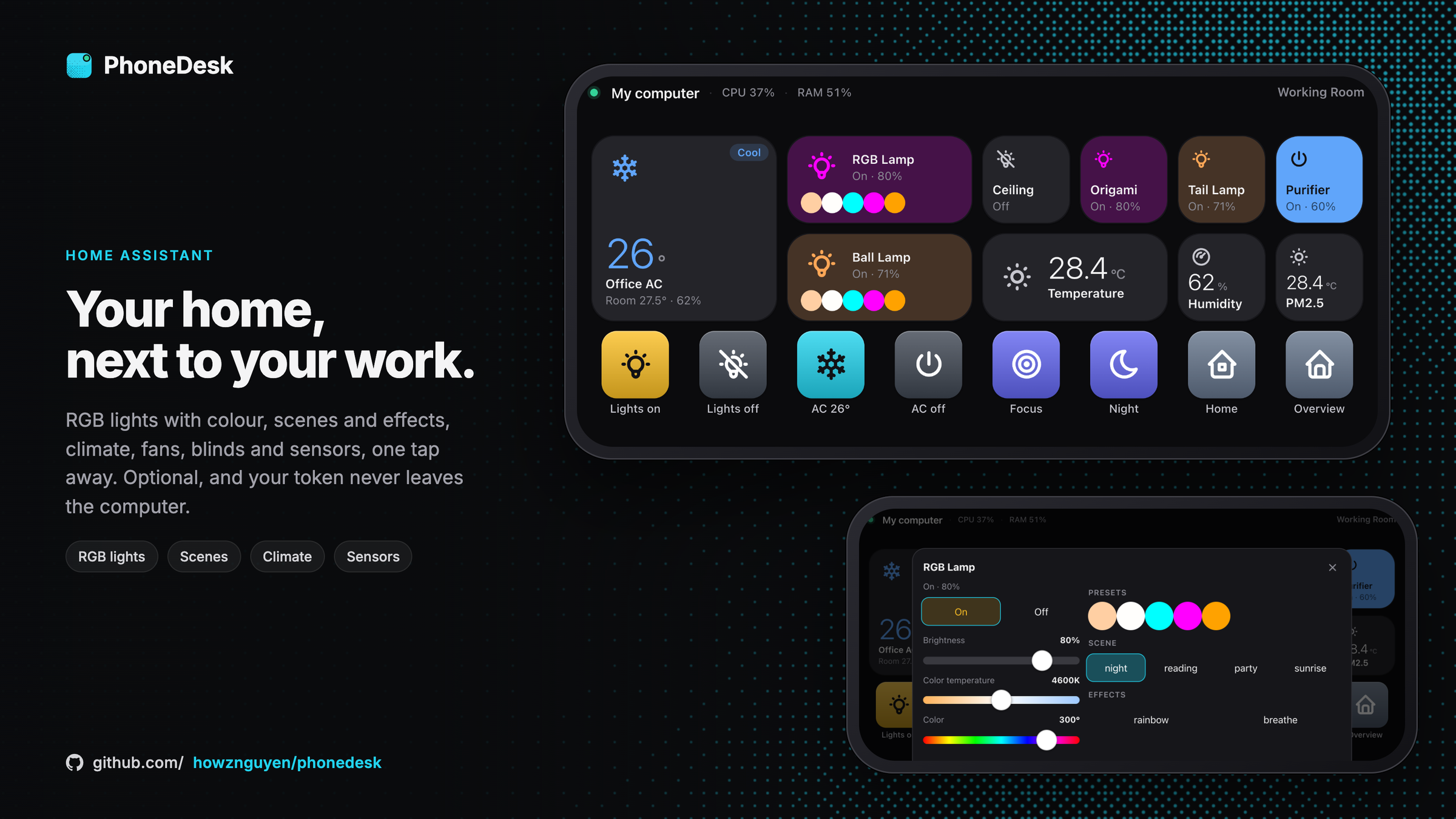 |
| Stream Deck-style keys | Home Assistant |
Install
You need a Mac (macOS 13 or later) or a Windows 10/11 PC, and a phone or tablet on the same Wi-Fi. Nothing
is installed on the phone. It takes about 2 minutes.
1. Install on the computer
On a Mac
- Open Terminal: press ⌘ Command + Space, type
Terminal, press Return. - Copy this line, paste it into Terminal, press Return:
curl -fsSL https://raw.githubusercontent.com/howznguyen/phonedesk/main/setup.sh | bash
On Windows (experimental)
- Open PowerShell: click Start, type
PowerShell, press Enter (no administrator needed). - Copy this line, paste it into PowerShell, press Enter:
irm https://raw.githubusercontent.com/howznguyen/phonedesk/main/setup.ps1 | iex
You will see a download bar, then a few OK lines. At the end PhoneDesk prints a QR code, a phone address
(for example http://your-mac.local:7420) and a 6-digit PIN. Keep that window open for the next step.
PhoneDesk now starts by itself every time you sign in, and the phonedesk command works in any new terminal window.
2. Open it on your phone
- Easiest: open the phone's Camera and point it at the QR code on the computer. Tap the link that appears.
- Or type the phone address into the phone's browser and enter the PIN.
The phone remembers it, so you only do this once. For a full-screen panel, add it to the home screen:
- iPhone (Safari): tap Share → Add to Home Screen.
- Android (Chrome): tap ⋮ → Add to Home screen.
3. Make it yours
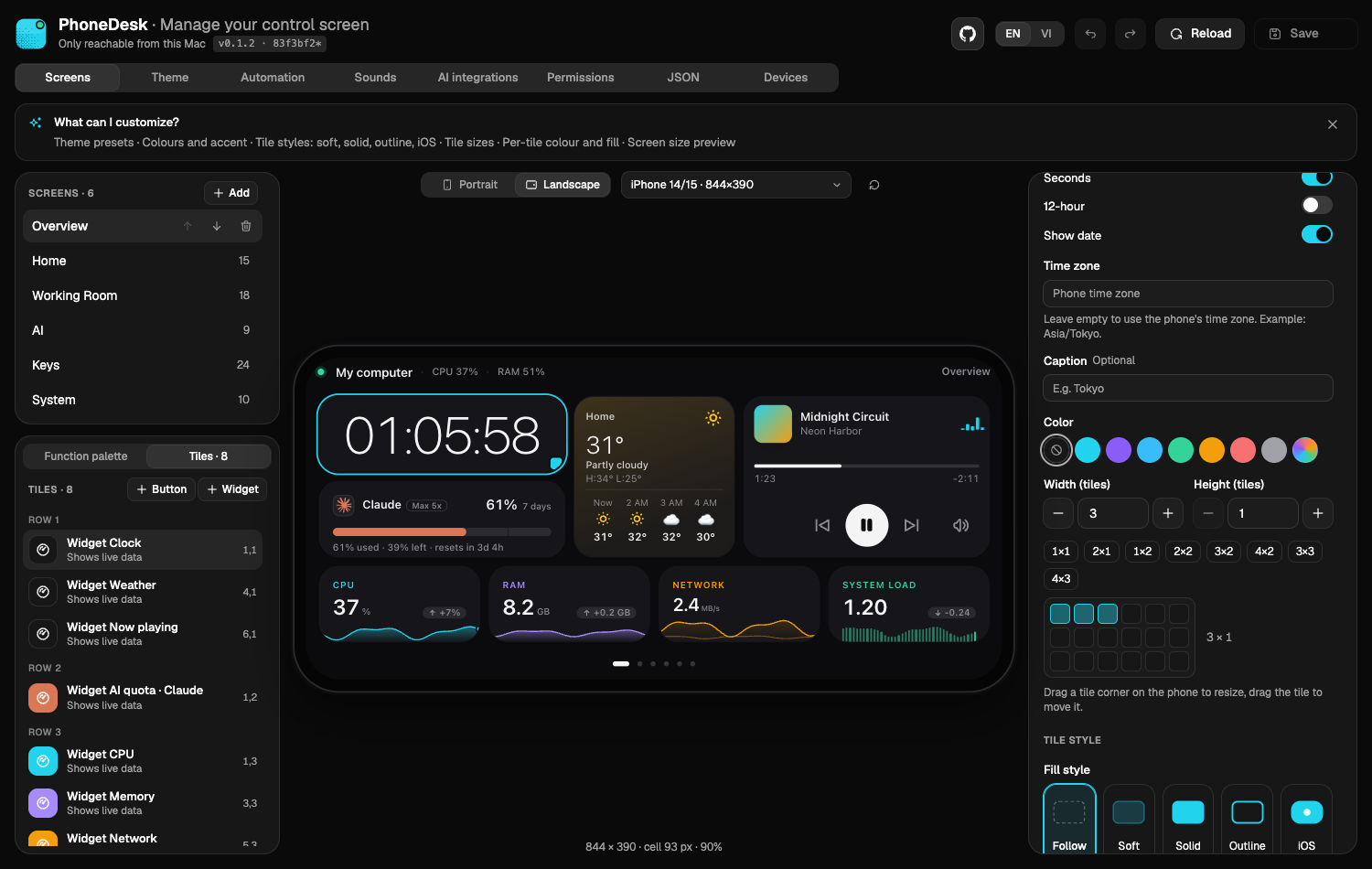
On the computer, open http://localhost:7420/manage/ in your browser. Drag apps, shortcuts and widgets onto the
phone preview, then press Save. The phone updates right away.
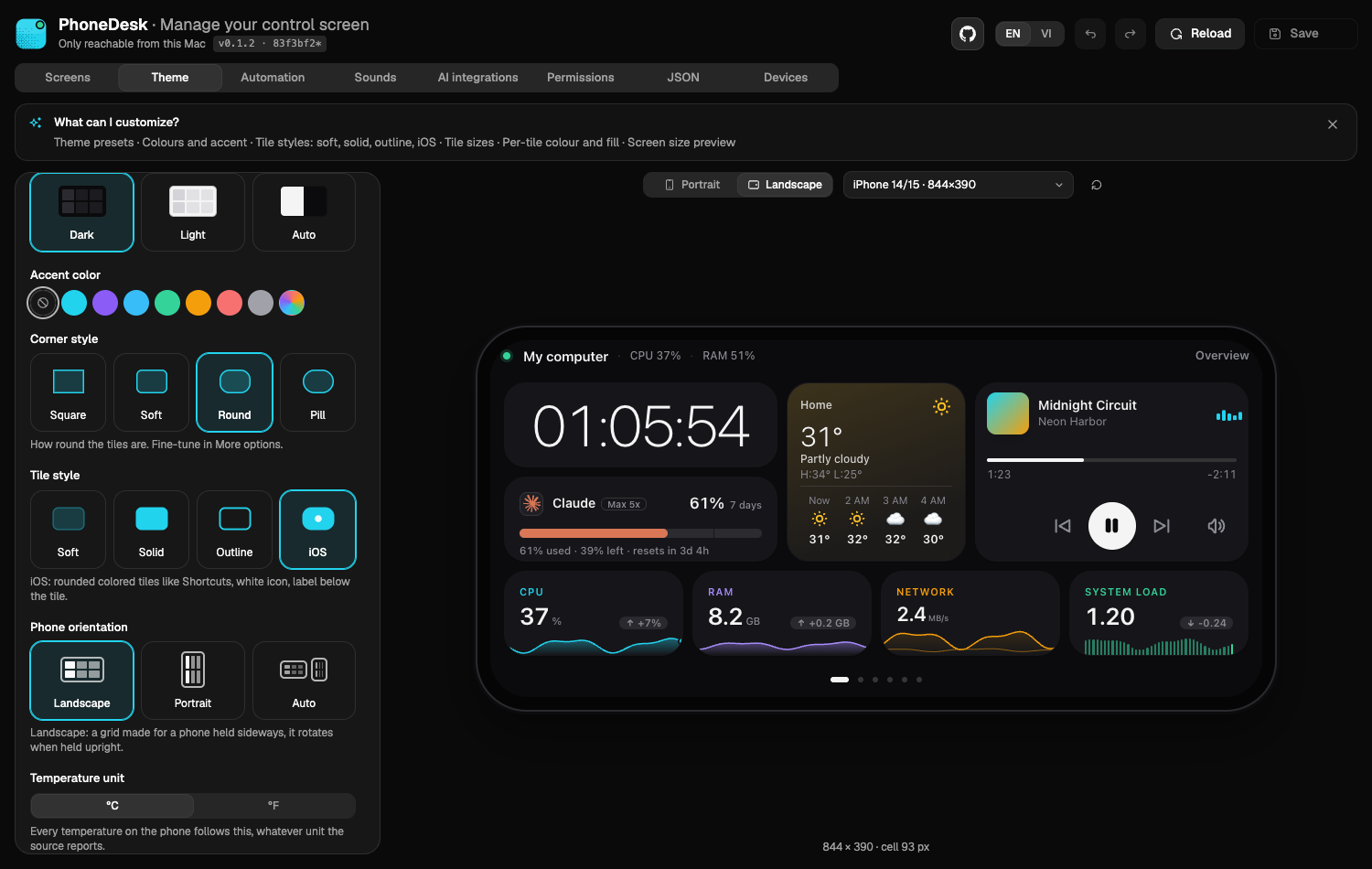
- Screen size: pick your phone (iPhone 5s/SE, iPhone, Pro Max, Android, iPad or a custom size) above the preview to
see exactly what it will show. A warning appears when tiles get too small to tap. - Theme: mode, corner style, tile style, orientation and accent colour are picture cards, so you see the result
before you choose. - Each tile: pick its colour, fill style and size (1×1 up to 4×3) from small previews.
 | |
 |
 |
The first time a key sends a shortcut, macOS asks for Accessibility permission: allow it (System Settings →
Privacy & Security → Accessibility). Windows asks once to allow PhoneDesk on the network: allow it.
Something not working?
| Problem | What to do |
|---|---|
| The phone cannot open the address | Make sure the phone and the computer are on the same Wi-Fi. On Windows, allow PhoneDesk in the firewall prompt. Try the number address the installer printed (http://192.168…:7420). |
could not reach GitHub or error: 503 |
GitHub had a hiccup. Wait a few seconds and run the same line again. |
| The download is slow | It is about 20 MB (Windows 40 MB). Leave it running; the bar shows the progress. |
phonedesk: command not found |
Open a new terminal window. |
| A key does nothing on the Mac | Allow Accessibility for PhoneDesk, then run phonedesk doctor to see what else is missing. |
| Keys stopped working after an update | macOS ties Accessibility to each build. In the management page, Permissions tab, press Reset and ask again (or run phonedesk doctor --request accessibility --reset) and turn phonedesk on. |
.local address does not open on an old phone |
Use the IP address the installer printed, and give the computer a fixed IP in your router so it does not change. |
port 7420 is in use |
Another program uses that port. Run the installer again with --port 7421 (Mac: … | bash -s -- --port 7421). |
Update or remove
- Update: run the same install line again. Your layout and paired phones are kept.
- Remove (Mac):
curl -fsSL https://raw.githubusercontent.com/howznguyen/phonedesk/main/uninstall.sh | bash. Your data is kept; add-s -- --purgeafterbashto delete it too. - Remove (Windows):
irm https://raw.githubusercontent.com/howznguyen/phonedesk/main/uninstall.ps1 | iex.
- The installer downloads the right file from the latest release, checks
its SHA-256 againstSHA256SUMSand refuses on a mismatch, installs it for your user only (nosudo, no
administrator), starts it at sign-in (a launchd agent on macOS, a Task Scheduler task on Windows) and adds it to your PATH. - Mac options go after
bash -s --:--yes(no questions),--version 0.1.1,--port 7421,--no-autostart,--no-open,--no-path,--dry-run. On Windows set environment variables before the line, for example$env:PHONEDESK_PORT=7421; irm … | iex(see the top of setup.ps1). - Files: the program is
~/.phonedesk/bin/phonedeskon macOS and%LOCALAPPDATA%\PhoneDesk\bin\phonedesk.exeon
Windows; your data is in~/.phonedesk; logs are in~/.phonedesk/logs. - Background service:
phonedesk service install|uninstall|status|restart. - Signing: the binaries are signed ad hoc, not with an Apple Developer ID or a Windows certificate. The installers handle
this; a file downloaded in a browser may needxattr -d com.apple.quarantine <file>on macOS or "More info → Run
anyway" in Windows SmartScreen. - Known issue on Windows: keys that type text can produce wrong characters. Opening apps, shortcuts, media and volume work.
Install from source
Requirements: macOS 13+ (Apple silicon or Intel), or Windows 10/11 x64 (experimental). Linux is not tested yet.
From source (needs Bun 1.3+):
git clone https://github.com/howznguyen/phonedesk && cd phonedesk
bun install
bun run build          # builds the web apps and dist/phonedesk
./dist/phonedesk       # prints the phone URL and a pairing PIN
On Windows, bun run build:win produces dist/phonedesk-windows-x64.exe.
Open the printed URL on your phone (same Wi-Fi), enter the PIN, and add the page to the home screen for a
full-screen panel. The management page is at http://localhost:7420/manage/ on the Mac.
macOS asks for Accessibility permission the first time a tile sends key presses.
Claude Code integration (optional)
In Manage › AI, two separate switches install hooks into ~/.claude/settings.json (a backup is written first):
- Permission prompts: a
PermissionRequesthook shows Allow / Deny on the phone. - Questions: a
PreToolUsehook forAskUserQuestionshows Claude's options on the phone and returns your
choice. Optionally only while you are away from the keyboard.
If no phone answers in time, Claude Code asks in the terminal as usual. For Codex, the permission hook goes into~/.codex/hooks.json.
Quotas are read-only: PhoneDesk reads the sign-in Claude Code already stored (never refreshes it), Codex's local
session files and Antigravity's local server. See PRIVACY.md for every outbound connection.
Permissions
macOS ties each permission to the program that asks. Under the background service that is the phonedesk binary; started from a terminal it is the terminal app. Run phonedesk doctor to see what is granted (it asks the running agent, never shows a prompt by itself):
| Permission | Needed for | Where |
|---|---|---|
| Accessibility | key press, typing and volume tiles | Privacy & Security > Accessibility |
| Automation: System Events, Music, Spotify | key tiles, Now Playing and media keys | Privacy & Security > Automation |
| Keychain: Claude Code | Claude usage quota (read-only) | macOS asks once: choose Always Allow |
| Local Network | Home Assistant on your LAN | Privacy & Security > Local Network |
| Firewall | phones connecting to the agent | Network > Firewall > Options |
phonedesk doctor                          # ✓ / ✗ for each item, with the fix
phonedesk doctor --open accessibility     # open the right Settings pane
phonedesk doctor --request accessibility  # make macOS list phonedesk (shows its prompt)
Updates are ad-hoc signed, so macOS may ask again after an update: remove the old phonedesk entry from the Privacy list and add it again. This goes away once releases are signed with a Developer ID.
On Windows phonedesk doctor checks different things (same commands, phonedesk doctor --open firewall opens Windows Security):
| Check | Why it matters |
|---|---|
| Firewall | Windows blocks incoming connections unless a rule allows phonedesk.exe; the installer offers one rule, for your local subnet only (one UAC prompt, removed by uninstall.ps1). Manually, as administrator: netsh advfirewall firewall add rule name="PhoneDesk" dir=in action=allow program="<path>\phonedesk.exe" profile=any remoteip=localsubnet |
| Network profile | Your Wi-Fi or Ethernet should be a Private network (Settings > Network & internet) |
| Desktop session | Key presses, typing, Now Playing and volume only work when PhoneDesk runs in your signed-in desktop session (the scheduled task does; an SSH session or a Windows service does not) |
| PowerShell helper | Now Playing, volume, app icons and the process list use a small Windows PowerShell 5.1 helper |
| SmartScreen | A downloaded phonedesk.exe carrying the internet mark triggers warnings; the installer removes it |
AI layout assistant (MCP)
PhoneDesk ships an MCP server, so Claude Code (or any MCP client) can arrange your deck in plain language: "add a page with my dev tools", "put Spotify next to the clock". It talks to the running agent, so start PhoneDesk first.
Register it once, with the path the installer used:
| Installed with | Command |
|---|---|
setup.sh (macOS) |
claude mcp add phonedesk -- ~/.phonedesk/bin/phonedesk mcp |
setup.ps1 (Windows) |
claude mcp add phonedesk -- "%LOCALAPPDATA%\PhoneDesk\bin\phonedesk.exe" mcp |
| Built from source | claude mcp add phonedesk -- /full/path/to/dist/phonedesk mcp |
Add --port N after mcp if the agent does not use port 7420, and --scope user before phonedesk to make it available in every project. Check it with claude mcp list.
Tools: get_layout, add_page, add_item, update_item, move_item, resize_item, remove_item, update_page, remove_page, set_theme, list_apps, list_widgets, search_icons, preview_changes, undo. Every change goes through the same validation as the management page and can be undone. The layout skill describes the schema to the assistant.
Security
- The agent listens on your LAN. Phones must pair with a 6-digit PIN; the device token is kept in a cookie.
- The management API only answers on
localhostand rejects cross-site and DNS-rebinding requests. - Tiles can run shell commands you configure. Only pair devices you trust.
Development
bun run dev     # agent with watch mode
bun run test    # unit tests
Layout: src/ agent (Bun + TypeScript), web/deck phone overlay (Preact, Safari 12+), web/manage management page
(React), web/shared code used by both.
Credits
- Icons: Tabler Icons (MIT) and LobeHub Icons (MIT).
- UI components: Knowns UI.
- Weather data: Open-Meteo (CC BY 4.0).
License
Reviews (0)
Sign in to leave a review.
Leave a reviewNo results found