claude-plugins
Health Uyari
- No license — Repository has no license file
- Description — Repository has a description
- Active repo — Last push 0 days ago
- Community trust — 62 GitHub stars
Code Uyari
- process.env — Environment variable access in plugins/composure/app/scripts/extract-graph.js
Permissions Gecti
- Permissions — No dangerous permissions requested
Bu listing icin henuz AI raporu yok.
Claude Code plugin — code quality hooks, knowledge graph, impact-aware reviews, decomposition enforcement. Babysitter for your AI's code quality.
Claude Code Plugins
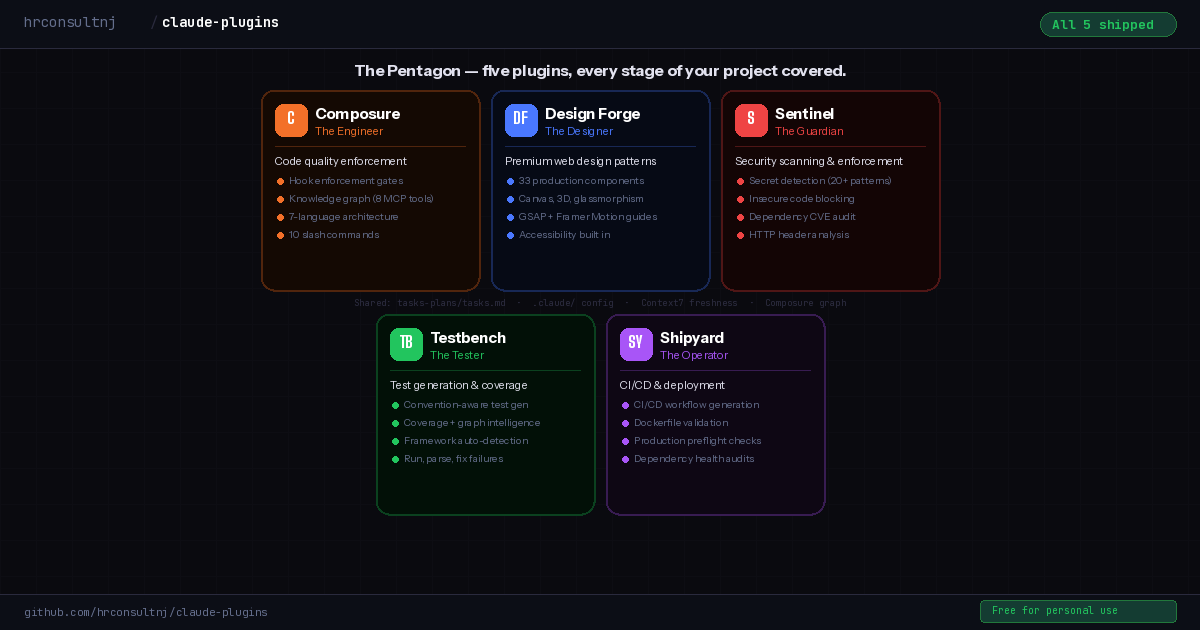
Claude writes code fast. These plugins make sure it writes it right.
5 plugins · 29 skills · 20 automated hooks · 7 languages · One command setup
The Problem
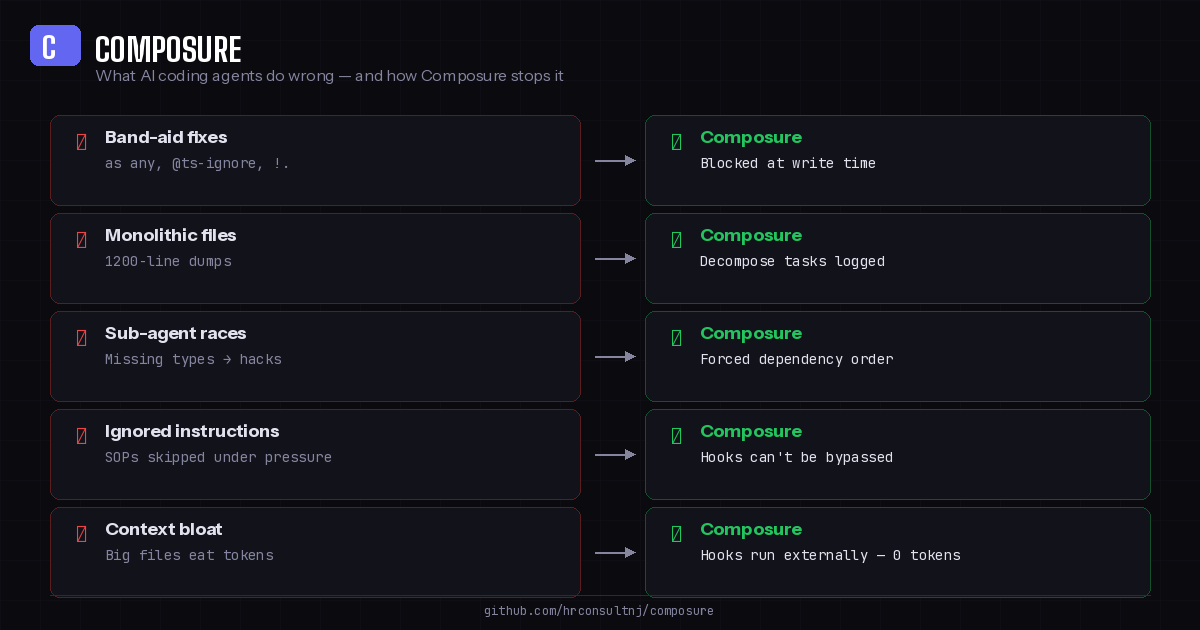
AI coding agents are fast — but speed without guardrails creates expensive cleanup work. If you've used Claude Code on a real project, you've seen this:
- Band-aid fixes —
as any,@ts-ignore, non-null assertions to silence errors instead of fixing types - Monolithic files — 800+ line components that no one wants to touch later
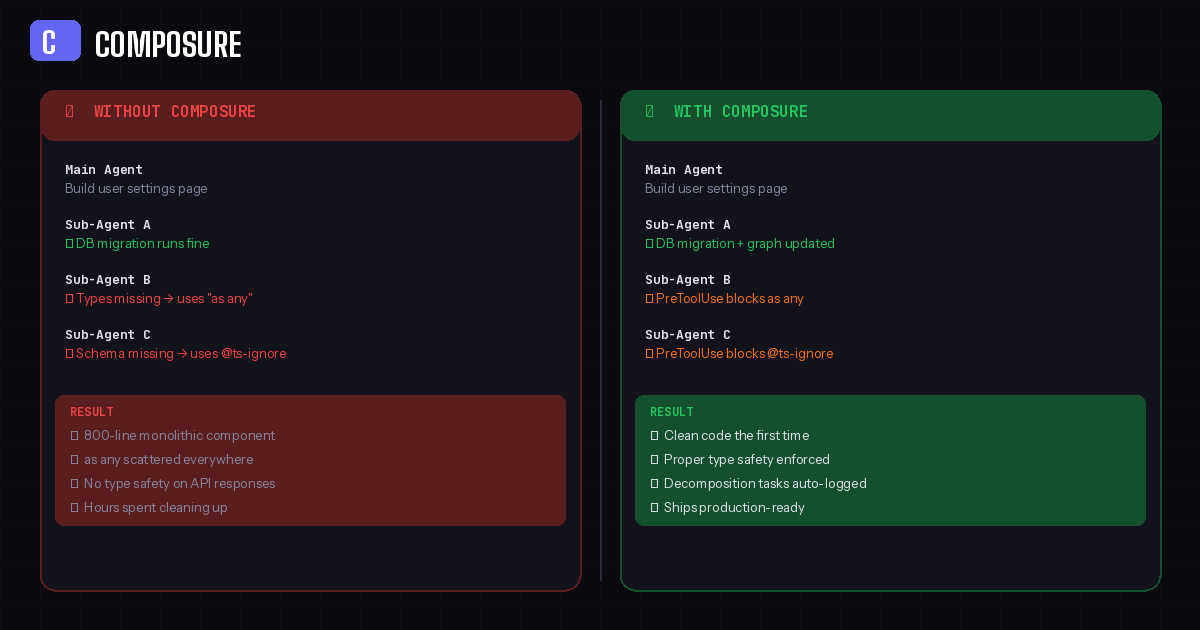
- Sub-agent races — parallel agents skip shared types and hack around missing schemas
- Ignored instructions — CLAUDE.md says "use proper types" but under pressure, the agent takes shortcuts
- No test coverage — features ship without tests, coverage erodes silently
- Insecure patterns — hardcoded secrets,
eval(), SQL injection vectors slip through unnoticed
You can write better prompts. You can add more rules to CLAUDE.md. But the agent can still ignore all of it — instructions are suggestions, not enforcement.
Hooks are different. They run as shell scripts on every Read/Edit/Write — outside the LLM, at zero token cost. The agent literally cannot bypass them. That's how these plugins work.
What You Get (Free)
All plugins, all skills, all hooks — free for personal use, education, and nonprofits.
| What | Count | Details |
|---|---|---|
| Plugins | 5 | Composure, Design Forge, Sentinel, Testbench, Shipyard |
| Skills | 27 | Architecture, security scanning, test generation, CI/CD, audits |
| Hooks | 19 | Code quality, secret detection, type safety, CI validation |
| Reference docs | 23 | Security patterns, testing patterns, deployment guides |
| Templates | 12 | Test files, GH Actions workflows, Dockerfiles |
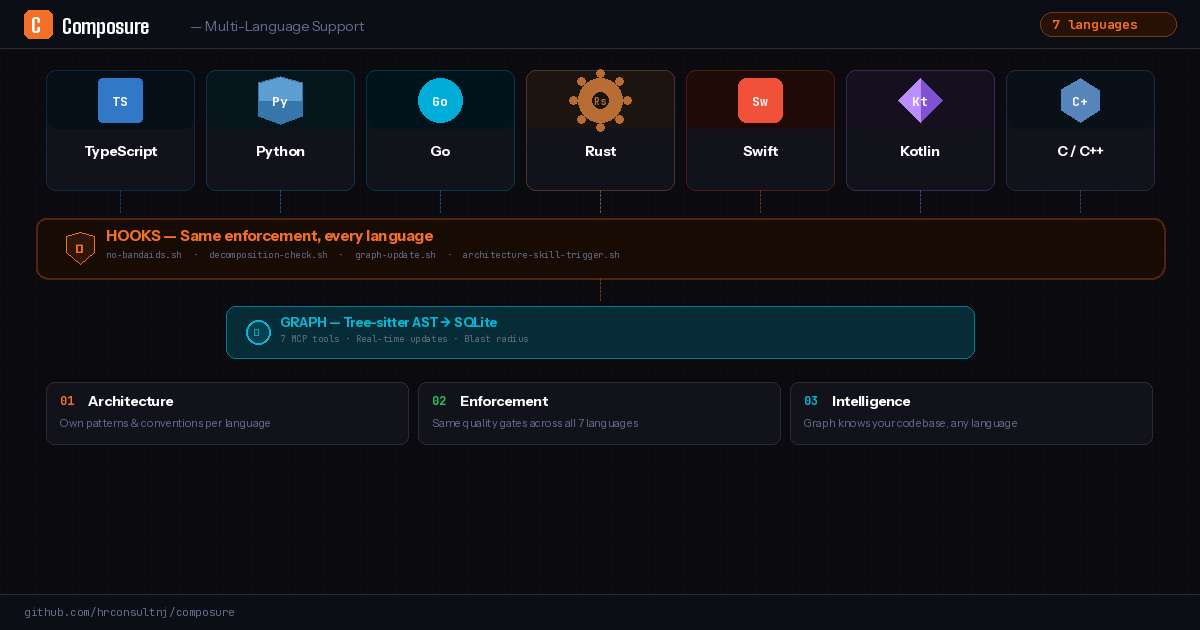
| Languages | 7 | TypeScript, Python, Go, Rust, C++, Swift, Kotlin |
Plugins
| Plugin | What it solves |
|---|---|
| Composure | Code quality enforcement — decomposition hooks, architecture skills, code review knowledge graph, severity-tracked task queue. The foundation that all other plugins build on. |
| Sentinel | Security scanning — SAST, secret detection on every write, dependency CVE audit, HTTP header analysis. Local-first, no cloud auth. |
| Testbench | Convention-aware test generation — reads your existing tests to match project style. Nudges when you edit untested files. |
| Shipyard | CI/CD generation and validation — GitHub Actions, GitLab CI, Bitbucket Pipelines. Dockerfile validation, dependency health, production readiness. |
| Composure Pro | 22 production architecture patterns + schema guard hook. Postgres RLS, tenant isolation, entity registry, auth model, type generation — battle-tested across 322+ migrations. Works with any Postgres host. |
| Design Forge | Premium web design patterns — 33 production components, canvas presets, animation recipes, 3D integration, accessibility-first. |
Installation
You only need one install command. Composure is the foundation — when you run /composure:initialize, it detects your stack and automatically installs the companion plugins (Sentinel, Testbench, Shipyard).
# Add the marketplace
claude plugin marketplace add hrconsultnj/claude-plugins

# Install Composure
claude plugin install composure@my-claude-plugins

# Initialize in your project (auto-installs companion plugins)
/composure:initialize
Design Forge is the one optional install — add it if you're building frontend experiences:
claude plugin install design-forge@my-claude-plugins
How It Works
Composure operates at three layers — each one doing a different job:
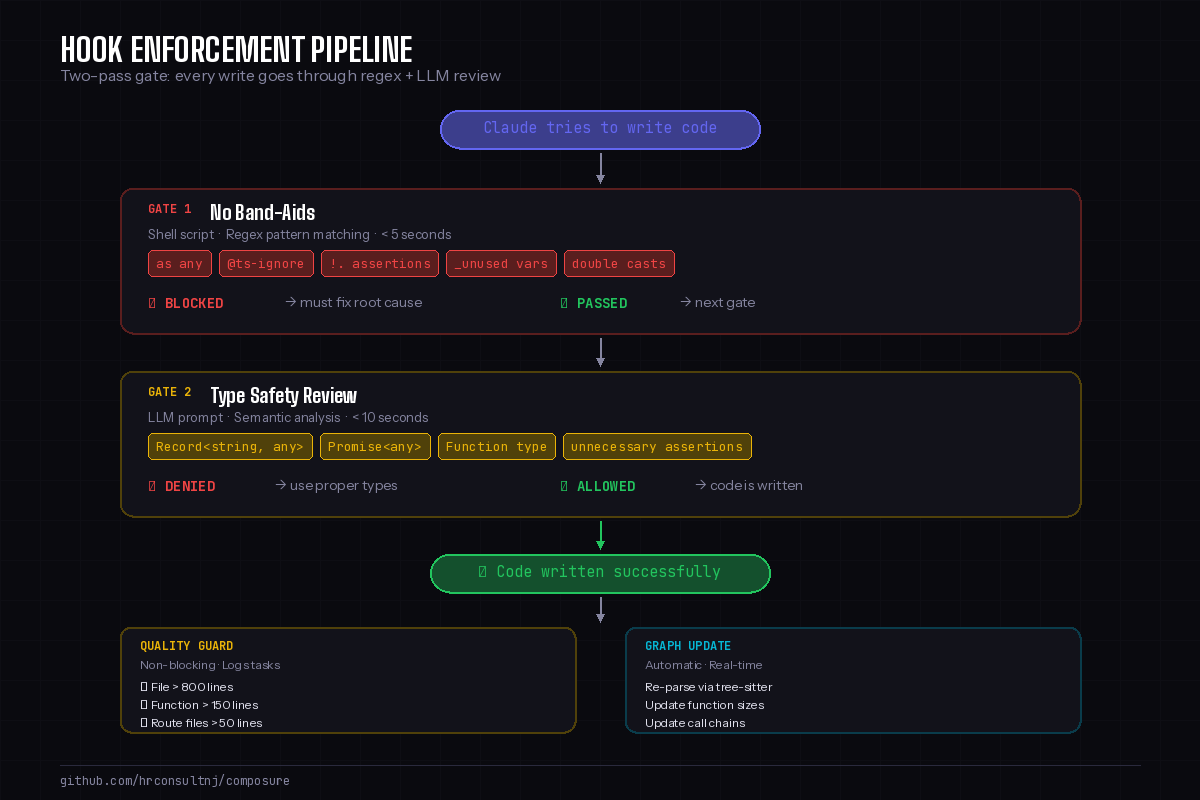
Hooks (The Enforcer) — Shell scripts that fire on every Read, Edit, and Write. Two-pass gate: regex pattern matching blocks as any, @ts-ignore, and other band-aids in under 5 seconds. Then a semantic type-safety review catches Record<string, any>, Promise<any>, and unnecessary assertions. The agent cannot bypass hooks — they run outside the LLM at zero token cost.
Skills (The Playbook) — 27 slash commands covering architecture (/composure:app-architecture), security scanning (/sentinel:scan), test generation (/testbench:generate), CI/CD (/shipyard:ci-generate), and more. Each skill loads framework-specific reference docs so Claude builds features using current API patterns, not stale training data.
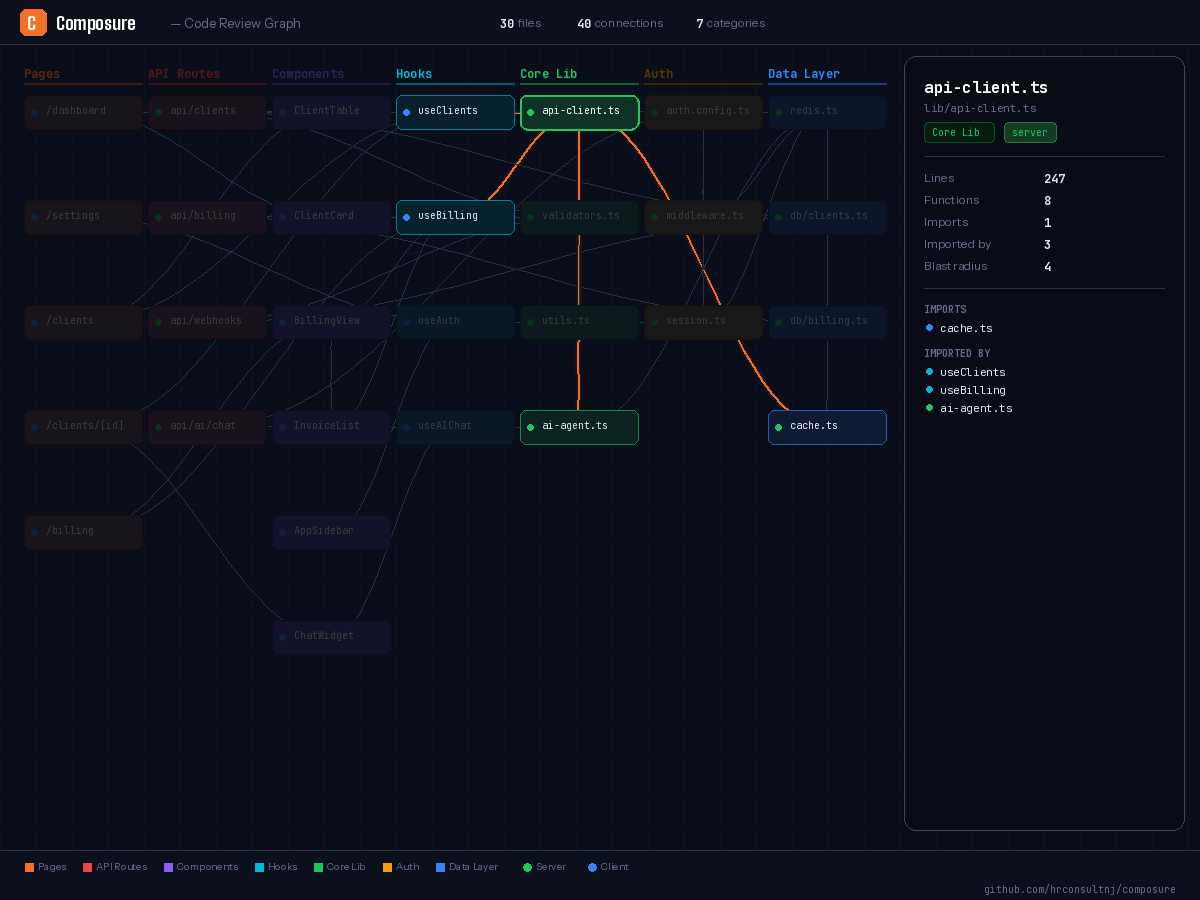
Graph (The Brain) — A tree-sitter AST parser that builds a SQLite knowledge graph of your codebase. Functions, imports, call chains, file sizes — all queryable through 7 MCP tools. When you run /composure:review-pr, Claude knows the blast radius of every change. When you edit a file, the graph updates automatically.
Composure (foundation)
  ├── .claude/no-bandaids.json      ← All plugins read this for stack detection
  ├── tasks-plans/tasks.md          ← All plugins write findings here
  ├── /composure:commit             ← Blocks on Critical findings from ANY plugin
  └── composure-graph MCP           ← Testbench uses for coverage intelligence

Sentinel (security layer)
  ├── secret-guard.sh               ← Blocks exposed secrets on every Edit/Write
  ├── insecure-pattern-guard.sh     ← Blocks insecure code patterns (22 patterns, 4 languages)
  └── /sentinel:scan                ← Full SAST + dependency audit → tasks-plans/

Testbench (testing layer)
  ├── test-coverage-nudge.sh        ← Nudges when editing untested files (session-deduped)
  ├── /testbench:generate           ← Convention-aware test generation
  └── /testbench:run                ← Run tests, parse failures with source context

Shipyard (deployment layer)
  ├── ci-syntax-guard.sh            ← Validates CI config on every edit
  ├── dockerfile-guard.sh           ← Warns on Docker anti-patterns
  ├── /shipyard:ci-generate         ← Generate CI workflow from detected stack
  └── /shipyard:preflight           ← Production readiness checklist

Design Forge (design layer)
  └── /design-forge                 ← Premium components adapted to your stack
Composure
/composure:initialize            # Detect stack, build graph, generate config
/composure:app-architecture      # Feature-building guide — framework-specific refs
/composure:commit                # Commit with auto task queue hygiene + graph update
/composure:decomposition-audit   # Full codebase scan for size violations + ghost duplicates
/composure:review-tasks          # Process task queue (verify, delegate, archive)
/composure:review-pr             # PR review with blast-radius analysis
/composure:review-delta          # Review changes since last commit
/composure:build-graph           # Build/update code review knowledge graph
/composure:code-organizer        # Restructure project layout to framework conventions
/composure:update-project        # Refresh config, hooks, or docs without full re-init
Sentinel
/sentinel:initialize             # Detect stack, install security tools, generate config
/sentinel:scan                   # Full SAST (Semgrep) + dependency audit
/sentinel:audit-deps             # Focused dependency vulnerability scan
/sentinel:headers                # HTTP security header analysis (context-aware grading)
Sentinel also runs automatically via hooks:
- secret-guard — blocks exposed secrets on every Edit/Write (19 patterns: AWS, GitHub, Stripe, SSH keys, JWTs, Supabase service_role, and more)
- insecure-pattern-guard — blocks insecure code patterns (eval, innerHTML, SQL injection, command injection across TypeScript, Python, Go, Rust)
- dep-freshness-check — checks for known CVEs on session start
Testbench
/testbench:initialize            # Detect test framework, learn project conventions
/testbench:generate <file>       # Generate tests matching your project style
/testbench:run [all|changed]     # Run tests, parse failures with source context
Shipyard
/shipyard:initialize             # Detect CI platform, deployment target, tools
/shipyard:ci-generate            # Generate CI workflow (GH Actions, GitLab, Bitbucket)
/shipyard:ci-validate            # Validate existing CI workflows (12 checks + actionlint)
/shipyard:deps-check             # Dependency health — CVEs, safe version recommendations
/shipyard:dockerfile             # Generate/validate multi-stage Dockerfiles
/shipyard:preflight              # Production readiness checklist
Design Forge
/design-forge                    # Browse and apply premium web design patterns
/ux-researcher                   # Research design patterns and competitors
Composure Pro ($39)
The free plugins catch mistakes as they happen — band-aids blocked, secrets caught, decomposition violations logged. But catching mistakes is reactive. Pro makes Claude proactive.
Pro adds 22 production architecture patterns and a schema guard hook — the kind of knowledge you build after shipping 9+ multi-tenant apps across 322+ migrations. These aren't tutorials. They're reference patterns that Claude reads and applies directly when building features, plus a PreToolUse hook that blocks SQL anti-patterns before they land.
The difference: Without Pro, Claude builds the feature and the hooks catch what went wrong. With Pro, Claude builds it correctly from the start — proper tenant isolation, layered access control, migration-safe RLS policies, trigger-driven denormalization — because it has the architectural knowledge before writing the first line, and the schema guard blocks mistakes the agent would otherwise make.
| Category | Docs | What Claude Learns |
|---|---|---|
| Bootstrap | 1 | Foundation migration sequence — enum catalog, function authority, dependency order |
| DB Foundation | 5 | Entity registry, ID prefixes, 4-level auth, privacy roles, contact-first linking |
| Conventions | 1 | JSONB metadata naming, entity.relationship templates |
| Infrastructure | 3 | Google Places → trigger → PostGIS pipeline, trigger-driven denormalization, DB-to-TypeScript type generation |
| Optional Modules | 3 | Device registry + sessions, unified inbox/threads/messages, OAuth token storage |
| RLS Policies | 5 | Row-level security patterns, role hierarchy, migration checklist (90+ items), common pitfalls |
| Frontend | 4 | Query key factories, component patterns, three-tier loading system, multi-tenant OrgSwitcher with tenant filtering |
Plus a schema guard hook that blocks: boolean status columns, inline role definitions, missing tenant columns, missing RLS, and computed privacy groups — citing the exact pattern doc in each violation message.
When you combine free + Pro, this is what changes: anytime you need to build something that touches the database, the agent builds it properly — pages, components, migrations, permissions — without you having to go back, babysit, and re-read documentation that was clearly defined but got skipped for speed.
Get Composure Pro ($39) — one-time per major version. Existing customers get 50% off upgrades.
Troubleshooting
Reinstall a plugin# Uninstall
claude plugin uninstall composure
# Reinstall
claude plugin install composure@my-claude-plugins
# Restart Claude Code (exit and reopen)
Composure's code graph requires Node.js 22.5+. Check with node --version.
If Node is fine but the graph still doesn't work, run /composure:initialize — it will auto-register the server and survive future plugin updates.
Or register manually:
# Find your plugin path
COMPOSURE_PATH=$(claude plugin list --json | node -e "
  const p = JSON.parse(require('fs').readFileSync('/dev/stdin','utf8'));
  const c = p.find(x => x.id.startsWith('composure') && x.enabled);
  if (c) console.log(c.installPath);
")

# Copy launcher to stable location + register
cp "$COMPOSURE_PATH/scripts/launch-graph-server.sh" ~/.claude/plugins/composure-graph-launcher.sh
chmod +x ~/.claude/plugins/composure-graph-launcher.sh
claude mcp add composure-graph -- bash ~/.claude/plugins/composure-graph-launcher.sh

# Restart Claude Code
After claude plugin update composure, just restart Claude Code (Ctrl+C → claude). The launcher resolves the latest cached version at startup — no re-registration needed.
# Remove plugins
claude plugin uninstall composure
claude plugin uninstall design-forge
claude plugin uninstall sentinel
claude plugin uninstall testbench
claude plugin uninstall shipyard

# Remove the MCP server (if registered)
claude mcp remove composure-graph

# Remove the marketplace
claude plugin marketplace remove my-claude-plugins
Licensing
All plugins are PolyForm Noncommercial 1.0.0.
| Tier | Price | What you get |
|---|---|---|
| Free | $0 | All 5 plugins, 29 skills, 20 hooks — personal use, education, nonprofits |
| Composure Pro | $39 | 22 architecture patterns + schema guard hook — for individual developers |
| Commercial License | $99 | All plugins for commercial use + includes Pro patterns — one-time, per major version |
One-time purchase. Most AI code review tools charge $20-30/seat/month — this is a flat fee for your entire team, forever.
Get Pro ($39) · Get Commercial ($99) · Existing customers get 50% off upgrades
Support
If these plugins save you time, consider supporting the project:

Yorumlar (0)
Yorum birakmak icin giris yap.
Yorum birakSonuc bulunamadi